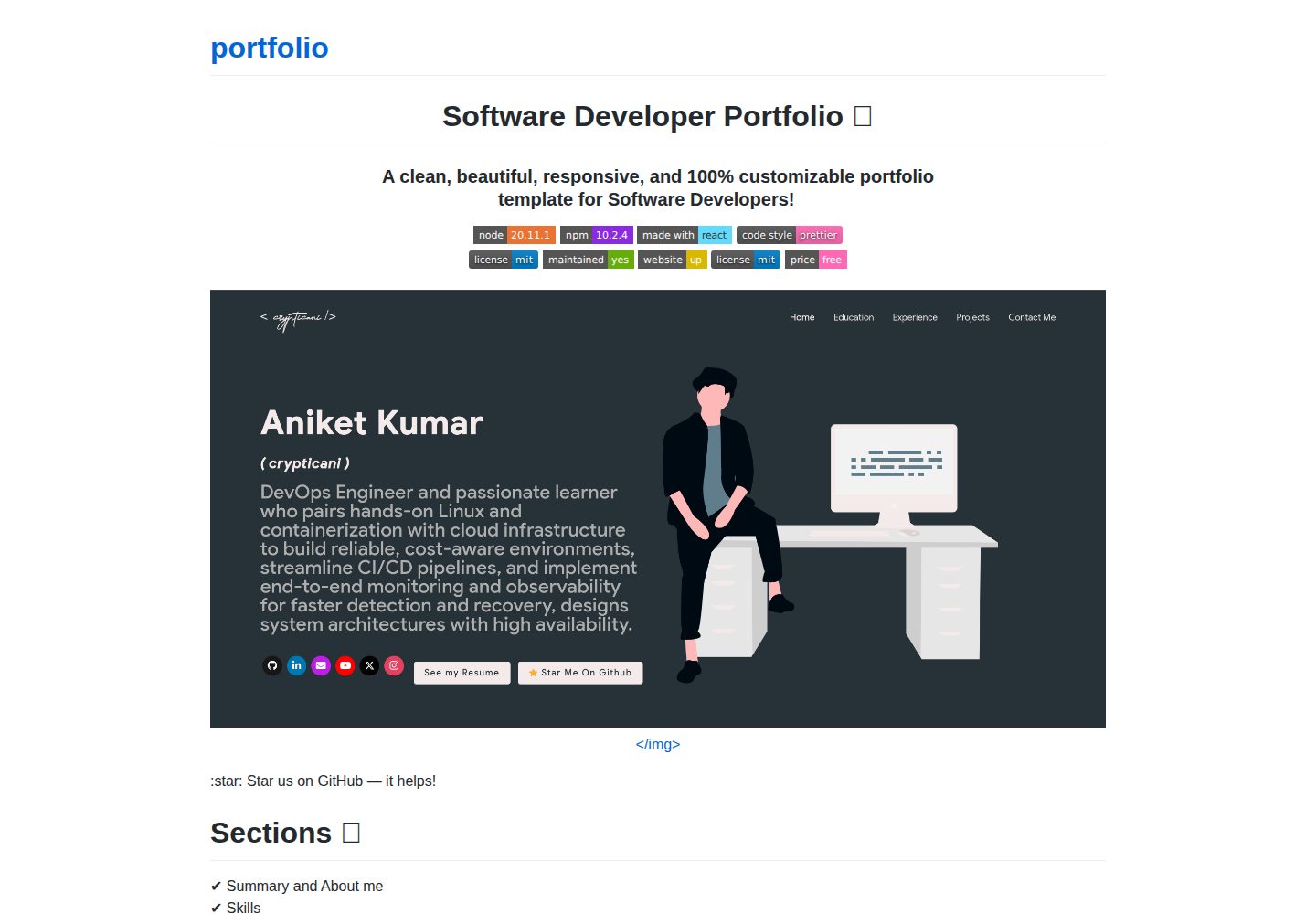
内容集中在 src/portfolio.js 配置,覆盖个人信息、技能、经历、教育、认证、博客与联系方式
React作品集
portfolio (crypticani) — React 作品集模板
作者 crypticani
基于 React 的开发者作品集网站模板,通过 src/portfolio.js 集中配置个人信息、技能、经历、项目与联系方式,并支持从 GitHub 抓取项目数据。
看看你的网站会是什么样
浏览真实页面截图,比较内容排版与手机效果。点击下方缩略图切换,放大查看整页细节。
全部页面与视图 2
截图用于了解视觉与布局,交互效果请以实际项目为准。
采集于 2026-10-02查看来源
值得关注的模板亮点
从已有项目资料中,快速了解它的特点。
通过 git_data_fetcher.mjs 脚本从 GitHub 抓取项目、Issue、组织等数据并替换到页面中
在 src/theme.js 中通过 chosenTheme 切换预置配色主题
技能图标支持 Iconify 图标类名或 public/skills 下的自定义图片
README 提供 GitHub Pages 的两种部署方式
模板详细介绍
这是一个用 React 编写的软件开发者作品集网站模板,仓库采用 MIT 许可。页面包含 Summary/About me、Skills、与 GitHub 关联的开源项目、Experience、Certifications、Blogs、Education 和 Contact me 等区块。
模板把大部分内容集中在 src/portfolio.js 中配置,包括问候语、社交媒体链接、技能、经历、教育、认证、博客和联系信息;GitHub 相关数据由根目录的 git_data_fetcher.mjs 脚本抓取,需要先在 .env 中填写 GITHUB_TOKEN 与 GITHUB_USERNAME,再运行该脚本,之后更新 GitHub 信息时需重新执行。主题在 src/theme.js 中通过 chosenTheme 切换,仓库内已定义多套配色。
使用前需要安装 Node.js 与 npm,克隆仓库后执行 npm install,再用 npm start 本地预览。部署方面 README 推荐 GitHub Pages,并给出两种方式:手动构建后推送到 <用户名>.github.io 仓库,或使用 npm run deploy 生成 gh-pages 分支。首页的动画 Splash Logo 需要自行设计,或在 src/portfolio.js 的 settings 中把 isSplash 设为 false 跳过。
React作品集
适合你的项目吗?
适用场景
- 软件开发者搭建个人作品集网站,集中展示技能、经历、开源项目与联系方式
- 需要把 GitHub 上的项目、Issue 等数据自动同步到个人主页的开发者
- 希望以单一配置文件维护作品集内容、并快速切换配色的使用者
- 准备用 GitHub Pages 免费托管个人主页的开发者
适合人群
- 熟悉 React 与 npm 基本操作的前端或全栈开发者
- 愿意按 README 步骤修改配置文件、生成 GitHub Token 并运行数据抓取脚本的用户
- 需要可自定义内容与主题的开发者作品集模板的个人开发者
上手与定制指南
结合仓库当前版本的说明,按下面的资料检查内容、配置与运行要求。
- 1
需安装 Node.js 与 npm,版本不低于 README 徽章标注的版本
- 2
克隆仓库后执行 npm install,再用 npm start 本地预览
- 3
修改 package.json 中的 homepage 为 https://<你的 GitHub 用户名>.github.io,并保留 https:// 前缀
- 4
使用 GitHub 数据前,需根据 env.example 创建 .env 并填写 GITHUB_TOKEN 与 GITHUB_USERNAME,然后运行 node git_data_fetcher.mjs
- 5
Splash 动画 Logo 不可直接配置,可在 src/portfolio.js 的 settings 中将 isSplash 设为 false 跳过
授权与来源资料
使用条件与限制
免费使用 · 保留许可声明本次收录的是公开仓库中采用 MIT 许可的免费版本;免费范围为该版本代码,不代表外部服务或第三方素材免费。
使用时需要遵守
- 允许免费使用、修改、商用和分发该版本代码。
- 分发代码副本或实质性部分时,保留原作者版权声明和完整 MIT 许可声明。
- 代码按现状提供;担保与责任限制以原许可证及适用法律为准。
额外费用与待核对事项
- 使用 GitHub 数据抓取功能需自行创建 GitHub 个人访问令牌(Token),并按 README 要求授予全部权限,将令牌与用户名填入 .env 文件;不提供令牌则无法获取 GitHub 项目数据。
- 需手动依据 env.example 创建 .env 文件并填写 GITHUB_TOKEN 与 GITHUB_USERNAME,属于使用 GitHub 相关功能的前置配置要求。
- GitHub 相关信息不会自动更新,每次需要刷新网站上的 GitHub 数据时都必须重新运行 node git_data_fetcher.mjs 脚本。
- 首页动画 Splash Logo 部分不可直接配置,需自行设计 Logo,或在 src/portfolio.js 的 settings 中将 isSplash 设为 false 以跳过该动画。
- README 推荐使用 GitHub Pages 部署,需自行创建名为 <用户名>.github.io 的仓库并完成构建与推送,部署依赖外部托管服务。
- 演示图片、字体、图标及其他第三方素材需按各自许可核对,不能仅凭代码的 MIT 许可判断。
- 域名、托管、数据库、支付或 AI 等外部服务可能另外收费。
查看原文依据
Permission is hereby granted, free of charge
许可证原文
You can get a github token as described [here](https://docs.github.com/en/github/authenticating-to-github/creating-a-personal-access-token). Give all permissions while generating token.
README 原文
In the project you will see a `env.example` file, create a new file named `.env` and copy contents of `env.example` into it.
README 原文
Whenever you want to update the github related information on the website you need to run this command.
README 原文
Therefore, this part of portfolio is not customizable.
README 原文
https://github.com/crypticani/portfolio/blob/main/LICENSEhttps://github.com/crypticani/portfolio/blob/main/README.mdI highly recommend using [Github Pages](https://create-react-app.dev/docs/deployment/#github-pages) to achieve this the EASIEST WAY.
README 原文
DeepSeek 根据仓库许可证和 README 整理 ·2026-10-03。结果仅覆盖已读取资料,依赖、图片、字体及后续条款变更以各自原文为准。
项目核对记录与介绍依据
模板资料
- 来源平台
- GitHub
- 资料与维护参考分
- 资料较完整 · 87 / 100
- 技术栈
- React
- 网站类型
- 作品集
这个分数如何计算
本站按许可资料(最高30分)、演示链接(12分)、预览图(10分)、Star数(15分)、记录的维护时间(15分)、描述完整度(8分)、功能记录(5分)和分类资料(5分)计算。它不是代码、安全或性能测试,也不是 Google 评分;有链接不代表已实测可用。
这个项目需要核对什么
- 记录的仓库更新时间
- 2026-03-22
- 截图检查日期
- 2026-10-03
已收录演示链接。请用你的内容与屏幕尺寸检查;有演示不代表表单、认证或支付已经可用。
目录记录的主要技术栈是 React。请通过依赖清单和锁文件核对实际版本与托管要求。这些说明基于收录资料,不代表代码审计或部署实测。
查看具体选型方法 →介绍的制作与核对状态
介绍由 AI 辅助整理目录与仓库资料。仓库作者不等于这篇介绍的审核者。
已完成服务器许可规则与 AI 来源核对;未经过人工编辑审核。
查看当时使用的来源资料
SHA-256: 201fc26ed11bfbab25d3a402828389775c41a8a56809ea2e873d526ae6fb1a7c
2026-10-03T00:01:53.901Z
来源文件 / 仓库<h1 align="center"> Software Developer Portfolio 🔥 </h1>
<h3 align="center"> A clean, beautiful, responsive, and 100% customizable portfolio <br /> template for Software Developers! </h3>
<p align="center">
<a href="https://nodejs.org/en/blog/release/v20.11.1"><img alt="NodeJS" src="https://img.shields.io/badge/node-20.11.1-important?style=flat-square" /></a>
<a href="https://www.npmjs.com/package/npm/v/10.2.4"><img alt="NPM" src="https://img.shields.io/badge/npm-10.2.4-blueviolet?style=flat-square" /></a>
<a href="https://reactjs.org/"><img alt="Made With React" src="https://img.shields.io/badge/made%20with-react-61DAFB?style=flat-square" /></a>
<a href="https://github.com/prettier/prettier"><img alt="code style: prettier" src="https://img.shields.io/badge/code_style-prettier-ff69b4.svg?style=flat-square?style=flat-square" /></a>
<br/>
<a href="http://badges.mit-license.org/"><img alt="License" src="http://img.shields.io/:license-mit-blue.svg?style=flat-square?style=flat-square" /></a>
<a href="https://github.com/crypticani/portfolio/commits/master"><img alt="Maintenance" src="https://img.shields.io/badge/maintained-yes-green.svg?style=flat-square" /></a>
<a href="http://badges.mit-license.org/"><img alt="Website" src="https://img.shields.io/badge/website-up-yellow?style=flat-square" /></a>
<a href="https://crypticani.github.io/"><img alt="License" src="http://img.shields.io/:license-mit-blue.svg?style=flat-square?style=flat-square" /></a>
<a href="https://img.shields.io/badge/price-free-ff69b4"><img alt="Price" src="https://img.shields.io/badge/price-free-ff69b4?style=flat-square" /></a>
</p>
<p align="center">
<a href="https://crypticani.github.io" target="_blank">
<img src="images/portfolio_snapshot.png"></img>
</a>
</p>
:star: Star us on GitHub — it helps!
# Sections 📚
✔️ Summary and About me\
✔️ Skills \
✔️ Open Source Projects Connected with Github\
✔️ Experience\
✔️ Certifications 🏆\
✔️ Blogs\
✔️ Education\
✔️ Contact me
To view a live example, **[click here](https://crypticani.github.io/)**
# Table of Contents
- [Clone and Use](#clone-and-use)
- [Customizing](#customize-it-to-make-your-own-portfolio)
- [Choose Theme](#choose-theme)
- [Deployment](#deployment)
- [Technologies Used](#technologies-used)
- [Illustrations](#illustrations)
- [License](#license)
- [Contributors](#contributors)
- [References](#references)
# Clone and Use 📋
- The website is completely built on `react-js` library of `javascript` and that's why we need `nodejs` and `npm` installed
- While installing `nodejs` and `npm`, try to install versions which are equal or greater than the versions mentioned in badges above
- In case you want to help developing it or simply saving it, you can fork the repository just by clicking the button on the top-right corner of this page
- After the successful installation of `nodejs` and `npm`, clone the repository into your local system using below command:
```bash
git clone https://github.com/crypticani/portfolio.git
```
This will clone the whole repository in your system.
- To download required dependencies to your system, navigate to the directory where the cloned repository resides and execute following command:
```node
npm install
```
- Now the project is ready to use
- You can check it using `npm start`, it will open the website locally on your browser.
# Customize it to make your own portfolio ✏️
In this project, there are basically 4 things that you need to change to customize this to anyone else's portfolio: **package.json**, **Personal Information**, **Github Information** and **Splash Logo**.
### package.json
Open this file, which is in the main cloned directory, choose any "name" and change "homepage " to `https://<your-github-username>.github.io`. Do not forget the `https://`, otherwise fonts will not load.
### Personal Information
You will find `src/portfolio.js` file which contains the complete information about the user. The file looks something like below:
```javascript
// Home Page
const greeting = {
...
}
// Social Media
const socialMediaLinks = {
...
}
...
```
You can change the personal information, experience, education, social media, certifications, blog information, contact information etc. in `src/portfolio.js` to directly reflect them in portfolio website.
### How to change the icons on homepage under what i do section?
1. This section pulls data from `skills` in portfolio.js file.
2. Visit this website: https://icon-sets.iconify.design/
3. Search for the skill you are looking to add.
4. Select the icon of your choice.
5. Copy the text beside **Selected Icon** and replace it with `fontAwesomeClassName` of that particular softwareSkill.
#### How to use custom images instead of Iconify Icons?
1. Add a valid image file into the `public/skills` folder
2. Insert the image name into the `imageSrc` attribute of the particular softwareSkill
3. Remove the `fontAwesomeClassName` property or leave it empty because it takes precedence over `imageSrc`
4. Add custom styling to the `img` using the `style` Property
### How to Change the Icons on Education page under Basic Qualification and Certifications?
1. The icons for this section are pulled from the `competitiveSites` array in the `portfolio.js` file.
2. Visit the [Simple Icons website](https://simpleicons.org/).
3. Search for the competitive site you want to add an icon for.
4. Select the icon you want to use.
5. Copy the text beside Selected Icon and replace it with iconifyClassname of that particular competitive site.
### How to Use Custom Images Instead of Simple Icons for Competitive Sites
1. Place the custom image file in the `public/skills` folder.
2. Update the `imageSrc` attribute of the corresponding competitive site with the name of your custom image (e.g., `imageSrc: "customImage.png"`).
3. Remove the `iconifyClassname` property or leave it empty, as the `imageSrc` property takes precedence over `iconifyClassname`.
4. Optionally, add custom styling to the `<img>` tag using the `style` property to adjust size, positioning, etc.
### Github Information
You will find `git_data_fetcher.mjs` file in the main directory of the repository. This file is used to fetch the data (Pull requests, Issues, Organizations, Pinned projects etc.) from your github.
In the project you will see a `env.example` file, create a new file named `.env` and copy contents of `env.example` into it. In that file, you will see the following environment variables
```javascript
GITHUB_TOKEN = your_token;
GITHUB_USERNAME = your_username;
```
You can get a github token as described [here](https://docs.github.com/en/github/authenticating-to-github/creating-a-personal-access-token). Give all permissions while generating token. Add your github username and the token generated in `GITHUB_USERNAME` and `GITHUB_TOKEN` variables in the .env file.
Now, you need to run following command. (Make sure you executed `npm install` before this)
**Warning:** Treat your tokens like passwords and keep them secret. When working with the API, use tokens as environment variables instead of hardcoding them into your programs.
```node
node git_data_fetcher.mjs
```
This will fetch all the data from your github and it will automatically replace my data with yours.
Whenever you want to update the github related information on the website you need to run this command.
### Splash Logo
Note here that if you click [Ashutosh's portfolio](https://ashutosh1919.github.io), you can see animating the logo at the beginning. He has designed that logo in [`Figma`](https://www.figma.com/) and then animated it using css.
Therefore, this part of portfolio is not customizable. But don't worry we have a solution to this problem. You have below two alternatives:
- If you want to design your own logo, then you can design it using `Figma` or `Adobe XD` or `Adobe Illustrator` or `Inkscape`. If you want to animate it, you can refer to `./src/components/Loader` directory which contains `js` and `css` files which animates the logo
- If you don't want Splash screen or you don't know how to design logo, then this option is for you
- You can open `src/portfolio.js` file and at the top of this file you will see `settings` component as below:
```javascript
// Website related settings
const settings = {
isSplash: true,
};
```
- Change `isSplash` from `true` to `false`
- Now, if you see your website using `npm start`, it will directly open `home` rather than animating logo `splash` screen
- If you design your logo in future, then edit the files in `./src/components/Loader` and then revert `isSplash` to `true` in `src/portfolio.js`.
## Other
- You need to change the website title and other descriptions in `public/index.html`
- You can define your own favicon in `public/icons` directory. If you don't have a favicon, you can generate favicons from [Favicon Generator](https://www.favicon-generator.org/) and [Favicon IO](https://favicon.io/)
- You can also edit your website preview (known as description image). Run your site locally, take a screenshot and replace with `public/icons/desc.png`. Note that your screenshot should be 1280x640 for better preview.
# Choose Theme 🌈
- You can take a look at `src/theme.js` file where all available themes are mentioned with their respective color codes
- At the bottom of this file you will see the below code:
- `export const chosenTheme = blueTheme;`
- You need to change the name from `blueTheme` to whatever theme you want to set your website to
- You can define new theme similarly as other themes and you can assign name of that new defined theme to `chosenTheme`
- That's it. You just need to change the theme name and the code will take care of everything else
- Run `npm start` to check if everything is ok.
# Deployment 📦
- Once you are done with your setup and have successfully completed all steps above, you need to put your website online!
- I highly recommend using [Github Pages](https://create-react-app.dev/docs/deployment/#github-pages) to achieve this the EASIEST WAY.
- To deploy your website, you have two options. First you need to create a github repository with the name `<your-github-username>.github.io`. Please don't give it any other name.
- Now, you need to generate a production build and deploy the website.
**Option 1:**
- Run `npm run build` to generate the production build folder.
- Enter the build folder, `git init` and push the generated code to the `master` branch of your new repository on github. That's it. It's Done.
- You may need to `git init` and force push at every new build.
**Option 2 (will not work with [user pages](https://docs.github.com/en/github/working-with-github-pages/about-github-pages)):**
- Run `npm run deploy` to build and create a branch called `gh-pages`. It will push the `build` files to that branch.
- The last step in deploying is to enable `Github Pages` in settings of the repository and select `gh-pages` branch.
Now, your website is successfully deployed and you can visit it at `<your-github-username>.github.io`.
If you are stuck somewhere and want to observe the deployment process in depth, then please watch below video.
<p align="center">
<a href="http://www.youtube.com/watch?v=IwBS39TOmpA" target="_blank">
<img src="http://img.youtube.com/vi/IwBS39TOmpA/0.jpg"></img>
</a>
</p>
# Technologies used 🛠️
- [React](https://reactjs.org/)
- [graphql](https://graphql.org/)
- [apollo-boost](https://www.apollographql.com/docs/react/get-started/)
- [baseui](https://github.com/uber/baseweb)
- [react-reveal](https://www.react-reveal.com/)
- [styled-components](https://styled-components.com/)
# illustrations 🍥
- [UnDraw](https://undraw.co/illustrations)
# License 📄
This project is licensed under the MIT License - see the [LICENSE.md](./LICENSE) file for details.
# Contributors ✨
<!-- ALL-CONTRIBUTORS-LIST:START - Do not remove or modify this section -->
<!-- prettier-ignore-start -->
<!-- markdownlint-disable -->
<table>
<tbody>
<tr>
<td align="center" valign="top" width="14.28%"><a href="http://ashutosh1919.github.io"><img src="https://avatars3.githubusercontent.com/u/20843596?s=460&u=7f184b911f73ae1dc5765ab686fff2b2e984830f&v=4?s=100" width="100px;" alt="Ashutosh Hathidara"/><br /><sub><b>Ashutosh Hathidara</b></sub></a><br /><a href="https://github.com/ashutosh1919/masterPortfolio/commits?author=ashutosh1919" title="Code">💻</a> <a href="https://github.com/ashutosh1919/masterPortfolio/commits?author=ashutosh1919" title="Documentation">📖</a> <a href="#design-ashutosh1919" title="Design">🎨</a> <a href="#maintenance-ashutosh1919" title="Maintenance">🚧</a> <a href="#ideas-ashutosh1919" title="Ideas, Planning, & Feedback">🤔</a></td>
<td align="center" valign="top" width="14.28%"><a href="https://danielmarostica.github.io/"><img src="https://avatars3.githubusercontent.com/u/3595998?v=4?s=100" width="100px;" alt="Daniel Marostica"/><br /><sub><b>Daniel Marostica</b></sub></a><br /><a href="https://github.com/ashutosh1919/masterPortfolio/commits?author=danielmarostica" title="Documentation">📖</a> <a href="#design-danielmarostica" title="Design">🎨</a></td>
<td align="center" valign="top" width="14.28%"><a href="https://dineshnadimpalli.com"><img src="https://avatars2.githubusercontent.com/u/13104926?v=4?s=100" width="100px;" alt="Dinesh Nadimpalli"/><br /><sub><b>Dinesh Nadimpalli</b></sub></a><br /><a href="https://github.com/ashutosh1919/masterPortfolio/commits?author=dineshnadimpalli" title="Code">💻</a></td>
<td align="center" valign="top" width="14.28%"><a href="http://jivthesh.github.io"><img src="https://avatars3.githubusercontent.com/u/20579980?v=4?s=100" width="100px;" alt="Jivthesh M R"/><br /><sub><b>Jivthesh M R</b></sub></a><br /><a href="https://github.com/ashutosh1919/masterPortfolio/commits?author=jivthesh" title="Documentation">📖</a></td>
<td align="center" valign="top" width="14.28%"><a href="http://jatinchauhan.tech"><img src="https://avatars2.githubusercontent.com/u/40722235?v=4?s=100" width="100px;" alt="Jatin Chauhan"/><br /><sub><b>Jatin Chauhan</b></sub></a><br /><a href="https://github.com/ashutosh1919/masterPortfolio/commits?author=mrjatinchauhan" title="Code">💻</a></td>
<td align="center" valign="top" width="14.28%"><a href="https://th3c0d3br34ker.github.io/"><img src="https://avatars1.githubusercontent.com/u/60807938?v=4?s=100" width="100px;" alt="Jainam Desai"/><br /><sub><b>Jainam Desai</b></sub></a><br /><a href="https://github.com/ashutosh1919/masterPortfolio/commits?author=th3c0d3br34ker" title="Code">💻</a> <a href="#question-th3c0d3br34ker" title="Answering Questions">💬</a></td>
<td align="center" valign="top" width="14.28%"><a href="https://miftaulmannan.wordpress.com/"><img src="https://avatars0.githubusercontent.com/u/42533823?v=4?s=100" width="100px;" alt="Miftaul Mannan"/><br /><sub><b>Miftaul Mannan</b></sub></a><br /><a href="https://github.com/ashutosh1919/masterPortfolio/commits?author=Tasin5541" title="Code">💻</a></td>
</tr>
<tr>
<td align="center" valign="top" width="14.28%"><a href="http://a-mishra.github.io"><img src="https://avatars0.githubusercontent.com/u/10567548?v=4?s=100" width="100px;" alt="Ashutosh Mishra"/><br /><sub><b>Ashutosh Mishra</b></sub></a><br /><a href="https://github.com/ashutosh1919/masterPortfolio/commits?author=a-mishra" title="Code">💻</a></td>
<td align="center" valign="top" width="14.28%"><a href="http://tamojit.wixsite.com/mrtamojit"><img src="https://avatars0.githubusercontent.com/u/40804626?v=4?s=100" width="100px;" alt="Tamojit"/><br /><sub><b>Tamojit</b></sub></a><br /><a href="https://github.com/ashutosh1919/masterPortfolio/commits?author=tamojit-123" title="Documentation">📖</a> <a href="https://github.com/ashutosh1919/masterPortfolio/commits?author=tamojit-123" title="Code">💻</a> <a href="#design-tamojit-123" title="Design">🎨</a></td>
<td align="center" valign="top" width="14.28%"><a href="https://prabin-karki.com.np"><img src="https://avatars.githubusercontent.com/u/43983896?v=4?s=100" width="100px;" alt="Prabin Karki"/><br /><sub><b>Prabin Karki</b></sub></a><br /><a href="https://github.com/ashutosh1919/masterPortfolio/commits?author=githubprabin143" title="Code">💻</a></td>
<td align="center" valign="top" width="14.28%"><a href="https://praveen.science/"><img src="https://avatars.githubusercontent.com/u/1830380?v=4?s=100" width="100px;" alt="Praveen Kumar Purushothaman"/><br /><sub><b>Praveen Kumar Purushothaman</b></sub></a><br /><a href="https://github.com/ashutosh1919/masterPortfolio/commits?author=praveenscience" title="Documentation">📖</a></td>
<td align="center" valign="top" width="14.28%"><a href="http://baul.ml"><img src="https://avatars.githubusercontent.com/u/33395806?v=4?s=100" width="100px;" alt="paul"/><br /><sub><b>paul</b></sub></a><br /><a href="https://github.com/ashutosh1919/masterPortfolio/commits?author=baulml" title="Code">💻</a></td>
<td align="center" valign="top" width="14.28%"><a href="https://github.com/SandipDhang"><img src="https://avatars.githubusercontent.com/u/50694884?v=4?s=100" width="100px;" alt="Sandip Dhang"/><br /><sub><b>Sandip Dhang</b></sub></a><br /><a href="https://github.com/ashutosh1919/masterPortfolio/commits?author=SandipDhang" title="Code">💻</a></td>
<td align="center" valign="top" width="14.28%"><a href="https://github.com/ioribrn"><img src="https://avatars.githubusercontent.com/u/43734587?v=4?s=100" width="100px;" alt="Jawad Moustadif"/><br /><sub><b>Jawad Moustadif</b></sub></a><br /><a href="https://github.com/ashutosh1919/masterPortfolio/commits?author=ioribrn" title="Code">💻</a></td>
</tr>
<tr>
<td align="center" valign="top" width="14.28%"><a href="https://github.com/priyanshk20"><img src="https://avatars.githubusercontent.com/u/52736997?v=4?s=100" width="100px;" alt="Priyansh Khandelwal"/><br /><sub><b>Priyansh Khandelwal</b></sub></a><br /><a href="https://github.com/ashutosh1919/masterPortfolio/commits?author=priyanshk20" title="Code">💻</a> <a href="#design-priyanshk20" title="Design">🎨</a></td>
<td align="center" valign="top" width="14.28%"><a href="https://github.com/abdslam01"><img src="https://avatars.githubusercontent.com/u/59281502?v=4?s=100" width="100px;" alt="Abdessalam Bahafid"/><br /><sub><b>Abdessalam Bahafid</b></sub></a><br /><a href="https://github.com/ashutosh1919/masterPortfolio/commits?author=abdslam01" title="Code">💻</a></td>
<td align="center" valign="top" width="14.28%"><a href="https://dhruvkrishnavaid.github.io"><img src="https://avatars.githubusercontent.com/u/69188774?v=4?s=100" width="100px;" alt="Dhruv Krishna Vaid"/><br /><sub><b>Dhruv Krishna Vaid</b></sub></a><br /><a href="https://github.com/ashutosh1919/masterPortfolio/commits?author=dhruvkrishnavaid" title="Code">💻</a> <a href="https://github.com/ashutosh1919/masterPortfolio/commits?author=dhruvkrishnavaid" title="Documentation">📖</a> <a href="#ideas-dhruvkrishnavaid" title="Ideas, Planning, & Feedback">🤔</a> <a href="#question-dhruvkrishnavaid" title="Answering Questions">💬</a></td>
<td align="center" valign="top" width="14.28%"><a href="https://kasroudra.github.io"><img src="https://avatars.githubusercontent.com/u/78908440?v=4?s=100" width="100px;" alt="KasRoudra"/><br /><sub><b>KasRoudra</b></sub></a><br /><a href="https://github.com/ashutosh1919/masterPortfolio/commits?author=KasRoudra" title="Code">💻</a></td>
<td align="center" valign="top" width="14.28%"><a href="https://telegram.dog/AlbertEinstein_TG"><img src="https://avatars.githubusercontent.com/u/73480087?v=4?s=100" width="100px;" alt="Albert Einstein"/><br /><sub><b>Albert Einstein</b></sub></a><br /><a href="https://github.com/ashutosh1919/masterPortfolio/commits?author=AlbertEinsteinTG" title="Documentation">📖</a></td>
<td align="center" valign="top" width="14.28%"><a href="https://github.com/SurajPratap10"><img src="https://avatars.githubusercontent.com/u/92919173?v=4?s=100" width="100px;" alt="Suraj Pratap"/><br /><sub><b>Suraj Pratap</b></sub></a><br /><a href="https://github.com/ashutosh1919/masterPortfolio/commits?author=SurajPratap10" title="Documentation">📖</a></td>
<td align="center" valign="top" width="14.28%"><a href="https://lightmap.dev"><img src="https://avatars.githubusercontent.com/u/40917760?v=4?s=100" width="100px;" alt="Sai Teja"/><br /><sub><b>Sai Teja</b></sub></a><br /><a href="https://github.com/ashutosh1919/masterPortfolio/commits?author=saiteja13427" title="Code">💻</a> <a href="https://github.com/ashutosh1919/masterPortfolio/commits?author=saiteja13427" title="Documentation">📖</a> <a href="#maintenance-saiteja13427" title="Maintenance">🚧</a> <a href="#ideas-saiteja13427" title="Ideas, Planning, & Feedback">🤔</a></td>
</tr>
<tr>
<td align="center" valign="top" width="14.28%"><a href="https://anirudhpanda.in/"><img src="https://avatars.githubusercontent.com/u/66218496?v=4?s=100" width="100px;" alt="Anirudh Panda"/><br /><sub><b>Anirudh Panda</b></sub></a><br /><a href="https://github.com/ashutosh1919/masterPortfolio/commits?author=AnirudhPanda" title="Code">💻</a></td>
<td align="center" valign="top" width="14.28%"><a href="https://hidayat7z.github.io"><img src="https://avatars.githubusercontent.com/u/63554016?v=4?s=100" width="100px;" alt="Md Hidayat Rasool"/><br /><sub><b>Md Hidayat Rasool</b></sub></a><br /><a href="https://github.com/ashutosh1919/masterPortfolio/commits?author=hidayat7z" title="Documentation">📖</a></td>
<td align="center" valign="top" width="14.28%"><a href="https://www.linkedin.com/in/siddhantsadangi/"><img src="https://avatars.githubusercontent.com/u/41324509?v=4?s=100" width="100px;" alt="Siddhant Sadangi"/><br /><sub><b>Siddhant Sadangi</b></sub></a><br /><a href="https://github.com/ashutosh1919/masterPortfolio/commits?author=SiddhantSadangi" title="Documentation">📖</a></td>
<td align="center" valign="top" width="14.28%"><a href="https://anoopvarghese.in/"><img src="https://avatars.githubusercontent.com/u/59723767?v=4?s=100" width="100px;" alt="Anoop V"/><br /><sub><b>Anoop V</b></sub></a><br /><a href="https://github.com/ashutosh1919/masterPortfolio/commits?author=vanoop729" title="Code">💻</a></td>
<td align="center" valign="top" width="14.28%"><a href="https://github.com/aash1999"><img src="https://avatars.githubusercontent.com/u/39939476?v=4?s=100" width="100px;" alt="Aakash Singh"/><br /><sub><b>Aakash Singh</b></sub></a><br /><a href="https://github.com/ashutosh1919/masterPortfolio/commits?author=aash1999" title="Code">💻</a></td>
<td align="center" valign="top" width="14.28%"><a href="https://aherrera3.github.io/"><img src="https://avatars.githubusercontent.com/u/52289646?v=4?s=100" width="100px;" alt="Angélica Herrera Alba"/><br /><sub><b>Angélica Herrera Alba</b></sub></a><br /><a href="https://github.com/ashutosh1919/masterPortfolio/commits?author=aherrera3" title="Code">💻</a></td>
<td align="center" valign="top" width="14.28%"><a href="https://davidminkovski.com"><img src="https://avatars.githubusercontent.com/u/1609264?v=4?s=100" width="100px;" alt="David Minkovski"/><br /><sub><b>David Minkovski</b></sub></a><br /><a href="#ideas-dminkovski" title="Ideas, Planning, & Feedback">🤔</a> <a href="https://github.com/ashutosh1919/masterPortfolio/commits?author=dminkovski" title="Code">💻</a></td>
</tr>
<tr>
<td align="center" valign="top" width="14.28%"><a href="http://cdigruttola.it"><img src="https://avatars.githubusercontent.com/u/9153905?v=4?s=100" width="100px;" alt="Carmine Di Gruttola"/><br /><sub><b>Carmine Di Gruttola</b></sub></a><br /><a href="#ideas-cdigruttola" title="Ideas, Planning, & Feedback">🤔</a> <a href="#promotion-cdigruttola" title="Promotion">📣</a></td>
<td align="center" valign="top" width="14.28%"><a href="https://github.com/Vyomrana02"><img src="https://avatars.githubusercontent.com/u/87069619?v=4?s=100" width="100px;" alt="Vyom Rana"/><br /><sub><b>Vyom Rana</b></sub></a><br /><a href="https://github.com/ashutosh1919/masterPortfolio/commits?author=Vyomrana02" title="Code">💻</a></td>
<td align="center" valign="top" width="14.28%"><a href="https://github.com/parthrc"><img src="https://avatars.githubusercontent.com/u/101104958?v=4?s=100" width="100px;" alt="Parth Chawande"/><br /><sub><b>Parth Chawande</b></sub></a><br /><a href="https://github.com/ashutosh1919/masterPortfolio/commits?author=parthrc" title="Code">💻</a></td>
<td align="center" valign="top" width="14.28%"><a href="https://github.com/0Armaan025"><img src="https://avatars.githubusercontent.com/u/104704093?v=4?s=100" width="100px;" alt="Armaan"/><br /><sub><b>Armaan</b></sub></a><br /><a href="https://github.com/ashutosh1919/masterPortfolio/commits?author=0Armaan025" title="Documentation">📖</a></td>
<td align="center" valign="top" width="14.28%"><a href="https://varundhand.netlify.app/"><img src="https://avatars.githubusercontent.com/u/110025628?v=4?s=100" width="100px;" alt="Varun Dhand"/><br /><sub><b>Varun Dhand</b></sub></a><br /><a href="https://github.com/ashutosh1919/masterPortfolio/commits?author=varundhand" title="Code">💻</a></td>
<td align="center" valign="top" width="14.28%"><a href="http://vjspranav.dev"><img src="https://avatars.githubusercontent.com/u/17949836?v=4?s=100" width="100px;" alt="VJS Pranavasri"/><br /><sub><b>VJS Pranavasri</b></sub></a><br /><a href="https://github.com/ashutosh1919/masterPortfolio/commits?author=vjspranav" title="Code">💻</a></td>
<td align="center" valign="top" width="14.28%"><a href="https://rahulkush1.github.io/"><img src="https://avatars.githubusercontent.com/u/90745824?v=4?s=100" width="100px;" alt="Rahul Kushwaha"/><br /><sub><b>Rahul Kushwaha</b></sub></a><br /><a href="https://github.com/ashutosh1919/masterPortfolio/commits?author=Rahulkush1" title="Code">💻</a></td>
</tr>
<tr>
<td align="center" valign="top" width="14.28%"><a href="https://github.com/Adamou02"><img src="https://avatars.githubusercontent.com/u/42783707?v=4?s=100" width="100px;" alt="Adam Bouhrara"/><br /><sub><b>Adam Bouhrara</b></sub></a><br /><a href="https://github.com/ashutosh1919/masterPortfolio/commits?author=Adamou02" title="Code">💻</a></td>
<td align="center" valign="top" width="14.28%"><a href="https://github.com/16ratneshkumar"><img src="https://avatars.githubusercontent.com/u/142919875?v=4?s=100" width="100px;" alt="Ratnesh Kumar"/><br /><sub><b>Ratnesh Kumar</b></sub></a><br /><a href="https://github.com/ashutosh1919/masterPortfolio/commits?author=16ratneshkumar" title="Code">💻</a> <a href="https://github.com/ashutosh1919/masterPortfolio/commits?author=16ratneshkumar" title="Documentation">📖</a></td>
<td align="center" valign="top" width="14.28%"><a href="https://github.com/Towbee05"><img src="https://avatars.githubusercontent.com/u/114928370?v=4?s=100" width="100px;" alt="Tobi"/><br /><sub><b>Tobi</b></sub></a><br /><a href="https://github.com/ashutosh1919/masterPortfolio/commits?author=Towbee05" title="Documentation">📖</a></td>
</tr>
</tbody>
</table>
<!-- markdownlint-restore -->
<!-- prettier-ignore-end -->
<!-- ALL-CONTRIBUTORS-LIST:END -->
# References 👏🏻
- Some Design and Implementation Ideas are taken from [Saad Pasta's Portfolio Project](https://github.com/saadpasta/developerFolio).
- The Logo of MasterPortfolio is inspired from [prettier-logo](https://github.com/prettier/prettier-logo) for [prettier](https://github.com/prettier/prettier) designed by @ianstormtaylor.
看看同类模板
对比同技术栈与用途的模板,找到更适合的视觉与内容结构。

react-portfolio-template
React powered portfolio website template for developers
React · 作品集

personal-website-react
personal-website-react 是一个面向开发者的个人作品集单页模板,由 React 和 Material-UI 构建,并通过 Create React App 初始化。
React · 作品集

karngyan.com
karngyan.com 是一个面向开发者的个人网站与博客模板,作者用它搭建了自己的站点,并公开了完整代码。 模板的核心定位很明确:让写作者专注于内容,而不是花时间搭建基础设施。
React · 作品集

react-portfolio-template
react-portfolio-template 是一个由 Ryan Balieiro 开发的 React 作品集模板,定位为“sleek, futuristic”,适合开发者展示个人履历。
React · 作品集

portfolio
Personal website, Data scientist portfolio template
React · 作品集

react-portfolio
react-portfolio 是一个面向开发者的个人作品集模板,基于 React 16 和 Create React App 构建,界面样式采用 Material-UI。
React · 作品集