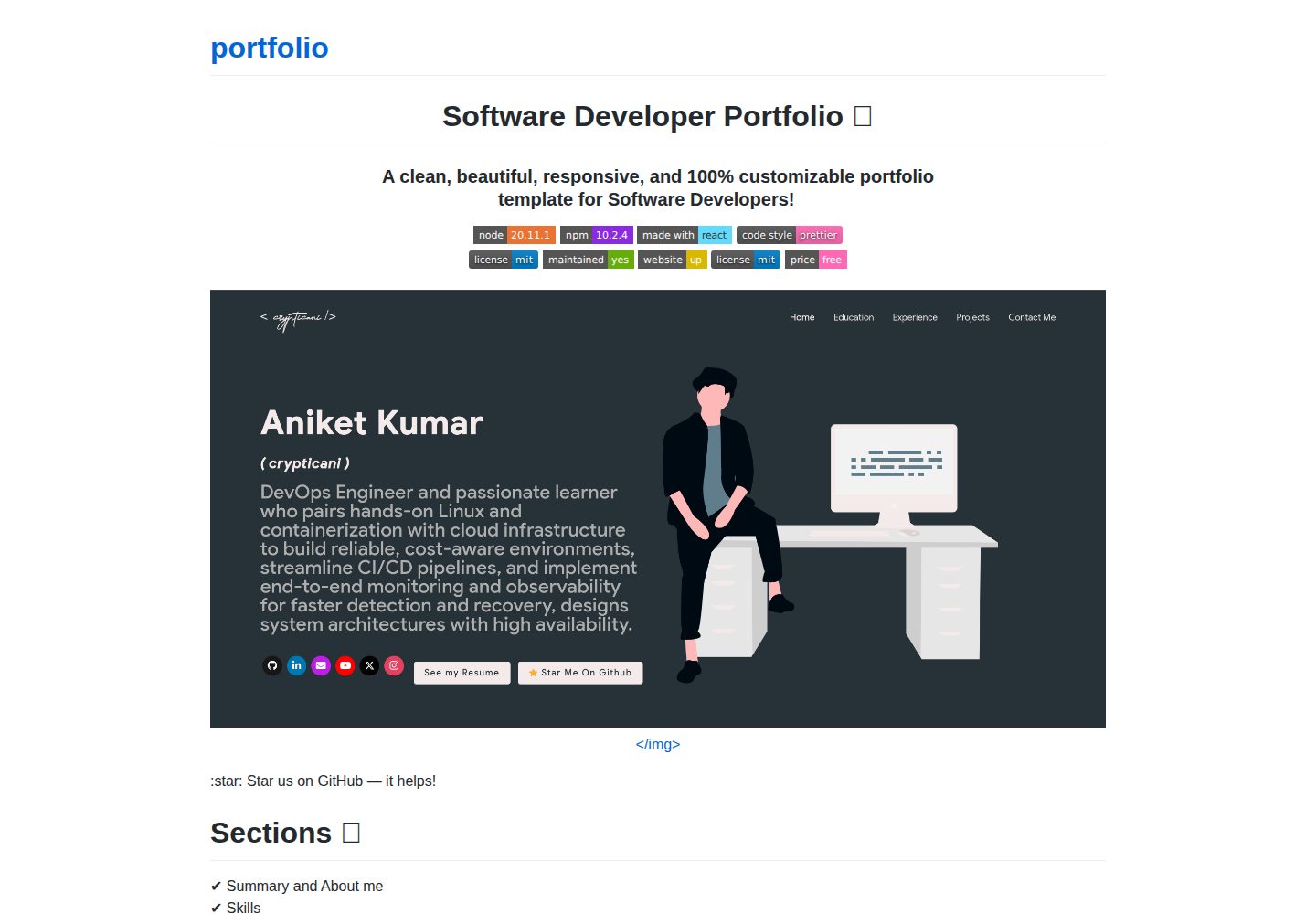
Content is centralized in src/portfolio.js, covering personal information, skills, experience, education, certifications, blogs, and contact details
ReactPortfolio
portfolio (crypticani) — React Portfolio Template
By crypticani
A React-based developer portfolio website template that centralizes personal information, skills, experience, projects, and contact details in src/portfolio.js, and supports fetching project data from GitHub.
Explore the design
Compare the page layouts and mobile experience. Open any screenshot for a closer look.
Desktop homepage1 / 2
Desktop captureTop of page
Actual screenshot captured by the server browser.
All pages & views 2
Screenshots show visual appearance; interactive behavior may differ.
Recorded 2026-10-02View source
What stands out
A quick read of the recorded project description.
Fetches projects, issues, organizations, and other data from GitHub via the git_data_fetcher.mjs script and replaces them on the page
Switches preset color themes via chosenTheme in src/theme.js
Skill icons support Iconify icon class names or custom images under public/skills
The README provides two deployment methods for GitHub Pages
Template Details
This is a software developer portfolio website template written in React, with the repository under the MIT license. The page includes sections such as Summary/About me, Skills, open-source projects linked to GitHub, Experience, Certifications, Blogs, Education, and Contact me.
The template centralizes most content in src/portfolio.js, including greetings, social media links, skills, experience, education, certifications, blogs, and contact information; GitHub-related data is fetched by the git_data_fetcher.mjs script in the root directory, which requires filling in GITHUB_TOKEN and GITHUB_USERNAME in .env first, then running the script, and re-running it whenever GitHub information needs updating. The theme is switched via chosenTheme in src/theme.js, with multiple color schemes already defined in the repository.
Before use, Node.js and npm need to be installed; after cloning the repository, run npm install, then use npm start for local preview. For deployment, the README recommends GitHub Pages and provides two methods: manually build and push to the <username>.github.io repository, or use npm run deploy to generate a gh-pages branch. The animated Splash Logo on the homepage needs to be designed separately, or skipped by setting isSplash to false in the settings of src/portfolio.js.
ReactPortfolio
Is it right for your project?
Use Cases
- Software developers building a personal portfolio website to centrally showcase skills, experience, open-source projects, and contact information
- Developers who need to automatically sync projects, issues, and other data from GitHub to their personal homepage
- Users who want to maintain portfolio content in a single configuration file and quickly switch color schemes
- Developers preparing to host their personal homepage for free on GitHub Pages
Suitable For
- Front-end or full-stack developers familiar with basic React and npm operations
- Users willing to follow the README steps to modify configuration files, generate a GitHub Token, and run the data fetching script
- Individual developers who need a developer portfolio template with customizable content and themes
Getting started & customization
Use these recorded setup notes alongside the repository instructions for your chosen version.
- 1
Node.js and npm need to be installed, with versions not lower than those indicated by the README badges
- 2
After cloning the repository, run npm install, then use npm start for local preview
- 3
Change the homepage in package.json to https://<your GitHub username>.github.io, keeping the https:// prefix
- 4
Before using GitHub data, create .env based on env.example and fill in GITHUB_TOKEN and GITHUB_USERNAME, then run node git_data_fetcher.mjs
- 5
The Splash animation Logo cannot be configured directly; you can skip it by setting isSplash to false in the settings of src/portfolio.js
License & source material
Usage conditions & limitations
Free to use · keep license noticeThis entry covers the free version under the MIT license in the public repository; the free scope is the code of this version and does not imply that external services or third-party assets are free.
Must comply with when using
- Free use, modification, commercial use, and distribution of this version's code are permitted.
- When distributing copies or substantial portions of the code, retain the original author's copyright notice and the full MIT license notice.
- The code is provided as is; warranties and limitations of liability are governed by the original license and applicable law.
Additional costs & items to verify
- Using the GitHub data fetching feature requires creating your own GitHub personal access token (Token) and granting full permissions as required by the README, then filling the token and username into the .env file; without a token, GitHub project data cannot be fetched.
- You need to manually create a .env file based on env.example and fill in GITHUB_TOKEN and GITHUB_USERNAME, which is a prerequisite configuration requirement for using GitHub-related features.
- GitHub-related information does not update automatically; each time you need to refresh the GitHub data on the website, you must re-run the node git_data_fetcher.mjs script.
- The animated Splash Logo on the homepage cannot be configured directly; you need to design the Logo yourself, or set isSplash to false in the settings of src/portfolio.js to skip the animation.
- The README recommends deploying with GitHub Pages, which requires creating a repository named <username>.github.io and completing the build and push; deployment depends on an external hosting service.
- Demo images, fonts, icons, and other third-party assets need to be checked against their respective licenses and cannot be judged solely based on the code's MIT license.
- External services such as domains, hosting, databases, payments, or AI may incur additional charges.
View Original Text Basis
Permission is hereby granted, free of charge
Original License Text
You can get a github token as described [here](https://docs.github.com/en/github/authenticating-to-github/creating-a-personal-access-token). Give all permissions while generating token.
Original README
In the project you will see a `env.example` file, create a new file named `.env` and copy contents of `env.example` into it.
Original README
Whenever you want to update the github related information on the website you need to run this command.
Original README
Therefore, this part of portfolio is not customizable.
Original README
https://github.com/crypticani/portfolio/blob/main/LICENSEhttps://github.com/crypticani/portfolio/blob/main/README.mdI highly recommend using [Github Pages](https://create-react-app.dev/docs/deployment/#github-pages) to achieve this the EASIEST WAY.
Original README
Compiled by DeepSeek based on repository license and README ·2026-10-03. Results only cover the materials read; dependencies, images, fonts, and subsequent term changes are subject to their respective original texts.
Project checks & description sources
Template Information
- Source platforms
- GitHub
- Documentation and maintenance reference score
- More documented · 87 / 100
- Technologies
- React
- Website type
- Portfolio
How this score is calculated
Our heuristic uses license records (up to 30), a demo link (12), a preview (10), stars (15), recorded maintenance (15), description completeness (8), feature records (5) and classification data (5). It is not a code, security or performance test, or a Google score. A link does not establish tested functionality.
What to verify for this project
- Repository update recorded
- 2026-03-22
- Screenshot last checked
- 2026-10-03
A demo link is listed. Check it with your own content and viewport sizes; its presence does not confirm that forms, authentication or payments work.
The catalog identifies React as the primary stack. Check the actual dependency manifest and lockfile for versions and hosting requirements. These notes use recorded metadata, not a code audit or a deployment test.
Use a selection guide →How this description was prepared
AI-assisted description based on catalog records and repository material. Repository authors are not automatically the reviewers of this description.
Automatically checked against source and license rules; no manual editorial review.
Inspect the recorded source material
SHA-256: 201fc26ed11bfbab25d3a402828389775c41a8a56809ea2e873d526ae6fb1a7c
2026-10-03T00:01:53.901Z
Source file / repository<h1 align="center"> Software Developer Portfolio 🔥 </h1>
<h3 align="center"> A clean, beautiful, responsive, and 100% customizable portfolio <br /> template for Software Developers! </h3>
<p align="center">
<a href="https://nodejs.org/en/blog/release/v20.11.1"><img alt="NodeJS" src="https://img.shields.io/badge/node-20.11.1-important?style=flat-square" /></a>
<a href="https://www.npmjs.com/package/npm/v/10.2.4"><img alt="NPM" src="https://img.shields.io/badge/npm-10.2.4-blueviolet?style=flat-square" /></a>
<a href="https://reactjs.org/"><img alt="Made With React" src="https://img.shields.io/badge/made%20with-react-61DAFB?style=flat-square" /></a>
<a href="https://github.com/prettier/prettier"><img alt="code style: prettier" src="https://img.shields.io/badge/code_style-prettier-ff69b4.svg?style=flat-square?style=flat-square" /></a>
<br/>
<a href="http://badges.mit-license.org/"><img alt="License" src="http://img.shields.io/:license-mit-blue.svg?style=flat-square?style=flat-square" /></a>
<a href="https://github.com/crypticani/portfolio/commits/master"><img alt="Maintenance" src="https://img.shields.io/badge/maintained-yes-green.svg?style=flat-square" /></a>
<a href="http://badges.mit-license.org/"><img alt="Website" src="https://img.shields.io/badge/website-up-yellow?style=flat-square" /></a>
<a href="https://crypticani.github.io/"><img alt="License" src="http://img.shields.io/:license-mit-blue.svg?style=flat-square?style=flat-square" /></a>
<a href="https://img.shields.io/badge/price-free-ff69b4"><img alt="Price" src="https://img.shields.io/badge/price-free-ff69b4?style=flat-square" /></a>
</p>
<p align="center">
<a href="https://crypticani.github.io" target="_blank">
<img src="images/portfolio_snapshot.png"></img>
</a>
</p>
:star: Star us on GitHub — it helps!
# Sections 📚
✔️ Summary and About me\
✔️ Skills \
✔️ Open Source Projects Connected with Github\
✔️ Experience\
✔️ Certifications 🏆\
✔️ Blogs\
✔️ Education\
✔️ Contact me
To view a live example, **[click here](https://crypticani.github.io/)**
# Table of Contents
- [Clone and Use](#clone-and-use)
- [Customizing](#customize-it-to-make-your-own-portfolio)
- [Choose Theme](#choose-theme)
- [Deployment](#deployment)
- [Technologies Used](#technologies-used)
- [Illustrations](#illustrations)
- [License](#license)
- [Contributors](#contributors)
- [References](#references)
# Clone and Use 📋
- The website is completely built on `react-js` library of `javascript` and that's why we need `nodejs` and `npm` installed
- While installing `nodejs` and `npm`, try to install versions which are equal or greater than the versions mentioned in badges above
- In case you want to help developing it or simply saving it, you can fork the repository just by clicking the button on the top-right corner of this page
- After the successful installation of `nodejs` and `npm`, clone the repository into your local system using below command:
```bash
git clone https://github.com/crypticani/portfolio.git
```
This will clone the whole repository in your system.
- To download required dependencies to your system, navigate to the directory where the cloned repository resides and execute following command:
```node
npm install
```
- Now the project is ready to use
- You can check it using `npm start`, it will open the website locally on your browser.
# Customize it to make your own portfolio ✏️
In this project, there are basically 4 things that you need to change to customize this to anyone else's portfolio: **package.json**, **Personal Information**, **Github Information** and **Splash Logo**.
### package.json
Open this file, which is in the main cloned directory, choose any "name" and change "homepage " to `https://<your-github-username>.github.io`. Do not forget the `https://`, otherwise fonts will not load.
### Personal Information
You will find `src/portfolio.js` file which contains the complete information about the user. The file looks something like below:
```javascript
// Home Page
const greeting = {
...
}
// Social Media
const socialMediaLinks = {
...
}
...
```
You can change the personal information, experience, education, social media, certifications, blog information, contact information etc. in `src/portfolio.js` to directly reflect them in portfolio website.
### How to change the icons on homepage under what i do section?
1. This section pulls data from `skills` in portfolio.js file.
2. Visit this website: https://icon-sets.iconify.design/
3. Search for the skill you are looking to add.
4. Select the icon of your choice.
5. Copy the text beside **Selected Icon** and replace it with `fontAwesomeClassName` of that particular softwareSkill.
#### How to use custom images instead of Iconify Icons?
1. Add a valid image file into the `public/skills` folder
2. Insert the image name into the `imageSrc` attribute of the particular softwareSkill
3. Remove the `fontAwesomeClassName` property or leave it empty because it takes precedence over `imageSrc`
4. Add custom styling to the `img` using the `style` Property
### How to Change the Icons on Education page under Basic Qualification and Certifications?
1. The icons for this section are pulled from the `competitiveSites` array in the `portfolio.js` file.
2. Visit the [Simple Icons website](https://simpleicons.org/).
3. Search for the competitive site you want to add an icon for.
4. Select the icon you want to use.
5. Copy the text beside Selected Icon and replace it with iconifyClassname of that particular competitive site.
### How to Use Custom Images Instead of Simple Icons for Competitive Sites
1. Place the custom image file in the `public/skills` folder.
2. Update the `imageSrc` attribute of the corresponding competitive site with the name of your custom image (e.g., `imageSrc: "customImage.png"`).
3. Remove the `iconifyClassname` property or leave it empty, as the `imageSrc` property takes precedence over `iconifyClassname`.
4. Optionally, add custom styling to the `<img>` tag using the `style` property to adjust size, positioning, etc.
### Github Information
You will find `git_data_fetcher.mjs` file in the main directory of the repository. This file is used to fetch the data (Pull requests, Issues, Organizations, Pinned projects etc.) from your github.
In the project you will see a `env.example` file, create a new file named `.env` and copy contents of `env.example` into it. In that file, you will see the following environment variables
```javascript
GITHUB_TOKEN = your_token;
GITHUB_USERNAME = your_username;
```
You can get a github token as described [here](https://docs.github.com/en/github/authenticating-to-github/creating-a-personal-access-token). Give all permissions while generating token. Add your github username and the token generated in `GITHUB_USERNAME` and `GITHUB_TOKEN` variables in the .env file.
Now, you need to run following command. (Make sure you executed `npm install` before this)
**Warning:** Treat your tokens like passwords and keep them secret. When working with the API, use tokens as environment variables instead of hardcoding them into your programs.
```node
node git_data_fetcher.mjs
```
This will fetch all the data from your github and it will automatically replace my data with yours.
Whenever you want to update the github related information on the website you need to run this command.
### Splash Logo
Note here that if you click [Ashutosh's portfolio](https://ashutosh1919.github.io), you can see animating the logo at the beginning. He has designed that logo in [`Figma`](https://www.figma.com/) and then animated it using css.
Therefore, this part of portfolio is not customizable. But don't worry we have a solution to this problem. You have below two alternatives:
- If you want to design your own logo, then you can design it using `Figma` or `Adobe XD` or `Adobe Illustrator` or `Inkscape`. If you want to animate it, you can refer to `./src/components/Loader` directory which contains `js` and `css` files which animates the logo
- If you don't want Splash screen or you don't know how to design logo, then this option is for you
- You can open `src/portfolio.js` file and at the top of this file you will see `settings` component as below:
```javascript
// Website related settings
const settings = {
isSplash: true,
};
```
- Change `isSplash` from `true` to `false`
- Now, if you see your website using `npm start`, it will directly open `home` rather than animating logo `splash` screen
- If you design your logo in future, then edit the files in `./src/components/Loader` and then revert `isSplash` to `true` in `src/portfolio.js`.
## Other
- You need to change the website title and other descriptions in `public/index.html`
- You can define your own favicon in `public/icons` directory. If you don't have a favicon, you can generate favicons from [Favicon Generator](https://www.favicon-generator.org/) and [Favicon IO](https://favicon.io/)
- You can also edit your website preview (known as description image). Run your site locally, take a screenshot and replace with `public/icons/desc.png`. Note that your screenshot should be 1280x640 for better preview.
# Choose Theme 🌈
- You can take a look at `src/theme.js` file where all available themes are mentioned with their respective color codes
- At the bottom of this file you will see the below code:
- `export const chosenTheme = blueTheme;`
- You need to change the name from `blueTheme` to whatever theme you want to set your website to
- You can define new theme similarly as other themes and you can assign name of that new defined theme to `chosenTheme`
- That's it. You just need to change the theme name and the code will take care of everything else
- Run `npm start` to check if everything is ok.
# Deployment 📦
- Once you are done with your setup and have successfully completed all steps above, you need to put your website online!
- I highly recommend using [Github Pages](https://create-react-app.dev/docs/deployment/#github-pages) to achieve this the EASIEST WAY.
- To deploy your website, you have two options. First you need to create a github repository with the name `<your-github-username>.github.io`. Please don't give it any other name.
- Now, you need to generate a production build and deploy the website.
**Option 1:**
- Run `npm run build` to generate the production build folder.
- Enter the build folder, `git init` and push the generated code to the `master` branch of your new repository on github. That's it. It's Done.
- You may need to `git init` and force push at every new build.
**Option 2 (will not work with [user pages](https://docs.github.com/en/github/working-with-github-pages/about-github-pages)):**
- Run `npm run deploy` to build and create a branch called `gh-pages`. It will push the `build` files to that branch.
- The last step in deploying is to enable `Github Pages` in settings of the repository and select `gh-pages` branch.
Now, your website is successfully deployed and you can visit it at `<your-github-username>.github.io`.
If you are stuck somewhere and want to observe the deployment process in depth, then please watch below video.
<p align="center">
<a href="http://www.youtube.com/watch?v=IwBS39TOmpA" target="_blank">
<img src="http://img.youtube.com/vi/IwBS39TOmpA/0.jpg"></img>
</a>
</p>
# Technologies used 🛠️
- [React](https://reactjs.org/)
- [graphql](https://graphql.org/)
- [apollo-boost](https://www.apollographql.com/docs/react/get-started/)
- [baseui](https://github.com/uber/baseweb)
- [react-reveal](https://www.react-reveal.com/)
- [styled-components](https://styled-components.com/)
# illustrations 🍥
- [UnDraw](https://undraw.co/illustrations)
# License 📄
This project is licensed under the MIT License - see the [LICENSE.md](./LICENSE) file for details.
# Contributors ✨
<!-- ALL-CONTRIBUTORS-LIST:START - Do not remove or modify this section -->
<!-- prettier-ignore-start -->
<!-- markdownlint-disable -->
<table>
<tbody>
<tr>
<td align="center" valign="top" width="14.28%"><a href="http://ashutosh1919.github.io"><img src="https://avatars3.githubusercontent.com/u/20843596?s=460&u=7f184b911f73ae1dc5765ab686fff2b2e984830f&v=4?s=100" width="100px;" alt="Ashutosh Hathidara"/><br /><sub><b>Ashutosh Hathidara</b></sub></a><br /><a href="https://github.com/ashutosh1919/masterPortfolio/commits?author=ashutosh1919" title="Code">💻</a> <a href="https://github.com/ashutosh1919/masterPortfolio/commits?author=ashutosh1919" title="Documentation">📖</a> <a href="#design-ashutosh1919" title="Design">🎨</a> <a href="#maintenance-ashutosh1919" title="Maintenance">🚧</a> <a href="#ideas-ashutosh1919" title="Ideas, Planning, & Feedback">🤔</a></td>
<td align="center" valign="top" width="14.28%"><a href="https://danielmarostica.github.io/"><img src="https://avatars3.githubusercontent.com/u/3595998?v=4?s=100" width="100px;" alt="Daniel Marostica"/><br /><sub><b>Daniel Marostica</b></sub></a><br /><a href="https://github.com/ashutosh1919/masterPortfolio/commits?author=danielmarostica" title="Documentation">📖</a> <a href="#design-danielmarostica" title="Design">🎨</a></td>
<td align="center" valign="top" width="14.28%"><a href="https://dineshnadimpalli.com"><img src="https://avatars2.githubusercontent.com/u/13104926?v=4?s=100" width="100px;" alt="Dinesh Nadimpalli"/><br /><sub><b>Dinesh Nadimpalli</b></sub></a><br /><a href="https://github.com/ashutosh1919/masterPortfolio/commits?author=dineshnadimpalli" title="Code">💻</a></td>
<td align="center" valign="top" width="14.28%"><a href="http://jivthesh.github.io"><img src="https://avatars3.githubusercontent.com/u/20579980?v=4?s=100" width="100px;" alt="Jivthesh M R"/><br /><sub><b>Jivthesh M R</b></sub></a><br /><a href="https://github.com/ashutosh1919/masterPortfolio/commits?author=jivthesh" title="Documentation">📖</a></td>
<td align="center" valign="top" width="14.28%"><a href="http://jatinchauhan.tech"><img src="https://avatars2.githubusercontent.com/u/40722235?v=4?s=100" width="100px;" alt="Jatin Chauhan"/><br /><sub><b>Jatin Chauhan</b></sub></a><br /><a href="https://github.com/ashutosh1919/masterPortfolio/commits?author=mrjatinchauhan" title="Code">💻</a></td>
<td align="center" valign="top" width="14.28%"><a href="https://th3c0d3br34ker.github.io/"><img src="https://avatars1.githubusercontent.com/u/60807938?v=4?s=100" width="100px;" alt="Jainam Desai"/><br /><sub><b>Jainam Desai</b></sub></a><br /><a href="https://github.com/ashutosh1919/masterPortfolio/commits?author=th3c0d3br34ker" title="Code">💻</a> <a href="#question-th3c0d3br34ker" title="Answering Questions">💬</a></td>
<td align="center" valign="top" width="14.28%"><a href="https://miftaulmannan.wordpress.com/"><img src="https://avatars0.githubusercontent.com/u/42533823?v=4?s=100" width="100px;" alt="Miftaul Mannan"/><br /><sub><b>Miftaul Mannan</b></sub></a><br /><a href="https://github.com/ashutosh1919/masterPortfolio/commits?author=Tasin5541" title="Code">💻</a></td>
</tr>
<tr>
<td align="center" valign="top" width="14.28%"><a href="http://a-mishra.github.io"><img src="https://avatars0.githubusercontent.com/u/10567548?v=4?s=100" width="100px;" alt="Ashutosh Mishra"/><br /><sub><b>Ashutosh Mishra</b></sub></a><br /><a href="https://github.com/ashutosh1919/masterPortfolio/commits?author=a-mishra" title="Code">💻</a></td>
<td align="center" valign="top" width="14.28%"><a href="http://tamojit.wixsite.com/mrtamojit"><img src="https://avatars0.githubusercontent.com/u/40804626?v=4?s=100" width="100px;" alt="Tamojit"/><br /><sub><b>Tamojit</b></sub></a><br /><a href="https://github.com/ashutosh1919/masterPortfolio/commits?author=tamojit-123" title="Documentation">📖</a> <a href="https://github.com/ashutosh1919/masterPortfolio/commits?author=tamojit-123" title="Code">💻</a> <a href="#design-tamojit-123" title="Design">🎨</a></td>
<td align="center" valign="top" width="14.28%"><a href="https://prabin-karki.com.np"><img src="https://avatars.githubusercontent.com/u/43983896?v=4?s=100" width="100px;" alt="Prabin Karki"/><br /><sub><b>Prabin Karki</b></sub></a><br /><a href="https://github.com/ashutosh1919/masterPortfolio/commits?author=githubprabin143" title="Code">💻</a></td>
<td align="center" valign="top" width="14.28%"><a href="https://praveen.science/"><img src="https://avatars.githubusercontent.com/u/1830380?v=4?s=100" width="100px;" alt="Praveen Kumar Purushothaman"/><br /><sub><b>Praveen Kumar Purushothaman</b></sub></a><br /><a href="https://github.com/ashutosh1919/masterPortfolio/commits?author=praveenscience" title="Documentation">📖</a></td>
<td align="center" valign="top" width="14.28%"><a href="http://baul.ml"><img src="https://avatars.githubusercontent.com/u/33395806?v=4?s=100" width="100px;" alt="paul"/><br /><sub><b>paul</b></sub></a><br /><a href="https://github.com/ashutosh1919/masterPortfolio/commits?author=baulml" title="Code">💻</a></td>
<td align="center" valign="top" width="14.28%"><a href="https://github.com/SandipDhang"><img src="https://avatars.githubusercontent.com/u/50694884?v=4?s=100" width="100px;" alt="Sandip Dhang"/><br /><sub><b>Sandip Dhang</b></sub></a><br /><a href="https://github.com/ashutosh1919/masterPortfolio/commits?author=SandipDhang" title="Code">💻</a></td>
<td align="center" valign="top" width="14.28%"><a href="https://github.com/ioribrn"><img src="https://avatars.githubusercontent.com/u/43734587?v=4?s=100" width="100px;" alt="Jawad Moustadif"/><br /><sub><b>Jawad Moustadif</b></sub></a><br /><a href="https://github.com/ashutosh1919/masterPortfolio/commits?author=ioribrn" title="Code">💻</a></td>
</tr>
<tr>
<td align="center" valign="top" width="14.28%"><a href="https://github.com/priyanshk20"><img src="https://avatars.githubusercontent.com/u/52736997?v=4?s=100" width="100px;" alt="Priyansh Khandelwal"/><br /><sub><b>Priyansh Khandelwal</b></sub></a><br /><a href="https://github.com/ashutosh1919/masterPortfolio/commits?author=priyanshk20" title="Code">💻</a> <a href="#design-priyanshk20" title="Design">🎨</a></td>
<td align="center" valign="top" width="14.28%"><a href="https://github.com/abdslam01"><img src="https://avatars.githubusercontent.com/u/59281502?v=4?s=100" width="100px;" alt="Abdessalam Bahafid"/><br /><sub><b>Abdessalam Bahafid</b></sub></a><br /><a href="https://github.com/ashutosh1919/masterPortfolio/commits?author=abdslam01" title="Code">💻</a></td>
<td align="center" valign="top" width="14.28%"><a href="https://dhruvkrishnavaid.github.io"><img src="https://avatars.githubusercontent.com/u/69188774?v=4?s=100" width="100px;" alt="Dhruv Krishna Vaid"/><br /><sub><b>Dhruv Krishna Vaid</b></sub></a><br /><a href="https://github.com/ashutosh1919/masterPortfolio/commits?author=dhruvkrishnavaid" title="Code">💻</a> <a href="https://github.com/ashutosh1919/masterPortfolio/commits?author=dhruvkrishnavaid" title="Documentation">📖</a> <a href="#ideas-dhruvkrishnavaid" title="Ideas, Planning, & Feedback">🤔</a> <a href="#question-dhruvkrishnavaid" title="Answering Questions">💬</a></td>
<td align="center" valign="top" width="14.28%"><a href="https://kasroudra.github.io"><img src="https://avatars.githubusercontent.com/u/78908440?v=4?s=100" width="100px;" alt="KasRoudra"/><br /><sub><b>KasRoudra</b></sub></a><br /><a href="https://github.com/ashutosh1919/masterPortfolio/commits?author=KasRoudra" title="Code">💻</a></td>
<td align="center" valign="top" width="14.28%"><a href="https://telegram.dog/AlbertEinstein_TG"><img src="https://avatars.githubusercontent.com/u/73480087?v=4?s=100" width="100px;" alt="Albert Einstein"/><br /><sub><b>Albert Einstein</b></sub></a><br /><a href="https://github.com/ashutosh1919/masterPortfolio/commits?author=AlbertEinsteinTG" title="Documentation">📖</a></td>
<td align="center" valign="top" width="14.28%"><a href="https://github.com/SurajPratap10"><img src="https://avatars.githubusercontent.com/u/92919173?v=4?s=100" width="100px;" alt="Suraj Pratap"/><br /><sub><b>Suraj Pratap</b></sub></a><br /><a href="https://github.com/ashutosh1919/masterPortfolio/commits?author=SurajPratap10" title="Documentation">📖</a></td>
<td align="center" valign="top" width="14.28%"><a href="https://lightmap.dev"><img src="https://avatars.githubusercontent.com/u/40917760?v=4?s=100" width="100px;" alt="Sai Teja"/><br /><sub><b>Sai Teja</b></sub></a><br /><a href="https://github.com/ashutosh1919/masterPortfolio/commits?author=saiteja13427" title="Code">💻</a> <a href="https://github.com/ashutosh1919/masterPortfolio/commits?author=saiteja13427" title="Documentation">📖</a> <a href="#maintenance-saiteja13427" title="Maintenance">🚧</a> <a href="#ideas-saiteja13427" title="Ideas, Planning, & Feedback">🤔</a></td>
</tr>
<tr>
<td align="center" valign="top" width="14.28%"><a href="https://anirudhpanda.in/"><img src="https://avatars.githubusercontent.com/u/66218496?v=4?s=100" width="100px;" alt="Anirudh Panda"/><br /><sub><b>Anirudh Panda</b></sub></a><br /><a href="https://github.com/ashutosh1919/masterPortfolio/commits?author=AnirudhPanda" title="Code">💻</a></td>
<td align="center" valign="top" width="14.28%"><a href="https://hidayat7z.github.io"><img src="https://avatars.githubusercontent.com/u/63554016?v=4?s=100" width="100px;" alt="Md Hidayat Rasool"/><br /><sub><b>Md Hidayat Rasool</b></sub></a><br /><a href="https://github.com/ashutosh1919/masterPortfolio/commits?author=hidayat7z" title="Documentation">📖</a></td>
<td align="center" valign="top" width="14.28%"><a href="https://www.linkedin.com/in/siddhantsadangi/"><img src="https://avatars.githubusercontent.com/u/41324509?v=4?s=100" width="100px;" alt="Siddhant Sadangi"/><br /><sub><b>Siddhant Sadangi</b></sub></a><br /><a href="https://github.com/ashutosh1919/masterPortfolio/commits?author=SiddhantSadangi" title="Documentation">📖</a></td>
<td align="center" valign="top" width="14.28%"><a href="https://anoopvarghese.in/"><img src="https://avatars.githubusercontent.com/u/59723767?v=4?s=100" width="100px;" alt="Anoop V"/><br /><sub><b>Anoop V</b></sub></a><br /><a href="https://github.com/ashutosh1919/masterPortfolio/commits?author=vanoop729" title="Code">💻</a></td>
<td align="center" valign="top" width="14.28%"><a href="https://github.com/aash1999"><img src="https://avatars.githubusercontent.com/u/39939476?v=4?s=100" width="100px;" alt="Aakash Singh"/><br /><sub><b>Aakash Singh</b></sub></a><br /><a href="https://github.com/ashutosh1919/masterPortfolio/commits?author=aash1999" title="Code">💻</a></td>
<td align="center" valign="top" width="14.28%"><a href="https://aherrera3.github.io/"><img src="https://avatars.githubusercontent.com/u/52289646?v=4?s=100" width="100px;" alt="Angélica Herrera Alba"/><br /><sub><b>Angélica Herrera Alba</b></sub></a><br /><a href="https://github.com/ashutosh1919/masterPortfolio/commits?author=aherrera3" title="Code">💻</a></td>
<td align="center" valign="top" width="14.28%"><a href="https://davidminkovski.com"><img src="https://avatars.githubusercontent.com/u/1609264?v=4?s=100" width="100px;" alt="David Minkovski"/><br /><sub><b>David Minkovski</b></sub></a><br /><a href="#ideas-dminkovski" title="Ideas, Planning, & Feedback">🤔</a> <a href="https://github.com/ashutosh1919/masterPortfolio/commits?author=dminkovski" title="Code">💻</a></td>
</tr>
<tr>
<td align="center" valign="top" width="14.28%"><a href="http://cdigruttola.it"><img src="https://avatars.githubusercontent.com/u/9153905?v=4?s=100" width="100px;" alt="Carmine Di Gruttola"/><br /><sub><b>Carmine Di Gruttola</b></sub></a><br /><a href="#ideas-cdigruttola" title="Ideas, Planning, & Feedback">🤔</a> <a href="#promotion-cdigruttola" title="Promotion">📣</a></td>
<td align="center" valign="top" width="14.28%"><a href="https://github.com/Vyomrana02"><img src="https://avatars.githubusercontent.com/u/87069619?v=4?s=100" width="100px;" alt="Vyom Rana"/><br /><sub><b>Vyom Rana</b></sub></a><br /><a href="https://github.com/ashutosh1919/masterPortfolio/commits?author=Vyomrana02" title="Code">💻</a></td>
<td align="center" valign="top" width="14.28%"><a href="https://github.com/parthrc"><img src="https://avatars.githubusercontent.com/u/101104958?v=4?s=100" width="100px;" alt="Parth Chawande"/><br /><sub><b>Parth Chawande</b></sub></a><br /><a href="https://github.com/ashutosh1919/masterPortfolio/commits?author=parthrc" title="Code">💻</a></td>
<td align="center" valign="top" width="14.28%"><a href="https://github.com/0Armaan025"><img src="https://avatars.githubusercontent.com/u/104704093?v=4?s=100" width="100px;" alt="Armaan"/><br /><sub><b>Armaan</b></sub></a><br /><a href="https://github.com/ashutosh1919/masterPortfolio/commits?author=0Armaan025" title="Documentation">📖</a></td>
<td align="center" valign="top" width="14.28%"><a href="https://varundhand.netlify.app/"><img src="https://avatars.githubusercontent.com/u/110025628?v=4?s=100" width="100px;" alt="Varun Dhand"/><br /><sub><b>Varun Dhand</b></sub></a><br /><a href="https://github.com/ashutosh1919/masterPortfolio/commits?author=varundhand" title="Code">💻</a></td>
<td align="center" valign="top" width="14.28%"><a href="http://vjspranav.dev"><img src="https://avatars.githubusercontent.com/u/17949836?v=4?s=100" width="100px;" alt="VJS Pranavasri"/><br /><sub><b>VJS Pranavasri</b></sub></a><br /><a href="https://github.com/ashutosh1919/masterPortfolio/commits?author=vjspranav" title="Code">💻</a></td>
<td align="center" valign="top" width="14.28%"><a href="https://rahulkush1.github.io/"><img src="https://avatars.githubusercontent.com/u/90745824?v=4?s=100" width="100px;" alt="Rahul Kushwaha"/><br /><sub><b>Rahul Kushwaha</b></sub></a><br /><a href="https://github.com/ashutosh1919/masterPortfolio/commits?author=Rahulkush1" title="Code">💻</a></td>
</tr>
<tr>
<td align="center" valign="top" width="14.28%"><a href="https://github.com/Adamou02"><img src="https://avatars.githubusercontent.com/u/42783707?v=4?s=100" width="100px;" alt="Adam Bouhrara"/><br /><sub><b>Adam Bouhrara</b></sub></a><br /><a href="https://github.com/ashutosh1919/masterPortfolio/commits?author=Adamou02" title="Code">💻</a></td>
<td align="center" valign="top" width="14.28%"><a href="https://github.com/16ratneshkumar"><img src="https://avatars.githubusercontent.com/u/142919875?v=4?s=100" width="100px;" alt="Ratnesh Kumar"/><br /><sub><b>Ratnesh Kumar</b></sub></a><br /><a href="https://github.com/ashutosh1919/masterPortfolio/commits?author=16ratneshkumar" title="Code">💻</a> <a href="https://github.com/ashutosh1919/masterPortfolio/commits?author=16ratneshkumar" title="Documentation">📖</a></td>
<td align="center" valign="top" width="14.28%"><a href="https://github.com/Towbee05"><img src="https://avatars.githubusercontent.com/u/114928370?v=4?s=100" width="100px;" alt="Tobi"/><br /><sub><b>Tobi</b></sub></a><br /><a href="https://github.com/ashutosh1919/masterPortfolio/commits?author=Towbee05" title="Documentation">📖</a></td>
</tr>
</tbody>
</table>
<!-- markdownlint-restore -->
<!-- prettier-ignore-end -->
<!-- ALL-CONTRIBUTORS-LIST:END -->
# References 👏🏻
- Some Design and Implementation Ideas are taken from [Saad Pasta's Portfolio Project](https://github.com/saadpasta/developerFolio).
- The Logo of MasterPortfolio is inspired from [prettier-logo](https://github.com/prettier/prettier-logo) for [prettier](https://github.com/prettier/prettier) designed by @ianstormtaylor.
Explore similar templates
Compare previews and descriptions within the same stack and category.

react-portfolio-template
A React-based developer portfolio template for showcasing projects, work history, and skills. It offers a multi-component layout, dark and light modes, and responsive mobile adaptation, with text and images editable in src/components.
React · Portfolio

personal-website-react
A single-page developer portfolio template built with React and Material-UI, driven by a JSON Resume-compliant resume.json. It offers light/dark theme switching with localStorage persistence, a clean responsive layout, and Create React App tooling for simple builds and static deployment.
React · Portfolio

karngyan.com
A personal website and blog template for developers, built with TanStack Start, React 19, Tailwind CSS v4, and shadcn/ui. It uses MDX for articles with Shiki highlighting and GFM tables, and automatically generates RSS, sitemap, robots.txt, llms.txt, and OG images.
React · Portfolio

react-portfolio-template
A React portfolio template by Ryan Balieiro with a fixed sidebar and page-turn transitions on desktop, bottom navigation on mobile, multilingual support, light/dark themes, and content components for experience, education, skills, projects, and testimonials.
React · Portfolio

portfolio
A data scientist personal portfolio template built with React and MUI, with content centrally managed through configuration files in the assets directory.
React · Portfolio

react-portfolio
A React 16 and Material-UI developer portfolio template that centralizes personal information in a JSON Resume-compliant resume.json, with light/dark theme switching saved to local storage. It currently provides portfolio display only; resume page templates and structured data enhancements are still planned.
React · Portfolio