基于 Nuxt 3,使用 pnpm 管理依赖
NuxtVue启动器
nuxt-boilerplate — Nuxt 启动器模板
作者 damisparks
基于 Nuxt 3 的启动器模板,集成 TypeScript、Nuxt UI、Pinia 与常用开发工具链,附带示例页面与组件。
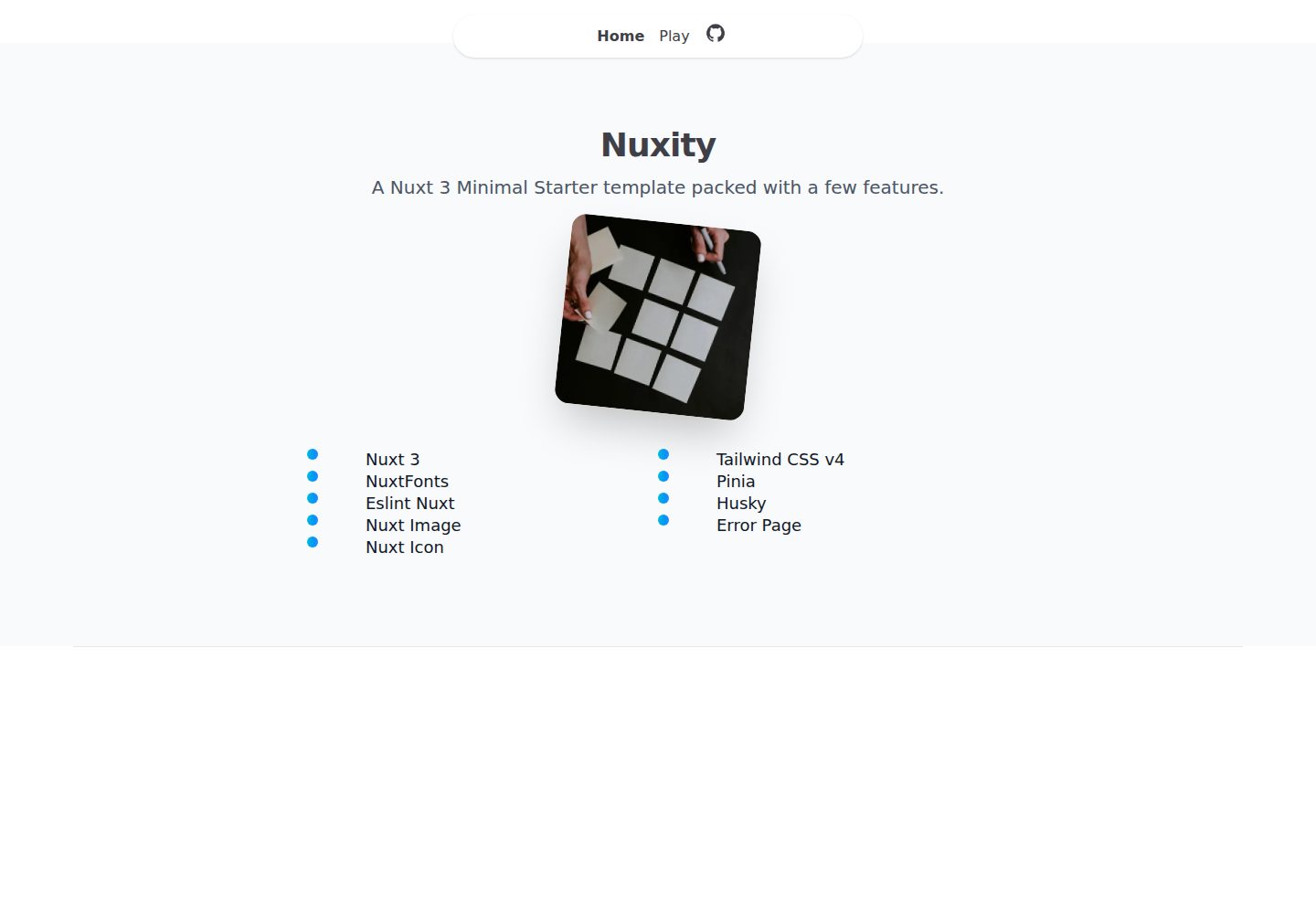
看看你的网站会是什么样
浏览真实页面截图,比较内容排版与手机效果。点击下方缩略图切换,放大查看整页细节。
全部页面与视图 2
截图用于了解视觉与布局,交互效果请以实际项目为准。
采集于 2026-10-03查看来源
值得关注的模板亮点
从已有项目资料中,快速了解它的特点。
内置 TypeScript、Nuxt UI 与 Pinia 状态管理
集成 NuxtFonts、Nuxt Image、Nuxt Icons 与设备检测模块
配置 ESLint Nuxt,并通过 Husky 与 lint-staged 建立 Git 钩子
提供自定义错误页与示例页面、组件、store 结构
模板详细介绍
这是一个面向 Nuxt 3 的启动器模板,采用 pnpm 作为包管理器,使用 TypeScript 编写。模板预置了 Nuxt UI 组件库、Pinia 状态管理、NuxtFonts 字体优化、Nuxt Image 图片处理与 Nuxt Icons 图标支持,并集成 @nuxtjs/device 做设备检测。
代码质量方面,模板包含 ESLint Nuxt 配置,以及 Husky 与 lint-staged 组成的 Git 钩子,用于提交前检查。项目结构已划分出 app 目录下的 assets、components、layouts、pages、store 与 types,并提供自定义错误页 error.vue。示例内容包含首页 index.vue、play.vue 页面,以及 AppNavBar、AppFooter、AppTitle、ProductCard、QuickAccess 等组件,store 目录下有一个 productStore 示例。
使用限制:模板定位为启动器,示例页面与组件仅用于演示结构,实际业务需自行替换。README 未说明测试、CI 或部署配置细节,Netlify 部署按钮指向的仓库地址与当前仓库不一致,需自行核对。许可为 MIT,但演示图片、字体、图标等第三方素材需单独确认授权。
NuxtVue启动器
适合你的项目吗?
适用场景
- 需要快速搭建 Nuxt 3 项目骨架并自带 UI 与状态管理
- 希望项目一开始就具备 TypeScript 与 ESLint 代码规范
- 需要图片、字体、图标等常见前端能力的预配置方案
适合人群
- 熟悉 Vue 与 Nuxt 的前端开发者
- 需要 Nuxt 3 起步模板的个人或小团队项目
- 希望以 Pinia 组织状态、以 Nuxt UI 构建界面的项目
上手与定制指南
结合仓库当前版本的说明,按下面的资料检查内容、配置与运行要求。
- 1
使用 pnpm install 安装依赖
- 2
pnpm dev 启动本地开发服务器(默认 http://localhost:3000)
- 3
pnpm build 构建生产版本,pnpm preview 本地预览
- 4
pnpm lint 与 pnpm lintfix 用于代码检查与自动修复
- 5
README 中的 Netlify 部署按钮指向 damisparks/nuxity 仓库,使用前需核对
授权与来源资料
使用条件与限制
免费使用 · 保留许可声明本次收录的是公开仓库中采用 MIT 许可的免费版本;免费范围为该版本代码,不代表外部服务或第三方素材免费。
使用时需要遵守
- 允许免费使用、修改、商用和分发该版本代码。
- 分发代码副本或实质性部分时,保留原作者版权声明和完整 MIT 许可声明。
- 代码按现状提供;担保与责任限制以原许可证及适用法律为准。
额外费用与待核对事项
- 演示图片、字体、图标及其他第三方素材需按各自许可核对,不能仅凭代码的 MIT 许可判断。
- 域名、托管、数据库、支付或 AI 等外部服务可能另外收费。
查看原文依据
https://github.com/damisparks/nuxt-boilerplate/blob/main/LICENSEhttps://github.com/damisparks/nuxt-boilerplate/blob/main/README.mdPermission is hereby granted, free of charge
许可证原文
DeepSeek 根据仓库许可证和 README 整理 ·2026-10-03。结果仅覆盖已读取资料,依赖、图片、字体及后续条款变更以各自原文为准。
项目核对记录与介绍依据
模板资料
- 来源平台
- GitHub
- 资料与维护参考分
- 资料较完整 · 82 / 100
- 技术栈
- Nuxt · Vue
- 网站类型
- 启动器
这个分数如何计算
本站按许可资料(最高30分)、演示链接(12分)、预览图(10分)、Star数(15分)、记录的维护时间(15分)、描述完整度(8分)、功能记录(5分)和分类资料(5分)计算。它不是代码、安全或性能测试,也不是 Google 评分;有链接不代表已实测可用。
这个项目需要核对什么
- 记录的仓库更新时间
- 2025-06-04
- 截图检查日期
- 2026-10-03
已收录演示链接。请用你的内容与屏幕尺寸检查;有演示不代表表单、认证或支付已经可用。
目录记录的主要技术栈是 Nuxt。请通过依赖清单和锁文件核对实际版本与托管要求。这些说明基于收录资料,不代表代码审计或部署实测。
查看具体选型方法 →介绍的制作与核对状态
介绍由 AI 辅助整理目录与仓库资料。仓库作者不等于这篇介绍的审核者。
已完成服务器许可规则与 AI 来源核对;未经过人工编辑审核。
查看当时使用的来源资料
SHA-256: 4d5dda57a0b4ad1ba3b79a4cd0c0ffc2b24a1a9ee4b625915e794109e31cb258
2026-10-03T02:00:29.576Z
来源文件 / 仓库# Nuxt 3 Boilerplate
A modern, feature-rich Nuxt 3 starter template with TypeScript support, Nuxt UI, state management with Pinia, and comprehensive tooling for development.
[<img src="https://www.netlify.com/img/deploy/button.svg" alt="Deploy to Netlify" />](https://app.netlify.com/start/deploy?repository=https://github.com/damisparks/nuxity#NODE_VERSION=18&AWS_LAMBDA_JS_RUNTIME=nodejs18.x)
## Features
* ⚡️ [Nuxt 3](https://github.com/nuxt/nuxt) with [pnpm](https://pnpm.io/) - super fast development and build times
* 🎨 [Nuxt UI](https://ui.nuxt.com) - sophisticated, accessible, and highly performant user interfaces
* 🔍 [TypeScript](https://www.typescriptlang.org/) - type safety and improved developer experience
* 📝 [NuxtFonts](https://fonts.nuxt.com) - plug-and-play fonts optimization
* 🍍 [Pinia](https://pinia.vuejs.org/) - intuitive, type safe store for Vue
* 📱 [Device Detection](https://github.com/nuxt-modules/device) - mobile and device detection (@nuxtjs/device)
* ✨ [Eslint Nuxt](https://github.com/nuxt/eslint-config) - code quality and consistency
* 🐕 [Husky](https://github.com/typicode/husky) & [Lint-staged](https://github.com/okonet/lint-staged) - Git hooks for code quality
* 🖼️ [Nuxt Image](https://image.nuxtjs.org/) - optimized image handling
* 🚀 [Nuxt Icons](https://ui.nuxt.com/getting-started/icons/nuxt) - easy icon usage
* 🧩 Custom error page with consistent UI
## Project Structure
```
├── eslint.config.mjs # ESLint configuration
├── LICENSE # License file
├── nuxt.config.ts # Nuxt configuration
├── package.json # Project dependencies
├── pnpm-lock.yaml # pnpm lock file
├── README.md # Project documentation
├── tsconfig.json # TypeScript configuration
├── app/ # Main application directory
│ ├── app.vue # Application entry point
│ ├── error.vue # Error page
│ ├── assets/ # Static assets
│ │ └── css/ # CSS files
│ │ └── main.css
│ ├── components/ # Vue components
│ │ ├── AppFooter.vue
│ │ ├── AppNavBar.vue
│ │ ├── AppTitle.vue
│ │ ├── ProductCard.vue
│ │ └── QuickAccess.vue
│ ├── layouts/ # Page layouts
│ │ └── default.vue
│ ├── pages/ # Application routes
│ │ ├── index.vue
│ │ └── play.vue
│ ├── store/ # Pinia store modules
│ │ └── productStore.ts
│ └── types/ # TypeScript type definitions
│ └── index.ts
└── public/ # Public static assets
└── favicon.ico
```
## Setup
Make sure to install the dependencies:
```bash
# Install dependencies
pnpm install
```
## Development
Start the development server on http://localhost:3000
```bash
pnpm dev
```
## Production
Build the application for production:
```bash
pnpm build
```
Locally preview production build:
```bash
pnpm preview
```
## Linting
Run linting:
```bash
pnpm lint
```
Fix linting issues:
```bash
pnpm lintfix
```
## Contributing
1. Fork the repository
2. Create your feature branch (`git checkout -b feature/amazing-feature`)
3. Commit your changes (`git commit -m 'Add some amazing feature'`)
4. Push to the branch (`git push origin feature/amazing-feature`)
5. Open a Pull Request
## License
This project is licensed under the [MIT License](LICENSE).
Check out the [Nuxt 3 documentation](https://nuxt.com/docs) for more information.
看看同类模板
对比同技术栈与用途的模板,找到更适合的视觉与内容结构。

laravel-nuxt
A Laravel-Nuxt starter kit.
Nuxt · 启动器

canvas
Portfolio template made with Nuxt 3, Nuxt Content v3, NuxtUI v3 and TailwindCSS v4
Nuxt · 作品集

nuxt3-starter
💚 A Better Nuxt 3 Starter Template,generate by nuxi.
Nuxt · 启动器

starter
Nuxt Starter Template for Nuxt UI.
Nuxt · 启动器

bloggrify
Run a blog from Markdown files. Themes, SEO, analytics, newsletter and comments preconfigured. Like Docus, but…
Nuxt · 博客
vitify-nuxt
🔽🏔 Vuetify + Nuxt Starter Template
Nuxt · 后台