前端使用 Next.js 与 React,后端使用 Motoko 编写 canister
Next.jsReact启动器
nextjs-ic-starter — Next.js 启动器模板
作者 dappblock
基于 Next.js 与 React 的 Internet Computer 启动模板,包含 Motoko 后端 canister 与前端示例页面。
看看你的网站会是什么样
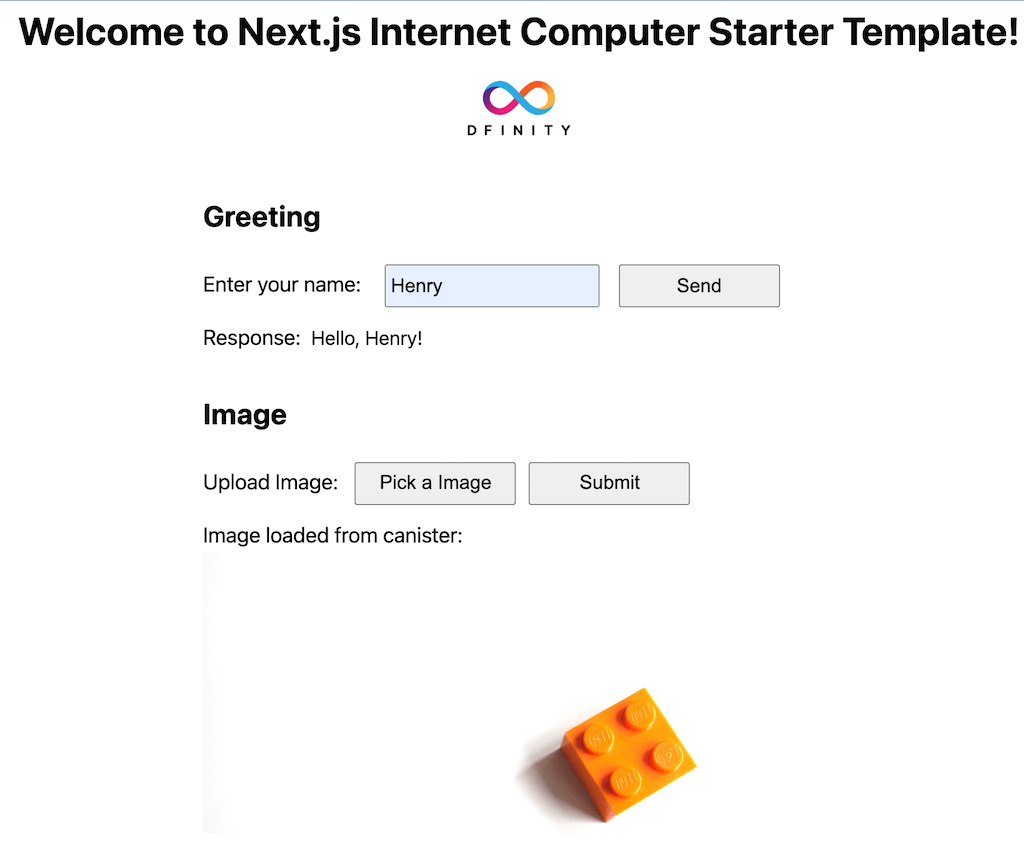
浏览真实页面截图,比较内容排版与手机效果。点击下方缩略图切换,放大查看整页细节。
目前有 1 张原始预览,可打开完整图片查看设计细节。
截图用于了解视觉与布局,交互效果请以实际项目为准。
采集于 2026-10-02查看来源
值得关注的模板亮点
从已有项目资料中,快速了解它的特点。
dfx.json 定义 hello、image、hello_assets 三个 canister
示例包含 greet 表单与图片上传/读取表单
ImageBucket canister 提供创建、删除、按 ID 获取图片方法
通过 useImageObject React Hook 加载图片二进制并转为 img 可用对象
使用 dfx generate 生成 UI 声明并复制到 ui/declarations 供前端调用
模板详细介绍
这是一个面向 Dfinity Internet Computer 的启动模板,前端使用 Next.js 与 React,后端使用 Motoko 编写 canister。项目在 dfx.json 中定义三个 canister:hello(后端)、image(后端)和 hello_assets(前端)。前端提供两个示例交互:一个姓名输入表单,调用 greet canister 并显示返回结果;一个图片上传表单,通过 Pick an Image 按钮把图片上传到 image canister,再用 useImageObject React Hook 把图片读回并显示。后端包含一个简单的问候 hello world canister,以及 ImageBucket canister,提供创建图片、删除图片和按 ID 获取图片的方法,其中 Image.mo 使用稳定变量实现正交持久化。前端代码按 Next.js 目录约定组织:pages 存放页面组件,public 存放静态文件,ui/styles 存放 CSS Modules,ui/components 存放 React 组件;入口页面为 pages/index.js。项目通过 dfx generate 生成 canister 的 UI 声明,并复制到 ui/declarations 下,再把 canister ID 环境变量改为 NEXT_PUBLIC 前缀,以便 Next.js 在构建时内联。actor-locator.js 采用服务定位器模式,通过 NEXT_PUBLIC_IC_HOST 环境变量处理 dfx agent 主机。README 说明前端使用 Next.js 静态导出,因此不能使用需要服务端 Node.js 的功能;若要连同前端一起部署到区块链,需要把导出的静态代码部署到 Internet Computer。仓库提供 IC 主网在线演示链接,许可为 MIT。
Next.jsReact启动器
适合你的项目吗?
适用场景
- 在本地 dfx 环境中搭建 Next.js 与 Internet Computer canister 联调项目
- 学习如何用 Motoko 编写带稳定变量持久化的图片存储 canister
- 参考 React Hook 与 actor 服务定位器模式调用 canister 方法
- 把 Next.js 静态导出代码部署到 Internet Computer 前端 canister
适合人群
- 希望从零开始搭建 Next.js + Internet Computer 项目的开发者
- 需要 Motoko 后端与 React 前端交互示例的团队
- 想了解 canister UI 声明生成与 NEXT_PUBLIC 环境变量配置的人
上手与定制指南
结合仓库当前版本的说明,按下面的资料检查内容、配置与运行要求。
- 1
需安装 Node.js 18 或更高版本、Internet Computer dfx CLI,以及可选的 VS Code 与 Motoko 扩展
- 2
本地运行依次执行 dfx start --background、npm install、dfx deploy --network local、npm run dev
- 3
部署到 IC 主网需要 ICP 代币并转换为 cycles,以及 cycles wallet
- 4
前端使用 Next.js 静态导出,不能使用依赖服务端 Node.js 的功能
- 5
部署前需按环境复制 .env.icprod 到 .env.production 并配置 NEXT_PUBLIC_IC_HOST
授权与来源资料
使用条件与限制
免费使用 · 保留许可声明本次收录的是公开仓库中采用 MIT 许可的免费版本;免费范围为该版本代码,不代表外部服务或第三方素材免费。
使用时需要遵守
- 允许免费使用、修改、商用和分发该版本代码。
- 分发代码副本或实质性部分时,保留原作者版权声明和完整 MIT 许可声明。
- 代码按现状提供;担保与责任限制以原许可证及适用法律为准。
额外费用与待核对事项
- 部署到 IC 主网需要 ICP 代币并转换为 cycles,还需创建 cycles wallet;本地开发则不需要。
- 前端采用 Next.js 静态导出,因此不能使用任何依赖服务端 Node.js 的 Next.js 功能。
- 运行需要 Node.js 18 或更高版本,以及 Internet Computer dfx CLI 等外部工具。
- 演示图片、字体、图标及其他第三方素材需按各自许可核对,不能仅凭代码的 MIT 许可判断。
- 域名、托管、数据库、支付或 AI 等外部服务可能另外收费。
查看原文依据
Permission is hereby granted, free of charge
许可证原文
To do that you will need: - ICP tokens and convert it to [cycles](https://internetcomputer.org/docs/current/concepts/tokens-cycles/) - Cycles wallet
README 原文
we use Next.js static code export here for hosting in Internet Computer so we can't use any features of Next.js that require server side NodeJS
README 原文
https://github.com/dappblock/nextjs-ic-starter/blob/master/LICENSEhttps://github.com/dappblock/nextjs-ic-starter/blob/master/README.mdInstall: - NodeJS 18.\* or higher
README 原文
DeepSeek 根据仓库许可证和 README 整理 ·2026-10-03。结果仅覆盖已读取资料,依赖、图片、字体及后续条款变更以各自原文为准。
项目核对记录与介绍依据
模板资料
- 来源平台
- GitHub
- 资料与维护参考分
- 资料一般 · 74 / 100
- 技术栈
- Next.js · React
- 网站类型
- 启动器
这个分数如何计算
本站按许可资料(最高30分)、演示链接(12分)、预览图(10分)、Star数(15分)、记录的维护时间(15分)、描述完整度(8分)、功能记录(5分)和分类资料(5分)计算。它不是代码、安全或性能测试,也不是 Google 评分;有链接不代表已实测可用。
这个项目需要核对什么
- 记录的仓库更新时间
- 2025-03-01
- 截图检查日期
- 2026-10-03
目前没有记录演示链接。请依据仓库说明在本地评估;仅凭截图无法确认交互行为。
目录记录的主要技术栈是 Next.js。请通过依赖清单和锁文件核对实际版本与托管要求。这些说明基于收录资料,不代表代码审计或部署实测。
查看具体选型方法 →介绍的制作与核对状态
介绍由 AI 辅助整理目录与仓库资料。仓库作者不等于这篇介绍的审核者。
审核声明: [email protected] · 2026-10-04
查看当时使用的来源资料
SHA-256: d7d955cd9698195777b456f2f2778cce0c28b334797dc40460a5788ee0ec694d
2026-10-03T17:16:19.889Z
来源文件 / 仓库# Next.js Internet Computer Starter Template
This project provides a simple starter template for Dfinity Internet Computer using Next.js framework as frontend.
**The Most Recent Updates**
- NextJS 15.2.0
- DFX 0.25.0
- NodeJS 22.12.0
**Backend**
- A simple greeting hello world canister written in Motoko
- ImageBucket canister written in Motoko with create image, delete image and getImageById
**Frontend**
- A simple React HTML form with name input, sending it to greet canister and showing the returned result
- An Image Upload HTML form with Pick an Image button, upload the image to image canister, loading the image back from the canister and display it using useImageObject React Hook
## Live Demo in IC Mainnet 🥳
https://u4gun-5aaaa-aaaah-qabma-cai.raw.ic0.app

## Quick Start (Run locally)
Install:
- NodeJS 18.\* or higher https://nodejs.org/en/download/
- Internet Computer dfx CLI https://internetcomputer.org/docs/current/developer-docs/setup/install/
- Visual Studio Code (Recommended Code Editor) https://code.visualstudio.com/Download
- VSCode extension - Motoko (Recommended) https://marketplace.visualstudio.com/items?itemName=dfinity-foundation.vscode-motoko
```bash
sh -ci "$(curl -fsSL https://internetcomputer.org/install.sh)"
```
Clone this Git repository:
```bash
git clone https://github.com/dappblock/nextjs-ic-starter
```
Open command terminal:
Enter the commands to start dfx local server in background:
```bash
cd nextjs-ic-starter
dfx start --background
```
Note: If you run it in MacOS, you may be asked to allow connections from dfx local server.
Enter the commands to install dependencies, deploy canister and run Next.js dev server:
```bash
npm install
dfx deploy --network local
npm run dev
```
http://localhost:3000/
Cleanup - stop dfx server running in background:
```bash
dfx stop
```
## Project Structure
Internet Computer has the concept of [Canister](https://smartcontracts.org/docs/current/concepts/canisters-code/) which is a computation unit. This project has 3 canisters:
- hello (backend)
- image (backend)
- hello_assets (frontend)
Canister configurations are stored in dfx.json.
### Backend
Backend code is inside /backend/ written in [Motoko language](https://internetcomputer.org/docs/current/motoko/main/motoko-introduction). Motoko is a type-safe language with modern language features like async/await and actor build-in. It also has [Orthogonal persistence](https://internetcomputer.org/docs/current/motoko/main/motoko/#orthogonal-persistence) which I find very interesting.
Image canister is introduced from release v0.2.0. It makes use of orthogonal persistence through stable variables and provides functions for create, delete and get image. See /backend/service/Image.mo.
### Frontend
Frontend code follows Next.js folder convention with /pages storing page React code, /public storing static files including images. This project uses CSS modules for styling which is stored in /ui/styles. React Components are stored in /ui/components
Entry page code is inside /pages/index.js where the magic starts. With the DFX UI declarations generated code, frontend can use RPC style call to server side actor and its functions without worrying about HTTP request and response parsing.
To generate UI declarations:
```
dfx generate
```
It will generate files in src/declarations for each canister. In our case, it is image, hello and hello_assets but we only need the backend canister image and hello UI declarations here.
The next step is to adapt it to work with Next.js.
The final adapted code is in ui/declaration/hello/index.js.
You can also follow the steps below to update it.
Basically, copy image.did.js and index.js from src/declarations/image/
```
cp src/declarations/image/image.did.js ui/declarations/image/image.did.js
cp src/declarations/image/index.js ui/declarations/image/index.js
```
Repeat the same for hello.
```
cp src/declarations/hello/hello.did.js ui/declarations/hello/hello.did.js
cp src/declarations/hello/index.js ui/declarations/hello/index.js
```
The next step is to update the canister ID env variable in each canister index.js to use NEXT_PUBLIC prefix so that NextJS can recognize when compiling it.
Open ui/declarations/hello/index.js and look for the line:
```
export const canisterId = process.env.HELLO_CANISTER_ID;
```
Update HELLO_CANISTER_ID to NEXT_PUBLIC_HELLO_CANISTER_ID:
```
export const canisterId = process.env.NEXT_PUBLIC_HELLO_CANISTER_ID
```
To see the final code, check the original ui/declarations in the Git repo.
The generated UI declarations also support TypeScript if you prefer TypeScript.
We use a service locator pattern through actor-locator.js that will handle the dfx agent host using env var NEXT_PUBLIC_IC_HOST.
Creating hello actor:
```javascript
import { makeHelloActor } from "../ui/service/actor-adapter"
const hello = makeHelloActor()
```
Calling hello actor:
```javascript
const greeting = await hello.greet(name)
```
The beautiful part is you can invoke the hello actor greet function with async/await style as if they are on the same platform. For details, see React Components GreetingSection.js and ImageSection.js in /ui/components/.
Webpack configuration:
In Next.js, it's located in next.config.js.
## React Hook
By using React Hook with actor UI declaration, it can greatly simplify frontend dev. It encourages component based composable logic. A great example is useImageObject.js React Hook in /ui/hooks. Given an imageId, useImageObject can load the image binary and convert it to a HTML image source object ready for use in <img>.
If you look closer, useImageObject.js depends on image-serivce.js which depends on actor-locator.js. When you open ImageSection.js, you can find how useImageObject is being used to greatly reduce the complexity and the underlying calls with Canister. This is the pattern I used very often in my Content Fly Dapp project.
## Backend dev
After marking changes in backend code e.g main.mo in /backend/service/hello, you can deploy it to the local DFX server using:
```bash
dfx deploy hello
```
**hello** is the backend canister name defined in dfx.json.
## Frontend dev - Next.js Static Code
Next.js developers are familiar with the handy hot code deployed in the Next.js dev environment when making changes in frontend code.
After deploying your backend code as shown above, you can run Next.js local dev server **npm run dev** and edit your frontend code with all the benefits of hot code deploy.
One thing to note is we use Next.js static code export here for hosting in Internet Computer so we can't use any features of Next.js that require server side NodeJS. Potentially, there might be ways to use Internet Computer canister as backend while deploying Next.js dapp to a hosting like Vercel that supports NodeJS server in the future. Further research is needed on that aspect. However, if you do want to run everything decentralized on blockchain including the frontend, you would want to deploy the exported static code to Internet Computer as well.
## Deploy and run frontend in local DFX server
In order to simulate the whole Internet Computer experience, you can deploy and run frontend code to local DFX server by running:
```bash
dfx start --background
npm run build
dfx deploy hello_assets
```
**hello_assets** is the frontend canister defined in dfx.json.
**npm run build** builds and export Next.js as static code storing in **/out** folder which would be picked up by **dfx deploy hello_assets** as defined in dfx.json with **/out** as the source.
When it completes, you can open Chrome and browse to:
http://localhost:8000/?canisterId=[canisterId]
Replace [canisterId] with the hello_assets canister ID which you can find by running:
```bash
dfx canister id hello_assets
```
## Environment Configuration
There are three key configs following Next.js [Environment Variables](https://nextjs.org/docs/basic-features/environment-variables) configuration:
**.env.development** stores configs for use in local dev.
```
NEXT_PUBLIC_IC_HOST=http://localhost:8000
```
**.env.production** is used when building and exporting static code using **npm run build**
```
NEXT_PUBLIC_IC_HOST=http://localhost:8000
```
Notice both files are identical if we want the Next.js dapp to interact with the local dfx server.
Note **NEXT_PUBLIC** is the prefix used by Next.js to make env vars available to client side code through [build time inlining](https://nextjs.org/docs/basic-features/environment-variables).
**.env.icprod** is included for deployment to Internet Computer ic network which would be covered below.
## Deploy to IC Network Canister
The most exciting part is to deploy your Next.js / Internet Computer Dapp to production Internet Computer mainnet blockchain network.
To do that you will need:
- ICP tokens and convert it to [cycles](https://internetcomputer.org/docs/current/concepts/tokens-cycles/)
- Cycles wallet
Follow the [Network Deployment](https://internetcomputer.org/docs/current/developer-docs/setup/cycles/cycles-wallet/) guide to create a wallet.
Dfinity offers [free cycle](https://faucet.dfinity.org/) to developers.
Now, you can deploy your Next.js Dapp to Internet Computer IC network by adding **--network ic** to the dfx subcommand. We will first update our env var to point to IC network host. Then deploy the backend canister first, export Next.js static code and deploy frontend canister **hello_assets**.
```bash
cp .env.icprod .env.production
dfx deploy --network ic
```
Open Chrome and go to https://[canisterId].raw.ic0.app/
Replace [canisterId] by the hello_assets canister id in the IC network. You can find it by running:
```bash
dfx canister --network ic id hello_assets
```
Congratulations !! Well Done !! 👏 🚀 🎉
## Troubleshooting
Use Chrome Dev Tools / Console / Network. Check if the dapp uses the right canister id and hostname.
## Author
Henry Chan, [email protected]
Twitter: @kinwo
## Contributing
Please feel free to raise an issue or submit a pull request.
## License
MIT
看看同类模板
对比同技术栈与用途的模板,找到更适合的视觉与内容结构。

ai-website-cloner-template
Clone any website with one command using AI coding agents
Next.js · 启动器

Next.js SaaS Starter
Next.js SaaS Starter 是 Next.js 官方维护的 SaaS 起点模板,定位介于学习资源和可直接部署的脚手架之间。
Next.js · SaaS

Next.js Commerce
Next.js Commerce 是 Vercel 团队维护的电商启动模板,基于 Next.js App Router 构建,采用服务端渲染、React Server Components、Server Actions …
Next.js · 电商

Next-js-Boilerplate
Next-js-Boilerplate 是一个面向 Next.js 16、Tailwind CSS 4 和 TypeScript 的启动器,核心定位是开发者体验优先。
Next.js · 启动器

tailwind-nextjs-starter-blog
tailwind-nextjs-starter-blog 是一个面向个人技术博客的 Next.js 与 Tailwind CSS 启动模板,其 v2 版本基于 App Router 与 React Server Comp…
Next.js · 博客

next-forge
Production-grade Turborepo template for Next.js apps.
Next.js · 启动器