Frontend uses Next.js and React, backend uses Motoko to write canisters
Next.jsReactStarter
nextjs-ic-starter — Next.js Starter Template
By dappblock
A Next.js and React starter template for the Internet Computer, including a Motoko backend canister and example frontend pages.
Explore the design
Compare the page layouts and mobile experience. Open any screenshot for a closer look.
Author preview
Author-provided previewTop of page
Preview provided in the project README.
One original preview is available. Open the full image to inspect the design.
Screenshots show visual appearance; interactive behavior may differ.
Recorded 2026-10-02View source
What stands out
A quick read of the recorded project description.
dfx.json defines three canisters: hello, image, and hello_assets
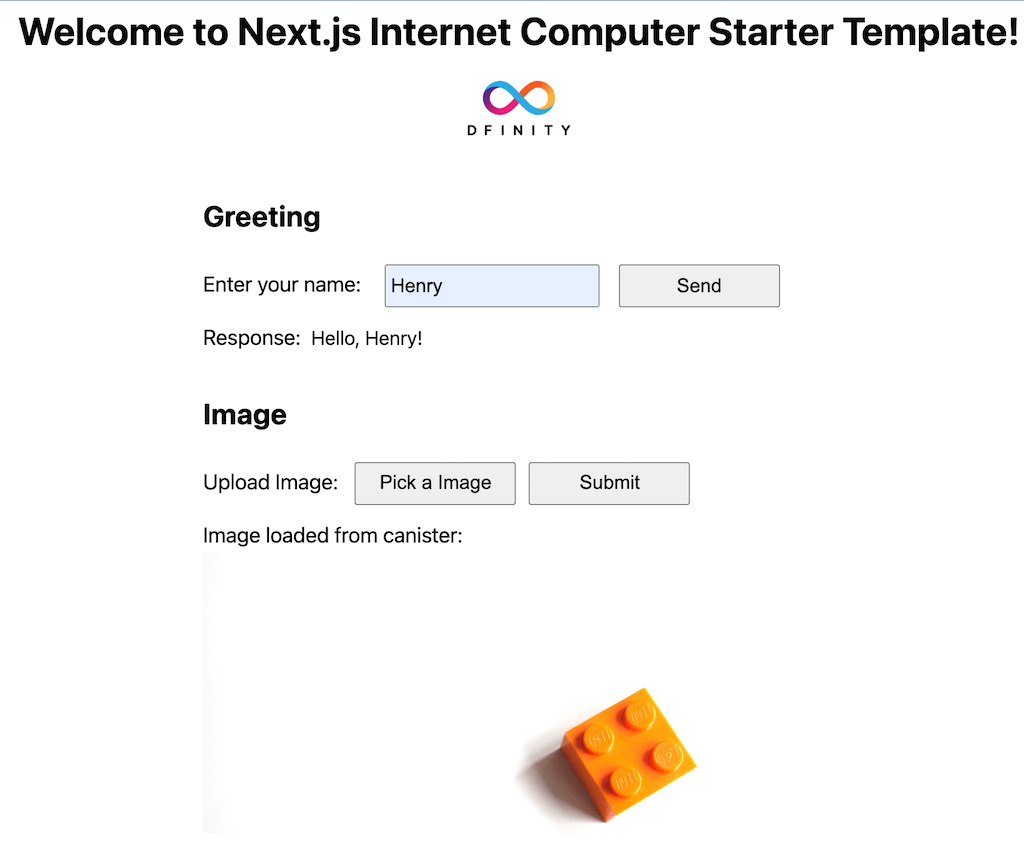
Examples include a greet form and an image upload/read form
ImageBucket canister provides methods to create, delete, and retrieve images by ID
Loads image binary via the useImageObject React Hook and converts it to an object usable by img
Uses dfx generate to generate UI declarations and copies them to ui/declarations for frontend calls
Template Details
This is a starter template for the Dfinity Internet Computer, with a frontend built using Next.js and React, and a backend written in Motoko for canisters. The project defines three canisters in dfx.json: hello (backend), image (backend), and hello_assets (frontend). The frontend provides two example interactions: a name input form that calls the greet canister and displays the returned result; and an image upload form that uploads an image to the image canister via the Pick an Image button, then reads the image back and displays it using the useImageObject React Hook. The backend includes a simple hello world greeting canister and an ImageBucket canister that provides methods to create an image, delete an image, and retrieve an image by ID, where Image.mo uses stable variables for orthogonal persistence. The frontend code is organized according to Next.js directory conventions: pages for page components, public for static files, ui/styles for CSS Modules, and ui/components for React components; the entry page is pages/index.js. The project generates canister UI declarations via dfx generate and copies them to ui/declarations, then changes the canister ID environment variable to use the NEXT_PUBLIC prefix so Next.js can inline it at build time. actor-locator.js uses the service locator pattern and handles the dfx agent host through the NEXT_PUBLIC_IC_HOST environment variable. The README explains that the frontend uses Next.js static export, so features requiring server-side Node.js cannot be used; to deploy the frontend along with the blockchain, the exported static code must be deployed to the Internet Computer. The repository provides an online demo link on the IC mainnet and is licensed under MIT.
Next.jsReactStarter
Is it right for your project?
Use Cases
- Set up a local dfx environment for a Next.js and Internet Computer canister integration project
- Learn how to write a Motoko image storage canister with stable variable persistence
- Reference React Hook and actor service locator patterns for calling canister methods
- Deploy Next.js static export code to an Internet Computer frontend canister
Suitable For
- Developers who want to build a Next.js + Internet Computer project from scratch
- Teams needing an example of Motoko backend and React frontend interaction
- Those who want to understand canister UI declaration generation and NEXT_PUBLIC environment variable configuration
Getting started & customization
Use these recorded setup notes alongside the repository instructions for your chosen version.
- 1
Requires Node.js 18 or higher, the Internet Computer dfx CLI, and optionally VS Code with the Motoko extension
- 2
For local run, execute in order: dfx start --background, npm install, dfx deploy --network local, npm run dev
- 3
Deploying to the IC mainnet requires ICP tokens converted to cycles, and a cycles wallet
- 4
The frontend uses Next.js static export, so features that depend on server-side Node.js cannot be used
- 5
Before deployment, copy .env.icprod to .env.production per environment and configure NEXT_PUBLIC_IC_HOST
License & source material
Usage conditions & limitations
Free to use · keep license noticeThis entry covers the free version under the MIT license from the public repository; the free scope is the code of this version and does not imply that external services or third-party assets are free.
Must comply with when using
- Permits free use, modification, commercial use, and distribution of this version's code.
- When distributing copies or substantial portions of the code, retain the original author's copyright notice and the full MIT license notice.
- The code is provided as is; warranties and limitations of liability are governed by the original license and applicable law.
Additional costs & items to verify
- Deploying to the IC mainnet requires ICP tokens converted to cycles and a cycles wallet; local development does not.
- The frontend uses Next.js static export, so any Next.js features that depend on server-side Node.js cannot be used.
- Running requires Node.js 18 or higher and external tools such as the Internet Computer dfx CLI.
- Demo images, fonts, icons, and other third-party assets must be checked against their respective licenses; they cannot be judged solely by the code's MIT license.
- External services such as domains, hosting, databases, payments, or AI may incur additional charges.
View Original Text Basis
Permission is hereby granted, free of charge
Original License Text
To do that you will need: - ICP tokens and convert it to [cycles](https://internetcomputer.org/docs/current/concepts/tokens-cycles/) - Cycles wallet
Original README
we use Next.js static code export here for hosting in Internet Computer so we can't use any features of Next.js that require server side NodeJS
Original README
https://github.com/dappblock/nextjs-ic-starter/blob/master/LICENSEhttps://github.com/dappblock/nextjs-ic-starter/blob/master/README.mdInstall: - NodeJS 18.\* or higher
Original README
Compiled by DeepSeek based on repository license and README ·2026-10-03. Results only cover the materials read; dependencies, images, fonts, and subsequent term changes are subject to their respective original texts.
Project checks & description sources
Template Information
- Source platforms
- GitHub
- Documentation and maintenance reference score
- Partly documented · 74 / 100
- Technologies
- Next.js · React
- Website type
- Starter
How this score is calculated
Our heuristic uses license records (up to 30), a demo link (12), a preview (10), stars (15), recorded maintenance (15), description completeness (8), feature records (5) and classification data (5). It is not a code, security or performance test, or a Google score. A link does not establish tested functionality.
What to verify for this project
- Repository update recorded
- 2025-03-01
- Screenshot last checked
- 2026-10-03
No demo link is recorded. Use the repository instructions to evaluate the project locally; the screenshot alone cannot establish interactive behavior.
The catalog identifies Next.js as the primary stack. Check the actual dependency manifest and lockfile for versions and hosting requirements. These notes use recorded metadata, not a code audit or a deployment test.
Use a selection guide →How this description was prepared
AI-assisted description based on catalog records and repository material. Repository authors are not automatically the reviewers of this description.
Review declaration: [email protected] · 2026-10-04
Inspect the recorded source material
SHA-256: d7d955cd9698195777b456f2f2778cce0c28b334797dc40460a5788ee0ec694d
2026-10-03T17:16:19.889Z
Source file / repository# Next.js Internet Computer Starter Template
This project provides a simple starter template for Dfinity Internet Computer using Next.js framework as frontend.
**The Most Recent Updates**
- NextJS 15.2.0
- DFX 0.25.0
- NodeJS 22.12.0
**Backend**
- A simple greeting hello world canister written in Motoko
- ImageBucket canister written in Motoko with create image, delete image and getImageById
**Frontend**
- A simple React HTML form with name input, sending it to greet canister and showing the returned result
- An Image Upload HTML form with Pick an Image button, upload the image to image canister, loading the image back from the canister and display it using useImageObject React Hook
## Live Demo in IC Mainnet 🥳
https://u4gun-5aaaa-aaaah-qabma-cai.raw.ic0.app

## Quick Start (Run locally)
Install:
- NodeJS 18.\* or higher https://nodejs.org/en/download/
- Internet Computer dfx CLI https://internetcomputer.org/docs/current/developer-docs/setup/install/
- Visual Studio Code (Recommended Code Editor) https://code.visualstudio.com/Download
- VSCode extension - Motoko (Recommended) https://marketplace.visualstudio.com/items?itemName=dfinity-foundation.vscode-motoko
```bash
sh -ci "$(curl -fsSL https://internetcomputer.org/install.sh)"
```
Clone this Git repository:
```bash
git clone https://github.com/dappblock/nextjs-ic-starter
```
Open command terminal:
Enter the commands to start dfx local server in background:
```bash
cd nextjs-ic-starter
dfx start --background
```
Note: If you run it in MacOS, you may be asked to allow connections from dfx local server.
Enter the commands to install dependencies, deploy canister and run Next.js dev server:
```bash
npm install
dfx deploy --network local
npm run dev
```
http://localhost:3000/
Cleanup - stop dfx server running in background:
```bash
dfx stop
```
## Project Structure
Internet Computer has the concept of [Canister](https://smartcontracts.org/docs/current/concepts/canisters-code/) which is a computation unit. This project has 3 canisters:
- hello (backend)
- image (backend)
- hello_assets (frontend)
Canister configurations are stored in dfx.json.
### Backend
Backend code is inside /backend/ written in [Motoko language](https://internetcomputer.org/docs/current/motoko/main/motoko-introduction). Motoko is a type-safe language with modern language features like async/await and actor build-in. It also has [Orthogonal persistence](https://internetcomputer.org/docs/current/motoko/main/motoko/#orthogonal-persistence) which I find very interesting.
Image canister is introduced from release v0.2.0. It makes use of orthogonal persistence through stable variables and provides functions for create, delete and get image. See /backend/service/Image.mo.
### Frontend
Frontend code follows Next.js folder convention with /pages storing page React code, /public storing static files including images. This project uses CSS modules for styling which is stored in /ui/styles. React Components are stored in /ui/components
Entry page code is inside /pages/index.js where the magic starts. With the DFX UI declarations generated code, frontend can use RPC style call to server side actor and its functions without worrying about HTTP request and response parsing.
To generate UI declarations:
```
dfx generate
```
It will generate files in src/declarations for each canister. In our case, it is image, hello and hello_assets but we only need the backend canister image and hello UI declarations here.
The next step is to adapt it to work with Next.js.
The final adapted code is in ui/declaration/hello/index.js.
You can also follow the steps below to update it.
Basically, copy image.did.js and index.js from src/declarations/image/
```
cp src/declarations/image/image.did.js ui/declarations/image/image.did.js
cp src/declarations/image/index.js ui/declarations/image/index.js
```
Repeat the same for hello.
```
cp src/declarations/hello/hello.did.js ui/declarations/hello/hello.did.js
cp src/declarations/hello/index.js ui/declarations/hello/index.js
```
The next step is to update the canister ID env variable in each canister index.js to use NEXT_PUBLIC prefix so that NextJS can recognize when compiling it.
Open ui/declarations/hello/index.js and look for the line:
```
export const canisterId = process.env.HELLO_CANISTER_ID;
```
Update HELLO_CANISTER_ID to NEXT_PUBLIC_HELLO_CANISTER_ID:
```
export const canisterId = process.env.NEXT_PUBLIC_HELLO_CANISTER_ID
```
To see the final code, check the original ui/declarations in the Git repo.
The generated UI declarations also support TypeScript if you prefer TypeScript.
We use a service locator pattern through actor-locator.js that will handle the dfx agent host using env var NEXT_PUBLIC_IC_HOST.
Creating hello actor:
```javascript
import { makeHelloActor } from "../ui/service/actor-adapter"
const hello = makeHelloActor()
```
Calling hello actor:
```javascript
const greeting = await hello.greet(name)
```
The beautiful part is you can invoke the hello actor greet function with async/await style as if they are on the same platform. For details, see React Components GreetingSection.js and ImageSection.js in /ui/components/.
Webpack configuration:
In Next.js, it's located in next.config.js.
## React Hook
By using React Hook with actor UI declaration, it can greatly simplify frontend dev. It encourages component based composable logic. A great example is useImageObject.js React Hook in /ui/hooks. Given an imageId, useImageObject can load the image binary and convert it to a HTML image source object ready for use in <img>.
If you look closer, useImageObject.js depends on image-serivce.js which depends on actor-locator.js. When you open ImageSection.js, you can find how useImageObject is being used to greatly reduce the complexity and the underlying calls with Canister. This is the pattern I used very often in my Content Fly Dapp project.
## Backend dev
After marking changes in backend code e.g main.mo in /backend/service/hello, you can deploy it to the local DFX server using:
```bash
dfx deploy hello
```
**hello** is the backend canister name defined in dfx.json.
## Frontend dev - Next.js Static Code
Next.js developers are familiar with the handy hot code deployed in the Next.js dev environment when making changes in frontend code.
After deploying your backend code as shown above, you can run Next.js local dev server **npm run dev** and edit your frontend code with all the benefits of hot code deploy.
One thing to note is we use Next.js static code export here for hosting in Internet Computer so we can't use any features of Next.js that require server side NodeJS. Potentially, there might be ways to use Internet Computer canister as backend while deploying Next.js dapp to a hosting like Vercel that supports NodeJS server in the future. Further research is needed on that aspect. However, if you do want to run everything decentralized on blockchain including the frontend, you would want to deploy the exported static code to Internet Computer as well.
## Deploy and run frontend in local DFX server
In order to simulate the whole Internet Computer experience, you can deploy and run frontend code to local DFX server by running:
```bash
dfx start --background
npm run build
dfx deploy hello_assets
```
**hello_assets** is the frontend canister defined in dfx.json.
**npm run build** builds and export Next.js as static code storing in **/out** folder which would be picked up by **dfx deploy hello_assets** as defined in dfx.json with **/out** as the source.
When it completes, you can open Chrome and browse to:
http://localhost:8000/?canisterId=[canisterId]
Replace [canisterId] with the hello_assets canister ID which you can find by running:
```bash
dfx canister id hello_assets
```
## Environment Configuration
There are three key configs following Next.js [Environment Variables](https://nextjs.org/docs/basic-features/environment-variables) configuration:
**.env.development** stores configs for use in local dev.
```
NEXT_PUBLIC_IC_HOST=http://localhost:8000
```
**.env.production** is used when building and exporting static code using **npm run build**
```
NEXT_PUBLIC_IC_HOST=http://localhost:8000
```
Notice both files are identical if we want the Next.js dapp to interact with the local dfx server.
Note **NEXT_PUBLIC** is the prefix used by Next.js to make env vars available to client side code through [build time inlining](https://nextjs.org/docs/basic-features/environment-variables).
**.env.icprod** is included for deployment to Internet Computer ic network which would be covered below.
## Deploy to IC Network Canister
The most exciting part is to deploy your Next.js / Internet Computer Dapp to production Internet Computer mainnet blockchain network.
To do that you will need:
- ICP tokens and convert it to [cycles](https://internetcomputer.org/docs/current/concepts/tokens-cycles/)
- Cycles wallet
Follow the [Network Deployment](https://internetcomputer.org/docs/current/developer-docs/setup/cycles/cycles-wallet/) guide to create a wallet.
Dfinity offers [free cycle](https://faucet.dfinity.org/) to developers.
Now, you can deploy your Next.js Dapp to Internet Computer IC network by adding **--network ic** to the dfx subcommand. We will first update our env var to point to IC network host. Then deploy the backend canister first, export Next.js static code and deploy frontend canister **hello_assets**.
```bash
cp .env.icprod .env.production
dfx deploy --network ic
```
Open Chrome and go to https://[canisterId].raw.ic0.app/
Replace [canisterId] by the hello_assets canister id in the IC network. You can find it by running:
```bash
dfx canister --network ic id hello_assets
```
Congratulations !! Well Done !! 👏 🚀 🎉
## Troubleshooting
Use Chrome Dev Tools / Console / Network. Check if the dapp uses the right canister id and hostname.
## Author
Henry Chan, [email protected]
Twitter: @kinwo
## Contributing
Please feel free to raise an issue or submit a pull request.
## License
MIT
Explore similar templates
Compare previews and descriptions within the same stack and category.

Next.js SaaS Starter
The official Next.js SaaS starter template, integrating email/password authentication, Stripe Checkout subscriptions, a dashboard with user/team CRUD, basic Owner/Member RBAC, and activity logging.
Next.js · SaaS

Next.js Commerce
Vercel's officially maintained Next.js App Router ecommerce starter with deep Shopify integration, offering a complete product catalog, cart, and checkout flow. Core logic is modular for swapping backends, and community provider versions exist for BigCommerce, Medusa, and Saleor.
Next.js · E-commerce

Next-js-Boilerplate
A developer-first Next.js 16 starter with Tailwind CSS 4 and TypeScript, supporting both App Router and Page Router.
Next.js · Starter

tailwind-nextjs-starter-blog
A Next.js and Tailwind CSS blog starter template using Contentlayer for Markdown/MDX, with built-in SEO, code highlighting, and tags. It targets personal technical blogs and migration from Jekyll/Hugo to React, and supports one-click Vercel deployment.
Next.js · Blog

next-forge
next-forge is a Turborepo-based Next.js template maintained by Vercel, positioned as a starting point for SaaS products.
Next.js · Starter

SaaS-Boilerplate
SaaS-Boilerplate is an open-source SaaS starter template built with Next.js App Router, React 19, TypeScript, Tailwind CSS, and Shadcn UI.
Next.js · SaaS