基于 Nuxt 3 与 TypeScript 的最小启动模板,仓库采用 MIT 许可
NuxtVue启动器
nuxt-starter-template — Nuxt 启动器模板
作者 denishsharma
基于 Nuxt 3 与 TypeScript 的最小启动模板,预配置 ESLint、Git Hooks、UnoCSS、Color Mode、VueUse、图标与 SEO 模块,并按 features 目录组织模块化代码。
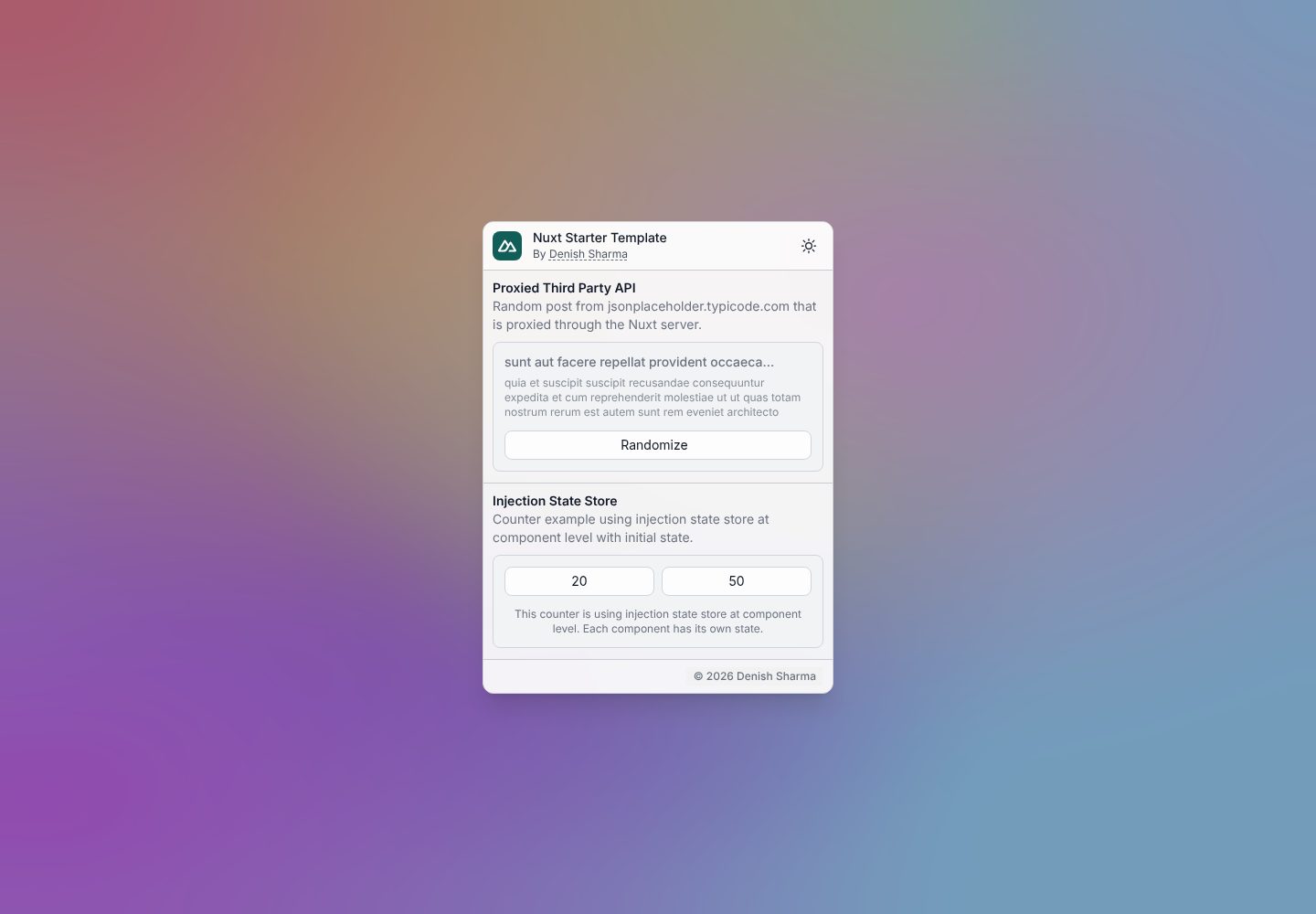
看看你的网站会是什么样
浏览真实页面截图,比较内容排版与手机效果。点击下方缩略图切换,放大查看整页细节。
全部页面与视图 2
截图用于了解视觉与布局,交互效果请以实际项目为准。
采集于 2026-10-13查看来源
值得关注的模板亮点
从已有项目资料中,快速了解它的特点。
预配置 ESLint、simple-git-hooks 与 pnpm 工作流
集成 Color Mode、VueUse、UnoCSS、图标集与 SEO 模块
提供 features 目录,按功能拆分组件、store、片段与样式
README 给出克隆、安装依赖与启动开发服务器的具体命令
模板详细介绍
这是一个 Nuxt 3 最小启动模板,使用 TypeScript 与 Vue 3,仓库采用 MIT 许可。它的重点在于把常用开发工具预先接好,让新项目可以直接进入业务开发,而不是从零配置工程环境。
模板预配置了 ESLint、simple-git-hooks、pnpm、Color Mode(明暗模式切换)、API Party(带代理与缓存的第三方 API 请求)、VueUse、UnoCSS、图标集以及 SEO 元数据与结构化数据支持。
代码组织上,模板提供一个 features 目录,把应用拆分为多个自包含的功能模块,每个模块可包含自己的组件、store、片段与样式。README 建议使用后删除其中的 welcome 示例功能,并更新 package.json 中的 name、version、description、author、repository 字段,以及 nuxt.config.ts 中 site 对象的站点信息。
限制方面:仓库未提供除 README 与截图之外的功能说明,模板本身不包含后端、数据库或部署配置;演示站点托管在 Vercel。使用前需自行确认演示图片、字体、图标等第三方素材的许可,外部服务可能另行收费。
NuxtVue启动器
适合你的项目吗?
适用场景
- 新建 Nuxt 3 项目时作为工程配置与目录结构的起点
- 需要明暗模式切换、图标与原子化 CSS 的中后台或展示型站点
- 希望按功能模块组织代码、避免所有逻辑堆在 pages 与 components 的项目
- 需要为第三方 API 请求配置代理与缓存的 Nuxt 应用
适合人群
- 熟悉 Vue 3 与 Nuxt 3、希望跳过基础配置的开发者
- 偏好 TypeScript 与 ESLint 约束的前端团队
- 需要模块化目录结构以支撑多业务功能的中小型项目
上手与定制指南
结合仓库当前版本的说明,按下面的资料检查内容、配置与运行要求。
- 1
README 的快速创建脚本仅适用于带 bash 的 Unix 系统,会克隆仓库、删除 .git 并重新初始化
- 2
手动方式为 git clone 仓库后执行 pnpm install,再用 pnpm run dev 启动,默认访问 http://localhost:3000
- 3
使用前删除 features 目录下的 welcome 示例功能
- 4
更新 package.json 中的 name、version、description、author、repository 字段
- 5
更新 nuxt.config.ts 中 site 对象的站点信息
授权与来源资料
使用条件与限制
免费使用 · 保留许可声明本次收录的是公开仓库中采用 MIT 许可的免费版本;免费范围为该版本代码,不代表外部服务或第三方素材免费。
使用时需要遵守
- 允许免费使用、修改、商用和分发该版本代码。
- 分发代码副本或实质性部分时,保留原作者版权声明和完整 MIT 许可声明。
- 代码按现状提供;担保与责任限制以原许可证及适用法律为准。
额外费用与待核对事项
- 演示图片、字体、图标及其他第三方素材需按各自许可核对,不能仅凭代码的 MIT 许可判断。
- 域名、托管、数据库、支付或 AI 等外部服务可能另外收费。
- README 提供的快速创建脚本仅在带 bash 的 Unix 系统上可用,Windows 等环境需改用手动克隆方式。
- 使用模板后需自行删除 features 目录下的 welcome 示例功能,否则会保留示例代码。
- 使用前需更新 package.json 中的 name、version、description、author、repository 字段。
- 使用前需更新 nuxt.config.ts 中 site 对象的站点信息。
查看原文依据
Permission is hereby granted, free of charge
许可证原文
# Only works on Unix-based systems with bash
README 原文
- Remove the "welcome" feature from the `features/` directory.
README 原文
- Update the `name`, `version`, `description`, `author`, and `repository` fields in the `package.json` file.
README 原文
https://github.com/denishsharma/nuxt-starter-template/blob/main/LICENSEhttps://github.com/denishsharma/nuxt-starter-template/blob/main/README.md- Update site details in the `nuxt.config.ts` file under the `site` object.
README 原文
DeepSeek 根据仓库许可证和 README 整理 ·2026-10-13。结果仅覆盖已读取资料,依赖、图片、字体及后续条款变更以各自原文为准。
项目核对记录与介绍依据
模板资料
- 来源平台
- GitHub
- 资料与维护参考分
- 资料一般 · 73 / 100
- 技术栈
- Nuxt · Vue
- 网站类型
- 启动器
这个分数如何计算
本站按许可资料(最高30分)、演示链接(12分)、预览图(10分)、Star数(15分)、记录的维护时间(15分)、描述完整度(8分)、功能记录(5分)和分类资料(5分)计算。它不是代码、安全或性能测试,也不是 Google 评分;有链接不代表已实测可用。
这个项目需要核对什么
- 记录的仓库更新时间
- 2024-09-18
- 截图检查日期
- 2026-10-13
已收录演示链接。请用你的内容与屏幕尺寸检查;有演示不代表表单、认证或支付已经可用。
目录记录的主要技术栈是 Nuxt。请通过依赖清单和锁文件核对实际版本与托管要求。这些说明基于收录资料,不代表代码审计或部署实测。
查看具体选型方法 →介绍的制作与核对状态
介绍由 AI 辅助整理目录与仓库资料。仓库作者不等于这篇介绍的审核者。
审核声明: [email protected] · 2026-10-13
查看当时使用的来源资料
SHA-256: a04344b0cdd97f5cb05a2a6453328ff45761075a995b7aa60ae7a88eb415a4b9
2026-10-13T05:29:38.891Z
来源文件 / 仓库# Nuxt Starter Template
This is a simple Nuxt 3 starter template that allows you to quickly get started with a new Nuxt 3 project.
Supercharge your development with pre-configured development tools, such as eslint, simple-git-hooks, and pnpm.
This template also includes a simple `features` folder that modularize your application into different features.
Each feature is a self-contained module that includes its own components, stores, fragments, styles, etc.
## Pre-configured Tools & Modules
- ESLint: Lint your code with opinionated configurations that help you write better code.
- Simple Git Hooks: Run scripts before committing, pushing, and more.
- Color Mode: Toggle between light and dark mode.
- API Party: Request third-party APIs with proxy support and caching.
- VueUse: Collection of essential Vue Composition API utils.
- UnoCSS: Utility-first CSS framework for rapid UI development.
- Icons: 100 thousand+ icons from popular icon sets like Font Awesome, Material Design, etc.
- SEO: Optimize your app for search engines with meta-tags and structured data.
## Getting Started
Copy and paste the following command to create a new project using this template:
```bash
# Only works on Unix-based systems with bash
read -p "Enter directory name: " dirname && git clone --single-branch --branch main https://github.com/denishsharma/nuxt-starter-template.git "$dirname" && cd "$dirname" && rm -rf .git && git init && { command -v pnpm >/dev/null 2>&1 || { echo >&2 "pnpm is not installed. Installing..."; npm install -g pnpm; }; } && pnpm install
```
To get started, clone the repository and install the dependencies:
```bash
git clone https://github.com/denishsharma/nuxt-starter-template.git
cd nuxt-starter-template
pnpm install
```
Then, start the development server:
```bash
pnpm run dev
```
Open [http://localhost:3000](http://localhost:3000) in your browser to see the app.
- Remove the "welcome" feature from the `features/` directory.
- Update the `name`, `version`, `description`, `author`, and `repository` fields in the `package.json` file.
- Update site details in the `nuxt.config.ts` file under the `site` object.
## Author
- Name: Denish Sharma
- Email: [[email protected]](matilto://[email protected])
看看同类模板
对比同技术栈与用途的模板,找到更适合的视觉与内容结构。

laravel-nuxt
A Laravel-Nuxt starter kit.
Nuxt · 启动器

canvas
Portfolio template made with Nuxt 3, Nuxt Content v3, NuxtUI v3 and TailwindCSS v4
Nuxt · 作品集

nuxt3-starter
💚 A Better Nuxt 3 Starter Template,generate by nuxi.
Nuxt · 启动器

starter
Nuxt Starter Template for Nuxt UI.
Nuxt · 启动器

bloggrify
Run a blog from Markdown files. Themes, SEO, analytics, newsletter and comments preconfigured. Like Docus, but…
Nuxt · 博客
vitify-nuxt
🔽🏔 Vuetify + Nuxt Starter Template
Nuxt · 后台