Astro 纯静态生成,构建时输出 HTML、CSS 和少量 JavaScript,无服务器或数据库依赖
Astro启动器
DevLinks — Astro 启动器模板
作者 devsebastian44
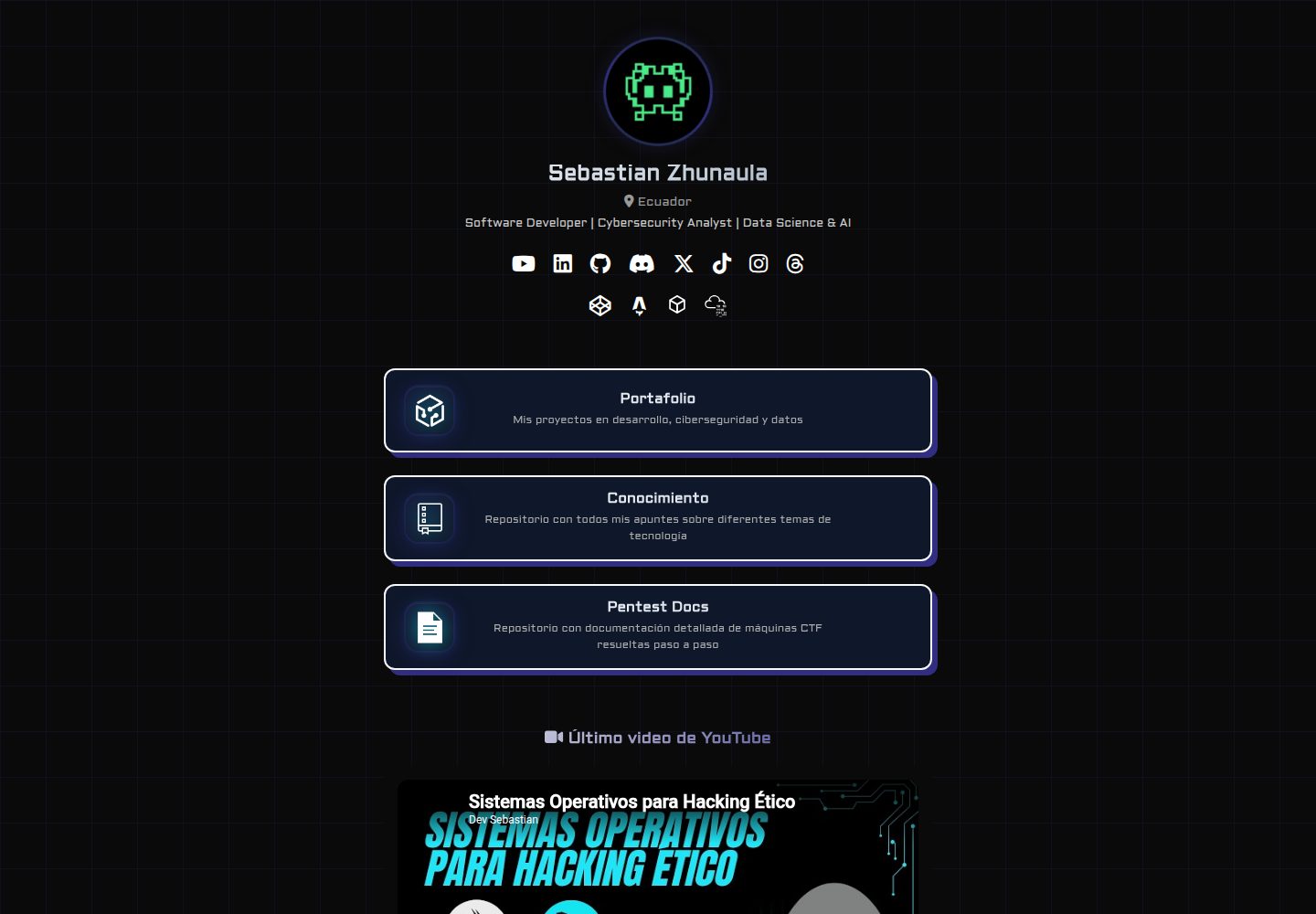
DevLinks 是一个用 Astro 静态生成构建的 Linktree 风格个人链接聚合页模板,采用 TypeScript 严格模式与原生 CSS,MIT 许可。
看看你的网站会是什么样
浏览真实页面截图,比较内容排版与手机效果。点击下方缩略图切换,放大查看整页细节。
全部页面与视图 2
截图用于了解视觉与布局,交互效果请以实际项目为准。
采集于 2026-10-05查看来源
值得关注的模板亮点
从已有项目资料中,快速了解它的特点。
Linktree 风格的个人链接聚合页面,集中展示职业档案、项目与社交账号
使用原生 CSS 手写样式,未引入工具类框架
TypeScript 严格模式,配合 Prettier(支持 Astro)与 Vitest 测试
提供 GitHub Actions 工作流,在 Pull Request 上自动执行 lint 与测试
仓库 LICENSE 为 MIT,允许免费使用、修改、商用与分发
模板详细介绍
DevLinks 是一个个人链接聚合页面模板,风格类似 Linktree,用于把开发者的职业档案、项目、社交账号和资源集中到一个入口。项目基于 Astro 的纯静态生成模式(SSG),在构建时输出 HTML、CSS 和少量 JavaScript,不依赖服务器或数据库,可部署到任意静态托管平台。
样式使用原生 CSS 手写,没有引入工具类框架;代码使用 TypeScript 严格模式,并配置了 Prettier(含 Astro 支持)与 Vitest 测试,仓库内提供 GitHub Actions 工作流用于在 Pull Request 上自动执行 lint 与测试。
使用前需要 Node.js v22 或更高版本及较新的 npm,通过 npm install 安装依赖,npm run dev 启动本地开发服务器(默认 4321 端口),npm run build 生成生产构建,npm run test 与 npm run lint 分别运行测试和代码检查。仓库包含 .env.example,README 提示按需复制为 .env 并填写,但未说明具体环境变量用途。
许可方面,仓库内 LICENSE 文件为 MIT,允许免费使用、修改、商用和分发该版本代码,分发时需保留版权声明与许可声明;演示图片、字体、图标等第三方素材需按各自许可单独核对,域名、托管等外部服务可能另行收费。
Astro启动器
适合你的项目吗?
适用场景
- 搭建个人开发者主页,把多个社交与项目链接汇总到一个页面
- 作为 Astro 静态站点项目的起步模板,替换内容与样式后部署
- 部署到 Netlify、GitHub Pages 等静态托管平台作为个人入口页
- 在教学中演示 Astro SSG、TypeScript 严格模式与 CI 工作流的组合
适合人群
- 需要自托管链接聚合页、替代 Linktree 或 Beacons 的个人开发者
- 熟悉或愿意使用 Astro 与 TypeScript 的前端开发者
- 希望用原生 CSS 自行控制样式、不引入工具类框架的项目
- 需要静态托管、不打算维护后端服务的个人站点
上手与定制指南
结合仓库当前版本的说明,按下面的资料检查内容、配置与运行要求。
- 1
需要 Node.js v22 或更高版本以及较新的 npm
- 2
克隆仓库后执行 npm install 安装依赖
- 3
README 提示复制 .env.example 为 .env 并按需填写,但未说明具体变量用途
- 4
npm run dev 启动开发服务器,默认地址为 http://localhost:4321
- 5
npm run build 生成生产构建,npm run test 运行测试,npm run lint 执行代码检查
授权与来源资料
使用条件与限制
免费使用 · 保留许可声明本次收录的是公开仓库中采用 MIT 许可的免费版本;免费范围为该版本代码,不代表外部服务或第三方素材免费。
使用时需要遵守
- 允许免费使用、修改、商用和分发该版本代码。
- 分发代码副本或实质性部分时,保留原作者版权声明和完整 MIT 许可声明。
- 代码按现状提供;担保与责任限制以原许可证及适用法律为准。
额外费用与待核对事项
- 演示图片、字体、图标及其他第三方素材需按各自许可核对,不能仅凭代码的 MIT 许可判断。
- 域名、托管、数据库、支付或 AI 等外部服务可能另外收费。
- README 的 Security Disclaimer 声明本项目仅用于教育与合乎道德的网络安全目的,作者不对信息或工具的滥用负责。该限制与项目实际功能(链接聚合页)不符,属于项目特定的使用范围声明,使用者需自行评估其适用性。
查看原文依据
Permission is hereby granted, free of charge
许可证原文
https://github.com/devsebastian44/DevLinks/blob/main/LICENSEhttps://github.com/devsebastian44/DevLinks/blob/main/README.mdThis project is for educational and ethical cybersecurity purposes only. The author is not responsible for any misuse of the information or tools contained in this repository.
README 原文
DeepSeek 根据仓库许可证和 README 整理 ·2026-10-05。结果仅覆盖已读取资料,依赖、图片、字体及后续条款变更以各自原文为准。
项目核对记录与介绍依据
模板资料
- 来源平台
- Astro Themes
- 资料与维护参考分
- 资料较完整 · 83 / 100
- 技术栈
- Astro
- 网站类型
- 启动器
这个分数如何计算
本站按许可资料(最高30分)、演示链接(12分)、预览图(10分)、Star数(15分)、记录的维护时间(15分)、描述完整度(8分)、功能记录(5分)和分类资料(5分)计算。它不是代码、安全或性能测试,也不是 Google 评分;有链接不代表已实测可用。
这个项目需要核对什么
- 记录的仓库更新时间
- 2026-04-29
- 截图检查日期
- 2026-10-05
已收录演示链接。请用你的内容与屏幕尺寸检查;有演示不代表表单、认证或支付已经可用。
目录记录的主要技术栈是 Astro。请通过依赖清单和锁文件核对实际版本与托管要求。这些说明基于收录资料,不代表代码审计或部署实测。
查看具体选型方法 →介绍的制作与核对状态
介绍由 AI 辅助整理目录与仓库资料。仓库作者不等于这篇介绍的审核者。
审核声明: [email protected] · 2026-10-05
查看当时使用的来源资料
SHA-256: aea137f6a53ce98ff38be982387284662d829f1263a8e5a08a0dc7fe6b8a26a2
2026-10-05T00:14:34.699Z
来源文件 / 仓库# 🔗 DevLinks






> 🌐 **Live:** [devlinks44.netlify.app](https://devlinks44.netlify.app)
---
## 🧠 Overview
**DevLinks** es una página personal de agregación de enlaces estilo **Linktree**,
construida con **Astro** en modo de generación estática pura (SSG). Su propósito
es centralizar en un único punto de acceso todos los perfiles profesionales,
proyectos destacados, redes sociales y recursos del desarrollador, ofreciendo
una alternativa rápida, personalizable y autohosteada a plataformas como Linktree
o Beacons.
Al estar generada completamente en tiempo de compilación como HTML, CSS y
JavaScript mínimo sin dependencias de servidor ni base de datos, la página
resultante es extremadamente ligera, de carga casi instantánea y compatible
con cualquier plataforma de hosting estático.
---
## ⚙️ Features
- **Página de enlaces centralizada** tipo Linktree.
- **Generación estática pura con Astro SSG** — Zero-JS por defecto.
- **Diseño visual personalizado con CSS nativo** — Sin frameworks de utilidades.
- **TypeScript strict mode** para máxima seguridad de tipos.
- **Prettier con soporte nativo para Astro** para consistencia de código.
- **CI/CD con GitHub Actions** para validación automática de Pull Requests.
---
## 🛠️ Tech Stack
| Categoría | Tecnología | Detalle |
| --------- | ----------------- | --------------------------------- |
| Framework | Astro (SSG) | Generación estática pura |
| Lenguaje | TypeScript | Strict mode |
| Estilos | CSS Personalizado | Diseño artesanal |
| Testing | Vitest | Pruebas unitarias y de validación |
| CI/CD | GitHub Actions | Automatización de lint y tests |
| Licencia | MIT | Libre uso personal y educativo |
---
## 📦 Installation & Setup
### Prerrequisitos
- **Node.js** (v22 o superior)
- **npm** actualizado
### 1. Clonar el repositorio
```bash
git clone https://github.com/devsebastian44/DevLinks.git
cd DevLinks
```
### 2. Instalar dependencias
```bash
npm install
```
### 3. Configurar el entorno
```bash
cp .env.example .env
# Editar .env con los valores necesarios (si aplica)
```
---
## ▶️ Usage
### Servidor de desarrollo
```bash
npm run dev
```
Abre [http://localhost:4321](http://localhost:4321) en tu navegador.
### Build de producción
```bash
npm run build
```
### Ejecutar Tests
```bash
npm run test
```
### Verificar Linting
```bash
npm run lint
```
---
## 📁 Project Structure
```
DevLinks/
│
├── .github/workflows/ # Configuración de GitHub Actions
├── src/ # Código fuente principal
├── public/ # Assets estáticos
├── tests/ # Pruebas automatizadas (Vitest)
├── astro.config.mjs # Configuración de Astro
├── package.json # Dependencias y scripts
└── README.md # Documentación principal
```
---
## 🤝 Contributing
¡Las contribuciones son bienvenidas! Sigue estos pasos para colaborar:
1. Haz un **Fork** del proyecto.
2. Crea una rama para tu mejora (`git checkout -B feature/mejor-increible`).
3. Realiza tus cambios y asegúrate de que pasen los tests (`npm run test`).
4. Haz un **Commit** de tus cambios siguiendo [Conventional Commits](https://www.conventionalcommits.org/).
5. Haz un **Push** a tu rama (`git push origin feature/mejor-increible`).
6. Abre un **Pull Request**.
---
## 🛡️ Security Disclaimer
> [!IMPORTANT]
> This project is for educational and ethical cybersecurity purposes only. The author is not responsible for any misuse of the information or tools contained in this repository.
---
## 📄 License
Este proyecto está distribuido bajo la licencia **MIT**.
Copyright © 2025 **Sebastián Zhunaula** (devsebastian44)
---
## 👨💻 Author
<table>
<tr>
<td align="center">
<b>Sebastián Zhunaula</b><br/>
<sub>Full-Stack Developer · Frontend Specialist · UI Designer</sub><br/><br/>
<a href="https://github.com/devsebastian44">
<img src="https://img.shields.io/badge/GitHub-devsebastian44-black?style=flat&logo=github" />
</a>
</td>
</tr>
</table>
看看同类模板
对比同技术栈与用途的模板,找到更适合的视觉与内容结构。

astrowind
⭕️ AstroWind: A free template using Astro v7 and Tailwind CSS v4. Astro starter theme.
Astro · 博客
accessible-astro-starter
Accessible Astro Starter 是一个以无障碍为核心理念的 Astro 6 启动模板,由 incluud 团队维护。
Astro · 博客

astro-erudite
An opinionated, unstyled static blogging template built with Astro and native CSS.
Astro · 作品集

astro-shopify
astro-shopify 是一个面向开发者的轻量级电商启动模板,用于构建基于 Shopify 的无头店面。
Astro · 电商

brutal
A neobrutalism Astro starter theme
Astro · 启动器

qwind
⭕️ Qwind: A template to make your website using Qwik + Tailwind CSS.
Astro · 工具站