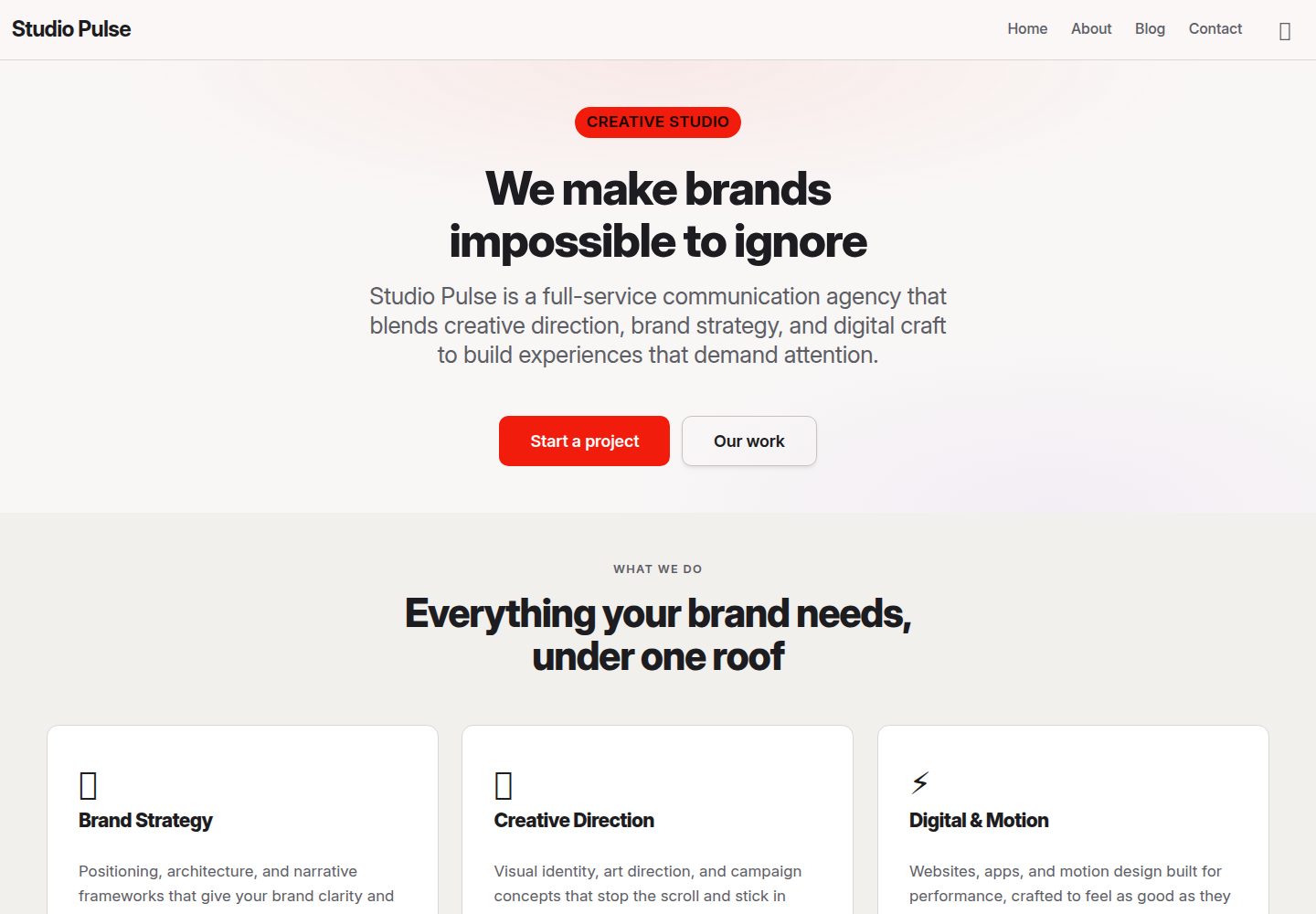
多页面结构:首页、关于、博客、联系四个页面
Astro企业官网
studio-pulse — Astro 企业官网模板
作者 DomeT99
Studio Pulse 是一个面向综合传播机构的营销网站模板,基于 Astro 与 Bulma 静态生成,包含首页、关于、博客与联系页面,并支持深色模式与客户端路由过渡。
看看你的网站会是什么样
浏览真实页面截图,比较内容排版与手机效果。点击下方缩略图切换,放大查看整页细节。
全部页面与视图 3
截图用于了解视觉与布局,交互效果请以实际项目为准。
采集于 2026-10-01查看来源
值得关注的模板亮点
从已有项目资料中,快速了解它的特点。
深色/浅色模式切换,偏好写入 localStorage 并遵循系统 prefers-color-scheme
基于 ClientRouter 的客户端导航与柔和淡入淡出过渡
博客使用 Astro 内容集合,Markdown 文章配类型化 frontmatter
包含跳转链接、语义化标题、aria-current、:focus-visible 与 prefers-reduced-motion 等无障碍处理
主题颜色与表面通过 global.css 中的 CSS 自定义属性统一管理
模板详细介绍
Studio Pulse 是 DomeT99 在 GitHub 上开源的营销网站模板,定位为综合传播机构的品牌展示站点,覆盖品牌策略、创意指导、数字与内容等业务方向。模板使用 Astro 静态生成,样式基于 Bulma 并配合自定义全局样式表,依赖较少。
站点包含四个页面:首页、关于、博客与联系。导航栏提供深色/浅色主题切换,偏好保存在 localStorage,首次访问时读取系统的 prefers-color-scheme。页面之间使用 ClientRouter 实现客户端导航与淡入淡出过渡。博客基于 Astro 内容集合,文章以 Markdown 编写,frontmatter 字段由 src/content.config.ts 中的 schema 约束,支持标题、日期、描述、作者与可选标签、图片。
无障碍方面,模板提供跳转链接、语义化地标与标题层级、当前导航项的 aria-current、可见的 :focus-visible 轮廓、对 prefers-reduced-motion 的支持,以及表单标签和必填、自动完成属性。主题颜色、表面与边框均以 CSS 自定义属性定义在 src/styles/global.css 中,通过 :root 与 [data-theme="dark"] 区分明暗主题。
使用限制:模板为静态站点,不包含后端或数据库;联系表单仅提供前端标记,未说明提交处理方式。演示图片、字体、图标等第三方素材需按各自许可单独核对,代码的 MIT 许可不覆盖这些素材。
Astro企业官网
适合你的项目吗?
适用场景
- 为传播、品牌或创意机构搭建静态营销网站
- 需要博客栏目并以 Markdown 维护文章的展示型站点
- 希望内置深色模式与客户端页面过渡的 Astro 项目起点
- 用作学习 Astro 内容集合、Bulma 主题定制与无障碍实践的参考模板
适合人群
- 传播、品牌策略或创意机构
- 需要多页面加博客的静态营销站点
- 使用 Astro 与 Bulma 的前端开发者
- 关注深色模式与基础无障碍实现的团队
上手与定制指南
结合仓库当前版本的说明,按下面的资料检查内容、配置与运行要求。
- 1
需要 Node.js ≥ 22.12,包管理器使用 pnpm
- 2
执行 pnpm install 安装依赖,pnpm dev 在 localhost:4321 启动开发服务器
- 3
pnpm build 生成静态站点到 ./dist/,pnpm preview 可本地预览构建结果
- 4
新增博客文章时在 src/content/blog/ 下创建 Markdown 文件,并按 src/content.config.ts 的 schema 填写 frontmatter
- 5
演示图片、字体、图标等第三方素材需按各自许可核对,MIT 许可仅覆盖代码
授权与来源资料
使用条件与限制
免费使用 · 保留许可声明本次收录的是公开仓库中采用 MIT 许可的免费版本;免费范围为该版本代码,不代表外部服务或第三方素材免费。
使用时需要遵守
- 允许免费使用、修改、商用和分发该版本代码。
- 分发代码副本或实质性部分时,保留原作者版权声明和完整 MIT 许可声明。
- 代码按现状提供;担保与责任限制以原许可证及适用法律为准。
额外费用与待核对事项
- 使用该模板需要 Node.js 22.12 或更高版本,低于此版本无法按文档安装与运行。
- 博客文章的 frontmatter 中 date 必须为 ISO 日期字符串,tags 与 image 为可选字段。
- 演示图片、字体、图标及其他第三方素材需按各自许可核对,不能仅凭代码的 MIT 许可判断。
- 域名、托管、数据库、支付或 AI 等外部服务可能另外收费。
查看原文依据
Permission is hereby granted, free of charge
许可证原文
Prerequisites: **Node.js ≥ 22.12** (see `package.json` `engines`).
README 原文
https://github.com/DomeT99/studio-pulse/blob/main/LICENSEhttps://github.com/DomeT99/studio-pulse/blob/main/README.mdThe `date` field accepts ISO date strings. `tags` and `image` are optional.
README 原文
DeepSeek 根据仓库许可证和 README 整理 ·2026-10-01。结果仅覆盖已读取资料,依赖、图片、字体及后续条款变更以各自原文为准。
项目核对记录与介绍依据
模板资料
- 来源平台
- GitHub
- 资料与维护参考分
- 资料较完整 · 83 / 100
- 技术栈
- Astro
- 网站类型
- 企业官网
这个分数如何计算
本站按许可资料(最高30分)、演示链接(12分)、预览图(10分)、Star数(15分)、记录的维护时间(15分)、描述完整度(8分)、功能记录(5分)和分类资料(5分)计算。它不是代码、安全或性能测试,也不是 Google 评分;有链接不代表已实测可用。
这个项目需要核对什么
- 记录的仓库更新时间
- 2026-09-16
- 截图检查日期
- 2026-10-01
已收录演示链接。请用你的内容与屏幕尺寸检查;有演示不代表表单、认证或支付已经可用。
目录记录的主要技术栈是 Astro。请通过依赖清单和锁文件核对实际版本与托管要求。这些说明基于收录资料,不代表代码审计或部署实测。
查看具体选型方法 →介绍的制作与核对状态
介绍由 AI 辅助整理目录与仓库资料。仓库作者不等于这篇介绍的审核者。
已完成服务器许可规则与 AI 来源核对;未经过人工编辑审核。
查看当时使用的来源资料
SHA-256: 07351530093da523895273e84de0d7a1908bb81350946a9a0971335e51ba559d
2026-10-01T04:26:56.250Z
来源文件 / 仓库# Studio Pulse Marketing site for a full-service communication agency — brand strategy, creative direction, digital, content, and more. Built with [Astro](https://astro.build) and [Bulma](https://bulma.io), statically generated and dependency-light. ## Features - **Multi-page site** — Home, About, Blog, Contact. - **Dark / light mode** — toggle in the navbar; preference persisted in `localStorage` and honors the OS `prefers-color-scheme` on first visit. - **SPA page transitions** — `<ClientRouter />` provides client-side navigation with a soft fade. - **Blog with content collections** — posts written in Markdown with typed frontmatter (`src/content/blog/`). - **Accessibility** — skip link, semantic landmarks and headings, `aria-current` on the active nav item, visible `:focus-visible` outlines, `prefers-reduced-motion` support, form labels + required/autocomplete attributes. ## Tech Stack | Layer | Choice | |-------|--------| | Framework | Astro 7 (static/SSG) | | CSS | Bulma 1.0.4 + custom global stylesheet | | Content | Astro Content Collections (`astro/loaders` `glob`) | | Package manager | pnpm | ## Project Structure ```text / ├── public/ # favicon + static assets ├── src/ │ ├── components/ │ │ ├── Card.astro # shared card component │ │ ├── Navbar.astro # navbar with burger menu + theme toggle │ │ └── Footer.astro # site footer │ ├── content/ │ │ └── blog/ # Markdown blog posts (content collection) │ ├── content.config.ts # content collection schema + loader │ ├── layouts/ │ │ └── Layout.astro # global layout: head, navbar, footer, theme toggle │ ├── pages/ │ │ ├── index.astro # Home │ │ ├── about.astro # About │ │ ├── blog/ │ │ │ ├── index.astro # Blog listing │ │ │ └── [...slug].astro # Individual blog post │ │ └── contact.astro # Contact │ └── styles/ │ └── global.css # design tokens (light/dark) + component overrides └── package.json ``` ## Getting Started Prerequisites: **Node.js ≥ 22.12** (see `package.json` `engines`). ```sh pnpm install pnpm dev ``` Open `http://localhost:4321`. ## Commands | Command | Action | | :---------------- | :-------------------------------------------- | | `pnpm install` | Install dependencies | | `pnpm dev` | Start local dev server at `localhost:4321` | | `pnpm build` | Build production site to `./dist/` | | `pnpm preview` | Preview the production build locally | ## Adding a Blog Post 1. Create a new Markdown file in `src/content/blog/`, e.g. `07-my-post.md`. 2. Add frontmatter matching the collection schema in `src/content.config.ts`: ```md --- title: "My Post Title" date: 2025-11-01 description: "Short summary shown on the blog listing page." author: "Team Member" tags: [strategy, branding] --- Your post body in Markdown here. ``` 3. The post is automatically available at `/blog/my-post/`. > The `date` field accepts ISO date strings. `tags` and `image` are optional. ## Theming All colors, surfaces, and borders are CSS custom properties defined in `src/styles/global.css`: - `:root` — light theme (default) - `[data-theme="dark"]` — dark theme The active theme is set on the `<html>` element by the inline script in `Layout.astro` (reads `localStorage`, falls back to `prefers-color-scheme`). During client-side navigation the theme is re-applied via the `astro:page-load` handler.
看看同类模板
对比同技术栈与用途的模板,找到更适合的视觉与内容结构。

astrowind
⭕️ AstroWind: A free template using Astro v7 and Tailwind CSS v4. Astro starter theme.
Astro · 博客

astro-landing-page
An Astro + Tailwind CSS Example/Template for Landing Pages
Astro · 企业官网

Tailcast
Dark-themed website template built on Astro and Tailwind CSS
Astro · 企业官网

Positivus
A stunning and versatile Astro theme designed for digital marketing agencies.
Astro · 企业官网

qwind
⭕️ Qwind: A template to make your website using Qwik + Tailwind CSS.
Astro · 工具站

agency-landing-page-Astrojs
A simple agency landing page made with astrojs and tailwindcss
Astro · 企业官网