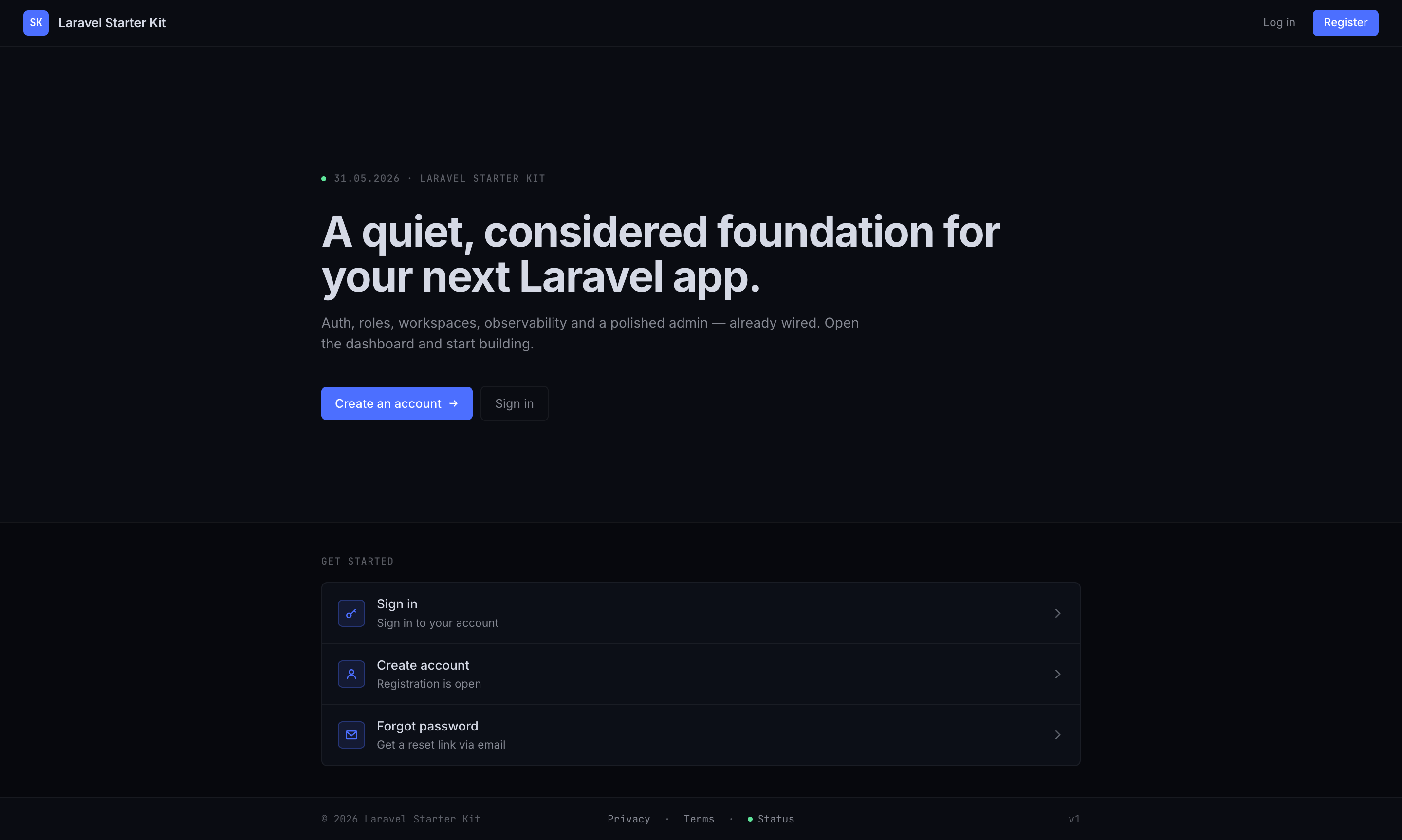
Fortify 认证体系:登录、注册、邮箱验证、密码重置、TOTP 双因素认证与恢复码
VueLaravel后台启动器
laravel-starter-kit — Vue 后台模板
作者 ekstremedia
基于 Laravel 与 Inertia/Vue 的后台启动模板,内置认证与 2FA、管理员面板、角色权限、文件上传、实时广播、监控与测试,全部通过 Docker 运行。
看看你的网站会是什么样
浏览真实页面截图,比较内容排版与手机效果。点击下方缩略图切换,放大查看整页细节。
目前有 1 张原始预览,可打开完整图片查看设计细节。
截图用于了解视觉与布局,交互效果请以实际项目为准。
采集于 2026-10-03查看来源
值得关注的模板亮点
从已有项目资料中,快速了解它的特点。
管理后台:用户 CRUD、角色与权限、邮件设置、存储配额、备份、系统健康与监控
Spatie Permission 预置 Admin / Editor / User 角色,/admin/* 由 super.admin 标志控制
可选多租户工作区,采用单数据库行级隔离与 BelongsToWorkspace 全局作用域
Reverb + Echo 实时广播,配合 ResourceChanged 与 useLiveReload 实现列表自动刷新
Pest 与 Vitest 测试,Pint、Larastan、vue-tsc 检查,GitHub Actions CI
模板详细介绍
这是一个面向后台系统的 Laravel 启动模板,前端采用 Inertia.js + Vue 3 + TypeScript,后端按领域模块组织在 app/Domains/* 下(Auth、Users、Access、Files、Chat、Workspaces、Notifications、Settings、Operations)。仓库以 GitHub 模板形式提供,可点击 Use this template 生成自己的项目。
功能覆盖:Fortify 提供登录、注册、邮箱验证、密码重置、TOTP 双因素认证与恢复码;Sanctum 处理认证;Spatie Permission 预置 Admin / Editor / User 角色;/admin/* 路由由平台级 super.admin 标志控制,包含用户管理、角色与权限、邮件设置、存储配额、备份、系统健康与监控页面;/profile 供用户自行管理资料、密码与 2FA。
可选能力包括:多租户工作区(单数据库行级隔离,通过 workspace_id 与 BelongsToWorkspace 全局作用域过滤,可配置注册时创建自有工作区或加入默认工作区)、表前缀、Inertia SSR、PWA。实时更新基于 Reverb + Echo 的 ResourceChanged 广播与 useLiveReload 组合式函数,Reverb 不可用时页面仍可正常工作。
使用限制:本地运行仅需 Docker,默认端口为 8120,Mailpit 端口为 8126,种子管理员为 [email protected] / password。destroy、fresh、rebuild 命令仅在 APP_ENV=local 时执行。表前缀只对 Eloquent / Query Builder / Schema 查询生效,原生 SQL 需自行调用 DB::getTablePrefix()。SSR 与 PWA 默认关闭,需显式开启并重新构建。
VueLaravel后台启动器
适合你的项目吗?
适用场景
- 需要快速搭建带认证、权限与后台管理界面的 Laravel 项目
- 希望以 Docker 方式统一本地开发环境,避免在宿主机安装 PHP、Node 与数据库
- 需要多租户工作区、邀请成员与按工作区分配角色的应用
- 需要实时列表刷新、活动日志、队列监控与备份能力的后台系统
适合人群
- 熟悉 Laravel 与 Vue 3 的后端或全栈开发者
- 需要可定制后台启动模板的团队
- 希望以领域模块方式组织后端代码的项目
- 接受 Docker 作为本地开发前置条件的开发者
上手与定制指南
结合仓库当前版本的说明,按下面的资料检查内容、配置与运行要求。
- 1
本地运行仅需 Docker,执行 make build 会创建 .env、构建镜像、启动服务并执行迁移与种子
- 2
默认访问 http://localhost:8120,种子管理员为 [email protected] / password,邮件在 http://localhost:8126 查看
- 3
make init 可交互设置应用名、端口、URL、数据库凭据与管理员账号;也可直接修改 .env
- 4
destroy、fresh、rebuild 仅在 APP_ENV=local 时允许执行
- 5
SSR 与 PWA 默认关闭,需分别设置 INERTIA_SSR_ENABLED=true 与 VITE_PWA_ENABLED=true 并重新构建
授权与来源资料
使用条件与限制
免费使用 · 保留许可声明本次收录的是公开仓库中采用 MIT 许可的免费版本;免费范围为该版本代码,不代表外部服务或第三方素材免费。
使用时需要遵守
- 允许免费使用、修改、商用和分发该版本代码。
- 分发代码副本或实质性部分时,保留原作者版权声明和完整 MIT 许可声明。
- 代码按现状提供;担保与责任限制以原许可证及适用法律为准。
额外费用与待核对事项
- 本地运行仅支持 Docker 方式,需先安装 Docker;不提供在宿主机直接安装 PHP、Node、Postgres 的运行方式。
- destroy、fresh、rebuild 命令仅在 APP_ENV=local 时才能执行,生产或非本地环境会被拒绝运行。
- 设置 DB_TABLE_PREFIX 表前缀后,仅 Eloquent、Query Builder 与 Schema 查询自动继承前缀;原生 SQL 必须自行调用 DB::getTablePrefix(),否则会出错。
- SSR 默认关闭,需设置 INERTIA_SSR_ENABLED=true、执行 npm run build:ssr 并手动启动 inertia-ssr 进程后才可用。
- PWA 默认关闭,需设置 VITE_PWA_ENABLED=true 并重新构建才能生成可安装的 manifest 与 Service Worker。
- 多租户工作区功能默认关闭,需设置 WORKSPACES_ENABLED=true 才启用;关闭时工作区路由挂载在根路径且无切换器。
- 工作区注册模式需显式配置:create_own 让每次注册创建独立工作区,join_default(默认)自动加入共享默认工作区。
- /login 的一键本地登录按钮默认关闭,需设置 DEV_EASY_LOGIN_ENABLED=true 才显示,仅适合本地开发。
- 演示图片、字体、图标及其他第三方素材需按各自许可核对,不能仅凭代码的 MIT 许可判断。
- 域名、托管、数据库、支付或 AI 等外部服务可能另外收费。
查看原文依据
Permission is hereby granted, free of charge
许可证原文
Requires **Docker** only — no host PHP, Node, Postgres, or `/etc/hosts` edits.
README 原文
`destroy`, `fresh`, and `rebuild` refuse to run unless `APP_ENV=local`.
README 原文
Only Eloquent / Query Builder / Schema queries inherit it; raw SQL must call `DB::getTablePrefix()`.
README 原文
Enable with `INERTIA_SSR_ENABLED=true`, then `npm run build:ssr` and `supervisorctl start inertia-ssr`
README 原文
set `VITE_PWA_ENABLED=true` and rebuild to emit an installable manifest
README 原文
`WORKSPACES_ENABLED=true` → users can belong to many workspaces with per-workspace roles
README 原文
`WORKSPACES_REGISTRATION_MODE=create_own` makes each sign-up create its own workspace (becoming admin) and invite others; `join_default` (default) auto-joins the shared default workspace.
README 原文
https://github.com/ekstremedia/laravel-starter-kit/blob/main/LICENSEhttps://github.com/ekstremedia/laravel-starter-kit/blob/main/README.mdFor a one-click local login button on `/login`, set `DEV_EASY_LOGIN_ENABLED=true`.
README 原文
DeepSeek 根据仓库许可证和 README 整理 ·2026-10-03。结果仅覆盖已读取资料,依赖、图片、字体及后续条款变更以各自原文为准。
项目核对记录与介绍依据
模板资料
- 来源平台
- GitHub
- 资料与维护参考分
- 资料较完整 · 76 / 100
- 技术栈
- Vue · Laravel
- 网站类型
- 后台 · 启动器
这个分数如何计算
本站按许可资料(最高30分)、演示链接(12分)、预览图(10分)、Star数(15分)、记录的维护时间(15分)、描述完整度(8分)、功能记录(5分)和分类资料(5分)计算。它不是代码、安全或性能测试,也不是 Google 评分;有链接不代表已实测可用。
这个项目需要核对什么
- 记录的仓库更新时间
- 2026-08-16
- 截图检查日期
- 2026-10-03
目前没有记录演示链接。请依据仓库说明在本地评估;仅凭截图无法确认交互行为。
目录记录的主要技术栈是 Vue。请通过依赖清单和锁文件核对实际版本与托管要求。这些说明基于收录资料,不代表代码审计或部署实测。
查看具体选型方法 →介绍的制作与核对状态
介绍由 AI 辅助整理目录与仓库资料。仓库作者不等于这篇介绍的审核者。
审核声明: [email protected] · 2026-10-04
查看当时使用的来源资料
SHA-256: 6e74464aac7dace735a62b771349046240918d3770b4516b2e54185d22aff338
2026-10-03T19:28:35.305Z
来源文件 / 仓库# Laravel Starter Kit [](https://github.com/ekstremedia/laravel-starter-kit/actions/workflows/tests.yml) [](https://github.com/ekstremedia/laravel-starter-kit/releases/latest) [](LICENSE)   A Laravel 13 + Inertia/Vue starter with the usual production pieces already wired up — auth with 2FA, an admin dashboard, roles & permissions, queues, broadcasting, media uploads, activity log, backups, observability, and tests — all running in Docker. ## Screenshots | | | | :---: | :---: | | [](docs/screenshots/welcome.png)<br>**Welcome** | [](docs/screenshots/dashboard.png)<br>**Dashboard** | | [](docs/screenshots/admin.png)<br>**Admin dashboard** | [](docs/screenshots/system.png)<br>**System & health** | ## Stack - **Laravel 13 · PHP 8.5** · PostgreSQL 17 · Redis 7 · Mailpit - **Inertia.js v3 + Vue 3 + TypeScript** (code-split, SSR-ready) · Pinia · Tailwind v4 · PrimeVue v4 · optional PWA - **Docker** — php-fpm, nginx, Vite, Reverb, Horizon, Pulse, and the scheduler under supervisor - **Fortify** (login, register, email verification, password reset, TOTP 2FA + recovery codes) · **Sanctum** · **Spatie Permission** (`Admin` / `Editor` / `User` seeded) - **Spatie** Medialibrary · Activitylog · Backup · Pulse · Horizon · Sentry · opcodesio log-viewer · lab404 impersonate - **Pest 4** + **Vitest 4** tests · Pint · Larastan · Husky pre-commit · GitHub Actions CI Backend code is organised into domain modules under `app/Domains/*` (Auth, Users, Access, Files, Chat, Workspaces, Notifications, Settings, Operations). Conventions live in `AGENTS.md`. ## Use this template This repo is a GitHub template — start your own project from it: 1. Click **[Use this template](https://github.com/ekstremedia/laravel-starter-kit/generate) → Create a new repository**. 2. Clone your new repo and run the [Quick start](#quick-start) below. 3. Make it yours: `make init` sets the app name, host port, URL, DB credentials, and seeded admin in one pass — then rebrand the welcome copy and icons (see [Customize first](#customize-first)). Dependabot is preconfigured to keep Composer, npm, and GitHub Actions dependencies fresh with weekly PRs. ## Quick start Requires **Docker** only — no host PHP, Node, Postgres, or `/etc/hosts` edits. ```bash make build # creates .env, builds the image, starts the stack, migrates + seeds ``` Open **http://localhost:8120** and sign in as the seeded admin (`[email protected]` / `password`). Captured email is at **http://localhost:8126** (Mailpit). For a one-click local login button on `/login`, set `DEV_EASY_LOGIN_ENABLED=true`. `make help` lists every target. The common ones: ```bash make shell # shell into the app container make test # Pest make test-all # Pest + Larastan + typecheck + Vitest make fresh # migrate:fresh --seed (local only) make logs # tail app logs ``` `destroy`, `fresh`, and `rebuild` refuse to run unless `APP_ENV=local`. ## Configuration `.env.example` is tuned for a zero-config localhost run. Override in `.env` when you need to: - **Different port** — set `APP_HOST_PORT` and the matching port in `APP_URL`. - **Run a second copy alongside this one** — also give it free `VITE_HOST_PORT`, `REVERB_HOST_PORT`, and `MAILPIT_HOST_PORT` values. - **Custom hostname** (e.g. `app.test`) — point `APP_URL`, `VITE_DEV_SERVER_HOST`, and `VITE_REVERB_HOST` at it and add it to `/etc/hosts`. - **Guided setup** — `make init` prompts for app name, host port, URL, DB creds, and the seeded admin, then writes `.env`. Optional; `make build` works without it. ## Admin Everything under `/admin/*` is gated by `super.admin` — the platform-level `is_super_admin` flag on the user (a `Gate::before` bypass, not a role). Workspace-admins manage their own members at `/w/{slug}/members`, which uses `role:Admin` scoped to the workspace. | Route | What's there | | --- | --- | | `/admin` | Dashboard — stats, charts, recent activity | | `/admin/users` | Users CRUD, roles, quotas, impersonate | | `/admin/workspaces` | Workspace CRUD — when `WORKSPACES_ENABLED=true` | | `/admin/roles` · `/admin/permissions` | Roles + granular permissions | | `/admin/mail` | SMTP settings (encrypted) + test send | | `/admin/storage` | Per-user storage usage and quotas | | `/admin/backups` | Run/clean backups, download archives, prepare restores | | `/admin/system` | Queue / Reverb / Redis health + runtime snapshot | | `/admin/monitoring` | Activity log + embedded Horizon · Pulse · log-viewer | Users self-manage profile, password, and 2FA at `/profile`. ## Optional features - **Multi-tenancy (workspaces)** — optional, **single-database row-level** isolation (no schema/DB per workspace). Every workspace-scoped table carries a `workspace_id` and the `BelongsToWorkspace` global scope auto-filters queries to the current workspace, so you can't leak across workspaces by forgetting a `where`. The current workspace is held by the `App\Domains\Workspaces\Support\WorkspaceContext` resolver (set per request by `ResolveWorkspace`). - `WORKSPACES_ENABLED=true` → users can belong to many workspaces with per-workspace roles; routes live under `/w/{workspace}/*`; the `/admin/workspaces` UI + workspace switcher appear. - `WORKSPACES_ENABLED=false` → behaves like a normal single-workspace Laravel app: workspace routes mount at the **root** (no `/w/` prefix), no switcher/picker. - `WORKSPACES_REGISTRATION_MODE=create_own` makes each sign-up create its own workspace (becoming admin) and invite others; `join_default` (default) auto-joins the shared default workspace. - Admins invite by email (`/members` → *Invite by email*); invitees accept via a tokenised link (`/invitations/{token}`), registering or logging in along the way. See **[docs/adding-a-workspace-entity.md](docs/adding-a-workspace-entity.md)** to add your own workspace-scoped entity (Car, Medicine, …). Model: `App\Domains\Workspaces\Models\Workspace`. - **Table prefix** — set `DB_TABLE_PREFIX=acme_` and re-migrate to namespace every core table. Only Eloquent / Query Builder / Schema queries inherit it; raw SQL must call `DB::getTablePrefix()`. ## Frontend, real-time & rendering A fast, optimized SPA that supplements itself with live updates. Details in **[docs/frontend-architecture.md](docs/frontend-architecture.md)** and **[docs/realtime-and-broadcasting.md](docs/realtime-and-broadcasting.md)**. - **Fast by default** — pages are per-page code-split; heavy libraries (ApexCharts, Leaflet, markdown-it) load lazily, never in the entry bundle; vendor chunks are cache-stable. The app uses Inertia v3 features (link prefetch, deferred props, history encryption). - **Live updates** — when one user changes a list, others viewing it refresh automatically over WebSockets (Reverb + Echo), via a reusable `ResourceChanged` broadcast + the `useLiveReload` composable. It **degrades gracefully**: if Reverb is down, pages still work, just without live refresh. New interactive pages should opt in — see the real-time doc. - **State** — Pinia stores in `resources/js/stores/` for shared/new state (live-connection status, recent notifications). - **SSR (opt-in, off by default)** — full Inertia SSR is wired. Enable with `INERTIA_SSR_ENABLED=true`, then `npm run build:ssr` and `supervisorctl start inertia-ssr` (the renderer ships `autostart=false`). - **PWA (opt-in, off by default)** — set `VITE_PWA_ENABLED=true` and rebuild to emit an installable manifest + a conservative, auth-safe service worker (precaches assets + an offline shell; never caches authenticated content). Re-brand the icons by replacing `resources/icons/source.svg` and running `npm run pwa:icons`. ## Testing Pest lives in `tests/`, Vitest in `tests/frontend/`. `make test` runs Pest on SQLite in-memory; `make test-all` runs the full suite (Pint, Larastan, vue-tsc, Vitest). CI runs the same suites (backend + frontend) on every push and PR — Pest on SQLite in-memory, matching `make test`. ## Customize first - Welcome page copy — `resources/js/i18n/{en,no}.ts` (`welcome.*` keys) - Roles & permissions — `database/seeders/RoleAndPermissionSeeder.php` - Branding — `public/`, `resources/js/Pages/Welcome.vue`, `APP_NAME` - Env vars — `.env.example` (every setting is commented) </content>
看看同类模板
对比同技术栈与用途的模板,找到更适合的视觉与内容结构。

vuestic-admin
Vuestic Admin is an open-source, ready-to-use admin template suite designed for rapid development, easy mainte…
Vue · 后台

vitesse
🏕 Opinionated Vite + Vue Starter Template
Vue · 启动器

v3-admin-vite
v3-admin-vite 是一个主打 AI 编程友好体验的 Vue3 后台管理模板,基于 Vue3、Vite、TypeScript、Element Plus 构建。
Vue · 后台

vue-typescript-admin-template
vue-typescript-admin-template 是一套面向后台管理界面的前端解决方案,基于 Vue 2.6、TypeScript 和 Element UI 构建。
Vue · 后台

vue-antd-admin
Vue Antd Admin 是 Ant Design Pro 的 Vue 实现版本,目标是为中后台项目提供一套开箱即用的前端与设计解决方案。
Vue · 后台

coreui-free-vue-admin-template
Free Vue Admin & Dashboard Template Built for AI-Assisted Development
Vue · 后台