Fortify authentication system: login, registration, email verification, password reset, TOTP two-factor authentication, and recovery codes
VueLaravelAdmin dashboardStarter
laravel-starter-kit — Vue Admin dashboard Template
By ekstremedia
A Laravel and Inertia/Vue admin starter template with built-in authentication and 2FA, admin panel, roles and permissions, file uploads, realtime broadcasting, monitoring, and tests, all running via Docker.
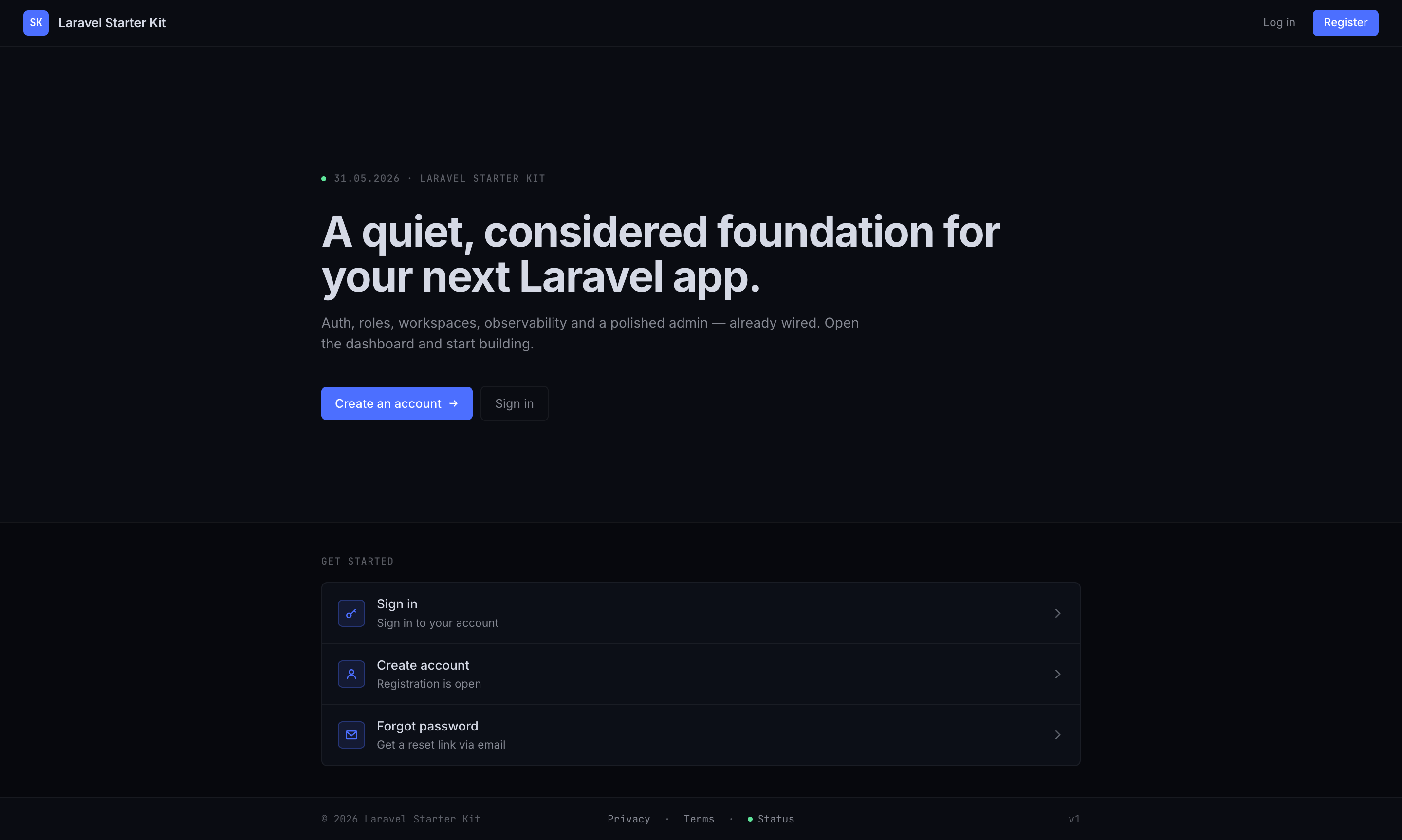
Explore the design
Compare the page layouts and mobile experience. Open any screenshot for a closer look.
Author preview
Author-provided preview
Preview provided in the project README.
One original preview is available. Open the full image to inspect the design.
Screenshots show visual appearance; interactive behavior may differ.
Recorded 2026-10-03View source
What stands out
A quick read of the recorded project description.
Admin panel: user CRUD, roles and permissions, email settings, storage quotas, backups, system health, and monitoring
Spatie Permission with preconfigured Admin / Editor / User roles; /admin/* controlled by the super.admin flag
Optional multi-tenant workspaces using single-database row-level isolation and the BelongsToWorkspace global scope
Reverb + Echo realtime broadcasting with ResourceChanged and useLiveReload for automatic list refresh
Pest and Vitest tests, Pint, Larastan, vue-tsc checks, and GitHub Actions CI
Template Details
This is a Laravel starter template for admin systems, with a frontend built on Inertia.js + Vue 3 + TypeScript and a backend organized by domain modules under app/Domains/* (Auth, Users, Access, Files, Chat, Workspaces, Notifications, Settings, Operations). The repository is provided as a GitHub template; click Use this template to generate your own project.
Feature coverage: Fortify provides login, registration, email verification, password reset, TOTP two-factor authentication, and recovery codes; Sanctum handles authentication; Spatie Permission comes with Admin / Editor / User roles preconfigured; /admin/* routes are controlled by the platform-level super.admin flag and include user management, roles and permissions, email settings, storage quotas, backups, system health, and monitoring pages; /profile lets users manage their own profile, password, and 2FA.
Optional capabilities include: multi-tenant workspaces (single-database row-level isolation, filtered via workspace_id and the BelongsToWorkspace global scope, configurable to create your own workspace on registration or join a default workspace), table prefixes, Inertia SSR, and PWA. Realtime updates are based on Reverb + Echo ResourceChanged broadcasts and the useLiveReload composable; pages still work when Reverb is unavailable.
Usage limitations: local running requires only Docker, the default port is 8120, Mailpit runs on port 8126, and the seeded admin is [email protected] / password. The destroy, fresh, and rebuild commands only run when APP_ENV=local. Table prefixes only apply to Eloquent / Query Builder / Schema queries; raw SQL must call DB::getTablePrefix() itself. SSR and PWA are disabled by default and must be explicitly enabled and rebuilt.
VueLaravelAdminStarter
Is it right for your project?
Use Cases
- Quickly building a Laravel project with authentication, permissions, and an admin management interface
- Unifying the local development environment with Docker to avoid installing PHP, Node, and a database on the host machine
- Applications that need multi-tenant workspaces, member invitations, and per-workspace role assignment
- Admin systems that need realtime list refresh, activity logs, queue monitoring, and backup capabilities
Suitable For
- Backend or full-stack developers familiar with Laravel and Vue 3
- Teams that need a customizable admin starter template
- Projects that want to organize backend code by domain modules
- Developers who accept Docker as a prerequisite for local development
Getting started & customization
Use these recorded setup notes alongside the repository instructions for your chosen version.
- 1
Local running requires only Docker; running make build creates .env, builds images, starts services, and runs migrations and seeds
- 2
Default access is http://localhost:8120, the seeded admin is [email protected] / password, and email can be viewed at http://localhost:8126
- 3
make init interactively sets the app name, port, URL, database credentials, and admin account; you can also edit .env directly
- 4
destroy, fresh, and rebuild are only allowed when APP_ENV=local
- 5
SSR and PWA are disabled by default; set INERTIA_SSR_ENABLED=true and VITE_PWA_ENABLED=true respectively and rebuild
License & source material
Usage conditions & limitations
Free to use · keep license noticeThis entry covers the free version of the public repository under the MIT license; the free scope is the code of that version and does not mean external services or third-party assets are free.
Must comply with when using
- You may use, modify, commercially use, and distribute the code of this version for free.
- When distributing copies or substantial portions of the code, retain the original author's copyright notice and the full MIT license notice.
- The code is provided as is; warranties and limitations of liability are governed by the original license and applicable law.
Additional costs & items to verify
- Local running supports only the Docker method and requires Docker to be installed first; there is no way to run it by installing PHP, Node, and Postgres directly on the host machine.
- The destroy, fresh, and rebuild commands can only run when APP_ENV=local; they will be refused in production or non-local environments.
- After setting the DB_TABLE_PREFIX table prefix, only Eloquent, Query Builder, and Schema queries automatically inherit the prefix; raw SQL must call DB::getTablePrefix() itself, otherwise errors will occur.
- SSR is disabled by default; it is available only after setting INERTIA_SSR_ENABLED=true, running npm run build:ssr, and manually starting the inertia-ssr process.
- PWA is disabled by default; an installable manifest and Service Worker are generated only after setting VITE_PWA_ENABLED=true and rebuilding.
- The multi-tenant workspace feature is disabled by default and requires WORKSPACES_ENABLED=true to enable; when disabled, workspace routes are mounted at the root path and there is no switcher.
- The workspace registration mode must be configured explicitly: create_own makes each registration create a separate workspace, while join_default (the default) automatically joins a shared default workspace.
- The one-click local login button on /login is disabled by default and appears only when DEV_EASY_LOGIN_ENABLED=true; it is suitable only for local development.
- Demo images, fonts, icons, and other third-party assets must be checked against their respective licenses and cannot be judged solely by the code's MIT license.
- External services such as domains, hosting, databases, payments, or AI may incur separate charges.
View Original Text Basis
Permission is hereby granted, free of charge
Original License Text
Requires **Docker** only — no host PHP, Node, Postgres, or `/etc/hosts` edits.
Original README
`destroy`, `fresh`, and `rebuild` refuse to run unless `APP_ENV=local`.
Original README
Only Eloquent / Query Builder / Schema queries inherit it; raw SQL must call `DB::getTablePrefix()`.
Original README
Enable with `INERTIA_SSR_ENABLED=true`, then `npm run build:ssr` and `supervisorctl start inertia-ssr`
Original README
set `VITE_PWA_ENABLED=true` and rebuild to emit an installable manifest
Original README
`WORKSPACES_ENABLED=true` → users can belong to many workspaces with per-workspace roles
Original README
`WORKSPACES_REGISTRATION_MODE=create_own` makes each sign-up create its own workspace (becoming admin) and invite others; `join_default` (default) auto-joins the shared default workspace.
Original README
https://github.com/ekstremedia/laravel-starter-kit/blob/main/LICENSEhttps://github.com/ekstremedia/laravel-starter-kit/blob/main/README.mdFor a one-click local login button on `/login`, set `DEV_EASY_LOGIN_ENABLED=true`.
Original README
Compiled by DeepSeek based on repository license and README ·2026-10-03. Results only cover the materials read; dependencies, images, fonts, and subsequent term changes are subject to their respective original texts.
Project checks & description sources
Template Information
- Source platforms
- GitHub
- Documentation and maintenance reference score
- More documented · 76 / 100
- Technologies
- Vue · Laravel
- Website type
- Admin dashboard · Starter
How this score is calculated
Our heuristic uses license records (up to 30), a demo link (12), a preview (10), stars (15), recorded maintenance (15), description completeness (8), feature records (5) and classification data (5). It is not a code, security or performance test, or a Google score. A link does not establish tested functionality.
What to verify for this project
- Repository update recorded
- 2026-08-16
- Screenshot last checked
- 2026-10-03
No demo link is recorded. Use the repository instructions to evaluate the project locally; the screenshot alone cannot establish interactive behavior.
The catalog identifies Vue as the primary stack. Check the actual dependency manifest and lockfile for versions and hosting requirements. These notes use recorded metadata, not a code audit or a deployment test.
Use a selection guide →How this description was prepared
AI-assisted description based on catalog records and repository material. Repository authors are not automatically the reviewers of this description.
Review declaration: [email protected] · 2026-10-04
Inspect the recorded source material
SHA-256: 6e74464aac7dace735a62b771349046240918d3770b4516b2e54185d22aff338
2026-10-03T19:28:35.305Z
Source file / repository# Laravel Starter Kit [](https://github.com/ekstremedia/laravel-starter-kit/actions/workflows/tests.yml) [](https://github.com/ekstremedia/laravel-starter-kit/releases/latest) [](LICENSE)   A Laravel 13 + Inertia/Vue starter with the usual production pieces already wired up — auth with 2FA, an admin dashboard, roles & permissions, queues, broadcasting, media uploads, activity log, backups, observability, and tests — all running in Docker. ## Screenshots | | | | :---: | :---: | | [](docs/screenshots/welcome.png)<br>**Welcome** | [](docs/screenshots/dashboard.png)<br>**Dashboard** | | [](docs/screenshots/admin.png)<br>**Admin dashboard** | [](docs/screenshots/system.png)<br>**System & health** | ## Stack - **Laravel 13 · PHP 8.5** · PostgreSQL 17 · Redis 7 · Mailpit - **Inertia.js v3 + Vue 3 + TypeScript** (code-split, SSR-ready) · Pinia · Tailwind v4 · PrimeVue v4 · optional PWA - **Docker** — php-fpm, nginx, Vite, Reverb, Horizon, Pulse, and the scheduler under supervisor - **Fortify** (login, register, email verification, password reset, TOTP 2FA + recovery codes) · **Sanctum** · **Spatie Permission** (`Admin` / `Editor` / `User` seeded) - **Spatie** Medialibrary · Activitylog · Backup · Pulse · Horizon · Sentry · opcodesio log-viewer · lab404 impersonate - **Pest 4** + **Vitest 4** tests · Pint · Larastan · Husky pre-commit · GitHub Actions CI Backend code is organised into domain modules under `app/Domains/*` (Auth, Users, Access, Files, Chat, Workspaces, Notifications, Settings, Operations). Conventions live in `AGENTS.md`. ## Use this template This repo is a GitHub template — start your own project from it: 1. Click **[Use this template](https://github.com/ekstremedia/laravel-starter-kit/generate) → Create a new repository**. 2. Clone your new repo and run the [Quick start](#quick-start) below. 3. Make it yours: `make init` sets the app name, host port, URL, DB credentials, and seeded admin in one pass — then rebrand the welcome copy and icons (see [Customize first](#customize-first)). Dependabot is preconfigured to keep Composer, npm, and GitHub Actions dependencies fresh with weekly PRs. ## Quick start Requires **Docker** only — no host PHP, Node, Postgres, or `/etc/hosts` edits. ```bash make build # creates .env, builds the image, starts the stack, migrates + seeds ``` Open **http://localhost:8120** and sign in as the seeded admin (`[email protected]` / `password`). Captured email is at **http://localhost:8126** (Mailpit). For a one-click local login button on `/login`, set `DEV_EASY_LOGIN_ENABLED=true`. `make help` lists every target. The common ones: ```bash make shell # shell into the app container make test # Pest make test-all # Pest + Larastan + typecheck + Vitest make fresh # migrate:fresh --seed (local only) make logs # tail app logs ``` `destroy`, `fresh`, and `rebuild` refuse to run unless `APP_ENV=local`. ## Configuration `.env.example` is tuned for a zero-config localhost run. Override in `.env` when you need to: - **Different port** — set `APP_HOST_PORT` and the matching port in `APP_URL`. - **Run a second copy alongside this one** — also give it free `VITE_HOST_PORT`, `REVERB_HOST_PORT`, and `MAILPIT_HOST_PORT` values. - **Custom hostname** (e.g. `app.test`) — point `APP_URL`, `VITE_DEV_SERVER_HOST`, and `VITE_REVERB_HOST` at it and add it to `/etc/hosts`. - **Guided setup** — `make init` prompts for app name, host port, URL, DB creds, and the seeded admin, then writes `.env`. Optional; `make build` works without it. ## Admin Everything under `/admin/*` is gated by `super.admin` — the platform-level `is_super_admin` flag on the user (a `Gate::before` bypass, not a role). Workspace-admins manage their own members at `/w/{slug}/members`, which uses `role:Admin` scoped to the workspace. | Route | What's there | | --- | --- | | `/admin` | Dashboard — stats, charts, recent activity | | `/admin/users` | Users CRUD, roles, quotas, impersonate | | `/admin/workspaces` | Workspace CRUD — when `WORKSPACES_ENABLED=true` | | `/admin/roles` · `/admin/permissions` | Roles + granular permissions | | `/admin/mail` | SMTP settings (encrypted) + test send | | `/admin/storage` | Per-user storage usage and quotas | | `/admin/backups` | Run/clean backups, download archives, prepare restores | | `/admin/system` | Queue / Reverb / Redis health + runtime snapshot | | `/admin/monitoring` | Activity log + embedded Horizon · Pulse · log-viewer | Users self-manage profile, password, and 2FA at `/profile`. ## Optional features - **Multi-tenancy (workspaces)** — optional, **single-database row-level** isolation (no schema/DB per workspace). Every workspace-scoped table carries a `workspace_id` and the `BelongsToWorkspace` global scope auto-filters queries to the current workspace, so you can't leak across workspaces by forgetting a `where`. The current workspace is held by the `App\Domains\Workspaces\Support\WorkspaceContext` resolver (set per request by `ResolveWorkspace`). - `WORKSPACES_ENABLED=true` → users can belong to many workspaces with per-workspace roles; routes live under `/w/{workspace}/*`; the `/admin/workspaces` UI + workspace switcher appear. - `WORKSPACES_ENABLED=false` → behaves like a normal single-workspace Laravel app: workspace routes mount at the **root** (no `/w/` prefix), no switcher/picker. - `WORKSPACES_REGISTRATION_MODE=create_own` makes each sign-up create its own workspace (becoming admin) and invite others; `join_default` (default) auto-joins the shared default workspace. - Admins invite by email (`/members` → *Invite by email*); invitees accept via a tokenised link (`/invitations/{token}`), registering or logging in along the way. See **[docs/adding-a-workspace-entity.md](docs/adding-a-workspace-entity.md)** to add your own workspace-scoped entity (Car, Medicine, …). Model: `App\Domains\Workspaces\Models\Workspace`. - **Table prefix** — set `DB_TABLE_PREFIX=acme_` and re-migrate to namespace every core table. Only Eloquent / Query Builder / Schema queries inherit it; raw SQL must call `DB::getTablePrefix()`. ## Frontend, real-time & rendering A fast, optimized SPA that supplements itself with live updates. Details in **[docs/frontend-architecture.md](docs/frontend-architecture.md)** and **[docs/realtime-and-broadcasting.md](docs/realtime-and-broadcasting.md)**. - **Fast by default** — pages are per-page code-split; heavy libraries (ApexCharts, Leaflet, markdown-it) load lazily, never in the entry bundle; vendor chunks are cache-stable. The app uses Inertia v3 features (link prefetch, deferred props, history encryption). - **Live updates** — when one user changes a list, others viewing it refresh automatically over WebSockets (Reverb + Echo), via a reusable `ResourceChanged` broadcast + the `useLiveReload` composable. It **degrades gracefully**: if Reverb is down, pages still work, just without live refresh. New interactive pages should opt in — see the real-time doc. - **State** — Pinia stores in `resources/js/stores/` for shared/new state (live-connection status, recent notifications). - **SSR (opt-in, off by default)** — full Inertia SSR is wired. Enable with `INERTIA_SSR_ENABLED=true`, then `npm run build:ssr` and `supervisorctl start inertia-ssr` (the renderer ships `autostart=false`). - **PWA (opt-in, off by default)** — set `VITE_PWA_ENABLED=true` and rebuild to emit an installable manifest + a conservative, auth-safe service worker (precaches assets + an offline shell; never caches authenticated content). Re-brand the icons by replacing `resources/icons/source.svg` and running `npm run pwa:icons`. ## Testing Pest lives in `tests/`, Vitest in `tests/frontend/`. `make test` runs Pest on SQLite in-memory; `make test-all` runs the full suite (Pint, Larastan, vue-tsc, Vitest). CI runs the same suites (backend + frontend) on every push and PR — Pest on SQLite in-memory, matching `make test`. ## Customize first - Welcome page copy — `resources/js/i18n/{en,no}.ts` (`welcome.*` keys) - Roles & permissions — `database/seeders/RoleAndPermissionSeeder.php` - Branding — `public/`, `resources/js/Pages/Welcome.vue`, `APP_NAME` - Env vars — `.env.example` (every setting is commented) </content>
Explore similar templates
Compare previews and descriptions within the same stack and category.

vuestic-admin
Vuestic Admin is an open-source Vue 3 admin template maintained by Epicmax, built on Vuestic UI with Vite, Pinia, and Tailwind CSS. It provides a ready-to-run dashboard with a dark theme, global configuration, i18n internationalization, and responsive layout.
Vue · Admin dashboard

vitesse
Vitesse is an opinionated Vite + Vue 3 starter template maintained by antfu-collective, offering file-based routing, component and API auto-import, Pinia, UnoCSS, PWA, i18n, Markdown, vite-ssg, TypeScript, Vitest, and Cypress.
Vue · Starter

v3-admin-vite
v3-admin-vite is an AI-friendly Vue3 admin template built on Vue3, Vite, TypeScript, and Element Plus. It keeps a lean structure with detailed comments, supports backend-controlled dynamic route permissions, page-level and button-level permissions, multiple themes and layouts, and mobile compatibility.
Vue · Admin dashboard

vue-typescript-admin-template
A Vue 2.6 + TypeScript + Element UI admin template ported from vue-element-admin, offering type safety and enterprise features like permission authentication, internationalization, dynamic themes, editors, charts, Excel/PDF handling, and PWA support.
Vue · Admin dashboard

vue-antd-admin
Vue Antd Admin is the Vue implementation of Ant Design Pro, providing an out-of-the-box front-end and design solution for admin dashboards.
Vue · Admin dashboard

coreui-free-vue-admin-template
CoreUI's official free Vue admin template, MIT licensed, built on Vue 3 and the CoreUI component library with Vue Router, Pinia, and Vite.
Vue · Admin dashboard