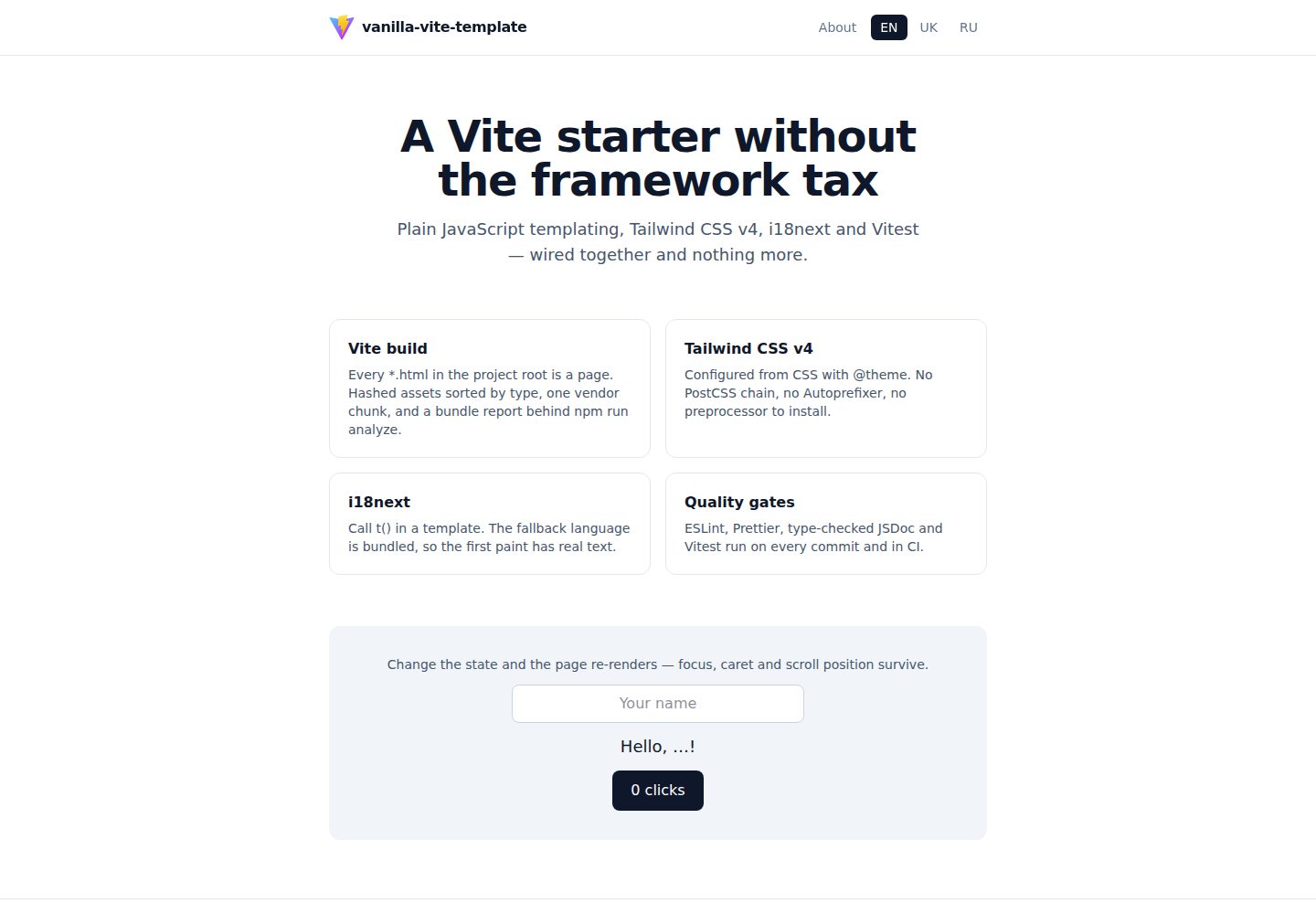
使用 Vite 构建,支持多页面,每个根目录 *.html 文件自动成为页面
Next.jsViteHTMLReact启动器
vanilla-vite-template — Next.js 启动器模板
作者 eternalvision
一个基于 Vite 的静态内容优先站点启动模板,使用原生 JavaScript 模板、Tailwind CSS v4 和 i18next,不含客户端路由或组件模型。
看看你的网站会是什么样
浏览真实页面截图,比较内容排版与手机效果。点击下方缩略图切换,放大查看整页细节。
全部页面与视图 3
截图用于了解视觉与布局,交互效果请以实际项目为准。
采集于 2026-10-15查看来源
值得关注的模板亮点
从已有项目资料中,快速了解它的特点。
模板使用带自动转义的标签模板字面量,数组自动拼接,null/undefined/false 渲染为空字符串
状态更新通过每页一个 update() 完成,保留焦点、光标和滚动位置
样式使用 Tailwind CSS v4,通过 @tailwindcss/vite 插件集成,在 CSS 中配置
国际化使用 i18next,回退语言打包,其余语言按需获取
项目身份信息集中在 package.json,通过 sync:meta 脚本同步到 LICENSE 和站点清单
模板详细介绍
vanilla-vite-template 是一个 Vite 启动模板,面向静态、内容优先的站点,例如落地页、文档、营销页面和小型多页站点。它不使用前端框架,采用带自动转义的标签模板字面量进行渲染,样式使用 Tailwind CSS v4,国际化基于 i18next,测试使用 Vitest。模板默认包含首页和关于页两个页面,生产构建为 14 个文件共 164 kB(其中 gzip 后 JavaScript 22 kB、CSS 3.9 kB)。README 明确说明它不是应用外壳:没有客户端路由、状态管理或组件模型,导航是真实的页面加载,状态集中在一个区域并在变化时重新渲染。如果项目包含大量相互依赖的状态视图,README 建议改用框架。项目身份信息集中在 package.json,通过脚本同步到 LICENSE 和站点清单;每个根目录下的 *.html 文件自动成为一个页面,共享的 head 在构建时注入。
Next.jsViteHTML启动器
适合你的项目吗?
适用场景
- 构建静态落地页或营销页面,需要多页面导航和国际化支持
- 开发小型文档站点,内容优先且不需要客户端路由或复杂状态管理
- 作为学习原生 JavaScript 模板、Tailwind CSS v4 和 i18next 集成的起点
- 需要将项目身份信息从 package.json 统一管理并同步到多个文件的场景
适合人群
- 需要静态、内容优先站点的开发者,接受无框架的页面加载导航
- 希望使用原生 JavaScript 和 JSDoc 类型检查,而非 TypeScript 或前端框架的团队
- 需要内置国际化、测试和代码质量工具链的小型多页项目
上手与定制指南
结合仓库当前版本的说明,按下面的资料检查内容、配置与运行要求。
- 1
需要 Node.js 22.12 或更高版本,CI 在 Node 22 和 24 上运行完整检查
- 2
克隆仓库后运行 npm install,然后 npm run dev 启动开发服务器,监听 http://localhost:9999 并暴露在本地网络
- 3
项目身份信息在 package.json 中修改后,运行 npm run sync:meta 同步到 LICENSE 和 public/site.webmanifest
- 4
npm run sync:meta:check 会在文件与 package.json 不一致时失败,该检查包含在 npm run check 和 CI 中
- 5
添加新页面时,复制 index.html 并指向新的入口脚本,无需修改构建配置
授权与来源资料
使用条件与限制
免费使用 · 保留许可声明本次收录的是公开仓库中采用 MIT 许可的免费版本;免费范围为该版本代码,不代表外部服务或第三方素材免费。
使用时需要遵守
- 允许免费使用、修改、商用和分发该版本代码。
- 分发代码副本或实质性部分时,保留原作者版权声明和完整 MIT 许可声明。
- 代码按现状提供;担保与责任限制以原许可证及适用法律为准。
额外费用与待核对事项
- 演示图片、字体、图标及其他第三方素材需按各自许可核对,不能仅凭代码的 MIT 许可判断。
- 域名、托管、数据库、支付或 AI 等外部服务可能另外收费。
查看原文依据
https://github.com/eternalvision/vanilla-vite-template/blob/main/LICENSEhttps://github.com/eternalvision/vanilla-vite-template/blob/main/README.mdPermission is hereby granted, free of charge
许可证原文
DeepSeek 根据仓库许可证和 README 整理 ·2026-10-15。结果仅覆盖已读取资料,依赖、图片、字体及后续条款变更以各自原文为准。
项目核对记录与介绍依据
模板资料
- 来源平台
- GitHub
- 资料与维护参考分
- 资料较完整 · 88 / 100
- 技术栈
- Next.js · Vite · HTML · React
- 网站类型
- 启动器
这个分数如何计算
本站按许可资料(最高30分)、演示链接(12分)、预览图(10分)、Star数(15分)、记录的维护时间(15分)、描述完整度(8分)、功能记录(5分)和分类资料(5分)计算。它不是代码、安全或性能测试,也不是 Google 评分;有链接不代表已实测可用。
这个项目需要核对什么
- 记录的仓库更新时间
- 2026-08-27
- 截图检查日期
- 2026-10-15
已收录演示链接。请用你的内容与屏幕尺寸检查;有演示不代表表单、认证或支付已经可用。
目录记录的主要技术栈是 Next.js。请通过依赖清单和锁文件核对实际版本与托管要求。这些说明基于收录资料,不代表代码审计或部署实测。
查看具体选型方法 →介绍的制作与核对状态
介绍由 AI 辅助整理目录与仓库资料。仓库作者不等于这篇介绍的审核者。
审核声明: codex-user-requested-batch-review-20261017 · 2026-10-16
查看当时使用的来源资料
SHA-256: 4240cdfadc1167592bac0ff956f49cd569f61cafd18cee9942252a6505c7ca4b
2026-10-15T15:20:07.555Z
来源文件 / 仓库# vanilla-vite-template
A Vite starter for **static, content-first sites** — landing pages, documentation, marketing pages,
small multi-page sites — built without a framework: plain JavaScript templating, Tailwind CSS v4,
i18next, and Vitest, wired together, type-checked, and nothing more.
A production build of the two pages it ships with is **164 kB across 14 files** (22 kB of gzipped
JavaScript, 3.9 kB of gzipped CSS).
### What it is not
It is not an application shell. There is no client-side router, no state management, and no
component model — navigation is real page loads ([ADR-0010](docs/adr/0010-multi-page-by-default.md)),
and state lives in one region that re-renders when it changes
([ADR-0011](docs/adr/0011-region-updates-not-a-renderer.md)). If the thing being built has many
interdependent stateful views, reach for a framework instead; this template will fight you.
## Stack
| Concern | Choice |
| ---------- | ----------------------------------------------------------------------------- |
| Build | Vite 8 (rolldown bundler, oxc minifier, Lightning CSS), multi-page |
| Templating | Tagged template literals with automatic escaping (`src/lib/html.js`) |
| Updates | One `update()` per page; focus, caret and scroll are preserved |
| Styles | Tailwind CSS v4 via `@tailwindcss/vite`, configured in CSS; plain CSS globals |
| i18n | i18next, fallback language bundled, the rest fetched on demand |
| Tests | Vitest + jsdom, V8 coverage |
| Types | JavaScript with JSDoc, checked by `tsc --noEmit` |
| Quality | ESLint 10 (flat config), Prettier, Husky + lint-staged, GitHub Actions |
Every non-obvious choice is recorded in [`docs/adr/`](docs/adr/); the system view is in
[`docs/architecture.md`](docs/architecture.md).
## Getting started
```bash
git clone https://github.com/eternalvision/vanilla-vite-template.git my-project
cd my-project
npm install
npm run dev
```
The dev server listens on **http://localhost:9999** and is exposed on the local network
(`vite --host`).
Requires Node.js **22.12 or newer**. CI runs the full gate on Node 22 and 24.
## Make it yours
Project identity lives in **`package.json` only** — `name`, `description`, `author`, `repository`,
and `license`. Everything else derives from it
([ADR-0007](docs/adr/0007-project-identity-from-package-json.md)):
| Consumer | How it gets there |
| ------------------------------------------------ | ------------------------------------------------------------------------------ |
| Footer credit and repository link | `virtual:app-meta` module, injected by `conf/appMetaPlugin.js` |
| HTML title, description, author, Open Graph tags | `%APP_NAME%` / `%APP_DESCRIPTION%` / `%APP_AUTHOR%` / `%APP_URL%` placeholders |
| `LICENSE` copyright holder | `npm run sync:meta` |
| `public/site.webmanifest` name and description | `npm run sync:meta` |
So, after forking:
```bash
# 1. edit name / description / author / repository in package.json
# 2. propagate it into the files that cannot read it at runtime
npm run sync:meta
```
`npm run sync:meta:check` fails when those files drift from `package.json`; it runs in
`npm run check` and in CI. The licence _year_ is never rewritten — the start year is a fact about
your project.
Left to change by hand, because they are content rather than identity:
- `app.name` and `app.title` in `public/locales/*/common.json`
- `short_name` in `public/site.webmanifest` (it has its own length limit)
- `public/logo.svg` and `public/og-image.png` (1200×630, used for link previews)
To read the identity from your own code:
```js
import { APP_META } from 'virtual:app-meta';
console.log(APP_META.name, APP_META.repositoryUrl);
```
## Scripts
| Command | What it does |
| -------------------------------- | --------------------------------------------------------------------- |
| `npm run dev` | Dev server with HMR on port 9999 |
| `npm run build` | Production build into `dist/` — builds only, never edits sources |
| `npm run analyze` | Build with sourcemaps and a bundle treemap at `dist/stats.html` |
| `npm run preview` | Serve `dist/` on port 8888 |
| `npm run lint` / `lint:fix` | ESLint |
| `npm run format` / `format:fix` | Prettier check / write |
| `npm run typecheck` | `tsc --noEmit` over JSDoc-annotated sources |
| `npm test` | Vitest, single run |
| `npm run test:watch` / `test:ui` | Interactive Vitest |
| `npm run test:coverage` | Coverage report (text, HTML, lcov) |
| `npm run sync:meta` | Propagate `package.json` identity into `LICENSE` and the web manifest |
| `npm run sync:meta:check` | Fail if those files drift from `package.json` (runs in CI) |
| `npm run check` | lint + format + typecheck + sync check + test — the gate CI runs |
## Project structure
```
├── .github/workflows/
│ ├── ci.yml # lint, format, typecheck, coverage, build (Node 22 + 24)
│ └── deploy.yml # build with BASE_PATH and publish to GitHub Pages
├── .husky/ # pre-commit (lint-staged), pre-push (typecheck + tests)
├── conf/ # build helpers used by vite.config.js
│ ├── appMeta.js # project identity read from package.json
│ ├── appMetaPlugin.js # virtual:app-meta + the injected <head>
│ ├── assetFileNamer.js # output folder per asset type
│ ├── basePath.js # BASE_PATH normalization
│ ├── chunkSplitter.js # single vendor chunk
│ └── htmlEntries.js # every *.html in the root becomes a page
├── docs/
│ ├── architecture.md # requirements, diagrams, failure modes, risks
│ └── adr/ # architecture decision records
├── public/
│ ├── locales/{en,uk,ru}/ # translation namespaces, served as static JSON
│ ├── logo.svg
│ ├── og-image.png # 1200×630 link preview
│ ├── robots.txt
│ └── site.webmanifest
├── scripts/
│ └── syncMeta.js # writes package.json identity into LICENSE + manifest
├── src/
│ ├── lib/
│ │ ├── html.js # escaping tagged template literal
│ │ └── dom.js # rendering + focus, caret and scroll preservation
│ ├── templates/ # header, nav, home, about, footer, layout
│ ├── styles/app.css # global rules Tailwind's preflight does not cover
│ ├── tailwind.css # Tailwind entry, @theme tokens
│ ├── i18n.js # i18next setup, fallback locale bundled
│ ├── bootstrap.js # startApp: shell, translations, update()
│ ├── main.js # home page entry
│ └── about.js # about page entry
├── tests/ # Vitest specs
├── types/ # ambient declarations (virtual:app-meta)
├── index.html # 9 lines; the head is injected
├── about.html
├── jsconfig.json # aliases + checkJs
├── vite.config.js
└── vitest.config.js
```
## Templating
Templates are functions returning markup from the `html` tag. Interpolated values are HTML-escaped
unless wrapped in `raw()`:
```js
import { html } from '@/lib/html.js';
export const card = ({ title, items }) => html`
<article>
<h2>${title}</h2>
<ul>
${items.map((item) => html`<li>${item}</li>`)}
</ul>
</article>
`;
```
Rules worth knowing:
- `null`, `undefined`, and `false` render as an empty string, so ``${flag && html`…`}`` works.
The flip side: never interpolate a boolean into an attribute — `aria-current="${isActive}"`
produces `aria-current=""`. Spell the value out, as `src/templates/nav.js` does.
- Arrays are concatenated — no `.join('')` needed.
- `raw(value)` skips escaping. Use it only for markup you produced yourself.
- The result is a `RawHtml` object; take `.value` when you need the string.
- Prettier formats `html` templates as HTML, so do not depend on their exact whitespace.
## Pages
Every `*.html` file in the project root is a page — there is no build config to edit. To add `blog`:
1. Copy `index.html` to `blog.html` and point its script at `/src/blog.js`.
2. Create `src/blog.js`:
```js
import { startApp } from '@/bootstrap.js';
import { html } from '@/lib/html.js';
startApp(({ t }) => html`<main>${t('blog.title')}</main>`);
```
That is the whole procedure. A page's HTML is nine lines, because the shared `<head>` — description,
Open Graph tags, icons, manifest — is injected from `package.json` at build time
([ADR-0014](docs/adr/0014-discover-pages-and-inject-the-head.md)):
```html
<!doctype html>
<html lang="en">
<head>
<script type="module" src="/src/blog.js"></script>
</head>
<body>
<div id="app"></div>
<noscript>This page needs JavaScript enabled to render.</noscript>
</body>
</html>
```
A page that wants its own static `<title>` can just write one; the injected default steps aside.
`src/bootstrap.js` holds everything pages share — styles, the header/footer shell, the language
switcher — and Vite code-splits it into a chunk every page reuses. Link between pages with the
`.html` extension so the URLs resolve on every static host.
## State and updates
State is a plain object. Change it, call `update()`, and the page re-renders with focus, caret and
scroll position preserved:
```js
const state = { name: '', count: 0 };
const app = startApp(({ t }) => home({ t, state }));
app.root.addEventListener('input', (event) => {
if (event.target.dataset.field !== 'name') return;
state.name = event.target.value;
app.update();
});
```
Listeners live on `app.root` and use delegation, so re-rendering never unbinds anything. An element
opts into focus restoration with `data-focus-key`; text fields also keep their caret position. The
home page does exactly this and is covered by tests.
Two consequences: node identity is not stable across an update, so re-query elements rather than
holding references; and anything without `data-focus-key` loses focus when the page re-renders.
For a page too large to re-render wholesale, `renderInto(region, markup)` from `src/lib/dom.js`
replaces one region instead. **When even that is not enough** — many stateful regions, list
reordering, animation across updates — swap the render layer for
[lit-html](https://lit.dev/docs/libraries/standalone-templates/) (~5 kB): its `html` tag is a
drop-in at the call sites, `renderInto` becomes lit-html's `render`, and `data-focus-key` handling
can go, because lit-html patches the DOM in place.
## Internationalisation
Call `t()` in the template. Interpolation, plurals and translated attributes all come from i18next
([ADR-0013](docs/adr/0013-translate-in-templates.md)):
```js
html`
<h1>${t('hero.title')}</h1>
<p>${t('demo.greeting', { name })}</p>
<button aria-label="${t('nav.languages')}">${t('demo.clicks', { count })}</button>
`;
```
Values are escaped by the `html` tag, so a translation — or a user-supplied name inside one — can
never inject markup.
Translations are static JSON under `public/locales/{lng}/{ns}.json`. The fallback language (`en`) is
bundled, so the first paint has real text; other languages are fetched on demand
([ADR-0012](docs/adr/0012-bundle-the-fallback-locale.md)). Plural forms use i18next's suffixes, and
each language may have as many as its grammar needs:
```json
{
"demo": {
"clicks_one": "{{count}} click",
"clicks_other": "{{count}} clicks"
}
}
```
**To add a language:** create `public/locales/<code>/common.json` and add `<code>` to
`SUPPORTED_LANGUAGES` in [`src/i18n.js`](src/i18n.js). A test fails if the files disagree about
which keys exist — a missing translation falls back to English silently, which is exactly the kind
of bug that surfaces months later.
**To remove one:** delete its folder and its entry in that same array. The template ships `en`, `uk`
and `ru` as sample content, not as a recommendation.
**To remove i18next entirely** (it is 44 kB of the 57 kB vendor chunk): delete `src/i18n.js`, drop
the three `i18next*` dependencies, replace the `t` in `src/bootstrap.js`'s page context with a
function returning literal strings, and delete the language switcher from `src/templates/nav.js`.
Detection order is querystring (`?lng=uk`), `localStorage`, cookie, then browser settings, and the
choice is cached. Region subtags are stripped, so `en-GB` resolves to `en`.
## Styling
Tailwind v4 is configured from CSS. Design tokens live in `@theme` in
[`src/tailwind.css`](src/tailwind.css):
```css
@theme {
--color-brand: oklch(0.62 0.19 258);
--font-sans: 'Inter', ui-sans-serif, system-ui, sans-serif;
}
```
There is no `tailwind.config.js` — v4 scans the project automatically and honours `.gitignore`.
Use `@source` to add a directory the scanner would otherwise miss.
[`src/styles/app.css`](src/styles/app.css) holds only what Tailwind's preflight does not: font
smoothing, dark-mode body colours, a `prefers-reduced-motion` block, and a visible `:focus-visible`
outline. It is plain CSS on purpose ([ADR-0009](docs/adr/0009-drop-sass.md)); if a project genuinely
needs Sass, `npm i -D sass-embedded`, rename the file to `.scss`, and Vite compiles it with no
further configuration.
### Adding icons
Icon fonts and flag sprites are deliberately not bundled — imported wholesale they added 5.6 MB to
the build (see [ADR-0003](docs/adr/0003-icons-and-flags-out-of-core.md)). To add them, install the
package and import only the variant you use:
```js
// one variant, not the whole family
import 'material-icons/iconfont/outlined.css';
```
For flags, prefer inlining the handful of SVGs you actually render over importing
`flag-icons/css/flag-icons.min.css`, which pulls in every country.
## Testing
Vitest runs in jsdom with `globals: false`, so imports are explicit:
```js
import { describe, expect, it } from 'vitest';
```
Specs live in `tests/` or beside a module as `*.test.js`. Coverage is collected with V8 and reported
as text, HTML (`coverage/index.html`), and lcov.
## Types
Sources are JavaScript annotated with JSDoc and checked by TypeScript in `--noEmit` mode:
```js
/**
* @param {{ languages: readonly string[], language: string }} props
* @returns {import('@/lib/html.js').RawHtml}
*/
export const nav = ({ languages, language }) => html`…`;
```
`npm run typecheck` runs the check; the `pre-push` hook and CI run it for you.
`maxNodeModuleJsDepth: 0` in `jsconfig.json` keeps the checker out of third-party JavaScript —
without it, `@types/node` pulls the untyped `punycode` package into the program.
## Environment variables
Copy `.env.example` to `.env` and prefix anything that must reach the browser with `VITE_`:
```ini
VITE_API_URL=https://api.example.com
```
Read it as `import.meta.env.VITE_API_URL`. Variables without the prefix stay server-side and are
never inlined into the bundle.
Two build-time variables are read by the Vite config itself, not by client code: `BASE_PATH` (see
below) and `SITE_URL`, which turns Open Graph image paths into the absolute URLs crawlers require.
## Build output
`dist/` is organised by asset type: `js/`, `styles/`, `icons/`, `images/`, `fonts/`, and `assets/`
for everything else — all content-hashed. Third-party code lands in a single `vendor` chunk
([ADR-0005](docs/adr/0005-single-vendor-chunk.md)), and code shared between pages is split out
automatically. Chunks above 500 kB trigger a build warning; `npm run analyze` shows what is inside
them.
## Deployment
The build is a static bundle — any static host works. Serve `dist/`.
### Base path
The public base path is a build input, not a constant
([ADR-0008](docs/adr/0008-configurable-base-path-and-pages-deploy.md)):
```bash
npm run build # served from the domain root
BASE_PATH=my-repo npm run build # served from https://host/my-repo/
```
`BASE_PATH` accepts `my-repo`, `/my-repo`, or `/my-repo/` — all normalize to `/my-repo/`.
When referencing files from `public/` inside JavaScript, build the URL from the base rather than
writing a root-absolute path, which breaks under a sub-path:
```js
html`<img src="${import.meta.env.BASE_URL}logo.svg" alt="" />`;
```
In the HTML entry points, use `%APP_BASE%` for the same reason, and `%APP_URL%` where an absolute
URL is required. The web manifest uses paths relative to itself, so it needs no substitution.
### GitHub Pages
`.github/workflows/deploy.yml` builds with `BASE_PATH` set to the repository name and `SITE_URL` set
to the Pages origin, then publishes `dist/` on every push to `main`.
**One-time setup:** in the repository, open **Settings → Pages** and set **Source** to
**GitHub Actions**. Without it, Pages keeps publishing the repository source, which serves the
unbuilt HTML — placeholders in the title and a 404 for `/src/main.js`.
To preview a sub-path build locally:
```bash
BASE_PATH=my-repo npm run build && npx vite preview --base /my-repo/
```
## License
MIT © Alexander Priadchenko
看看同类模板
对比同技术栈与用途的模板,找到更适合的视觉与内容结构。

ai-website-cloner-template
Clone any website with one command using AI coding agents
Next.js · 启动器

Next.js SaaS Starter
Next.js SaaS Starter 是 Next.js 官方维护的 SaaS 起点模板,定位介于学习资源和可直接部署的脚手架之间。
Next.js · SaaS

Next.js Commerce
Next.js Commerce 是 Vercel 团队维护的电商启动模板,基于 Next.js App Router 构建,采用服务端渲染、React Server Components、Server Actions …
Next.js · 电商

Next-js-Boilerplate
Next-js-Boilerplate 是一个面向 Next.js 16、Tailwind CSS 4 和 TypeScript 的启动器,核心定位是开发者体验优先。
Next.js · 启动器

tailwind-nextjs-starter-blog
tailwind-nextjs-starter-blog 是一个面向个人技术博客的 Next.js 与 Tailwind CSS 启动模板,其 v2 版本基于 App Router 与 React Server Comp…
Next.js · 博客

next-forge
Production-grade Turborepo template for Next.js apps.
Next.js · 启动器