Built with Vite, supports multi-page, each root *.html file automatically becomes a page
Next.jsViteHTMLReactStarter
vanilla-vite-template — Next.js Starter Template
By eternalvision
A Vite-based starter template for static, content-first sites, using native JavaScript templates, Tailwind CSS v4, and i18next, without client-side routing or a component model.
Explore the design
Compare the page layouts and mobile experience. Open any screenshot for a closer look.
Desktop homepage1 / 3
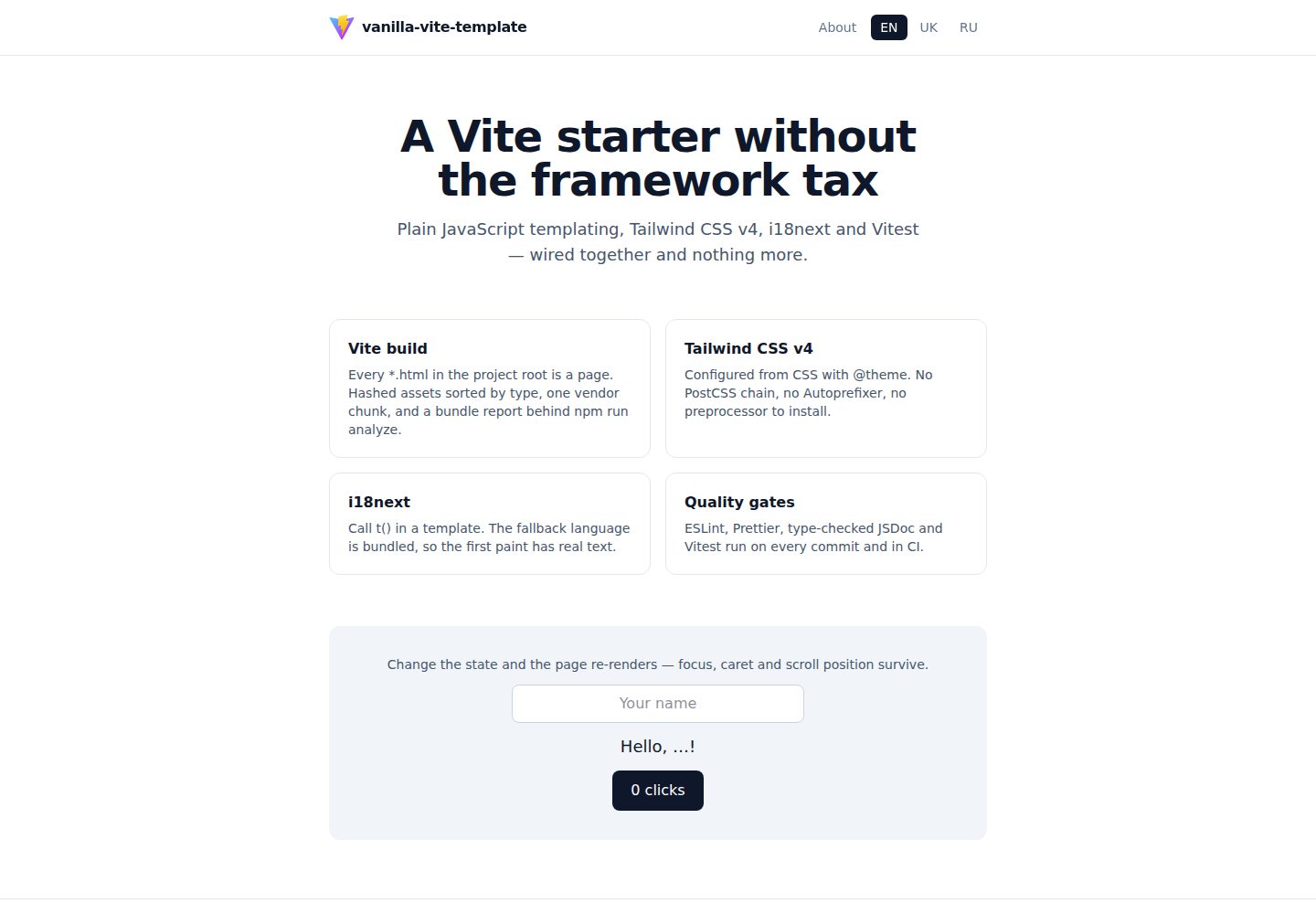
Desktop captureTop of page
Actual screenshot captured by the server browser.
All pages & views 3
Screenshots show visual appearance; interactive behavior may differ.
Recorded 2026-10-15View source
What stands out
A quick read of the recorded project description.
Templates use tagged template literals with automatic escaping, arrays are automatically concatenated, null/undefined/false render as empty strings
State updates are done via one update() per page, preserving focus, cursor, and scroll position
Styling uses Tailwind CSS v4, integrated via the @tailwindcss/vite plugin, configured in CSS
Internationalization uses i18next, fallback language is bundled, other languages are fetched on demand
Project identity information is centralized in package.json and synced to LICENSE and the site manifest via the sync:meta script
Template Details
vanilla-vite-template is a Vite starter template aimed at static, content-first sites such as landing pages, documentation, marketing pages, and small multi-page sites. It does not use a frontend framework; rendering uses tagged template literals with automatic escaping, styling uses Tailwind CSS v4, internationalization is based on i18next, and testing uses Vitest. The template includes two pages by default, a home page and an about page, and the production build is 14 files totaling 164 kB (of which JavaScript is 22 kB gzipped and CSS is 3.9 kB). The README explicitly states that it is not an application shell: there is no client-side routing, state management, or component model; navigation is real page loads, and state is centralized in one area and re-rendered on change. If a project contains many interdependent stateful views, the README recommends switching to a framework. Project identity information is centralized in package.json and synced via scripts to LICENSE and the site manifest; each *.html file in the root directory automatically becomes a page, and the shared head is injected at build time.
Next.jsViteHTMLStarter
Is it right for your project?
Use Cases
- Building static landing pages or marketing pages that need multi-page navigation and internationalization support
- Developing small documentation sites with content-first needs and no client-side routing or complex state management
- As a starting point for learning native JavaScript templating, Tailwind CSS v4, and i18next integration
- Scenarios where project identity information needs to be managed centrally from package.json and synced to multiple files
Suitable For
- Developers who need static, content-first sites and accept framework-free page-load navigation
- Teams that want to use native JavaScript and JSDoc type checking rather than TypeScript or a frontend framework
- Small multi-page projects that need built-in internationalization, testing, and code quality tooling
Getting started & customization
Use these recorded setup notes alongside the repository instructions for your chosen version.
- 1
Requires Node.js 22.12 or higher; CI runs the full checks on Node 22 and 24
- 2
After cloning the repository, run npm install, then npm run dev to start the development server, listening on http://localhost:9999 and exposed on the local network
- 3
After modifying project identity information in package.json, run npm run sync:meta to sync to LICENSE and public/site.webmanifest
- 4
npm run sync:meta:check fails when files are inconsistent with package.json; this check is included in npm run check and CI
- 5
When adding a new page, copy index.html and point to the new entry script; no build configuration changes are needed
License & source material
Usage conditions & limitations
Free to use · keep license noticeThis entry covers the free version under the MIT license in the public repository; the free scope is the code of that version and does not mean external services or third-party assets are free.
Must comply with when using
- Free use, modification, commercial use, and distribution of that version's code are permitted.
- When distributing copies or substantial portions of the code, retain the original author's copyright notice and the full MIT license notice.
- The code is provided as is; warranties and limitations of liability are governed by the original license and applicable law.
Additional costs & items to verify
- Demo images, fonts, icons, and other third-party assets must be checked against their respective licenses; they cannot be judged solely by the code's MIT license.
- External services such as domains, hosting, databases, payments, or AI may incur separate charges.
View Original Text Basis
https://github.com/eternalvision/vanilla-vite-template/blob/main/LICENSEhttps://github.com/eternalvision/vanilla-vite-template/blob/main/README.mdPermission is hereby granted, free of charge
Original License Text
Compiled by DeepSeek based on repository license and README ·2026-10-15. Results only cover the materials read; dependencies, images, fonts, and subsequent term changes are subject to their respective original texts.
Project checks & description sources
Template Information
- Source platforms
- GitHub
- Documentation and maintenance reference score
- More documented · 88 / 100
- Technologies
- Next.js · Vite · HTML · React
- Website type
- Starter
How this score is calculated
Our heuristic uses license records (up to 30), a demo link (12), a preview (10), stars (15), recorded maintenance (15), description completeness (8), feature records (5) and classification data (5). It is not a code, security or performance test, or a Google score. A link does not establish tested functionality.
What to verify for this project
- Repository update recorded
- 2026-08-27
- Screenshot last checked
- 2026-10-15
A demo link is listed. Check it with your own content and viewport sizes; its presence does not confirm that forms, authentication or payments work.
The catalog identifies Next.js as the primary stack. Check the actual dependency manifest and lockfile for versions and hosting requirements. These notes use recorded metadata, not a code audit or a deployment test.
Use a selection guide →How this description was prepared
AI-assisted description based on catalog records and repository material. Repository authors are not automatically the reviewers of this description.
Review declaration: codex-user-requested-batch-review-20261017 · 2026-10-16
Inspect the recorded source material
SHA-256: 4240cdfadc1167592bac0ff956f49cd569f61cafd18cee9942252a6505c7ca4b
2026-10-15T15:20:07.555Z
Source file / repository# vanilla-vite-template
A Vite starter for **static, content-first sites** — landing pages, documentation, marketing pages,
small multi-page sites — built without a framework: plain JavaScript templating, Tailwind CSS v4,
i18next, and Vitest, wired together, type-checked, and nothing more.
A production build of the two pages it ships with is **164 kB across 14 files** (22 kB of gzipped
JavaScript, 3.9 kB of gzipped CSS).
### What it is not
It is not an application shell. There is no client-side router, no state management, and no
component model — navigation is real page loads ([ADR-0010](docs/adr/0010-multi-page-by-default.md)),
and state lives in one region that re-renders when it changes
([ADR-0011](docs/adr/0011-region-updates-not-a-renderer.md)). If the thing being built has many
interdependent stateful views, reach for a framework instead; this template will fight you.
## Stack
| Concern | Choice |
| ---------- | ----------------------------------------------------------------------------- |
| Build | Vite 8 (rolldown bundler, oxc minifier, Lightning CSS), multi-page |
| Templating | Tagged template literals with automatic escaping (`src/lib/html.js`) |
| Updates | One `update()` per page; focus, caret and scroll are preserved |
| Styles | Tailwind CSS v4 via `@tailwindcss/vite`, configured in CSS; plain CSS globals |
| i18n | i18next, fallback language bundled, the rest fetched on demand |
| Tests | Vitest + jsdom, V8 coverage |
| Types | JavaScript with JSDoc, checked by `tsc --noEmit` |
| Quality | ESLint 10 (flat config), Prettier, Husky + lint-staged, GitHub Actions |
Every non-obvious choice is recorded in [`docs/adr/`](docs/adr/); the system view is in
[`docs/architecture.md`](docs/architecture.md).
## Getting started
```bash
git clone https://github.com/eternalvision/vanilla-vite-template.git my-project
cd my-project
npm install
npm run dev
```
The dev server listens on **http://localhost:9999** and is exposed on the local network
(`vite --host`).
Requires Node.js **22.12 or newer**. CI runs the full gate on Node 22 and 24.
## Make it yours
Project identity lives in **`package.json` only** — `name`, `description`, `author`, `repository`,
and `license`. Everything else derives from it
([ADR-0007](docs/adr/0007-project-identity-from-package-json.md)):
| Consumer | How it gets there |
| ------------------------------------------------ | ------------------------------------------------------------------------------ |
| Footer credit and repository link | `virtual:app-meta` module, injected by `conf/appMetaPlugin.js` |
| HTML title, description, author, Open Graph tags | `%APP_NAME%` / `%APP_DESCRIPTION%` / `%APP_AUTHOR%` / `%APP_URL%` placeholders |
| `LICENSE` copyright holder | `npm run sync:meta` |
| `public/site.webmanifest` name and description | `npm run sync:meta` |
So, after forking:
```bash
# 1. edit name / description / author / repository in package.json
# 2. propagate it into the files that cannot read it at runtime
npm run sync:meta
```
`npm run sync:meta:check` fails when those files drift from `package.json`; it runs in
`npm run check` and in CI. The licence _year_ is never rewritten — the start year is a fact about
your project.
Left to change by hand, because they are content rather than identity:
- `app.name` and `app.title` in `public/locales/*/common.json`
- `short_name` in `public/site.webmanifest` (it has its own length limit)
- `public/logo.svg` and `public/og-image.png` (1200×630, used for link previews)
To read the identity from your own code:
```js
import { APP_META } from 'virtual:app-meta';
console.log(APP_META.name, APP_META.repositoryUrl);
```
## Scripts
| Command | What it does |
| -------------------------------- | --------------------------------------------------------------------- |
| `npm run dev` | Dev server with HMR on port 9999 |
| `npm run build` | Production build into `dist/` — builds only, never edits sources |
| `npm run analyze` | Build with sourcemaps and a bundle treemap at `dist/stats.html` |
| `npm run preview` | Serve `dist/` on port 8888 |
| `npm run lint` / `lint:fix` | ESLint |
| `npm run format` / `format:fix` | Prettier check / write |
| `npm run typecheck` | `tsc --noEmit` over JSDoc-annotated sources |
| `npm test` | Vitest, single run |
| `npm run test:watch` / `test:ui` | Interactive Vitest |
| `npm run test:coverage` | Coverage report (text, HTML, lcov) |
| `npm run sync:meta` | Propagate `package.json` identity into `LICENSE` and the web manifest |
| `npm run sync:meta:check` | Fail if those files drift from `package.json` (runs in CI) |
| `npm run check` | lint + format + typecheck + sync check + test — the gate CI runs |
## Project structure
```
├── .github/workflows/
│ ├── ci.yml # lint, format, typecheck, coverage, build (Node 22 + 24)
│ └── deploy.yml # build with BASE_PATH and publish to GitHub Pages
├── .husky/ # pre-commit (lint-staged), pre-push (typecheck + tests)
├── conf/ # build helpers used by vite.config.js
│ ├── appMeta.js # project identity read from package.json
│ ├── appMetaPlugin.js # virtual:app-meta + the injected <head>
│ ├── assetFileNamer.js # output folder per asset type
│ ├── basePath.js # BASE_PATH normalization
│ ├── chunkSplitter.js # single vendor chunk
│ └── htmlEntries.js # every *.html in the root becomes a page
├── docs/
│ ├── architecture.md # requirements, diagrams, failure modes, risks
│ └── adr/ # architecture decision records
├── public/
│ ├── locales/{en,uk,ru}/ # translation namespaces, served as static JSON
│ ├── logo.svg
│ ├── og-image.png # 1200×630 link preview
│ ├── robots.txt
│ └── site.webmanifest
├── scripts/
│ └── syncMeta.js # writes package.json identity into LICENSE + manifest
├── src/
│ ├── lib/
│ │ ├── html.js # escaping tagged template literal
│ │ └── dom.js # rendering + focus, caret and scroll preservation
│ ├── templates/ # header, nav, home, about, footer, layout
│ ├── styles/app.css # global rules Tailwind's preflight does not cover
│ ├── tailwind.css # Tailwind entry, @theme tokens
│ ├── i18n.js # i18next setup, fallback locale bundled
│ ├── bootstrap.js # startApp: shell, translations, update()
│ ├── main.js # home page entry
│ └── about.js # about page entry
├── tests/ # Vitest specs
├── types/ # ambient declarations (virtual:app-meta)
├── index.html # 9 lines; the head is injected
├── about.html
├── jsconfig.json # aliases + checkJs
├── vite.config.js
└── vitest.config.js
```
## Templating
Templates are functions returning markup from the `html` tag. Interpolated values are HTML-escaped
unless wrapped in `raw()`:
```js
import { html } from '@/lib/html.js';
export const card = ({ title, items }) => html`
<article>
<h2>${title}</h2>
<ul>
${items.map((item) => html`<li>${item}</li>`)}
</ul>
</article>
`;
```
Rules worth knowing:
- `null`, `undefined`, and `false` render as an empty string, so ``${flag && html`…`}`` works.
The flip side: never interpolate a boolean into an attribute — `aria-current="${isActive}"`
produces `aria-current=""`. Spell the value out, as `src/templates/nav.js` does.
- Arrays are concatenated — no `.join('')` needed.
- `raw(value)` skips escaping. Use it only for markup you produced yourself.
- The result is a `RawHtml` object; take `.value` when you need the string.
- Prettier formats `html` templates as HTML, so do not depend on their exact whitespace.
## Pages
Every `*.html` file in the project root is a page — there is no build config to edit. To add `blog`:
1. Copy `index.html` to `blog.html` and point its script at `/src/blog.js`.
2. Create `src/blog.js`:
```js
import { startApp } from '@/bootstrap.js';
import { html } from '@/lib/html.js';
startApp(({ t }) => html`<main>${t('blog.title')}</main>`);
```
That is the whole procedure. A page's HTML is nine lines, because the shared `<head>` — description,
Open Graph tags, icons, manifest — is injected from `package.json` at build time
([ADR-0014](docs/adr/0014-discover-pages-and-inject-the-head.md)):
```html
<!doctype html>
<html lang="en">
<head>
<script type="module" src="/src/blog.js"></script>
</head>
<body>
<div id="app"></div>
<noscript>This page needs JavaScript enabled to render.</noscript>
</body>
</html>
```
A page that wants its own static `<title>` can just write one; the injected default steps aside.
`src/bootstrap.js` holds everything pages share — styles, the header/footer shell, the language
switcher — and Vite code-splits it into a chunk every page reuses. Link between pages with the
`.html` extension so the URLs resolve on every static host.
## State and updates
State is a plain object. Change it, call `update()`, and the page re-renders with focus, caret and
scroll position preserved:
```js
const state = { name: '', count: 0 };
const app = startApp(({ t }) => home({ t, state }));
app.root.addEventListener('input', (event) => {
if (event.target.dataset.field !== 'name') return;
state.name = event.target.value;
app.update();
});
```
Listeners live on `app.root` and use delegation, so re-rendering never unbinds anything. An element
opts into focus restoration with `data-focus-key`; text fields also keep their caret position. The
home page does exactly this and is covered by tests.
Two consequences: node identity is not stable across an update, so re-query elements rather than
holding references; and anything without `data-focus-key` loses focus when the page re-renders.
For a page too large to re-render wholesale, `renderInto(region, markup)` from `src/lib/dom.js`
replaces one region instead. **When even that is not enough** — many stateful regions, list
reordering, animation across updates — swap the render layer for
[lit-html](https://lit.dev/docs/libraries/standalone-templates/) (~5 kB): its `html` tag is a
drop-in at the call sites, `renderInto` becomes lit-html's `render`, and `data-focus-key` handling
can go, because lit-html patches the DOM in place.
## Internationalisation
Call `t()` in the template. Interpolation, plurals and translated attributes all come from i18next
([ADR-0013](docs/adr/0013-translate-in-templates.md)):
```js
html`
<h1>${t('hero.title')}</h1>
<p>${t('demo.greeting', { name })}</p>
<button aria-label="${t('nav.languages')}">${t('demo.clicks', { count })}</button>
`;
```
Values are escaped by the `html` tag, so a translation — or a user-supplied name inside one — can
never inject markup.
Translations are static JSON under `public/locales/{lng}/{ns}.json`. The fallback language (`en`) is
bundled, so the first paint has real text; other languages are fetched on demand
([ADR-0012](docs/adr/0012-bundle-the-fallback-locale.md)). Plural forms use i18next's suffixes, and
each language may have as many as its grammar needs:
```json
{
"demo": {
"clicks_one": "{{count}} click",
"clicks_other": "{{count}} clicks"
}
}
```
**To add a language:** create `public/locales/<code>/common.json` and add `<code>` to
`SUPPORTED_LANGUAGES` in [`src/i18n.js`](src/i18n.js). A test fails if the files disagree about
which keys exist — a missing translation falls back to English silently, which is exactly the kind
of bug that surfaces months later.
**To remove one:** delete its folder and its entry in that same array. The template ships `en`, `uk`
and `ru` as sample content, not as a recommendation.
**To remove i18next entirely** (it is 44 kB of the 57 kB vendor chunk): delete `src/i18n.js`, drop
the three `i18next*` dependencies, replace the `t` in `src/bootstrap.js`'s page context with a
function returning literal strings, and delete the language switcher from `src/templates/nav.js`.
Detection order is querystring (`?lng=uk`), `localStorage`, cookie, then browser settings, and the
choice is cached. Region subtags are stripped, so `en-GB` resolves to `en`.
## Styling
Tailwind v4 is configured from CSS. Design tokens live in `@theme` in
[`src/tailwind.css`](src/tailwind.css):
```css
@theme {
--color-brand: oklch(0.62 0.19 258);
--font-sans: 'Inter', ui-sans-serif, system-ui, sans-serif;
}
```
There is no `tailwind.config.js` — v4 scans the project automatically and honours `.gitignore`.
Use `@source` to add a directory the scanner would otherwise miss.
[`src/styles/app.css`](src/styles/app.css) holds only what Tailwind's preflight does not: font
smoothing, dark-mode body colours, a `prefers-reduced-motion` block, and a visible `:focus-visible`
outline. It is plain CSS on purpose ([ADR-0009](docs/adr/0009-drop-sass.md)); if a project genuinely
needs Sass, `npm i -D sass-embedded`, rename the file to `.scss`, and Vite compiles it with no
further configuration.
### Adding icons
Icon fonts and flag sprites are deliberately not bundled — imported wholesale they added 5.6 MB to
the build (see [ADR-0003](docs/adr/0003-icons-and-flags-out-of-core.md)). To add them, install the
package and import only the variant you use:
```js
// one variant, not the whole family
import 'material-icons/iconfont/outlined.css';
```
For flags, prefer inlining the handful of SVGs you actually render over importing
`flag-icons/css/flag-icons.min.css`, which pulls in every country.
## Testing
Vitest runs in jsdom with `globals: false`, so imports are explicit:
```js
import { describe, expect, it } from 'vitest';
```
Specs live in `tests/` or beside a module as `*.test.js`. Coverage is collected with V8 and reported
as text, HTML (`coverage/index.html`), and lcov.
## Types
Sources are JavaScript annotated with JSDoc and checked by TypeScript in `--noEmit` mode:
```js
/**
* @param {{ languages: readonly string[], language: string }} props
* @returns {import('@/lib/html.js').RawHtml}
*/
export const nav = ({ languages, language }) => html`…`;
```
`npm run typecheck` runs the check; the `pre-push` hook and CI run it for you.
`maxNodeModuleJsDepth: 0` in `jsconfig.json` keeps the checker out of third-party JavaScript —
without it, `@types/node` pulls the untyped `punycode` package into the program.
## Environment variables
Copy `.env.example` to `.env` and prefix anything that must reach the browser with `VITE_`:
```ini
VITE_API_URL=https://api.example.com
```
Read it as `import.meta.env.VITE_API_URL`. Variables without the prefix stay server-side and are
never inlined into the bundle.
Two build-time variables are read by the Vite config itself, not by client code: `BASE_PATH` (see
below) and `SITE_URL`, which turns Open Graph image paths into the absolute URLs crawlers require.
## Build output
`dist/` is organised by asset type: `js/`, `styles/`, `icons/`, `images/`, `fonts/`, and `assets/`
for everything else — all content-hashed. Third-party code lands in a single `vendor` chunk
([ADR-0005](docs/adr/0005-single-vendor-chunk.md)), and code shared between pages is split out
automatically. Chunks above 500 kB trigger a build warning; `npm run analyze` shows what is inside
them.
## Deployment
The build is a static bundle — any static host works. Serve `dist/`.
### Base path
The public base path is a build input, not a constant
([ADR-0008](docs/adr/0008-configurable-base-path-and-pages-deploy.md)):
```bash
npm run build # served from the domain root
BASE_PATH=my-repo npm run build # served from https://host/my-repo/
```
`BASE_PATH` accepts `my-repo`, `/my-repo`, or `/my-repo/` — all normalize to `/my-repo/`.
When referencing files from `public/` inside JavaScript, build the URL from the base rather than
writing a root-absolute path, which breaks under a sub-path:
```js
html`<img src="${import.meta.env.BASE_URL}logo.svg" alt="" />`;
```
In the HTML entry points, use `%APP_BASE%` for the same reason, and `%APP_URL%` where an absolute
URL is required. The web manifest uses paths relative to itself, so it needs no substitution.
### GitHub Pages
`.github/workflows/deploy.yml` builds with `BASE_PATH` set to the repository name and `SITE_URL` set
to the Pages origin, then publishes `dist/` on every push to `main`.
**One-time setup:** in the repository, open **Settings → Pages** and set **Source** to
**GitHub Actions**. Without it, Pages keeps publishing the repository source, which serves the
unbuilt HTML — placeholders in the title and a 404 for `/src/main.js`.
To preview a sub-path build locally:
```bash
BASE_PATH=my-repo npm run build && npx vite preview --base /my-repo/
```
## License
MIT © Alexander Priadchenko
Explore similar templates
Compare previews and descriptions within the same stack and category.

Next.js SaaS Starter
The official Next.js SaaS starter template, integrating email/password authentication, Stripe Checkout subscriptions, a dashboard with user/team CRUD, basic Owner/Member RBAC, and activity logging.
Next.js · SaaS

Next.js Commerce
Vercel's officially maintained Next.js App Router ecommerce starter with deep Shopify integration, offering a complete product catalog, cart, and checkout flow. Core logic is modular for swapping backends, and community provider versions exist for BigCommerce, Medusa, and Saleor.
Next.js · E-commerce

Next-js-Boilerplate
A developer-first Next.js 16 starter with Tailwind CSS 4 and TypeScript, supporting both App Router and Page Router.
Next.js · Starter

tailwind-nextjs-starter-blog
A Next.js and Tailwind CSS blog starter template using Contentlayer for Markdown/MDX, with built-in SEO, code highlighting, and tags. It targets personal technical blogs and migration from Jekyll/Hugo to React, and supports one-click Vercel deployment.
Next.js · Blog

next-forge
next-forge is a Turborepo-based Next.js template maintained by Vercel, positioned as a starting point for SaaS products.
Next.js · Starter

SaaS-Boilerplate
SaaS-Boilerplate is an open-source SaaS starter template built with Next.js App Router, React 19, TypeScript, Tailwind CSS, and Shadcn UI.
Next.js · SaaS