集成 web3modal,支持 MetaMask、Coinbase Wallet、Wallet Connect 等 EIP-1193 钱包连接
Next.jsReact启动器
web3-starter-kit — Next.js 启动器模板
作者 eth-salt-lake
基于 Next.js 与 React 的 Web3 去中心化应用前端启动模板,集成钱包连接、Material-UI 主题与 Etherscan 交易查询接口。
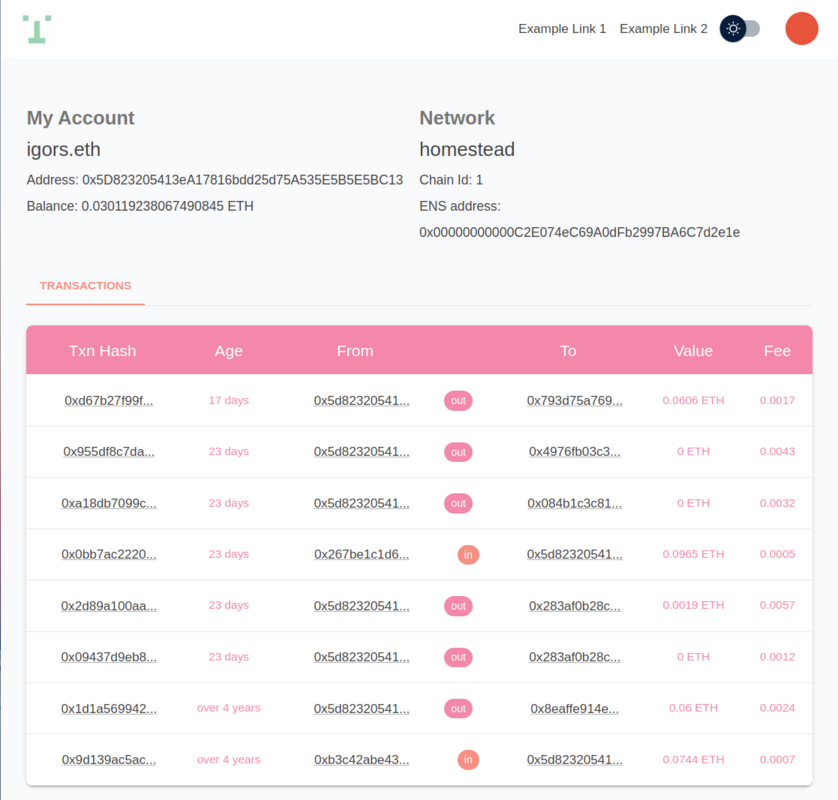
看看你的网站会是什么样
浏览真实页面截图,比较内容排版与手机效果。点击下方缩略图切换,放大查看整页细节。
目前有 1 张原始预览,可打开完整图片查看设计细节。
截图用于了解视觉与布局,交互效果请以实际项目为准。
采集于 2026-10-04查看来源
值得关注的模板亮点
从已有项目资料中,快速了解它的特点。
提供从 Etherscan 获取用户最新交易的 API 端点
通过 config.ts 与 .env 文件分别配置前端网络参数与 API 密钥
使用 redux-toolkit 管理状态,基于 ethers.js 的 Web3Provider 进行链上交互
提供 connect、connectTo、disconnect 与 wallet 等 Web3 hook 便捷方法
使用 Material-UI 进行样式定制,支持 light 与 dark 默认主题
模板详细介绍
这是一个面向去中心化应用前端的启动模板,使用 Next.js、React、TypeScript 与 Material-UI 构建界面,并通过 web3modal 提供钱包连接能力。README 说明其定位是作为新项目的样板代码、教学资源,以及便于自定义的灵活起点。
在功能层面,模板支持 MetaMask、Coinbase Wallet、Wallet Connect 等 EIP-1193 提供者的钱包连接,并缓存当前已连接钱包;同时提供从 Etherscan(或同类服务)获取用户最新交易的 API 端点。状态管理使用 redux-toolkit,链上交互基于 ethers.js 的 Web3Provider。
配置分为两部分:API 侧通过 .env.local 与 .env.production 设置应用名称、Etherscan API Key 与端点地址;前端侧通过根目录 config.ts 设置 Etherscan 基础链接、网络代币符号、默认网络 ID、应用名称与默认主题(light/dark)。README 附有常用链 ID 对照表,并说明 connect 与 connectTo 两个 hook 方法的区别:前者连接任意链,后者会要求用户切换或添加指定网络。
需要留意的是,README 中样式定制章节标注为 TDB,未给出具体修改位置;克隆命令示例指向的是 dao-app 仓库地址,与当前仓库名不一致。模板按 MIT 许可发布,但演示图片、字体、图标等第三方素材需单独核对许可,域名、托管等外部服务也可能产生费用。
Next.jsReact启动器
适合你的项目吗?
适用场景
- 作为新去中心化应用前端项目的样板代码快速起步
- 用于学习 Next.js、React 与 Web3 库如何组合使用
- 搭建带钱包连接与交易记录展示的 dApp 界面原型
- 作为教学或演示用途的 Web3 前端示例
适合人群
- 需要 Web3 前端启动模板的开发者
- 希望了解钱包连接与 Etherscan 接口集成方式的团队
- 使用 Next.js、React 与 TypeScript 技术栈的前端项目
- 需要可自定义网络与主题配置的 dApp 项目
上手与定制指南
结合仓库当前版本的说明,按下面的资料检查内容、配置与运行要求。
- 1
克隆仓库后执行 cp env.local.example .env.local 准备环境变量
- 2
在 .env 文件中填写 APP_NAME、ETHERSCAN_API_KEY 与 ETHERSCAN_API_ENDPOINT
- 3
在根目录 config.ts 中设置默认网络 ID、代币符号、应用名称与主题
- 4
执行 npm install 安装依赖,npm run dev 启动开发服务器,默认运行在 http://localhost:3000
- 5
生产构建使用 npm run build 与 npm run start,README 提到可部署到 Vercel
授权与来源资料
使用条件与限制
免费使用 · 保留许可声明本次收录的是公开仓库中采用 MIT 许可的免费版本;免费范围为该版本代码,不代表外部服务或第三方素材免费。
使用时需要遵守
- 允许免费使用、修改、商用和分发该版本代码。
- 分发代码副本或实质性部分时,保留原作者版权声明和完整 MIT 许可声明。
- 代码按现状提供;担保与责任限制以原许可证及适用法律为准。
额外费用与待核对事项
- 使用交易查询功能需自行申请 Etherscan(或同类服务)API Key,并在 .env 文件中配置 ETHERSCAN_API_KEY,否则无法获取用户最新交易数据。
- 需按 Etherscan 文档配置 ETHERSCAN_API_ENDPOINT 端点地址;若改用 Polygon 等 L2 链,需替换为对应区块浏览器的端点,外部服务可用性与配额受其条款约束。
- README 推荐使用 Vercel 部署,属于第三方托管服务,可能产生费用或受其服务条款限制,并非模板本身的免费代码授权范围。
- 演示图片、字体、图标及其他第三方素材需按各自许可核对,不能仅凭代码的 MIT 许可判断。
- 域名、托管、数据库、支付或 AI 等外部服务可能另外收费。
查看原文依据
Permission is hereby granted, free of charge
许可证原文
To request information directly from `etherscan` (or etherscan like service) you need an API key.
README 原文
Check the documentation for an endpoint [here](https://docs.etherscan.io/getting-started/endpoint-urls).
README 原文
https://github.com/eth-salt-lake/web3-starter-kit/blob/main/LICENSEhttps://github.com/eth-salt-lake/web3-starter-kit/blob/main/README.mdThe easiest way to deploy your Next.js app is to use the [Vercel Platform]
README 原文
DeepSeek 根据仓库许可证和 README 整理 ·2026-10-04。结果仅覆盖已读取资料,依赖、图片、字体及后续条款变更以各自原文为准。
项目核对记录与介绍依据
模板资料
- 来源平台
- GitHub
- 资料与维护参考分
- 资料一般 · 65 / 100
- 技术栈
- Next.js · React
- 网站类型
- 启动器
这个分数如何计算
本站按许可资料(最高30分)、演示链接(12分)、预览图(10分)、Star数(15分)、记录的维护时间(15分)、描述完整度(8分)、功能记录(5分)和分类资料(5分)计算。它不是代码、安全或性能测试,也不是 Google 评分;有链接不代表已实测可用。
这个项目需要核对什么
- 记录的仓库更新时间
- 2022-12-03
- 截图检查日期
- 2026-10-04
目前没有记录演示链接。请依据仓库说明在本地评估;仅凭截图无法确认交互行为。
目录记录的主要技术栈是 Next.js。请通过依赖清单和锁文件核对实际版本与托管要求。这些说明基于收录资料,不代表代码审计或部署实测。
查看具体选型方法 →介绍的制作与核对状态
介绍由 AI 辅助整理目录与仓库资料。仓库作者不等于这篇介绍的审核者。
审核声明: [email protected] · 2026-10-04
查看当时使用的来源资料
SHA-256: 09baa7b93b6b2d9a79bde4796e0f6f442bb61df4d2691c46bd0aa1c4d3d0ebec
2026-10-04T00:25:02.845Z
来源文件 / 仓库# Web3 Starter Kit
Web3 Starter Kit is flexible production grade **Web3** boilerplate with [Next.js 12](https://nextjs.org/blog/next-12), [React.js](https://reactjs.org/), [Material-UI](https://mui.com/), [Typescript](https://www.typescriptlang.org/) and [web3modal](https://github.com/Web3Modal/web3modal).
It's a user interface for your decentralized application.
Includes wallet connection for most popular javascript [EIP-1193](https://eips.ethereum.org/EIPS/eip-1193) providers:
- [MetaMask](https://metamask.io/)
- [Coinbase Wallet](https://www.coinbase.com/wallet)
- [Wallet Connect](https://walletconnect.com/)
- Retrieval of users **latest transactions** from etherscan
Web3 Starter Kit is meant:
- to be used as **boilerplate** to quickly deploy new project
- to be used as **educational** resource
- to be **flexible** accomodating **easy customization**
# Why
Finding out which web3 libraries work together is still a difficult job. Web3 Started Kit aims to boild down the complexity to simple configuration.
## Preview

# Quick start
## Running locally in development mode
1. `git clone https://github.com/eth-salt-lake/dao-app.git` clones the Web3 Starter Kit repository
2. `cd dao-app && git checkout main` checks out the desired branch
3. `cp env.local.example .env.local` prepares environment variables for development
4. `npm install` installs dependencies
5. `npm run dev` runs development server
That's it. The project should run on your local computer `http://localhost:3000`
# Features
- based om latest [Next.js](https://nextjs.org/)
- styling customization with [material design]((https://mui.com/))
- Wallet connections and current connected wallet caching with [web3-react (beta)](https://github.com/NoahZinsmeister/web3-react)
- state management with [redux-toolkit](https://github.com/reduxjs/redux-toolkit)
- [dotenv](https://github.com/motdotla/dotenv), and more...
# Guides
The Web3 app has 2 configurations.
1. One for the API, which is used to communicate with etherscan to retrieve users latest transactions. (environment files: `.env.local`, `.env.production`)
2. One for the Frontend part which is used to configure to which wallets and which blockchains you'd like your users to interact with. (file: `config.ts`)
## API Configuration
In development create in the root folder file `.env.local`, for production `.env.production`:
```
.env.local
.env.production
```
Contents:
```
APP_NAME=My Web3 Project Name
ETHERSCAN_API_KEY=mykey
ETHERSCAN_API_ENDPOINT=https://api-testnet.polygonscan.com/api
```
`APP_NAME`
Custom app name
`ETHERSCAN_API_KEY`
To request information directly from `etherscan` (or etherscan like service) you need an API key. For example for [etherscan.io](https://etherscan.io) go to: `https://etherscan.io/myapikey` and create one.
`ETHERSCAN_API_ENDPOINT`
Check the documentation for an endpoint [here](https://docs.etherscan.io/getting-started/endpoint-urls). Or if you'd like to connect to L2 chain like [Polygon](https://polygon.technology/) then check the endpoints [here](https://docs.polygonscan.com/getting-started/endpoint-urls).
## Frontend Configuration
```
root
|_config.ts
```
Contents:
```
export const ETHERSCAN_URL = 'https://etherscan.io/';
export const NETWORK_COIN_SYMBOL = 'ETH';
export const DEFAULT_NETWORK_ID = 1; // check folder web/chain.ts for more network IDs
export const APP_NAME = "Web3 Started Kit"
export const DEFAULT_APP_THEME = 'light'; // light, dark
```
`ETHERSCAN_URL`
Base URl from the transactions table to etherscan for more details.
`NETWORK_COIN_SYMBOL`
Display value for selected chains currency
`APP_NAME`
Custom app name.
`DEFAULT_APP_THEME`
`light` or `dark`.
`DEFAULT_NETWORK_ID`
The selected network Web3 will communicate with.
Helper chain table:
| Chain ID | Network |
|----------|---------|
| 1 | Mainnet |
| 3 | Ropsten |
| 4 | Rinkeby |
| 5 | Goerli |
| 10 | Optimism |
| 42 | Kovan |
| 56 | BSC |
| 137 | Polygon |
| 42161 | Arbitrum One |
| 43114 | Avalanche |
| 80001 | Polygoin Mumbai |
## Usage - Web3 convenience methods
TO access Web3 method use our `web3 hook`:
```javascript
const { connect, connectTo, disconnect, wallet } = useWeb3();
```
### `connect` and `connectTo`
The `connect` and `connectTo` are shortcuts to instantiate [web3modal](https://github.com/Web3Modal/web3modal) connection wizard. Most of the times this will be users first needed step to interact with your dApp.
`connect` allows user to connect to any blockchain.
`connecTo` will ask user to switch or add the blockchain network you'd like user to connect to. connectTo required 1 parameter which you can find in `blockchains.ts` file.
For further customization of web3modal please visit [web3modal GitHub](https://github.com/Web3Modal/web3modal#usage).
### `disconnect`
Disconnects users wallet.
### `wallet`
wallet holds connected wallets information. The structure is defined in folder `types`:
```javascript
export interface MyWallet {
address?: string;
ensName?: string;
avatar?: string;
}
```
### `provider`
Web3 Starter Kit is built on top of [ethers.js v5](https://docs.ethers.io/v5/). Ethers.js allows various interactions with Blockchains, such as sending transactions and interacting with your deployed contracts.
Provider is an instance of `ethers.providers.Web3Provider` with an established connection to desired blockchain (see `Frontend configuration`).
For full documentation on ethers.js please visit their [documentation page](https://docs.ethers.io/v5/api/).
## API Endpoints
Endpoint for getting users latest transactions.
```
|-- pages/api/transactions/[walletaddress].ts
```
## Styling with Material Design
TDB (Where to modify it)
##
---
# Building and deploying in production
If you wanted to run this site in production, you should install modules then build the site with `npm run build` and run it with `npm run start`:
```
npm install
npm run build
npm run start
```
## Deploy on Vercel
The easiest way to deploy your Next.js app is to use the [Vercel Platform](https://vercel.com/new?utm_medium=default-template&filter=next.js&utm_source=create-next-app&utm_campaign=create-next-app-readme) from the creators of Next.js.
Check out our [Next.js deployment documentation](https://nextjs.org/docs/deployment) for more details.
看看同类模板
对比同技术栈与用途的模板,找到更适合的视觉与内容结构。

ai-website-cloner-template
Clone any website with one command using AI coding agents
Next.js · 启动器

Next.js SaaS Starter
Next.js SaaS Starter 是 Next.js 官方维护的 SaaS 起点模板,定位介于学习资源和可直接部署的脚手架之间。
Next.js · SaaS

Next.js Commerce
Next.js Commerce 是 Vercel 团队维护的电商启动模板,基于 Next.js App Router 构建,采用服务端渲染、React Server Components、Server Actions …
Next.js · 电商

Next-js-Boilerplate
Next-js-Boilerplate 是一个面向 Next.js 16、Tailwind CSS 4 和 TypeScript 的启动器,核心定位是开发者体验优先。
Next.js · 启动器

tailwind-nextjs-starter-blog
tailwind-nextjs-starter-blog 是一个面向个人技术博客的 Next.js 与 Tailwind CSS 启动模板,其 v2 版本基于 App Router 与 React Server Comp…
Next.js · 博客

next-forge
Production-grade Turborepo template for Next.js apps.
Next.js · 启动器