基于 Laravel 构建,并集成 Voyager、TailwindCSS 等技术
Laravel启动器
Laravel-wave-starter-project — Laravel 启动器模板
作者 EvanDaley
Wave 是一个基于 Laravel 的 SaaS 启动套件,提供认证、用户资料、订阅、博客、API 和 Voyager 管理后台等模块,README 给出了克隆仓库、配置 MySQL、安装 Composer 依赖并运行迁移与种子数据的安装步骤。
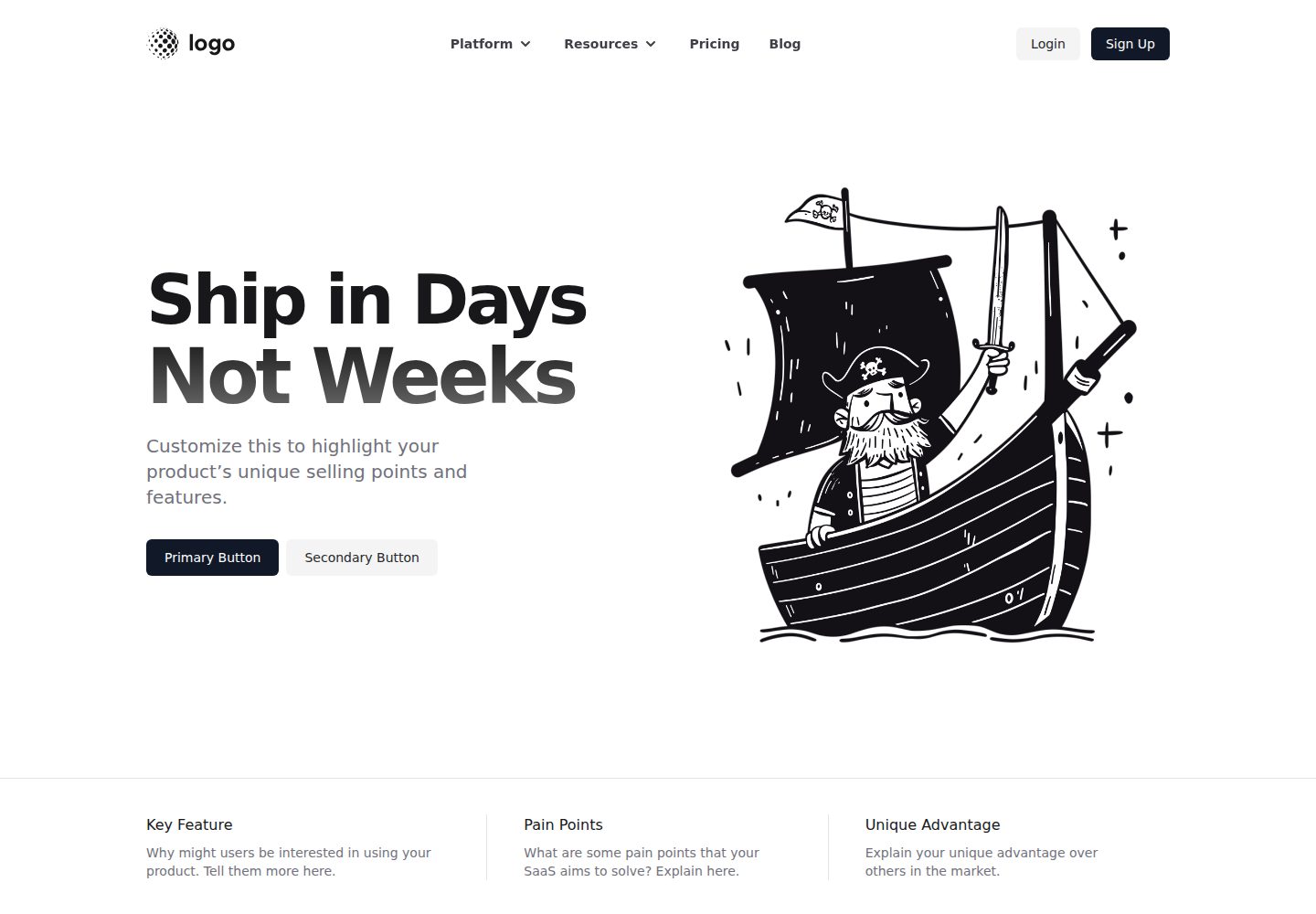
看看你的网站会是什么样
浏览真实页面截图,比较内容排版与手机效果。点击下方缩略图切换,放大查看整页细节。
全部页面与视图 3
截图用于了解视觉与布局,交互效果请以实际项目为准。
采集于 2026-10-13查看来源
值得关注的模板亮点
从已有项目资料中,快速了解它的特点。
README 列出的功能包括认证、用户资料、用户模拟登录、订阅与订阅计划、用户角色、通知、公告、博客、API、Voyager 管理后台和可自定义主题
安装流程为四步:创建 MySQL 数据库、配置 .env、运行 composer install、执行迁移与种子数据
README 提供在线演示地址,并给出部署到 DigitalOcean 的按钮
README 提到有配套视频系列,部分视频需要 DevDojo Pro 订阅
模板详细介绍
Wave 是一个 Software as a Service 启动套件,用于搭建 SaaS 应用的基础结构。README 说明它基于 Laravel 构建,并集成 Voyager、TailwindCSS 等技术。
README 列出的功能包括:认证、用户资料、用户模拟登录、订阅、订阅计划、用户角色、通知、公告、可用的博客、开箱即用的 API、Voyager 管理后台以及可自定义主题。这些功能均指向官方文档页面,README 本身未展开具体实现细节。
安装方面,README 要求先克隆或下载仓库,然后按四步操作:创建 MySQL 数据库;复制 .env.example 为 .env 并填写 DB_DATABASE、DB_USERNAME、DB_PASSWORD 以及 APP_URL;运行 composer install;执行 php artisan migrate 和 php artisan db:seed。README 还提到可通过 DigitalOcean 按钮部署实例,并提供在线演示地址。
README 未说明 PHP 或 Laravel 的具体版本要求,也未说明生产环境部署、安全配置或性能相关事项。
Laravel启动器
适合你的项目吗?
适用场景
- 需要基于 Laravel 搭建包含用户认证与订阅模块的 SaaS 应用基础结构
- 希望通过 Voyager 管理后台管理应用数据
- 需要博客、通知、公告等常见 SaaS 配套功能作为起点
- 希望参考 README 中的步骤在本地或 DigitalOcean 上运行一个 Wave 实例
适合人群
- 使用 Laravel 并希望以现成启动套件开始 SaaS 项目的开发者
- 需要 MySQL 数据库并熟悉 Composer 与 Artisan 命令的开发者
- 希望借助 Voyager 管理后台进行内容与用户管理的项目
上手与定制指南
结合仓库当前版本的说明,按下面的资料检查内容、配置与运行要求。
- 1
克隆或下载仓库后,需创建一个 MySQL 数据库并保存凭据
- 2
复制 .env.example 为 .env,填写 DB_DATABASE、DB_USERNAME、DB_PASSWORD,并将 APP_URL 改为应用地址
- 3
运行 composer install 安装依赖
- 4
依次运行 php artisan migrate 和 php artisan db:seed 完成数据库迁移与种子数据
- 5
README 未说明 PHP 或 Laravel 的具体版本要求,也未提供生产环境部署与安全配置说明
授权与来源资料
使用条件与限制
免费使用 · 保留许可声明本次收录的是公开仓库中采用 MIT 许可的免费版本;免费范围为该版本代码,不代表外部服务或第三方素材免费。
使用时需要遵守
- 允许免费使用、修改、商用和分发该版本代码。
- 分发代码副本或实质性部分时,保留原作者版权声明和完整 MIT 许可声明。
- 代码按现状提供;担保与责任限制以原许可证及适用法律为准。
额外费用与待核对事项
- 演示图片、字体、图标及其他第三方素材需按各自许可核对,不能仅凭代码的 MIT 许可判断。
- 域名、托管、数据库、支付或 AI 等外部服务可能另外收费。
- 配套视频系列仅前几集免费,其余视频需要 DevDojo Pro 订阅才能观看;订阅为可选付费内容,不影响代码本身的使用。
查看原文依据
Permission is hereby granted, free of charge
许可证原文
https://github.com/EvanDaley/Laravel-wave-starter-project/blob/main/LICENSE.mdhttps://github.com/EvanDaley/Laravel-wave-starter-project/blob/main/README.mdWe've also got a full video series on how you can setup, build, and configure Wave. 🍿 You can watch first few videos for free, and additional videos will require a [DevDojo Pro](https://devdojo.com/pro) subscription. By subscribing to a [DevDojo Pro](https://devdojo.com/pro) subscription you will also be supporting the ongoing development of this project. It's a win win! 🙌
README 原文
DeepSeek 根据仓库许可证和 README 整理 ·2026-10-13。结果仅覆盖已读取资料,依赖、图片、字体及后续条款变更以各自原文为准。
项目核对记录与介绍依据
模板资料
- 来源平台
- GitHub
- 资料与维护参考分
- 资料一般 · 65 / 100
- 技术栈
- Laravel
- 网站类型
- 启动器
这个分数如何计算
本站按许可资料(最高30分)、演示链接(12分)、预览图(10分)、Star数(15分)、记录的维护时间(15分)、描述完整度(8分)、功能记录(5分)和分类资料(5分)计算。它不是代码、安全或性能测试,也不是 Google 评分;有链接不代表已实测可用。
这个项目需要核对什么
- 记录的仓库更新时间
- 2021-11-02
- 截图检查日期
- 2026-10-13
已收录演示链接。请用你的内容与屏幕尺寸检查;有演示不代表表单、认证或支付已经可用。
目录记录的主要技术栈是 Laravel。请通过依赖清单和锁文件核对实际版本与托管要求。这些说明基于收录资料,不代表代码审计或部署实测。
查看具体选型方法 →介绍的制作与核对状态
介绍由 AI 辅助整理目录与仓库资料。仓库作者不等于这篇介绍的审核者。
审核声明: codex-user-requested-batch-review-20261015 · 2026-10-15
查看当时使用的来源资料
SHA-256: b75e8737d6950d5c5c7571f15a657567d5d8adfb02c8e4ae15ae904311c21704
2026-10-13T00:42:46.751Z
来源文件 / 仓库<p align="center"><a href="https://devdojo.com/wave" target="_blank"><img src="https://cdn.devdojo.com/assets/img/github-wave-logo.svg" width="240"></a></p> <p align="center"><a href="https://www.producthunt.com/posts/wave-2-0" target="_blank"><img src="https://cdn.devdojo.com/images/april2021/upvote-product-hunt-img.png" height="auto" width="auto"></a></p> ## Introduction [Wave](https://devdojo.com/wave) is a Software as a Service Starter Kit that can help you build your next great idea 💰. Wave is built with [Laravel](https://laravel.com), [Voyager](https://voyager.devdojo.com), [TailwindCSS](https://tailwindcss.com), and a few other awesome technologies. Here are some of the awesome features ✨: - [Authentication](https://wave.devdojo.com/docs/features/authentication) - [User Profiles](https://wave.devdojo.com/docs/features/user-profiles) - [User Impersonation](https://wave.devdojo.com/docs/features/user-impersonation) - [Subscriptions](https://wave.devdojo.com/docs/features/billing) - [Subscription Plans](https://wave.devdojo.com/docs/features/subscription-plans) - [User Roles](https://wave.devdojo.com/docs/features/user-roles) - [Notifications](https://wave.devdojo.com/docs/features/notifications) - [Announcements](https://wave.devdojo.com/docs/features/announcements) - [Fully Functional Blog](https://wave.devdojo.com/docs/features/blog) - [Out of the Box API](https://wave.devdojo.com/docs/features/api) - [Voyager Admin](https://wave.devdojo.com/docs/features/admin) - [Customizable Themes](https://wave.devdojo.com/docs/features/themes) ## Demo View a live [demo here](https://wave.devdojo.com), or deploy your own instance to DigitalOcean, by clicking the button below. <a href="https://cloud.digitalocean.com/apps/new?repo=https://github.com/thedevdojo/wave/tree/main" target="_blank"><img src="https://www.deploytodo.com/do-btn-blue.svg" width="240" alt="Deploy to DO"></a> ## Installation To install Wave, you'll want to clone or download this repo: ``` git clone https://github.com/thedevdojo/wave.git project_name ``` Next, we can install Wave with these **4 simple steps**: ### 1. Create a New Database During the installation we need to use a MySQL database. You will need to create a new database and save the credentials for the next step. ### 2. Copy the `.env.example` file We need to specify our Environment variables for our application. You will see a file named `.env.example`, you will need to duplicate that file and rename it to `.env`. Then, open up the `.env` file and update your *DB_DATABASE*, *DB_USERNAME*, and *DB_PASSWORD* in the appropriate fields. You will also want to update the *APP_URL* to the URL of your application. ```bash APP_URL=http://wave.test DB_CONNECTION=mysql DB_HOST=127.0.0.1 DB_PORT=3306 DB_DATABASE=wave DB_USERNAME=root DB_PASSWORD= ``` ### 3. Add Composer Dependencies Next, we will need to install all our composer dependencies by running the following command: ```php composer install ``` ### 4. Run Migrations and Seeds We need to migrate our database structure into our database, which we can do by running: ```php php artisan migrate ``` <br> Finally, we will need to seed our database with the following command: ```php php artisan db:seed ``` <br> 🎉 And that's it! You will now be able to visit your URL and see your Wave application up and running. ## Watch, Learn, and Build We've also got a full video series on how you can setup, build, and configure Wave. 🍿 You can watch first few videos for free, and additional videos will require a [DevDojo Pro](https://devdojo.com/pro) subscription. By subscribing to a [DevDojo Pro](https://devdojo.com/pro) subscription you will also be supporting the ongoing development of this project. It's a win win! 🙌 [Click here to watch the Wave Video Series](https://devdojo.com/course/wave). ## Documentation Checkout the [official documentation here](https://wave.devdojo.com/docs).
看看同类模板
对比同技术栈与用途的模板,找到更适合的视觉与内容结构。

sage
WordPress starter theme with Laravel Blade components and templates, Tailwind CSS, and block editor support
Laravel · 启动器

wave
Wave - The Software as a Service Starter Kit, designed to help you build the SAAS of your dreams 🚀 💰
Laravel · SaaS

filament-starter
A beautiful starting point for your next TALL stack project using Filament. ⚡
Laravel · 启动器

electrik
Laravel SaaS starter kit: auth, teams, Stripe billing, and Slate 3 — Composer package for Laravel 12
Laravel · SaaS

php-saas
The everything-included starter kit for your next idea
Laravel · SaaS

filament-jetstream
A Laravel starter kit built with Filament inspired by Jetstream.
Laravel · 启动器