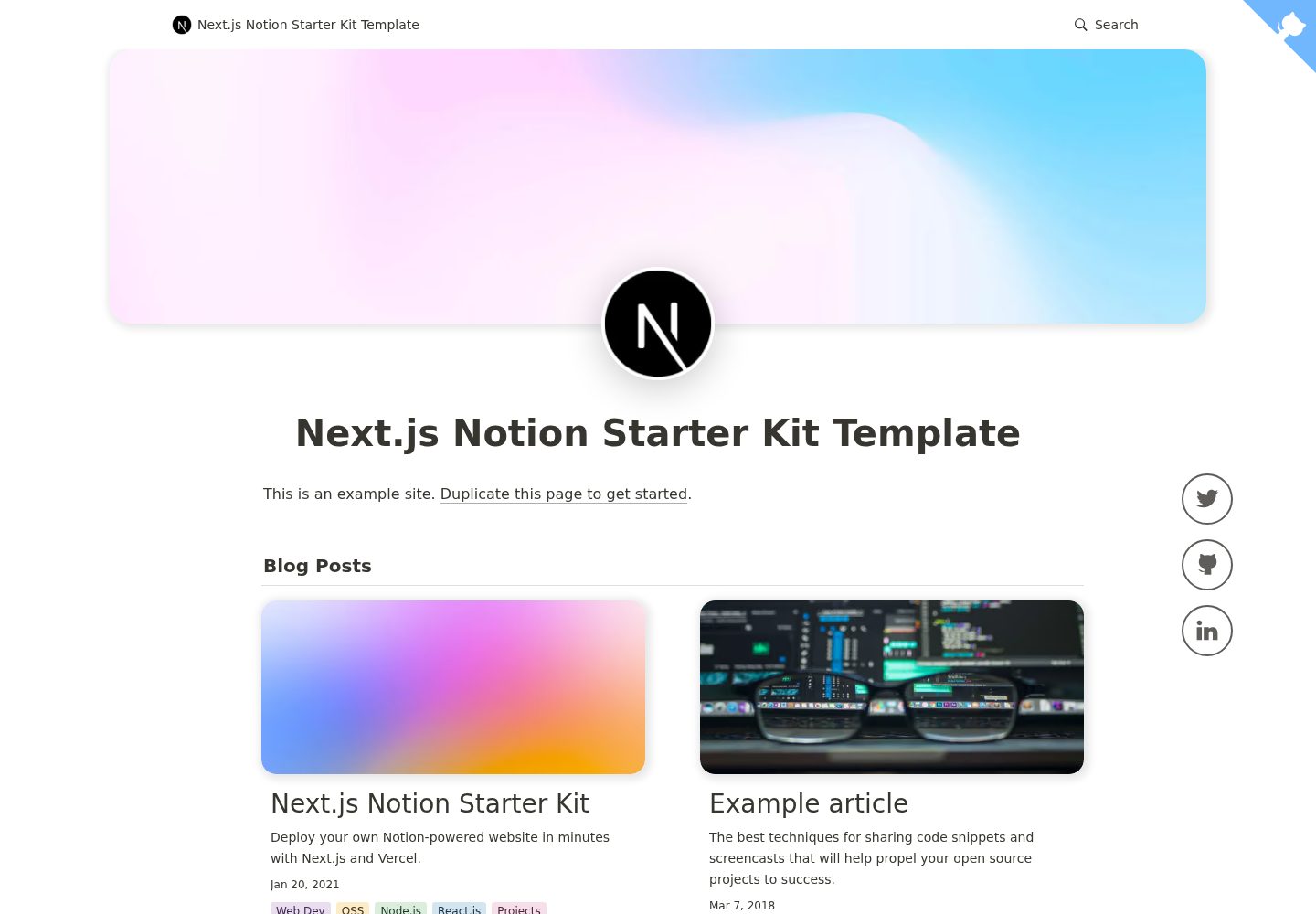
以 Notion 作为 CMS,通过 react-notion-x 渲染页面内容
Next.jsReact博客启动器
nexon — Next.js 博客模板
作者 fky2015
Nexon 是基于 Next.js 与 Notion 的博客模板,由 nextjs-notion-starter-kit 修改而来,侧重改善博客写作与阅读体验。
看看你的网站会是什么样
浏览真实页面截图,比较内容排版与手机效果。点击下方缩略图切换,放大查看整页细节。
全部页面与视图 3
截图用于了解视觉与布局,交互效果请以实际项目为准。
采集于 2026-10-03查看来源
值得关注的模板亮点
从已有项目资料中,快速了解它的特点。
站点配置集中在 site.config.ts,主要填写 rootNotionPageId 即可起步
支持暗色模式、自动目录、CMD+K/CMD+P 快速搜索与响应式布局
自动生成 Open Graph 与社交图片,模板位于 api/social-image.tsx
可选启用图片预览与 Redis 缓存,以及 Fathom、PostHog 分析
由 nextjs-notion-starter-kit 修改而来,强调与上游保持兼容和可迁移
模板详细介绍
Nexon 是一个以 Notion 作为内容源的博客模板,使用 Next.js 构建,并面向 Vercel 部署。它由 transitive-bullshit 的 nextjs-notion-starter-kit 修改而来,目标是与最新版 Starter Kit 保持兼容、让用户能从 Starter Kit 平滑迁移,并加入一些不一定适合合并回 Starter Kit 的博客向自定义功能。README 说明更多信息放在项目 wiki 中。
模板沿用 Starter Kit 的能力:通过 react-notion-x 渲染 Notion 内容,站点配置集中在 site.config.ts,支持暗色模式、自动社交图片、自动目录、CMD+K/CMD+P 快速搜索以及响应式布局。图片使用 next/image 提供,预览图可选启用;如需缓存预览图,可接入外部 Redis。分析功能为可选项,支持 Fathom 与 PostHog。
使用上的限制:需要准备一个公开的 Notion 根页面,并从中提取页面 ID 填入配置;页面标题变化可能影响旧链接,模板未提供旧链接检测方案,只能借助 Next.js 的重定向能力处理。若工作区中存在多个同名(slug 化后相同)页面,构建会报重复路径错误。
Next.js博客启动器
适合你的项目吗?
适用场景
- 用公开的 Notion 页面作为内容源搭建个人博客
- 将已有的 nextjs-notion-starter-kit 站点迁移到 Nexon
- 在 Vercel 上部署以 Notion 为后台的博客或作品集站点
- 需要暗色模式、自动目录与快速搜索的阅读型站点
适合人群
- 习惯在 Notion 中写作、希望直接发布为网站的作者
- 使用 Next.js 并计划部署到 Vercel 的开发者
- 需要从 nextjs-notion-starter-kit 平滑迁移的现有用户
- 接受以公开 Notion 页面作为内容源的个人站点维护者
上手与定制指南
结合仓库当前版本的说明,按下面的资料检查内容、配置与运行要求。
- 1
Fork 或克隆仓库后修改 site.config.ts,核心是设置 rootNotionPageId
- 2
需使用较新的 Node.js,README 建议 16 及以上
- 3
依次执行 npm install、npm run dev 本地测试、npm run deploy 部署到 Vercel
- 4
根 Notion 页面必须为公开状态,并从页面链接中提取末尾的 Notion ID
- 5
启用 Redis 缓存或分析功能时,需在 Vercel 项目中配置对应环境变量
授权与来源资料
使用条件与限制
免费使用 · 保留许可声明本次收录的是公开仓库中采用 MIT 许可的免费版本;免费范围为该版本代码,不代表外部服务或第三方素材免费。
使用时需要遵守
- 允许免费使用、修改、商用和分发该版本代码。
- 分发代码副本或实质性部分时,保留原作者版权声明和完整 MIT 许可声明。
- 代码按现状提供;担保与责任限制以原许可证及适用法律为准。
额外费用与待核对事项
- 使用前提:必须将根 Notion 页面设为公开,并从中提取页面 ID 填入配置,否则站点无法获取内容。
- 限制:工作区中若存在多个 slug 化后同名的页面,构建会因重复 URL 路径而报错,需自行避免重名。
- 限制:修改页面标题后旧链接可能失效,模板不提供旧链接检测,只能借助 Next.js 重定向自行处理。
- 可选外部依赖:若要缓存预览图,需自行搭建外部 Redis 并配置 REDIS_HOST、REDIS_PASSWORD 环境变量。
- 可选外部服务:启用 Fathom 分析需注册该第三方服务并配置 NEXT_PUBLIC_FATHOM_ID 环境变量。
- 可选外部服务:启用 PostHog 分析需注册该第三方服务并配置 NEXT_PUBLIC_POSTHOG_ID 环境变量。
- 部署依赖:默认部署流程面向 Vercel 平台,使用其部署命令与相关环境变量配置。
- 演示图片、字体、图标及其他第三方素材需按各自许可核对,不能仅凭代码的 MIT 许可判断。
- 域名、托管、数据库、支付或 AI 等外部服务可能另外收费。
查看原文依据
Permission is hereby granted, free of charge
许可证原文
Make sure your root Notion page is **public** and then copy the link to your clipboard.
README 原文
if you have multiple pages in your workspace with the same slugified name, the app will throw an error letting you know that there are duplicate URL pathnames.
README 原文
we don't currently provide a solution for detecting old links aside from Next.js's built-in [support for redirects]
README 原文
you'll need to first set up an external [Redis](https://redis.io) data store.
README 原文
To enable, just add a `NEXT_PUBLIC_FATHOM_ID` environment variable, which will only be used in production.
README 原文
To enable, just add a `NEXT_PUBLIC_POSTHOG_ID` environment variable, which will only be used in production.
README 原文
https://github.com/fky2015/nexon/blob/main/licensehttps://github.com/fky2015/nexon/blob/main/readme.md`npm run deploy` to deploy to vercel 💪
README 原文
DeepSeek 根据仓库许可证和 README 整理 ·2026-10-03。结果仅覆盖已读取资料,依赖、图片、字体及后续条款变更以各自原文为准。
项目核对记录与介绍依据
模板资料
- 来源平台
- GitHub
- 资料与维护参考分
- 资料较完整 · 77 / 100
- 技术栈
- Next.js · React
- 网站类型
- 博客 · 启动器
这个分数如何计算
本站按许可资料(最高30分)、演示链接(12分)、预览图(10分)、Star数(15分)、记录的维护时间(15分)、描述完整度(8分)、功能记录(5分)和分类资料(5分)计算。它不是代码、安全或性能测试,也不是 Google 评分;有链接不代表已实测可用。
这个项目需要核对什么
- 记录的仓库更新时间
- 2023-02-13
- 截图检查日期
- 2026-10-03
已收录演示链接。请用你的内容与屏幕尺寸检查;有演示不代表表单、认证或支付已经可用。
目录记录的主要技术栈是 Next.js。请通过依赖清单和锁文件核对实际版本与托管要求。这些说明基于收录资料,不代表代码审计或部署实测。
查看具体选型方法 →介绍的制作与核对状态
介绍由 AI 辅助整理目录与仓库资料。仓库作者不等于这篇介绍的审核者。
已完成服务器许可规则与 AI 来源核对;未经过人工编辑审核。
查看当时使用的来源资料
SHA-256: e11f57c3368f67729ee2385a19fd0a61ea0b3e10f528d4414aaed12266b57c27
2026-10-03T05:49:07.970Z
来源文件 / 仓库<p align="center">
<a href="https://nexon-demo.vercel.app/">
<img alt="Example article page" src="https://s2.loli.net/2022/04/10/2lCV7ijT9J8yWGm.png" width="689">
</a>
</p>
Nexon is a modified version of [Starter Kit][startkit] with a special focus on better blogging experience.
The Goals of Nexon:
- Be compatible with latest [Starter Kit][startkit].
- Make sure users can seamlessly migrate from Starter Kit to Nexon.
- Add custom features (to bring a better blogging experience) that may not be suitable to merge into [Starter Kit][startkit].
More information is available on [wiki](https://github.com/fky2015/nexon/wiki).
(Down below is the [Starter Kit's readme][startkit]. I'm leaving it as is. All credit goes to [@transitive-bullshit](https://github.com/transitive-bullshit/))
**You are also encouraged to use the [Starter Kit][startkit]. It's a well-developed project!**
[startkit]: https://github.com/transitive-bullshit/nextjs-notion-starter-kit
---
<p align="center">
<a href="https://transitivebullsh.it/nextjs-notion-starter-kit">
<img alt="Example article page" src="https://user-images.githubusercontent.com/552829/160132094-12875e09-41ec-450a-80fc-ae8cd488129d.jpg" width="689">
</a>
</p>
# Next.js Notion Starter Kit
> The perfect starter kit for building websites with Next.js and Notion.
[](https://github.com/transitive-bullshit/nextjs-notion-starter-kit/actions/workflows/build.yml) [](https://prettier.io)
## Intro
This repo is what I use to power my personal blog and portfolio site [transitivebullsh.it](https://transitivebullsh.it).
It uses Notion as a CMS, [react-notion-x](https://github.com/NotionX/react-notion-x), [Next.js](https://nextjs.org/), and [Vercel](https://vercel.com).
## Features
- Setup only takes a few minutes ([single config file](./site.config.ts)) 💪
- Robust support for Notion content via [react-notion-x](https://github.com/NotionX/react-notion-x)
- Built using Next.js, TS, and React
- Excellent page speeds
- Smooth image previews
- Automatic social images
- Automatic pretty URLs
- Automatic table of contents
- Full support for dark mode
- Quick search via CMD+K / CMD+P
- Responsive for different devices
- Optimized for Next.js and Vercel
## Demos
- [Default demo](https://nextjs-notion-starter-kit.transitivebullsh.it) - Deployed from the `main` branch
- [My site](https://transitivebullsh.it) - Deployed from the `transitive-bullshit` branch
## Setup
**All config is defined in [site.config.ts](./site.config.ts).**
This project requires a recent version of Node.js (we recommend >= 16).
1. Fork / clone this repo
2. Change a few values in [site.config.ts](./site.config.ts)
3. `npm install`
4. `npm run dev` to test locally
5. `npm run deploy` to deploy to vercel 💪
I tried to make configuration as easy as possible — All you really need to do to get started is edit `rootNotionPageId`.
We recommend duplicating the [default page](https://notion.so/7875426197cf461698809def95960ebf) as a starting point, but you can use any public notion page you want.
Make sure your root Notion page is **public** and then copy the link to your clipboard. Extract the last part of the URL that looks like `7875426197cf461698809def95960ebf`, which is your page's Notion ID.
In order to find your Notion workspace ID (optional), just load any of your site's pages into your browser and open up the developer console. There will be a global variable that you can access called `block` which is the Notion data for the current page. If you enter `block.space_id`, it will print out your page's workspace ID.
I recommend setting up a collection on your home page that contains all of your articles / projects / content. There are no structural constraints on your Notion workspace, however, so feel free to add content as you normally would in Notion.
## URL Paths
The app defaults to slightly different URL paths in dev vs prod (though pasting any dev pathname into prod will work and vice-versa).
In development, it will use `/nextjs-notion-blog-d1b5dcf8b9ff425b8aef5ce6f0730202` which is a slugified version of the page's title suffixed with its Notion ID. I've found that it's really useful to always have the Notion Page ID front and center during local development.
In production, it will use `/nextjs-notion-blog` which is a bit nicer as it gets rid of the extra ID clutter.
The mapping of Notion ID to slugified page titles is done automatically as part of the build process. Just keep in mind that if you plan on changing page titles over time, you probably want to make sure old links will still work, and we don't currently provide a solution for detecting old links aside from Next.js's built-in [support for redirects](https://nextjs.org/docs/api-reference/next.config.js/redirects).
See [mapPageUrl](./lib/map-page-url.ts) and [getCanonicalPageId](https://github.com/NotionX/react-notion-x/blob/master/packages/notion-utils/src/get-canonical-page-id.ts) for more details.
You can override the default slug generation on a per-page basis by adding a `Slug` text property to your database. Any page which has a `Slug` property will use that as its slug.
NOTE: if you have multiple pages in your workspace with the same slugified name, the app will throw an error letting you know that there are duplicate URL pathnames.
## Preview Images
<p align="center">
<img alt="Example preview image" src="https://user-images.githubusercontent.com/552829/160142320-35343317-aa9e-4710-bcf7-67e5cdec586d.gif" width="458">
</p>
We use [next/image](https://nextjs.org/docs/api-reference/next/image) to serve images efficiently, with preview images optionally generated via [lqip-modern](https://github.com/transitive-bullshit/lqip-modern). This gives us extremely optimized image support for sexy smooth images.
Preview images are **enabled by default**, but they can be slow to generate, so if you want to disable them, set `isPreviewImageSupportEnabled` to `false` in `site.config.ts`.
### Redis
If you want to cache generated preview images to speed up subsequent builds, you'll need to first set up an external [Redis](https://redis.io) data store. To enable redis caching, set `isRedisEnabled` to `true` in `site.config.ts` and then set `REDIS_HOST` and `REDIS_PASSWORD` environment variables to point to your redis instance.
You can do this locally by adding a `.env` file:
```bash
REDIS_HOST='TODO'
REDIS_PASSWORD='TODO'
```
If you're not sure which Redis provider to use, we recommend [Redis Labs](https://redis.com), which provides a free plan.
Note that preview images and redis caching are both optional features. If you’d rather not deal with them, just disable them in your site config.
## Styles
All CSS styles that customize Notion content are located in [styles/notion.css](./styles/notion.css). They mainly target global CSS classes exported by react-notion-x [styles.css](https://github.com/NotionX/react-notion-x/blob/master/packages/react-notion-x/src/styles.css).
Every notion block gets its own unique classname, so you can target individual blocks like this:
```css
.notion-block-260baa77f1e1428b97fb14ac99c7c385 {
display: none;
}
```
## Dark Mode
<p align="center">
<img alt="Light Mode" src="https://transitive-bs.notion.site/image/https%3A%2F%2Fs3-us-west-2.amazonaws.com%2Fsecure.notion-static.com%2F83ea9f0f-4761-4c0b-b53e-1913627975fc%2Ftransitivebullsh.it_-opt.jpg?table=block&id=ed7e8f60-c6d1-449e-840b-5c7762505c44&spaceId=fde5ac74-eea3-4527-8f00-4482710e1af3&width=2000&userId=&cache=v2" width="45%">
<img alt="Dark Mode" src="https://transitive-bs.notion.site/image/https%3A%2F%2Fs3-us-west-2.amazonaws.com%2Fsecure.notion-static.com%2Fc0839d6c-7141-48df-8afd-69b27fed84aa%2Ftransitivebullsh.it__(1)-opt.jpg?table=block&id=23b11fe5-d6df-422d-9674-39cf7f547523&spaceId=fde5ac74-eea3-4527-8f00-4482710e1af3&width=2000&userId=&cache=v2" width="45%">
</p>
Dark mode is fully supported and can be toggled via the sun / moon icon in the footer.
## Automatic Social Images
<p align="center">
<img alt="Example social image" src="https://user-images.githubusercontent.com/552829/162001133-34d4cf24-123a-4569-a540-f683b22830d1.jpeg" width="600">
</p>
All Open Graph and social meta tags are generated from your Notion content, which makes social sharing look professional by default.
Social images are generated automatically using [Vercel OG Image Generation](https://vercel.com/docs/concepts/functions/edge-functions/og-image-generation). You can tweak the default React template for social images by editing [api/social-images.tsx](./pages/api/social-image.tsx).
You can view an example social image live in production [here](https://transitivebullsh.it/api/social-image?id=dfc7f709-ae3e-42c6-9292-f6543d5586f0).
## Automatic Table of Contents
<p align="center">
<img alt="Smooth ToC Scrollspy" src="https://www.notion.so/image/https%3A%2F%2Fs3-us-west-2.amazonaws.com%2Fsecure.notion-static.com%2Fcb2df62d-9028-440b-964b-117711450921%2Ftoc2.gif?table=block&id=d7e9951b-289c-4ff2-8b82-b0a61fe260b1&cache=v2" width="240">
</p>
By default, every article page will have a table of contents displayed as an `aside` on desktop. It uses **scrollspy** logic to automatically update the current section as the user scrolls through your document, and makes it really easy to jump between different sections.
If a page has less than `minTableOfContentsItems` (default 3), the table of contents will be hidden. It is also hidden on the index page and if the browser window is too small.
This table of contents uses the same logic that Notion uses for its built-in Table of Contents block (see [getPageTableOfContents](https://github.com/NotionX/react-notion-x/blob/master/packages/notion-utils/src/get-page-table-of-contents.ts) for the underlying logic).
## Responsive
<p align="center">
<img alt="Mobile article page" src="https://user-images.githubusercontent.com/552829/160132983-c2dd5830-80b3-4a0e-a8f1-abab5dbeed11.jpg" width="300">
</p>
All pages are designed to be responsive across common device sizes.
## Analytics
Analytics are an optional feature that are easy to enable if you want.
### Fathom Analytics
[Fathom](https://usefathom.com/ref/42TFOZ) provides a lightweight alternative to Google Analytics.
To enable, just add a `NEXT_PUBLIC_FATHOM_ID` environment variable, which will only be used in production.
### PostHog Analytics
[PostHog](https://posthog.com/) provides a lightweight, **open source** alternative to Google Analytics.
To enable, just add a `NEXT_PUBLIC_POSTHOG_ID` environment variable, which will only be used in production.
## Environment Variables
If you're using Redis, analytics, or any other feature which requires environment variables, then you'll need to [add them to your Vercel project](https://vercel.com/docs/concepts/projects/environment-variables).
If you want to test your redis builds with GitHub Actions, then you'll need to edit the [default build action](./.github/workflows/build.yml) to add `REDIS_HOST` and `REDIS_PASSWORD`. Here is an [example from my personal branch](https://github.com/transitive-bullshit/nextjs-notion-starter-kit/blob/transitive-bullshit/.github/workflows/build.yml#L17-L21). You'll also need to add these environment variables to your GitHub repo as [repository secrets](https://docs.github.com/en/actions/security-guides/encrypted-secrets).
## Contributing
See the [contribution guide](contributing.md) and join our amazing list of [contributors](https://github.com/transitive-bullshit/nextjs-notion-starter-kit/graphs/contributors)!
## License
MIT © [Travis Fischer](https://transitivebullsh.it)
Support my open source work by <a href="https://twitter.com/transitive_bs">following me on twitter <img src="https://storage.googleapis.com/saasify-assets/twitter-logo.svg" alt="twitter" height="24px" align="center"></a>
看看同类模板
对比同技术栈与用途的模板,找到更适合的视觉与内容结构。

ai-website-cloner-template
Clone any website with one command using AI coding agents
Next.js · 启动器

Next.js SaaS Starter
Next.js SaaS Starter 是 Next.js 官方维护的 SaaS 起点模板,定位介于学习资源和可直接部署的脚手架之间。
Next.js · SaaS

Next.js Commerce
Next.js Commerce 是 Vercel 团队维护的电商启动模板,基于 Next.js App Router 构建,采用服务端渲染、React Server Components、Server Actions …
Next.js · 电商

Next-js-Boilerplate
Next-js-Boilerplate 是一个面向 Next.js 16、Tailwind CSS 4 和 TypeScript 的启动器,核心定位是开发者体验优先。
Next.js · 启动器

tailwind-nextjs-starter-blog
tailwind-nextjs-starter-blog 是一个面向个人技术博客的 Next.js 与 Tailwind CSS 启动模板,其 v2 版本基于 App Router 与 React Server Comp…
Next.js · 博客

next-forge
Production-grade Turborepo template for Next.js apps.
Next.js · 启动器