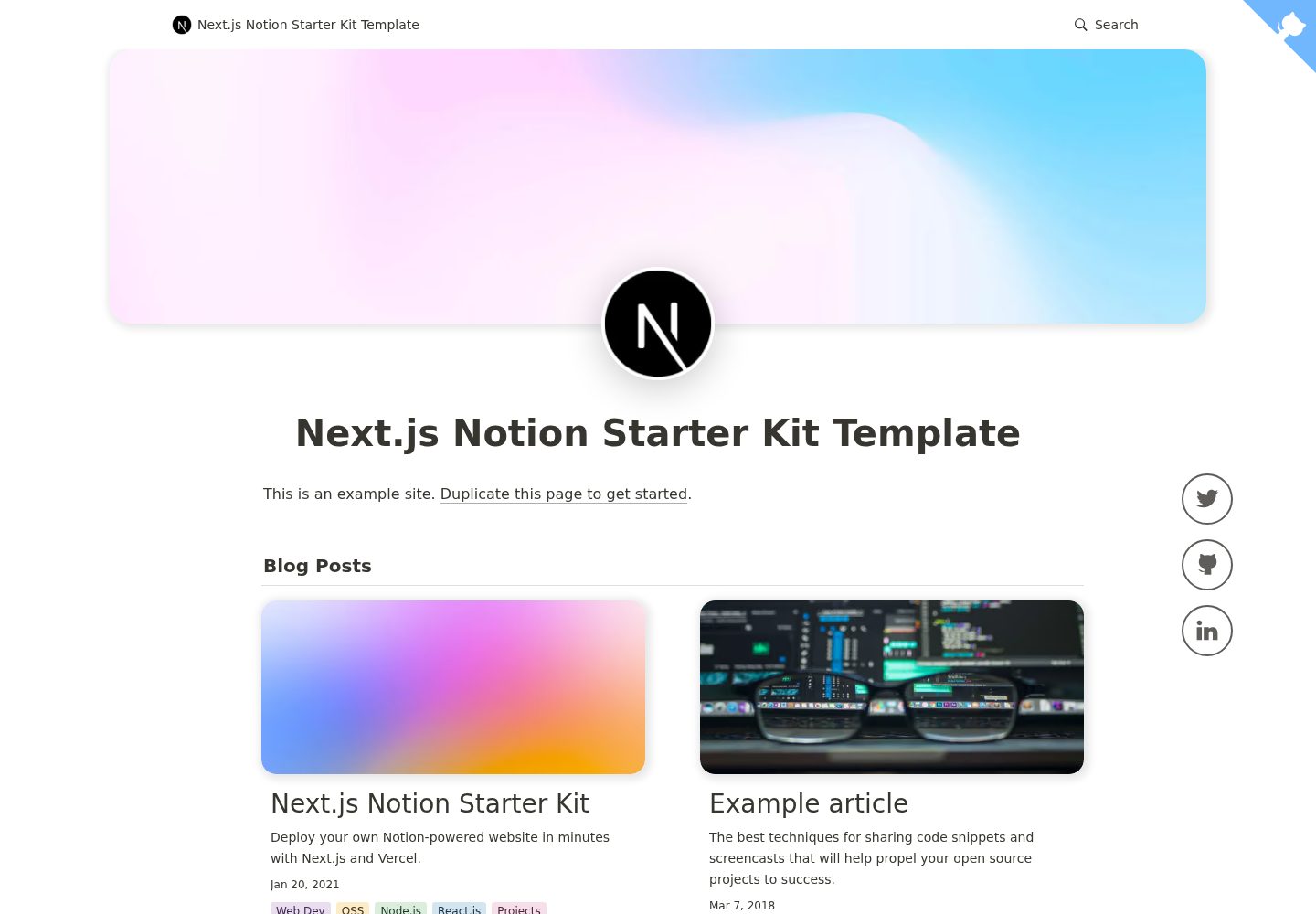
Uses Notion as a CMS, rendering page content via react-notion-x
Next.jsReactBlogStarter
nexon — Next.js Blog Template
By fky2015
Nexon is a blog template based on Next.js and Notion, modified from nextjs-notion-starter-kit, with a focus on improving the blog writing and reading experience.
Explore the design
Compare the page layouts and mobile experience. Open any screenshot for a closer look.
Desktop homepage1 / 3
Desktop captureTop of page
Actual screenshot captured by the server browser.
All pages & views 3
Screenshots show visual appearance; interactive behavior may differ.
Recorded 2026-10-03View source
What stands out
A quick read of the recorded project description.
Site configuration is centralized in site.config.ts; mainly set rootNotionPageId to get started
Supports dark mode, automatic table of contents, CMD+K/CMD+P quick search, and responsive layout
Automatically generates Open Graph and social images; the template is located at api/social-image.tsx
Optionally enables image previews and Redis caching, as well as Fathom and PostHog analytics
Modified from nextjs-notion-starter-kit, emphasizing compatibility with upstream and migratability
Template Details
Nexon is a blog template that uses Notion as its content source, built with Next.js and intended for deployment on Vercel. It is modified from transitive-bullshit's nextjs-notion-starter-kit, with the goals of staying compatible with the latest Starter Kit, allowing users to migrate smoothly from the Starter Kit, and adding some blog-oriented custom features that may not necessarily be suitable for merging back into the Starter Kit. The README states that more information is available in the project wiki.
The template retains the Starter Kit's capabilities: rendering Notion content via react-notion-x, centralizing site configuration in site.config.ts, and supporting dark mode, automatic social images, automatic table of contents, CMD+K/CMD+P quick search, and responsive layout. Images are provided using next/image, with preview images optionally enabled; if you need to cache preview images, you can integrate an external Redis. Analytics is optional, with support for Fathom and PostHog.
Usage limitations: you need to prepare a public Notion root page and extract its page ID to fill in the configuration; changes to page titles may affect old links, and the template does not provide a solution for detecting old links, so you can only handle this via Next.js redirects. If there are multiple pages with the same name (same after slugification) in the workspace, the build will report a duplicate path error.
Next.jsBlogStarter kit
Is it right for your project?
Use Cases
- Build a personal blog using a public Notion page as the content source
- Migrate an existing nextjs-notion-starter-kit site to Nexon
- Deploy a blog or portfolio site with Notion as the backend on Vercel
- Reading-oriented sites that need dark mode, automatic table of contents, and quick search
Suitable For
- Authors who are used to writing in Notion and want to publish directly as a website
- Developers using Next.js and planning to deploy to Vercel
- Existing users who need a smooth migration from nextjs-notion-starter-kit
- Individual site maintainers who accept using a public Notion page as the content source
Getting started & customization
Use these recorded setup notes alongside the repository instructions for your chosen version.
- 1
After forking or cloning the repository, modify site.config.ts; the core step is setting rootNotionPageId
- 2
A relatively recent Node.js is required; the README recommends 16 or above
- 3
Run npm install, npm run dev for local testing, and npm run deploy to deploy to Vercel in sequence
- 4
The root Notion page must be public, and you need to extract the Notion ID from the end of the page link
- 5
When enabling Redis caching or analytics, configure the corresponding environment variables in the Vercel project
License & source material
Usage conditions & limitations
Free to use · keep license noticeThis entry covers the free version under the MIT license in the public repository; the free scope is the code of this version and does not mean that external services or third-party assets are free.
Must comply with when using
- Free use, modification, commercial use, and distribution of this version's code are permitted.
- When distributing copies or substantial portions of the code, retain the original author's copyright notice and the full MIT license notice.
- The code is provided as is; warranties and limitations of liability are governed by the original license and applicable law.
Additional costs & items to verify
- Prerequisite: the root Notion page must be set to public, and its page ID must be extracted and filled into the configuration, otherwise the site cannot fetch content.
- Limitation: if multiple pages in the workspace have the same name after slugification, the build will fail with a duplicate URL path error; you must avoid duplicate names yourself.
- Limitation: after changing a page title, old links may break; the template does not provide old link detection, so you must handle this yourself using Next.js redirects.
- Optional external dependency: to cache preview images, you need to set up an external Redis yourself and configure the REDIS_HOST and REDIS_PASSWORD environment variables.
- Optional external service: enabling Fathom analytics requires registering for that third-party service and configuring the NEXT_PUBLIC_FATHOM_ID environment variable.
- Optional external service: enabling PostHog analytics requires registering for that third-party service and configuring the NEXT_PUBLIC_POSTHOG_ID environment variable.
- Deployment dependency: the default deployment process targets the Vercel platform, using its deployment commands and related environment variable configuration.
- Demo images, fonts, icons, and other third-party assets must be checked against their respective licenses; you cannot judge based solely on the code's MIT license.
- External services such as domains, hosting, databases, payments, or AI may incur additional charges.
View Original Text Basis
Permission is hereby granted, free of charge
Original License Text
Make sure your root Notion page is **public** and then copy the link to your clipboard.
Original README
if you have multiple pages in your workspace with the same slugified name, the app will throw an error letting you know that there are duplicate URL pathnames.
Original README
we don't currently provide a solution for detecting old links aside from Next.js's built-in [support for redirects]
Original README
you'll need to first set up an external [Redis](https://redis.io) data store.
Original README
To enable, just add a `NEXT_PUBLIC_FATHOM_ID` environment variable, which will only be used in production.
Original README
To enable, just add a `NEXT_PUBLIC_POSTHOG_ID` environment variable, which will only be used in production.
Original README
https://github.com/fky2015/nexon/blob/main/licensehttps://github.com/fky2015/nexon/blob/main/readme.md`npm run deploy` to deploy to vercel 💪
Original README
Compiled by DeepSeek based on repository license and README ·2026-10-03. Results only cover the materials read; dependencies, images, fonts, and subsequent term changes are subject to their respective original texts.
Project checks & description sources
Template Information
- Source platforms
- GitHub
- Documentation and maintenance reference score
- More documented · 77 / 100
- Technologies
- Next.js · React
- Website type
- Blog · Starter
How this score is calculated
Our heuristic uses license records (up to 30), a demo link (12), a preview (10), stars (15), recorded maintenance (15), description completeness (8), feature records (5) and classification data (5). It is not a code, security or performance test, or a Google score. A link does not establish tested functionality.
What to verify for this project
- Repository update recorded
- 2023-02-13
- Screenshot last checked
- 2026-10-03
A demo link is listed. Check it with your own content and viewport sizes; its presence does not confirm that forms, authentication or payments work.
The catalog identifies Next.js as the primary stack. Check the actual dependency manifest and lockfile for versions and hosting requirements. These notes use recorded metadata, not a code audit or a deployment test.
Use a selection guide →How this description was prepared
AI-assisted description based on catalog records and repository material. Repository authors are not automatically the reviewers of this description.
Automatically checked against source and license rules; no manual editorial review.
Inspect the recorded source material
SHA-256: e11f57c3368f67729ee2385a19fd0a61ea0b3e10f528d4414aaed12266b57c27
2026-10-03T05:49:07.970Z
Source file / repository<p align="center">
<a href="https://nexon-demo.vercel.app/">
<img alt="Example article page" src="https://s2.loli.net/2022/04/10/2lCV7ijT9J8yWGm.png" width="689">
</a>
</p>
Nexon is a modified version of [Starter Kit][startkit] with a special focus on better blogging experience.
The Goals of Nexon:
- Be compatible with latest [Starter Kit][startkit].
- Make sure users can seamlessly migrate from Starter Kit to Nexon.
- Add custom features (to bring a better blogging experience) that may not be suitable to merge into [Starter Kit][startkit].
More information is available on [wiki](https://github.com/fky2015/nexon/wiki).
(Down below is the [Starter Kit's readme][startkit]. I'm leaving it as is. All credit goes to [@transitive-bullshit](https://github.com/transitive-bullshit/))
**You are also encouraged to use the [Starter Kit][startkit]. It's a well-developed project!**
[startkit]: https://github.com/transitive-bullshit/nextjs-notion-starter-kit
---
<p align="center">
<a href="https://transitivebullsh.it/nextjs-notion-starter-kit">
<img alt="Example article page" src="https://user-images.githubusercontent.com/552829/160132094-12875e09-41ec-450a-80fc-ae8cd488129d.jpg" width="689">
</a>
</p>
# Next.js Notion Starter Kit
> The perfect starter kit for building websites with Next.js and Notion.
[](https://github.com/transitive-bullshit/nextjs-notion-starter-kit/actions/workflows/build.yml) [](https://prettier.io)
## Intro
This repo is what I use to power my personal blog and portfolio site [transitivebullsh.it](https://transitivebullsh.it).
It uses Notion as a CMS, [react-notion-x](https://github.com/NotionX/react-notion-x), [Next.js](https://nextjs.org/), and [Vercel](https://vercel.com).
## Features
- Setup only takes a few minutes ([single config file](./site.config.ts)) 💪
- Robust support for Notion content via [react-notion-x](https://github.com/NotionX/react-notion-x)
- Built using Next.js, TS, and React
- Excellent page speeds
- Smooth image previews
- Automatic social images
- Automatic pretty URLs
- Automatic table of contents
- Full support for dark mode
- Quick search via CMD+K / CMD+P
- Responsive for different devices
- Optimized for Next.js and Vercel
## Demos
- [Default demo](https://nextjs-notion-starter-kit.transitivebullsh.it) - Deployed from the `main` branch
- [My site](https://transitivebullsh.it) - Deployed from the `transitive-bullshit` branch
## Setup
**All config is defined in [site.config.ts](./site.config.ts).**
This project requires a recent version of Node.js (we recommend >= 16).
1. Fork / clone this repo
2. Change a few values in [site.config.ts](./site.config.ts)
3. `npm install`
4. `npm run dev` to test locally
5. `npm run deploy` to deploy to vercel 💪
I tried to make configuration as easy as possible — All you really need to do to get started is edit `rootNotionPageId`.
We recommend duplicating the [default page](https://notion.so/7875426197cf461698809def95960ebf) as a starting point, but you can use any public notion page you want.
Make sure your root Notion page is **public** and then copy the link to your clipboard. Extract the last part of the URL that looks like `7875426197cf461698809def95960ebf`, which is your page's Notion ID.
In order to find your Notion workspace ID (optional), just load any of your site's pages into your browser and open up the developer console. There will be a global variable that you can access called `block` which is the Notion data for the current page. If you enter `block.space_id`, it will print out your page's workspace ID.
I recommend setting up a collection on your home page that contains all of your articles / projects / content. There are no structural constraints on your Notion workspace, however, so feel free to add content as you normally would in Notion.
## URL Paths
The app defaults to slightly different URL paths in dev vs prod (though pasting any dev pathname into prod will work and vice-versa).
In development, it will use `/nextjs-notion-blog-d1b5dcf8b9ff425b8aef5ce6f0730202` which is a slugified version of the page's title suffixed with its Notion ID. I've found that it's really useful to always have the Notion Page ID front and center during local development.
In production, it will use `/nextjs-notion-blog` which is a bit nicer as it gets rid of the extra ID clutter.
The mapping of Notion ID to slugified page titles is done automatically as part of the build process. Just keep in mind that if you plan on changing page titles over time, you probably want to make sure old links will still work, and we don't currently provide a solution for detecting old links aside from Next.js's built-in [support for redirects](https://nextjs.org/docs/api-reference/next.config.js/redirects).
See [mapPageUrl](./lib/map-page-url.ts) and [getCanonicalPageId](https://github.com/NotionX/react-notion-x/blob/master/packages/notion-utils/src/get-canonical-page-id.ts) for more details.
You can override the default slug generation on a per-page basis by adding a `Slug` text property to your database. Any page which has a `Slug` property will use that as its slug.
NOTE: if you have multiple pages in your workspace with the same slugified name, the app will throw an error letting you know that there are duplicate URL pathnames.
## Preview Images
<p align="center">
<img alt="Example preview image" src="https://user-images.githubusercontent.com/552829/160142320-35343317-aa9e-4710-bcf7-67e5cdec586d.gif" width="458">
</p>
We use [next/image](https://nextjs.org/docs/api-reference/next/image) to serve images efficiently, with preview images optionally generated via [lqip-modern](https://github.com/transitive-bullshit/lqip-modern). This gives us extremely optimized image support for sexy smooth images.
Preview images are **enabled by default**, but they can be slow to generate, so if you want to disable them, set `isPreviewImageSupportEnabled` to `false` in `site.config.ts`.
### Redis
If you want to cache generated preview images to speed up subsequent builds, you'll need to first set up an external [Redis](https://redis.io) data store. To enable redis caching, set `isRedisEnabled` to `true` in `site.config.ts` and then set `REDIS_HOST` and `REDIS_PASSWORD` environment variables to point to your redis instance.
You can do this locally by adding a `.env` file:
```bash
REDIS_HOST='TODO'
REDIS_PASSWORD='TODO'
```
If you're not sure which Redis provider to use, we recommend [Redis Labs](https://redis.com), which provides a free plan.
Note that preview images and redis caching are both optional features. If you’d rather not deal with them, just disable them in your site config.
## Styles
All CSS styles that customize Notion content are located in [styles/notion.css](./styles/notion.css). They mainly target global CSS classes exported by react-notion-x [styles.css](https://github.com/NotionX/react-notion-x/blob/master/packages/react-notion-x/src/styles.css).
Every notion block gets its own unique classname, so you can target individual blocks like this:
```css
.notion-block-260baa77f1e1428b97fb14ac99c7c385 {
display: none;
}
```
## Dark Mode
<p align="center">
<img alt="Light Mode" src="https://transitive-bs.notion.site/image/https%3A%2F%2Fs3-us-west-2.amazonaws.com%2Fsecure.notion-static.com%2F83ea9f0f-4761-4c0b-b53e-1913627975fc%2Ftransitivebullsh.it_-opt.jpg?table=block&id=ed7e8f60-c6d1-449e-840b-5c7762505c44&spaceId=fde5ac74-eea3-4527-8f00-4482710e1af3&width=2000&userId=&cache=v2" width="45%">
<img alt="Dark Mode" src="https://transitive-bs.notion.site/image/https%3A%2F%2Fs3-us-west-2.amazonaws.com%2Fsecure.notion-static.com%2Fc0839d6c-7141-48df-8afd-69b27fed84aa%2Ftransitivebullsh.it__(1)-opt.jpg?table=block&id=23b11fe5-d6df-422d-9674-39cf7f547523&spaceId=fde5ac74-eea3-4527-8f00-4482710e1af3&width=2000&userId=&cache=v2" width="45%">
</p>
Dark mode is fully supported and can be toggled via the sun / moon icon in the footer.
## Automatic Social Images
<p align="center">
<img alt="Example social image" src="https://user-images.githubusercontent.com/552829/162001133-34d4cf24-123a-4569-a540-f683b22830d1.jpeg" width="600">
</p>
All Open Graph and social meta tags are generated from your Notion content, which makes social sharing look professional by default.
Social images are generated automatically using [Vercel OG Image Generation](https://vercel.com/docs/concepts/functions/edge-functions/og-image-generation). You can tweak the default React template for social images by editing [api/social-images.tsx](./pages/api/social-image.tsx).
You can view an example social image live in production [here](https://transitivebullsh.it/api/social-image?id=dfc7f709-ae3e-42c6-9292-f6543d5586f0).
## Automatic Table of Contents
<p align="center">
<img alt="Smooth ToC Scrollspy" src="https://www.notion.so/image/https%3A%2F%2Fs3-us-west-2.amazonaws.com%2Fsecure.notion-static.com%2Fcb2df62d-9028-440b-964b-117711450921%2Ftoc2.gif?table=block&id=d7e9951b-289c-4ff2-8b82-b0a61fe260b1&cache=v2" width="240">
</p>
By default, every article page will have a table of contents displayed as an `aside` on desktop. It uses **scrollspy** logic to automatically update the current section as the user scrolls through your document, and makes it really easy to jump between different sections.
If a page has less than `minTableOfContentsItems` (default 3), the table of contents will be hidden. It is also hidden on the index page and if the browser window is too small.
This table of contents uses the same logic that Notion uses for its built-in Table of Contents block (see [getPageTableOfContents](https://github.com/NotionX/react-notion-x/blob/master/packages/notion-utils/src/get-page-table-of-contents.ts) for the underlying logic).
## Responsive
<p align="center">
<img alt="Mobile article page" src="https://user-images.githubusercontent.com/552829/160132983-c2dd5830-80b3-4a0e-a8f1-abab5dbeed11.jpg" width="300">
</p>
All pages are designed to be responsive across common device sizes.
## Analytics
Analytics are an optional feature that are easy to enable if you want.
### Fathom Analytics
[Fathom](https://usefathom.com/ref/42TFOZ) provides a lightweight alternative to Google Analytics.
To enable, just add a `NEXT_PUBLIC_FATHOM_ID` environment variable, which will only be used in production.
### PostHog Analytics
[PostHog](https://posthog.com/) provides a lightweight, **open source** alternative to Google Analytics.
To enable, just add a `NEXT_PUBLIC_POSTHOG_ID` environment variable, which will only be used in production.
## Environment Variables
If you're using Redis, analytics, or any other feature which requires environment variables, then you'll need to [add them to your Vercel project](https://vercel.com/docs/concepts/projects/environment-variables).
If you want to test your redis builds with GitHub Actions, then you'll need to edit the [default build action](./.github/workflows/build.yml) to add `REDIS_HOST` and `REDIS_PASSWORD`. Here is an [example from my personal branch](https://github.com/transitive-bullshit/nextjs-notion-starter-kit/blob/transitive-bullshit/.github/workflows/build.yml#L17-L21). You'll also need to add these environment variables to your GitHub repo as [repository secrets](https://docs.github.com/en/actions/security-guides/encrypted-secrets).
## Contributing
See the [contribution guide](contributing.md) and join our amazing list of [contributors](https://github.com/transitive-bullshit/nextjs-notion-starter-kit/graphs/contributors)!
## License
MIT © [Travis Fischer](https://transitivebullsh.it)
Support my open source work by <a href="https://twitter.com/transitive_bs">following me on twitter <img src="https://storage.googleapis.com/saasify-assets/twitter-logo.svg" alt="twitter" height="24px" align="center"></a>
Explore similar templates
Compare previews and descriptions within the same stack and category.

Next.js SaaS Starter
The official Next.js SaaS starter template, integrating email/password authentication, Stripe Checkout subscriptions, a dashboard with user/team CRUD, basic Owner/Member RBAC, and activity logging.
Next.js · SaaS

Next.js Commerce
Vercel's officially maintained Next.js App Router ecommerce starter with deep Shopify integration, offering a complete product catalog, cart, and checkout flow. Core logic is modular for swapping backends, and community provider versions exist for BigCommerce, Medusa, and Saleor.
Next.js · E-commerce

Next-js-Boilerplate
A developer-first Next.js 16 starter with Tailwind CSS 4 and TypeScript, supporting both App Router and Page Router.
Next.js · Starter

tailwind-nextjs-starter-blog
A Next.js and Tailwind CSS blog starter template using Contentlayer for Markdown/MDX, with built-in SEO, code highlighting, and tags. It targets personal technical blogs and migration from Jekyll/Hugo to React, and supports one-click Vercel deployment.
Next.js · Blog

next-forge
next-forge is a Turborepo-based Next.js template maintained by Vercel, positioned as a starting point for SaaS products.
Next.js · Starter

SaaS-Boilerplate
SaaS-Boilerplate is an open-source SaaS starter template built with Next.js App Router, React 19, TypeScript, Tailwind CSS, and Shadcn UI.
Next.js · SaaS