README 提供 Vite + React 项目初始化步骤,并列出 react-router-dom、@noriginmedia/norigin-spatial-navigation、tailwindcss 等依赖
ViteReact启动器
smart-tv-starter — Vite 启动器模板
作者 foridpathan
基于 Vite 与 React 的 Smart TV 应用起步模板,README 说明如何为 Tizen 与 WebOS 配置构建输出,并用 norigin-spatial-navigation 实现遥控器方向键导航。
看看你的网站会是什么样
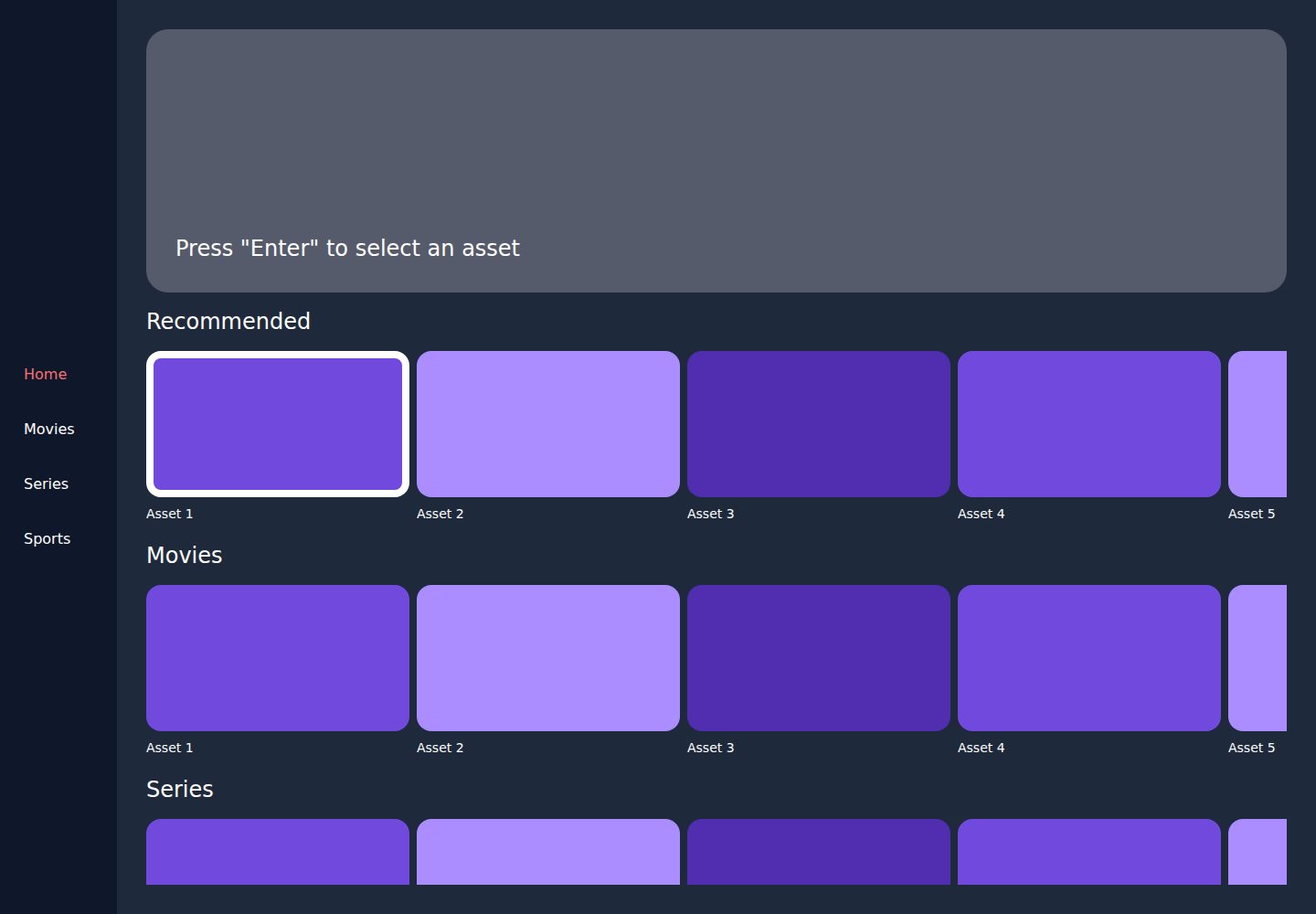
浏览真实页面截图,比较内容排版与手机效果。点击下方缩略图切换,放大查看整页细节。
全部页面与视图 2
截图用于了解视觉与布局,交互效果请以实际项目为准。
采集于 2026-10-15查看来源
值得关注的模板亮点
从已有项目资料中,快速了解它的特点。
通过 package.json 脚本与 WEBPACK_MODE 环境变量区分 Tizen、WebOS 和生产构建,输出目录分别为 build/tizen、build/webos/uhd、build/production
vite.config.ts 示例展示按平台设置 outDir、esbuild 目标与压缩选项,并配置 @ 路径别名
使用 norigin-spatial-navigation 的 init、useFocusable、FocusContext 实现焦点导航,示例包含 Home 与 ContentRow 组件
路由使用 createMemoryRouter 定义首页、movies、series、sports 等路径
模板详细介绍
该模板的 README 以教程形式介绍如何用 Vite 创建 React 项目并针对 Smart TV 平台调整构建配置。核心内容包括:在 package.json 中定义 copy:tizen、copy:webos、platform:tizen、platform:webos 等脚本,通过 WEBPACK_MODE 环境变量区分 Tizen、WebOS 与普通生产构建,输出到 build/tizen、build/webos/uhd 或 build/production 目录;在 vite.config.ts 中根据模式选择 outDir,并针对 Tizen/WebOS 设置 esbuild 选项。README 还说明需要创建平台配置文件(如 Tizen 的 config.xml、WebOS 的 appinfo.json),但未给出这些文件的完整内容。导航部分使用 react-router-dom 的 createMemoryRouter 定义首页、电影、剧集、体育等路由,并用 @noriginmedia/norigin-spatial-navigation 的 init、useFocusable、FocusContext 实现焦点管理与滚动。README 未说明模板是否包含完整页面实现、样式细节、测试覆盖或生产部署流程,也未提供依赖版本号。
ViteReact启动器
适合你的项目吗?
适用场景
- 为 Tizen 或 WebOS 电视应用搭建 Vite + React 构建流程
- 在电视端实现基于方向键的焦点导航与横向内容行滚动
- 参考 README 中的路由与焦点组件示例组织 Smart TV 应用结构
适合人群
- 需要为 Tizen 或 WebOS 平台配置 Vite 构建的 React 开发者
- 希望了解 norigin-spatial-navigation 在电视端基本用法的前端工程师
- 以 README 教程为起点搭建 Smart TV 应用原型的团队
上手与定制指南
结合仓库当前版本的说明,按下面的资料检查内容、配置与运行要求。
- 1
README 使用 npm create vite@latest 创建 React 项目,并安装 react-router-dom、@noriginmedia/norigin-spatial-navigation、tailwindcss
- 2
需在 package.json 中添加 copy:tizen、copy:webos、platform:tizen、platform:webos、platform:build、build 等脚本
- 3
需按 README 示例替换 vite.config.ts,并根据平台设置 WEBPACK_MODE 环境变量
- 4
Windows 环境下 README 提示将 export 替换为 set
- 5
README 提到需创建 Tizen 的 config.xml 与 WebOS 的 appinfo.json 等平台配置文件,但未提供完整文件内容
授权与来源资料
使用条件与限制
免费使用 · 保留许可声明本次收录的是公开仓库中采用 MIT 许可的免费版本;免费范围为该版本代码,不代表外部服务或第三方素材免费。
使用时需要遵守
- 允许免费使用、修改、商用和分发该版本代码。
- 分发代码副本或实质性部分时,保留原作者版权声明和完整 MIT 许可声明。
- 代码按现状提供;担保与责任限制以原许可证及适用法律为准。
额外费用与待核对事项
- 演示图片、字体、图标及其他第三方素材需按各自许可核对,不能仅凭代码的 MIT 许可判断。
- 域名、托管、数据库、支付或 AI 等外部服务可能另外收费。
- Windows 用户需将脚本中的 export 替换为 set,否则环境变量设置命令无法在 Windows 上生效。
查看原文依据
Permission is hereby granted, free of charge
许可证原文
https://github.com/foridpathan/smart-tv-starter/blob/main/LICENSEhttps://github.com/foridpathan/smart-tv-starter/blob/main/README.md> **Note:** if you use Windows then please use `set` intend of `export` becuase `export` will not working in windows
README 原文
DeepSeek 根据仓库许可证和 README 整理 ·2026-10-15。结果仅覆盖已读取资料,依赖、图片、字体及后续条款变更以各自原文为准。
项目核对记录与介绍依据
模板资料
- 来源平台
- GitHub
- 资料与维护参考分
- 资料较完整 · 82 / 100
- 技术栈
- Vite · React
- 网站类型
- 启动器
这个分数如何计算
本站按许可资料(最高30分)、演示链接(12分)、预览图(10分)、Star数(15分)、记录的维护时间(15分)、描述完整度(8分)、功能记录(5分)和分类资料(5分)计算。它不是代码、安全或性能测试,也不是 Google 评分;有链接不代表已实测可用。
这个项目需要核对什么
- 记录的仓库更新时间
- 2024-11-11
- 截图检查日期
- 2026-10-15
已收录演示链接。请用你的内容与屏幕尺寸检查;有演示不代表表单、认证或支付已经可用。
目录记录的主要技术栈是 Vite。请通过依赖清单和锁文件核对实际版本与托管要求。这些说明基于收录资料,不代表代码审计或部署实测。
查看具体选型方法 →介绍的制作与核对状态
介绍由 AI 辅助整理目录与仓库资料。仓库作者不等于这篇介绍的审核者。
审核声明: codex-user-requested-batch-review-20261015 · 2026-10-15
查看当时使用的来源资料
SHA-256: 2fa3cd704c8f07fd1b1d9c19a5da79570d140436864c51dde2304df8f2bda470
2026-10-15T04:21:59.333Z
来源文件 / 仓库
This guide is particularly focused on leveraging Vite’s configuration options to build for specific platforms like Tizen and WebOS and covers setting up navigation and routing within the app.

## Project Setup
Let’s start by setting up a new React project with Vite and tailoring the configuration to fit Smart TV specifications.

### Step 1: Create the Vite Project
**1. Initialize a Vite Project:**
Create a new Vite project with React support.
```
npm create vite@latest my-smart-tv-app - template react
cd my-smart-tv-app
```

**2. Install Dependencies:**
Install necessary packages
```
npm install react-router-dom @noriginmedia/norigin-spatial-navigation tailwindcss
```

### Step 2: Configuring Vite for Smart TV Platforms

This configuration step is essential for adapting the Vite build to meet the unique requirements of Smart TVs. Vite will be set up to output separate builds for Tizen and WebOS platforms, alongside a production build. We’ll also auto-configure platform-specific files, such as config.xml for Tizen and appinfo.json for WebOS.

To simplify the build process, we define several custom scripts in `package.json`
```JSON
"scripts": {
    "copy:tizen": "node config/index.cjs tizen && node --experimental-modules config/tizen-script.cjs",
    "copy:webos": "node config/index.cjs webos && node --experimental-modules config/webos-script.cjs && node config/fhd-script.cjs",
    "platform:tizen": "export WEBPACK_MODE=tizen tsc && vite build && npm run copy:tizen",
    "platform:webos": "export WEBPACK_MODE=webos tsc && vite build && npm run copy:webos",
    "platform:build": "tsc && vite build",
    "build": "npm-run-all --sequential platform:*",
    ...
}
...
```
 - **Copy Scripts (copy:tizen and copy:webos):** These scripts copy the configuration files for each platform to their respective directories.
 - **Platform Build Scripts (platform:tizen and platform:webos):** These scripts set the appropriate WEBPACK_MODE and execute the build for the specified platform.
 - **Build Command:** Runs the platform build scripts in sequence to produce builds for both Tizen and WebOS.

> **Note:** if you use Windows then please use `set` intend of `export` becuase `export` will not working in windows

In your `vite.config.ts`, replace the content with the following configuration:
```js
import react from "@vitejs/plugin-react";
import browserslist from "browserslist";
import { resolveToEsbuildTarget } from "esbuild-plugin-browserslist";
import path from "path";
import tailwindcss from "tailwindcss";
import { defineConfig, loadEnv } from "vite";

// https://vitejs.dev/config/
export default defineConfig(() => {
  const WEBPACK_MODE = process.env.WEBPACK_MODE?.trim() || "";
  // File config for specific platform
  const tizen = "tizen";
  const webos = "webos";

  const tizenBuild = "build/tizen";
  const webosBuild = "build/webos/uhd"; // WebOS have two app on UHD & FSD

  // Determine the output directory based on the mode
  const isTizen = WEBPACK_MODE === tizen;
  const isWebOS = WEBPACK_MODE === webos;
  const outDir = isTizen ? tizenBuild : isWebOS ? webosBuild : "build/production";
  const env = loadEnv(WEBPACK_MODE, process.cwd(), "");

  function getBuildTarget(browsers) {
    return resolveToEsbuildTarget(browserslist(browsers), {
      printUnknownTargets: false,
    });
  }

  const baseConfig: any = {
    plugins: [react(), tailwindcss()],
    define: {
      "process.env": env || {},
    },
    resolve: {
      alias: {
        "@": path.resolve(__dirname, "./src"),
      },
    },
    base: "./",
    build: {
      minify: "terser",
      target: getBuildTarget([
        ">0.1% and supports es6-module and not ios < 12 and not opera > 0",
        "node >= 18.13.0",
      ]),
      outDir,
      rollupOptions: {
        input: {
          app: path.resolve(__dirname, "index.html"),
        },
        output: {
          manualChunks: undefined,
        },
      },
      terserOptions: {
        compress: {
          drop_console: true,
        },
        format: {
          comments: false,
        },
      },
    },
    test: {
      globals: true,
      environment: "jsdom",
      setupFiles: "./src/__tests__/setup.ts",
      css: true,
    },
  };

  if (isTizen || isWebOS) {
    baseConfig.esbuild = {
      minifyIdentifiers: false,
      legalComments: "none",
      target: "es6",
      include: /\.(ts|jsx|tsx)$/,
      define: {
        "import.meta.url": JSON.stringify(""),
      },
    };
  }
  return baseConfig;
});
```

### Platform Configuration Files

> To streamline the configuration process, create the following configuration files to handle platform-specific tweaks. All configuration file ander config folder:

In the main `App.js` wrap the app in a SpatialNavigation provider:
```js
import Layout from "@/components/layout";
import { NavigationProvider } from "@/context";
import Home from "@/pages/home";
import Movies from "@/pages/movies";
import Series from "@/pages/series";
import Sports from "@/pages/sports";
import { init } from "@noriginmedia/norigin-spatial-navigation";
import { createMemoryRouter, RouterProvider } from "react-router-dom";

init({
  debug: false,
  visualDebug: false,
  distanceCalculationMethod: "center",
});
const Providers = () => {
  return (
    <NavigationProvider>
      <Layout />
    </NavigationProvider>
  )
}
const route = [{
  path: "/",
  Component: Providers,
  children: [
    {
      index: true,
      Component: Home,
    },
    {
      path: "movies",
      Component: Movies,
    },
    {
      path: "series",
      Component: Series,
    },
    {
      path: "sports",
      Component: Sports,
    },
  ],
}];
const router = createMemoryRouter(route);

export default function App() {
  return (
    <RouterProvider router={router} fallbackElement={<Fallback />} />
  );
}
export function Fallback() {
  return <>Loading</>;
}
```

**Define Focusable Components:**
Use the Focusable component to make elements navigable. Here’s an example:

`home.tsx`
```js
import ContentRow from "@/components/ContentRow";
import SelectedRow from "@/components/SelectedRow";
import { FocusContext, useFocusable } from "@noriginmedia/norigin-spatial-navigation";
import { useCallback, useEffect, useState } from "react";

const Home = () => {
    const { ref, focusKey, focusSelf } = useFocusable({ focusKey: "CONTENT" });
    const [selectedAsset, setSelectedAsset] = useState(null);

    useEffect(() => {
        focusSelf();
    }, [focusSelf]);

    const onAssetPress = useCallback((asset) => {
        setSelectedAsset(asset);
    }, []);

    const onRowFocus = useCallback(
        ({ y }: { y: number }) => {
            ref.current.scrollTo({
                top: y,
                behavior: 'smooth'
            });
        },
        [ref]
    );

    return (
        <FocusContext.Provider value={focusKey}>
            <div className="flex flex-col h-full w-full">
                <SelectedRow selectedAsset={selectedAsset} />
                <div className="overflow-y-auto flex-1" ref={ref}>
                    <div className="space-y-5">
                        {rows.map(({ title }) => (
                            <ContentRow
                                key={title}
                                title={title}
                                onAssetPress={onAssetPress}
                                onFocus={onRowFocus}
                            />
                        ))}
                    </div>
                </div>
            </div>
        </FocusContext.Provider>
    );
};

export default Home;
```

`ContentRow.tsx` component
```js
import { FocusContext, useFocusable } from "@noriginmedia/norigin-spatial-navigation";
import { useCallback, useRef } from "react";
import Asset from "./Asset";
const ContentRow = ({ title, onAssetPress, onFocus }) => {
    const { ref, focusKey } = useFocusable({
        onFocus
    });
    const scrollingRef = useRef(null);
    const onAssetFocus = useCallback(
        ({ x }: { x: number }) => {
            scrollingRef.current.scrollTo({
                left: x,
                behavior: 'smooth'
            });
        },
        [scrollingRef]
    );

    return (
        <FocusContext.Provider value={focusKey}>
            <div
                ref={ref}
            >
                <div className="text-2xl font-medium text-white pb-4 ">{title}</div>
                <div className="overflow-x-auto overflow-y-hidden" ref={scrollingRef}>
                    <div className="flex gap-2">
                        {assets.map(({ title, color }) => (
                            <Asset
                                key={title}
                                title={title}
                                color={color}
                                onEnterPress={onAssetPress}
                                onFocus={onAssetFocus}
                            />
                        ))}
                    </div>
                </div>
            </div>
        </FocusContext.Provider>
    )
}
export default ContentRow
```
This setup provides a solid foundation for navigation in your Smart TV app. Focus states and navigation paths are handled automatically by the spatial navigation library, enhancing the user experience on TV devices.

**Start the Development Server:**
```bash
npm run dev
```
**Build for Production:**
To create platform-specific builds, set the WEBPACK_MODE environment variable and build:
```bash
npm run build
```看看同类模板
对比同技术栈与用途的模板,找到更适合的视觉与内容结构。

cove
The Cove Stack: 🏝️ minimal TanStack Start template with Vite+, Better Auth, Drizzle ORM, shadcn/ui
Vite · SaaS

vite-react-boilerplate
A production ready, scalable starter template for Vite + React
Vite · 启动器

vital
Starter template for Vite with React (TypeScript). Supports Tailwind. Vitest and @react/testing-library config…
Vite · 启动器

react-vite-admin
This Starter utilizes React, Recoil, React Query, React Hooks, Typescript, Axios And Vite. 全新技术栈的后台管理系统
Vite · 后台

typescript-react_best_practices-vite_template
<⚡⚛️> Start your React project with Vite following code best practices (TypeScript, Linting, testing, CI/CD…)
Vite · 启动器

cloudflare-starter-kit
Template (boilerplate) repository for scaffolding Cloudflare Workers projects
Vite · 启动器