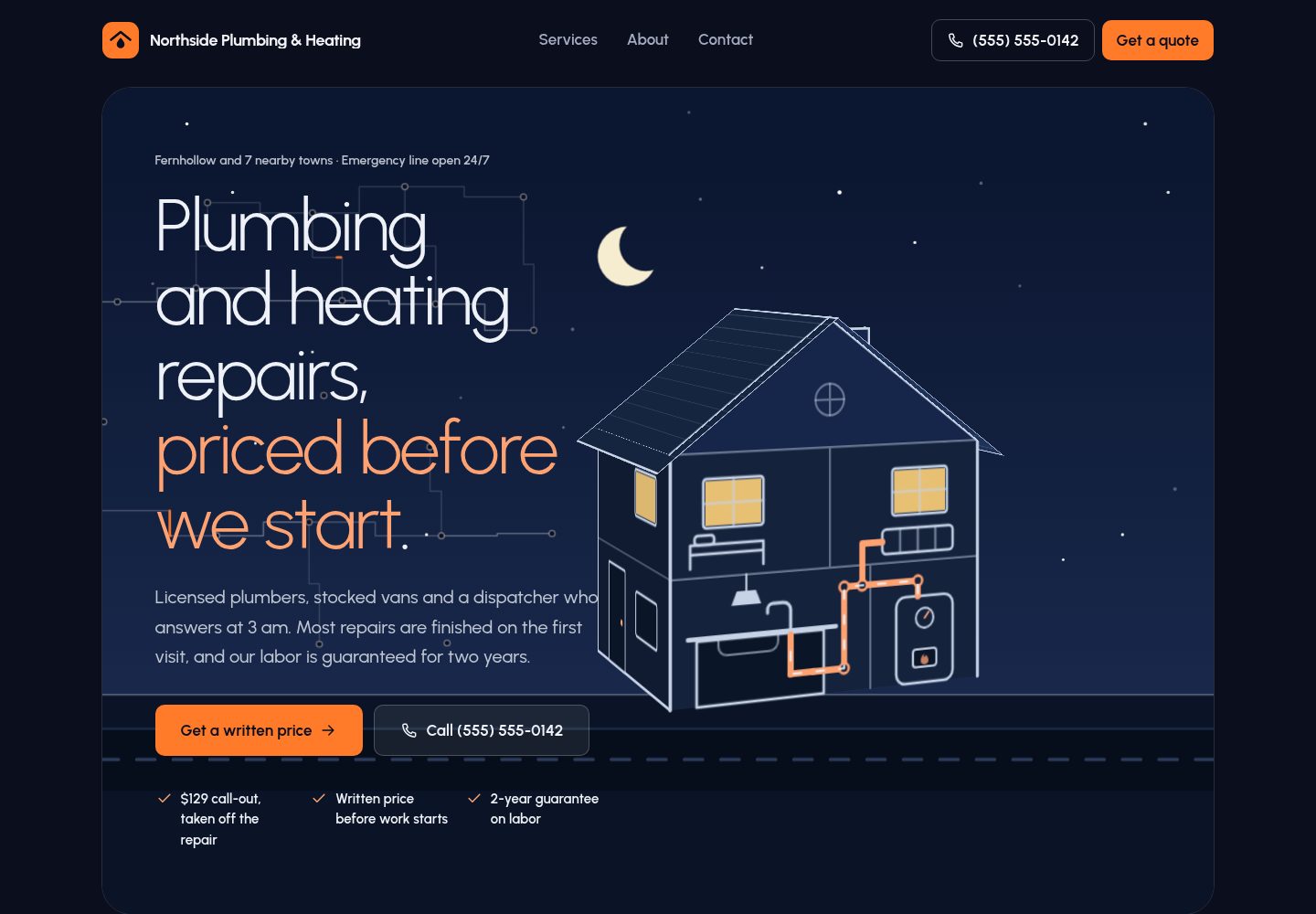
首页滚动叙事由 CSS 滚动驱动动画实现,包含固定视角的 CSS 3D 房屋剖面,无需动画库或 WebGL。
Astro启动器
craftline-astro-theme — Astro 启动器模板
作者 formgong
面向水管工等本地服务行业的免费 Astro 主题,包含滚动叙事首页、CSS 3D 房屋场景和基于 Formgong 的报价表单。
看看你的网站会是什么样
浏览真实页面截图,比较内容排版与手机效果。点击下方缩略图切换,放大查看整页细节。
全部页面与视图 3
截图用于了解视觉与布局,交互效果请以实际项目为准。
采集于 2026-10-08查看来源
值得关注的模板亮点
从已有项目资料中,快速了解它的特点。
报价表单仅在 Formgong 后端返回 success: true 时显示成功,错误和断网会显示错误信息,无 JavaScript 时仍可提交。
品牌信息、联系方式、服务区域、营业时间、社交链接、强调色和表单密钥集中在 src/config.ts 一个文件中。
服务、推荐语和常见问题由 Markdown 与 JSON 内容文件管理,服务卡片可配置线条动画类型。
深色导航底色搭配单一强调色,服务卡片为实色强调块,所有文字颜色对满足 AA 对比度。
静态页面、一个自托管可变字体和两个小脚本,并处理 prefers-reduced-motion。
模板详细介绍
Craftline 是一个用 Astro 构建的免费主题,面向水管工、电工、清洁工、杂工和承包商等本地服务业务。演示站点虚构了 Northside Plumbing & Heating 这家水管公司,所有电话、邮箱和链接均为示例内容。主题的核心是首页的滚动叙事:从深夜漏水、手机提交表单、货车出发、固定报价到地板恢复干燥,配合一个固定三分之四视角的 CSS 3D 房屋剖面,展示厨房、管道和锅炉。所有动画由 CSS 滚动驱动,不依赖动画库、WebGL 或 JavaScript。报价表单提交到 Formgong 托管后端,只有在后端返回 success: true 时才显示成功状态;无 JavaScript 时仍可作为普通 HTML 表单提交。品牌信息、联系方式、服务区域、营业时间、社交链接、强调色和表单密钥集中在 src/config.ts 一个文件中。服务、推荐语和常见问题分别由 Markdown 和 JSON 内容文件管理。主题使用深色导航底色、浅色展示字体和单一强调色,服务卡片为实色强调块并带有小型线条动画。构建工具链为 Astro、Tailwind CSS 和 TypeScript,要求 Node 22.12 或更新版本。
Astro启动器
适合你的项目吗?
适用场景
- 为水管工、电工、清洁工、杂工或承包商搭建本地服务展示网站。
- 需要一个带有滚动叙事和 3D 房屋场景的行业主题首页。
- 希望通过托管表单后端收集报价请求,且不伪造提交成功状态。
- 需要将品牌信息、服务内容和联系方式集中配置后快速替换示例内容。
- 在无 JavaScript 或减少动态效果的环境下仍要保证表单和内容可访问。
适合人群
- 水管工、电工、清洁工、杂工和承包商等本地服务业务。
- 接受使用 Formgong 或兼容标准表单 POST 的托管后端来接收报价的站点。
- 使用 Astro 并需要静态输出、内容文件管理和集中配置的开发者。
- 需要深色界面、单一强调色和可访问表单的网站。
上手与定制指南
结合仓库当前版本的说明,按下面的资料检查内容、配置与运行要求。
- 1
需要 Node 22.12 或更新版本,使用 npm create astro 或克隆仓库后运行 npm install 和 npm run dev。
- 2
在 src/config.ts 中替换名称、电话、地址、服务区域、营业时间、社交链接、强调色和表单密钥等示例内容。
- 3
在 Formgong 创建免费表单获取以 fk_ 开头的访问密钥,通过 .env 的 PUBLIC_FORMGONG_ACCESS_KEY 或 src/config.ts 配置。
- 4
将 src/config.ts 中的 url 设置为真实域名,并替换 Logo、favicon、og.png 和 apple-touch-icon.png。
- 5
演示图片、字体、图标等第三方素材需按各自许可核对,域名、托管等外部服务可能另外收费。
授权与来源资料
使用条件与限制
免费使用 · 保留许可声明本次收录的是公开仓库中采用 MIT 许可的免费版本;免费范围为该版本代码,不代表外部服务或第三方素材免费。
使用时需要遵守
- 允许免费使用、修改、商用和分发该版本代码。
- 分发代码副本或实质性部分时,保留原作者版权声明和完整 MIT 许可声明。
- 代码按现状提供;担保与责任限制以原许可证及适用法律为准。
额外费用与待核对事项
- 演示图片、字体、图标及其他第三方素材需按各自许可核对,不能仅凭代码的 MIT 许可判断。
- 域名、托管、数据库、支付或 AI 等外部服务可能另外收费。
- 报价表单默认依赖 Formgong 托管表单后端,需要外部服务才能接收提交。
- 使用表单功能需在 Formgong 注册并创建表单,即需要外部账户。
- 必须获取并配置以 fk_ 开头的 Formgong 访问密钥,表单才能正常工作。
- Formgong 免费方案每月仅覆盖 300 次提交,超出可能需要付费升级。
- 若不使用 Formgong,需自行改用其他接受标准表单 POST 的后端服务。
- 部署到 Vercel 或 Netlify 时需在构建环境变量中配置访问密钥,密钥在构建时读取。
- 使用 Cloudflare 部署按钮时,密钥会作为 Worker secret 存储,并由 worker.js 在每次页面请求时注入表单。
查看原文依据
Permission is hereby granted, free of charge
许可证原文
The quote form posts to [Formgong](https://formgong.com), a hosted form backend, so you don't need a server.
README 原文
Create a free form at [formgong.com/new](https://formgong.com/new?name=Website%20quote%20form) (or from the dashboard if you already have an account).
README 原文
Copy the form's access key. It starts with `fk_` and is public by design: it only lets visitors send submissions to that one form.
README 原文
The free plan covers 300 submissions a month.
README 原文
**Using another form backend.** Any service that accepts a standard form `POST` works.
README 原文
On Vercel or Netlify, set `PUBLIC_FORMGONG_ACCESS_KEY` in the project's build environment variables: the key is read at build time.
README 原文
https://github.com/formgong/craftline-astro-theme/blob/main/LICENSEhttps://github.com/formgong/craftline-astro-theme/blob/main/README.mdThe Deploy to Cloudflare button stores it as a Worker secret instead, and `worker.js` puts it into the form as each page is served.
README 原文
DeepSeek 根据仓库许可证和 README 整理 ·2026-10-08。结果仅覆盖已读取资料,依赖、图片、字体及后续条款变更以各自原文为准。
项目核对记录与介绍依据
模板资料
- 来源平台
- GitHub
- 资料与维护参考分
- 资料较完整 · 80 / 100
- 技术栈
- Astro
- 网站类型
- 启动器
这个分数如何计算
本站按许可资料(最高30分)、演示链接(12分)、预览图(10分)、Star数(15分)、记录的维护时间(15分)、描述完整度(8分)、功能记录(5分)和分类资料(5分)计算。它不是代码、安全或性能测试,也不是 Google 评分;有链接不代表已实测可用。
这个项目需要核对什么
- 记录的仓库更新时间
- 2026-10-08
- 截图检查日期
- 2026-10-08
已收录演示链接。请用你的内容与屏幕尺寸检查;有演示不代表表单、认证或支付已经可用。
目录记录的主要技术栈是 Astro。请通过依赖清单和锁文件核对实际版本与托管要求。这些说明基于收录资料,不代表代码审计或部署实测。
查看具体选型方法 →介绍的制作与核对状态
介绍由 AI 辅助整理目录与仓库资料。仓库作者不等于这篇介绍的审核者。
审核声明: [email protected] · 2026-10-09
查看当时使用的来源资料
SHA-256: a4a47c4c5b941387d0b227279b6afed5e10f1ec2e2a9ce332cbd5779a05dd3d7
2026-10-08T22:09:52.378Z
来源文件 / 仓库# Craftline A free Astro theme for local service businesses: plumbers, electricians, cleaners, handymen and contractors. **Live demo:** https://craftline.formgong.com · **No build step?** Download `craftline-html.zip` from the [latest release](https://github.com/formgong/craftline-astro-theme/releases/latest): plain HTML files, replace `fk_your_access_key` and `https://example.com` with your own and upload them anywhere. [](https://deploy.workers.cloudflare.com/?url=https://github.com/formgong/craftline-astro-theme) [](https://vercel.com/new/clone?repository-url=https%3A%2F%2Fgithub.com%2Fformgong%2Fcraftline-astro-theme&project-name=craftline&repository-name=craftline&env=PUBLIC_FORMGONG_ACCESS_KEY&envDescription=Your%20Formgong%20access%20key%20%28fk_...%29.%20Create%20a%20free%20form%20to%20get%20one.&envLink=https%3A%2F%2Fformgong.com%2Fnew%3Fname%3Dcraftline) Each button copies the theme to your GitHub, builds it and asks for one value: your Formgong access key (`fk_…`), free at https://formgong.com/new. The form works from the first deploy. Then set `url` in `src/config.ts` to your domain. The demo business is **Northside Plumbing & Heating**, a fictional plumber in the fictional town of Fernhollow. Everything you see is sample content: phone numbers use the 555-01xx range reserved for fiction, and every email and link uses `example.com`. - **One file to rebrand.** Name, phone, address, service areas, hours, social links, accent color and the form key live in `src/config.ts`. - **A home page that tells a story.** The hero picture is the first frame of a scroll story: a leak at 11:40 pm, a form sent from a phone, a van on the way, a fixed price, a dry floor. The house is a real CSS 3D object, seen at a fixed three-quarter angle, with a cutaway front wall where the leak and the repair happen. Everything is driven by CSS (scroll-driven animations). No animation library, no WebGL, no JavaScript. - **A quote form that never fakes success.** It shows "Request received" only when the form backend answers `success: true`. Errors and lost connections show an error. Without JavaScript it still works as a plain HTML form. - **Dark, light type, one loud accent.** A navy ground, large light-weight display type with the key words in the accent, solid accent service cards with small line animations that explain each service, stat counters, a large quote panel, and an ambient pipe network behind the hero. - **Fast and accessible.** Static pages, one self-hosted variable font, two tiny scripts (the form and closing the mobile menu). Labels on every field, visible focus, AA contrast on every text color pair, `prefers-reduced-motion` respected. Built with Astro 7, Tailwind CSS 4 and TypeScript. ## Quick start ```sh npm create astro@latest -- --template formgong/craftline-astro-theme cd your-project npm run dev ``` Or clone the repository and run `npm install`, then `npm run dev`. Node 22.12 or newer is required. | Command | What it does | | ----------------- | ---------------------------------------------- | | `npm run dev` | Local dev server at `http://localhost:4321` | | `npm run build` | Static site in `dist/` | | `npm run preview` | Serve the built site locally | | `npm run check` | Type-check `.astro` and `.ts` files | ## Rebrand it Open `src/config.ts`. The main fields: | Field | Used for | | ----------------------------- | ---------------------------------------------------------------------------- | | `name`, `shortName`, `tagline`, `description` | Header, footer, page titles, meta description, JSON-LD | | `url` | Canonical URLs, Open Graph, sitemap, robots.txt and the form's redirect | | `schemaType` | schema.org type: `Plumber`, `Electrician`, `HVACBusiness`, `RoofingContractor`, `GeneralContractor` or `LocalBusiness` | | `phone`, `emergencyPhone`, `email`, `address` | Click-to-call buttons, contact page, footer, JSON-LD | | `serviceAreas` | Service area list and map (the first eight get a pin), JSON-LD `areaServed` | | `hours`, `hoursNote` | Contact page, footer, JSON-LD opening hours | | `social` | Footer icons. Real profile URLs are also added to JSON-LD `sameAs` | | `trust` | License number, years, rating, response time, call-out fee. Sample values: replace them, then clear `trust.note` | | `theme.accent`, `theme.accentText` | The one accent color (highlighted words, buttons, service cards) and the text color on accent fills (keep 4.5:1 contrast) | | `formgong` | Fallback access key, endpoint and email subject for the quote form | Replace the logo in `src/components/Logo.astro` and `public/favicon.svg`, and regenerate `public/og.png` (1200×630) and `public/apple-touch-icon.png` (180×180). The JSON-LD block deliberately has no star rating: search engines ignore ratings a business publishes about itself. ## Set up the form The quote form posts to [Formgong](https://formgong.com), a hosted form backend, so you don't need a server. 1. Create a free form at [formgong.com/new](https://formgong.com/new?name=Website%20quote%20form) (or from the dashboard if you already have an account). 2. Copy the form's access key. It starts with `fk_` and is public by design: it only lets visitors send submissions to that one form. 3. Add it to a `.env` file in the project root: ```sh PUBLIC_FORMGONG_ACCESS_KEY=fk_your_access_key ``` or set `formgong.accessKey` in `src/config.ts`. While the placeholder key is in use, the dev server shows a reminder above the form. 4. Set `url` in `src/config.ts` to your real domain. Visitors without JavaScript are redirected to `/thanks/` on that domain. Submissions arrive by email and, if you connect it, in Telegram. The free plan covers 300 submissions a month. **How the form behaves** - Without JavaScript: a normal `POST` to `https://formgong.com/submit`. The hidden `_redirect` field sends the visitor to `/thanks/` afterwards. - With JavaScript: the same fields are sent with `fetch` and `Accept: application/json`. The button is disabled while sending. The success state, with its checkmark animation, appears only when the JSON response has `success === true`. Any other response shows the server's `message`. A network failure shows an error and the phone number. - The hidden `botcheck` field is a spam honeypot. Keep it empty and keep it in the markup. **Using another form backend.** Any service that accepts a standard form `POST` works. Set `PUBLIC_FORMGONG_ENDPOINT` (or `formgong.endpoint`) to its URL and rename the hidden fields to what that service expects. If its JSON response is shaped differently, change the single `reply?.success === true` check in `src/components/QuoteForm.astro`. ## Edit the content - **Services:** one Markdown file per service in `src/content/services/`. Frontmatter: `title`, `summary`, `order`, `priceFrom`, `priceNote`, `duration`, `included` (list), `featured` (adds the emergency number to the card) and `art`, the card's line animation: `pulse`, `sonar`, `drain`, `bars`, `wave` or `drip` (see `src/components/ServiceArt.astro`). The body is the service page. - **Headings:** wrap key words in asterisks to show them in the accent, for example `title="What we fix, and what it *usually costs*"` (section headings, page headers and the quote section). - **Testimonials:** `src/content/testimonials.json`. Each review can point to a service by its file name. The demo reviews are samples and are labeled as such on the page. - **FAQ:** `src/content/faq.json`. - **Page copy:** the home page story captions are in `src/components/story/StoryHero.astro`; the hero headline and bullets in `src/pages/index.astro`. Some sample figures appear in copy as well as in the config (the $129 call-out in the FAQ, the $149 repair in the story). Search for `$` when you change prices. ## The home page story Four files: - `src/components/story/StoryHero.astro`: hero text and the six chapter captions. - `src/components/story/StoryScene.astro`: three stacked layers that share one coordinate system: the sky and road (SVG), the house (below), and the cards, phone and van in front of it (SVG). - `src/components/story/House3D.astro`: the house as a CSS 3D box (`transform-style: preserve-3d`): four walls, floor, a two-plane roof and a chimney. The front wall is the cutaway with the kitchen, pipes and boiler that the story animates. - `src/styles/story.css`: layout, the 3D geometry and the timelines. The scene is a 1200×600 canvas anchored to the right edge. The frame is a size container, and one canvas unit is `--u = max(100cqw / 1200, 100cqh / 600)` pixels, so the SVG layers and the 3D house line up exactly at any frame size. On wide layouts the unit is capped so the house stays in the right half. The house itself never moves. It sits at one fixed three-quarter angle (the cutaway faces you, the left wall and the roof show), and only the things inside the cutaway and the cards around it animate. An earlier version turned the house with the scroll; on a pinned stage that read as the house jumping, so the 3D wrappers now have no animations at all. Each caption block declares a named view timeline (`--ch1` … `--ch6`) and the story wrapper shares them with `timeline-scope`. Every animated part of the scene follows exactly one chapter, with `animation-range` set per layout. When something has to appear in one chapter and leave in a later one, it sits inside two nested groups with one animation each. On desktop the scene is pinned next to the captions; on phones it is pinned at the top (about 55% of the screen) and the captions scroll underneath. Browsers without scroll-driven animations or `timeline-scope`, and visitors who prefer reduced motion, get a static version: a front-facing house that doesn't move, and a small picture next to each caption. Nothing is hidden. The scroll version was checked in Chrome and in WebKit (Playwright's WebKit 27.2, via a recorded video: its screenshot path flattens every 3D transform, even a plain test cube). To adapt the story to another trade, rewrite the captions and redraw the parts of the scene you need, or replace `StoryHero` with a plain hero in `src/pages/index.astro`. Two CSS details that keep it working: - Scroll-driven rules use longhand properties (`animation-name`, `animation-timeline`, …). A minifier can merge a shorthand and `animation-timeline` into one declaration that Chrome rejects. - Wrappers around revealed content use `overflow: clip`, not `overflow: hidden`. `overflow: hidden` creates a scroll container, and a view timeline inside it would track that box instead of the page. ## Look Dark first: navy ground (`--c-bg`), near-white type, one accent from `theme.accent`. Display type is Urbanist at a light weight; the key words of each heading take the accent and a thin accent rule follows the lead. Service cards are solid accent blocks with dark type. Colors are tokens at the top of `src/styles/global.css`. ## Motion All motion is CSS and SVG. Page-to-page transitions use native cross-document View Transitions (`@view-transition`), so there is no client router. Sections fade in with `animation-timeline: view()` where supported. The stat numbers count up once as they scroll in (a registered integer property printed with `counter()`; screen readers get the plain number). The pipe network behind the hero (`src/components/story/PipeNetwork.astro`) is generated at build time from a fixed seed, with slow water pulses along some runs. Hover effects move only `transform` and `opacity`. With `prefers-reduced-motion: reduce` there are no transitions, reveals, counters or ambient animations: everything shows its final state. ## Project structure ```text src/ ├── components/ │ ├── story/ StoryHero, StoryScene (SVG layers), House3D (CSS 3D house), PipeNetwork, StoryVignette (static fallback pictures) │ ├── sections/ Stats, services grid, quote panel, how it works, areas, reviews, FAQ, quote section │ ├── illustrations/ Van, map placeholder │ ├── QuoteForm.astro The form and its script │ ├── Head.astro Meta tags, Open Graph, JSON-LD │ ├── Header.astro, Footer.astro, Logo.astro, Icon.astro, icons.ts │ └── PageHeader.astro, SectionHeading.astro, Highlight.astro, ServiceCard.astro, ServiceArt.astro ├── content/ services/*.md, testimonials.json, faq.json ├── layouts/ BaseLayout.astro ├── lib/schema.ts JSON-LD built from the config ├── pages/ index, about, contact, thanks, 404, services/, robots.txt.ts ├── styles/ global.css (tokens, components, motion), story.css ├── config.ts Everything you rebrand └── content.config.ts Collection schemas public/ favicon.svg, og.png, apple-touch-icon.png ``` ## Deploy `npm run build` produces a static site in `dist/` that any static host can serve. On Vercel or Netlify, set `PUBLIC_FORMGONG_ACCESS_KEY` in the project's build environment variables: the key is read at build time. The Deploy to Cloudflare button stores it as a Worker secret instead, and `worker.js` puts it into the form as each page is served. Set `url` in `src/config.ts` first so canonical links, the sitemap and the form redirect point at your domain. ## License MIT, see `LICENSE`. The illustrations and icons were drawn for this theme and are covered by the same license. The font is Urbanist, licensed under the SIL Open Font License 1.1 and installed from `@fontsource-variable/urbanist`.
看看同类模板
对比同技术栈与用途的模板,找到更适合的视觉与内容结构。

astrowind
⭕️ AstroWind: A free template using Astro v7 and Tailwind CSS v4. Astro starter theme.
Astro · 博客
accessible-astro-starter
Accessible Astro Starter 是一个以无障碍为核心理念的 Astro 6 启动模板,由 incluud 团队维护。
Astro · 博客

astro-erudite
An opinionated, unstyled static blogging template built with Astro and native CSS.
Astro · 作品集

astro-shopify
astro-shopify 是一个面向开发者的轻量级电商启动模板,用于构建基于 Shopify 的无头店面。
Astro · 电商

brutal
A neobrutalism Astro starter theme
Astro · 启动器

qwind
⭕️ Qwind: A template to make your website using Qwik + Tailwind CSS.
Astro · 工具站