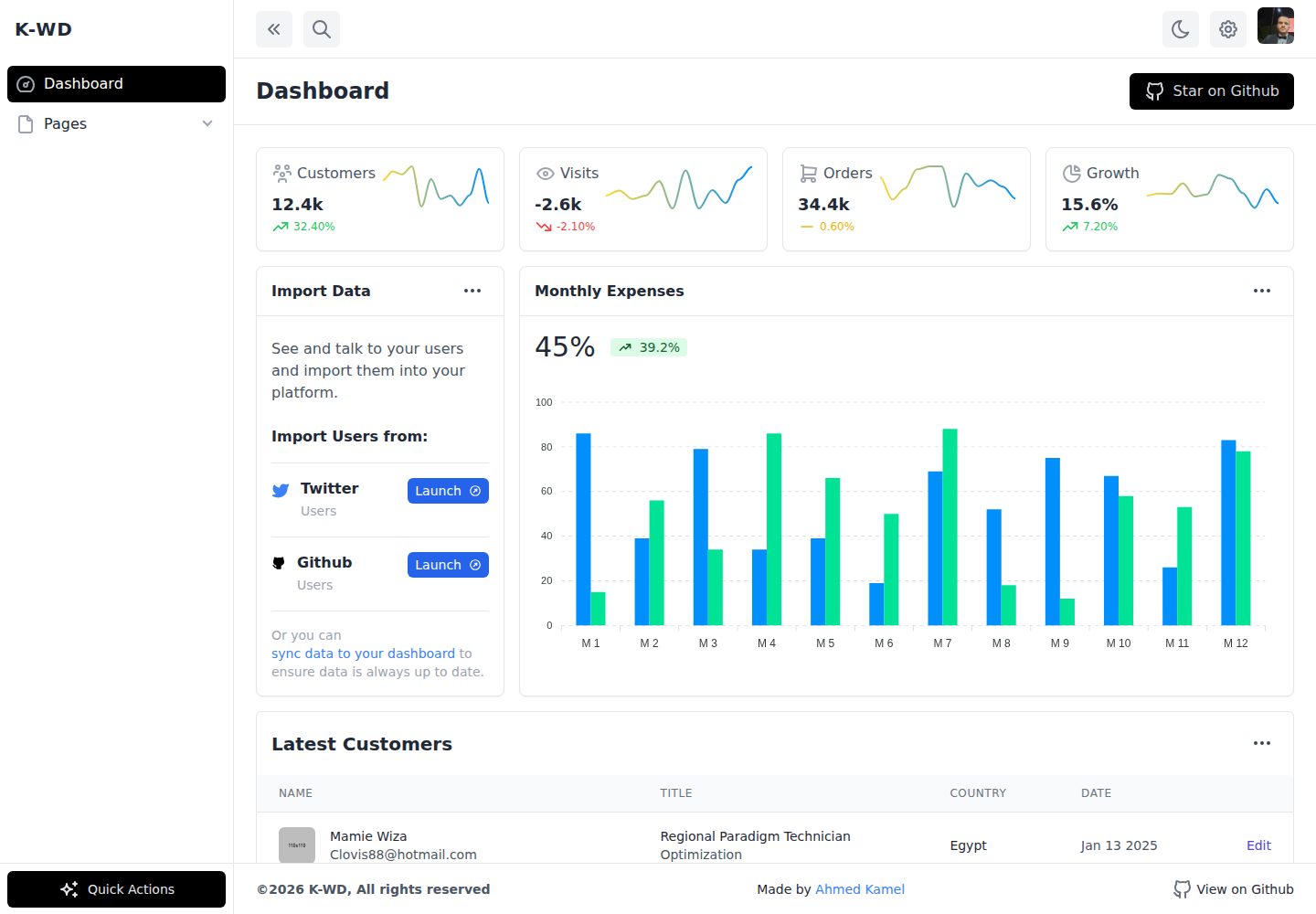
使用 Tailwind CSS 构建界面样式,Alpine.js 处理页面交互
HTML后台启动器
starter-tailwind-dashboard — HTML 后台模板
作者 fu4303
基于 Tailwind CSS 与 Alpine.js 的响应式后台仪表盘布局起始模板,提供侧边栏与内容区骨架。
看看你的网站会是什么样
浏览真实页面截图,比较内容排版与手机效果。点击下方缩略图切换,放大查看整页细节。
全部页面与视图 2
截图用于了解视觉与布局,交互效果请以实际项目为准。
采集于 2026-10-13查看来源
值得关注的模板亮点
从已有项目资料中,快速了解它的特点。
提供响应式后台仪表盘布局骨架,含桌面端与移动端适配
页面入口为 public/index.html,可直接编辑 HTML 结构
通过 npm 或 Yarn 安装依赖并启动本地开发服务器
提供生产构建命令,输出优化后的 Tailwind CSS 文件
模板详细介绍
这是一个后台仪表盘布局的起始模板,使用 Tailwind CSS 做样式、Alpine.js 处理交互,仓库以 HTML 为主要技术栈。README 说明其用途是提供响应式仪表盘布局的起点,页面入口为 public/index.html,可在此基础上继续修改。
模板通过 npm 或 Yarn 安装依赖,使用 npm run serve / yarn serve 启动本地开发服务器,默认访问 localhost:8080;生产构建使用 npm run production / yarn production,输出优化后的 CSS 到 ./public/build/tailwind.css。
仓库同时提到另一个提供深色与浅色模式示例的版本(kwd-dashboard),本仓库本身未在 README 中说明包含主题切换功能。资料未涉及后端接口、数据源或具体业务模块,模板定位为纯前端布局骨架。
HTML后台启动器
适合你的项目吗?
适用场景
- 搭建后台管理系统时需要一个现成的仪表盘布局起点
- 学习 Tailwind CSS 与 Alpine.js 组合使用的示例项目
- 在纯 HTML 项目中快速引入响应式侧边栏与内容区结构
适合人群
- 需要后台仪表盘布局骨架的前端开发者
- 使用 Tailwind CSS 与 Alpine.js 技术栈的项目
- 希望以静态 HTML 起步、后续自行接入业务逻辑的开发者
上手与定制指南
结合仓库当前版本的说明,按下面的资料检查内容、配置与运行要求。
- 1
克隆仓库后进入目录,使用 npm install 或 yarn 安装依赖
- 2
运行 npm run serve 或 yarn serve 启动开发服务器,默认地址为 localhost:8080
- 3
编辑 public/index.html 进行页面结构调整
- 4
运行 npm run production 或 yarn production 生成优化后的 CSS,输出到 ./public/build/tailwind.css
- 5
代码采用 MIT 许可,分发时需保留版权声明与许可声明;演示图片、字体、图标等第三方素材需单独核对许可
授权与来源资料
使用条件与限制
免费使用 · 保留许可声明本次收录的是公开仓库中采用 MIT 许可的免费版本;免费范围为该版本代码,不代表外部服务或第三方素材免费。
使用时需要遵守
- 允许免费使用、修改、商用和分发该版本代码。
- 分发代码副本或实质性部分时,保留原作者版权声明和完整 MIT 许可声明。
- 代码按现状提供;担保与责任限制以原许可证及适用法律为准。
额外费用与待核对事项
- 演示图片、字体、图标及其他第三方素材需按各自许可核对,不能仅凭代码的 MIT 许可判断。
- 域名、托管、数据库、支付或 AI 等外部服务可能另外收费。
- 捐赠为完全自愿,非使用条件;但若选择捐赠,项目方声明没有退款机制,捐赠前需自行确认。
查看原文依据
Permission is hereby granted, free of charge
许可证原文
https://github.com/fu4303/starter-tailwind-dashboard/blob/main/License.mdhttps://github.com/fu4303/starter-tailwind-dashboard/blob/main/README.md### Be careful and donate just if it is within your possibilities, because there is no refund system. And remember that you don't need to donate, it is just a free choice for you.
README 原文
DeepSeek 根据仓库许可证和 README 整理 ·2026-10-13。结果仅覆盖已读取资料,依赖、图片、字体及后续条款变更以各自原文为准。
项目核对记录与介绍依据
模板资料
- 来源平台
- GitHub
- 资料与维护参考分
- 资料一般 · 73 / 100
- 技术栈
- HTML
- 网站类型
- 后台 · 启动器
这个分数如何计算
本站按许可资料(最高30分)、演示链接(12分)、预览图(10分)、Star数(15分)、记录的维护时间(15分)、描述完整度(8分)、功能记录(5分)和分类资料(5分)计算。它不是代码、安全或性能测试,也不是 Google 评分;有链接不代表已实测可用。
这个项目需要核对什么
- 记录的仓库更新时间
- 2021-02-07
- 截图检查日期
- 2026-10-13
已收录演示链接。请用你的内容与屏幕尺寸检查;有演示不代表表单、认证或支付已经可用。
目录记录的主要技术栈是 HTML。请通过依赖清单和锁文件核对实际版本与托管要求。这些说明基于收录资料,不代表代码审计或部署实测。
查看具体选型方法 →介绍的制作与核对状态
介绍由 AI 辅助整理目录与仓库资料。仓库作者不等于这篇介绍的审核者。
审核声明: [email protected] · 2026-10-13
查看当时使用的来源资料
SHA-256: fa7043bbc8df7d1c2e1686c3208bb182b4ad4c9cd79308cf5cb64bf5d7857d9c
2026-10-13T02:20:44.090Z
来源文件 / 仓库# Starter Responsive Dashboard Layout Starter responsive dashboard layout built with tailwindcss alpinejs [](https://github.com/Kamona-WD/starter-dashboard-layout/blob/main/License.md) [](https://github.com/Kamona-WD/starter-dashboard-layout/stargazers) ## [See live](https://kamona-wd.github.io/starter-dashboard-layout/) ## Another version ### Dark & light mode example ### [Live](https://kamona-wd.github.io/kwd-dashboard/) ### [Github repo](https://github.com/Kamona-WD/kwd-dashboard/) --- To get started: 1. Clone the repository: ```bash git clone https://github.com/Kamona-WD/starter-dashboard-layout.git cd starter-dashboard-layout ``` 2. Install the dependencies: ```bash # Using npm npm install # Using Yarn yarn ``` 3. Start the development server: ```bash # Using npm npm run serve # Using Yarn yarn serve ``` Now you should be able to see the project running at localhost:8080. 4. Open `public/index.html` in your editor and start experimenting! ## Building for production To build an optimized version of your CSS, simply run: ```bash # Using npm npm run production # Using Yarn yarn production ``` After that's done, check out `./public/build/tailwind.css` to see the optimized output. --- ## Support <a href="https://www.buymeacoffee.com/ahmedkamel" target="_blank" style="display: inline-block !important;"><img src="https://cdn.buymeacoffee.com/buttons/v2/default-green.png" alt="Buy Me A Coffee" height="41" width="174"></a> ### Be careful and donate just if it is within your possibilities, because there is no refund system. And remember that you don't need to donate, it is just a free choice for you. Thank you!
看看同类模板
对比同技术栈与用途的模板,找到更适合的视觉与内容结构。

gentelella
Free admin dashboard template — vanilla JS, SCSS, Vite 8. No Bootstrap, no jQuery.
HTML · 后台

coreui-free-bootstrap-admin-template
Free Bootstrap Admin & Dashboard Template Built for AI-Assisted Development
HTML · 后台

dashboards
Responsive dashboard templates 📊✨
HTML · 后台

SB Admin 2
SB Admin 2 是 Start Bootstrap 推出的开源后台模板,基于 Bootstrap 构建,整体风格偏向经典管理界面。
HTML · 后台

Adminator-admin-dashboard
Adminator is easy to use and well design admin dashboard template with dark mode for web apps, websites, servi…
HTML · 后台

SB Admin
SB Admin 是 Start Bootstrap 推出的开源后台管理模板,基于 Bootstrap 构建,定位是简洁、实用的管理界面。
HTML · 后台