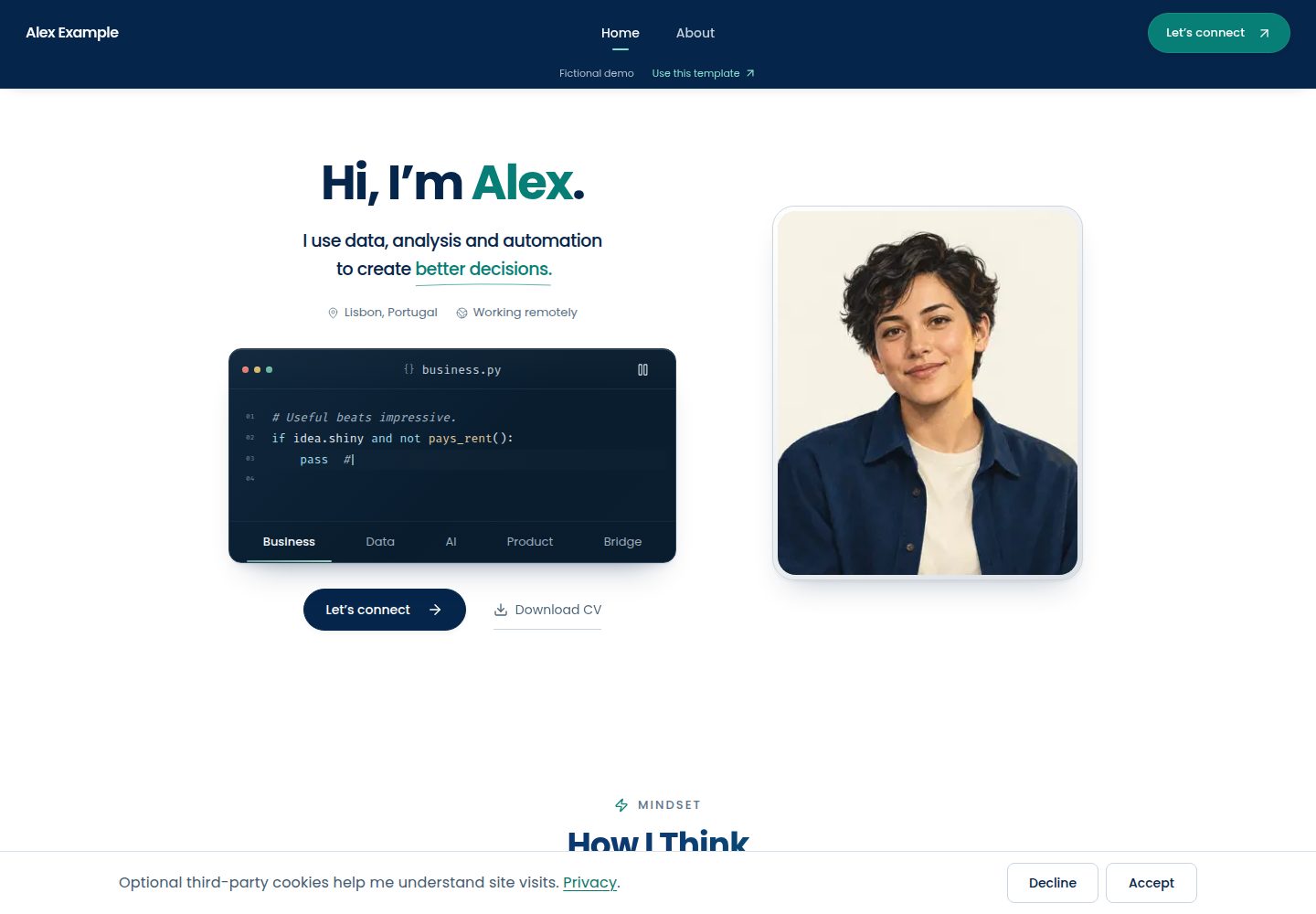
内容以 TypeScript 文件维护,身份、故事、项目、工具集与联系信息分文件组织
Next.jsReact作品集启动器
career-portfolio-template — Next.js 作品集模板
作者 Gvasi
基于 Next.js 与 TypeScript 的个人作品集与数字简历启动模板,内容以 TypeScript 文件维护,含项目故事、职业时间线与可选的联系与预约集成。
看看你的网站会是什么样
浏览真实页面截图,比较内容排版与手机效果。点击下方缩略图切换,放大查看整页细节。
全部页面与视图 3
截图用于了解视觉与布局,交互效果请以实际项目为准。
采集于 2026-10-03查看来源
值得关注的模板亮点
从已有项目资料中,快速了解它的特点。
项目展示含决策与工具说明,另有职业时间线、资质与 About 介绍
提供代码故事终端、动画章节与可编辑的工具集探索器等个性化区块
默认站点无需环境变量,联系从直接邮件链接开始,预约与消息投递为可选集成
包含响应式布局、键盘交互、减少动态效果与需同意后才启用的分析
仓库提供定制、复用、架构、测试与部署文档,并有内容检查命令
模板详细介绍
这是一个从作者个人作品集改编而来的 Next.js + TypeScript 启动模板,用于搭建个人作品集与数字简历。演示站使用虚构人物 Alex Example 的内容与中性素材,展示可复用版本。
内容存放在 TypeScript 文件中,没有可视化编辑器或 CMS,需要能编辑 React 与 TypeScript 代码。默认站点不需要服务账号或环境变量:联系方式先是直接的邮件链接,预约、消息投递与分析属于可选配置。
模板按“用多少取多少”组织:可以整体运行后替换示例内容,也可以只借用某个区块(项目展示、职业时间线、工具集等)或某段动画与交互。仓库提供定制、复用、架构、测试与部署等文档,以及内容检查命令用于发现遗留的示例内容与缺失素材。
已知限制:浏览器测试仅覆盖 Chromium,未配置 WebKit 与 Firefox;项目展示的滚轮与触摸测试为合成事件,真实鼠标与触控板表现可能不同;预约与投递在测试中使用模拟的 Google、Turnstile 与 Redis,真实投递取决于自己的账号与配置。
Next.jsReact作品集启动器
适合你的项目吗?
适用场景
- 搭建个人作品集与数字简历站点,展示项目、职业经历与资质
- 在已有网站上借用项目展示、职业时间线或工具集等单个区块
- 复用其中的动画章节、过渡或交互方式
- 为作品集接入可选的预约、消息投递与分析功能
适合人群
- 能编辑 React 与 TypeScript 代码的个人开发者或设计师
- 希望内容以代码而非 CMS 维护的作品集项目
- 需要按区块或动画粒度复用模板的开发者
- 愿意按文档自行配置可选外部服务的用户
上手与定制指南
结合仓库当前版本的说明,按下面的资料检查内容、配置与运行要求。
- 1
需要 Node.js 22.15 或更高版本(推荐 Node 24 LTS)与 pnpm 10.34.5
- 2
在 GitHub 上使用模板创建仓库,克隆后执行 pnpm install --frozen-lockfile 与 pnpm dev
- 3
默认站点无需环境变量,但分享前应修改 src/config/site.ts 中的示例邮箱等身份信息
- 4
示例人物、雇主、证书与项目均为虚构,部署前需替换;可运行 pnpm check:content 检查遗留示例内容
- 5
预约、消息投递与分析为可选集成,启用生产表单提交需要 Cloudflare Turnstile 与 Redis 限流
授权与来源资料
使用条件与限制
免费使用 · 保留许可声明本次收录的是公开仓库中采用 MIT 许可的免费版本;免费范围为该版本代码,不代表外部服务或第三方素材免费。
使用时需要遵守
- 允许免费使用、修改、商用和分发该版本代码。
- 分发代码副本或实质性部分时,保留原作者版权声明和完整 MIT 许可声明。
- 代码按现状提供;担保与责任限制以原许可证及适用法律为准。
额外费用与待核对事项
- 预约与消息投递为可选集成,需自备 Google Calendar、Meet 与 Gmail 凭据及私有收件箱;默认直接邮件站点无需这些账号。
- 启用真实表单提交与预约时,必须配置 Cloudflare Turnstile 与 Redis 限流;仅部署默认直接邮件站点则不需要。
- 分析功能为可选,需自备 PostHog 或 GA4 的公开令牌,且仅在所设 url 上、经用户同意后启用。
- 内容以 TypeScript 代码维护,没有可视化编辑器或 CMS,需具备编辑 React 与 TypeScript 的能力。
- 浏览器测试仅覆盖 Chromium,未配置 WebKit 与 Firefox。
- 项目展示的滚轮与触摸测试为合成事件,真实鼠标与触控板表现可能不同,需自行在硬件上验证。
- 预约与投递在测试中使用模拟服务,真实投递取决于用户自己的账号与配置。
- 演示图片、字体、图标及其他第三方素材需按各自许可核对,不能仅凭代码的 MIT 许可判断。
- 域名、托管、数据库、支付或 AI 等外部服务可能另外收费。
查看原文依据
Permission is hereby granted, free of charge
许可证原文
Booking and message delivery:** Google Calendar, Meet and Gmail, with your own credentials and private destination inbox.
README 原文
Cloudflare Turnstile and Redis rate limiting are required for real form submissions and bookings.
README 原文
Analytics** (PostHog, GA4): public tokens, consent-gated, active only on the `url` you set
README 原文
Content is code: you edit TypeScript files, not a CMS.
README 原文
Browser tests run in Chromium only; WebKit and Firefox are not configured.
README 原文
physical mice and trackpads behave differently and are worth a check on your own hardware.
README 原文
https://github.com/Gvasi/career-portfolio-template/blob/main/LICENSEhttps://github.com/Gvasi/career-portfolio-template/blob/main/README.mdreal delivery depends on your accounts and configuration.
README 原文
DeepSeek 根据仓库许可证和 README 整理 ·2026-10-03。结果仅覆盖已读取资料,依赖、图片、字体及后续条款变更以各自原文为准。
项目核对记录与介绍依据
模板资料
- 来源平台
- GitHub
- 资料与维护参考分
- 资料较完整 · 88 / 100
- 技术栈
- Next.js · React
- 网站类型
- 作品集 · 启动器
这个分数如何计算
本站按许可资料(最高30分)、演示链接(12分)、预览图(10分)、Star数(15分)、记录的维护时间(15分)、描述完整度(8分)、功能记录(5分)和分类资料(5分)计算。它不是代码、安全或性能测试,也不是 Google 评分;有链接不代表已实测可用。
这个项目需要核对什么
- 记录的仓库更新时间
- 2026-10-03
- 截图检查日期
- 2026-10-03
已收录演示链接。请用你的内容与屏幕尺寸检查;有演示不代表表单、认证或支付已经可用。
目录记录的主要技术栈是 Next.js。请通过依赖清单和锁文件核对实际版本与托管要求。这些说明基于收录资料,不代表代码审计或部署实测。
查看具体选型方法 →介绍的制作与核对状态
介绍由 AI 辅助整理目录与仓库资料。仓库作者不等于这篇介绍的审核者。
审核声明: [email protected] · 2026-10-04
查看当时使用的来源资料
SHA-256: 3be9ae8c876d8c71f844eec7e98d814587bf8f4733101c2e7eebe5012566e772
2026-10-03T16:55:07.624Z
来源文件 / 仓库# Career Portfolio Template [](https://github.com/Gvasi/career-portfolio-template/actions/workflows/ci.yml) [](LICENSE) [](package.json) [](https://vercel.com/new/clone?repository-url=https%3A%2F%2Fgithub.com%2FGvasi%2Fcareer-portfolio-template) A Next.js and TypeScript starter for a personal portfolio and digital CV, adapted from [my own portfolio](https://www.gvasilakopoulos.com). A place for the work, interests and small stories that do not quite fit on a CV. Use the whole site, borrow a section, or take an interaction apart and make it your own. **[Template demo](https://career-portfolio-demo.vercel.app)** · **[My live portfolio](https://www.gvasilakopoulos.com)** · **[Get started](#use-this-template)**  The demo shows the reusable version, with fictional Alex Example content and neutral assets. My live portfolio shows how I use it with my own work and story. Booking and messages in the template demo are simulated: nothing is booked or sent. Content lives in TypeScript files, with no visual editor or CMS. You should be comfortable editing React and TypeScript, or happy to learn as you go. **The default site needs no service accounts or environment variables.** Contact starts with a direct email link; booking, message delivery and analytics have optional setup. ## Use as much or as little as you need | Your starting point | A useful next step | |---|---| | “I want my own portfolio.” | [Run the whole site](#use-this-template), then replace the example story in the [customisation guide](docs/customisation.md). | | “I already have a site, but I like that section.” | [Find the section and its dependencies](docs/reuse.md#borrow-a-section). The project reel, career timeline, toolkit and other sections can be adapted separately. | | “I just want an animation or an idea.” | [Start with the animation guide](docs/reuse.md#borrow-an-animation). Keep a chapter animation, a transition, or the way an interaction responds. | ## Use this template Requirements: Node.js 22.15 or later (**Node 24 LTS recommended**) and pnpm 10.34.5 (declared in `package.json`). New to running a project locally? [Build your first portfolio](docs/first-portfolio.md) walks through the tools, your first edits and deployment. 1. Choose **Use this template → Create a new repository** on GitHub. 2. Clone your new repository and enter its folder. Replace the two example names below: ```bash git clone https://github.com/YOUR-USERNAME/YOUR-REPOSITORY.git cd YOUR-REPOSITORY pnpm install --frozen-lockfile pnpm dev # http://localhost:3000 ``` 3. Open `http://localhost:3000`. No environment variables are needed to explore the example. Contact uses a direct email link until integrations are configured; change the example address in `src/config/site.ts` before sharing your version. 4. Follow [Customisation](docs/customisation.md) to replace the identity, stories, images, links and sample CV. Run `pnpm check:content`; the untouched example intentionally reports placeholders. See the [test guide](tests/README.md#after-changing-the-example-content) when changing content or removing sections. 5. Run `pnpm check` and the [browser tests](tests/README.md), then follow the [deployment guide](docs/setup.md#deploying). Start with an introduction, one project you can explain well, and a way to get in touch. The [worked writing example](docs/reuse.md#turn-a-project-into-a-story) helps turn a project into a story. Before sharing, try your site on a phone, follow every link and open the CV. ## What you get <p> <a href="docs/images/template-project.jpg"><img src="docs/images/template-project.jpg" width="70%" alt="The fictional portfolio project opened in its detail dialog, with tabs for its overview, decisions and stack."></a> <a href="docs/images/template-mobile.jpg"><img src="docs/images/template-mobile.jpg" width="20%" alt="The fictional demo on a narrow phone screen."></a> </p> Open either image for a closer look, or [try the demo](https://career-portfolio-demo.vercel.app) to explore the interactions. - **Show your work:** project walkthroughs with decisions and tools, a career timeline and credentials. - **Make it personal:** a code-story terminal, animated chapters and an editable toolkit explorer. Keep only the sections you need. - **Let people reach you:** direct email, with optional booking and message delivery. - **Support different visitors:** responsive layouts, keyboard interactions, reduced motion and consent-gated analytics. ## Make it yours Start with these three places. The customisation guide also points out the optional component-level copy and illustration changes. | where | what | |---|---| | `src/config/site.ts` | name, role, location, public URL, public contact address, GitHub/LinkedIn and social profiles, optional chat link, asset paths | | `src/content/` | `home.ts` (greeting, code stories, How I work chapters, closing phrases), `career.ts` (career chapters, credentials, About intro), `projects.ts` (the project reel and its stories), `toolkit.tsx` (tool catalogue and notes), `contact.ts` (topics and notes) | | `public/` | your portrait (`images/profile/portrait-source.png`; the sizes are generated), About portrait, career and project illustrations, CV (`documents/sample-cv.pdf`), icons and the six chapter animations | The example person, employers, certificates and projects are fictional. Replace them before you deploy under your own name. ## Engineering notes If you want to understand or adapt the implementation, start with the [architecture guide](docs/architecture.md) and [test guide](tests/README.md). - Public identity and content are separate from server credentials and integrations. - Booking handles retries and uncertain provider responses, so a failed notification does not become another calendar booking. - Shared dialogs and motion helpers cover focus handling, reduced motion and work that pauses offscreen, with regression tests for those interactions. The CI workflow checks types, linting, unit tests and Chromium browser behavior. Optional service calls are mocked in tests; connecting real accounts is a separate setup step. ## Optional integrations You can deploy a direct-email portfolio without these. Enable only what you need; the [setup guide](docs/setup.md) explains the accounts and variables. - **Booking and message delivery:** Google Calendar, Meet and Gmail, with your own credentials and private destination inbox. - **Protection for enabled production submissions:** Cloudflare Turnstile and Redis rate limiting are required for real form submissions and bookings. They are not required to deploy the default direct-email site. - **Analytics** (PostHog, GA4): public tokens, consent-gated, active only on the `url` you set in `src/config/site.ts`. The commented [`.env.example`](.env.example) can stay empty for the default site. Integration libraries are included in the install even when their services are disabled. ## Commands ```bash pnpm dev # development server on http://localhost:3000 pnpm typecheck # next typegen + tsc --noEmit pnpm lint # eslint pnpm test:unit # Node unit tests (tests/unit), services mocked pnpm test:e2e # Playwright browser tests (tests/e2e, Chromium; run `npx playwright install chromium` once) pnpm build && pnpm start pnpm check # typecheck, lint, unit tests and build in one go (what CI runs) pnpm check:content # before your own launch: find leftover example content and missing assets ``` ## Stack Next.js 16.3 · React 19.1 · TypeScript (strict) · Tailwind CSS 4 · Framer Motion 12 · Lottie. See [package.json](package.json) for the full dependency list. Install from the committed lockfile; other versions are untested. ## Scope and known limits - Browser tests run in Chromium only; WebKit and Firefox are not configured. - The project reel is covered by synthetic wheel and touch tests; physical mice and trackpads behave differently and are worth a check on your own hardware. - Booking and delivery are exercised in tests with mocked Google, Turnstile and Redis; real delivery depends on your accounts and configuration. - Content is code: you edit TypeScript files, not a CMS. A few things still take a component edit (listed in the customisation guide). ## Provenance and maintenance The template and [my portfolio](https://www.gvasilakopoulos.com) share their starting point, but are versioned separately. This edition replaces personal material with fictional content and redistributable assets. See the [changelog](CHANGELOG.md) for template updates; the two sites may evolve differently. ## Questions and contributions If you get stuck, open a question with what you are trying to change and the file or page involved. If you borrow something, I would like to see what you made—even if it looks nothing like this site. Issues and small pull requests are welcome; see [CONTRIBUTING.md](CONTRIBUTING.md). Security reports go to the address in [SECURITY.md](SECURITY.md). If this saved you some work, a star helps other people find it. **Created by George Vasilakopoulos.** Adapted from my personal portfolio. Code, developer documentation and the example material are offered under the MIT licence ([LICENSE](LICENSE)); [ASSETS.md](ASSETS.md) lists the bundled assets, their origin and their terms.
看看同类模板
对比同技术栈与用途的模板,找到更适合的视觉与内容结构。

ai-website-cloner-template
Clone any website with one command using AI coding agents
Next.js · 启动器

Next.js SaaS Starter
Next.js SaaS Starter 是 Next.js 官方维护的 SaaS 起点模板,定位介于学习资源和可直接部署的脚手架之间。
Next.js · SaaS

Next.js Commerce
Next.js Commerce 是 Vercel 团队维护的电商启动模板,基于 Next.js App Router 构建,采用服务端渲染、React Server Components、Server Actions …
Next.js · 电商

Next-js-Boilerplate
Next-js-Boilerplate 是一个面向 Next.js 16、Tailwind CSS 4 和 TypeScript 的启动器,核心定位是开发者体验优先。
Next.js · 启动器

tailwind-nextjs-starter-blog
tailwind-nextjs-starter-blog 是一个面向个人技术博客的 Next.js 与 Tailwind CSS 启动模板,其 v2 版本基于 App Router 与 React Server Comp…
Next.js · 博客

next-forge
Production-grade Turborepo template for Next.js apps.
Next.js · 启动器