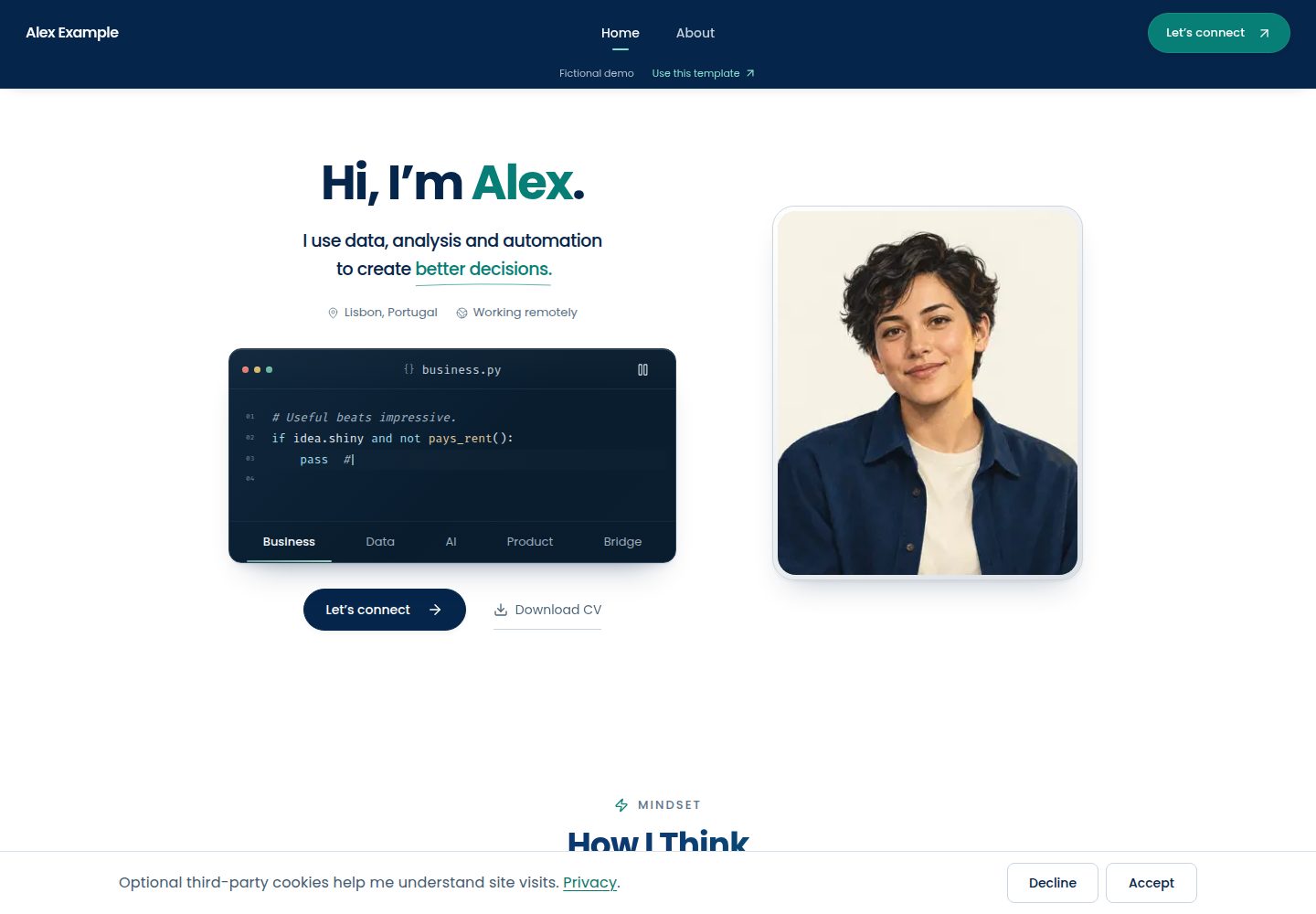
Content is maintained in TypeScript files, with identity, stories, projects, toolset, and contact information organized in separate files
Next.jsReactPortfolioStarter
career-portfolio-template — Next.js Portfolio Template
By Gvasi
A Next.js and TypeScript personal portfolio and digital CV starter template, with content maintained in TypeScript files, including project stories, career timeline, and optional contact and booking integrations.
Explore the design
Compare the page layouts and mobile experience. Open any screenshot for a closer look.
Desktop homepage1 / 3
Desktop captureTop of page
Actual screenshot captured by the server browser.
All pages & views 3
Screenshots show visual appearance; interactive behavior may differ.
Recorded 2026-10-03View source
What stands out
A quick read of the recorded project description.
The project showcase includes decisions and tool descriptions, plus a career timeline, credentials, and an About introduction
Provides personalized sections such as a code story terminal, animated chapters, and an editable toolset explorer
The default site requires no environment variables; contact starts with a direct email link, and booking and message delivery are optional integrations
Includes responsive layout, keyboard interaction, reduced motion support, and analytics that are enabled only after consent
The repository provides documentation on customization, reuse, architecture, testing, and deployment, along with a content check command
Template Details
This is a Next.js + TypeScript starter template adapted from the author's personal portfolio, used to build a personal portfolio and digital CV. The demo site uses content and neutral assets for a fictional character, Alex Example, to showcase a reusable version.
Content is stored in TypeScript files; there is no visual editor or CMS, and you need to be able to edit React and TypeScript code. The default site does not require service accounts or environment variables: contact starts as a direct email link, while booking, message delivery, and analytics are optional configurations.
The template is organized on a "take only what you need" basis: you can run it as a whole and replace the sample content, or borrow just a single section (project showcase, career timeline, toolset, etc.) or a piece of animation and interaction. The repository provides documentation on customization, reuse, architecture, testing, and deployment, as well as a content check command to find leftover sample content and missing assets.
Known limitations: browser testing covers only Chromium; WebKit and Firefox are not configured. Wheel and touch tests for the project showcase use synthetic events, so real mouse and trackpad behavior may differ. Booking and delivery use mocked Google, Turnstile, and Redis in tests; real delivery depends on your own accounts and configuration.
Next.jsReactPortfolioStarter
Is it right for your project?
Use Cases
- Build a personal portfolio and digital CV site to showcase projects, career experience, and credentials
- Borrow a single section such as the project showcase, career timeline, or toolset for an existing website
- Reuse the animated chapters, transitions, or interaction patterns
- Add optional booking, message delivery, and analytics to a portfolio
Suitable For
- Individual developers or designers who can edit React and TypeScript code
- Portfolio projects that prefer content maintained in code rather than a CMS
- Developers who need to reuse the template at the section or animation level
- Users willing to configure optional external services themselves according to the documentation
Getting started & customization
Use these recorded setup notes alongside the repository instructions for your chosen version.
- 1
Requires Node.js 22.15 or higher (Node 24 LTS recommended) and pnpm 10.34.5
- 2
Create a repository from the template on GitHub, clone it, then run pnpm install --frozen-lockfile and pnpm dev
- 3
The default site requires no environment variables, but before sharing you should change the sample email and other identity information in src/config/site.ts
- 4
The sample person, employers, certificates, and projects are fictional and must be replaced before deployment; you can run pnpm check:content to check for leftover sample content
- 5
Booking, message delivery, and analytics are optional integrations; enabling production form submissions requires Cloudflare Turnstile and Redis rate limiting
License & source material
Usage conditions & limitations
Free to use · keep license noticeThis entry covers the free version under the MIT license in the public repository; the free scope is the code of that version and does not mean external services or third-party assets are free.
Must comply with when using
- You are allowed to use, modify, commercialize, and distribute the code of this version for free.
- When distributing copies or substantial portions of the code, retain the original author's copyright notice and the full MIT license notice.
- The code is provided as is; warranties and limitations of liability are governed by the original license and applicable law.
Additional costs & items to verify
- Booking and message delivery are optional integrations and require your own Google Calendar, Meet, and Gmail credentials and a private inbox; the default direct email site does not need these accounts.
- Enabling real form submissions and booking requires configuring Cloudflare Turnstile and Redis rate limiting; deploying only the default direct email site does not.
- Analytics is optional and requires your own public token for PostHog or GA4, and is enabled only on the configured url and after user consent.
- Content is maintained in TypeScript code; there is no visual editor or CMS, and you need the ability to edit React and TypeScript.
- Browser testing covers only Chromium; WebKit and Firefox are not configured.
- Wheel and touch tests for the project showcase use synthetic events, so real mouse and trackpad behavior may differ; you need to verify on your own hardware.
- Booking and delivery use mocked services in tests; real delivery depends on your own accounts and configuration.
- Demo images, fonts, icons, and other third-party assets must be checked against their respective licenses; you cannot judge solely by the code's MIT license.
- External services such as domains, hosting, databases, payments, or AI may incur additional charges.
View Original Text Basis
Permission is hereby granted, free of charge
Original License Text
Booking and message delivery:** Google Calendar, Meet and Gmail, with your own credentials and private destination inbox.
Original README
Cloudflare Turnstile and Redis rate limiting are required for real form submissions and bookings.
Original README
Analytics** (PostHog, GA4): public tokens, consent-gated, active only on the `url` you set
Original README
Content is code: you edit TypeScript files, not a CMS.
Original README
Browser tests run in Chromium only; WebKit and Firefox are not configured.
Original README
physical mice and trackpads behave differently and are worth a check on your own hardware.
Original README
https://github.com/Gvasi/career-portfolio-template/blob/main/LICENSEhttps://github.com/Gvasi/career-portfolio-template/blob/main/README.mdreal delivery depends on your accounts and configuration.
Original README
Compiled by DeepSeek based on repository license and README ·2026-10-03. Results only cover the materials read; dependencies, images, fonts, and subsequent term changes are subject to their respective original texts.
Project checks & description sources
Template Information
- Source platforms
- GitHub
- Documentation and maintenance reference score
- More documented · 88 / 100
- Technologies
- Next.js · React
- Website type
- Portfolio · Starter
How this score is calculated
Our heuristic uses license records (up to 30), a demo link (12), a preview (10), stars (15), recorded maintenance (15), description completeness (8), feature records (5) and classification data (5). It is not a code, security or performance test, or a Google score. A link does not establish tested functionality.
What to verify for this project
- Repository update recorded
- 2026-10-03
- Screenshot last checked
- 2026-10-03
A demo link is listed. Check it with your own content and viewport sizes; its presence does not confirm that forms, authentication or payments work.
The catalog identifies Next.js as the primary stack. Check the actual dependency manifest and lockfile for versions and hosting requirements. These notes use recorded metadata, not a code audit or a deployment test.
Use a selection guide →How this description was prepared
AI-assisted description based on catalog records and repository material. Repository authors are not automatically the reviewers of this description.
Review declaration: [email protected] · 2026-10-04
Inspect the recorded source material
SHA-256: 3be9ae8c876d8c71f844eec7e98d814587bf8f4733101c2e7eebe5012566e772
2026-10-03T16:55:07.624Z
Source file / repository# Career Portfolio Template [](https://github.com/Gvasi/career-portfolio-template/actions/workflows/ci.yml) [](LICENSE) [](package.json) [](https://vercel.com/new/clone?repository-url=https%3A%2F%2Fgithub.com%2FGvasi%2Fcareer-portfolio-template) A Next.js and TypeScript starter for a personal portfolio and digital CV, adapted from [my own portfolio](https://www.gvasilakopoulos.com). A place for the work, interests and small stories that do not quite fit on a CV. Use the whole site, borrow a section, or take an interaction apart and make it your own. **[Template demo](https://career-portfolio-demo.vercel.app)** · **[My live portfolio](https://www.gvasilakopoulos.com)** · **[Get started](#use-this-template)**  The demo shows the reusable version, with fictional Alex Example content and neutral assets. My live portfolio shows how I use it with my own work and story. Booking and messages in the template demo are simulated: nothing is booked or sent. Content lives in TypeScript files, with no visual editor or CMS. You should be comfortable editing React and TypeScript, or happy to learn as you go. **The default site needs no service accounts or environment variables.** Contact starts with a direct email link; booking, message delivery and analytics have optional setup. ## Use as much or as little as you need | Your starting point | A useful next step | |---|---| | “I want my own portfolio.” | [Run the whole site](#use-this-template), then replace the example story in the [customisation guide](docs/customisation.md). | | “I already have a site, but I like that section.” | [Find the section and its dependencies](docs/reuse.md#borrow-a-section). The project reel, career timeline, toolkit and other sections can be adapted separately. | | “I just want an animation or an idea.” | [Start with the animation guide](docs/reuse.md#borrow-an-animation). Keep a chapter animation, a transition, or the way an interaction responds. | ## Use this template Requirements: Node.js 22.15 or later (**Node 24 LTS recommended**) and pnpm 10.34.5 (declared in `package.json`). New to running a project locally? [Build your first portfolio](docs/first-portfolio.md) walks through the tools, your first edits and deployment. 1. Choose **Use this template → Create a new repository** on GitHub. 2. Clone your new repository and enter its folder. Replace the two example names below: ```bash git clone https://github.com/YOUR-USERNAME/YOUR-REPOSITORY.git cd YOUR-REPOSITORY pnpm install --frozen-lockfile pnpm dev # http://localhost:3000 ``` 3. Open `http://localhost:3000`. No environment variables are needed to explore the example. Contact uses a direct email link until integrations are configured; change the example address in `src/config/site.ts` before sharing your version. 4. Follow [Customisation](docs/customisation.md) to replace the identity, stories, images, links and sample CV. Run `pnpm check:content`; the untouched example intentionally reports placeholders. See the [test guide](tests/README.md#after-changing-the-example-content) when changing content or removing sections. 5. Run `pnpm check` and the [browser tests](tests/README.md), then follow the [deployment guide](docs/setup.md#deploying). Start with an introduction, one project you can explain well, and a way to get in touch. The [worked writing example](docs/reuse.md#turn-a-project-into-a-story) helps turn a project into a story. Before sharing, try your site on a phone, follow every link and open the CV. ## What you get <p> <a href="docs/images/template-project.jpg"><img src="docs/images/template-project.jpg" width="70%" alt="The fictional portfolio project opened in its detail dialog, with tabs for its overview, decisions and stack."></a> <a href="docs/images/template-mobile.jpg"><img src="docs/images/template-mobile.jpg" width="20%" alt="The fictional demo on a narrow phone screen."></a> </p> Open either image for a closer look, or [try the demo](https://career-portfolio-demo.vercel.app) to explore the interactions. - **Show your work:** project walkthroughs with decisions and tools, a career timeline and credentials. - **Make it personal:** a code-story terminal, animated chapters and an editable toolkit explorer. Keep only the sections you need. - **Let people reach you:** direct email, with optional booking and message delivery. - **Support different visitors:** responsive layouts, keyboard interactions, reduced motion and consent-gated analytics. ## Make it yours Start with these three places. The customisation guide also points out the optional component-level copy and illustration changes. | where | what | |---|---| | `src/config/site.ts` | name, role, location, public URL, public contact address, GitHub/LinkedIn and social profiles, optional chat link, asset paths | | `src/content/` | `home.ts` (greeting, code stories, How I work chapters, closing phrases), `career.ts` (career chapters, credentials, About intro), `projects.ts` (the project reel and its stories), `toolkit.tsx` (tool catalogue and notes), `contact.ts` (topics and notes) | | `public/` | your portrait (`images/profile/portrait-source.png`; the sizes are generated), About portrait, career and project illustrations, CV (`documents/sample-cv.pdf`), icons and the six chapter animations | The example person, employers, certificates and projects are fictional. Replace them before you deploy under your own name. ## Engineering notes If you want to understand or adapt the implementation, start with the [architecture guide](docs/architecture.md) and [test guide](tests/README.md). - Public identity and content are separate from server credentials and integrations. - Booking handles retries and uncertain provider responses, so a failed notification does not become another calendar booking. - Shared dialogs and motion helpers cover focus handling, reduced motion and work that pauses offscreen, with regression tests for those interactions. The CI workflow checks types, linting, unit tests and Chromium browser behavior. Optional service calls are mocked in tests; connecting real accounts is a separate setup step. ## Optional integrations You can deploy a direct-email portfolio without these. Enable only what you need; the [setup guide](docs/setup.md) explains the accounts and variables. - **Booking and message delivery:** Google Calendar, Meet and Gmail, with your own credentials and private destination inbox. - **Protection for enabled production submissions:** Cloudflare Turnstile and Redis rate limiting are required for real form submissions and bookings. They are not required to deploy the default direct-email site. - **Analytics** (PostHog, GA4): public tokens, consent-gated, active only on the `url` you set in `src/config/site.ts`. The commented [`.env.example`](.env.example) can stay empty for the default site. Integration libraries are included in the install even when their services are disabled. ## Commands ```bash pnpm dev # development server on http://localhost:3000 pnpm typecheck # next typegen + tsc --noEmit pnpm lint # eslint pnpm test:unit # Node unit tests (tests/unit), services mocked pnpm test:e2e # Playwright browser tests (tests/e2e, Chromium; run `npx playwright install chromium` once) pnpm build && pnpm start pnpm check # typecheck, lint, unit tests and build in one go (what CI runs) pnpm check:content # before your own launch: find leftover example content and missing assets ``` ## Stack Next.js 16.3 · React 19.1 · TypeScript (strict) · Tailwind CSS 4 · Framer Motion 12 · Lottie. See [package.json](package.json) for the full dependency list. Install from the committed lockfile; other versions are untested. ## Scope and known limits - Browser tests run in Chromium only; WebKit and Firefox are not configured. - The project reel is covered by synthetic wheel and touch tests; physical mice and trackpads behave differently and are worth a check on your own hardware. - Booking and delivery are exercised in tests with mocked Google, Turnstile and Redis; real delivery depends on your accounts and configuration. - Content is code: you edit TypeScript files, not a CMS. A few things still take a component edit (listed in the customisation guide). ## Provenance and maintenance The template and [my portfolio](https://www.gvasilakopoulos.com) share their starting point, but are versioned separately. This edition replaces personal material with fictional content and redistributable assets. See the [changelog](CHANGELOG.md) for template updates; the two sites may evolve differently. ## Questions and contributions If you get stuck, open a question with what you are trying to change and the file or page involved. If you borrow something, I would like to see what you made—even if it looks nothing like this site. Issues and small pull requests are welcome; see [CONTRIBUTING.md](CONTRIBUTING.md). Security reports go to the address in [SECURITY.md](SECURITY.md). If this saved you some work, a star helps other people find it. **Created by George Vasilakopoulos.** Adapted from my personal portfolio. Code, developer documentation and the example material are offered under the MIT licence ([LICENSE](LICENSE)); [ASSETS.md](ASSETS.md) lists the bundled assets, their origin and their terms.
Explore similar templates
Compare previews and descriptions within the same stack and category.

Next.js SaaS Starter
The official Next.js SaaS starter template, integrating email/password authentication, Stripe Checkout subscriptions, a dashboard with user/team CRUD, basic Owner/Member RBAC, and activity logging.
Next.js · SaaS

Next.js Commerce
Vercel's officially maintained Next.js App Router ecommerce starter with deep Shopify integration, offering a complete product catalog, cart, and checkout flow. Core logic is modular for swapping backends, and community provider versions exist for BigCommerce, Medusa, and Saleor.
Next.js · E-commerce

Next-js-Boilerplate
A developer-first Next.js 16 starter with Tailwind CSS 4 and TypeScript, supporting both App Router and Page Router.
Next.js · Starter

tailwind-nextjs-starter-blog
A Next.js and Tailwind CSS blog starter template using Contentlayer for Markdown/MDX, with built-in SEO, code highlighting, and tags. It targets personal technical blogs and migration from Jekyll/Hugo to React, and supports one-click Vercel deployment.
Next.js · Blog

next-forge
next-forge is a Turborepo-based Next.js template maintained by Vercel, positioned as a starting point for SaaS products.
Next.js · Starter

SaaS-Boilerplate
SaaS-Boilerplate is an open-source SaaS starter template built with Next.js App Router, React 19, TypeScript, Tailwind CSS, and Shadcn UI.
Next.js · SaaS