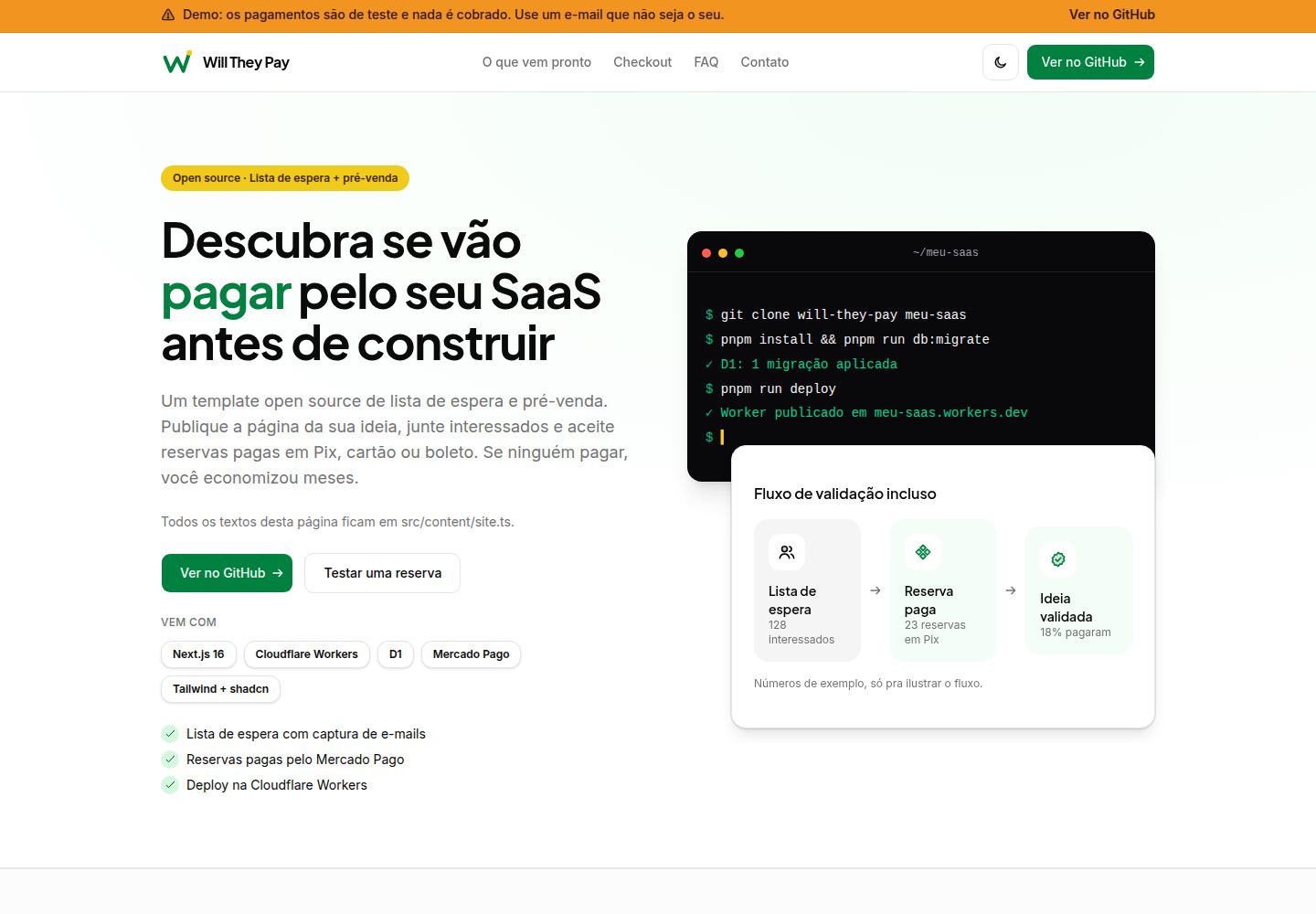
包含营销落地页、等待名单线索表单与演示定价方案,可直接试用 Checkout Pro 流程
Next.jsReactSaaS
will-they-pay — Next.js SaaS模板
作者 hugomendonca98
一个用于验证 SaaS 想法的开源模板,提供等待名单收集与通过 Mercado Pago(Pix、信用卡、boleto)的付费预售流程,基于 Next.js 部署在 Cloudflare Workers 与 D1 上。
看看你的网站会是什么样
浏览真实页面截图,比较内容排版与手机效果。点击下方缩略图切换,放大查看整页细节。
全部页面与视图 2
截图用于了解视觉与布局,交互效果请以实际项目为准。
采集于 2026-10-11查看来源
值得关注的模板亮点
从已有项目资料中,快速了解它的特点。
线索经 Zod 校验与 server actions 写入 Cloudflare D1
支付流程在 D1 创建订单并生成 Mercado Pago preference,支持 Pix、信用卡与 boleto
提供 /api/webhooks/mercadopago 回调端点,使用 x-signature 的 HMAC-SHA256 校验并更新订单状态
使用 Drizzle ORM 管理 D1 表结构与迁移,附带本地与远程迁移脚本
测试使用 Vitest + MSW,不调用真实 Mercado Pago 接口;CI 执行 lint、typecheck 与测试
模板详细介绍
Will They Pay 是一个开源模板,目标是在正式开发产品之前先验证用户是否愿意付费。它把营销落地页、等待名单线索表单和付费预售流程组合在一起:访客可以留下姓名、邮箱、电话和留言,也可以选择演示定价方案进入 Mercado Pago Checkout Pro 完成支付。
技术实现上,项目使用 Next.js(App Router)并通过 @opennextjs/cloudflare 部署到 Cloudflare Workers,数据存储在 Cloudflare D1,配合 Drizzle ORM 管理表结构与迁移,样式使用 Tailwind CSS 与 shadcn/ui。线索提交走 Zod 校验与 server actions;支付流程会在 D1 中创建订单、创建 Mercado Pago preference 并跳转到结账页,同时提供 success、failure、pending 返回页面。支付回调由 POST /api/webhooks/mercadopago 处理,使用 x-signature 的 HMAC-SHA256 校验后更新订单与支付状态。
界面文案为巴西葡萄牙语,代码、标识符与注释为英语。项目附带 Vitest + MSW 测试(不调用真实 Mercado Pago 接口)以及 GitHub Actions 的 lint、typecheck、test 流程,并可选在推送到 main 时自动部署到 Cloudflare Workers。
使用前需要自行准备 Cloudflare 账号、Mercado Pago 开发者应用(本地/沙箱用测试凭证)以及 Wrangler CLI。模板仓库中的 database_id 是占位值,本地 D1 可直接使用,生产环境需要创建真实 D1 数据库并替换;Mercado Pago 的 webhook 需要在面板中手动配置,部署脚本不会自动注册。
Next.jsSaaS
适合你的项目吗?
适用场景
- 在写代码之前,用落地页与等待名单收集潜在用户线索
- 通过 Mercado Pago 的 Pix、信用卡或 boleto 收取付费预售,验证付费意愿
- 作为学习 Next.js + Cloudflare Workers + D1 + Drizzle 组合的参考项目
- 需要巴西葡萄牙语界面、面向巴西支付方式的 SaaS 验证页
适合人群
- 想快速验证 SaaS 想法付费意愿的独立开发者或小团队
- 使用 Cloudflare Workers 与 D1 作为部署和数据库方案的项目
- 需要接入 Mercado Pago Checkout Pro 的巴西市场产品
- 希望参考 Next.js 在 Cloudflare 上运行方式的开发者
上手与定制指南
结合仓库当前版本的说明,按下面的资料检查内容、配置与运行要求。
- 1
需要 Node.js 22+ 与 pnpm(可通过 corepack enable 启用),并使用 pnpm run <script> 调用脚本
- 2
复制 .dev.vars.example 为 .dev.vars 并填入 Mercado Pago 测试凭证;密钥与 Worker 变量放在 .dev.vars 而非提交到仓库
- 3
本地运行前执行 pnpm run db:migrate 应用 D1 迁移;生产环境需先 pnpm wrangler d1 create 并将 database_id 写入 wrangler.jsonc
- 4
生产环境通过 pnpm wrangler secret put 设置 MERCADOPAGO_ACCESS_TOKEN 与 MERCADOPAGO_WEBHOOK_SECRET,并在 wrangler.jsonc 配置 APP_URL 等公开变量
- 5
Mercado Pago webhook 需在面板中手动配置指向 https://YOUR_DOMAIN/api/webhooks/mercadopago,部署脚本不会自动注册
授权与来源资料
使用条件与限制
免费使用 · 保留许可声明本次收录的是公开仓库中采用 MIT 许可的免费版本;免费范围为该版本代码,不代表外部服务或第三方素材免费。
使用时需要遵守
- 允许免费使用、修改、商用和分发该版本代码。
- 分发代码副本或实质性部分时,保留原作者版权声明和完整 MIT 许可声明。
- 代码按现状提供;担保与责任限制以原许可证及适用法律为准。
额外费用与待核对事项
- 演示图片、字体、图标及其他第三方素材需按各自许可核对,不能仅凭代码的 MIT 许可判断。
- 域名、托管、数据库、支付或 AI 等外部服务可能另外收费。
- 使用前必须自行注册并准备 Cloudflare 账号(需启用 Workers)以及 Mercado Pago 开发者应用,否则无法完成部署与支付流程。
- 支付功能依赖第三方服务 Mercado Pago Checkout Pro,需自行申请账号与凭证,并非模板内置的免费支付能力。
- 远程 D1 操作与部署前必须登录 Wrangler(Cloudflare 账号),否则无法执行远程迁移或发布。
- 生产环境必须自行创建真实 D1 数据库并替换占位 database_id,模板默认值仅适用于本地开发。
- 部署脚本不会自动注册或配置 Mercado Pago webhook,必须手动在面板中设置回调 URL 与事件。
- 本地测试 webhook 需要公网 HTTPS 地址,必须借助隧道工具(如 Cloudflare Tunnel、ngrok)才能接收回调。
- 演示定价方案中的价格仅为示例展示,不构成真实商品或价格承诺,需自行替换为实际方案。
- Next.js 被固定在 16.3.8,升级到更新的 16.4.x 可能破坏 OpenNext Cloudflare 适配器,升级需谨慎。
- 当前未启用 Cache Components,若在此 OpenNext 版本下启用可能导致本地 Worker 挂起,属于已知使用限制。
- 依赖链中存在已知高危安全告警(braces),仅影响开发依赖,运行时与已部署 Worker 不受影响,但需知悉。
- 禁止将 Mercado Pago 令牌放入 GitHub,必须通过 wrangler secret put 在 Worker 上设置密钥。
- 不得将真实令牌、密钥、账号 ID 或 D1 数据库 ID 提交到仓库,需自行妥善保管。
查看原文依据
Permission is hereby granted, free of charge
许可证原文
**Accounts you need:**
README 原文
Mercado Pago **Checkout Pro** (Pix, card, boleto)
README 原文
**Wrangler CLI** (included as a dev dependency). Log in before remote D1 or deploy:
README 原文
`wrangler.jsonc` ships with a **placeholder** `database_id` (`00000000-0000-0000-0000-000000000000`). Local D1 works with that placeholder. For **production**:
README 原文
`pnpm run deploy` **does not** register or configure webhooks in the Mercado Pago dashboard. You must do this yourself:
README 原文
For **local** webhook testing, Mercado Pago needs a public HTTPS URL — use a tunnel (e.g. Cloudflare Tunnel, ngrok) and point the panel URL at your tunnel.
README 原文
Demo plan prices are defined in `src/content/site.ts` (`site.pricing.plans`); they are for illustration only.
README 原文
**Next.js pinned to 16.3.8** — Newer 16.4.x releases can break `@opennextjs/[email protected]`
README 原文
**Cache Components** — Not enabled: enabling Cache Components with this OpenNext version can hang the local Worker.
README 原文
**`pnpm audit` reports `braces` (high)** — The advisory affects a dev-only dependency chain
README 原文
Do **not** put Mercado Pago tokens in GitHub. Keep using `pnpm wrangler secret put` on the Worker.
README 原文
https://github.com/hugomendonca98/will-they-pay/blob/main/LICENSEhttps://github.com/hugomendonca98/will-they-pay/blob/main/README.md**Never commit real tokens, secrets, account IDs, or D1 database IDs.**
README 原文
DeepSeek 根据仓库许可证和 README 整理 ·2026-10-11。结果仅覆盖已读取资料,依赖、图片、字体及后续条款变更以各自原文为准。
项目核对记录与介绍依据
模板资料
- 来源平台
- GitHub
- 资料与维护参考分
- 资料较完整 · 80 / 100
- 技术栈
- Next.js · React
- 网站类型
- SaaS
这个分数如何计算
本站按许可资料(最高30分)、演示链接(12分)、预览图(10分)、Star数(15分)、记录的维护时间(15分)、描述完整度(8分)、功能记录(5分)和分类资料(5分)计算。它不是代码、安全或性能测试,也不是 Google 评分;有链接不代表已实测可用。
这个项目需要核对什么
- 记录的仓库更新时间
- 2026-10-11
- 截图检查日期
- 2026-10-11
已收录演示链接。请用你的内容与屏幕尺寸检查;有演示不代表表单、认证或支付已经可用。
目录记录的主要技术栈是 Next.js。请通过依赖清单和锁文件核对实际版本与托管要求。这些说明基于收录资料,不代表代码审计或部署实测。
查看具体选型方法 →介绍的制作与核对状态
介绍由 AI 辅助整理目录与仓库资料。仓库作者不等于这篇介绍的审核者。
审核声明: [email protected] · 2026-10-11
查看当时使用的来源资料
SHA-256: d855db43f106ab451e7fde9eb1ae5aea11ea331806da566cf954a06248750401
2026-10-11T02:05:35.767Z
来源文件 / 仓库
**[Read in Brazilian Portuguese (README.pt-BR.md)](README.pt-BR.md)** · [](LICENSE)
**Find out if people will pay for your SaaS before you build it.**
Will They Pay is an open source waitlist and pre-sale template. Launch a page for your idea, collect sign-ups, and take paid reservations via Pix, card, or boleto with Mercado Pago. Built with Next.js 16 on Cloudflare Workers and D1.
This repository is public. **Never commit real tokens, secrets, account IDs, or D1 database IDs.**
## What you get
- Marketing landing page (copy in `src/content/site.ts`) with waitlist lead form and **demo** checkout plans to try Checkout Pro.
- Lead capture (name, email, phone, message) with Zod validation, server actions, and D1 persistence.
- Checkout Pro flow: creates an order in D1, creates a Mercado Pago preference, redirects to checkout, and handles `success` / `failure` / `pending` return pages.
- `POST /api/webhooks/mercadopago` with `x-signature` validation (HMAC-SHA256) and order/payment updates in D1.
- Typed payment layer, Vitest + MSW (no real Mercado Pago calls in tests).
- GitHub Actions CI: lint, typecheck, and tests; optional auto-deploy to Cloudflare Workers on push to `main`.
UI copy is **Brazilian Portuguese**. Code, identifiers, and comments are **English**.
## Stack and requirements
| Piece | Version / notes |
| --- | --- |
| **Runtime** | Node.js **22+** (`engines` in `package.json`) |
| **Package manager** | **pnpm** (`packageManager` in `package.json`; enable with `corepack enable`) |
| **Framework** | Next.js **16.3.8** (App Router) |
| **Deploy target** | Cloudflare Workers via [`@opennextjs/cloudflare`](https://github.com/opennextjs/cloudflare) |
| **Database** | Cloudflare **D1** + **Drizzle ORM** |
| **Payments** | Mercado Pago **Checkout Pro** (Pix, card, boleto) |
| **Styling** | Tailwind CSS 4 + shadcn/ui |
**Accounts you need:**
1. [Cloudflare](https://dash.cloudflare.com/) account with Workers enabled.
2. [Mercado Pago Developers](https://www.mercadopago.com.br/developers/panel/app) application (test credentials for local/sandbox).
3. **Wrangler CLI** (included as a dev dependency). Log in before remote D1 or deploy:
```bash
pnpm wrangler login
```
## Scripts
| Command | What it does |
| --- | --- |
| `pnpm run dev` | `next dev` — local Next.js with Cloudflare bindings via OpenNext dev integration |
| `pnpm run build` | `next build` |
| `pnpm run preview` | `opennextjs-cloudflare build` + `opennextjs-cloudflare preview` (Workers runtime locally) |
| `pnpm run deploy` | `opennextjs-cloudflare build` + `opennextjs-cloudflare deploy` |
| `pnpm run test` | Vitest (single run) |
| `pnpm run test:watch` | Vitest watch mode |
| `pnpm run typecheck` | `tsc --noEmit` |
| `pnpm run lint` | ESLint |
| `pnpm run format` | Prettier write |
| `pnpm run format:check` | Prettier check |
| `pnpm run db:generate` | `drizzle-kit generate` → SQL in `./drizzle` |
| `pnpm run db:migrate` | Apply migrations to **local** D1 (alias of `db:migrate:local`) |
| `pnpm run db:migrate:local` | `wrangler d1 migrations apply DB --local` |
| `pnpm run db:migrate:remote` | `wrangler d1 migrations apply DB --remote` |
| `pnpm run cf-typegen` | Regenerate `cloudflare-env.d.ts` from Wrangler bindings |
Use `pnpm run <script>` for package scripts. pnpm ships a built-in `deploy` command (workspace deploy), so plain `pnpm deploy` does **not** run the `deploy` script in `package.json` and may fail with `ERR_PNPM_NOTHING_TO_DEPLOY`.
## Run locally (step by step)
### 1. Clone and install
```bash
git clone https://github.com/hugomendonca98/will-they-pay.git
cd will-they-pay
corepack enable
pnpm install
```
### 2. Local environment file
```bash
cp .dev.vars.example .dev.vars
```
Edit `.dev.vars` with your **Mercado Pago test** credentials (see [Configure](#configure-the-project)). `.dev.vars` is gitignored.
Optional: copy `.env.example` to `.env.local` if you need Next-specific tooling; **secrets and Worker vars belong in `.dev.vars`**, not in git.
### 3. Apply D1 migrations (local)
```bash
pnpm run db:migrate
```
This uses the placeholder `database_id` in `wrangler.jsonc` — that is expected for **local** D1. Tables are created in Wrangler’s local D1 store.
### 4. Start the dev server
```bash
pnpm run dev
```
Open [http://localhost:3000](http://localhost:3000). In development, `next.config.ts` calls `initOpenNextCloudflareForDev()` so D1 and vars from `.dev.vars` are available to server code.
### 5. Preview on the Workers runtime (optional)
```bash
pnpm run preview
```
This builds the OpenNext output and runs Wrangler’s dev server. Check the terminal for the URL (commonly `http://localhost:8787`). If tables are missing, run `pnpm run db:migrate:local` again against that local D1.
Set `APP_URL` in `.dev.vars` to match the URL you use for checkout return links (no trailing slash).
### 6. Quality checks
```bash
pnpm run lint
pnpm run typecheck
pnpm run test
```
CI runs the same three commands; tests use in-memory SQLite and MSW — they do **not** read `.dev.vars` or call Mercado Pago.
## Configure the project
### Environment variables and secrets
| Name | Kind | Local | Production |
| --- | --- | --- | --- |
| `NEXTJS_ENV` | var | `.dev.vars` — use `development` for `pnpm run dev` | Not required for deploy |
| `APP_URL` | public var | `.dev.vars` — e.g. `http://localhost:3000` | `vars` in `wrangler.jsonc` (HTTPS URL, no trailing slash) |
| `MERCADOPAGO_SANDBOX` | public var | `.dev.vars` — `true` for sandbox | `vars` in `wrangler.jsonc` — `true` or `false` |
| `DEMO_MODE` | public var (optional) | `.dev.vars` — omit or `false` (default off) | `vars` in `wrangler.jsonc` or Cloudflare dashboard — set `"true"` only on a public demo deploy |
| `MERCADOPAGO_ACCESS_TOKEN` | **secret** | `.dev.vars` | `pnpm wrangler secret put MERCADOPAGO_ACCESS_TOKEN` |
| `MERCADOPAGO_WEBHOOK_SECRET` | **secret** | `.dev.vars` | `pnpm wrangler secret put MERCADOPAGO_WEBHOOK_SECRET` |
**Where to get Mercado Pago values**
1. Open [Your integrations](https://www.mercadopago.com.br/developers/panel/app) and create or select an application.
2. **Credentials** → copy the **test** Access Token (`TEST-…`) into `MERCADOPAGO_ACCESS_TOKEN` for local/sandbox. Use the **production** token only as a Worker secret when you go live.
3. **Webhooks** → configure notifications (see below) → reveal the **secret** and set `MERCADOPAGO_WEBHOOK_SECRET`.
The app treats placeholder values (e.g. `replace-with-your-test-access-token`) as missing so checkout fails closed (`src/lib/env.ts`).
`APP_URL` drives Checkout Pro `back_urls` and the `notification_url` sent when creating a preference (`{APP_URL}/api/webhooks/mercadopago`). `auto_return` is only sent when `APP_URL` starts with `https://` (`src/lib/payments/service.ts`).
### Public demo banner (optional)
`DEMO_MODE` is evaluated **at runtime** from the Worker environment (`getCloudflareContext`), not at build time — the same deploy artifact can be toggled without rebuilding.
- **Default:** off (omit `DEMO_MODE` or set it to `false`). The template `wrangler.jsonc` does not enable it, so clones do not inherit the banner.
- **Local / preview:** add `DEMO_MODE=true` to `.dev.vars` (commented in `.dev.vars.example`).
- **Cloudflare:** set `DEMO_MODE` to `"true"` under `vars` in `wrangler.jsonc` for a demo/staging Worker only, or add the variable in the [Cloudflare dashboard](https://dash.cloudflare.com/) → **Workers & Pages** → your worker → **Settings** → **Variables**. Banner copy is in `site.demoBanner` (`src/content/site.ts`).
### D1 database
`wrangler.jsonc` ships with a **placeholder** `database_id` (`00000000-0000-0000-0000-000000000000`). Local D1 works with that placeholder. For **production**:
```bash
pnpm wrangler d1 create will-they-pay
```
Copy the printed `database_id` into `wrangler.jsonc` under `d1_databases` for a private fork, or keep the placeholder and set GitHub secret `D1_DATABASE_ID` for auto-deploy (see [Automatic deploy](#automatic-deploy-to-cloudflare-workers)). Do not commit real IDs in a shared template.
After schema changes:
```bash
pnpm run db:generate # optional: generate SQL from Drizzle schema
pnpm run db:migrate:local # local
pnpm run db:migrate:remote # remote (requires wrangler login or CLOUDFLARE_API_TOKEN)
```
### Mercado Pago webhook (manual — not automatic)
`pnpm run deploy` **does not** register or configure webhooks in the Mercado Pago dashboard. You must do this yourself:
1. Deploy (or use a tunnel) so `https://YOUR_DOMAIN/api/webhooks/mercadopago` is reachable.
2. In Mercado Pago → **Webhooks** → configure notifications:
- **URL:** `https://YOUR_DOMAIN/api/webhooks/mercadopago`
- **Event:** Payments (and any others you need)
3. Save and copy the **webhook secret** into `MERCADOPAGO_WEBHOOK_SECRET`.
For **local** webhook testing, Mercado Pago needs a public HTTPS URL — use a tunnel (e.g. Cloudflare Tunnel, ngrok) and point the panel URL at your tunnel. Set `APP_URL` to that public origin.
The handler validates `x-signature` (`ts=…,v1=…`), builds the manifest `id:{data.id};request-id:{x-request-id};ts:{ts};`, and compares HMAC-SHA256 in constant time before fetching the payment and updating D1.
### Test a payment in sandbox
1. Keep `MERCADOPAGO_SANDBOX=true` and a **test** access token in `.dev.vars`.
2. Run `pnpm run dev` (or `pnpm run preview` with matching `APP_URL`).
3. On the home page, use **Testar uma reserva** (scrolls to demo plans) or open `/#precos`, pick a plan, and complete Checkout Pro.
4. Use Mercado Pago [test users](https://www.mercadopago.com.br/developers/en/docs/your-integrations/test/accounts) and [test cards](https://www.mercadopago.com.br/developers/en/docs/checkout-pro/additional-content/test-cards) as documented by Mercado Pago.
Demo plan prices are defined in `src/content/site.ts` (`site.pricing.plans`); they are for illustration only.
## Deploy to Cloudflare (step by step)
1. `pnpm wrangler login`
2. Create a D1 database and set `database_id` in `wrangler.jsonc` (see [D1](#d1-database)).
3. Set public vars in `wrangler.jsonc`, at minimum:
- `APP_URL` — your Worker HTTPS URL (custom domain or `*.workers.dev`)
- `MERCADOPAGO_SANDBOX` — `true` until you switch to live credentials
4. Set secrets (interactive; do not paste secrets into shell history on shared machines):
```bash
pnpm wrangler secret put MERCADOPAGO_ACCESS_TOKEN
pnpm wrangler secret put MERCADOPAGO_WEBHOOK_SECRET
```
5. Apply migrations to production D1:
```bash
pnpm run db:migrate:remote
```
6. Deploy:
```bash
pnpm run deploy
```
7. In the Mercado Pago panel, configure the webhook URL for your **deployed** domain (see [Mercado Pago webhook](#mercado-pago-webhook-manual--not-automatic)).
8. When going live, set production credentials, set `MERCADOPAGO_SANDBOX` to `false`, and redeploy.
To publish on every push to `main` instead of running these steps locally, see [Automatic deploy](#automatic-deploy-to-cloudflare-workers).
## After using this template
When you create a repo from **Use this template**, replace upstream-specific values before your first deploy:
1. **Marketing URLs and GitHub links** — In `src/content/site.ts`, set `repoUrl` and `issuesUrl` to your repository (and any other `href: "repoUrl"` / `"issuesUrl"` CTAs you keep).
2. **Cloudflare Worker name (three places, keep them in sync)** — In `wrangler.jsonc`:
- top-level `"name"` (Worker script name),
- `services[0].service` under `WORKER_SELF_REFERENCE` (must match the Worker name),
- `d1_databases[0].database_name` (logical D1 name; usually the same string as the Worker).
After `pnpm wrangler d1 create <your-name>`, set `database_id` to the UUID Wrangler prints (or keep the placeholder for local-only work).
3. **`APP_URL`** — Local: `http://localhost:3000` in `.dev.vars` (from `.dev.vars.example`). Deployed: HTTPS origin with no trailing slash in `wrangler.jsonc` `vars` (and match it in the Mercado Pago webhook panel).
4. **Mercado Pago secrets** — Never commit tokens. Local: `MERCADOPAGO_ACCESS_TOKEN` and `MERCADOPAGO_WEBHOOK_SECRET` in `.dev.vars`. Production: `pnpm wrangler secret put` on your Worker.
5. **GitHub auto-deploy (optional)** — CI deploy runs only on push to `main` when all of `CLOUDFLARE_API_TOKEN`, `CLOUDFLARE_ACCOUNT_ID`, and `D1_DATABASE_ID` are set, plus `APP_URL` as a variable. Forks/clones with **no** Cloudflare secrets skip deploy (green workflow). To disable deploy on your repo while keeping secrets for other uses, set GitHub variable `CLOUDFLARE_AUTO_DEPLOY` to `false`.
6. **Brand assets** — Replace files under `public/brand/` and update paths in `site.brand` (`src/content/site.ts`). Adjust colors in `src/app/globals.css` if needed.
## Customize branding and copy
| What | Where |
| --- | --- |
| Product name, URLs, marketing copy, demo plan labels | `src/content/site.ts` |
| Colors and typography tokens | `src/app/globals.css` |
| Logos and favicons | `public/brand/` (paths in `site.brand`) |
| Hero illustration (terminal + validation flow) | `src/components/marketing/hero-visual.tsx` — swap for a product screenshot if you prefer |
## Project structure
```
src/content/ Marketing copy and demo checkout plans (site.ts)
src/app/ App Router pages, actions, webhook route
src/components/ UI (shadcn), marketing sections, forms
src/lib/db/ Drizzle schema and D1 client
src/lib/leads/ Lead validation and persistence
src/lib/payments/ Mercado Pago client, webhook, checkout service
drizzle/ Versioned SQL migrations
public/brand/ Brand assets
docs/ README banners and docs assets
```
**UI routes:** `/` (landing), `/checkout/success`, `/checkout/failure`, `/checkout/pending`.
**API:** `POST /api/webhooks/mercadopago`.
## Continuous integration
Workflow: `.github/workflows/ci.yml`.
### Quality checks
On every push to `main` and on pull requests:
- `pnpm run lint`
- `pnpm run typecheck`
- `pnpm run test`
No Mercado Pago or Cloudflare credentials are required for this job.
### Production build
After quality checks pass, a separate job runs on every push and pull request:
- `pnpm run build`
- `pnpm exec opennextjs-cloudflare build`
No secrets are required. This catches production-only build failures that lint/typecheck/tests might miss.
### Automatic deploy to Cloudflare Workers
After the quality and production build jobs **pass**, a deploy job runs **only on push to `main`** (not on pull requests). It is **skipped** (the workflow stays green) when the Cloudflare GitHub secrets are missing — that is expected for forks and clones.
Do **not** put Mercado Pago tokens in GitHub. Keep using `pnpm wrangler secret put` on the Worker. Wrangler deploys never delete Worker secrets (`MERCADOPAGO_ACCESS_TOKEN`, `MERCADOPAGO_WEBHOOK_SECRET`).
**GitHub Actions secrets** (Settings → Secrets and variables → Actions → Secrets):
| Secret | Purpose |
| --- | --- |
| `CLOUDFLARE_API_TOKEN` | Wrangler authentication |
| `CLOUDFLARE_ACCOUNT_ID` | Cloudflare account that owns the Worker and D1 database |
| `D1_DATABASE_ID` | Production D1 UUID. Injected into `wrangler.jsonc` on the runner only — never committed |
**GitHub Actions variables** (Settings → Secrets and variables → Actions → Variables). A secret of the same name also works; variables are the better fit because these values are not credentials:
| Variable | Purpose |
| --- | --- |
| `APP_URL` | Public HTTPS origin of the Worker (no trailing slash), e.g. `https://will-they-pay.<subdomain>.workers.dev`. **Required** when auto-deploy is enabled. CI rewrites `vars.APP_URL` in `wrangler.jsonc` before deploy so Wrangler does not publish the committed `http://localhost:3000` default. |
| `DEMO_MODE` | Optional. `true` shows the public-demo banner; `false` forces it off. When unset, CI does not add `DEMO_MODE` to the Wrangler config and passes `--keep-vars`, so a dashboard value is left as-is. |
| `CLOUDFLARE_AUTO_DEPLOY` | Optional kill switch. Set to `false` to skip auto-deploy even when the Cloudflare secrets exist. |
**Minimum API token permissions**
Create a token at [Account API tokens](https://dash.cloudflare.com/profile/api-tokens):
1. Use the **Edit Cloudflare Workers** template (Workers Scripts Edit + Account Settings Read).
2. Add **Account → D1 → Edit** so remote migrations can run.
**Enable:** create the three secrets and `APP_URL`, then push to `main`.
**Disable:** set `CLOUDFLARE_AUTO_DEPLOY` to `false`, or delete all three Cloudflare secrets. If only some of those secrets are set, the job **fails** so a partial setup is visible.
The deploy job:
1. Rewrites `database_id`, `APP_URL`, and optionally `DEMO_MODE` in `wrangler.jsonc` on the runner (nothing sensitive is committed).
2. Applies remote D1 migrations (`pnpm run db:migrate:remote`). Already-applied SQL is skipped — safe and idempotent.
3. Builds with OpenNext and deploys with `opennextjs-cloudflare deploy -- --keep-vars` so dashboard-only vars are not wiped, while the rewritten `APP_URL` is what Wrangler uploads.
Deploys share a concurrency group so two pushes cannot publish at the same time.
## Troubleshooting
**Next.js pinned to 16.3.8** — Newer 16.4.x releases can break `@opennextjs/[email protected]` (e.g. `preview-props.json`; see [opennextjs/cloudflare#1355](https://github.com/opennextjs/opennextjs-cloudflare/issues/1355)). This repo includes a `pnpm` patch under `patches/` for the adapter; revisit when upgrading.
**Cache Components** — Not enabled: enabling Cache Components with this OpenNext version can hang the local Worker. See comments in `next.config.ts`.
**Checkout fails immediately** — Check `.dev.vars` for real test tokens (not placeholders) and that `pnpm run db:migrate` has been run. On the deployed Worker, stream logs with `npx wrangler tail will-they-pay` (replace with your Worker name from `wrangler.jsonc`). Checkout failures log a single JSON line with `"event":"checkout_start_failed"` plus a stable `code` and, for Mercado Pago HTTP errors, `mpStatus` (no secrets).
**Checkout modal shows a full-page server error** — In production, a `"use server"` file must only export async functions. Exporting initial form state or other objects from `src/app/actions/*.ts` throws at runtime (`invalid-use-server-value`). Keep shared state in a sibling module without `"use server"` (for example `checkout-state.ts`). CI runs a Vitest guard in `use-server-exports.test.ts`.
**Webhook never updates orders** — Confirm the URL and secret in the Mercado Pago panel match production, and that the endpoint is HTTPS and publicly reachable.
**`ERR_PNPM_NOTHING_TO_DEPLOY` when deploying** — You ran pnpm’s built-in `deploy` instead of the package script. Use `pnpm run deploy`.
**`pnpm audit` reports `braces` (high)** — The advisory affects a dev-only dependency chain (`eslint-config-next` → `fast-glob` → `micromatch` → `braces`). npm’s latest `braces` release is still flagged; there is no upstream patched version yet. Runtime and deployed Workers are unaffected.
## Contributing
Issues and pull requests are welcome on [GitHub](https://github.com/hugomendonca98/will-they-pay). Keep secrets out of the tree; run `pnpm run lint`, `pnpm run typecheck`, and `pnpm run test` before opening a PR.
## License
This project is licensed under the [MIT License](LICENSE).
看看同类模板
对比同技术栈与用途的模板,找到更适合的视觉与内容结构。

Next.js SaaS Starter
Next.js SaaS Starter 是 Next.js 官方维护的 SaaS 起点模板,定位介于学习资源和可直接部署的脚手架之间。
Next.js · SaaS

SaaS-Boilerplate
🚀🎉📚 SaaS Boilerplate built with Next.js + Tailwind CSS + Shadcn UI + TypeScript. ⚡️ Full-stack React applic…
Next.js · SaaS

create-t3-turbo
create-t3-turbo 是一个面向全栈 TypeScript 的 monorepo 起点,由 T3 OSS 维护,在 Vercel 模板目录中收录。
Next.js · 启动器

saas-starter-kit
🔥 Enterprise SaaS Starter Kit - Kickstart your enterprise app development with the Next.js SaaS boilerplate �…
Next.js · SaaS
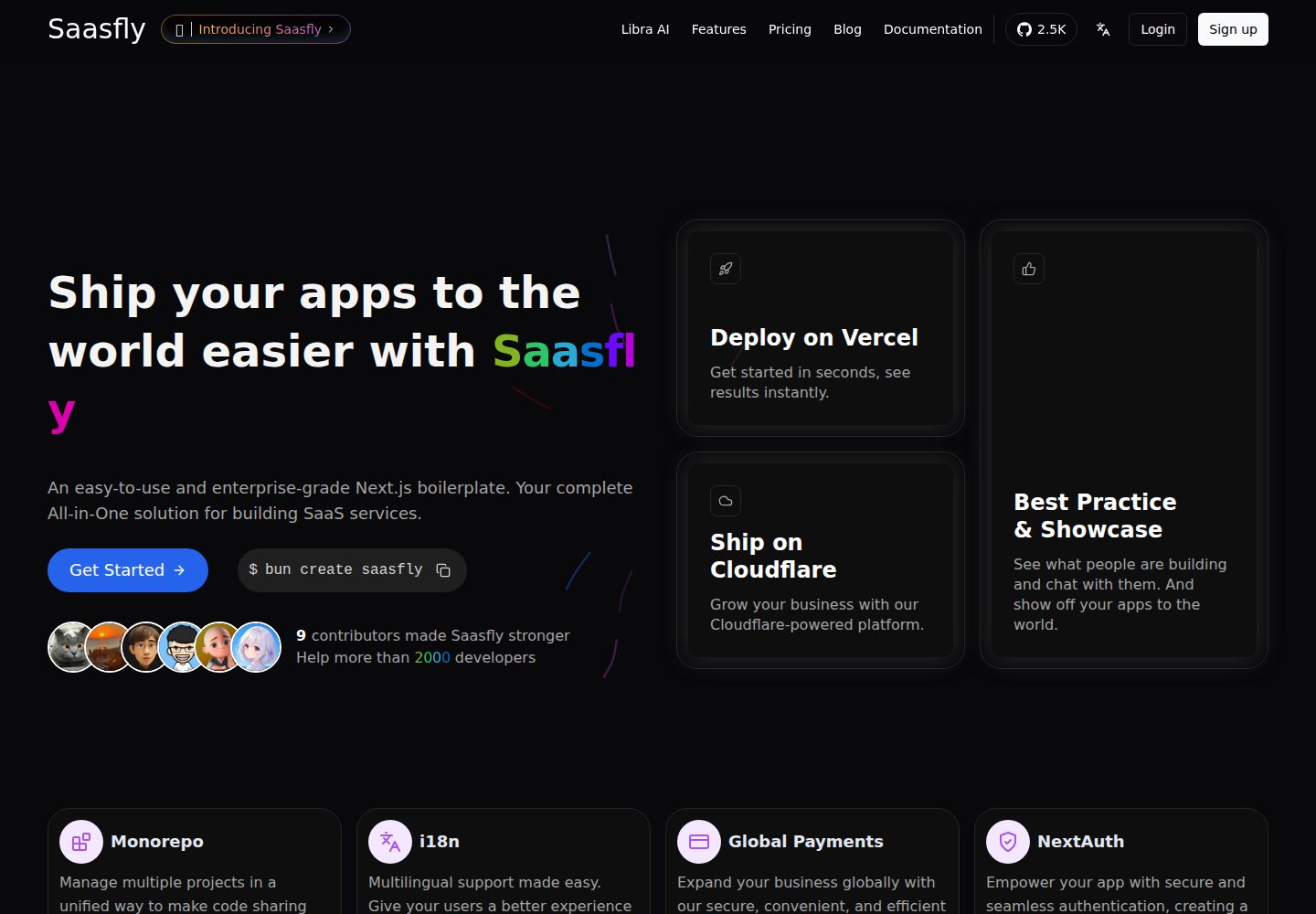
saasfly
Your Next SaaS Template or Boilerplate ! A magic trip start with `bun create saasfly` . The more stars, the mo…
Next.js · SaaS

next-saas-starter
⚡️ Free Next.js responsive landing page template for SaaS products made using JAMStack architecture.
Next.js · SaaS