纯静态前端模板,克隆后直接打开 index.html 即可预览
HTML作品集
Freelance-Web-Developer-Portfolio-Template — HTML 作品集模板
作者 Iamdivyak
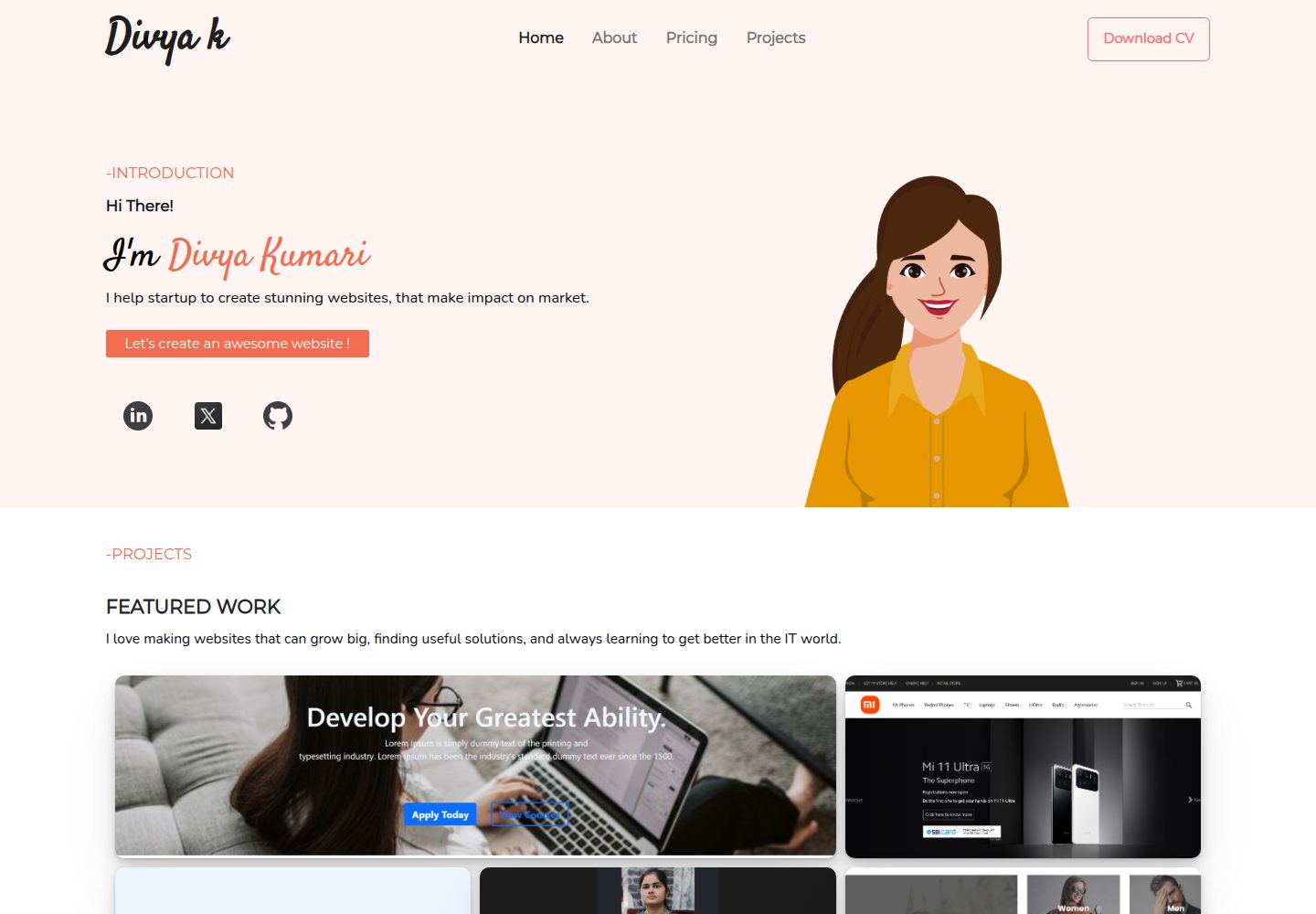
基于 HTML、CSS、JavaScript 与 Bootstrap 的响应式自由职业者作品集模板,包含项目展示、技能服务、博客与联系表单等页面模块。
看看你的网站会是什么样
浏览真实页面截图,比较内容排版与手机效果。点击下方缩略图切换,放大查看整页细节。
全部页面与视图 3
截图用于了解视觉与布局,交互效果请以实际项目为准。
采集于 2026-09-30查看来源
值得关注的模板亮点
从已有项目资料中,快速了解它的特点。
基于 Bootstrap 构建响应式布局,适配桌面与移动端
内置项目展示、技能与服务、博客、联系表单等页面模块
提供 Figma 设计文件链接,便于对照调整视觉样式
采用 MIT 许可,允许修改、商用与分发该版本代码
模板详细介绍
这是一个面向 Web 开发者的个人作品集网站模板,仓库以纯前端静态页面形式提供,技术栈为 HTML、CSS、JavaScript 和 Bootstrap。README 说明其定位是帮助开发者展示技能与作品,并给出了 Netlify 上的在线示例。
模板包含的模块有:项目展示(含详情、图片与链接)、技能与服务介绍、博客区块、联系表单,以及响应式布局与 SEO 相关设置。仓库同时提供了 Figma 设计文件链接,便于对照设计稿调整页面。
使用方式较为直接:将仓库克隆到本地后打开 index.html 即可查看页面,再按个人品牌替换内容、图片与样式。仓库采用 MIT 许可,允许免费使用、修改、商用与分发该版本代码,但需保留版权声明与许可声明;演示图片、字体、图标等第三方素材需单独核对各自许可,域名、托管等外部服务也可能产生费用。
HTML作品集
适合你的项目吗?
适用场景
- Web 开发者搭建个人作品集网站,集中展示项目与技能
- 自由职业者用作品集页面承接客户咨询与联系
- 前端学习者以该模板练习 HTML、CSS、JavaScript 与 Bootstrap 的页面组织
适合人群
- 需要快速起步个人作品集页面的 Web 开发者
- 希望按自己品牌替换内容与配色的自由职业者
- 想参考静态作品集页面结构的前端初学者
上手与定制指南
结合仓库当前版本的说明,按下面的资料检查内容、配置与运行要求。
- 1
克隆仓库到本地后,直接打开 index.html 文件即可查看页面
- 2
按个人品牌替换页面中的文字、图片与样式,可参考仓库提供的 Figma 设计文件
- 3
分发代码副本或实质性部分时,需保留原作者版权声明与完整 MIT 许可声明
- 4
演示图片、字体、图标等第三方素材需按各自许可单独核对
- 5
域名、托管等外部服务可能另行收费,需自行评估
授权与来源资料
使用条件与限制
免费使用 · 保留许可声明本次收录的是公开仓库中采用 MIT 许可的免费版本;免费范围为该版本代码,不代表外部服务或第三方素材免费。
使用时需要遵守
- 允许免费使用、修改、商用和分发该版本代码。
- 分发代码副本或实质性部分时,保留原作者版权声明和完整 MIT 许可声明。
- 代码按现状提供;担保与责任限制以原许可证及适用法律为准。
额外费用与待核对事项
- 演示图片、字体、图标及其他第三方素材需按各自许可核对,不能仅凭代码的 MIT 许可判断。
- 域名、托管、数据库、支付或 AI 等外部服务可能另外收费。
查看原文依据
DeepSeek 根据仓库许可证和 README 整理 ·2026-09-30。结果仅覆盖已读取资料,依赖、图片、字体及后续条款变更以各自原文为准。
项目核对记录与介绍依据
模板资料
- 来源平台
- GitHub
- 资料与维护参考分
- 资料一般 · 72 / 100
- 技术栈
- HTML
- 网站类型
- 作品集
这个分数如何计算
本站按许可资料(最高30分)、演示链接(12分)、预览图(10分)、Star数(15分)、记录的维护时间(15分)、描述完整度(8分)、功能记录(5分)和分类资料(5分)计算。它不是代码、安全或性能测试,也不是 Google 评分;有链接不代表已实测可用。
这个项目需要核对什么
- 记录的仓库更新时间
- 2023-11-02
- 截图检查日期
- 2026-09-30
已收录演示链接。请用你的内容与屏幕尺寸检查;有演示不代表表单、认证或支付已经可用。
目录记录的主要技术栈是 HTML。请通过依赖清单和锁文件核对实际版本与托管要求。这些说明基于收录资料,不代表代码审计或部署实测。
查看具体选型方法 →介绍的制作与核对状态
介绍由 AI 辅助整理目录与仓库资料。仓库作者不等于这篇介绍的审核者。
已完成服务器许可规则与 AI 来源核对;未经过人工编辑审核。
查看当时使用的来源资料
SHA-256: 85659493d48e3a2993144bb9c50f37e98a755b7832a14ebf6c610b89d67c6eb4
2026-09-30T10:58:17.411Z
来源文件 / 仓库<h1 style="color: #F26C4F; text-align: center; padding: 20px 0"> Freelance Web Developer Portfolio Template ✨</h1> ## A clean, beautiful, and responsive portfolio template for Developers! <img width="908" alt="image" src="https://github.com/Iamdivyak/Freelance-Web-Developer-Portfolio-Template/assets/102896170/9035b9d2-255f-4df1-a355-dd4cb7d16fe4"> Welcome to the Freelance Web Developer Portfolio Template, an open-source project to help web developers showcase their skills and work in a professional manner. This template provides a customizable and responsive portfolio website, allowing you to create a stunning online presence to attract clients and employers. To view a live example, **[click here](https://iamdivyak.netlify.app/)**. ## Features - **Responsive Design**: Your portfolio will look great on various devices and screen sizes. - **Customizable**: Easily modify content, images, and styles to suit your personal brand. - **Projects Showcase**: Display your projects with details, images, and links. - **Contact Form**: Include a contact form for potential clients and collaborators to reach out to you. - **Skills and Services**: Showcase your skills and services to highlight what you can offer. - **Blog Section**: Share your thoughts, insights, and knowledge with a built-in blog section. - **SEO Friendly**: Optimize your portfolio for search engines to increase your online visibility. ## Getting Started 1. **Fork the Repository**: Start by forking this repository to your GitHub account. 2. **Clone the Repository**: Clone the forked repository to your local development environment: ```bash git clone https://github.com/yourusername/Freelance-Web-Developer-Portfolio-Template.git To get your personal portfolio. Customize your portfolio theme by using your own color scheme. Feel free to use it as-is or personalize it as much as you want. If you'd like to **contribute** and make this much better for other users, have a look at [Issues](https://github.com/Iamdivyak/Freelance-Web-Developer-Portfolio-Template/issues) or feel free to create an issue that helps to make the portfolio more batter. ## 🖼️ Figma Design of the Website - Visite the design file [Figma Design](https://www.figma.com/file/wKcuUSuG9uEbaXL4TytRzG/my-profile%2Fportfolio-design?type=design&node-id=0%3A1&mode=design&t=TgSPcyjNpZr9n8YT-1) ## 💻 Tech Stack - [HTML5](https://developer.mozilla.org/en-US/docs/Glossary/HTML5) - HTML is the standard markup language for Web pages - [JavaScript](https://tc39.es/) - JS is an Open source runtime environment, built on the Chrome browser's V8 engine - [CSS](https://developer.mozilla.org/en-US/docs/Web/CSS) - CSS describes how HTML elements should be displayed - [Bootstrap](https://getbootstrap.com/docs/5.0/getting-started/introduction/) - A popular framework for building responsive, mobile-first sites. ## 🚀 Quick start Contributions are welcome! If you have any ideas, suggestions, or bug fixes, please feel free to open an [issue](https://github.com/Iamdivyak/Freelance-Web-Developer-Portfolio-Template/issues) and submit a pull request. Make sure to follow the project's code of conduct. > **Note**: If you are new to open source contributions, you can refer to [this](https://opensource.guide/how-to-contribute/) guide by GitHub. > **Warning**: Please do not spam the repository with unnecessary PRs. Please create PRs if and only if you are assigned to the respective issue. Make sure to follow the project's [code of conduct](/CODE_OF_CONDUCT.md). ### Installation 1. Clone the repo ```sh git clone https://github.com/Iamdivyak/Freelance-Web-Developer-Portfolio-Template.git ``` 2. Open the **index.html** file 3. Have fun! ### Creating A Pull Request 1. Fork the Project 2. Clone your forked repository ```sh git clone https://github.com/<your_github_username>/Freelance-Web-Developer-Portfolio-Template.git ``` 3. Now go ahead and create a new branch and move to the branch ```sh git checkout -b fix-issue-<ISSUE-NUMBER> ``` 4. After you have added your changes, follow the following command chain Check the changed files ```sh git status -s ``` 5. Add all the files to the staging area ```sh git add . ``` or ```sh git add <file_name1> <file_name2> ``` 6. Commit your changes ```sh git commit -m "<EXPLAIN-YOUR_CHANGES>" ``` 7. Push your changes ```sh git push origin fix-issue-<ISSUE-NUMBER> ``` 8. Open a Pull Request ## Thanks to all Contributors 💪 Your contribution is the root of the success of this project. Also Give it a Star 🌟, If you loved contributing to the project. Let's connect on my [Github](https://github.com/Iamdivyak) for more such projects !! <a href="https://github.com/Iamdivyak/Freelance-Web-Developer-Portfolio-Template/graphs/contributors"> <img src="https://contrib.rocks/image?repo=Iamdivyak/Freelance-Web-Developer-Portfolio-Template" /> </a> ## 👩💻 Project Admin <table> <tr> <td align="center"> <a href="https://github.com/Iamdivyak"> <img src="https://avatars.githubusercontent.com/u/102896170?v=4" width="100px" alt="" /> <br /> <sub><b>Divya Kumari</b></sub> </a> <br /> <a href="https://github.com/Iamdivyak"> 👩💻Admin </a> </td> </tr> </table>
看看同类模板
对比同技术栈与用途的模板,找到更适合的视觉与内容结构。

simplefolio
⚡️ A minimal portfolio template for Developers
HTML · 作品集

Freelancer
Freelancer 是 Start Bootstrap 出品的单页作品集模板,专为自由职业者、设计师和小型工作室设计。 页面结构清晰,包含多个内容区块、响应式作品集网格,每个作品项目配有模态窗口展示详情。
HTML · 作品集

Resume
Resume 是 Start Bootstrap 推出的简历与 CV 主题,基于 Bootstrap 构建,采用固定侧边栏加内容区块的结构。
HTML · 作品集

Creative
Creative 是 Start Bootstrap 团队维护的一款单页营销模板,定位明确:为创意机构或产品服务提供一个以作品展示和行动号召为核心的落地页。
HTML · 企业官网

Grayscale
Grayscale 是 Start Bootstrap 出品的深色系单页 HTML 模板,基于 Bootstrap 构建。 它的视觉重心放在大尺寸首屏和清晰的内容分区上,整体氛围偏暗,适合摄影、活动或品牌叙事类网站。
HTML · 企业官网

startbootstrap-stylish-portfolio
Stylish Portfolio 是 Start Bootstrap 维护的单页作品集主题,基于 Bootstrap 构建,采用多个内容区块加离屏导航菜单的结构。
HTML · 作品集