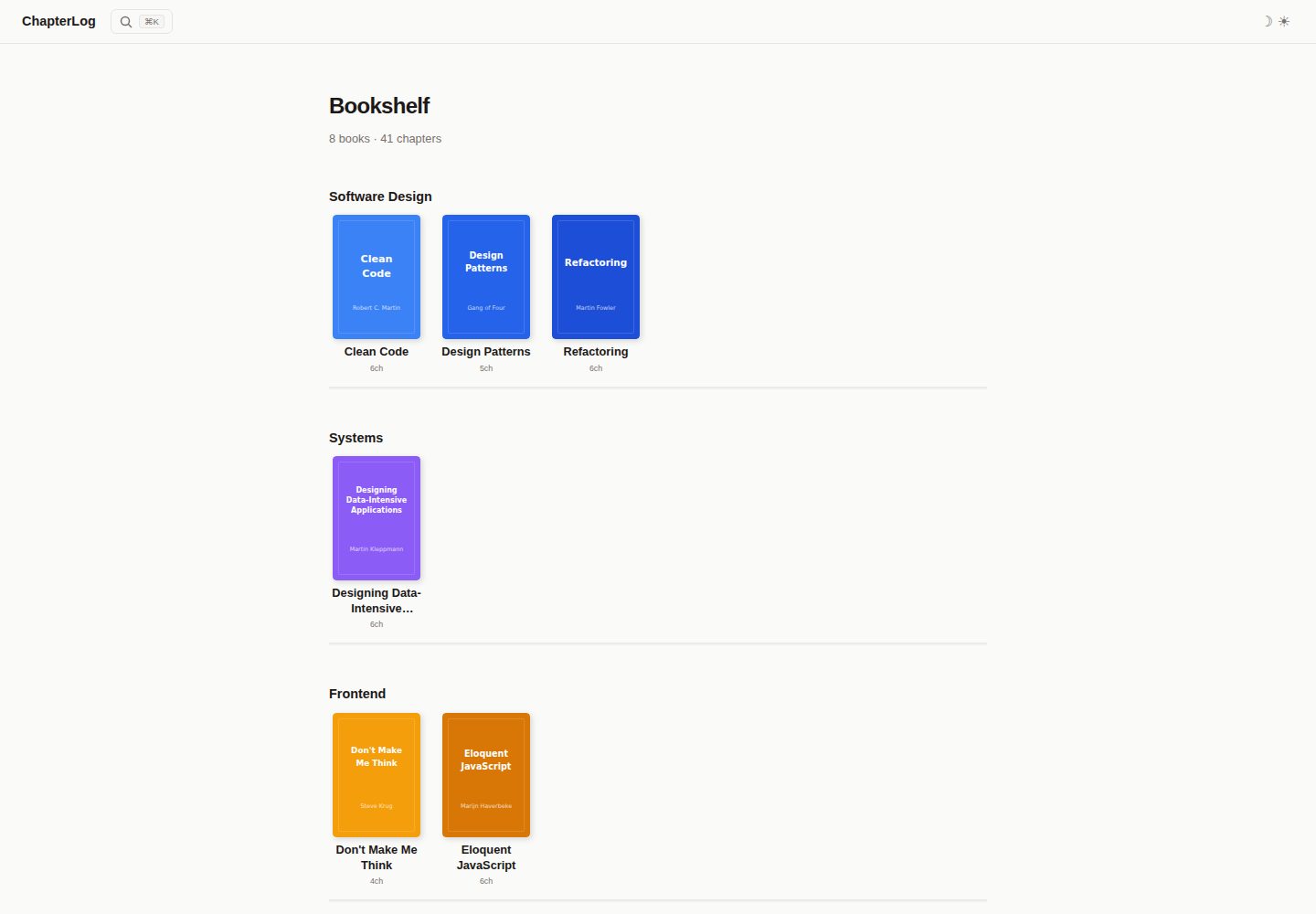
首页书架按封面图与 category 字段分组展示书籍
Astro启动器
astro-theme-chapterlog — Astro 启动器模板
作者 IMMINJU
基于 Astro 的个人书架主题,用章节组织书籍笔记,提供 wiki 式侧边栏阅读界面。
看看你的网站会是什么样
浏览真实页面截图,比较内容排版与手机效果。点击下方缩略图切换,放大查看整页细节。
全部页面与视图 2
截图用于了解视觉与布局,交互效果请以实际项目为准。
采集于 2026-10-03查看来源
值得关注的模板亮点
从已有项目资料中,快速了解它的特点。
wiki 式章节阅读页,带侧边栏导航
Ctrl+K 搜索可同时检索书籍与章节
深色/浅色主题切换,移动端侧边栏滑入
输出 sitemap、RSS、Open Graph 与 canonical URL
纯静态构建,可部署到任意静态托管
模板详细介绍
ChapterLog 是一个 Astro 静态站点主题,用于搭建个人书架:首页以封面图和分类分组展示书籍,进入书籍后按章节阅读,采用 wiki 风格的侧边栏导航。内容以文件形式管理,每本书放在 src/content/books/{slug}/ 目录下,包含一个 book.yaml 元数据文件和若干章节 Markdown 文件;book.yaml 中定义书名、作者、译者、出版社、出版日期、分类、封面路径,以及 parts 与 chapters 的层级结构,章节 Markdown 的 frontmatter 可声明 sections 小节标题。主题内置 Ctrl+K 搜索(覆盖书籍与章节)、深色/浅色主题切换、移动端滑入式侧边栏、404 页面,以及 sitemap、RSS、Open Graph 和 canonical URL 等 SEO 相关输出。站点名称、描述、URL、作者在 src/data/site.ts 中配置,界面文案集中在 src/data/labels.ts,便于本地化;书籍按 book.yaml 的 category 字段分组,分类配色自动分配并在最多 5 套调色板间循环。构建产物为纯静态文件,可部署到 Vercel、Netlify、Cloudflare Pages、GitHub Pages 等静态托管。项目采用 marked 解析 Markdown、js-yaml 解析 YAML,代码以 MIT 许可发布。
Astro启动器
适合你的项目吗?
适用场景
- 整理并公开个人读书笔记,按书与章节归档
- 为某本书建立带侧边栏导航的在线章节阅读页
- 搭建以封面图分类展示的个人书单页面
适合人群
- 希望用 Markdown 与 YAML 文件管理书籍内容的个人用户
- 需要静态输出、可部署到任意静态托管的站点
- 偏好 wiki 式侧边栏阅读体验的读书笔记项目
上手与定制指南
结合仓库当前版本的说明,按下面的资料检查内容、配置与运行要求。
- 1
使用 npm create astro@latest -- --template IMMINJU/astro-theme-chapterlog 创建项目,再执行 npm install 与 npm run dev
- 2
每本书在 src/content/books/{slug}/ 下创建 book.yaml 与章节 Markdown,封面图放入 public/covers/
- 3
在 src/data/site.ts 修改站点名称、描述、URL 与作者,在 src/data/labels.ts 调整界面文案
- 4
分类由 book.yaml 的 category 字段决定,配色自动分配,最多 5 套调色板循环
- 5
演示图片、字体、图标等第三方素材需单独核对其许可,托管等外部服务可能另行收费
授权与来源资料
使用条件与限制
免费使用 · 保留许可声明本次收录的是公开仓库中采用 MIT 许可的免费版本;免费范围为该版本代码,不代表外部服务或第三方素材免费。
使用时需要遵守
- 允许免费使用、修改、商用和分发该版本代码。
- 分发代码副本或实质性部分时,保留原作者版权声明和完整 MIT 许可声明。
- 代码按现状提供;担保与责任限制以原许可证及适用法律为准。
额外费用与待核对事项
- 演示图片、字体、图标及其他第三方素材需按各自许可核对,不能仅凭代码的 MIT 许可判断。
- 域名、托管、数据库、支付或 AI 等外部服务可能另外收费。
查看原文依据
https://github.com/IMMINJU/astro-theme-chapterlog/blob/main/LICENSEhttps://github.com/IMMINJU/astro-theme-chapterlog/blob/main/README.mdPermission is hereby granted, free of charge
许可证原文
DeepSeek 根据仓库许可证和 README 整理 ·2026-10-03。结果仅覆盖已读取资料,依赖、图片、字体及后续条款变更以各自原文为准。
项目核对记录与介绍依据
模板资料
- 来源平台
- Astro Themes
- 资料与维护参考分
- 资料较完整 · 83 / 100
- 技术栈
- Astro
- 网站类型
- 启动器
这个分数如何计算
本站按许可资料(最高30分)、演示链接(12分)、预览图(10分)、Star数(15分)、记录的维护时间(15分)、描述完整度(8分)、功能记录(5分)和分类资料(5分)计算。它不是代码、安全或性能测试,也不是 Google 评分;有链接不代表已实测可用。
这个项目需要核对什么
- 记录的仓库更新时间
- 2026-03-16
- 截图检查日期
- 2026-10-03
已收录演示链接。请用你的内容与屏幕尺寸检查;有演示不代表表单、认证或支付已经可用。
目录记录的主要技术栈是 Astro。请通过依赖清单和锁文件核对实际版本与托管要求。这些说明基于收录资料,不代表代码审计或部署实测。
查看具体选型方法 →介绍的制作与核对状态
介绍由 AI 辅助整理目录与仓库资料。仓库作者不等于这篇介绍的审核者。
审核声明: [email protected] · 2026-10-04
查看当时使用的来源资料
SHA-256: ffa13c0f21752e6b683208274f1ca91e20ba4f523ef3a5033ab967c08606ecd9
2026-10-03T15:26:43.662Z
来源文件 / 仓库# astro-theme-chapterlog
A minimal Astro theme for building your personal bookshelf. Organize books by chapter with a clean wiki-style layout.

[Live Demo](https://astro-theme-chapterlog.vercel.app)
## Features
- Bookshelf home page with cover images and category grouping
- Wiki-style chapter reader with sidebar navigation
- Search (Ctrl+K) across books and chapters
- Dark/light theme toggle
- Mobile responsive with slide-in sidebar
- SEO-ready (sitemap, RSS, Open Graph, canonical URLs)
- 404 page
- Fully static — deploy anywhere
## Quick Start
```bash
# Create a new project from this theme
npm create astro@latest -- --template IMMINJU/astro-theme-chapterlog
# Install dependencies
npm install
# Start dev server
npm run dev
```
## Adding a Book
Each book lives in `src/content/books/{slug}/` with a `book.yaml` and chapter markdown files.
### 1. Create `book.yaml`
```yaml
# src/content/books/my-book/book.yaml
title: My Book
author: Author Name
translator: ""
publisher: Publisher
publishedAt: "2024.01.01"
category: Software Design
cover: /covers/my-book.svg
parts:
- title: Part 1
chapters:
- slug: chapter-01
number: 1
title: Introduction
- slug: chapter-02
number: 2
title: Getting Started
```
### 2. Write chapters
```markdown
<!-- src/content/books/my-book/chapter-01.md -->
---
sections:
- "1.1 Why This Book"
- "1.2 How to Read It"
---
## Why This Book
Your chapter notes here...
```
### 3. Add a cover image (optional)
Place a cover image in `public/covers/` and reference it in `book.yaml`. SVG or JPG/PNG both work.
## Configuration
Edit `src/data/site.ts` to personalize:
```typescript
export const site = {
name: "ChapterLog",
description: "My personal bookshelf — chapter-by-chapter book notes",
url: "https://your-site.vercel.app",
author: "Your Name",
};
```
### Categories
Books are grouped by the `category` field in `book.yaml`. Colors are assigned automatically per category — up to 5 distinct palettes cycle through.
### Labels
UI strings are in `src/data/labels.ts`. Edit them to localize or customize wording.
## Project Structure
```
src/
├── components/
│ ├── Sidebar.astro # Book navigation sidebar
│ └── Search.astro # Search modal (Ctrl+K)
├── content/books/
│ └── {slug}/
│ ├── book.yaml # Book metadata + chapter definitions
│ ├── chapter-01.md
│ └── ...
├── data/
│ ├── books.ts # YAML loader → Book[]
│ ├── labels.ts # UI strings
│ └── site.ts # Site configuration
├── layouts/
│ ├── Layout.astro # Base HTML layout
│ └── WikiLayout.astro # Sidebar + content layout
├── pages/
│ ├── index.astro # Bookshelf home
│ ├── 404.astro # Not found page
│ ├── api/search-index.json.ts
│ ├── rss.xml.ts
│ └── [book]/
│ ├── index.astro # Book overview
│ └── [chapter].astro # Chapter reader
└── styles/
└── global.css # CSS variables + theme
```
## Deploy
[](https://vercel.com/new/clone?repository-url=https://github.com/IMMINJU/astro-theme-chapterlog)
Or deploy to any static hosting (Netlify, Cloudflare Pages, GitHub Pages).
## Tech Stack
- [Astro](https://astro.build) — Static site framework
- [marked](https://marked.js.org) — Markdown parser
- [js-yaml](https://github.com/nodeca/js-yaml) — YAML parser
## License
MIT
看看同类模板
对比同技术栈与用途的模板,找到更适合的视觉与内容结构。

astrowind
⭕️ AstroWind: A free template using Astro v7 and Tailwind CSS v4. Astro starter theme.
Astro · 博客
accessible-astro-starter
Accessible Astro Starter 是一个以无障碍为核心理念的 Astro 6 启动模板,由 incluud 团队维护。
Astro · 博客

astro-erudite
An opinionated, unstyled static blogging template built with Astro and native CSS.
Astro · 作品集

astro-shopify
astro-shopify 是一个面向开发者的轻量级电商启动模板,用于构建基于 Shopify 的无头店面。
Astro · 电商

brutal
A neobrutalism Astro starter theme
Astro · 启动器

qwind
⭕️ Qwind: A template to make your website using Qwik + Tailwind CSS.
Astro · 工具站