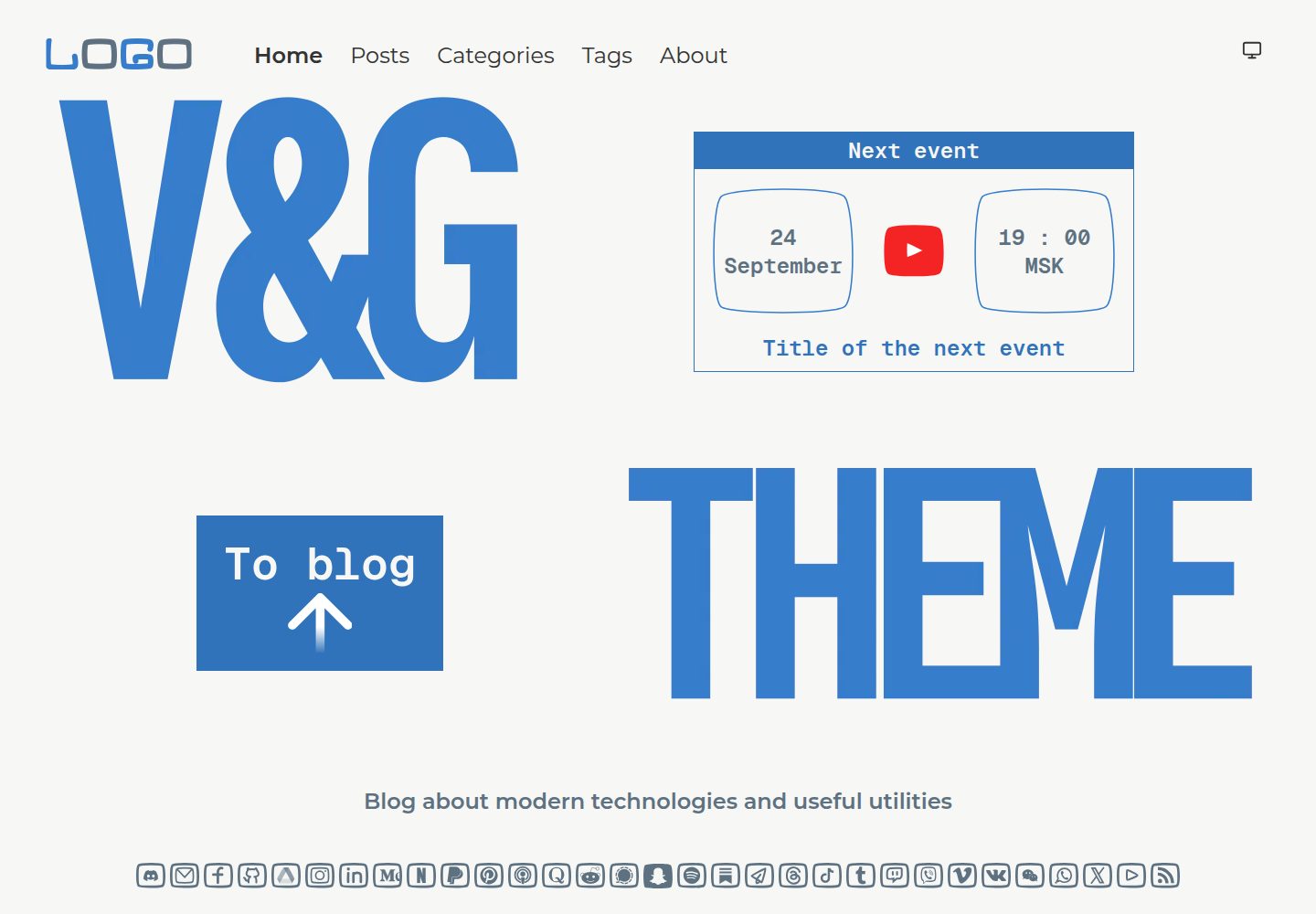
首页事件区块位置可配置为顶部、底部或不显示
Hugo博客
hugo-theme-vng-blue — Hugo 博客模板
作者 ismd
一个面向 Hugo 的响应式博客主题,提供分类、标签与社交图标支持,并内置首页事件区块与 Giscus 评论。
看看你的网站会是什么样
浏览真实页面截图,比较内容排版与手机效果。点击下方缩略图切换,放大查看整页细节。
全部页面与视图 3
截图用于了解视觉与布局,交互效果请以实际项目为准。
采集于 2026-09-30查看来源
值得关注的模板亮点
从已有项目资料中,快速了解它的特点。
内置 30 多个社交网络图标,含主流与较冷门平台
标签页支持带 URL 状态的筛选,可分享或收藏筛选结果
分类以可折叠侧边栏列表展示
单篇文章页支持 Giscus 评论
支持响应式布局、汉堡菜单与 HiDPI 图片
模板详细介绍
hugo-theme-vng-blue 是发布在 GitHub 上的 Hugo 博客主题,采用 MIT 许可。它围绕结构化博客内容设计:文章可按分类与标签组织,标签页支持带 URL 状态的筛选,分类以可折叠侧边栏列表呈现。首页提供可配置的事件区块,位置可选顶部、底部或不显示,并可选择是否保留底部 logo。主题内置 30 多个社交网络图标,覆盖 X、Instagram、LinkedIn、YouTube、GitHub 以及 Signal、Substack、Threads、微信、Viber、VK 等。单篇文章页可接入 Giscus 评论。主题支持响应式布局、汉堡菜单与 HiDPI 图片,并附带关于页面的标签式分区内容。安装方式包括 Hugo Modules 与 Git submodule 两种,配置示例可参考作者提供的演示项目仓库。
Hugo博客
适合你的项目吗?
适用场景
- 搭建带分类与标签体系的个人博客
- 需要在首页公告近期活动的博客站点
- 希望文章页接入 Giscus 评论的 Hugo 站点
- 需要展示多个社交平台入口的博客
适合人群
- 使用 Hugo 构建博客的开发者
- 需要分类、标签与社交图标支持的博客作者
- 接受通过 Giscus 接入评论的站点
上手与定制指南
结合仓库当前版本的说明,按下面的资料检查内容、配置与运行要求。
- 1
推荐使用 Hugo Modules 安装,需先执行 hugo mod init 并安装 Go
- 2
也可通过 git submodule add 将主题放入 themes/vng-blue
- 3
配置示例可参考作者提供的 demo-hugo-theme-vng-blue 仓库
- 4
首页事件区块通过 homeEventPosition 参数控制位置,可选 top、bottom 或 none
- 5
HiDPI 图片需按 README 建议尺寸准备并放入站点 assets 目录
授权与来源资料
使用条件与限制
免费使用 · 保留许可声明本次收录的是公开仓库中采用 MIT 许可的免费版本;免费范围为该版本代码,不代表外部服务或第三方素材免费。
使用时需要遵守
- 允许免费使用、修改、商用和分发该版本代码。
- 分发代码副本或实质性部分时,保留原作者版权声明和完整 MIT 许可声明。
- 代码按现状提供;担保与责任限制以原许可证及适用法律为准。
额外费用与待核对事项
- 使用 Hugo Modules 方式安装主题时,需要先在本地安装 Go 语言环境,否则无法通过 hugo mod 命令获取主题。
- 评论功能依赖第三方服务 Giscus,需自行在 Giscus 注册并填写仓库、分类等配置,评论数据托管于 GitHub Discussions,非主题自带后端。
- 启用 Giscus 评论需提供自己的 GitHub 仓库及仓库 ID、分类名称与分类 ID 等参数,未配置则评论不可用。
- 演示图片、字体、图标及其他第三方素材需按各自许可核对,不能仅凭代码的 MIT 许可判断。
- 域名、托管、数据库、支付或 AI 等外部服务可能另外收费。
查看原文依据
Permission is hereby granted, free of charge
许可证原文
Hugo Modules require [Go](https://go.dev/dl/) to be installed.
README 原文
The theme supports Giscus comments on single post pages
README 原文
https://github.com/ismd/hugo-theme-vng-blue/blob/main/LICENSEhttps://github.com/ismd/hugo-theme-vng-blue/blob/main/README.mddata-repo="[ENTER REPO HERE]"
README 原文
DeepSeek 根据仓库许可证和 README 整理 ·2026-10-01。结果仅覆盖已读取资料,依赖、图片、字体及后续条款变更以各自原文为准。
项目核对记录与介绍依据
模板资料
- 来源平台
- GitHub
- 资料与维护参考分
- 资料较完整 · 83 / 100
- 技术栈
- Hugo
- 网站类型
- 博客
这个分数如何计算
本站按许可资料(最高30分)、演示链接(12分)、预览图(10分)、Star数(15分)、记录的维护时间(15分)、描述完整度(8分)、功能记录(5分)和分类资料(5分)计算。它不是代码、安全或性能测试,也不是 Google 评分;有链接不代表已实测可用。
这个项目需要核对什么
- 记录的仓库更新时间
- 2026-09-25
- 截图检查日期
- 2026-10-01
已收录演示链接。请用你的内容与屏幕尺寸检查;有演示不代表表单、认证或支付已经可用。
目录记录的主要技术栈是 Hugo。请通过依赖清单和锁文件核对实际版本与托管要求。这些说明基于收录资料,不代表代码审计或部署实测。
查看具体选型方法 →介绍的制作与核对状态
介绍由 AI 辅助整理目录与仓库资料。仓库作者不等于这篇介绍的审核者。
已完成服务器许可规则与 AI 来源核对;未经过人工编辑审核。
查看当时使用的来源资料
SHA-256: a48c0ed4459e6d276ced8036fac3d02230bd92e9b883666a854f3524e7b01575
2026-10-01T14:48:54.730Z
来源文件 / 仓库# V&G Blue theme for Hugo
A responsive Hugo blog theme with a perfect Lighthouse score, a flexible home page, and 30+ ready-to-use social network icons.
[Demo website](https://ismd.github.io/demo-hugo-theme-vng-blue/)

## Features
- **Perfect Lighthouse score** — 100/100/100/100 across Performance, Accessibility, Best Practices and SEO, on both **desktop and mobile**
- **"Next event" block on the home page** — a built-in section for announcing upcoming events, with three layout options (`top`, `bottom`, `none`)
- **30+ social network icons** included out of the box — from mainstream (X, Instagram, LinkedIn, YouTube, GitHub) to niche (Signal, Substack, Threads, WeChat, Viber, VK)
- **Responsive design** with a hamburger menu and HiDPI (2x) image support
- **Tag filtering** on the tags page with URL state — share or bookmark filtered views
- **Categories** with a collapsible sidebar list
- **About page with tabs** for sectioned profile content
- **Giscus comments** on single post pages
## Installation
### Hugo Modules (recommended)
Initialize your site as a Hugo Module (if it isn't already):
```bash
hugo mod init github.com/your-username/your-site
```
Add the theme to your site configuration.
`hugo.toml`:
```toml
theme = ["github.com/ismd/hugo-theme-vng-blue"]
[module]
[[module.imports]]
path = "github.com/ismd/hugo-theme-vng-blue"
```
`hugo.yaml`:
```yaml
theme:
- github.com/ismd/hugo-theme-vng-blue
module:
imports:
- path: github.com/ismd/hugo-theme-vng-blue
```
Then fetch the theme:
```bash
hugo mod get github.com/ismd/hugo-theme-vng-blue
```
To update the theme later:
```bash
hugo mod get -u github.com/ismd/hugo-theme-vng-blue
```
> Hugo Modules require [Go](https://go.dev/dl/) to be installed.
### Git submodule
```bash
git submodule add https://github.com/ismd/hugo-theme-vng-blue.git themes/vng-blue
```
## Configuration
See [demo project configuration](https://github.com/ismd/demo-hugo-theme-vng-blue) for example of configuration.
### Home page
It's possible to configure different styles for the home page. The following parameters are available:
```yaml
homeEventPosition: "top" # "top" or "bottom" or "none"
homeToBlogText: "To blog"
```
#### Screenshots
homeEventPosition: "top"

homeEventPosition: "bottom"

homeEventPosition: "none"

You can also hide the bottom logo on the home page. To do this, remove the `assets/home-logo-bottom.png` file. It will look like this:
homeEventPosition: "top"

homeEventPosition: "none"

### Comments
The theme supports Giscus comments on single post pages:
```yaml
giscus:
enable: true
custom_script_inline: |
<script src="https://giscus.app/client.js"
data-repo="[ENTER REPO HERE]"
data-repo-id="[ENTER REPO ID HERE]"
data-category="[ENTER CATEGORY NAME HERE]"
data-category-id="[ENTER CATEGORY ID HERE]"
data-mapping="pathname"
data-strict="0"
data-reactions-enabled="1"
data-emit-metadata="0"
data-input-position="bottom"
data-theme="preferred_color_scheme"
data-lang="en"
crossorigin="anonymous"
async>
</script>
```
## Images
This theme supports HiDPI displays, which means you should provide images at double resolution for better quality. All sizes below are the target HiDPI resolutions.
### Home page
On the home page there are two images: `home-logo-top.png` and `home-logo-bottom.png`. Their sizes can be different, but the optimal ones are:
1. The top one: 1600x530
2. The bottom one: 2080x470
### Logos
There are two logos:
1. In the top-left corner of every page — the size of the logo can be anything, but 320x100 is recommended
2. In the right sidebar on every page except the home page — the size **must be** at least 440x440 px
Put all of these files in the `assets` directory of your site.
看看同类模板
对比同技术栈与用途的模板,找到更适合的视觉与内容结构。

hugo-PaperMod
PaperMod 是 Hugo 生态里知名度较高的主题之一,定位很明确:给博客和轻量作品集站点提供一套干净、响应式的阅读界面。
Hugo · 作品集

LoveIt
❤️A clean, elegant but advanced blog theme for Hugo 一个简洁、优雅且高效的 Hugo 主题
Hugo · 博客

hugo-coder
A minimalist blog theme for hugo.
Hugo · 博客

blowfish
Personal Website & Blog Theme for Hugo
Hugo · 博客

hugo-paper
🪺 A simple, clean, customizable Hugo theme
Hugo · 博客

hextra
Hextra 是一个 Hugo 主题,定位在文档站与博客之间:既提供侧边栏导航、目录、面包屑、分页这类文档站结构,也能承载博客内容。
Hugo · 文档