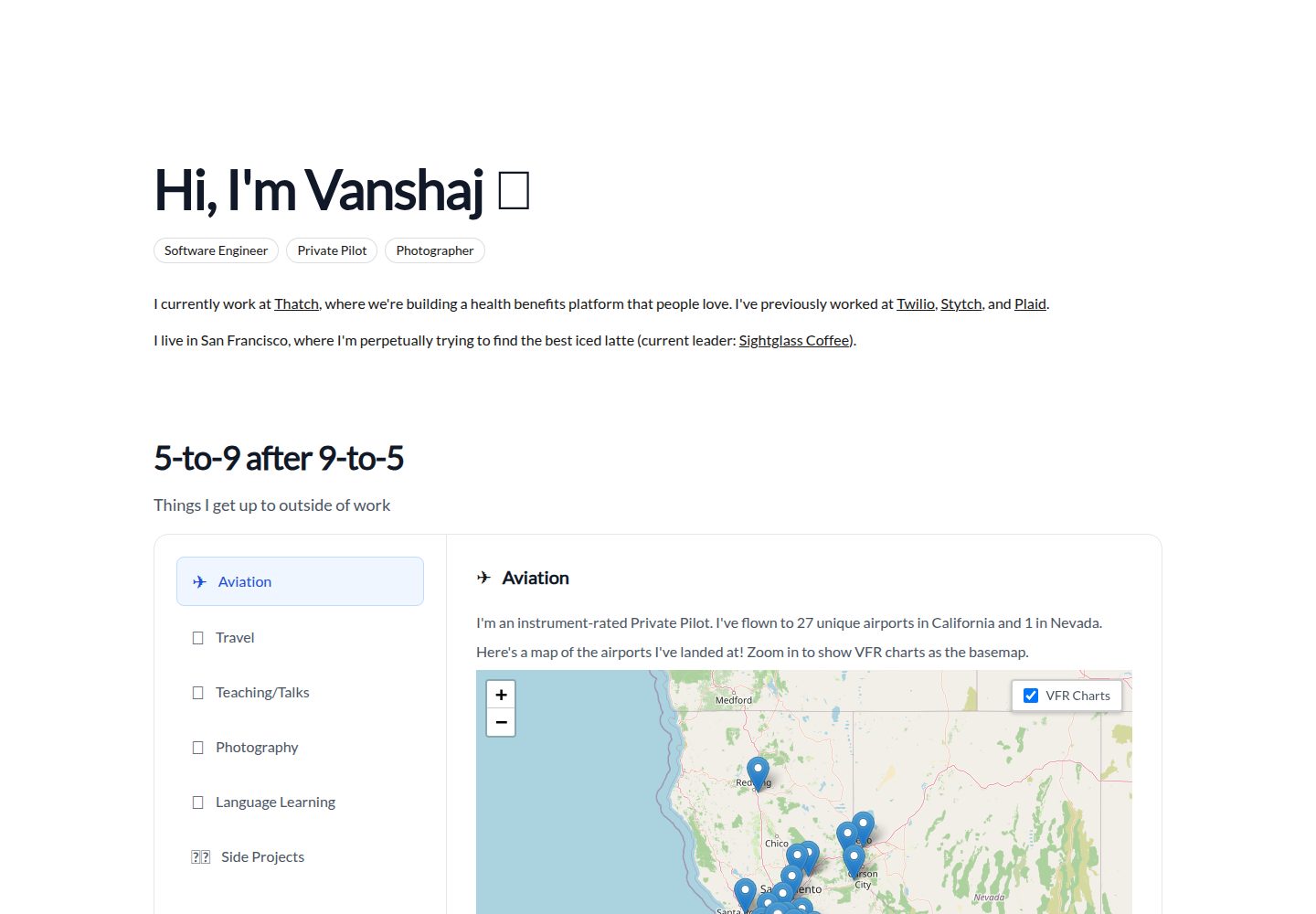
通过 config.json 集中配置站点标题、顶部导航、子导航、页脚版权与底部导航
Next.jsReact启动器
starter (itsvs) — Next.js 启动器模板
作者 itsvs
一个基于 Next.js 的个人网站启动模板,通过 config.json 配置导航、页脚与自定义样式脚本,并提供 Header 与 Layout 两个组件。
看看你的网站会是什么样
浏览真实页面截图,比较内容排版与手机效果。点击下方缩略图切换,放大查看整页细节。
全部页面与视图 2
截图用于了解视觉与布局,交互效果请以实际项目为准。
采集于 2026-10-12查看来源
值得关注的模板亮点
从已有项目资料中,快速了解它的特点。
提供 Header 与 Layout 两个组件,Header 支持 pre、plus、full 参数控制页面标题格式
Layout 自动根据配置生成顶部导航、移动端汉堡菜单与页脚
支持引入外部 customcss 与 customjs,并固定导入 /style.css 与 /custom.js
README 提供 curl 脚本与 Makefile 两种克隆方式,并说明 fork 后的替换方法
采用 MIT 许可,允许免费使用、修改、商用与分发
模板详细介绍
这是作者 itsvs 用于自己多数网站(imvs.me)的 Next.js 启动模板,公开供他人 fork 或复制使用。模板以 config.json 为核心配置入口,集中管理站点标题、顶部导航、页脚与外部 CSS/JS 引用;页面结构由 Header 和 Layout 两个组件承担,Header 扩展 Next.js 默认 Head 并处理标题拼接与样式引入,Layout 负责渲染顶部导航(含移动端汉堡菜单)、正文 children 与页脚。README 给出了 curl 脚本与 Makefile 两种克隆方式,并说明 fork 后 curl 脚本仍指向作者默认仓库,需改用 Makefile 方法替换仓库地址。模板附带 example-config.json 供复制为 config.json 后修改。仓库采用 MIT 许可,代码可免费使用、修改、商用与分发,但演示图片、字体、图标等第三方素材需单独核对许可,域名、托管等外部服务可能另计费用。
Next.js启动器
适合你的项目吗?
适用场景
- 搭建以导航和页脚为主的个人网站或作品集站点
- 需要快速复制一份 Next.js 项目结构并集中管理站点配置
- 希望用 config.json 而非散落代码来维护站点标题、导航与页脚信息
- 作为学习 Next.js 页面组件与布局组织的参考模板
适合人群
- 熟悉 Next.js 与 React 组件开发的开发者
- 需要轻量个人网站启动模板并愿意自行配置 config.json 的用户
- 接受以 MIT 许可使用代码、并会自行核对第三方素材许可的开发者
上手与定制指南
结合仓库当前版本的说明,按下面的资料检查内容、配置与运行要求。
- 1
复制 example-config.json 为 config.json 并按需修改配置项
- 2
克隆可使用 README 中的 curl 脚本或 Makefile 方法;fork 后需改用 Makefile 并替换仓库地址
- 3
页面中需引入 Header 与 Layout 组件,Layout 包裹正文内容
- 4
模板固定导入 /style.css 与 /custom.js,即使文件不存在也会尝试导入
- 5
演示图片、字体、图标等第三方素材需按各自许可单独核对
授权与来源资料
使用条件与限制
免费使用 · 保留许可声明本次收录的是公开仓库中采用 MIT 许可的免费版本;免费范围为该版本代码,不代表外部服务或第三方素材免费。
使用时需要遵守
- 允许免费使用、修改、商用和分发该版本代码。
- 分发代码副本或实质性部分时,保留原作者版权声明和完整 MIT 许可声明。
- 代码按现状提供;担保与责任限制以原许可证及适用法律为准。
额外费用与待核对事项
- 演示图片、字体、图标及其他第三方素材需按各自许可核对,不能仅凭代码的 MIT 许可判断。
- 域名、托管、数据库、支付或 AI 等外部服务可能另外收费。
- 若 fork 本仓库,README 中的 curl 脚本仍会指向作者默认仓库;要使用自己的 fork,需改用 Makefile 方法并将仓库地址替换为自己的 fork URL。
查看原文依据
Permission is hereby granted, free of charge
许可证原文
https://github.com/itsvs/starter/blob/master/LICENSE.mdhttps://github.com/itsvs/starter/blob/master/README.md**Forking Note**: If you fork this repository, the `curl` script will use _my default_ repository. To use your fork instead, use the Makefile method and replace `[email protected]:itsvs/starter` with the URL for your fork.
README 原文
DeepSeek 根据仓库许可证和 README 整理 ·2026-10-12。结果仅覆盖已读取资料,依赖、图片、字体及后续条款变更以各自原文为准。
项目核对记录与介绍依据
模板资料
- 来源平台
- GitHub
- 资料与维护参考分
- 资料一般 · 65 / 100
- 技术栈
- Next.js · React
- 网站类型
- 启动器
这个分数如何计算
本站按许可资料(最高30分)、演示链接(12分)、预览图(10分)、Star数(15分)、记录的维护时间(15分)、描述完整度(8分)、功能记录(5分)和分类资料(5分)计算。它不是代码、安全或性能测试,也不是 Google 评分;有链接不代表已实测可用。
这个项目需要核对什么
- 记录的仓库更新时间
- 2020-11-28
- 截图检查日期
- 2026-10-12
已收录演示链接。请用你的内容与屏幕尺寸检查;有演示不代表表单、认证或支付已经可用。
目录记录的主要技术栈是 Next.js。请通过依赖清单和锁文件核对实际版本与托管要求。这些说明基于收录资料,不代表代码审计或部署实测。
查看具体选型方法 →介绍的制作与核对状态
介绍由 AI 辅助整理目录与仓库资料。仓库作者不等于这篇介绍的审核者。
审核声明: [email protected] · 2026-10-13
查看当时使用的来源资料
SHA-256: db63d40a0ec67aa8609e5dce27bd9815aa30ec0c35acf9023bf0283a66697089
2026-10-12T23:38:59.197Z
来源文件 / 仓库# imvs starter template
This is the next.js starter template I use for most of my websites at [imvs.me](https://imvs.me). I was told it's a clean template and people wanted to replicate it, so I decided to make it public and reusable. Feel free to fork this repo and use it as a starting template, or use the built-in Makefile scripts to create a copy and get started!
## Cloning This Template
To clone this template, you can do one of two things.
### `curl` Script Method
Run the following command, replacing `starter-example` with the name of the folder you want to copy this repository into:
```sh
$ curl -s https://imvs.me/copy | sh -s starter-example
```
This will have the same effect as the method below if you're using this specific template.
### Makefile Method
Create a Makefile with the following contents:
```makefile
TARGET=starter
init:
git clone [email protected]:itsvs/starter $(TARGET)
cd $(TARGET) && $(MAKE) init
```
Then, run `make init TARGET=starter-example`, where `starter-example` is the name of the folder you want to copy this repository into. This will clone the repository and run the included `make init` procedure. To see why this is useful, check out the next section.
**Forking Note**: If you fork this repository, the `curl` script will use _my default_ repository. To use your fork instead, use the Makefile method and replace `[email protected]:itsvs/starter` with the URL for your fork.
## Using This Template
To get started with this template, check out `example-config.json`. You may want to copy this example config to `config.json` and make changes as needed.
### `config.json` Structure
The structure of the template configuration is relatively straightforward.
- `sitetitle`: The name of the website. This will appear as the HTML `<title>` tag, as well as the name of the website in the top-left if no `homename` is specified.
- `customcss`: URL for a custom stylesheet that may be hosted externally. The template also always imports `/style.css`, so this is really only for an external stylesheet such as the one I use across my websites for hot reloads.
- `header`: Some details that go in the top nav bar.
- `homelink`: The URL that the top-left label in the nav bar will go to. If nonexistent, then the top-left label will not be marked as a link.
- `homename`: The label that will appear in the top-left of the nav bar. If unspecified, then `sitetitle` will be used here.
- `subtitle`: The label that will appear in the lower-left of the nav bar.
- `topnav`: An array containing the navigation items in the top-right of the nav bar. Each of these follow the following format:
- `title`: The label of the link.
- `url`: The link destination.
`subnav`: An (optional) array containing the navigation items in the lower-right of the nav bar. These follow the same format as the `topnav` items.
- `footer`: Some details that go in the footer bar.
- `copyright`: The copyright statement. If empty, only the copyright symbol will appear.
- `bottomnav`: An array containing the navigation items on the right side of the footer bar. This is primarily intended for social links, and these follow the same format as the `topnav` and `subnav` items.
- `customjs`: URL for a custom script that may be hosted externally. The template also always imports `/custom.js`, so this is really only for an external script such as the one I use across my websites for hot reloads.
### Sample Page
For more information on the components we use below, check out the following section. Here's a sample page you could create using this template:
```js
import Header from "../components/head";
import Layout from "../components/layout";
export default function Index() {
return [
<Header />,
<Layout>
<p>
Lorem ipsum dolor sit amet, consectetur adipiscing elit. Nunc
vel erat orci. Sed felis est, placerat tempus mollis vel, mollis
ac est. Curabitur non lectus nisl. Maecenas malesuada metus
ipsum, eget rhoncus leo sagittis vitae. Vivamus sit amet
sagittis enim. Aenean dapibus felis ultrices tortor volutpat
laoreet. Nulla viverra sapien a erat laoreet lobortis.
Suspendisse id lacinia elit. Nunc tristique ut enim non
fringilla. Morbi sollicitudin cursus ornare. Donec a magna ex.
Pellentesque ut nisl neque. Praesent placerat nec sem ut
lobortis. Phasellus tempor convallis leo sed posuere.
</p>
<p>
Fusce fermentum lacinia elit in congue. Donec pellentesque enim
orci, in lacinia nunc gravida ut. Nulla sollicitudin ligula eget
dictum efficitur. Nulla convallis ex id massa gravida maximus.
Nulla sed elit diam. Proin aliquet ac diam sit amet
pellentesque. Nullam venenatis elit sit amet tristique vehicula.
Curabitur eleifend magna tortor, ac rutrum quam vestibulum nec.
Donec est enim, hendrerit nec faucibus et, interdum et eros.
</p>
<br />
</Layout>,
];
}
```
## Features
The template comes with two components: a `Header` and a `Layout`.
### `Header`
The `Header` component doesn't contain any body content, but rather extends the default next.js `Head` with stylesheets and a page title. If no parameters are passed in, the `sitetitle` from `config.json` is used. However, you may choose to wrap or override this title:
- If the `pre` parameter is passed in, your page title will look like `pre | sitetitle`.
- If the `plus` parameter is passed in, your page title will look like `sitetitle/plus`.
- If both the `pre` and `plus` parameters are passed in, your page title will look like `pre | sitetitle/plus`.
- If the `full` parameter is passed in, your page title will look like `full` and all other parameters will be ignored.
If a `customcss` is defined, it will be imported here. Also, `/style.css` will be imported regardless of whether it exists or not.
### `Layout`
The `Layout` component first renders the top nav bar, including mobile navigation as needed. This involves the following actions (all variables are in reference to `config.json`):
- Create the mobile hamburger menu. If `header.subnav` exists, add it and a horizontal separator to the mobile hamburger. If `header.topnav` exists, add it below any existing hamburger content.
- Create the top nav as follows.
- If `header.homelink` exists, create an `<a>` element pointing to it. If `header.homename` exists, use this as the `<a>` element's contents. Otherwise, if `sitetitle` exists, use that. If neither exist, then use `"home"`. If `header.homelink` doesn't exist, use the labeling process anyway except not as an `<a>` element.
- If `header.topnav` exists, add those elements in order, separated by `" / "`.
- If `header.subtitle` exists, add that label to the lower-left of the nav bar.
- If `header.subnav` exists, add those elements in order, separated by `" / "`.
- Add any `children` of the React component to the body.
- Create the footer as follows.
- Write the copyright symbol. If `footer.copyright` is defined, add this message after the symbol.
- If `footer.bottomnav` exists, add those elements in order, separated by `" / "`.
At the end, if `customjs` was defined, then this script is imported. Also, `/custom.js` will be imported regardless of whether it exists or not.
## License
Copyright (c) 2020 Vanshaj Singhania. See [LICENSE](LICENSE.md).
看看同类模板
对比同技术栈与用途的模板,找到更适合的视觉与内容结构。

ai-website-cloner-template
Clone any website with one command using AI coding agents
Next.js · 启动器

Next.js SaaS Starter
Next.js SaaS Starter 是 Next.js 官方维护的 SaaS 起点模板,定位介于学习资源和可直接部署的脚手架之间。
Next.js · SaaS

Next.js Commerce
Next.js Commerce 是 Vercel 团队维护的电商启动模板,基于 Next.js App Router 构建,采用服务端渲染、React Server Components、Server Actions …
Next.js · 电商

Next-js-Boilerplate
Next-js-Boilerplate 是一个面向 Next.js 16、Tailwind CSS 4 和 TypeScript 的启动器,核心定位是开发者体验优先。
Next.js · 启动器

tailwind-nextjs-starter-blog
tailwind-nextjs-starter-blog 是一个面向个人技术博客的 Next.js 与 Tailwind CSS 启动模板,其 v2 版本基于 App Router 与 React Server Comp…
Next.js · 博客

next-forge
Production-grade Turborepo template for Next.js apps.
Next.js · 启动器