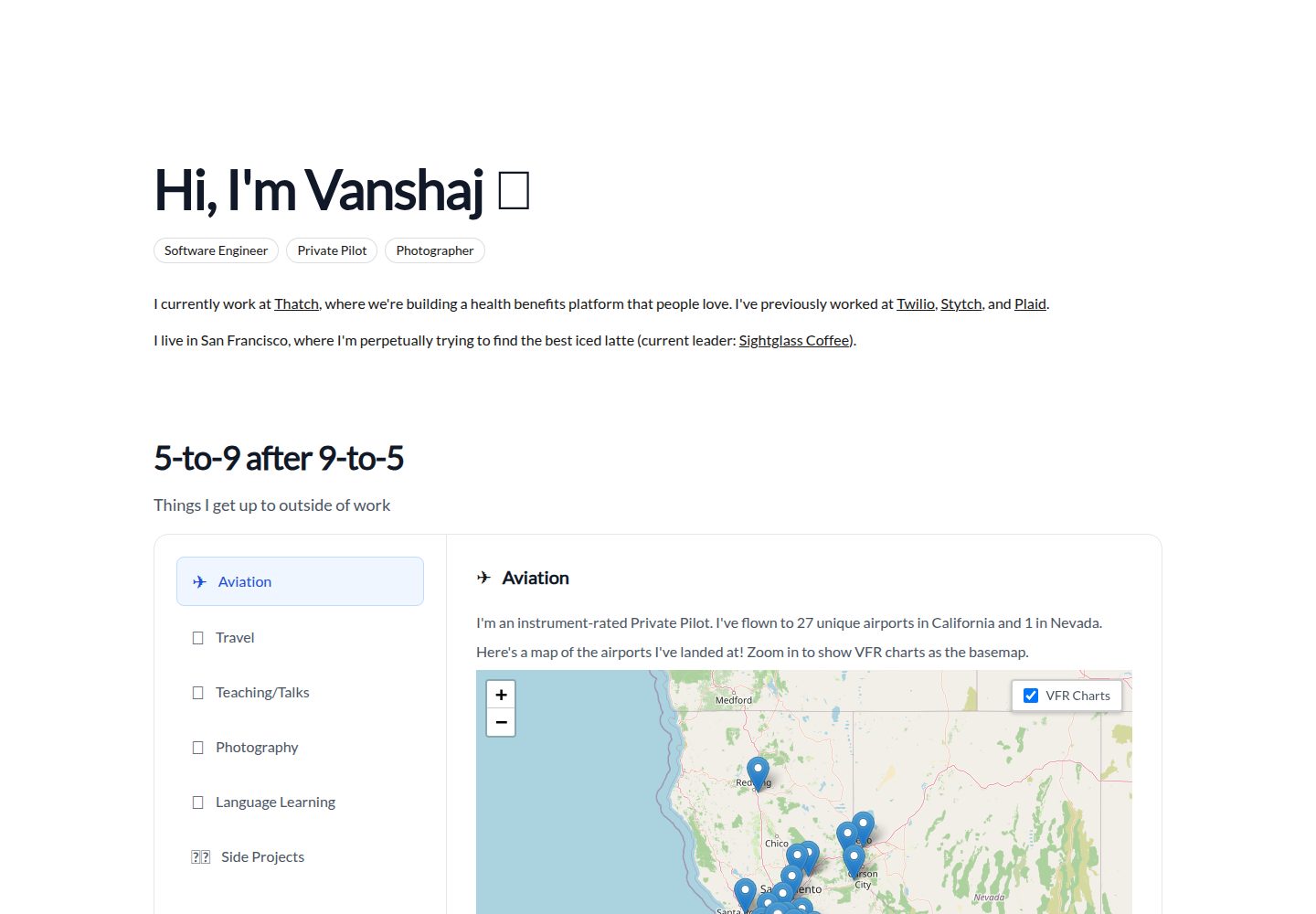
Centralized configuration via config.json for site title, top navigation, sub-navigation, footer copyright, and bottom navigation
Next.jsReactStarter
starter (itsvs) — Next.js Starter Template
By itsvs
A Next.js starter template for personal websites, configured via config.json for navigation, footer, and custom style scripts, and providing Header and Layout components.
Explore the design
Compare the page layouts and mobile experience. Open any screenshot for a closer look.
Desktop homepage1 / 2
Desktop captureTop of page
Actual screenshot captured by the server browser.
All pages & views 2
Screenshots show visual appearance; interactive behavior may differ.
Recorded 2026-10-12View source
What stands out
A quick read of the recorded project description.
Provides Header and Layout components; Header supports pre, plus, and full parameters to control page title formatting
Layout automatically generates top navigation, mobile hamburger menu, and footer based on configuration
Supports importing external customcss and customjs, and always imports /style.css and /custom.js
README provides two cloning methods: a curl script and a Makefile, with instructions for replacing the repository after forking
MIT license allows free use, modification, commercial use, and distribution
Template Details
This is the Next.js starter template used by its author itsvs for most of his websites (imvs.me), released publicly for others to fork or copy. The template uses config.json as its core configuration entry point, centrally managing the site title, top navigation, footer, and external CSS/JS references; the page structure is handled by two components, Header and Layout. Header extends Next.js's default Head and handles title concatenation and style injection, while Layout renders the top navigation (including a mobile hamburger menu), the main children content, and the footer. The README provides two cloning methods: a curl script and a Makefile, and notes that after forking, the curl script still points to the author's default repository, so the Makefile method must be used with the repository address replaced. The template includes example-config.json to be copied to config.json and modified. The repository is under the MIT license, allowing free use, modification, commercial use, and distribution of the code, but third-party assets such as demo images, fonts, and icons require separate license verification, and external services like domains and hosting may incur additional costs.
Next.jsStarter
Is it right for your project?
Use Cases
- Building a personal website or portfolio site centered on navigation and footer
- Quickly copying a Next.js project structure and centrally managing site configuration
- Maintaining site title, navigation, and footer information via config.json instead of scattered code
- Using as a reference template for learning Next.js page components and layout organization
Suitable For
- Developers familiar with Next.js and React component development
- Users who need a lightweight personal website starter template and are willing to configure config.json themselves
- Developers who accept using the code under the MIT license and will independently verify third-party asset licenses
Getting started & customization
Use these recorded setup notes alongside the repository instructions for your chosen version.
- 1
Copy example-config.json to config.json and modify configuration items as needed
- 2
Cloning can use the curl script or Makefile method in the README; after forking, use the Makefile method and replace the repository address
- 3
The page must import the Header and Layout components, with Layout wrapping the main content
- 4
The template always imports /style.css and /custom.js, even if the files do not exist
- 5
Third-party assets such as demo images, fonts, and icons require separate license verification
License & source material
Usage conditions & limitations
Free to use · keep license noticeThis entry covers the free version under the MIT license in the public repository; the free scope is the code of this version and does not imply that external services or third-party assets are free.
Must comply with when using
- Free use, modification, commercial use, and distribution of this version's code are permitted.
- When distributing copies or substantial portions of the code, retain the original author's copyright notice and the full MIT license notice.
- The code is provided as-is; warranties and liability limitations are governed by the original license and applicable law.
Additional costs & items to verify
- Demo images, fonts, icons, and other third-party assets require separate license verification and cannot be judged solely by the code's MIT license.
- External services such as domains, hosting, databases, payments, or AI may incur additional charges.
- If you fork this repository, the curl script in the README still points to the author's default repository; to use your own fork, use the Makefile method and replace the repository address with your fork URL.
View Original Text Basis
Permission is hereby granted, free of charge
Original License Text
https://github.com/itsvs/starter/blob/master/LICENSE.mdhttps://github.com/itsvs/starter/blob/master/README.md**Forking Note**: If you fork this repository, the `curl` script will use _my default_ repository. To use your fork instead, use the Makefile method and replace `[email protected]:itsvs/starter` with the URL for your fork.
Original README
Compiled by DeepSeek based on repository license and README ·2026-10-12. Results only cover the materials read; dependencies, images, fonts, and subsequent term changes are subject to their respective original texts.
Project checks & description sources
Template Information
- Source platforms
- GitHub
- Documentation and maintenance reference score
- Partly documented · 65 / 100
- Technologies
- Next.js · React
- Website type
- Starter
How this score is calculated
Our heuristic uses license records (up to 30), a demo link (12), a preview (10), stars (15), recorded maintenance (15), description completeness (8), feature records (5) and classification data (5). It is not a code, security or performance test, or a Google score. A link does not establish tested functionality.
What to verify for this project
- Repository update recorded
- 2020-11-28
- Screenshot last checked
- 2026-10-12
A demo link is listed. Check it with your own content and viewport sizes; its presence does not confirm that forms, authentication or payments work.
The catalog identifies Next.js as the primary stack. Check the actual dependency manifest and lockfile for versions and hosting requirements. These notes use recorded metadata, not a code audit or a deployment test.
Use a selection guide →How this description was prepared
AI-assisted description based on catalog records and repository material. Repository authors are not automatically the reviewers of this description.
Review declaration: [email protected] · 2026-10-13
Inspect the recorded source material
SHA-256: db63d40a0ec67aa8609e5dce27bd9815aa30ec0c35acf9023bf0283a66697089
2026-10-12T23:38:59.197Z
Source file / repository# imvs starter template
This is the next.js starter template I use for most of my websites at [imvs.me](https://imvs.me). I was told it's a clean template and people wanted to replicate it, so I decided to make it public and reusable. Feel free to fork this repo and use it as a starting template, or use the built-in Makefile scripts to create a copy and get started!
## Cloning This Template
To clone this template, you can do one of two things.
### `curl` Script Method
Run the following command, replacing `starter-example` with the name of the folder you want to copy this repository into:
```sh
$ curl -s https://imvs.me/copy | sh -s starter-example
```
This will have the same effect as the method below if you're using this specific template.
### Makefile Method
Create a Makefile with the following contents:
```makefile
TARGET=starter
init:
git clone [email protected]:itsvs/starter $(TARGET)
cd $(TARGET) && $(MAKE) init
```
Then, run `make init TARGET=starter-example`, where `starter-example` is the name of the folder you want to copy this repository into. This will clone the repository and run the included `make init` procedure. To see why this is useful, check out the next section.
**Forking Note**: If you fork this repository, the `curl` script will use _my default_ repository. To use your fork instead, use the Makefile method and replace `[email protected]:itsvs/starter` with the URL for your fork.
## Using This Template
To get started with this template, check out `example-config.json`. You may want to copy this example config to `config.json` and make changes as needed.
### `config.json` Structure
The structure of the template configuration is relatively straightforward.
- `sitetitle`: The name of the website. This will appear as the HTML `<title>` tag, as well as the name of the website in the top-left if no `homename` is specified.
- `customcss`: URL for a custom stylesheet that may be hosted externally. The template also always imports `/style.css`, so this is really only for an external stylesheet such as the one I use across my websites for hot reloads.
- `header`: Some details that go in the top nav bar.
- `homelink`: The URL that the top-left label in the nav bar will go to. If nonexistent, then the top-left label will not be marked as a link.
- `homename`: The label that will appear in the top-left of the nav bar. If unspecified, then `sitetitle` will be used here.
- `subtitle`: The label that will appear in the lower-left of the nav bar.
- `topnav`: An array containing the navigation items in the top-right of the nav bar. Each of these follow the following format:
- `title`: The label of the link.
- `url`: The link destination.
`subnav`: An (optional) array containing the navigation items in the lower-right of the nav bar. These follow the same format as the `topnav` items.
- `footer`: Some details that go in the footer bar.
- `copyright`: The copyright statement. If empty, only the copyright symbol will appear.
- `bottomnav`: An array containing the navigation items on the right side of the footer bar. This is primarily intended for social links, and these follow the same format as the `topnav` and `subnav` items.
- `customjs`: URL for a custom script that may be hosted externally. The template also always imports `/custom.js`, so this is really only for an external script such as the one I use across my websites for hot reloads.
### Sample Page
For more information on the components we use below, check out the following section. Here's a sample page you could create using this template:
```js
import Header from "../components/head";
import Layout from "../components/layout";
export default function Index() {
return [
<Header />,
<Layout>
<p>
Lorem ipsum dolor sit amet, consectetur adipiscing elit. Nunc
vel erat orci. Sed felis est, placerat tempus mollis vel, mollis
ac est. Curabitur non lectus nisl. Maecenas malesuada metus
ipsum, eget rhoncus leo sagittis vitae. Vivamus sit amet
sagittis enim. Aenean dapibus felis ultrices tortor volutpat
laoreet. Nulla viverra sapien a erat laoreet lobortis.
Suspendisse id lacinia elit. Nunc tristique ut enim non
fringilla. Morbi sollicitudin cursus ornare. Donec a magna ex.
Pellentesque ut nisl neque. Praesent placerat nec sem ut
lobortis. Phasellus tempor convallis leo sed posuere.
</p>
<p>
Fusce fermentum lacinia elit in congue. Donec pellentesque enim
orci, in lacinia nunc gravida ut. Nulla sollicitudin ligula eget
dictum efficitur. Nulla convallis ex id massa gravida maximus.
Nulla sed elit diam. Proin aliquet ac diam sit amet
pellentesque. Nullam venenatis elit sit amet tristique vehicula.
Curabitur eleifend magna tortor, ac rutrum quam vestibulum nec.
Donec est enim, hendrerit nec faucibus et, interdum et eros.
</p>
<br />
</Layout>,
];
}
```
## Features
The template comes with two components: a `Header` and a `Layout`.
### `Header`
The `Header` component doesn't contain any body content, but rather extends the default next.js `Head` with stylesheets and a page title. If no parameters are passed in, the `sitetitle` from `config.json` is used. However, you may choose to wrap or override this title:
- If the `pre` parameter is passed in, your page title will look like `pre | sitetitle`.
- If the `plus` parameter is passed in, your page title will look like `sitetitle/plus`.
- If both the `pre` and `plus` parameters are passed in, your page title will look like `pre | sitetitle/plus`.
- If the `full` parameter is passed in, your page title will look like `full` and all other parameters will be ignored.
If a `customcss` is defined, it will be imported here. Also, `/style.css` will be imported regardless of whether it exists or not.
### `Layout`
The `Layout` component first renders the top nav bar, including mobile navigation as needed. This involves the following actions (all variables are in reference to `config.json`):
- Create the mobile hamburger menu. If `header.subnav` exists, add it and a horizontal separator to the mobile hamburger. If `header.topnav` exists, add it below any existing hamburger content.
- Create the top nav as follows.
- If `header.homelink` exists, create an `<a>` element pointing to it. If `header.homename` exists, use this as the `<a>` element's contents. Otherwise, if `sitetitle` exists, use that. If neither exist, then use `"home"`. If `header.homelink` doesn't exist, use the labeling process anyway except not as an `<a>` element.
- If `header.topnav` exists, add those elements in order, separated by `" / "`.
- If `header.subtitle` exists, add that label to the lower-left of the nav bar.
- If `header.subnav` exists, add those elements in order, separated by `" / "`.
- Add any `children` of the React component to the body.
- Create the footer as follows.
- Write the copyright symbol. If `footer.copyright` is defined, add this message after the symbol.
- If `footer.bottomnav` exists, add those elements in order, separated by `" / "`.
At the end, if `customjs` was defined, then this script is imported. Also, `/custom.js` will be imported regardless of whether it exists or not.
## License
Copyright (c) 2020 Vanshaj Singhania. See [LICENSE](LICENSE.md).
Explore similar templates
Compare previews and descriptions within the same stack and category.

Next.js SaaS Starter
The official Next.js SaaS starter template, integrating email/password authentication, Stripe Checkout subscriptions, a dashboard with user/team CRUD, basic Owner/Member RBAC, and activity logging.
Next.js · SaaS

Next.js Commerce
Vercel's officially maintained Next.js App Router ecommerce starter with deep Shopify integration, offering a complete product catalog, cart, and checkout flow. Core logic is modular for swapping backends, and community provider versions exist for BigCommerce, Medusa, and Saleor.
Next.js · E-commerce

Next-js-Boilerplate
A developer-first Next.js 16 starter with Tailwind CSS 4 and TypeScript, supporting both App Router and Page Router.
Next.js · Starter

tailwind-nextjs-starter-blog
A Next.js and Tailwind CSS blog starter template using Contentlayer for Markdown/MDX, with built-in SEO, code highlighting, and tags. It targets personal technical blogs and migration from Jekyll/Hugo to React, and supports one-click Vercel deployment.
Next.js · Blog

next-forge
next-forge is a Turborepo-based Next.js template maintained by Vercel, positioned as a starting point for SaaS products.
Next.js · Starter

SaaS-Boilerplate
SaaS-Boilerplate is an open-source SaaS starter template built with Next.js App Router, React 19, TypeScript, Tailwind CSS, and Shadcn UI.
Next.js · SaaS