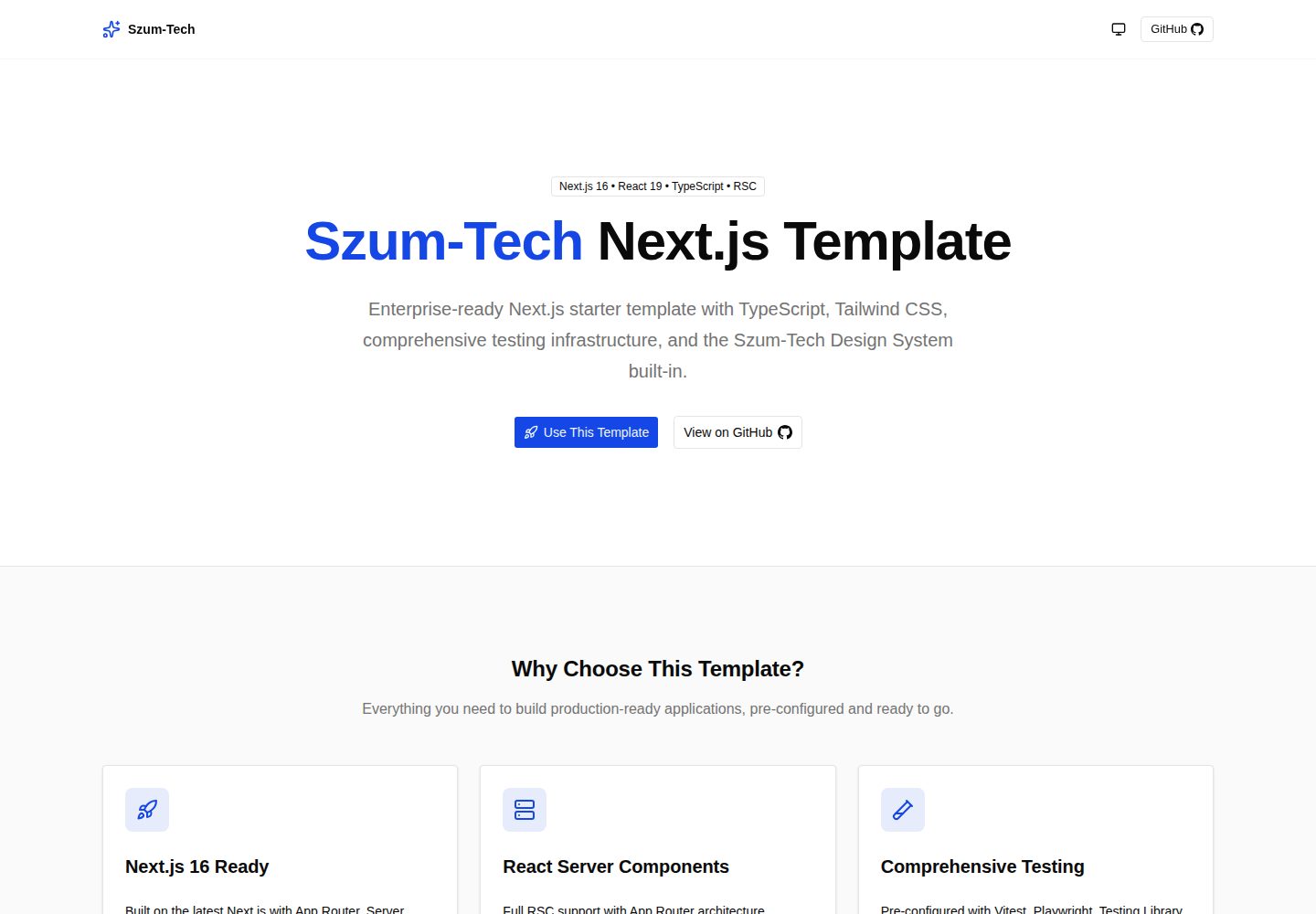
基于 App Router 与 Server Components,配合 TypeScript 严格模式与 ts-reset 类型增强
Next.jsReact启动器
nextjs-szumplate — Next.js 启动器模板
作者 JanSzewczyk
基于 Next.js 与 React 的启动器模板,预置 TypeScript、Tailwind CSS、Biome、Vitest、Playwright、Storybook 与 GitHub Actions 工作流。
看看你的网站会是什么样
浏览真实页面截图,比较内容排版与手机效果。点击下方缩略图切换,放大查看整页细节。
全部页面与视图 2
截图用于了解视觉与布局,交互效果请以实际项目为准。
采集于 2026-10-12查看来源
值得关注的模板亮点
从已有项目资料中,快速了解它的特点。
Tailwind CSS CSS-first 配置与 Szum-Tech 设计系统组件,含设计令牌
Biome 统一 lint 与格式化,Knip 检测未使用文件、依赖与导出
Vitest、Testing Library、Playwright 与 Storybook 覆盖单元、集成、端到端与组件测试
GitHub Actions 预置 PR 检查、CodeQL 与语义化发布工作流,Dependabot 更新依赖
T3 Env 类型安全环境变量、Pino 结构化日志、next-themes 主题切换与 /api/health 健康检查
模板详细介绍
nextjs-szumplate 是一个面向企业项目的 Next.js 启动器模板,采用 MIT 许可发布,仓库公开可自由使用、修改与分发。模板以 App Router 与 Server Components 为基础,配合 TypeScript 严格模式与 ts-reset 强化类型,样式层使用 Tailwind CSS 的 CSS-first 配置与设计令牌,并集成 Szum-Tech 设计系统提供的可访问组件。表单与校验由 React Hook Form 与 Zod 承担,环境变量通过 T3 Env 做类型安全与构建期校验。
质量与测试方面,模板预置 Biome 作为统一的 lint 与格式化工具,Knip 用于发现未使用的文件、依赖与导出,Vitest 与 Testing Library 负责单元和集成测试,Playwright 负责端到端测试,Storybook 用于组件开发与交互测试。自动化部分包含 GitHub Actions 的 PR 检查、CodeQL 与语义化发布工作流,Dependabot 负责依赖安全更新。
开发体验上提供 Pino 结构化日志、next-themes 明暗主题切换、Bundle Analyzer 体积分析、server-only 守卫以及 /api/health 等健康检查端点。使用前需注意:模板要求 Node.js 24.x 或更高版本,使用 npm 作为包管理器;语义化发布需手动取消 release.yml 中相关行的注释;演示图片、字体、图标等第三方素材需按各自许可单独核对,域名、托管等外部服务可能另行收费。
Next.jsReact启动器
适合你的项目吗?
适用场景
- 需要快速搭建带完整测试与 CI 流程的 Next.js 企业项目
- 团队希望统一代码规范、类型校验与依赖清理工具链
- 为组件库或设计系统建立可交互文档与测试环境
- 在 Kubernetes 等环境中需要健康检查端点的应用
适合人群
- 熟悉 Next.js 与 React 并希望减少初始配置工作的开发团队
- 需要 TypeScript 严格类型与 Zod 表单校验的项目
- 重视单元测试、端到端测试与 CI 自动化的团队
- 使用 Tailwind CSS 与设计系统组件构建界面的前端项目
上手与定制指南
结合仓库当前版本的说明,按下面的资料检查内容、配置与运行要求。
- 1
需要 Node.js 24.x 或更高版本,并使用 npm 作为包管理器
- 2
克隆仓库后运行 npm ci 安装依赖,在根目录创建 .env.local 配置环境变量
- 3
使用 npm run dev 启动开发服务器,默认访问 http://localhost:3000
- 4
如需启用语义化发布,需在 .github/workflows/release.yml 中取消第 26–30 行的注释
- 5
演示图片、字体、图标等第三方素材需按各自许可单独核对
授权与来源资料
使用条件与限制
免费使用 · 保留许可声明本次收录的是公开仓库中采用 MIT 许可的免费版本;免费范围为该版本代码,不代表外部服务或第三方素材免费。
使用时需要遵守
- 允许免费使用、修改、商用和分发该版本代码。
- 分发代码副本或实质性部分时,保留原作者版权声明和完整 MIT 许可声明。
- 代码按现状提供;担保与责任限制以原许可证及适用法律为准。
额外费用与待核对事项
- 演示图片、字体、图标及其他第三方素材需按各自许可核对,不能仅凭代码的 MIT 许可判断。
- 域名、托管、数据库、支付或 AI 等外部服务可能另外收费。
- 使用该模板需安装 Node.js 24.x 或更高版本,低于此版本无法运行。
- 项目指定使用 npm 作为包管理器,使用其他包管理器可能不受支持。
- 语义化发布功能默认关闭,需手动取消 release.yml 第 26–30 行注释才能启用。
- 部署到 Vercel 时需在 Vercel 控制台配置环境变量,依赖该外部托管服务。
- 中间件会记录每个 HTTP 请求的方法、URL、User-Agent、状态与耗时,涉及请求日志采集。
查看原文依据
Permission is hereby granted, free of charge
许可证原文
- **Node.js** (version 24.x or higher)
README 原文
- **npm** package manager
README 原文
2. Uncomment lines 26–30
README 原文
3. Configure environment variables in the Vercel dashboard
README 原文
https://github.com/JanSzewczyk/nextjs-szumplate/blob/main/LICENSEhttps://github.com/JanSzewczyk/nextjs-szumplate/blob/main/README.md- **Request middleware** (`proxy.ts`) — every HTTP request logs method, URL, user agent, status, and duration
README 原文
DeepSeek 根据仓库许可证和 README 整理 ·2026-10-12。结果仅覆盖已读取资料,依赖、图片、字体及后续条款变更以各自原文为准。
项目核对记录与介绍依据
模板资料
- 来源平台
- GitHub
- 资料与维护参考分
- 资料较完整 · 88 / 100
- 技术栈
- Next.js · React
- 网站类型
- 启动器
这个分数如何计算
本站按许可资料(最高30分)、演示链接(12分)、预览图(10分)、Star数(15分)、记录的维护时间(15分)、描述完整度(8分)、功能记录(5分)和分类资料(5分)计算。它不是代码、安全或性能测试,也不是 Google 评分;有链接不代表已实测可用。
这个项目需要核对什么
- 记录的仓库更新时间
- 2026-10-12
- 截图检查日期
- 2026-10-12
已收录演示链接。请用你的内容与屏幕尺寸检查;有演示不代表表单、认证或支付已经可用。
目录记录的主要技术栈是 Next.js。请通过依赖清单和锁文件核对实际版本与托管要求。这些说明基于收录资料,不代表代码审计或部署实测。
查看具体选型方法 →介绍的制作与核对状态
介绍由 AI 辅助整理目录与仓库资料。仓库作者不等于这篇介绍的审核者。
审核声明: [email protected] · 2026-10-13
查看当时使用的来源资料
SHA-256: 5b8177ff0b6f78a68b1d9b7f036e1100b89aba021f4dad5f9ef9b25c4482b6ca
2026-10-12T13:27:06.140Z
来源文件 / 仓库<div align="center">
# 🚀 Next.js Szumplate
[](https://vercel.com/new?utm_source=github&utm_campaign=nextjs-szumplate)
[](https://github.com/JanSzewczyk/nextjs-szumplate/stargazers)
[](https://opensource.org/licenses/MIT)
[](https://github.com/JanSzewczyk/nextjs-szumplate/actions/workflows/pr-check.yml)
**An enterprise-ready Next.js template that accelerates your development workflow**
[Features](#-features) • [Getting Started](#-getting-started) • [Documentation](#-table-of-contents) •
[Deployment](#-deployment)
</div>
---
## 👋 Hello there!
This is **Next.js Szumplate**, an open-source template for enterprise projects! It is packed with features that will
help you create an efficient, maintainable, and enjoyable application. This template will save you a lot of time, so sit
back, relax, and get ready to conquer the whole world with your new awesome app!
## ✨ Features
### 🏗️ Core Technologies
- [](https://nextjs.org/)
— App Router, Server Components, Server Actions, and Turbopack for fast builds
- [](https://react.dev/)
— React 19 with React Compiler for automatic memoization without manual optimization
- [](https://www.typescriptlang.org/)
— Strict mode with `ts-reset` library for ultimate type safety
- [](https://tailwindcss.com/)
— CSS-first configuration with design tokens and utility-first styling
- [](https://szum-tech-design-system.vercel.app/)
— Pre-built accessible components and design tokens from Szum-Tech
- [](https://zod.dev/)
— TypeScript-first schema validation
- [](https://react-hook-form.com/)
— Performant forms with easy validation
- **🎯 Absolute imports** — `~/` path alias for clean, spaghetti-free imports
### 🧪 Testing & Quality
- [](https://vitest.dev/)
— Rock-solid, high-speed unit and integration tests with browser mode
- [](https://testing-library.com/)
— Custom Jest/Vitest matchers for asserting on DOM state
- [](https://playwright.dev/)
— End-to-end tests with cross-browser support and Playwright UI
- [](https://storybook.js.org/)
— Component development, documentation, and interaction testing
- [](https://biomejs.dev/)
— All-in-one linter and formatter replacing ESLint + Prettier
- [](https://knip.dev/)
— Finds unused files, dependencies, and exports
### 🤖 Automation & DevOps
- [](https://github.com/features/actions)
— Pre-configured CI/CD workflows (PR checks, CodeQL, semantic releases)
- [](https://github.com/semantic-release/semantic-release)
— Automated versioning and CHANGELOG generation via Conventional Commits
- [](https://github.com/dependabot)
— Automated dependency security updates
### 🔧 Developer Experience
- [](https://env.t3.gg/)
— Type-safe environment variable management with build-time validation
- [](https://www.npmjs.com/package/@next/bundle-analyzer)
— Bundle size analysis for Client, Server, and Edge environments
- [](https://getpino.io/)
— High-performance structured JSON logging with automatic request tracking
- [](https://github.com/pacocoursey/next-themes)
— Dark/light/system theme switching with localStorage persistence
- **⚕️ Health Checks** — Kubernetes-compatible endpoint at `/api/health` with aliases `/healthz`, `/health`, `/ping`
- **🔒 Server-only Guards** — Prevents server code from leaking into client bundles
### 🏆 Performance
- **💯 Perfect Lighthouse Score** — Optimized for performance, accessibility, and SEO
- **⚡ React Compiler** — Automatic memoization without `useMemo`/`useCallback`/`memo` boilerplate
---
## 📖 Table of Contents
- [✨ Features](#-features)
- [🎯 Getting Started](#-getting-started)
- [🚀 Deployment](#-deployment)
- [📃 Scripts Overview](#-scripts-overview)
- [🧪 Testing](#-testing)
- [🧹 Dead Code Detection](#-dead-code-detection)
- [🎨 Styling and Design System](#-styling-and-design-system)
- [💻 Environment Variables](#-environment-variables)
- [📝 Logging](#-logging)
- [🤖 GitHub Actions](#-github-actions)
- [🔒 Keeping Server-only Code out of the Client Environment](#-keeping-server-only-code-out-of-the-client-environment)
- [📁 Project Structure](#-project-structure)
- [🤝 Contributing](#-contributing)
- [📜 License](#-license)
- [🙏 Acknowledgments](#-acknowledgments)
- [📧 Contact & Support](#-contact--support)
---
## 🎯 Getting Started
### 📋 Prerequisites
Before you begin, ensure you have the following installed:
- **Node.js** (version 24.x or higher)
- **npm** package manager
- **Git** for version control
### 📦 Installation
#### 1. Star and Fork the Repository
Don't forget to star ⭐ and fork the repository first!
#### 2. Clone the Repository
```bash
git clone https://github.com/<your_username>/nextjs-szumplate.git
cd nextjs-szumplate
```
#### 3. Install Dependencies
```bash
npm ci
```
#### 4. Configure Environment Variables
Create a `.env.local` file in the root directory:
```env
# Add your environment variables here
# NEXT_PUBLIC_API_URL=your_api_url
# LOG_LEVEL=debug
```
#### 5. Start Development Server
```bash
npm run dev
```
Open [http://localhost:3000](http://localhost:3000) to view the app. You can start editing by modifying `app/page.tsx` —
the page auto-updates as you edit.
### Optional Configuration
#### Semantic Release Setup
To enable automated releases with [Semantic Release](https://github.com/semantic-release/semantic-release):
1. Open `.github/workflows/release.yml`
2. Uncomment lines 26–30
3. Enjoy automated versioning and changelog generation
([more details](https://www.npmjs.com/package/@szum-tech/semantic-release-config))
---
## 🚀 Deployment
Deploy your Next.js app instantly with **Vercel**:
[](https://vercel.com/new?utm_source=github&utm_campaign=nextjs-szumplate)
### Deployment Steps
1. Click the "Deploy with Vercel" button above
2. Connect your GitHub repository
3. Configure environment variables in the Vercel dashboard
4. Deploy — your app will be live in minutes with automatic CI/CD
---
## 📃 Scripts Overview
### Development
| Script | Description |
| ----------------- | ------------------------------------------- |
| `npm run dev` | Start the development server with Turbopack |
| `npm run build` | Build the app for production |
| `npm run start` | Start the production server |
| `npm run analyze` | Analyze bundle sizes (Client, Server, Edge) |
### Code Quality
| Script | Description |
| --------------------------- | ---------------------------------------------- |
| `npm run biome:check` | Run Biome check (lint + format) |
| `npm run biome:ci` | Run Biome CI check with GitHub reporter |
| `npm run biome:fix` | Auto-fix all lint and format issues |
| `npm run biome:lint` | Run Biome linter only |
| `npm run biome:lint:fix` | Auto-fix lint issues |
| `npm run biome:format` | Check code formatting |
| `npm run biome:format:fix` | Auto-fix formatting |
| `npm run type-check` | Run TypeScript type checking (`next typegen` + `tsc`) |
| `npm run knip` | Find unused files, dependencies, and exports |
| `npm run knip:ci` | Run Knip with the GitHub Actions reporter (CI mode) |
### Testing
| Script | Description |
| --------------------------------- | --------------------------------------------- |
| `npm run test` | Run all Vitest tests |
| `npm run test:ci` | Run all tests with coverage (CI mode) |
| `npm run test:coverage` | Generate full coverage report |
| `npm run test:unit` | Run unit tests only |
| `npm run test:unit:coverage` | Unit tests with separate coverage report |
| `npm run test:watch` | Run tests in watch mode |
| `npm run test:ui` | Vitest UI dashboard |
| `npm run test:storybook` | Storybook component tests with coverage |
| `npm run test:storybook:coverage` | Storybook tests with separate coverage report |
| `npm run test:e2e` | Run Playwright E2E tests |
| `npm run test:e2e:ui` | E2E tests with Playwright UI |
| `npm run test:e2e:ci` | E2E tests in CI mode |
### Storybook
| Script | Description |
| ------------------------- | --------------------------------- |
| `npm run storybook:dev` | Start Storybook (port 6006) |
| `npm run storybook:build` | Build static Storybook |
| `npm run storybook:serve` | Serve the built Storybook locally |
---
## 🧪 Testing
This template provides a comprehensive testing infrastructure covering unit, component, and E2E tests.
### 🔬 Unit & Integration Tests
```bash
npm run test
```
Watch mode for active development:
```bash
npm run test:watch
```
Generate a coverage report:
```bash
npm run test:coverage
```
Vitest is configured with two project modes:
- **unit** — Node environment for `*.test.ts` files
- **storybook** — Browser environment (Playwright) for Storybook component tests
### 🎭 End-to-End Tests
```bash
npm run test:e2e
```
Interactive debugging with Playwright UI:
```bash
npm run test:e2e:ui
```
### 📚 Storybook Tests
```bash
npm run test:storybook
```
Storybook tests use `play` functions for interaction testing with accessibility checks via `@storybook/addon-a11y`. Use
the `test-only` tag to exclude stories from docs while keeping them in the test suite.
---
## 🧹 Dead Code Detection
[Knip](https://knip.dev/) analyzes the dependency graph to find unused files, exports, and dependencies that can be
safely removed.
```bash
npm run knip
```
Run it in CI mode with GitHub Actions annotations:
```bash
npm run knip:ci
```
Configuration lives in [`knip.json`](./knip.json). Intentionally unused-for-now items (template scaffolding such as
`data/env/client.ts`, or dependencies like `server-only` and `react-hook-form` that ship ready for use but aren't
wired into the example code yet) are listed in `ignore` / `ignoreDependencies`. Exports that are part of this
template's public data contract (e.g. the types in `constants/`) are marked with a `/** @public */` JSDoc tag so Knip
doesn't flag them as unused.
---
## 🎨 Styling and Design System
This template uses [Tailwind CSS](https://tailwindcss.com/) (CSS-first configuration) alongside the
[Szum-Tech Design System](https://szum-tech-design-system.vercel.app/), which provides:
- ✅ Fully designed, accessible components built on Radix UI
- 🎨 OKLCH semantic color palette and design tokens
- 🛠️ Utility functions and helpers
- 📖 Comprehensive Storybook documentation
### Usage Example
```tsx
import { Button } from "@szum-tech/design-system";
export default function MyComponent() {
return <Button variant="primary">Click me!</Button>;
}
```
Icons are available from the design system's re-exports:
```tsx
import { GithubIcon, SparklesIcon } from "lucide-react";
```
**[View Design System Documentation →](https://szum-tech-design-system.vercel.app/?path=/docs/components--docs)**
---
## 💻 Environment Variables
[T3 Env](https://env.t3.gg/) provides type-safe environment variable management with build-time validation. Missing or
invalid variables cause a clear error at build time rather than a runtime surprise.
### Configuration
Variables are split into two files in `data/env/`:
```typescript
import { createEnv } from "@t3-oss/env-nextjs";
import { z } from "zod";
const env = createEnv({
server: {
// Server-side variables
SECRET_KEY: z.string(),
},
client: {
// Client-side variables (must be prefixed with NEXT_PUBLIC_)
API_URL: z.string().url(),
},
runtimeEnv: {
SECRET_KEY: process.env.SECRET_KEY,
API_URL: process.env.NEXT_PUBLIC_API_URL,
},
});
```
- Server variables: `data/env/server.ts`
- Client variables: `data/env/client.ts` (must be prefixed with `NEXT_PUBLIC_`)
- Skip validation: `SKIP_ENV_VALIDATION=true` (useful for Docker builds)
If required variables are missing at build time:
```
❌ Invalid environment variables: { SECRET_KEY: [ 'Required' ] }
```
---
## 📝 Logging
This template uses [Pino](https://getpino.io/), one of the fastest logging libraries for Node.js, with structured JSON
output optimized for Next.js App Router and Turbopack.
### Features
- ✅ **High Performance** — Minimal overhead with fast JSON serialization
- ✅ **Structured Logging** — JSON-formatted logs ready for log aggregation tools (Datadog, ELK, CloudWatch, Grafana
Loki)
- ✅ **Request Tracking** — Automatic request ID (UUID) via middleware with `X-Request-ID` response header
- ✅ **Redaction** — Sensitive fields (passwords, tokens, secrets, `authorization` headers) are stripped from
log output automatically
- ✅ **Server/Client Split** — Server-side code uses the structured logger (`~/lib/logger`); client-side error
boundaries use the browser console (see below — these are two independent mechanisms)
- ✅ **Type-safe** — `LOG_LEVEL` environment variable validated with TypeScript
### Usage
```typescript
import logger, { createLogger } from "~/lib/logger";
// Basic logging
logger.info("User logged in successfully");
logger.warn("API rate limit approaching");
logger.withContext({ userId: "123" }).withError(new Error("Request failed")).error("Failed to fetch user data");
// Context logger — persists context in every log line
const apiLogger = createLogger({ module: "api", service: "user-service" });
apiLogger.info("Processing request");
```
### Log Levels
Control verbosity via the `LOG_LEVEL` environment variable (add to `.env.local`):
```env
LOG_LEVEL=debug
```
Available levels (highest to lowest priority): `fatal` | `error` | `warn` | `info` (default) | `debug` | `trace`
### Built-in Logging
The template automatically logs in these areas:
- **Request middleware** (`proxy.ts`) — every HTTP request logs method, URL, user agent, status, and duration
- **Health check API** (`app/api/health/route.ts`) — logs each health probe
- **Error boundaries** (`app/error.tsx`, `app/global-error.tsx`) — these are Client Components, so they don't have
access to the server-side logger. They log caught errors with `console.error` in the browser console instead —
this is the pattern Next.js itself recommends for error boundaries. There's a `TODO` comment next to each call
marking where to wire in an error-tracking provider (Sentry, Bugsnag, ...) if you need one; none is bundled by
default so the template doesn't force a vendor choice on you.
### Production Best Practices
```typescript
// Include context objects for searchability
logger.withMetadata({ userId, orderId, error }).error("Order processing failed");
// Never log sensitive data
logger.withMetadata({ userId: user.id }).info("User login"); // ✅
logger.withMetadata({ password: user.password }).info("User login"); // ❌
// Always pass error objects for full stack traces
try {
// ...
} catch (error) {
logger.withMetadata({ error }).error("Operation failed");
}
```
---
## 🤖 GitHub Actions
Three pre-configured workflows automate quality checks and releases:
### ✅ PR Check (`pr-check.yml`)
[](https://github.com/JanSzewczyk/nextjs-szumplate/actions/workflows/pr-check.yml)
Runs on every pull request and validates:
- Build — ensures the project compiles successfully
- Storybook build — validates Storybook compilation
- Biome — linting and formatting check with GitHub inline annotations
- TypeScript — type checking
- Knip — detects unused files, dependencies, and exports
- Vitest unit tests with coverage
- Storybook interaction tests with coverage
- Merged coverage comment on PR
- Playwright E2E tests
- Dependency review — security audit of dependency changes
### 🔒 CodeQL (`codeql.yml`)
[](https://github.com/JanSzewczyk/nextjs-szumplate/actions/workflows/codeql.yml)
Automated security scanning powered by GitHub CodeQL, running on push and schedule.
### 🚀 Release (`release.yml`)
Triggers automatically when changes are merged to `main`:
- Determines the next version using [Semantic Release](https://github.com/semantic-release/semantic-release)
- Updates `CHANGELOG.md`
- Creates a GitHub Release with release notes
- Bumps version in `package.json`
Based on [Conventional Commits](https://www.conventionalcommits.org/) via `@szum-tech/semantic-release-config`.
---
## 🔒 Keeping Server-only Code out of the Client Environment
JavaScript modules can be shared between Server and Client Components, making it possible for server-only code to
accidentally end up in the client bundle.
### Solution: `server-only` Package
Use the [server-only](https://www.npmjs.com/package/server-only) package to get a build-time error if server code is
ever imported in a Client Component:
```bash
npm install server-only
```
Import it at the top of any module that must stay on the server:
```typescript
import "server-only";
export async function getData() {
// This function can only be used on the server
}
```
Any Client Component that imports this module will fail the build — catching the mistake before it reaches production.
---
## 📁 Project Structure
```
nextjs-szumplate/
├── .claude/ # Claude Code configuration (agents, skills, hooks)
├── .github/
│ └── workflows/ # GitHub Actions workflows (CI/CD)
├── .storybook/ # Storybook configuration and themes
├── app/ # Next.js App Router (pages, layouts, API routes)
├── components/ # Reusable React components with co-located stories
├── constants/ # Static data and configuration constants
├── data/
│ └── env/ # T3 Env type-safe environment variable definitions
├── features/ # Feature-based modules (components, schemas, server)
├── lib/ # Utility functions and configurations (logger)
├── public/ # Static assets (images, icons, SVGs)
├── stories/ # Standalone Storybook stories
├── tests/
│ ├── e2e/ # Playwright end-to-end tests
│ ├── integration/ # Storybook integration test setup
│ └── unit/ # Vitest unit tests
├── types/ # Global TypeScript type declarations
├── utils/ # Shared utility functions
├── biome.json # Biome linter and formatter configuration
├── knip.json # Knip dead code / unused dependency configuration
├── next.config.ts # Next.js configuration
├── playwright.config.ts # Playwright E2E test configuration
├── postcss.config.js # PostCSS and Tailwind CSS configuration
├── proxy.ts # Request logging middleware
├── release.config.js # Semantic Release configuration
├── tsconfig.json # TypeScript compiler options and path aliases
└── vitest.config.ts # Vitest test configuration
```
### Key Directories
- **`.claude/`** — Claude Code configuration (agents, skills, hooks, project context)
- **`.github/workflows/`** — CI/CD automation (PR checks, CodeQL, releases)
- **`.storybook/`** — Storybook setup for component development and documentation
- **`app/`** — Next.js App Router with Server/Client Components, layouts, and API routes
- **`components/`** — Shared, reusable UI components with co-located Storybook stories
- **`data/env/`** — T3 Env type-safe environment variable definitions (server + client)
- **`features/`** — Feature-based modules with related components, Zod schemas, and server actions
- **`lib/`** — Utilities, helpers, and third-party library configurations (logger)
- **`tests/`** — Test files organized by type: unit (Vitest), integration (Storybook), and E2E (Playwright)
### Important Configuration Files
- **`biome.json`** — Biome linter and formatter rules (replaces ESLint + Prettier)
- **`knip.json`** — Knip configuration for detecting unused files, dependencies, and exports
- **`next.config.ts`** — Next.js config (React Compiler, bundle analyzer, health rewrites)
- **`playwright.config.ts`** — Playwright E2E test configuration
- **`postcss.config.js`** — PostCSS plugins and Tailwind CSS processing
- **`tsconfig.json`** — TypeScript compiler options including `~/` path alias
- **`vitest.config.ts`** — Vitest configuration with `unit` and `storybook` project modes
---
## 🤝 Contributing
Contributions are welcome! If you'd like to contribute to this project:
1. Fork the repository
2. Create a feature branch (`git checkout -b feature/amazing-feature`)
3. Commit your changes using [Conventional Commits](https://www.conventionalcommits.org/)
4. Push to the branch (`git push origin feature/amazing-feature`)
5. Open a Pull Request
Please make sure your code passes all tests and follows the project's coding standards.
---
## 📜 License
This project is licensed under the **MIT License**. For more information, see the [LICENSE](LICENSE) file.
---
## 🙏 Acknowledgments
This template is built with amazing tools and libraries from the open-source community:
- [Next.js](https://nextjs.org/) - The React Framework
- [Tailwind CSS](https://tailwindcss.com/) - Utility-first CSS framework
- [TypeScript](https://www.typescriptlang.org/) - JavaScript with syntax for types
- [Vitest](https://vitest.dev/) - Next generation testing framework
- [Playwright](https://playwright.dev/) - E2E testing framework
- [Storybook](https://storybook.js.org/) - UI component explorer
- And many more amazing libraries!
---
## 📧 Contact & Support
If you have any questions, suggestions, or issues:
- 🐛 [Open an issue](https://github.com/JanSzewczyk/nextjs-szumplate/issues)
- ⭐ [Star this repository](https://github.com/JanSzewczyk/nextjs-szumplate)
- 👨💻 Check out my [GitHub profile](https://github.com/JanSzewczyk)
---
<div align="center">
**Made with ❤️ by [Szum-Tech](https://github.com/szum-tech)**
If this template helped you, please consider giving it a ⭐ on GitHub!
[⬆ Back to Top](#-nextjs-szumplate)
</div>
看看同类模板
对比同技术栈与用途的模板,找到更适合的视觉与内容结构。

ai-website-cloner-template
Clone any website with one command using AI coding agents
Next.js · 启动器

Next.js SaaS Starter
Next.js SaaS Starter 是 Next.js 官方维护的 SaaS 起点模板,定位介于学习资源和可直接部署的脚手架之间。
Next.js · SaaS

Next.js Commerce
Next.js Commerce 是 Vercel 团队维护的电商启动模板,基于 Next.js App Router 构建,采用服务端渲染、React Server Components、Server Actions …
Next.js · 电商

Next-js-Boilerplate
Next-js-Boilerplate 是一个面向 Next.js 16、Tailwind CSS 4 和 TypeScript 的启动器,核心定位是开发者体验优先。
Next.js · 启动器

tailwind-nextjs-starter-blog
tailwind-nextjs-starter-blog 是一个面向个人技术博客的 Next.js 与 Tailwind CSS 启动模板,其 v2 版本基于 App Router 与 React Server Comp…
Next.js · 博客

next-forge
Production-grade Turborepo template for Next.js apps.
Next.js · 启动器