Built on App Router and Server Components, combined with TypeScript strict mode and ts-reset type enhancements
Next.jsReactStarter
nextjs-szumplate — Next.js Starter Template
By JanSzewczyk
A Next.js and React starter template pre-configured with TypeScript, Tailwind CSS, Biome, Vitest, Playwright, Storybook, and GitHub Actions workflows.
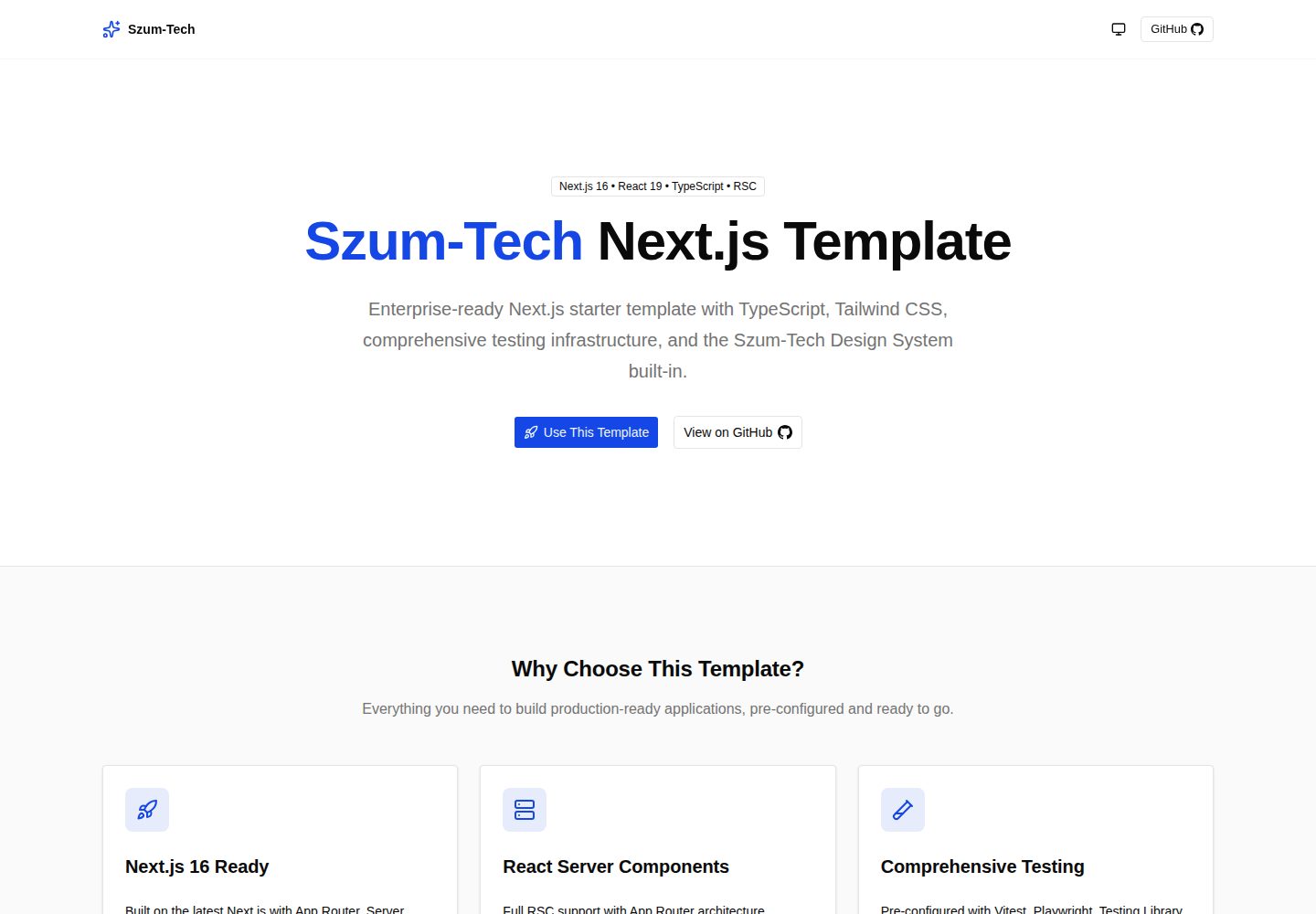
Explore the design
Compare the page layouts and mobile experience. Open any screenshot for a closer look.
Desktop homepage1 / 2
Desktop captureTop of page
Actual screenshot captured by the server browser.
All pages & views 2
Screenshots show visual appearance; interactive behavior may differ.
Recorded 2026-10-12View source
What stands out
A quick read of the recorded project description.
Tailwind CSS CSS-first configuration and Szum-Tech design system components, including design tokens
Biome for unified linting and formatting, Knip for detecting unused files, dependencies, and exports
Vitest, Testing Library, Playwright, and Storybook cover unit, integration, end-to-end, and component testing
GitHub Actions pre-configured with PR checks, CodeQL, and semantic release workflows, with Dependabot updating dependencies
T3 Env type-safe environment variables, Pino structured logging, next-themes theme switching, and /api/health health check
Template Details
nextjs-szumplate is a Next.js starter template aimed at enterprise projects, released under the MIT license, with a public repository that can be freely used, modified, and distributed. The template is built on the App Router and Server Components, combined with TypeScript strict mode and ts-reset for stronger typing. The styling layer uses Tailwind CSS's CSS-first configuration and design tokens, and integrates accessible components provided by the Szum-Tech design system. Forms and validation are handled by React Hook Form and Zod, while environment variables are type-safe and validated at build time via T3 Env.
For quality and testing, the template pre-configures Biome as the unified linting and formatting tool, Knip for detecting unused files, dependencies, and exports, Vitest and Testing Library for unit and integration tests, Playwright for end-to-end tests, and Storybook for component development and interaction testing. Automation includes GitHub Actions workflows for PR checks, CodeQL, and semantic release, with Dependabot handling dependency security updates.
For developer experience, it provides Pino structured logging, next-themes light/dark theme switching, Bundle Analyzer for bundle size analysis, a server-only guard, and health check endpoints such as /api/health. Before use, note the following: the template requires Node.js 24.x or higher and uses npm as the package manager; semantic release requires manually uncommenting the relevant lines in release.yml; third-party assets such as demo images, fonts, and icons must be checked separately under their respective licenses, and external services such as domains and hosting may incur separate charges.
Next.jsReactStarter
Is it right for your project?
Use Cases
- Quickly setting up a Next.js enterprise project with a complete testing and CI pipeline
- Teams wanting to unify code standards, type checking, and dependency cleanup tooling
- Establishing an interactive documentation and testing environment for a component library or design system
- Applications that need health check endpoints in environments such as Kubernetes
Suitable For
- Development teams familiar with Next.js and React who want to reduce initial configuration work
- Projects that need TypeScript strict typing and Zod form validation
- Teams that value unit testing, end-to-end testing, and CI automation
- Frontend projects building interfaces with Tailwind CSS and design system components
Getting started & customization
Use these recorded setup notes alongside the repository instructions for your chosen version.
- 1
Requires Node.js 24.x or higher and uses npm as the package manager
- 2
After cloning the repository, run npm ci to install dependencies, and create .env.local in the root directory to configure environment variables
- 3
Use npm run dev to start the development server, accessible by default at http://localhost:3000
- 4
To enable semantic release, uncomment lines 26–30 in .github/workflows/release.yml
- 5
Third-party assets such as demo images, fonts, and icons must be checked separately under their respective licenses
License & source material
Usage conditions & limitations
Free to use · keep license noticeThis entry covers the free version under the MIT license in the public repository; the free scope is the code of that version and does not mean external services or third-party assets are free.
Must comply with when using
- The code of this version may be used, modified, used commercially, and distributed free of charge.
- When distributing copies or substantial portions of the code, retain the original author's copyright notice and the full MIT license notice.
- The code is provided as is; warranties and limitations of liability are governed by the original license and applicable law.
Additional costs & items to verify
- Demo images, fonts, icons, and other third-party assets must be checked under their respective licenses and cannot be judged solely by the code's MIT license.
- External services such as domains, hosting, databases, payments, or AI may incur additional charges.
- Using this template requires installing Node.js 24.x or higher; lower versions cannot run it.
- The project specifies npm as the package manager; using other package managers may not be supported.
- Semantic release is disabled by default and requires manually uncommenting lines 26–30 in release.yml to enable.
- When deploying to Vercel, environment variables must be configured in the Vercel console, relying on that external hosting service.
- Middleware logs the method, URL, User-Agent, status, and duration of every HTTP request, involving request log collection.
View Original Text Basis
Permission is hereby granted, free of charge
Original License Text
- **Node.js** (version 24.x or higher)
Original README
- **npm** package manager
Original README
2. Uncomment lines 26–30
Original README
3. Configure environment variables in the Vercel dashboard
Original README
https://github.com/JanSzewczyk/nextjs-szumplate/blob/main/LICENSEhttps://github.com/JanSzewczyk/nextjs-szumplate/blob/main/README.md- **Request middleware** (`proxy.ts`) — every HTTP request logs method, URL, user agent, status, and duration
Original README
Compiled by DeepSeek based on repository license and README ·2026-10-12. Results only cover the materials read; dependencies, images, fonts, and subsequent term changes are subject to their respective original texts.
Project checks & description sources
Template Information
- Source platforms
- GitHub
- Documentation and maintenance reference score
- More documented · 88 / 100
- Technologies
- Next.js · React
- Website type
- Starter
How this score is calculated
Our heuristic uses license records (up to 30), a demo link (12), a preview (10), stars (15), recorded maintenance (15), description completeness (8), feature records (5) and classification data (5). It is not a code, security or performance test, or a Google score. A link does not establish tested functionality.
What to verify for this project
- Repository update recorded
- 2026-10-12
- Screenshot last checked
- 2026-10-12
A demo link is listed. Check it with your own content and viewport sizes; its presence does not confirm that forms, authentication or payments work.
The catalog identifies Next.js as the primary stack. Check the actual dependency manifest and lockfile for versions and hosting requirements. These notes use recorded metadata, not a code audit or a deployment test.
Use a selection guide →How this description was prepared
AI-assisted description based on catalog records and repository material. Repository authors are not automatically the reviewers of this description.
Review declaration: [email protected] · 2026-10-13
Inspect the recorded source material
SHA-256: 5b8177ff0b6f78a68b1d9b7f036e1100b89aba021f4dad5f9ef9b25c4482b6ca
2026-10-12T13:27:06.140Z
Source file / repository<div align="center">
# 🚀 Next.js Szumplate
[](https://vercel.com/new?utm_source=github&utm_campaign=nextjs-szumplate)
[](https://github.com/JanSzewczyk/nextjs-szumplate/stargazers)
[](https://opensource.org/licenses/MIT)
[](https://github.com/JanSzewczyk/nextjs-szumplate/actions/workflows/pr-check.yml)
**An enterprise-ready Next.js template that accelerates your development workflow**
[Features](#-features) • [Getting Started](#-getting-started) • [Documentation](#-table-of-contents) •
[Deployment](#-deployment)
</div>
---
## 👋 Hello there!
This is **Next.js Szumplate**, an open-source template for enterprise projects! It is packed with features that will
help you create an efficient, maintainable, and enjoyable application. This template will save you a lot of time, so sit
back, relax, and get ready to conquer the whole world with your new awesome app!
## ✨ Features
### 🏗️ Core Technologies
- [](https://nextjs.org/)
— App Router, Server Components, Server Actions, and Turbopack for fast builds
- [](https://react.dev/)
— React 19 with React Compiler for automatic memoization without manual optimization
- [](https://www.typescriptlang.org/)
— Strict mode with `ts-reset` library for ultimate type safety
- [](https://tailwindcss.com/)
— CSS-first configuration with design tokens and utility-first styling
- [](https://szum-tech-design-system.vercel.app/)
— Pre-built accessible components and design tokens from Szum-Tech
- [](https://zod.dev/)
— TypeScript-first schema validation
- [](https://react-hook-form.com/)
— Performant forms with easy validation
- **🎯 Absolute imports** — `~/` path alias for clean, spaghetti-free imports
### 🧪 Testing & Quality
- [](https://vitest.dev/)
— Rock-solid, high-speed unit and integration tests with browser mode
- [](https://testing-library.com/)
— Custom Jest/Vitest matchers for asserting on DOM state
- [](https://playwright.dev/)
— End-to-end tests with cross-browser support and Playwright UI
- [](https://storybook.js.org/)
— Component development, documentation, and interaction testing
- [](https://biomejs.dev/)
— All-in-one linter and formatter replacing ESLint + Prettier
- [](https://knip.dev/)
— Finds unused files, dependencies, and exports
### 🤖 Automation & DevOps
- [](https://github.com/features/actions)
— Pre-configured CI/CD workflows (PR checks, CodeQL, semantic releases)
- [](https://github.com/semantic-release/semantic-release)
— Automated versioning and CHANGELOG generation via Conventional Commits
- [](https://github.com/dependabot)
— Automated dependency security updates
### 🔧 Developer Experience
- [](https://env.t3.gg/)
— Type-safe environment variable management with build-time validation
- [](https://www.npmjs.com/package/@next/bundle-analyzer)
— Bundle size analysis for Client, Server, and Edge environments
- [](https://getpino.io/)
— High-performance structured JSON logging with automatic request tracking
- [](https://github.com/pacocoursey/next-themes)
— Dark/light/system theme switching with localStorage persistence
- **⚕️ Health Checks** — Kubernetes-compatible endpoint at `/api/health` with aliases `/healthz`, `/health`, `/ping`
- **🔒 Server-only Guards** — Prevents server code from leaking into client bundles
### 🏆 Performance
- **💯 Perfect Lighthouse Score** — Optimized for performance, accessibility, and SEO
- **⚡ React Compiler** — Automatic memoization without `useMemo`/`useCallback`/`memo` boilerplate
---
## 📖 Table of Contents
- [✨ Features](#-features)
- [🎯 Getting Started](#-getting-started)
- [🚀 Deployment](#-deployment)
- [📃 Scripts Overview](#-scripts-overview)
- [🧪 Testing](#-testing)
- [🧹 Dead Code Detection](#-dead-code-detection)
- [🎨 Styling and Design System](#-styling-and-design-system)
- [💻 Environment Variables](#-environment-variables)
- [📝 Logging](#-logging)
- [🤖 GitHub Actions](#-github-actions)
- [🔒 Keeping Server-only Code out of the Client Environment](#-keeping-server-only-code-out-of-the-client-environment)
- [📁 Project Structure](#-project-structure)
- [🤝 Contributing](#-contributing)
- [📜 License](#-license)
- [🙏 Acknowledgments](#-acknowledgments)
- [📧 Contact & Support](#-contact--support)
---
## 🎯 Getting Started
### 📋 Prerequisites
Before you begin, ensure you have the following installed:
- **Node.js** (version 24.x or higher)
- **npm** package manager
- **Git** for version control
### 📦 Installation
#### 1. Star and Fork the Repository
Don't forget to star ⭐ and fork the repository first!
#### 2. Clone the Repository
```bash
git clone https://github.com/<your_username>/nextjs-szumplate.git
cd nextjs-szumplate
```
#### 3. Install Dependencies
```bash
npm ci
```
#### 4. Configure Environment Variables
Create a `.env.local` file in the root directory:
```env
# Add your environment variables here
# NEXT_PUBLIC_API_URL=your_api_url
# LOG_LEVEL=debug
```
#### 5. Start Development Server
```bash
npm run dev
```
Open [http://localhost:3000](http://localhost:3000) to view the app. You can start editing by modifying `app/page.tsx` —
the page auto-updates as you edit.
### Optional Configuration
#### Semantic Release Setup
To enable automated releases with [Semantic Release](https://github.com/semantic-release/semantic-release):
1. Open `.github/workflows/release.yml`
2. Uncomment lines 26–30
3. Enjoy automated versioning and changelog generation
([more details](https://www.npmjs.com/package/@szum-tech/semantic-release-config))
---
## 🚀 Deployment
Deploy your Next.js app instantly with **Vercel**:
[](https://vercel.com/new?utm_source=github&utm_campaign=nextjs-szumplate)
### Deployment Steps
1. Click the "Deploy with Vercel" button above
2. Connect your GitHub repository
3. Configure environment variables in the Vercel dashboard
4. Deploy — your app will be live in minutes with automatic CI/CD
---
## 📃 Scripts Overview
### Development
| Script | Description |
| ----------------- | ------------------------------------------- |
| `npm run dev` | Start the development server with Turbopack |
| `npm run build` | Build the app for production |
| `npm run start` | Start the production server |
| `npm run analyze` | Analyze bundle sizes (Client, Server, Edge) |
### Code Quality
| Script | Description |
| --------------------------- | ---------------------------------------------- |
| `npm run biome:check` | Run Biome check (lint + format) |
| `npm run biome:ci` | Run Biome CI check with GitHub reporter |
| `npm run biome:fix` | Auto-fix all lint and format issues |
| `npm run biome:lint` | Run Biome linter only |
| `npm run biome:lint:fix` | Auto-fix lint issues |
| `npm run biome:format` | Check code formatting |
| `npm run biome:format:fix` | Auto-fix formatting |
| `npm run type-check` | Run TypeScript type checking (`next typegen` + `tsc`) |
| `npm run knip` | Find unused files, dependencies, and exports |
| `npm run knip:ci` | Run Knip with the GitHub Actions reporter (CI mode) |
### Testing
| Script | Description |
| --------------------------------- | --------------------------------------------- |
| `npm run test` | Run all Vitest tests |
| `npm run test:ci` | Run all tests with coverage (CI mode) |
| `npm run test:coverage` | Generate full coverage report |
| `npm run test:unit` | Run unit tests only |
| `npm run test:unit:coverage` | Unit tests with separate coverage report |
| `npm run test:watch` | Run tests in watch mode |
| `npm run test:ui` | Vitest UI dashboard |
| `npm run test:storybook` | Storybook component tests with coverage |
| `npm run test:storybook:coverage` | Storybook tests with separate coverage report |
| `npm run test:e2e` | Run Playwright E2E tests |
| `npm run test:e2e:ui` | E2E tests with Playwright UI |
| `npm run test:e2e:ci` | E2E tests in CI mode |
### Storybook
| Script | Description |
| ------------------------- | --------------------------------- |
| `npm run storybook:dev` | Start Storybook (port 6006) |
| `npm run storybook:build` | Build static Storybook |
| `npm run storybook:serve` | Serve the built Storybook locally |
---
## 🧪 Testing
This template provides a comprehensive testing infrastructure covering unit, component, and E2E tests.
### 🔬 Unit & Integration Tests
```bash
npm run test
```
Watch mode for active development:
```bash
npm run test:watch
```
Generate a coverage report:
```bash
npm run test:coverage
```
Vitest is configured with two project modes:
- **unit** — Node environment for `*.test.ts` files
- **storybook** — Browser environment (Playwright) for Storybook component tests
### 🎭 End-to-End Tests
```bash
npm run test:e2e
```
Interactive debugging with Playwright UI:
```bash
npm run test:e2e:ui
```
### 📚 Storybook Tests
```bash
npm run test:storybook
```
Storybook tests use `play` functions for interaction testing with accessibility checks via `@storybook/addon-a11y`. Use
the `test-only` tag to exclude stories from docs while keeping them in the test suite.
---
## 🧹 Dead Code Detection
[Knip](https://knip.dev/) analyzes the dependency graph to find unused files, exports, and dependencies that can be
safely removed.
```bash
npm run knip
```
Run it in CI mode with GitHub Actions annotations:
```bash
npm run knip:ci
```
Configuration lives in [`knip.json`](./knip.json). Intentionally unused-for-now items (template scaffolding such as
`data/env/client.ts`, or dependencies like `server-only` and `react-hook-form` that ship ready for use but aren't
wired into the example code yet) are listed in `ignore` / `ignoreDependencies`. Exports that are part of this
template's public data contract (e.g. the types in `constants/`) are marked with a `/** @public */` JSDoc tag so Knip
doesn't flag them as unused.
---
## 🎨 Styling and Design System
This template uses [Tailwind CSS](https://tailwindcss.com/) (CSS-first configuration) alongside the
[Szum-Tech Design System](https://szum-tech-design-system.vercel.app/), which provides:
- ✅ Fully designed, accessible components built on Radix UI
- 🎨 OKLCH semantic color palette and design tokens
- 🛠️ Utility functions and helpers
- 📖 Comprehensive Storybook documentation
### Usage Example
```tsx
import { Button } from "@szum-tech/design-system";
export default function MyComponent() {
return <Button variant="primary">Click me!</Button>;
}
```
Icons are available from the design system's re-exports:
```tsx
import { GithubIcon, SparklesIcon } from "lucide-react";
```
**[View Design System Documentation →](https://szum-tech-design-system.vercel.app/?path=/docs/components--docs)**
---
## 💻 Environment Variables
[T3 Env](https://env.t3.gg/) provides type-safe environment variable management with build-time validation. Missing or
invalid variables cause a clear error at build time rather than a runtime surprise.
### Configuration
Variables are split into two files in `data/env/`:
```typescript
import { createEnv } from "@t3-oss/env-nextjs";
import { z } from "zod";
const env = createEnv({
server: {
// Server-side variables
SECRET_KEY: z.string(),
},
client: {
// Client-side variables (must be prefixed with NEXT_PUBLIC_)
API_URL: z.string().url(),
},
runtimeEnv: {
SECRET_KEY: process.env.SECRET_KEY,
API_URL: process.env.NEXT_PUBLIC_API_URL,
},
});
```
- Server variables: `data/env/server.ts`
- Client variables: `data/env/client.ts` (must be prefixed with `NEXT_PUBLIC_`)
- Skip validation: `SKIP_ENV_VALIDATION=true` (useful for Docker builds)
If required variables are missing at build time:
```
❌ Invalid environment variables: { SECRET_KEY: [ 'Required' ] }
```
---
## 📝 Logging
This template uses [Pino](https://getpino.io/), one of the fastest logging libraries for Node.js, with structured JSON
output optimized for Next.js App Router and Turbopack.
### Features
- ✅ **High Performance** — Minimal overhead with fast JSON serialization
- ✅ **Structured Logging** — JSON-formatted logs ready for log aggregation tools (Datadog, ELK, CloudWatch, Grafana
Loki)
- ✅ **Request Tracking** — Automatic request ID (UUID) via middleware with `X-Request-ID` response header
- ✅ **Redaction** — Sensitive fields (passwords, tokens, secrets, `authorization` headers) are stripped from
log output automatically
- ✅ **Server/Client Split** — Server-side code uses the structured logger (`~/lib/logger`); client-side error
boundaries use the browser console (see below — these are two independent mechanisms)
- ✅ **Type-safe** — `LOG_LEVEL` environment variable validated with TypeScript
### Usage
```typescript
import logger, { createLogger } from "~/lib/logger";
// Basic logging
logger.info("User logged in successfully");
logger.warn("API rate limit approaching");
logger.withContext({ userId: "123" }).withError(new Error("Request failed")).error("Failed to fetch user data");
// Context logger — persists context in every log line
const apiLogger = createLogger({ module: "api", service: "user-service" });
apiLogger.info("Processing request");
```
### Log Levels
Control verbosity via the `LOG_LEVEL` environment variable (add to `.env.local`):
```env
LOG_LEVEL=debug
```
Available levels (highest to lowest priority): `fatal` | `error` | `warn` | `info` (default) | `debug` | `trace`
### Built-in Logging
The template automatically logs in these areas:
- **Request middleware** (`proxy.ts`) — every HTTP request logs method, URL, user agent, status, and duration
- **Health check API** (`app/api/health/route.ts`) — logs each health probe
- **Error boundaries** (`app/error.tsx`, `app/global-error.tsx`) — these are Client Components, so they don't have
access to the server-side logger. They log caught errors with `console.error` in the browser console instead —
this is the pattern Next.js itself recommends for error boundaries. There's a `TODO` comment next to each call
marking where to wire in an error-tracking provider (Sentry, Bugsnag, ...) if you need one; none is bundled by
default so the template doesn't force a vendor choice on you.
### Production Best Practices
```typescript
// Include context objects for searchability
logger.withMetadata({ userId, orderId, error }).error("Order processing failed");
// Never log sensitive data
logger.withMetadata({ userId: user.id }).info("User login"); // ✅
logger.withMetadata({ password: user.password }).info("User login"); // ❌
// Always pass error objects for full stack traces
try {
// ...
} catch (error) {
logger.withMetadata({ error }).error("Operation failed");
}
```
---
## 🤖 GitHub Actions
Three pre-configured workflows automate quality checks and releases:
### ✅ PR Check (`pr-check.yml`)
[](https://github.com/JanSzewczyk/nextjs-szumplate/actions/workflows/pr-check.yml)
Runs on every pull request and validates:
- Build — ensures the project compiles successfully
- Storybook build — validates Storybook compilation
- Biome — linting and formatting check with GitHub inline annotations
- TypeScript — type checking
- Knip — detects unused files, dependencies, and exports
- Vitest unit tests with coverage
- Storybook interaction tests with coverage
- Merged coverage comment on PR
- Playwright E2E tests
- Dependency review — security audit of dependency changes
### 🔒 CodeQL (`codeql.yml`)
[](https://github.com/JanSzewczyk/nextjs-szumplate/actions/workflows/codeql.yml)
Automated security scanning powered by GitHub CodeQL, running on push and schedule.
### 🚀 Release (`release.yml`)
Triggers automatically when changes are merged to `main`:
- Determines the next version using [Semantic Release](https://github.com/semantic-release/semantic-release)
- Updates `CHANGELOG.md`
- Creates a GitHub Release with release notes
- Bumps version in `package.json`
Based on [Conventional Commits](https://www.conventionalcommits.org/) via `@szum-tech/semantic-release-config`.
---
## 🔒 Keeping Server-only Code out of the Client Environment
JavaScript modules can be shared between Server and Client Components, making it possible for server-only code to
accidentally end up in the client bundle.
### Solution: `server-only` Package
Use the [server-only](https://www.npmjs.com/package/server-only) package to get a build-time error if server code is
ever imported in a Client Component:
```bash
npm install server-only
```
Import it at the top of any module that must stay on the server:
```typescript
import "server-only";
export async function getData() {
// This function can only be used on the server
}
```
Any Client Component that imports this module will fail the build — catching the mistake before it reaches production.
---
## 📁 Project Structure
```
nextjs-szumplate/
├── .claude/ # Claude Code configuration (agents, skills, hooks)
├── .github/
│ └── workflows/ # GitHub Actions workflows (CI/CD)
├── .storybook/ # Storybook configuration and themes
├── app/ # Next.js App Router (pages, layouts, API routes)
├── components/ # Reusable React components with co-located stories
├── constants/ # Static data and configuration constants
├── data/
│ └── env/ # T3 Env type-safe environment variable definitions
├── features/ # Feature-based modules (components, schemas, server)
├── lib/ # Utility functions and configurations (logger)
├── public/ # Static assets (images, icons, SVGs)
├── stories/ # Standalone Storybook stories
├── tests/
│ ├── e2e/ # Playwright end-to-end tests
│ ├── integration/ # Storybook integration test setup
│ └── unit/ # Vitest unit tests
├── types/ # Global TypeScript type declarations
├── utils/ # Shared utility functions
├── biome.json # Biome linter and formatter configuration
├── knip.json # Knip dead code / unused dependency configuration
├── next.config.ts # Next.js configuration
├── playwright.config.ts # Playwright E2E test configuration
├── postcss.config.js # PostCSS and Tailwind CSS configuration
├── proxy.ts # Request logging middleware
├── release.config.js # Semantic Release configuration
├── tsconfig.json # TypeScript compiler options and path aliases
└── vitest.config.ts # Vitest test configuration
```
### Key Directories
- **`.claude/`** — Claude Code configuration (agents, skills, hooks, project context)
- **`.github/workflows/`** — CI/CD automation (PR checks, CodeQL, releases)
- **`.storybook/`** — Storybook setup for component development and documentation
- **`app/`** — Next.js App Router with Server/Client Components, layouts, and API routes
- **`components/`** — Shared, reusable UI components with co-located Storybook stories
- **`data/env/`** — T3 Env type-safe environment variable definitions (server + client)
- **`features/`** — Feature-based modules with related components, Zod schemas, and server actions
- **`lib/`** — Utilities, helpers, and third-party library configurations (logger)
- **`tests/`** — Test files organized by type: unit (Vitest), integration (Storybook), and E2E (Playwright)
### Important Configuration Files
- **`biome.json`** — Biome linter and formatter rules (replaces ESLint + Prettier)
- **`knip.json`** — Knip configuration for detecting unused files, dependencies, and exports
- **`next.config.ts`** — Next.js config (React Compiler, bundle analyzer, health rewrites)
- **`playwright.config.ts`** — Playwright E2E test configuration
- **`postcss.config.js`** — PostCSS plugins and Tailwind CSS processing
- **`tsconfig.json`** — TypeScript compiler options including `~/` path alias
- **`vitest.config.ts`** — Vitest configuration with `unit` and `storybook` project modes
---
## 🤝 Contributing
Contributions are welcome! If you'd like to contribute to this project:
1. Fork the repository
2. Create a feature branch (`git checkout -b feature/amazing-feature`)
3. Commit your changes using [Conventional Commits](https://www.conventionalcommits.org/)
4. Push to the branch (`git push origin feature/amazing-feature`)
5. Open a Pull Request
Please make sure your code passes all tests and follows the project's coding standards.
---
## 📜 License
This project is licensed under the **MIT License**. For more information, see the [LICENSE](LICENSE) file.
---
## 🙏 Acknowledgments
This template is built with amazing tools and libraries from the open-source community:
- [Next.js](https://nextjs.org/) - The React Framework
- [Tailwind CSS](https://tailwindcss.com/) - Utility-first CSS framework
- [TypeScript](https://www.typescriptlang.org/) - JavaScript with syntax for types
- [Vitest](https://vitest.dev/) - Next generation testing framework
- [Playwright](https://playwright.dev/) - E2E testing framework
- [Storybook](https://storybook.js.org/) - UI component explorer
- And many more amazing libraries!
---
## 📧 Contact & Support
If you have any questions, suggestions, or issues:
- 🐛 [Open an issue](https://github.com/JanSzewczyk/nextjs-szumplate/issues)
- ⭐ [Star this repository](https://github.com/JanSzewczyk/nextjs-szumplate)
- 👨💻 Check out my [GitHub profile](https://github.com/JanSzewczyk)
---
<div align="center">
**Made with ❤️ by [Szum-Tech](https://github.com/szum-tech)**
If this template helped you, please consider giving it a ⭐ on GitHub!
[⬆ Back to Top](#-nextjs-szumplate)
</div>
Explore similar templates
Compare previews and descriptions within the same stack and category.

Next.js SaaS Starter
The official Next.js SaaS starter template, integrating email/password authentication, Stripe Checkout subscriptions, a dashboard with user/team CRUD, basic Owner/Member RBAC, and activity logging.
Next.js · SaaS

Next.js Commerce
Vercel's officially maintained Next.js App Router ecommerce starter with deep Shopify integration, offering a complete product catalog, cart, and checkout flow. Core logic is modular for swapping backends, and community provider versions exist for BigCommerce, Medusa, and Saleor.
Next.js · E-commerce

Next-js-Boilerplate
A developer-first Next.js 16 starter with Tailwind CSS 4 and TypeScript, supporting both App Router and Page Router.
Next.js · Starter

tailwind-nextjs-starter-blog
A Next.js and Tailwind CSS blog starter template using Contentlayer for Markdown/MDX, with built-in SEO, code highlighting, and tags. It targets personal technical blogs and migration from Jekyll/Hugo to React, and supports one-click Vercel deployment.
Next.js · Blog

next-forge
next-forge is a Turborepo-based Next.js template maintained by Vercel, positioned as a starting point for SaaS products.
Next.js · Starter

SaaS-Boilerplate
SaaS-Boilerplate is an open-source SaaS starter template built with Next.js App Router, React 19, TypeScript, Tailwind CSS, and Shadcn UI.
Next.js · SaaS