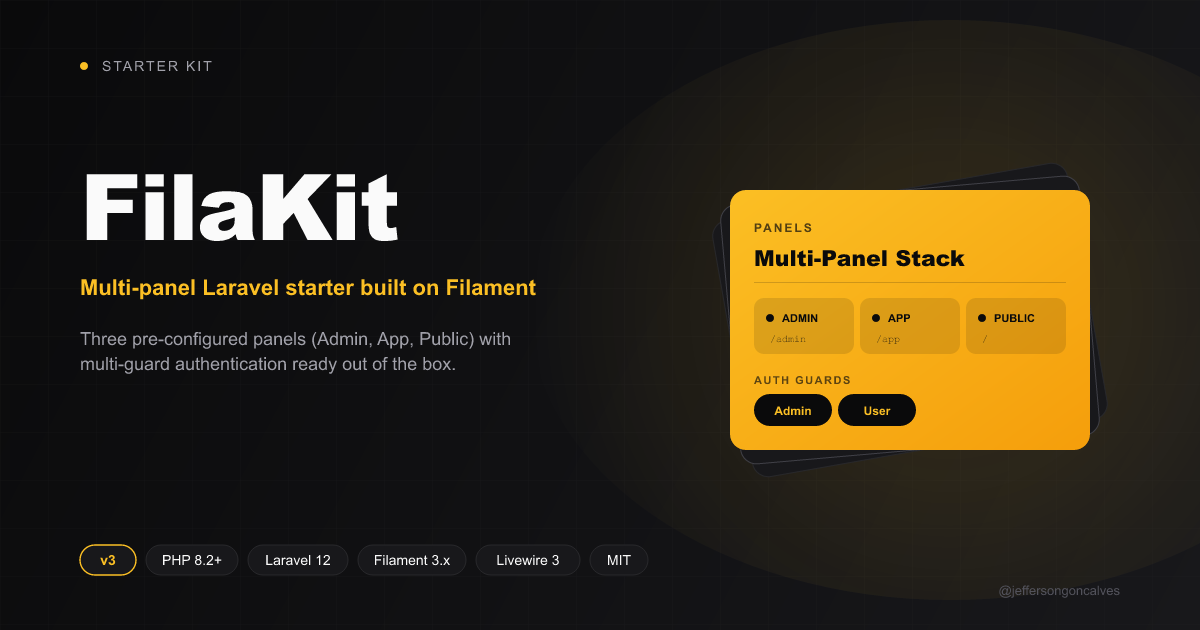
基于 Laravel 12.x 与 Filament 3.x 构建的启动器
Laravel启动器
filakit — Laravel 启动器模板
作者 jeffersongoncalves
FilaKit 是基于 Laravel 12.x 与 Filament 3.x 的启动器,预置 Admin、App 与 Public 三个面板,并区分 Admin 与 User 两套认证守卫。
看看你的网站会是什么样
浏览真实页面截图,比较内容排版与手机效果。点击下方缩略图切换,放大查看整页细节。
目前有 1 张原始预览,可打开完整图片查看设计细节。
截图用于了解视觉与布局,交互效果请以实际项目为准。
采集于 2026-10-01查看来源
值得关注的模板亮点
从已有项目资料中,快速了解它的特点。
预置 Admin(/admin)、App(/app)与 Public 三个面板
区分 Admin 与 User 的多认证守卫结构
通过 config/filakit.php 集中管理面板路由、中间件、品牌与认证守卫
提供 laravel new、FilaKit CLI、install.php 脚本和手动安装多种方式
包含 Laravel Sail 的 Docker 安装说明
模板详细介绍
FilaKit 是一个面向 Laravel 应用的启动器模板,技术栈为 Laravel 12.x 与 Filament 3.x。它把后台管理、登录用户应用界面和面向访客的前端界面拆成三个预配置面板:Admin Panel 挂载在 /admin,App Panel 挂载在 /app,Public Panel 提供前端界面。认证方面预置了 Admin 与 User 两种用户类型,分别对应管理面板与应用面板的访问。面板的路由、中间件、品牌(logo、颜色)和认证守卫集中在 config/filakit.php 中管理,也可以分别到 app/Providers/Filament 下的三个 PanelProvider 中调整。
安装方式包括:用 laravel new 指定本仓库作为模板、通过 FilaKit CLI 创建项目、执行仓库内的 php install.php 自动完成依赖安装与环境初始化,或按 README 手动执行 Composer 与 pnpm 安装、复制 .env、生成密钥、迁移数据库和构建前端资源。也提供了基于 Laravel Sail 的 Docker 安装步骤,需要自行配置应用、MySQL、Redis 和 Mailpit 的端口。
运行环境要求 PHP 8.2 或更高,并需要 Composer 以及 Node.js 和 PNPM。开发时可用 composer dev 同时启动服务、队列监听和前端资源编译,或分别运行 php artisan serve、php artisan queue:listen 和 pnpm run dev。模板本身采用 MIT 许可,代码可免费使用、修改、商用和分发,但演示图片、字体、图标等第三方素材以及域名、托管、数据库等外部服务需另行核对许可与费用。
Laravel启动器
适合你的项目吗?
适用场景
- 需要同时提供后台管理、登录用户应用界面和公开前端页面的 Laravel 项目
- 希望以 Filament 面板为基础快速搭建多角色访问入口的开发者
- 需要区分管理员与普通用户两套认证体系的 Laravel 应用
- 想通过 laravel new 或 FilaKit CLI 直接以模板创建新项目的团队
适合人群
- 熟悉 Laravel 与 Filament 的 PHP 开发者
- 需要多面板与多认证守卫起步结构的项目
- 接受以 config/filakit.php 和 PanelProvider 进行配置调整的团队
- 使用 PHP 8.2+、Composer、Node.js 与 PNPM 的开发环境
上手与定制指南
结合仓库当前版本的说明,按下面的资料检查内容、配置与运行要求。
- 1
环境要求 PHP 8.2 或更高,并需安装 Composer、Node.js 和 PNPM。
- 2
可用 laravel new my-app --using=jeffersongoncalves/filakit --database=mysql 创建项目,或通过 FilaKit CLI 执行 filakit new。
- 3
仓库提供 php install.php 自动安装脚本,也可手动执行 composer install、pnpm install、复制 .env、生成密钥、迁移和构建资源。
- 4
使用 Docker 时通过 Laravel Sail 启动容器,并需按需配置 APP_PORT、FORWARD_DB_PORT、FORWARD_REDIS_PORT、FORWARD_MAILPIT_PORT 等端口。
- 5
开发时可用 composer dev 同时运行服务、队列监听与前端资源编译。
授权与来源资料
使用条件与限制
免费使用 · 保留许可声明本次收录的是公开仓库中采用 MIT 许可的免费版本;免费范围为该版本代码,不代表外部服务或第三方素材免费。
使用时需要遵守
- 允许免费使用、修改、商用和分发该版本代码。
- 分发代码副本或实质性部分时,保留原作者版权声明和完整 MIT 许可声明。
- 代码按现状提供;担保与责任限制以原许可证及适用法律为准。
额外费用与待核对事项
- 演示图片、字体、图标及其他第三方素材需按各自许可核对,不能仅凭代码的 MIT 许可判断。
- 域名、托管、数据库、支付或 AI 等外部服务可能另外收费。
查看原文依据
https://github.com/jeffersongoncalves/filakit/blob/main/LICENSE.mdhttps://github.com/jeffersongoncalves/filakit/blob/main/README.mdPermission is hereby granted, free of charge
许可证原文
DeepSeek 根据仓库许可证和 README 整理 ·2026-10-01。结果仅覆盖已读取资料,依赖、图片、字体及后续条款变更以各自原文为准。
项目核对记录与介绍依据
模板资料
- 来源平台
- GitHub
- 资料与维护参考分
- 资料一般 · 71 / 100
- 技术栈
- Laravel
- 网站类型
- 启动器
这个分数如何计算
本站按许可资料(最高30分)、演示链接(12分)、预览图(10分)、Star数(15分)、记录的维护时间(15分)、描述完整度(8分)、功能记录(5分)和分类资料(5分)计算。它不是代码、安全或性能测试,也不是 Google 评分;有链接不代表已实测可用。
这个项目需要核对什么
- 记录的仓库更新时间
- 2026-09-28
- 截图检查日期
- 2026-10-01
目前没有记录演示链接。请依据仓库说明在本地评估;仅凭截图无法确认交互行为。
目录记录的主要技术栈是 Laravel。请通过依赖清单和锁文件核对实际版本与托管要求。这些说明基于收录资料,不代表代码审计或部署实测。
查看具体选型方法 →介绍的制作与核对状态
介绍由 AI 辅助整理目录与仓库资料。仓库作者不等于这篇介绍的审核者。
已完成服务器许可规则与 AI 来源核对;未经过人工编辑审核。
查看当时使用的来源资料
SHA-256: 508c1aa431fdfcfb6cc1ff6aff0cacc577797b1c20ae5368e9f4bd240afa1fb0
2026-10-01T02:22:51.066Z
来源文件 / 仓库<div class="filament-hidden">
</div>
# FilaKit Start Kit Filament 3.x and Laravel 12.x
[](https://buymeacoffee.com/jeffersongoncalves)
## About FilaKit
FilaKit is a robust starter kit built on Laravel 12.x and Filament 3.x, designed to accelerate the development of modern
web applications with a ready-to-use multi-panel structure.
## Features
- **Laravel 12.x** - The latest version of the most elegant PHP framework
- **Filament 3.x** - Powerful and flexible admin framework
- **Multi-Panel Structure** - Includes three pre-configured panels:
- Admin Panel (`/admin`) - For system administrators
- App Panel (`/app`) - For authenticated application users
- Public Panel (frontend interface) - For visitors
- **Environment Configuration** - Centralized configuration through the `config/filakit.php` file
## System Requirements
- PHP 8.2 or higher
- Composer
- Node.js and PNPM
## Installation
Clone the repository
``` bash
laravel new my-app --using=jeffersongoncalves/filakit --database=mysql
```
### Using FilaKit CLI
Or use [FilaKit CLI](https://github.com/jeffersongoncalves/filakit-cli) for a simplified setup:
```bash
filakit new my-app --kit=jeffersongoncalves/filakit
```
> Install FilaKit CLI: `composer global require jeffersongoncalves/filakit-cli`
### Easy Installation
FilaKit can be easily installed using the following command:
```bash
php install.php
```
This command automates the installation process by:
- Installing Composer dependencies
- Setting up the environment file
- Generating application key
- Setting up the database
- Running migrations
- Installing Node.js dependencies
- Building assets
- Configuring Herd (if used)
### Manual Installation
Install JavaScript dependencies
``` bash
pnpm install
```
Install Composer dependencies
``` bash
composer install
```
Set up environment
``` bash
cp .env.example .env
php artisan key:generate
```
Configure your database in the .env file
Run migrations
``` bash
php artisan migrate
```
Build frontend assets
``` bash
pnpm run build
```
Run the server
``` bash
php artisan serve
```
## Installation with Docker
Clone the repository
```bash
laravel new my-app --using=jeffersongoncalves/filakit --database=mysql
```
Move into the project directory
```bash
cd my-app
```
Install Composer dependencies
```bash
composer install
```
Set up environment
```bash
cp .env.example .env
```
Configuring custom ports may be necessary if you have other services running on the same ports.
```bash
# Application Port (ex: 8080)
APP_PORT=8080
# MySQL Port (ex: 3306)
FORWARD_DB_PORT=3306
# Redis Port (ex: 6379)
FORWARD_REDIS_PORT=6379
# Mailpit Port (ex: 1025)
FORWARD_MAILPIT_PORT=1025
```
Start the Sail containers
```bash
./vendor/bin/sail up -d
```
You won’t need to run `php artisan serve`, as Laravel Sail automatically handles the development server within the container.
Attach to the application container
```bash
./vendor/bin/sail shell
```
Generate the application key
```bash
php artisan key:generate
```
Install JavaScript dependencies
```bash
pnpm install
```
## Authentication Structure
FilaKit comes pre-configured with a custom authentication system that supports different types of users:
- `Admin` - For administrative panel access
- `User` - For application panel access
## Development
``` bash
# Run the development server with logs, queues and asset compilation
composer dev
# Or run each component separately
php artisan serve
php artisan queue:listen --tries=1
pnpm run dev
```
## Customization
### Panel Configuration
Panels can be customized through their respective providers:
- `app/Providers/Filament/AdminPanelProvider.php`
- `app/Providers/Filament/AppPanelProvider.php`
- `app/Providers/Filament/PublicPanelProvider.php`
Alternatively, these settings are also consolidated in the `config/filakit.php` file for easier management.
### Themes and Colors
Each panel can have its own color scheme, which can be easily modified in the corresponding Provider files or in the
`filakit.php` configuration file.
### Configuration File
The `config/filakit.php` file centralizes the configuration of the starter kit, including:
- Panel routes
- Middleware for each panel
- Branding options (logo, colors)
- Authentication guards
## Resources
FilaKit includes support for:
- User and admin management
- Multi-guard authentication system
- Tailwind CSS integration
- Database queue configuration
- Customizable panel routing and branding
## License
This project is licensed under the [MIT License](LICENSE).
## Credits
Developed by [Jefferson Gonçalves](https://github.com/jeffersongoncalves).
看看同类模板
对比同技术栈与用途的模板,找到更适合的视觉与内容结构。

sage
WordPress starter theme with Laravel Blade components and templates, Tailwind CSS, and block editor support
Laravel · 启动器

wave
Wave - The Software as a Service Starter Kit, designed to help you build the SAAS of your dreams 🚀 💰
Laravel · SaaS

filament-starter
A beautiful starting point for your next TALL stack project using Filament. ⚡
Laravel · 启动器

electrik
Laravel SaaS starter kit: auth, teams, Stripe billing, and Slate 3 — Composer package for Laravel 12
Laravel · SaaS

php-saas
The everything-included starter kit for your next idea
Laravel · SaaS

filament-jetstream
A Laravel starter kit built with Filament inspired by Jetstream.
Laravel · 启动器