10 个落地页区块:导航栏、Hero、Logo 云、功能、统计、评价、定价、FAQ、CTA、页脚
Next.jsReact企业官网
kairo-blocks-lite — Next.js 企业官网模板
作者 jeffev
Kairo Blocks Lite 是面向 Next.js 与 shadcn/ui 项目的免费落地页区块集合,包含 10 个可复制粘贴的独立 .tsx 文件,采用 MIT 许可。
看看你的网站会是什么样
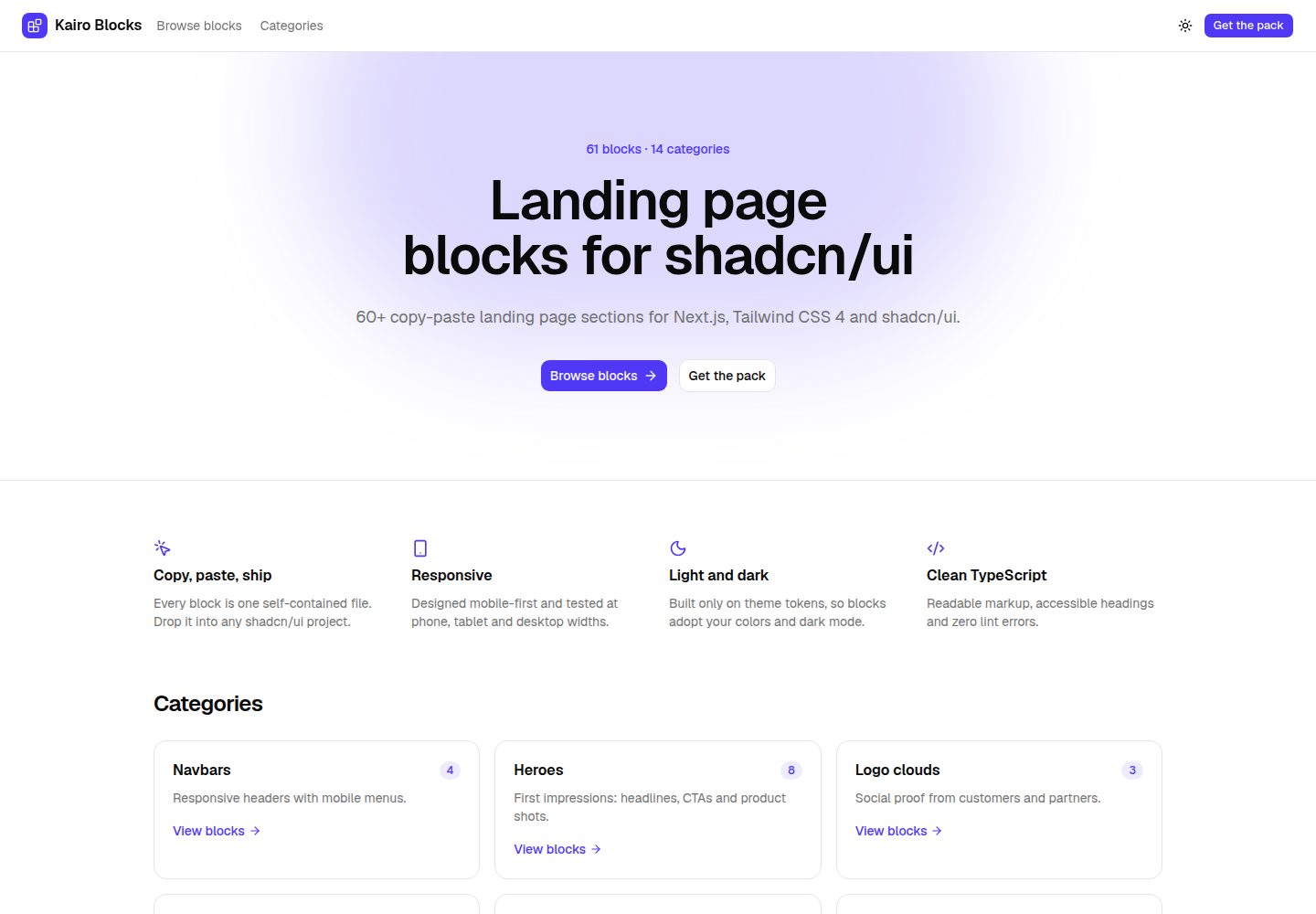
浏览真实页面截图,比较内容排版与手机效果。点击下方缩略图切换,放大查看整页细节。
全部页面与视图 3
截图用于了解视觉与布局,交互效果请以实际项目为准。
采集于 2026-10-07查看来源
值得关注的模板亮点
从已有项目资料中,快速了解它的特点。
每个区块为单个自包含 .tsx 文件,可复制粘贴到任意 shadcn/ui 项目
仅使用 shadcn/ui 主题令牌,自动适配项目颜色、圆角与深色模式
不依赖外部图片或额外 npm 包,仅需 shadcn/ui、lucide-react 和 Next.js
附带展示站点,支持本地查看桌面、平板和手机预览及代码
MIT 许可,允许个人与商业项目使用
模板详细介绍
Kairo Blocks Lite 提供 10 个落地页区块,覆盖导航栏、Hero、Logo 云、功能、数据统计、用户评价、定价、FAQ、行动号召和页脚。每个区块是单个自包含的 .tsx 文件,可直接复制进任意 shadcn/ui 项目,示例数据以常量形式放在组件顶部,便于替换。区块只使用 shadcn/ui 主题令牌,因此会跟随项目在 globals.css 中定义的颜色、圆角和深色模式。README 说明区块在手机、平板和桌面宽度下响应式,不依赖外部图片或额外 npm 包,仅使用 shadcn/ui、lucide-react 和 Next.js。navbar-01 与 pricing-01 因使用状态(移动菜单、计费切换)以 "use client" 开头。仓库同时包含一个展示站点,可通过 npm run dev 在本地浏览区块的桌面、平板和手机预览及代码视图,npm run build 会生成可部署到任意位置的静态站点。免费范围仅限该 Lite 版本代码,完整版 Kairo Blocks 为单独销售的 61 个区块包。
Next.jsReact企业官网
适合你的项目吗?
适用场景
- 为 Next.js 与 shadcn/ui 项目快速搭建企业官网或产品落地页
- 在已有 shadcn/ui 主题下直接复用区块,保持视觉风格统一
- 作为展示站点本地浏览各区块在不同屏幕宽度下的效果与源码
- 在需要移动菜单或计费切换的页面中直接使用带状态的 navbar-01 与 pricing-01
适合人群
- 使用 Next.js 与 shadcn/ui 的前端开发者
- 需要快速组装落地页区块的企业官网项目
- 希望区块样式跟随自身主题令牌的团队
- 接受 MIT 许可并自行替换示例内容的个人或商业项目
上手与定制指南
结合仓库当前版本的说明,按下面的资料检查内容、配置与运行要求。
- 1
项目需已配置 Tailwind CSS 与 shadcn/ui,安装方式参考 shadcn/ui 官方文档
- 2
将区块 .tsx 文件复制到项目任意目录(如 components/sections/),并按文件顶部注释添加所需 shadcn/ui 组件
- 3
替换组件顶部常量中的示例文案、链接和数据
- 4
navbar-01 与 pricing-01 因使用状态以 "use client" 开头,需在支持客户端组件的环境中使用
- 5
运行展示站点:npm install 后 npm run dev,访问 http://localhost:3000;npm run build 生成 out/ 静态站点
授权与来源资料
使用条件与限制
免费使用 · 保留许可声明本次收录的是公开仓库中采用 MIT 许可的免费版本;免费范围为该版本代码,不代表外部服务或第三方素材免费。
使用时需要遵守
- 允许免费使用、修改、商用和分发该版本代码。
- 分发代码副本或实质性部分时,保留原作者版权声明和完整 MIT 许可声明。
- 代码按现状提供;担保与责任限制以原许可证及适用法律为准。
额外费用与待核对事项
- 演示图片、字体、图标及其他第三方素材需按各自许可核对,不能仅凭代码的 MIT 许可判断。
- 域名、托管、数据库、支付或 AI 等外部服务可能另外收费。
- 免费范围仅限本 Lite 仓库的 10 个区块;完整版 Kairo Blocks(61 个区块、14 个分类)需在 Payhip 单独付费购买,不包含在免费提供中。
- 完整版 Kairo Blocks 套件单独销售并适用其自身许可,不属于本 MIT 免费仓库的授权范围。
- 使用区块前,目标项目必须已配置 Tailwind CSS 4 与 shadcn/ui,否则无法直接复制使用。
- 每个区块依赖其顶部列出的 shadcn/ui 组件,需先通过 shadcn CLI 添加这些组件才能正常渲染。
查看原文依据
Permission is hereby granted, free of charge
许可证原文
> **Want more?** [Kairo Blocks](https://payhip.com/b/gD6od) has **61 blocks in 14 categories**: every variant of > these sections plus team, blog, contact and newsletter blocks.
README 原文
The full Kairo Blocks pack is sold separately under its own license.
README 原文
Your project needs Tailwind CSS 4 and shadcn/ui ([setup guide](https://ui.shadcn.com/docs/installation)).
README 原文
https://github.com/jeffev/kairo-blocks-lite/blob/main/LICENSE.mdhttps://github.com/jeffev/kairo-blocks-lite/blob/main/README.mdAdd the shadcn/ui components it imports. Every block lists them at the top of the file:
README 原文
DeepSeek 根据仓库许可证和 README 整理 ·2026-10-07。结果仅覆盖已读取资料,依赖、图片、字体及后续条款变更以各自原文为准。
项目核对记录与介绍依据
模板资料
- 来源平台
- GitHub
- 资料与维护参考分
- 资料较完整 · 85 / 100
- 技术栈
- Next.js · React
- 网站类型
- 企业官网
这个分数如何计算
本站按许可资料(最高30分)、演示链接(12分)、预览图(10分)、Star数(15分)、记录的维护时间(15分)、描述完整度(8分)、功能记录(5分)和分类资料(5分)计算。它不是代码、安全或性能测试,也不是 Google 评分;有链接不代表已实测可用。
这个项目需要核对什么
- 记录的仓库更新时间
- 2026-10-06
- 截图检查日期
- 2026-10-07
已收录演示链接。请用你的内容与屏幕尺寸检查;有演示不代表表单、认证或支付已经可用。
目录记录的主要技术栈是 Next.js。请通过依赖清单和锁文件核对实际版本与托管要求。这些说明基于收录资料,不代表代码审计或部署实测。
查看具体选型方法 →介绍的制作与核对状态
介绍由 AI 辅助整理目录与仓库资料。仓库作者不等于这篇介绍的审核者。
审核声明: [email protected] · 2026-10-07
查看当时使用的来源资料
SHA-256: 4aac3e1d5f69428ec1cf88cd3d48bf5aa5291bf9b1d99b7a89e7bb3eb7dc766f
2026-10-07T00:48:29.781Z
来源文件 / 仓库# Kairo Blocks Lite
10 free landing page sections for **Next.js 16**, **Tailwind CSS 4** and **shadcn/ui**. Every block is a single,
self-contained `.tsx` file you can copy into any shadcn/ui project. MIT licensed.
| Category | Block |
|---|---|
| Navbar | `navbar-01`: responsive header with a mobile menu |
| Hero | `hero-01`: centered hero with product shot |
| Logo cloud | `logos-01`: logo grid |
| Features | `features-01`: three-column icon grid |
| Stats | `stats-01`: four big numbers |
| Testimonials | `testimonials-01`: three testimonial cards |
| Pricing | `pricing-01`: three tiers with billing toggle |
| FAQ | `faq-01`: accordion |
| Call to action | `cta-01`: primary banner with two buttons |
| Footer | `footer-01`: logo with four link columns |
- Built only on shadcn/ui theme tokens, so every block adopts your colors, radius and dark mode
- Responsive at phone, tablet and desktop widths
- No external images or extra npm packages: only shadcn/ui, `lucide-react` and Next.js
- Accessible markup: heading order, labelled controls, keyboard-friendly menus and accordions
> **Want more?** [Kairo Blocks](https://payhip.com/b/gD6od) has **61 blocks in 14 categories**: every variant of
> these sections plus team, blog, contact and newsletter blocks.
> [Live demo of the full pack](https://kairo-blocks-demo.jeffev123.workers.dev).
## Using a block in your project
Your project needs Tailwind CSS 4 and shadcn/ui ([setup guide](https://ui.shadcn.com/docs/installation)).
1. Copy the file, for example `src/blocks/hero/hero-01.tsx`, into your project
(any folder, e.g. `components/sections/`).
2. Add the shadcn/ui components it imports. Every block lists them at the top of the file:
```bash
npx shadcn@latest add button badge
```
3. Render it:
```tsx
import Hero01 from "@/components/sections/hero-01";
export default function Page() {
return <Hero01 />;
}
```
4. Replace the sample copy, links and data (kept in constants at the top of each component) with your own.
Each file also exports a small `meta` object used by the showcase; you can delete it. `navbar-01` and
`pricing-01` start with `"use client"` because they use state (mobile menu, billing toggle).
## Running the showcase
```bash
npm install
npm run dev
```
Open http://localhost:3000 to browse the blocks with live previews (desktop, tablet and mobile) and the code
view. `npm run build` produces a static site in `out/` that you can deploy anywhere.
## Customizing the look
Blocks use theme tokens (`bg-primary`, `text-muted-foreground`, `border`…), so changing your shadcn/ui theme
in `globals.css` restyles every block at once.
## License
[MIT](./LICENSE.md). Use the blocks in personal and commercial projects. The full Kairo Blocks pack is sold
separately under its own license.
Made by [Jefferson Valandro](https://jeffev.github.io/jeffersonvalandro/) · [ValandroUI](https://payhip.com/ValandroUI)
看看同类模板
对比同技术栈与用途的模板,找到更适合的视觉与内容结构。

SaaS-Boilerplate
🚀🎉📚 SaaS Boilerplate built with Next.js + Tailwind CSS + Shadcn UI + TypeScript. ⚡️ Full-stack React applic…
Next.js · SaaS

Next-JS-Landing-Page-Starter-Template
🚀 Free NextJS Landing Page Template written in Tailwind CSS 3 and TypeScript ⚡️ Made with developer experienc…
Next.js · 企业官网

next-saas-starter
⚡️ Free Next.js responsive landing page template for SaaS products made using JAMStack architecture.
Next.js · SaaS

startup-nextjs
Startup is free Next.js template for SaaS startups comes with all the essential pages, components, and section…
Next.js · SaaS

shadcn-landing-page
New design 🎉 Nextjs + Shadcn + TypeScript + Tailwind. Landing page template ease-to-use
Next.js · 企业官网

shadcn-dashboard-landing-template
Accelerate your development with a sleek, open-source admin dashboard and landing page built on Vite-React, Ne…
Next.js · 后台