
纯语义化 HTML 与纯 CSS,不包含 JavaScript
Hugo启动器
risotto — Hugo 启动器模板
作者 joeroe
risotto 是一个基于 Hugo 的极简响应式主题,采用终端配色美学,使用纯 HTML 与纯 CSS 构建,不含 JavaScript,内置 20 套基于 base16 的配色方案。
看看你的网站会是什么样
浏览真实页面截图,比较内容排版与手机效果。点击下方缩略图切换,放大查看整页细节。
全部页面与视图 3
截图用于了解视觉与布局,交互效果请以实际项目为准。
采集于 2026-10-02查看来源
值得关注的模板亮点
从已有项目资料中,快速了解它的特点。
使用 CSS Grid 实现响应式布局,不依赖人为断点
内置 20 套基于 base16 的配色方案,含 13 套深色与 7 套浅色
支持通过 base16-styles 的 CSS 变量文件或自定义变量扩展配色
提供 .baseXX 与 .bg-baseXX 工具类,可在内容中直接引用配色
自动识别 static/ 目录下的 favicon 与 site.webmanifest
模板详细介绍
risotto 是面向 Hugo 的极简响应式主题,设计灵感来自终端 ricing 美学。主题使用语义化 HTML 与纯 CSS,不包含 JavaScript,也不依赖 CSS 框架或预处理器,样式表结构简单,便于直接修改。布局基于 CSS Grid 实现原生响应式行为,不依赖人为设定的断点。
配色方面,主题通过 base16 框架定义颜色,内置 20 套调色板(13 套深色、7 套浅色),包括 catppuccin、dracula、gruvbox、solarized、tokyo-night、windows-95 等,默认使用 base16-dark。也可以通过 theme.palette 参数切换,或将 base16-styles 仓库中的 CSS 变量文件放入 static/css/palettes 目录来使用其他 base16 风格;如需完全自定义,则要按 base16 的 00–0F 色位定义对应 CSS 变量,浅色方案需将 00–07 的顺序反转。内容中可直接使用 .baseXX 与 .bg-baseXX 工具类引用这些颜色。
主题会自动识别 static/ 目录下的 favicon.ico、favicon-16x16.png、favicon-32x32.png、apple-touch-icon.png 和 site.webmanifest,并写入站点 head。示例站点使用的“cooked rice” emoji 图标来自 Twemoji 项目,采用 CC-BY 4.0 许可。
安装方式为下载 release 并解压到项目的 themes/ 目录,或将仓库克隆到 themes/risotto 并检出最新版本标签;若站点本身是 git 仓库,克隆方式不可用,可改用 git submodule,但 README 说明由于追踪特定版本较困难而不推荐。更新时,git clone 安装的可执行 git pull,否则重新下载 release 覆盖旧版本。启用主题需在 hugo.toml 中添加 theme = 'risotto',或在 hugo.yaml 中添加 theme: risotto,主题专属参数可参考 exampleSite/config.toml。
Hugo启动器
适合你的项目吗?
适用场景
- 为 Hugo 站点提供终端配色风格的极简外观
- 需要无 JavaScript、便于直接修改样式表的静态站点
- 希望从内置的 catppuccin、dracula、gruvbox、solarized 等调色板中快速切换主题配色
- 使用 base16 体系自定义颜色并配合工具类在正文中着色
适合人群
- 使用 Hugo 构建个人博客或文档站点的开发者
- 偏好终端 ricing 美学与低依赖前端样式的用户
- 需要纯 CSS 响应式布局、不引入 JavaScript 的项目
- 希望以 base16 调色板统一站点配色的人
上手与定制指南
结合仓库当前版本的说明,按下面的资料检查内容、配置与运行要求。
- 1
下载最新 release 解压到项目的 themes/ 目录,或克隆仓库到 themes/risotto 并检出最新版本标签
- 2
若站点本身是 git 仓库,克隆方式不可用,可改用 git submodule,但 README 说明不推荐
- 3
在 hugo.toml 中添加 theme = 'risotto',或在 hugo.yaml 中添加 theme: risotto
- 4
主题专属参数参考 exampleSite/config.toml,通过 theme.palette 选择内置调色板
- 5
favicon 文件需直接放在站点 static/ 目录下,不能放在子目录或主题的 static/ 中
授权与来源资料
使用条件与限制
免费使用 · 保留许可声明本次收录的是公开仓库中采用 MIT 许可的免费版本;免费范围为该版本代码,不代表外部服务或第三方素材免费。
使用时需要遵守
- 允许免费使用、修改、商用和分发该版本代码。
- 分发代码副本或实质性部分时,保留原作者版权声明和完整 MIT 许可声明。
- 代码按现状提供;担保与责任限制以原许可证及适用法律为准。
额外费用与待核对事项
- 若站点本身是 git 仓库,则无法通过克隆主题仓库并检出标签的方式安装,需改用 git submodule。
- README 明确不推荐使用 git submodule 方式安装,因为难以追踪特定版本。
- favicon 文件必须直接放在站点 static/ 目录下,不能放在子目录或主题自身的 static/ 目录中。
- 示例站点使用的 cooked rice emoji 图标来自 Twemoji,采用 CC-BY 4.0 许可,与主题代码的 MIT 许可不同,使用时需遵守该许可。
- 演示图片、字体、图标及其他第三方素材需按各自许可核对,不能仅凭代码的 MIT 许可判断。
- 域名、托管、数据库、支付或 AI 等外部服务可能另外收费。
查看原文依据
Permission is hereby granted, free of charge
许可证原文
Note that this will not work if your site is itself a git repository.
README 原文
but this is not recommended due to the difficulty of tracking a specific release
README 原文
They must be placed directly under your site's `static/` directory, i.e. not in in a subdirectory or `themes/risotto/static/`.
README 原文
https://github.com/joeroe/risotto/blob/main/LICENSEhttps://github.com/joeroe/risotto/blob/main/README.mdThe 'cooked rice' emoji used as a favicon for the example site was created by the [Twemoji project](https://twemoji.twitter.com/) and is licensed under [CC-BY 4.0](https://creativecommons.org/licenses/by/4.0/).
README 原文
DeepSeek 根据仓库许可证和 README 整理 ·2026-10-02。结果仅覆盖已读取资料,依赖、图片、字体及后续条款变更以各自原文为准。
项目核对记录与介绍依据
模板资料
- 来源平台
- Hugo Themes
- 资料与维护参考分
- 资料较完整 · 91 / 100
- 技术栈
- Hugo
- 网站类型
- 启动器
这个分数如何计算
本站按许可资料(最高30分)、演示链接(12分)、预览图(10分)、Star数(15分)、记录的维护时间(15分)、描述完整度(8分)、功能记录(5分)和分类资料(5分)计算。它不是代码、安全或性能测试,也不是 Google 评分;有链接不代表已实测可用。
这个项目需要核对什么
- 记录的仓库更新时间
- 2026-08-12
- 截图检查日期
- 2026-10-02
已收录演示链接。请用你的内容与屏幕尺寸检查;有演示不代表表单、认证或支付已经可用。
目录记录的主要技术栈是 Hugo。请通过依赖清单和锁文件核对实际版本与托管要求。这些说明基于收录资料,不代表代码审计或部署实测。
查看具体选型方法 →介绍的制作与核对状态
介绍由 AI 辅助整理目录与仓库资料。仓库作者不等于这篇介绍的审核者。
已完成服务器许可规则与 AI 来源核对;未经过人工编辑审核。
查看当时使用的来源资料
SHA-256: aa1633e36f5ddaa6a5a8e31154277b389e6957e04f8134377e13644248d68eab
2026-10-02T14:56:12.958Z
来源文件 / 仓库# 🍚 risotto risotto is a minimalist, responsive [hugo](https://gohugo.io) theme inspired by terminal ricing aesthetics. [](https://themes.gohugo.io/themes/risotto/) [](https://semver.org)  [](https://validator.nu/?doc=https%3A%2F%2Frisotto.joeroe.io)  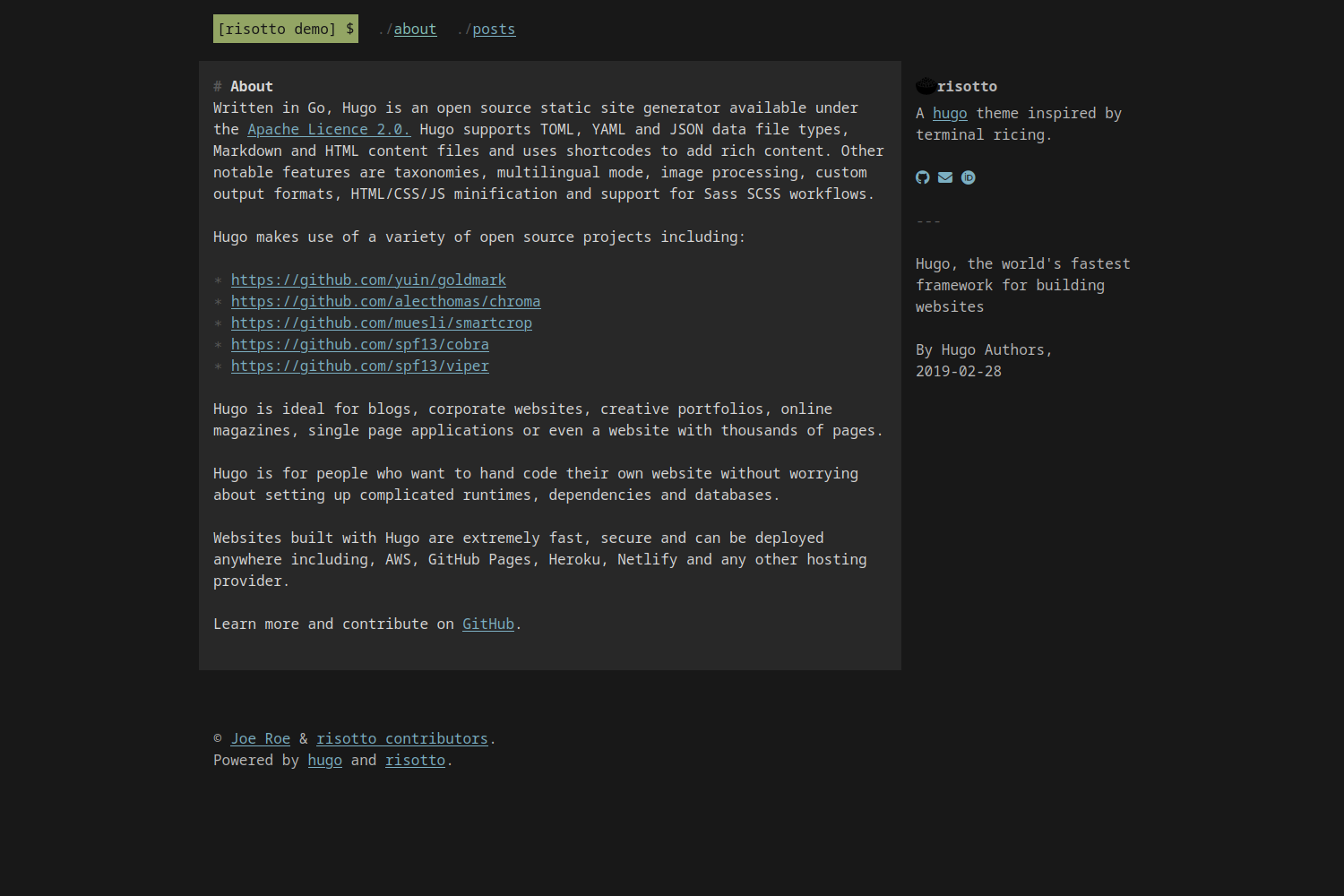 ## Features * Plain, semantic HTML with no Javascript * Plain CSS – no frameworks, no preprocessors, just simple and easy-to-customise stylesheets * Uses [CSS Grid](https://developer.mozilla.org/en-US/docs/Web/CSS/CSS_grid_layout) for native responsive behaviour without arbitrary breakpoints * Comes with [20 built-in colour schemes](#colour-schemes) based on popular terminal themes plus the ability to use custom themes using the [base16 system](https://github.com/monicfenga/base16-styles) ## Install The easiest way to install the theme is to [download the latest release](https://github.com/joeroe/risotto/releases) and extract it to your project's `themes/` directory. You can also clone this repository into your site's `themes` directory and checkout the latest release: ```shell git clone https://github.com/joeroe/risotto themes/risotto && cd themes/risotto git checkout $(git tag -l | grep '^v[0-9.]*$' | sort -V | tail -n 1) ``` Note that this will not work if your site is itself a git repository. In that case, you can add the theme as a [git submodule](https://git-scm.com/book/en/v2/Git-Tools-Submodules), but this is not recommended due to the difficulty of tracking a specific release. ## Update If you installed the theme using `git clone`, pull the repository to get the latest version: ```shell cd themes/risotto git pull ``` Otherwise, simply [download the latest release](https://github.com/joeroe/risotto/releases) and extract it to your project's `themes/` directory, replacing the old version. ## Configure To use the theme, add `theme = 'risotto'` to your site's `hugo.toml`, or `theme: risotto` to your `hugo.yaml`. See `exampleSite/config.toml` for the theme-specific parameters you need to add to your site's `hugo.toml` or `hugo.yaml` to configure the theme. ### Colour schemes risotto uses the [base16 framework](https://github.com/chriskempson/base16) to define colour schemes that can be used with the `theme.palette` parameter. A selection of 20 palettes (13 dark, 7 light) are bundled with the theme: `apprentice`, `base16-dark`, `base16-light`, `catppuccin-frappe`, `catppuccin-latte`, `catppuccin-macchiato`, `catppuccin-mocha`, `dracula`, `gruvbox-dark`, `gruvbox-light`, `material`, `papercolor-dark`, `papercolor-light`, `solarized-dark`, `solarized-light`, `tender`, `tokyo-night-dark`, `tokyo-night-light`, `windows-95` and `windows-95-light`. The default is `base16-dark`. | Palette | Preview | | -------------------- | ---------------------------------------------------------------------------------------------------------------------------------- | | apprentice | <img align="center" width="250" src="images/palette/apprentice.png" alt="risotto theme with apprentice palette"> | | base16-dark | <img align="center" width="250" src="images/palette/base16-dark.png" alt="risotto theme with base16-dark palette"> | | base16-light | <img align="center" width="250" src="images/palette/base16-light.png" alt="risotto theme with base16-light palette"> | | catppuccin-frappe | <img align="center" width="250" src="images/palette/catppuccin-frappe.png" alt="risotto theme with catppuccin-frappe palette"> | | catppuccin-latte | <img align="center" width="250" src="images/palette/catppuccin-latte.png" alt="risotto theme with catppuccin-latte palette"> | | catppuccin-macchiato | <img align="center" width="250" src="images/palette/catppuccin-macchiato.png" alt="risotto theme with catppuccin-macchiato palette"> | | catppuccin-mocha | <img align="center" width="250" src="images/palette/catppuccin-mocha.png" alt="risotto theme with catppuccin-mocha palette"> | | dracula | <img align="center" width="250" src="images/palette/dracula.png" alt="risotto theme with dracula palette"> | | gruvbox-dark | <img align="center" width="250" src="images/palette/gruvbox-dark.png" alt="risotto theme with gruvbox-dark palette"> | | gruvbox-light | <img align="center" width="250" src="images/palette/gruvbox-light.png" alt="risotto theme with gruvbox-light palette"> | | material | <img align="center" width="250" src="images/palette/material.png" alt="risotto theme with material palette"> | | papercolor-dark | <img align="center" width="250" src="images/palette/papercolor-dark.png" alt="risotto theme with papercolor-dark palette"> | | papercolor-light | <img align="center" width="250" src="images/palette/papercolor-light.png" alt="risotto theme with papercolor-light palette"> | | solarized-dark | <img align="center" width="250" src="images/palette/solarized-dark.png" alt="risotto theme with solarized-dark palette"> | | solarized-light | <img align="center" width="250" src="images/palette/solarized-light.png" alt="risotto theme with solarized-light palette"> | | tender | <img align="center" width="250" src="images/palette/tender.png" alt="risotto theme with tender palette"> | | tokyo-night-dark | <img align="center" width="250" src="images/palette/tokyo-night-dark.png" alt="risotto theme with tokyo-night-dark palette"> | | tokyo-night-light | <img align="center" width="250" src="images/palette/tokyo-night-light.png" alt="risotto theme with tokyo-night-light palette"> | | windows-95 | <img align="center" width="250" src="images/palette/windows-95.png" alt="risotto theme with windows-95 palette"> | | windows-95-light | <img align="center" width="250" src="images/palette/windows-95-light.png" alt="risotto theme with windows-95-light palette"> | The easiest way to use other base16 styles is to place .css file from https://github.com/monicfenga/base16-styles/tree/master/css-variables and place it in your `static/css/palettes` directory. Or to define a wholly custom theme, you will need to define the following CSS variables for the following base16 colours (see [base16-dark.css](blob/main/static/css/palettes/base16-dark.css) for an example): | Base | Default colour | Used for | Examples | | ---- | ------------------------------------------ | ------------------- | ------------------------------------ | | 00 | <span class="base00">Dark</span> | Background | Page background | | 01 | <span class="base01">│</span> | Alt. background | Content background | | 02 | <span class="base02">│</span> | In-text backgrounds | `<pre>`, `<code>`, `<kbd>`, `<samp>` | | 03 | <span class="base03">│</span> | Muted text | `:before` & `:marker` symbols | | 04 | <span class="base04">│</span> | Alt. foreground | Aside text | | 05 | <span class="base05">│</span> | Foreground | Content text | | 06 | <span class="base06">│</span> | | | | 07 | <span class="base07">Light</span> | | | | 08 | <span class="base08">Red</span> | | | | 09 | <span class="base09">Orange</span> | | | | 0A | <span class="base0A">Yellow</span> | Highlights | Selected text, `<mark>` | | 0B | <span class="base0B">Green</span> | Primary accent | Logo | | 0C | <span class="base0C">Cyan</span> | Active links | `a:active`, `a:hover` | | 0D | <span class="base0D">Blue</span> | Links | `a:link`, `a:visited` | | 0E | <span class="base0E">Magenta</span> | | | | 0F | <span class="base0F">Brown</span> | | | For light mode palettes, the sequence of 00–07 should be reversed (light to dark, not dark to light). Note that not all colours are currently used in the theme. You you use these colours directly in content using the convenience classes `.baseXX` and `.bg-baseXX`. For example: ```html <span class="base0A">Yellow text</span> <mark class="bg-base0D">Text highlighted in green</mark> ``` ## Favicon risotto will automatically use favicons placed in the `static/` directory. The following files will be detected and included in your site's `<head>` section: * `favicon.ico` * `favicon-16x16.png` * `favicon-32x32.png` * `apple-touch-icon.png` * `site.webmanifest` You can generate these from an image or emoji using [favicon.io](https://favicon.io/) or a similar service. They must be placed directly under your site's `static/` directory, i.e. not in in a subdirectory or `themes/risotto/static/`. ## Acknowledgements The 'cooked rice' emoji used as a favicon for the example site was created by the [Twemoji project](https://twemoji.twitter.com/) and is licensed under [CC-BY 4.0](https://creativecommons.org/licenses/by/4.0/).
看看同类模板
对比同技术栈与用途的模板,找到更适合的视觉与内容结构。

hugo-xmin
eXtremely Minimal Hugo theme: about 140 lines of code in total, including HTML and CSS (with no dependencies)
Hugo · 启动器

hugo-theme-gallery
Gallery Theme for Hugo
Hugo · 启动器

reveal-hugo
📽️ Create rich HTML-based presentations with Hugo and Reveal.js
Hugo · 启动器

anatole
Anatole is a minimalistic two-column theme for Hugo.
Hugo · 启动器

hugo-theme-diary
Moments piled up. A Hugo theme ported from SumiMakito/hexo-theme-Journal.
Hugo · 启动器
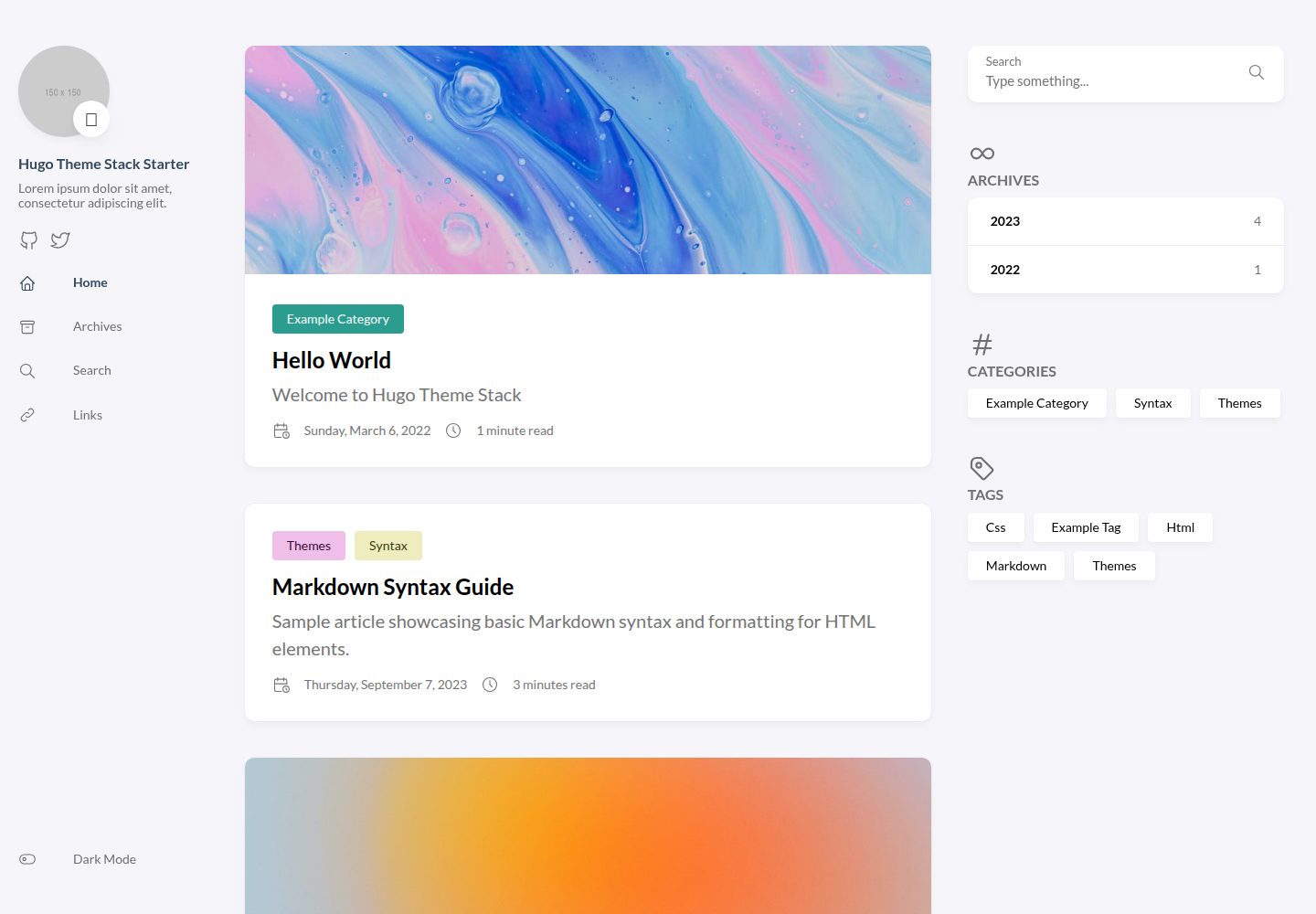
hugo-theme-stack-starter
A quickstart template to create a Hugo blog using hugo-theme-stack
Hugo · 博客