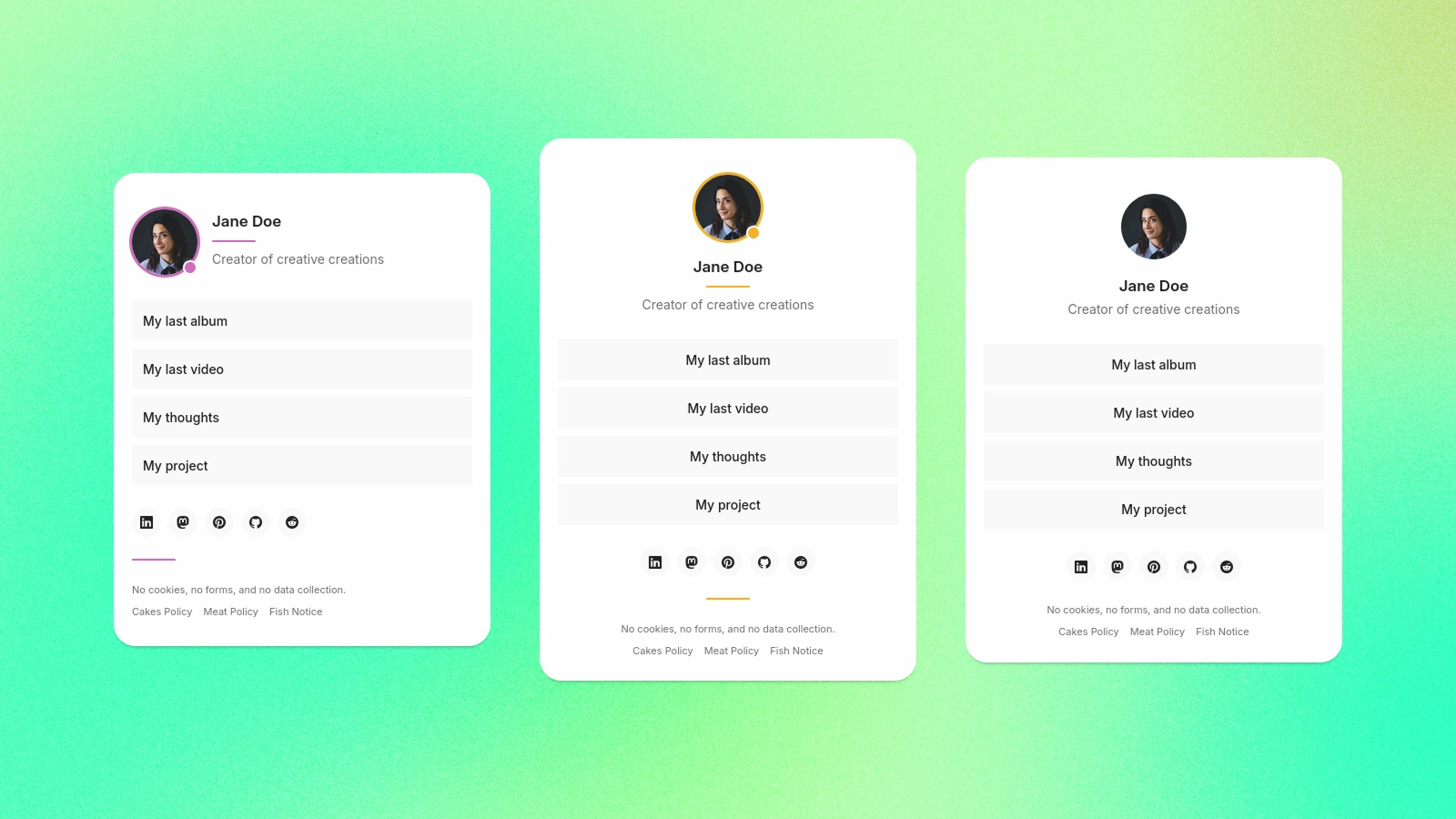
基于 Astro 的静态链接主页主题,可自托管部署
Astro启动器
manduca — Astro 启动器模板
作者 jomorespi
Manduca 是一个基于 Astro 的自托管“Link in Bio”主题,通过 settings.json 配置姓名、简介、头像、链接与社交图标,并用 Tailwind CSS 调整外观。
看看你的网站会是什么样
浏览真实页面截图,比较内容排版与手机效果。点击下方缩略图切换,放大查看整页细节。
目前有 1 张原始预览,可打开完整图片查看设计细节。
截图用于了解视觉与布局,交互效果请以实际项目为准。
采集于 2026-10-03查看来源
值得关注的模板亮点
从已有项目资料中,快速了解它的特点。
通过 src/settings.json 集中管理姓名、简介、头像、链接、社交与页脚
支持 center 与 left 两种对齐方式,以及 avatar、lines、all、none 四种装饰选项
内置 30 余个社交平台图标,自定义链接以通用图标显示
使用 Tailwind CSS 样式体系,可在 theme.css 中调整强调色等外观
支持用 Markdown 添加自定义内容页,并在页脚菜单中以相对链接引用
模板详细介绍
Manduca 是一个面向 Astro 的“Link in Bio”主题,用于搭建自托管的个人链接主页。内容与显示选项集中在 src/settings.json 中管理:可设置姓名、简介、头像、自定义链接、社交账号与页脚信息,并选择居中对齐或左对齐,以及头像、线条、全部或关闭等装饰方式。外观通过 src/assets/styles/theme.css 调整,主题基于 Tailwind CSS 的样式体系,可自定义强调色等样式。
社交图标内置了 Linkedin、Mastodon、Bluesky、Threads、Twitter、Instagram、Pinterest、Snapchat、Facebook、Vimeo、YouTube、TikTok、Twitch、Bandcamp、SoundCloud、Tidal、Spotify、GitHub、GitLab、Codeberg、StackOverflow、Discord、Behance、Dribbble、Reddit、Quora、Substack、Medium、WordPress、WhatsApp、Telegram 和 Strava;添加自定义条目时会以通用链接图标显示。页脚可填写版权、日期或声明文本,并通过菜单链接到自定义内容页。内容页使用 Markdown 编写,放在 src/pages 目录,并指定 PageLayout.astro 布局。
主题提供创建 Astro 项目或克隆仓库两种使用方式,开发服务器默认运行在 localhost:4321,构建输出到 ./dist/。语言通过 settings.json 中的 ISO 语言代码设置。README 未说明数据库、后台管理或动态数据能力,因此它更接近静态链接页方案。
Astro启动器
适合你的项目吗?
适用场景
- 为个人或创作者搭建自托管的 Link in Bio 页面,集中展示多个外部链接
- 将社交账号、作品集、音乐或视频平台链接聚合到一个静态页面
- 在页脚菜单中链接关于、联系、政策等 Markdown 内容页
- 需要自定义强调色与布局对齐方式,并希望用 Tailwind CSS 调整样式的场景
适合人群
- 熟悉 Astro 基础命令与项目结构的开发者
- 希望通过编辑 JSON 与 CSS 文件完成配置、不需要后台管理界面的用户
- 计划自行托管静态站点并自行处理域名与部署的人
- 需要多语言页面并愿意填写 ISO 语言代码的使用者
上手与定制指南
结合仓库当前版本的说明,按下面的资料检查内容、配置与运行要求。
- 1
可用 pnpm create astro@latest my-project -- --template jomorespi/manduca 创建项目,或克隆仓库后执行 pnpm install 与 pnpm dev
- 2
开发服务器默认地址为 localhost:4321,构建产物输出到 ./dist/
- 3
主要配置位于 src/settings.json,外观调整位于 src/assets/styles/theme.css
- 4
头像图片需放入 public/img 目录,自定义内容页需放在 src/pages 并使用 PageLayout.astro 布局
- 5
代码采用 MIT 许可,但演示图片、字体、图标等第三方素材需单独核对许可;域名、托管等外部服务可能另行收费
授权与来源资料
使用条件与限制
免费使用 · 保留许可声明本次收录的是公开仓库中采用 MIT 许可的免费版本;免费范围为该版本代码,不代表外部服务或第三方素材免费。
使用时需要遵守
- 允许免费使用、修改、商用和分发该版本代码。
- 分发代码副本或实质性部分时,保留原作者版权声明和完整 MIT 许可声明。
- 代码按现状提供;担保与责任限制以原许可证及适用法律为准。
额外费用与待核对事项
- 演示图片、字体、图标及其他第三方素材需按各自许可核对,不能仅凭代码的 MIT 许可判断。
- 域名、托管、数据库、支付或 AI 等外部服务可能另外收费。
查看原文依据
https://github.com/jomorespi/manduca/blob/main/LICENSEhttps://github.com/jomorespi/manduca/blob/main/README.mdPermission is hereby granted, free of charge
许可证原文
DeepSeek 根据仓库许可证和 README 整理 ·2026-10-03。结果仅覆盖已读取资料,依赖、图片、字体及后续条款变更以各自原文为准。
项目核对记录与介绍依据
模板资料
- 来源平台
- Astro Themes
- 资料与维护参考分
- 资料较完整 · 83 / 100
- 技术栈
- Astro
- 网站类型
- 启动器
这个分数如何计算
本站按许可资料(最高30分)、演示链接(12分)、预览图(10分)、Star数(15分)、记录的维护时间(15分)、描述完整度(8分)、功能记录(5分)和分类资料(5分)计算。它不是代码、安全或性能测试,也不是 Google 评分;有链接不代表已实测可用。
这个项目需要核对什么
- 记录的仓库更新时间
- 2026-09-20
- 截图检查日期
- 2026-10-03
已收录演示链接。请用你的内容与屏幕尺寸检查;有演示不代表表单、认证或支付已经可用。
目录记录的主要技术栈是 Astro。请通过依赖清单和锁文件核对实际版本与托管要求。这些说明基于收录资料,不代表代码审计或部署实测。
查看具体选型方法 →介绍的制作与核对状态
介绍由 AI 辅助整理目录与仓库资料。仓库作者不等于这篇介绍的审核者。
已完成服务器许可规则与 AI 来源核对;未经过人工编辑审核。
查看当时使用的来源资料
SHA-256: a222db3105773cf6aab37f041338ec41d194563a504571916af4bc4220694121
2026-10-03T00:25:42.955Z
来源文件 / 仓库# Manduca Astro Theme
**Manduca** is a **Link in Bio** theme for [Astro](https://astro.build).
[](https://manduca-astro-theme.netlify.app/)

[](https://astro.build)
[](https://tailwindcss.com/)
It comes with some basic options and a modern, lightweight Tailwind CSS 4-powered layout system.
If you want to publish your own custom, self-hosted, and accessible links homepage, Manduca is a simple and fast solution. It only needs a few minutes for customization and deployment.
## Quick start
To use this template, just launch the console and type:
```sh
pnpm create astro@latest my-project -- --template jomorespi/manduca
cd my-project
pnpm dev
```
<small>(of course, you can work with `npm` or `yarn` if you prefer)</small>
Alternatively, you can clone the repository:
```sh
git clone https://github.com/jomorespi/manduca.git
cd manduca
pnpm install
pnpm dev
```
## Content and Customization
This theme includes a `settings.json` file to make customization easier. In this file you can change display options as well as manipulate the content of your homepage.
Furthermore, thanks to the power of Tailwind CSS 4, you can manipulate its appearance with little effort.
1. Open `src/settings.json`
- Choose between style options.
- Write your name and description. Add your profile image.
- Set your custom links and social media profiles.
2. Open `src/assets/styles/theme.css`
- Set your custom accent color (make sure we all can enjoy your site: [whocanuse.com](https://www.whocanuse.com/)).
- Change anything you want.
By manipulating only these two files, you'll have your custom Link in Bio page ready.
### Settings file
You'll find a few options in the settings file:
#### Style
```json
"Align": "center", // Two layout modes: center / left
"Decoration": "all" // Four options for decorative elements: avatar / lines / all / none
```
#### Content
```json
"Language": "en" // Make sure to use a valid ISO Language Code (see w3schools.com/tags/ref_language_codes.asp)
```
#### Header
```json
"Name": "", // Your name
"Bio": "", // Description text
"Avatar": "default2.webp" // Save your image in the folder: public/img
```
#### Links
Just add your links following the examples in the file. They will appear on the homepage as large buttons.
```json
"My last album": "https://bandcamp.com/me/myalbum",
"My last video": "https://vimeo.com/myvideo",
```
#### Social
The available social media icons are: Linkedin, Mastodon, Bluesky, Threads, Twitter, Instagram, Pinterest, Snapchat, Facebook, Vimeo, YouTube, TikTok, Twitch, Bandcamp, SoundCloud, Tidal, Spotify, GitHub, GitLab, Codeberg, StackOverflow, Discord, Behance, Dribbble, Reddit, Quora, Substack, Medium, WordPress, WhatsApp, Telegram and Strava.
If you add a custom item, it will also appear with a link icon:
```json
"Example": "https://example.com",
```
#### Footer
```json
"Text": "", // Just a copyright, date, or disclaimer text in the footer
"Menu": {} // If you need to add custom content pages to your website, you can link them from this menu. Use relative links (without the leading slash). Examples: "about", "contact", "policy"
```
### Content pages
You can add content pages and edit them using Markdown. Just add as many `.md` files as you need in the pages folder: `src/pages`. Make sure you use the correct layout:
```md
---
layout: ../layouts/PageLayout.astro
title: "My page title"
---
```
## Learn more
### Tailwind CSS 4
Using the famous Tailwind utility classes, you'll be free to customize the theme. Check the [Tailwind docs](https://tailwindcss.com/docs/) for further information.
### Astro
Astro's power is enormous, starting with the ease of generating static pages with just a few commands:
| Command | Action |
| :------------------------ | :----------------------------------------------- |
| `pnpm install` | Installs dependencies |
| `pnpm dev` | Starts local dev server at `localhost:4321` |
| `pnpm build` | Build your production site to `./dist/` |
| `pnpm preview` | Preview your build locally before deploying |
| `pnpm astro ...` | Run CLI commands like `astro add`, `astro check` |
| `pnpm astro -- --help` | Get help using the Astro CLI |
Feel free to check the [Astro documentation](https://docs.astro.build) or jump into the Astro [Discord server](https://astro.build/chat).
## Support
If this theme has been helpful for you, please consider **giving it a star on GitHub**.
[](https://github.com/jomorespi/manduca)看看同类模板
对比同技术栈与用途的模板,找到更适合的视觉与内容结构。

astrowind
⭕️ AstroWind: A free template using Astro v7 and Tailwind CSS v4. Astro starter theme.
Astro · 博客
accessible-astro-starter
Accessible Astro Starter 是一个以无障碍为核心理念的 Astro 6 启动模板,由 incluud 团队维护。
Astro · 博客

astro-erudite
An opinionated, unstyled static blogging template built with Astro and native CSS.
Astro · 作品集

astro-shopify
astro-shopify 是一个面向开发者的轻量级电商启动模板,用于构建基于 Shopify 的无头店面。
Astro · 电商

brutal
A neobrutalism Astro starter theme
Astro · 启动器

qwind
⭕️ Qwind: A template to make your website using Qwik + Tailwind CSS.
Astro · 工具站