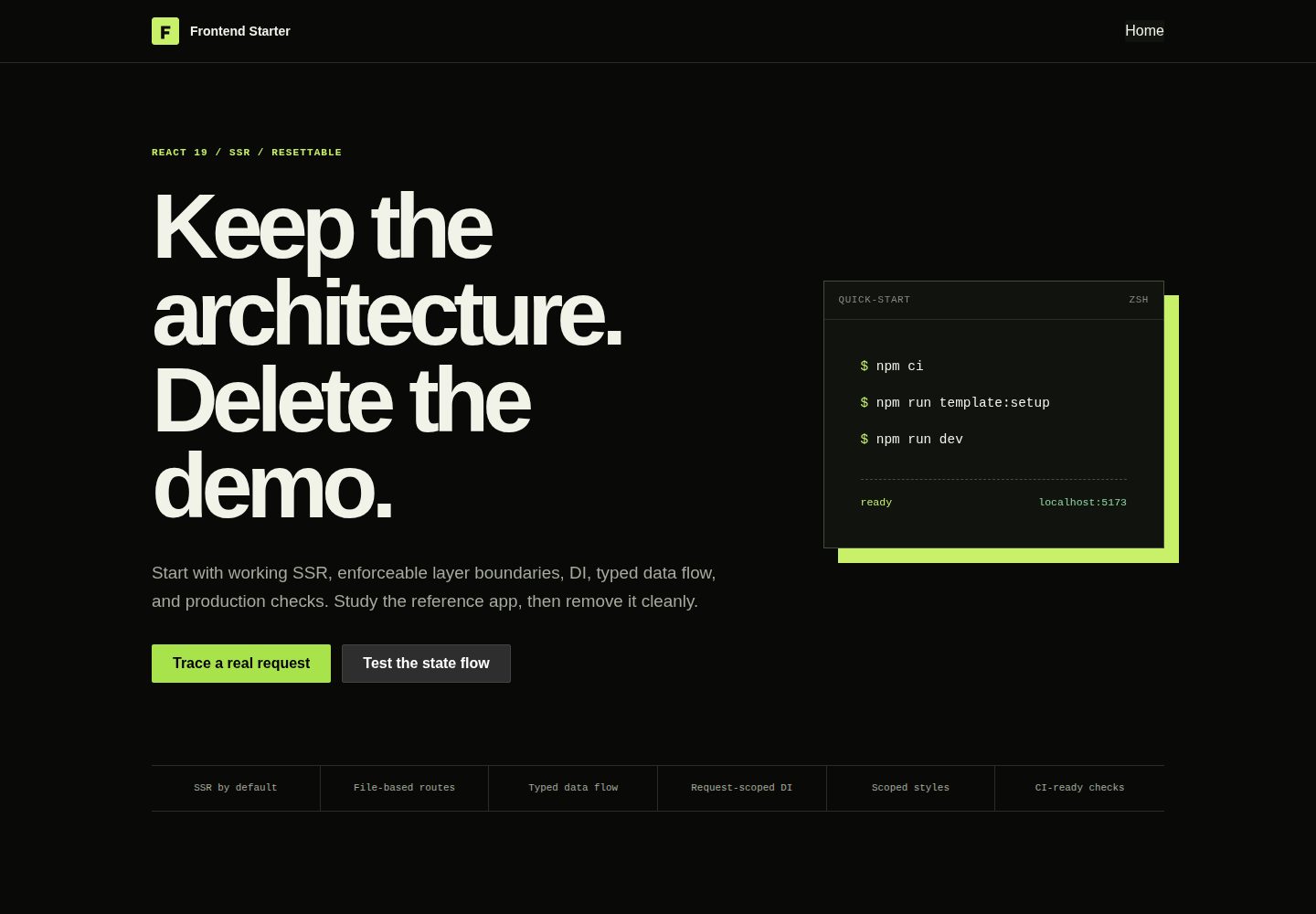
React 19 配合 React Router framework-mode 实现服务端渲染
ViteReact启动器
jst — Vite 启动器模板
作者 jst-stack
JST 是一个面向服务端渲染场景的 React 启动器,强调架构分层、依赖注入与可执行的代码质量检查。
看看你的网站会是什么样
浏览真实页面截图,比较内容排版与手机效果。点击下方缩略图切换,放大查看整页细节。
全部页面与视图 2
截图用于了解视觉与布局,交互效果请以实际项目为准。
采集于 2026-10-03查看来源
值得关注的模板亮点
从已有项目资料中,快速了解它的特点。
app → pages → widgets → features → entities → shared 的分层依赖方向
依赖注入支持请求作用域组装与自动发现 provider
内置 Vitest、Playwright、Axe、ESLint 边界规则、Knip 等质量工具
提供 create:slice 生成规范的 entity、feature 或 widget 切片
已发布 CLI、模板与架构插件组合记录在 jst.compatibility.json 中
模板详细介绍
JST 是一个 React 启动器,定位为“架构优先”,面向需要服务端渲染、明确依赖边界、类型化数据流以及从首次提交起就具备可执行质量门禁的产品。项目通过官方初始化器创建:执行 npm create jst@latest my-app,随后进入目录运行 npm run dev。它要求 Node.js 24 LTS,支持 npm 与 pnpm。
技术组成上,JST 使用 React 19 与 React Router 的 framework-mode 服务端渲染,配合 TypeScript、Vite 和基于文件系统的路由发现。架构采用 app → pages → widgets → features → entities → shared 的分层依赖方向,依赖指向稳定策略:pages 负责组合应用,features 承载用户目标,entities 承载领域行为与 I/O 契约,shared 只放与产品无关的基础设施。项目提供依赖注入,支持请求作用域的组装与自动发现 provider,并记录了 repository、DTO 校验、mapper、service、view-model、entry 与 props 驱动视图等边界的实现路径。
工具链方面,包含 CSS Modules、Stylelint、SVG sprites、Vitest、Playwright、Axe、ESLint 边界规则、React Doctor、Knip、Husky 与 lint-staged。命令覆盖开发、构建、单元与集成测试、端到端与无障碍检查、代码与样式及架构边界检查、React 正确性诊断,以及完整的本地 CI 门禁。另有 create:slice 用于生成规范的 entity、feature 或 widget 切片,template:setup 用于配置新产品。
需要注意的限制:完整架构演示与可运行的 API/持久化流程位于独立的 JST Showcase 仓库,并以 Git 子模块形式固定,生成的应用默认不包含它,需通过 npm create jst@latest my-demo -- --example showcase 显式创建。已发布的 CLI、模板与架构插件组合记录在 jst.compatibility.json 中,项目迁移依据该清单而非依赖版本推断。代码采用 MIT 许可,可免费使用、修改、商用与分发,但演示图片、字体、图标等第三方素材需按各自许可核对,域名、托管、数据库、支付或 AI 等外部服务可能另行收费。
ViteReact启动器
适合你的项目吗?
适用场景
- 需要服务端渲染的 React 产品从零搭建项目骨架
- 在团队中强制分层依赖边界与架构约束
- 为领域实体与功能模块生成结构一致的代码切片
- 在本地一次性运行单元、端到端、无障碍与架构边界检查
适合人群
- 需要服务端渲染与明确依赖边界的 React 项目
- 希望从首次提交起就具备可执行质量门禁的团队
- 使用 TypeScript 并接受分层架构约束的开发者
- 使用 npm 或 pnpm 且可运行 Node.js 24 LTS 的环境
上手与定制指南
结合仓库当前版本的说明,按下面的资料检查内容、配置与运行要求。
- 1
执行 npm create jst@latest my-app 创建项目,进入目录后运行 npm run dev
- 2
需要 Node.js 24 LTS,支持 npm 与 pnpm
- 3
完整架构演示需通过 npm create jst@latest my-demo -- --example showcase 显式创建
- 4
项目迁移请参考 jst.compatibility.json 中记录的 CLI、模板与架构插件组合
- 5
添加非平凡垂直切片前先阅读 docs/architecture.md
授权与来源资料
使用条件与限制
免费使用 · 保留许可声明本次收录的是公开仓库中采用 MIT 许可的免费版本;免费范围为该版本代码,不代表外部服务或第三方素材免费。
使用时需要遵守
- 允许免费使用、修改、商用和分发该版本代码。
- 分发代码副本或实质性部分时,保留原作者版权声明和完整 MIT 许可声明。
- 代码按现状提供;担保与责任限制以原许可证及适用法律为准。
额外费用与待核对事项
- 使用该模板需运行 Node.js 24 LTS 环境,包管理器仅支持 npm 与 pnpm。
- 完整架构演示与可运行的 API/持久化流程位于独立的 JST Showcase 仓库,生成的应用默认不包含,需通过 --example showcase 显式创建。
- 如需参考应用,必须显式执行带 --example showcase 的初始化命令,默认脚手架不提供该示例。
- 项目迁移须依据 jst.compatibility.json 中记录的 CLI、模板与架构插件组合,不能按依赖版本自行推断。
- 演示图片、字体、图标及其他第三方素材需按各自许可核对,不能仅凭代码的 MIT 许可判断。
- 域名、托管、数据库、支付或 AI 等外部服务可能另外收费。
查看原文依据
Permission is hereby granted, free of charge
许可证原文
JST requires Node.js 24 LTS and supports npm and pnpm.
README 原文
The full architecture walkthrough and working API/persistence flows live in the independent [JST Showcase](https://github.com/jst-stack/jst-showcase), pinned here as the `showcase` Git submodule. Generated applications do not include it.
README 原文
Create the reference application deliberately with `npm create jst@latest my-demo -- --example showcase`.
README 原文
https://github.com/jst-stack/jst/blob/main/LICENSEhttps://github.com/jst-stack/jst/blob/main/README.mdReleased CLI, template, and architecture-plugin combinations are recorded in [`jst.compatibility.json`](jst.compatibility.json); project migrations use the same manifest instead of guessing from dependency versions.
README 原文
DeepSeek 根据仓库许可证和 README 整理 ·2026-10-03。结果仅覆盖已读取资料,依赖、图片、字体及后续条款变更以各自原文为准。
项目核对记录与介绍依据
模板资料
- 来源平台
- GitHub
- 资料与维护参考分
- 资料较完整 · 77 / 100
- 技术栈
- Vite · React
- 网站类型
- 启动器
这个分数如何计算
本站按许可资料(最高30分)、演示链接(12分)、预览图(10分)、Star数(15分)、记录的维护时间(15分)、描述完整度(8分)、功能记录(5分)和分类资料(5分)计算。它不是代码、安全或性能测试,也不是 Google 评分;有链接不代表已实测可用。
这个项目需要核对什么
- 记录的仓库更新时间
- 2026-10-03
- 截图检查日期
- 2026-10-03
已收录演示链接。请用你的内容与屏幕尺寸检查;有演示不代表表单、认证或支付已经可用。
目录记录的主要技术栈是 Vite。请通过依赖清单和锁文件核对实际版本与托管要求。这些说明基于收录资料,不代表代码审计或部署实测。
查看具体选型方法 →介绍的制作与核对状态
介绍由 AI 辅助整理目录与仓库资料。仓库作者不等于这篇介绍的审核者。
审核声明: [email protected] · 2026-10-04
查看当时使用的来源资料
SHA-256: 331958505f86f9cc4c468d01aab7a0cb1bcf9acafda7ff4d893f2e5e5f2821b6
2026-10-03T22:30:37.312Z
来源文件 / 仓库<p align="center"> <img src="docs/assets/banner.svg" alt="JST — architecture-first React starter" width="1200"> </p> <p align="center"> <a href="https://github.com/jst-stack/jst/actions/workflows/ci.yml"><img src="https://img.shields.io/github/actions/workflow/status/jst-stack/jst/ci.yml?branch=main&style=flat-square&label=CI" alt="CI status"></a> <img src="https://img.shields.io/badge/Node.js-24_LTS-5FA04E?style=flat-square" alt="Node.js 24 LTS"> <img src="https://img.shields.io/badge/React-19-61DAFB?style=flat-square" alt="React 19"> <a href="LICENSE"><img src="https://img.shields.io/badge/license-MIT-6F9CFF?style=flat-square" alt="MIT license"></a> </p> # JST An architecture-first React starter for products that need server rendering, explicit dependency boundaries, typed data flow, and enforceable quality gates from the first commit. ## Quick start Create a project with the official initializer: ```bash npm create jst@latest my-app cd my-app npm run dev ``` The initializer configures the project, installs dependencies, and starts from the clean application shell. JST requires Node.js 24 LTS and supports npm and pnpm. Released CLI, template, and architecture-plugin combinations are recorded in [`jst.compatibility.json`](jst.compatibility.json); project migrations use the same manifest instead of guessing from dependency versions. ## Showcase The full architecture walkthrough and working API/persistence flows live in the independent [JST Showcase](https://github.com/jst-stack/jst-showcase), pinned here as the `showcase` Git submodule. Generated applications do not include it. Create the reference application deliberately with `npm create jst@latest my-demo -- --example showcase`. ## Included - React 19 and React Router framework-mode SSR - TypeScript, Vite, and filesystem route discovery - Dependency injection with request-scoped composition and auto-discovered providers - A documented path for repository, DTO validation, mapper, service, view-model, entry, and props-driven view boundaries - CSS Modules, Stylelint, SVG sprites, Vitest, Playwright, Axe, ESLint boundaries, React Doctor, Knip, Husky, and lint-staged ## Architecture ```text app → pages → widgets → features → entities → shared ``` Dependencies point toward stable policy. Pages compose the application, features own user outcomes, entities own domain behavior and I/O contracts, and `shared` contains product-agnostic infrastructure only. Read [Architecture](docs/architecture.md) before adding a non-trivial vertical slice. Coding agents should follow [the repository architecture skill](skills/frontend-architecture/SKILL.md). ## Commands | Command | Purpose | | --- | --- | | `npm run dev` | Start the SSR development server | | `npm run build` | Type-check and create production client/server builds | | `npm run test:unit` | Run unit and integration tests once | | `npm run test:e2e` | Run browser contracts and accessibility checks | | `npm run lint` | Check code, styles, and architecture boundaries | | `npm run doctor` | Diagnose React correctness and maintainability issues | | `npm run check` | Run the complete local CI gate | | `npm run create:slice -- entity account` | Create a canonical entity, feature, or widget slice | | `npm run template:setup` | Configure the new product | ## Project policy - [Compatibility](docs/compatibility.md) - [Migrations](docs/migrations.md) - [Production and deployment](docs/deployment.md) - [Troubleshooting](docs/troubleshooting.md) - [Release process](docs/releasing.md) - [Contributing](CONTRIBUTING.md) - [Security](SECURITY.md) - [MIT License](LICENSE) Maintained by [@antonbelous0v](https://github.com/antonbelous0v).
看看同类模板
对比同技术栈与用途的模板,找到更适合的视觉与内容结构。

react-starter-kit
Modern React starter kit with Bun, TypeScript, Tailwind CSS, tRPC, Stripe, and Cloudflare Workers. Production-…
Vite · SaaS

cove
The Cove Stack: 🏝️ minimal TanStack Start template with Vite+, Better Auth, Drizzle ORM, shadcn/ui
Vite · SaaS

vite-react-boilerplate
A production ready, scalable starter template for Vite + React
Vite · 启动器

react-vite-admin
This Starter utilizes React, Recoil, React Query, React Hooks, Typescript, Axios And Vite. 全新技术栈的后台管理系统
Vite · 后台

typescript-react_best_practices-vite_template
<⚡⚛️> Start your React project with Vite following code best practices (TypeScript, Linting, testing, CI/CD…)
Vite · 启动器

cloudflare-starter-kit
Template (boilerplate) repository for scaffolding Cloudflare Workers projects
Vite · 启动器