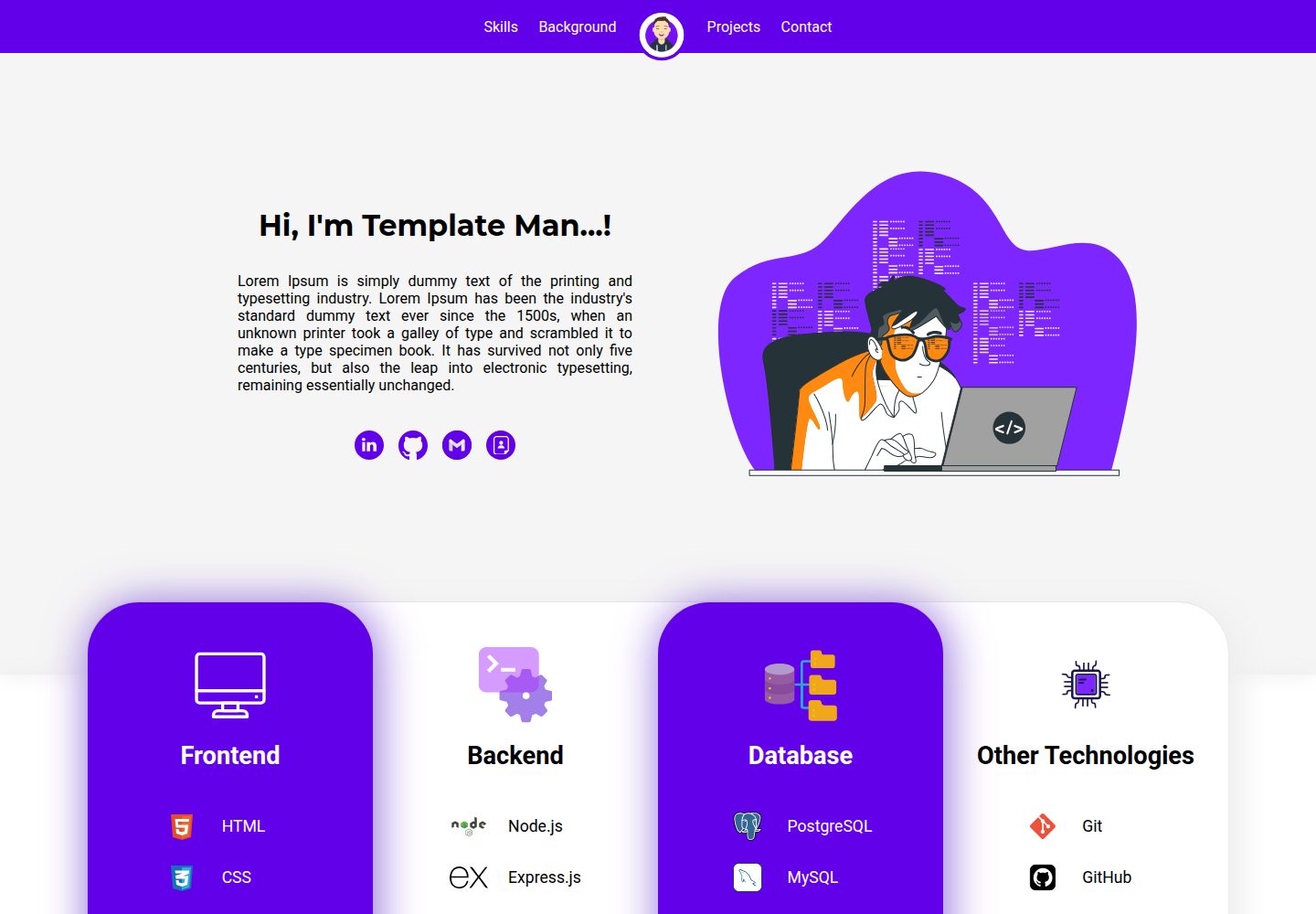
基于 React 构建,包含首页、技能、教育、经历、项目和联系等模块
ReactHTML作品集
Personal-Website-Template — React 作品集模板
作者 KoustubhSahu
一个基于 React 的个人网站模板,包含首页介绍、技能、教育经历、工作经验、项目展示和联系表单等模块,并提供修改与部署到 GitHub Pages 的说明。
看看你的网站会是什么样
浏览真实页面截图,比较内容排版与手机效果。点击下方缩略图切换,放大查看整页细节。
全部页面与视图 2
截图用于了解视觉与布局,交互效果请以实际项目为准。
采集于 2026-10-03查看来源
值得关注的模板亮点
从已有项目资料中,快速了解它的特点。
提供从 public 与 src 目录修改姓名、头像、链接、技能和项目等内容的说明
联系表单集成 Formspree,需自行配置表单端点
README 包含部署到 GitHub Pages 的具体步骤
声明为响应式设计,适配桌面和移动设备
模板详细介绍
该模板面向需要展示个人资料与作品的使用者,使用 React.js、HTML、CSS 和 JavaScript 构建,README 中说明其适用于计算机专业学生、求职者、软件与数据从业者等。页面模块包括可自定义的首页名称与介绍、技能展示、教育与工作经历、项目展示以及联系表单,并声明为响应式设计,适配桌面与移动设备。
个性化主要通过修改源码完成:在 ./public/index.html 中替换头像与网站标题;在 ./src/App.js 中修改姓名、介绍与首页动画;在 ./src/components 下更新连接链接、导航栏头像、技能、教育、经历、项目和联系信息。项目截图建议使用 16:9 比例。联系表单使用 Formspree,需要自行配置端点。
部署方面,README 提供了 GitHub Pages 的步骤:在 package.json 中添加 homepage 字段,安装 gh-pages,运行 npm run deploy,并在仓库设置中将 Pages 分支设为 gh-pages。运行开发环境需要 Node.js,执行 npm install 后使用 npm start,默认访问 http://localhost:3000。
ReactHTML作品集
适合你的项目吗?
适用场景
- 计算机专业学生或求职者搭建个人主页展示简历与项目
- 软件或数据从业者整理个人资料、技能与工作经历
- 需要快速部署静态个人网站到 GitHub Pages 的场景
适合人群
- 希望用 React 修改并部署个人作品集网站的使用者
- 需要现成模块化个人主页结构并自行填充内容的人
- 能接受通过编辑源码文件进行个性化的开发者
上手与定制指南
结合仓库当前版本的说明,按下面的资料检查内容、配置与运行要求。
- 1
需要 Node.js(README 标注 v12.x 或更高版本),克隆仓库后运行 npm install 安装依赖
- 2
使用 npm start 启动开发服务器,默认地址为 http://localhost:3000
- 3
联系表单使用 Formspree,需在 Contact.js 中替换为自己的表单端点
- 4
部署到 GitHub Pages 需在 package.json 添加 homepage 字段,安装 gh-pages 并运行 npm run deploy,再将 Pages 分支设为 gh-pages
- 5
项目截图建议使用 16:9 比例;演示图片、字体、图标等第三方素材需单独核对许可
授权与来源资料
使用条件与限制
免费使用 · 保留许可声明本次收录的是公开仓库中采用 MIT 许可的免费版本;免费范围为该版本代码,不代表外部服务或第三方素材免费。
使用时需要遵守
- 允许免费使用、修改、商用和分发该版本代码。
- 分发代码副本或实质性部分时,保留原作者版权声明和完整 MIT 许可声明。
- 代码按现状提供;担保与责任限制以原许可证及适用法律为准。
额外费用与待核对事项
- 联系表单依赖第三方服务 Formspree,需自行注册并配置表单端点,否则表单无法正常提交。
- 联系模块需自行替换邮箱、Formspree 端点及 Google Maps iframe 代码,涉及外部服务配置。
- 首页动画需从 LottieFiles 获取,该第三方素材的许可需单独核对,不随本项目 MIT 许可一并授予。
- 图标素材来自 SVGRepo 等第三方站点,其许可需单独确认,不属于本项目 MIT 授权范围。
- README 提及 Formspree 表单服务;真实提交需配置服务端点,其使用额度与费用需单独核对。
- 演示图片、字体、图标及其他第三方素材需按各自许可核对,不能仅凭代码的 MIT 许可判断。
- 域名、托管、数据库、支付或 AI 等外部服务可能另外收费。
查看原文依据
Permission is hereby granted, free of charge
许可证原文
Simple contact form with Formspree integration.
README 原文
Update your email, Formspree endpoint, and Google Maps iframe code in `Contact.js`.
README 原文
Find and customize an animation from [LottieFiles](https://lottiefiles.com/) and save the `.json` file in `./src/components/animations`.
README 原文
https://github.com/KoustubhSahu/Personal-Website-Template/blob/main/LICENSEhttps://github.com/KoustubhSahu/Personal-Website-Template/blob/main/README.md- **[SVGRepo](https://www.svgrepo.com/)**: Source for SVG icons.
README 原文
DeepSeek 根据仓库许可证和 README 整理 ·2026-10-03。结果仅覆盖已读取资料,依赖、图片、字体及后续条款变更以各自原文为准。
项目核对记录与介绍依据
模板资料
- 来源平台
- GitHub
- 资料与维护参考分
- 资料一般 · 73 / 100
- 技术栈
- React · HTML
- 网站类型
- 作品集
这个分数如何计算
本站按许可资料(最高30分)、演示链接(12分)、预览图(10分)、Star数(15分)、记录的维护时间(15分)、描述完整度(8分)、功能记录(5分)和分类资料(5分)计算。它不是代码、安全或性能测试,也不是 Google 评分;有链接不代表已实测可用。
这个项目需要核对什么
- 记录的仓库更新时间
- 2024-08-10
- 截图检查日期
- 2026-10-03
已收录演示链接。请用你的内容与屏幕尺寸检查;有演示不代表表单、认证或支付已经可用。
目录记录的主要技术栈是 React。请通过依赖清单和锁文件核对实际版本与托管要求。这些说明基于收录资料,不代表代码审计或部署实测。
查看具体选型方法 →介绍的制作与核对状态
介绍由 AI 辅助整理目录与仓库资料。仓库作者不等于这篇介绍的审核者。
审核声明: [email protected] · 2026-10-04
查看当时使用的来源资料
SHA-256: e1ac34de48a2b4bf82fba1aae29c0b8e3a0f4441c34813413f01269f5cf0db51
2026-10-03T20:11:57.094Z
来源文件 / 仓库# Personal Website Template
Welcome to the Personal Website Template! This web app is designed to help you create a personalized website easily. It's particularly useful for computer science students, freshers, software professionals, data professionals, and anyone else looking to showcase their work and profile. The template is built using React.js, HTML, CSS, and JavaScript.

## Table of Contents
1. [Key Features](#key-features)
2. [Technologies Used](#technologies-used)
3. [Getting Started](#getting-started)
- [Prerequisites](#prerequisites)
- [Installation](#installation)
- [Running the Project](#running-the-project)
4. [Personalizing the Project](#personalizing-the-project)
- [Changes in the `./public` Folder](#changes-in-the-public-folder)
- [Changes in the `./src` Folder](#changes-in-the-src-folder)
5. [Hosting on GitHub](#hosting-on-github)
6. [Helpful Websites](#helpful-websites)
7. [Contributing](#contributing)
8. [License](#license)
9. [Contact](#contact)
## Key Features
- **Customizable Home Section**: Personalize your name, introduction, and animation.
- **Skills Showcase**: Display your skills with customizable icons and animations.
- **Education and Experience**: List your educational background and professional experience.
- **Projects Section**: Highlight your projects with screenshots and links.
- **Contact Form**: Simple contact form with Formspree integration.
- **Responsive Design**: Optimized for desktop and mobile devices.
## Technologies Used
- **React.js**: For building the user interface.
- **HTML**: For the structure of the web pages.
- **CSS**: For styling the application.
- **JavaScript**: For interactivity and functionality.
- **Node.js**: Required to run the development server for the frontend application.
## Getting Started
### Prerequisites
- Node.js (v12.x or later)
### Installation
1. Clone the repository:
```bash
git clone https://github.com/NJITCDS/Personal-Website-Template.git
```
2. Navigate to the project directory:
```bash
cd Personal-Website-Template
```
3. Install the dependencies:
```bash
npm install
```
### Running the Project
1. Start the application:
```bash
npm start
```
2. Open your browser and navigate to `http://localhost:3000`.
## Personalizing the Project
### Changes in the `./public` Folder
- **Website Icon and Title** (`./public/index.html`)
- Change the profile photo or logo by replacing `avatar.png` in the `./public` folder and update the reference in line 6 of `index.html`.
- Update the website title in `index.html` at line 9.
### Changes in the `./src` Folder
- **Home Section Name and Introduction** (`./src/App.js`)
- Update your name at line 31 and introduction at line 34 in `App.js`.
- **Home Section Animation** (`./src/App.js`)
- Find and customize an animation from [LottieFiles](https://lottiefiles.com/) and save the `.json` file in `./src/components/animations`. Reference the file at line 42 in `App.js`.
- **Home Section Connection Links** (`./src/components/Connect.js`)
- Update your LinkedIn, GitHub, and resume links in `Connect.js`.
- **Nav Bar Profile Image/Logo** (`./src/components/Navbar.js`)
- Replace `avatar.png` in the `./src/components/images` folder and update the reference at line 17 in `Navbar.js`.
- **Skills Section** (`./src/components/Skills.js`)
- Edit the `skillsSection` constant at line 8 in `Skills.js` to update your skills and their icons.
- **Education and Experience** (`./src/components/Education.js`, `./src/components/Experience.js`)
- Update your education details in the `education` constant at line 3 in `Education.js`.
- Update your experience details in the `experience` constant at line 3 in `Experience.js`.
- **Projects** (`./src/components/Projects.js`)
- Add your projects to the `projects` constant in `Projects.js`.
- **Recommended Image Ratio**: For best results, use images with a 16:9 ratio for project screenshots.
- **Contact Section** (`./src/components/Contact.js`)
- Update your email, Formspree endpoint, and Google Maps iframe code in `Contact.js`.
## Hosting on GitHub
1. Add homepage to `package.json`:
```json
"homepage": "https://myusername.github.io/my-app",
```
Replace `myusername` with your GitHub username and `my-app` with your repository name.
2. Install `gh-pages`:
```bash
npm install --save gh-pages
```
3. Deploy the site:
```bash
npm run deploy
```
4. Configure GitHub Pages:
- Go to your repository settings on GitHub.
- Select `Pages` from the menu.
- Ensure the branch is set to `gh-pages`.
## Helpful Websites
- **[LottieFiles](https://lottiefiles.com/)**: Customize and download animations.
- **[SVGRepo](https://www.svgrepo.com/)**: Source for SVG icons.
- **[ChatGPT](https://chatgpt.com/)**: AI tool for explanations, debugging, and content enhancement.
- **[CodePen](https://codepen.io/)**: Experiment with HTML, CSS, and JS elements.
- **[CodeSandbox](https://codesandbox.io/)**: Create and run React apps.
- **[Formspree](https://formspree.io/)**: Handle form submissions and get email notifications.
- **[Crop Circle](https://crop-circle.imageonline.co/#circlecropresult)**: Crop images into circles.
## Contributing
Contributions are welcome! Please follow these steps to contribute:
1. Fork the repository.
2. Create your feature branch:
```bash
git checkout -b feature/AmazingFeature
```
3. Commit your changes:
```bash
git commit -m 'Add some AmazingFeature'
```
4. Push to the branch:
```bash
git push origin feature/AmazingFeature
```
5. Open a pull request.
## License
This project is licensed under the MIT License. See the [LICENSE](LICENSE) file for details.
## Contact
For inquiries regarding this project, please contact:
- GitHub: [Koustubh Sahu](https://github.com/KoustubhSahu)
---
Thank you for using the Personal Website Template! We hope it helps you create a stunning personal website.
看看同类模板
对比同技术栈与用途的模板,找到更适合的视觉与内容结构。

react-portfolio-template
React powered portfolio website template for developers
React · 作品集

personal-website-react
personal-website-react 是一个面向开发者的个人作品集单页模板,由 React 和 Material-UI 构建,并通过 Create React App 初始化。
React · 作品集

karngyan.com
karngyan.com 是一个面向开发者的个人网站与博客模板,作者用它搭建了自己的站点,并公开了完整代码。 模板的核心定位很明确:让写作者专注于内容,而不是花时间搭建基础设施。
React · 作品集

react-portfolio-template
react-portfolio-template 是一个由 Ryan Balieiro 开发的 React 作品集模板,定位为“sleek, futuristic”,适合开发者展示个人履历。
React · 作品集

portfolio
Personal website, Data scientist portfolio template
React · 作品集

react-portfolio
react-portfolio 是一个面向开发者的个人作品集模板,基于 React 16 和 Create React App 构建,界面样式采用 Material-UI。
React · 作品集