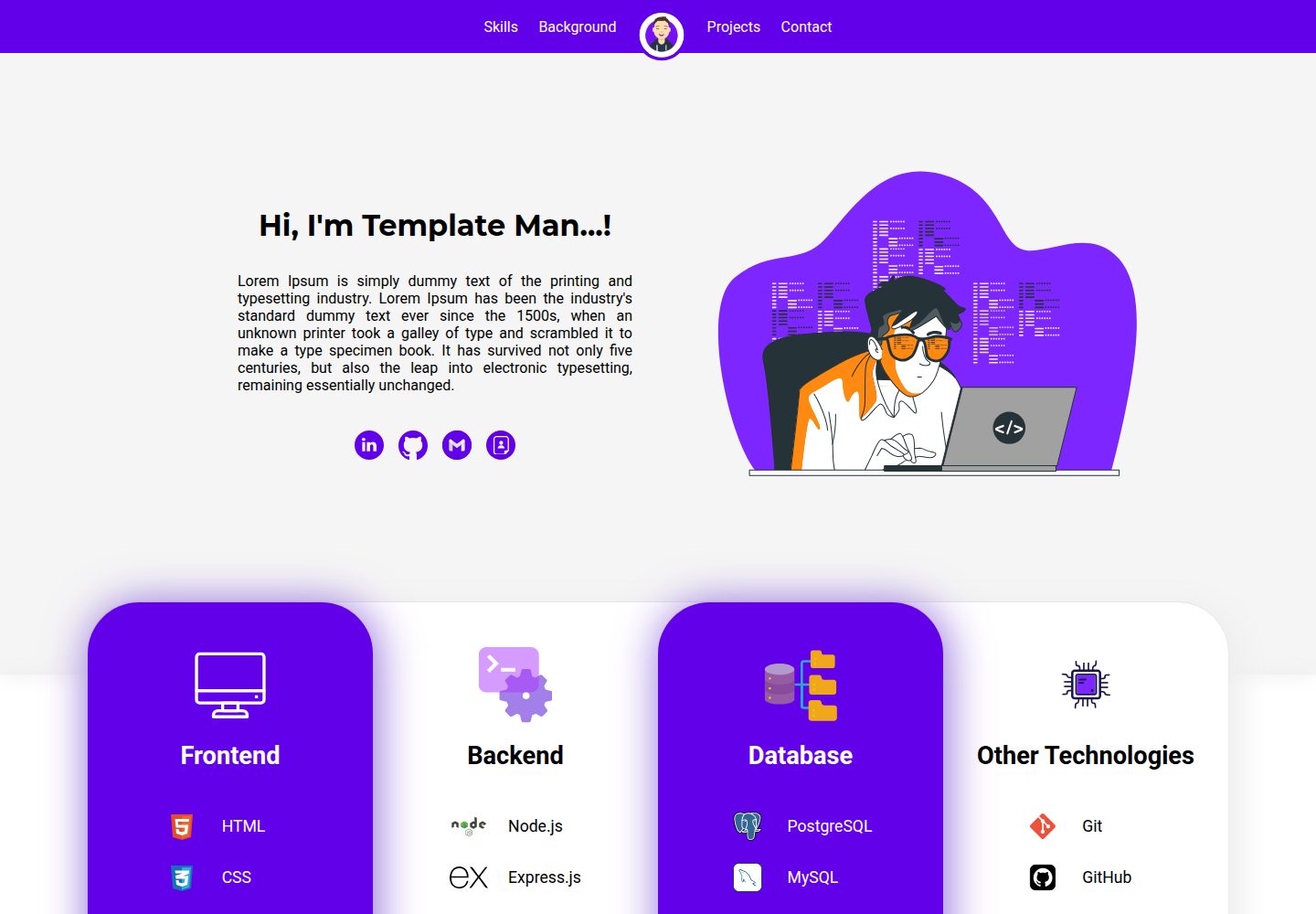
Built with React, including modules for homepage, skills, education, experience, projects, and contact
ReactHTMLPortfolio
Personal-Website-Template — React Portfolio Template
By KoustubhSahu
A React-based personal website template that includes modules for homepage introduction, skills, education, work experience, project showcase, and a contact form, along with instructions for modification and deployment to GitHub Pages.
Explore the design
Compare the page layouts and mobile experience. Open any screenshot for a closer look.
Desktop homepage1 / 2
Desktop captureTop of page
Actual screenshot captured by the server browser.
All pages & views 2
Screenshots show visual appearance; interactive behavior may differ.
Recorded 2026-10-03View source
What stands out
A quick read of the recorded project description.
Provides instructions for modifying names, avatars, links, skills, and projects from the public and src directories
Contact form integrates Formspree; you need to configure the form endpoint yourself
README includes specific steps for deploying to GitHub Pages
Declared as responsive, adapting to desktop and mobile devices
Template Details
This template is aimed at users who need to showcase personal profiles and work. It is built with React.js, HTML, CSS, and JavaScript. The README states that it is suitable for computer science students, job seekers, software and data professionals, among others. Page modules include a customizable homepage name and introduction, skills display, education and work experience, project showcase, and a contact form. It is declared as responsive, adapting to desktop and mobile devices.
Personalization is mainly done by modifying the source code: replace the avatar and website title in ./public/index.html; modify the name, introduction, and homepage animation in ./src/App.js; update connection links, navbar avatar, skills, education, experience, projects, and contact information under ./src/components. Project screenshots are recommended to use a 16:9 ratio. The contact form uses Formspree and requires you to configure the endpoint yourself.
For deployment, the README provides steps for GitHub Pages: add a homepage field in package.json, install gh-pages, run npm run deploy, and set the Pages branch to gh-pages in the repository settings. Running the development environment requires Node.js; after npm install, use npm start, and access http://localhost:3000 by default.
ReactHTMLPortfolio
Is it right for your project?
Use Cases
- Computer science students or job seekers building a personal homepage to showcase resumes and projects
- Software or data professionals organizing personal profiles, skills, and work experience
- Scenarios requiring quick deployment of a static personal website to GitHub Pages
Suitable For
- Users who want to modify and deploy a personal portfolio website with React
- Those who need a ready-made modular personal homepage structure and fill in content themselves
- Developers who accept personalization by editing source files
Getting started & customization
Use these recorded setup notes alongside the repository instructions for your chosen version.
- 1
Requires Node.js (README states v12.x or higher). After cloning the repository, run npm install to install dependencies
- 2
Use npm start to launch the development server, default address is http://localhost:3000
- 3
The contact form uses Formspree; replace with your own form endpoint in Contact.js
- 4
To deploy to GitHub Pages, add a homepage field in package.json, install gh-pages and run npm run deploy, then set the Pages branch to gh-pages
- 5
Project screenshots are recommended to use a 16:9 ratio; third-party assets such as demo images, fonts, and icons need separate license verification
License & source material
Usage conditions & limitations
Free to use · keep license noticeThis entry covers the free version under MIT license in a public repository; the free scope is the code of this version and does not imply that external services or third-party assets are free.
Must comply with when using
- Free use, modification, commercial use, and distribution of this version's code are permitted.
- When distributing copies or substantial portions of the code, retain the original author's copyright notice and the full MIT license notice.
- The code is provided as-is; warranties and limitations of liability are governed by the original license and applicable law.
Additional costs & items to verify
- The contact form relies on the third-party service Formspree; you need to register and configure the form endpoint yourself, otherwise the form cannot submit properly.
- The contact module requires you to replace the email, Formspree endpoint, and Google Maps iframe code, involving external service configuration.
- The homepage animation needs to be obtained from LottieFiles; the license for this third-party asset must be verified separately and is not granted with this project's MIT license.
- Icon assets come from third-party sites such as SVGRepo; their licenses must be confirmed separately and are not covered by this project's MIT authorization.
- The README mentions the Formspree form service; actual submission requires configuring a service endpoint, and its usage quotas and fees must be checked separately.
- Demo images, fonts, icons, and other third-party assets must be checked according to their respective licenses; they cannot be judged solely based on the code's MIT license.
- External services such as domain, hosting, database, payment, or AI may incur additional charges.
View Original Text Basis
Permission is hereby granted, free of charge
Original License Text
Simple contact form with Formspree integration.
Original README
Update your email, Formspree endpoint, and Google Maps iframe code in `Contact.js`.
Original README
Find and customize an animation from [LottieFiles](https://lottiefiles.com/) and save the `.json` file in `./src/components/animations`.
Original README
https://github.com/KoustubhSahu/Personal-Website-Template/blob/main/LICENSEhttps://github.com/KoustubhSahu/Personal-Website-Template/blob/main/README.md- **[SVGRepo](https://www.svgrepo.com/)**: Source for SVG icons.
Original README
Compiled by DeepSeek based on repository license and README ·2026-10-03. Results only cover the materials read; dependencies, images, fonts, and subsequent term changes are subject to their respective original texts.
Project checks & description sources
Template Information
- Source platforms
- GitHub
- Documentation and maintenance reference score
- Partly documented · 73 / 100
- Technologies
- React · HTML
- Website type
- Portfolio
How this score is calculated
Our heuristic uses license records (up to 30), a demo link (12), a preview (10), stars (15), recorded maintenance (15), description completeness (8), feature records (5) and classification data (5). It is not a code, security or performance test, or a Google score. A link does not establish tested functionality.
What to verify for this project
- Repository update recorded
- 2024-08-10
- Screenshot last checked
- 2026-10-03
A demo link is listed. Check it with your own content and viewport sizes; its presence does not confirm that forms, authentication or payments work.
The catalog identifies React as the primary stack. Check the actual dependency manifest and lockfile for versions and hosting requirements. These notes use recorded metadata, not a code audit or a deployment test.
Use a selection guide →How this description was prepared
AI-assisted description based on catalog records and repository material. Repository authors are not automatically the reviewers of this description.
Review declaration: [email protected] · 2026-10-04
Inspect the recorded source material
SHA-256: e1ac34de48a2b4bf82fba1aae29c0b8e3a0f4441c34813413f01269f5cf0db51
2026-10-03T20:11:57.094Z
Source file / repository# Personal Website Template
Welcome to the Personal Website Template! This web app is designed to help you create a personalized website easily. It's particularly useful for computer science students, freshers, software professionals, data professionals, and anyone else looking to showcase their work and profile. The template is built using React.js, HTML, CSS, and JavaScript.

## Table of Contents
1. [Key Features](#key-features)
2. [Technologies Used](#technologies-used)
3. [Getting Started](#getting-started)
- [Prerequisites](#prerequisites)
- [Installation](#installation)
- [Running the Project](#running-the-project)
4. [Personalizing the Project](#personalizing-the-project)
- [Changes in the `./public` Folder](#changes-in-the-public-folder)
- [Changes in the `./src` Folder](#changes-in-the-src-folder)
5. [Hosting on GitHub](#hosting-on-github)
6. [Helpful Websites](#helpful-websites)
7. [Contributing](#contributing)
8. [License](#license)
9. [Contact](#contact)
## Key Features
- **Customizable Home Section**: Personalize your name, introduction, and animation.
- **Skills Showcase**: Display your skills with customizable icons and animations.
- **Education and Experience**: List your educational background and professional experience.
- **Projects Section**: Highlight your projects with screenshots and links.
- **Contact Form**: Simple contact form with Formspree integration.
- **Responsive Design**: Optimized for desktop and mobile devices.
## Technologies Used
- **React.js**: For building the user interface.
- **HTML**: For the structure of the web pages.
- **CSS**: For styling the application.
- **JavaScript**: For interactivity and functionality.
- **Node.js**: Required to run the development server for the frontend application.
## Getting Started
### Prerequisites
- Node.js (v12.x or later)
### Installation
1. Clone the repository:
```bash
git clone https://github.com/NJITCDS/Personal-Website-Template.git
```
2. Navigate to the project directory:
```bash
cd Personal-Website-Template
```
3. Install the dependencies:
```bash
npm install
```
### Running the Project
1. Start the application:
```bash
npm start
```
2. Open your browser and navigate to `http://localhost:3000`.
## Personalizing the Project
### Changes in the `./public` Folder
- **Website Icon and Title** (`./public/index.html`)
- Change the profile photo or logo by replacing `avatar.png` in the `./public` folder and update the reference in line 6 of `index.html`.
- Update the website title in `index.html` at line 9.
### Changes in the `./src` Folder
- **Home Section Name and Introduction** (`./src/App.js`)
- Update your name at line 31 and introduction at line 34 in `App.js`.
- **Home Section Animation** (`./src/App.js`)
- Find and customize an animation from [LottieFiles](https://lottiefiles.com/) and save the `.json` file in `./src/components/animations`. Reference the file at line 42 in `App.js`.
- **Home Section Connection Links** (`./src/components/Connect.js`)
- Update your LinkedIn, GitHub, and resume links in `Connect.js`.
- **Nav Bar Profile Image/Logo** (`./src/components/Navbar.js`)
- Replace `avatar.png` in the `./src/components/images` folder and update the reference at line 17 in `Navbar.js`.
- **Skills Section** (`./src/components/Skills.js`)
- Edit the `skillsSection` constant at line 8 in `Skills.js` to update your skills and their icons.
- **Education and Experience** (`./src/components/Education.js`, `./src/components/Experience.js`)
- Update your education details in the `education` constant at line 3 in `Education.js`.
- Update your experience details in the `experience` constant at line 3 in `Experience.js`.
- **Projects** (`./src/components/Projects.js`)
- Add your projects to the `projects` constant in `Projects.js`.
- **Recommended Image Ratio**: For best results, use images with a 16:9 ratio for project screenshots.
- **Contact Section** (`./src/components/Contact.js`)
- Update your email, Formspree endpoint, and Google Maps iframe code in `Contact.js`.
## Hosting on GitHub
1. Add homepage to `package.json`:
```json
"homepage": "https://myusername.github.io/my-app",
```
Replace `myusername` with your GitHub username and `my-app` with your repository name.
2. Install `gh-pages`:
```bash
npm install --save gh-pages
```
3. Deploy the site:
```bash
npm run deploy
```
4. Configure GitHub Pages:
- Go to your repository settings on GitHub.
- Select `Pages` from the menu.
- Ensure the branch is set to `gh-pages`.
## Helpful Websites
- **[LottieFiles](https://lottiefiles.com/)**: Customize and download animations.
- **[SVGRepo](https://www.svgrepo.com/)**: Source for SVG icons.
- **[ChatGPT](https://chatgpt.com/)**: AI tool for explanations, debugging, and content enhancement.
- **[CodePen](https://codepen.io/)**: Experiment with HTML, CSS, and JS elements.
- **[CodeSandbox](https://codesandbox.io/)**: Create and run React apps.
- **[Formspree](https://formspree.io/)**: Handle form submissions and get email notifications.
- **[Crop Circle](https://crop-circle.imageonline.co/#circlecropresult)**: Crop images into circles.
## Contributing
Contributions are welcome! Please follow these steps to contribute:
1. Fork the repository.
2. Create your feature branch:
```bash
git checkout -b feature/AmazingFeature
```
3. Commit your changes:
```bash
git commit -m 'Add some AmazingFeature'
```
4. Push to the branch:
```bash
git push origin feature/AmazingFeature
```
5. Open a pull request.
## License
This project is licensed under the MIT License. See the [LICENSE](LICENSE) file for details.
## Contact
For inquiries regarding this project, please contact:
- GitHub: [Koustubh Sahu](https://github.com/KoustubhSahu)
---
Thank you for using the Personal Website Template! We hope it helps you create a stunning personal website.
Explore similar templates
Compare previews and descriptions within the same stack and category.

react-portfolio-template
A React-based developer portfolio template for showcasing projects, work history, and skills. It offers a multi-component layout, dark and light modes, and responsive mobile adaptation, with text and images editable in src/components.
React · Portfolio

personal-website-react
A single-page developer portfolio template built with React and Material-UI, driven by a JSON Resume-compliant resume.json. It offers light/dark theme switching with localStorage persistence, a clean responsive layout, and Create React App tooling for simple builds and static deployment.
React · Portfolio

karngyan.com
A personal website and blog template for developers, built with TanStack Start, React 19, Tailwind CSS v4, and shadcn/ui. It uses MDX for articles with Shiki highlighting and GFM tables, and automatically generates RSS, sitemap, robots.txt, llms.txt, and OG images.
React · Portfolio

react-portfolio-template
A React portfolio template by Ryan Balieiro with a fixed sidebar and page-turn transitions on desktop, bottom navigation on mobile, multilingual support, light/dark themes, and content components for experience, education, skills, projects, and testimonials.
React · Portfolio

portfolio
A data scientist personal portfolio template built with React and MUI, with content centrally managed through configuration files in the assets directory.
React · Portfolio

react-portfolio
A React 16 and Material-UI developer portfolio template that centralizes personal information in a JSON Resume-compliant resume.json, with light/dark theme switching saved to local storage. It currently provides portfolio display only; resume page templates and structured data enhancements are still planned.
React · Portfolio