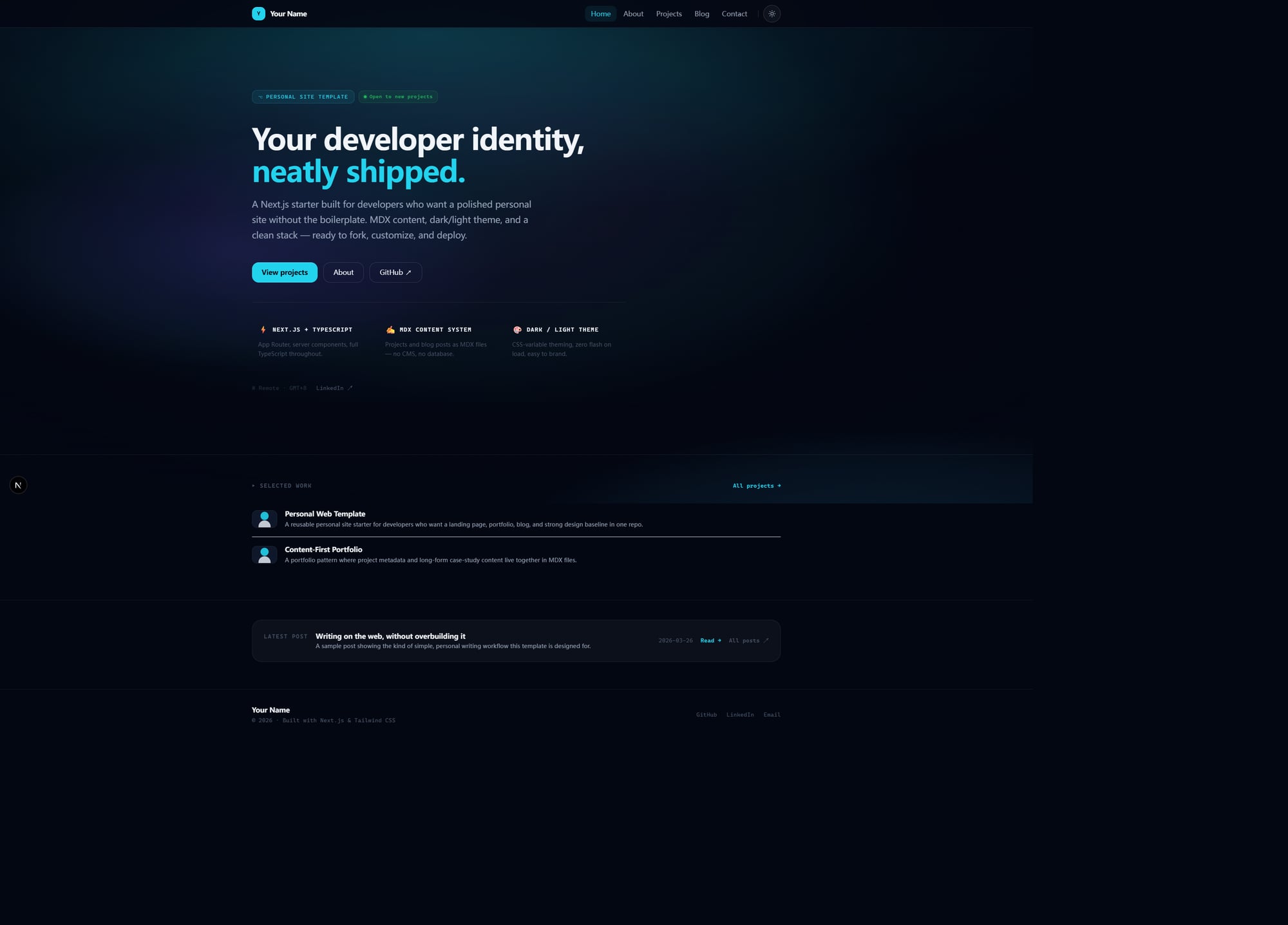
落地页式首页,而非默认文章索引
Next.jsReact作品集博客企业官网启动器
personal-web-template — Next.js 作品集模板
作者 KYD-bloody
基于 Next.js、TypeScript、Tailwind CSS 与文件式 MDX 的个人网站模板,包含落地页、作品集、博客与模块化关于页,适合直接 fork 后按配置与 MDX 内容个性化。
看看你的网站会是什么样
浏览真实页面截图,比较内容排版与手机效果。点击下方缩略图切换,放大查看整页细节。
目前有 1 张原始预览,可打开完整图片查看设计细节。
截图用于了解视觉与布局,交互效果请以实际项目为准。
采集于 2026-10-03查看来源
值得关注的模板亮点
从已有项目资料中,快速了解它的特点。
博客与作品集均使用仓库内文件式 MDX 内容
作品集卡片支持 summary、status、role、tags、period、cover、video 等元数据
关于页由配置驱动,可模块化调整结构
明暗主题与统一动画背景系统
包含 metadata、sitemap、robots、not-found 与 OG 路由占位等 SEO 基础
模板详细介绍
这是一个面向开发者与产品型创作者的个人网站起始模板,仓库采用 MIT 许可,目标是在“过于简陋的脚手架”和“过于主观难以修改”之间取一个中间位置:视觉上已接近可发布状态,结构上便于复用,同时尽量通过配置与文件内容完成个性化。
页面结构包含首页落地页、模块化关于页、作品集列表与详情、博客索引与详情,以及一个简单联系页。作品集与博客内容以 MDX 文件形式存放在 src/content 下,frontmatter 由 gray-matter 解析,MDX 由 next-mdx-remote 渲染;仓库中保留的 contentlayer.config.ts 只是兼容与未来扩展的占位文件,不属于当前运行时架构。
个性化路径以配置优先:站点身份、首页文案与关于页结构分别位于 src/config/site.ts、src/config/home.ts、src/config/about.ts,示例内容与占位资源位于 src/content 与 public 目录。模板自带明暗主题、统一动画背景,以及 metadata、sitemap、robots、not-found 与 OG 路由占位等 SEO 基础。
限制方面,它不提供 CMS 后台、多作者发布平台、无代码建站能力,也不是包含大量业务页面的完整营销站框架;内容层刻意保持简单,若需要更复杂的 schema 或 Contentlayer 工作流,需在 fork 中自行扩展。
Next.js作品集博客企业官网启动器
适合你的项目吗?
适用场景
- 为开发者个人品牌搭建包含作品集与博客的静态站点
- 在 fork 后通过 src/config 下的配置文件快速替换站点身份与首页文案
- 用 MDX 文件维护项目案例与博客文章,不引入 CMS 后端
- 以模块化关于页展示个人简介、价值观、工作方式与当前关注点
适合人群
- 希望个人网站有较强视觉基线、又不想从零设计的开发者
- 需要作品集与博客放在同一仓库、内容以文件形式管理的创作者
- 偏好通过配置与 MDX 完成个性化、不依赖 CMS 后台的用户
- 能接受 Next.js App Router 与 TypeScript 代码库的 fork 使用者
上手与定制指南
结合仓库当前版本的说明,按下面的资料检查内容、配置与运行要求。
- 1
安装依赖并启动开发服务器:npm install,npm run dev,默认访问 http://localhost:3000
- 2
fork 后优先修改 src/config/site.ts、src/config/home.ts、src/config/about.ts 替换站点身份与页面文案
- 3
替换 src/content/projects 与 src/content/blog 中的示例内容,并更新 public 下的占位资源
- 4
生产验证前先停止 dev server,再运行 npm run build,避免 .next 缓存干扰
- 5
演示图片、字体、图标等第三方素材需按各自许可单独核对,代码的 MIT 许可不覆盖这些素材
授权与来源资料
使用条件与限制
免费使用 · 保留许可声明本次收录的是公开仓库中采用 MIT 许可的免费版本;免费范围为该版本代码,不代表外部服务或第三方素材免费。
使用时需要遵守
- 允许免费使用、修改、商用和分发该版本代码。
- 分发代码副本或实质性部分时,保留原作者版权声明和完整 MIT 许可声明。
- 代码按现状提供;担保与责任限制以原许可证及适用法律为准。
额外费用与待核对事项
- 演示图片、字体、图标及其他第三方素材需按各自许可核对,不能仅凭代码的 MIT 许可判断。
- 域名、托管、数据库、支付或 AI 等外部服务可能另外收费。
查看原文依据
https://github.com/KYD-bloody/personal-web-template/blob/master/LICENSEhttps://github.com/KYD-bloody/personal-web-template/blob/master/README.mdPermission is hereby granted, free of charge
许可证原文
DeepSeek 根据仓库许可证和 README 整理 ·2026-10-03。结果仅覆盖已读取资料,依赖、图片、字体及后续条款变更以各自原文为准。
项目核对记录与介绍依据
模板资料
- 来源平台
- GitHub
- 资料与维护参考分
- 资料一般 · 73 / 100
- 技术栈
- Next.js · React
- 网站类型
- 作品集 · 博客 · 企业官网 · 启动器
这个分数如何计算
本站按许可资料(最高30分)、演示链接(12分)、预览图(10分)、Star数(15分)、记录的维护时间(15分)、描述完整度(8分)、功能记录(5分)和分类资料(5分)计算。它不是代码、安全或性能测试,也不是 Google 评分;有链接不代表已实测可用。
这个项目需要核对什么
- 记录的仓库更新时间
- 2026-03-27
- 截图检查日期
- 2026-10-03
目前没有记录演示链接。请依据仓库说明在本地评估;仅凭截图无法确认交互行为。
目录记录的主要技术栈是 Next.js。请通过依赖清单和锁文件核对实际版本与托管要求。这些说明基于收录资料,不代表代码审计或部署实测。
查看具体选型方法 →介绍的制作与核对状态
介绍由 AI 辅助整理目录与仓库资料。仓库作者不等于这篇介绍的审核者。
审核声明: [email protected] · 2026-10-04
查看当时使用的来源资料
SHA-256: 7f791309d3eec697ec0825529aa122cc88b185be6fa86ec10800280dae5ecb7c
2026-10-03T15:11:42.529Z
来源文件 / 仓库# personal-web-template A polished **personal site starter** for developers who want a modern personal website with a strong landing page, a media-friendly projects section, and a file-based blog — without adding a CMS. Built with **Next.js**, **TypeScript**, **Tailwind CSS**, and a **file-based MDX content workflow**. Created by **Xinjie** — shaped by a practical view of personal sites for builders, developers, and product-minded people. This repo is meant to be **forked, customized, and deployed**. --- ## Preview  --- ## What this template is This template is for people who want: - a homepage that feels like a real personal brand page, not a default post index - a projects section that works more like a portfolio showcase than a plain list - a blog powered by files in the repo - an About page that is structured, but still personalizable - a starter that already feels publishable before heavy redesign A lot of personal-site starters land at one of two extremes: 1. **Too bare** — technically fine, but still obviously a scaffold 2. **Too opinionated** — visually strong, but annoying to adapt This repo aims for the middle: - **polished enough to publish** - **structured enough to reuse** - **simple enough to fork quickly** - **flexible enough to make your own** --- ## Core highlights - **Landing-style homepage** instead of a plain content index - **File-based MDX blog and projects** stored inside the repo - **Media-friendly Projects page** with richer metadata like summary, status, role, tags, period, cover, and optional video - **Modular About page** driven by config instead of hardcoded copy - **Dark / light theme** with a unified animated background system - **Config-first customization** for site identity, homepage copy, and about-page structure - **SEO foundations** included: metadata, sitemap, robots, not-found, OG route placeholder --- ## Current page structure - `/` — landing / homepage - `/about` — modular about page - `/projects` — portfolio showcase - `/projects/[slug]` — project detail page from MDX - `/blog` — blog index - `/blog/[slug]` — blog post detail page from MDX - `/contact` — simple contact page --- ## Tech stack - **Framework:** Next.js 15 - **Language:** TypeScript - **Styling:** Tailwind CSS + CSS variables - **Content:** file-based MDX + gray-matter + next-mdx-remote - **Rendering model:** App Router + static generation where appropriate --- ## Quick start Install dependencies: ```bash npm install ``` Run the dev server: ```bash npm run dev ``` Then open: ```txt http://localhost:3000 ``` --- ## Start here after forking If you only want the fastest path to your own version, do this in order: ### 1. Update site identity Edit: ```bash src/config/site.ts ``` Change: - site name - title / description - URL - author info - socials - nav ### 2. Rewrite the homepage Edit: ```bash src/config/home.ts ``` Change: - hero headline - description - CTA labels / links - feature cards - positioning pillars - status strip ### 3. Replace About page content Edit: ```bash src/config/about.ts ``` Change: - headline - manifesto - bio - values - work style - interests - current focus - stack - availability ### 4. Replace example content Edit: ```bash src/content/projects/ src/content/blog/ ``` ### 5. Replace placeholder assets Current placeholder assets live under: ```bash public/ ``` ### 6. Verify locally ```bash npm run build ``` That sequence should get most users from fork → local personalized version very quickly. --- ## What it includes - **Next.js App Router** structure - **TypeScript-first** codebase - **MDX-based content system** for blog posts and projects - **Dark / light theme** with CSS variable theming - **Reusable config layer** for site identity and core page content - **Portfolio-style Projects page** with richer project cards - **Modular About page** with configurable sections - **SEO-ready app shell** for personal site use cases --- ## Documentation map Use the docs like this: - [`docs/customization.md`](./docs/customization.md) — what to change first after forking - [`docs/deployment.md`](./docs/deployment.md) — how to verify and deploy - [`docs/release-checklist.md`](./docs/release-checklist.md) — final checks before publishing the template publicly - [`docs/github-release-notes.md`](./docs/github-release-notes.md) — suggested GitHub description, topics, and first release copy - [`docs/repo-architecture.md`](./docs/repo-architecture.md) — how the repo is organized internally - [`docs/roadmap.md`](./docs/roadmap.md) — what still needs polishing or future expansion --- ## Project structure ```bash personal-web-template/ ├─ public/ ├─ src/ │ ├─ app/ │ ├─ components/ │ ├─ config/ │ ├─ content/ │ ├─ data/ │ ├─ hooks/ │ ├─ lib/ │ ├─ styles/ │ └─ types/ ├─ docs/ ├─ README.md └─ package.json ``` --- ## Content system direction This template currently adopts a **file-based MDX content workflow**. That means: - blog posts and projects live in `src/content/**` - frontmatter is parsed with `gray-matter` - MDX is rendered with `next-mdx-remote` - the content layer is intentionally simple, readable, and easy to fork It does **not** currently use Contentlayer as the active content pipeline. A placeholder `contentlayer.config.ts` still exists in the repo, but it is there only as a compatibility / future-extension stub. It is **not part of the current runtime architecture**. Why this route was chosen: - fewer moving parts for template users - easier onboarding for people forking the repo - clearer debugging when editing local content files - enough structure for a personal site without adding build-time schema tooling yet If you want to extend the content system, the intended default is: 1. keep content in MDX files 2. evolve frontmatter deliberately 3. update `src/lib/content.ts` and the related types as the schema grows If you personally prefer Contentlayer, you can add it in your own fork — but this template should currently be understood as a **file-based MDX starter, not a Contentlayer starter**. --- ## Content model ### Blog posts Create files in: ```bash src/content/blog/ ``` Example frontmatter: ```md --- title: "My First Post" description: "A short intro post" date: "2026-03-26" tags: ["nextjs", "personal-site"] published: true cover: "/images/blog/first-post.jpg" --- ``` ### Projects Create files in: ```bash src/content/projects/ ``` Example frontmatter: ```md --- title: "Personal Web Template" description: "A reusable personal site starter" summary: "A polished portfolio + blog starter for developers" slug: "personal-web-template" stack: ["Next.js", "TypeScript", "Tailwind CSS"] featured: true featuredOrder: 1 status: "shipped" role: "Template design + implementation" client: "Self-initiated" period: "2026" tags: ["starter", "portfolio", "blog"] github: "https://github.com/your-name/personal-web-template" demo: "https://your-demo-url.com" cover: "/images/projects/my-project-cover.png" video: "https://www.youtube.com/embed/..." # optional category: "Open Source" year: "2026" --- ``` --- ## Important local dev workflow note During active development, keep: ```bash npm run dev ``` running while you iterate. When you want a production verification pass: 1. stop the dev server 2. run: ```bash npm run build ``` This helps avoid local `.next` cache / chunk confusion during iteration. --- ## Build for production ```bash npm run build npm run start ``` --- ## Good fit if... This template is a good fit if you want: - a personal website starter with a stronger visual baseline - a portfolio + blog in one repo - content stored as files - a modern starter without adding a CMS backend - a template that can be personalized mostly through config + MDX ## Probably not the right fit if... This is probably not the right fit if you want: - a CMS-backed editorial workflow - a multi-author publishing platform - a no-code website builder - a full marketing-site framework with many business pages --- ## Current strengths At the current stage, this project already has: - a clear starter-template direction - a reusable config layer - a functioning file-based content system - a stronger homepage than a typical starter - a portfolio page that feels more like showcase than list - a modular about page with room for expression - a unified animated background system --- ## What still needs polishing This repo is already usable, but if the goal is a stronger open-source release, the next layers are: - tighter documentation and onboarding - better placeholder assets / screenshots / demo materials - richer portfolio content schema over time - stronger release packaging for GitHub discovery See [`docs/roadmap.md`](./docs/roadmap.md). --- ## Author Created by **Xinjie**. - GitHub: <https://github.com/KYD-bloody> The template defaults remain intentionally easy to replace (`Your Name`, `your-handle`, `your-domain.com`) so that people forking the repo can adapt it quickly without inheriting someone else's personal site. --- ## License MIT — see [`LICENSE`](./LICENSE).
看看同类模板
对比同技术栈与用途的模板,找到更适合的视觉与内容结构。

ai-website-cloner-template
Clone any website with one command using AI coding agents
Next.js · 启动器

Next.js SaaS Starter
Next.js SaaS Starter 是 Next.js 官方维护的 SaaS 起点模板,定位介于学习资源和可直接部署的脚手架之间。
Next.js · SaaS

Next.js Commerce
Next.js Commerce 是 Vercel 团队维护的电商启动模板,基于 Next.js App Router 构建,采用服务端渲染、React Server Components、Server Actions …
Next.js · 电商

Next-js-Boilerplate
Next-js-Boilerplate 是一个面向 Next.js 16、Tailwind CSS 4 和 TypeScript 的启动器,核心定位是开发者体验优先。
Next.js · 启动器

tailwind-nextjs-starter-blog
tailwind-nextjs-starter-blog 是一个面向个人技术博客的 Next.js 与 Tailwind CSS 启动模板,其 v2 版本基于 App Router 与 React Server Comp…
Next.js · 博客

next-forge
Production-grade Turborepo template for Next.js apps.
Next.js · 启动器