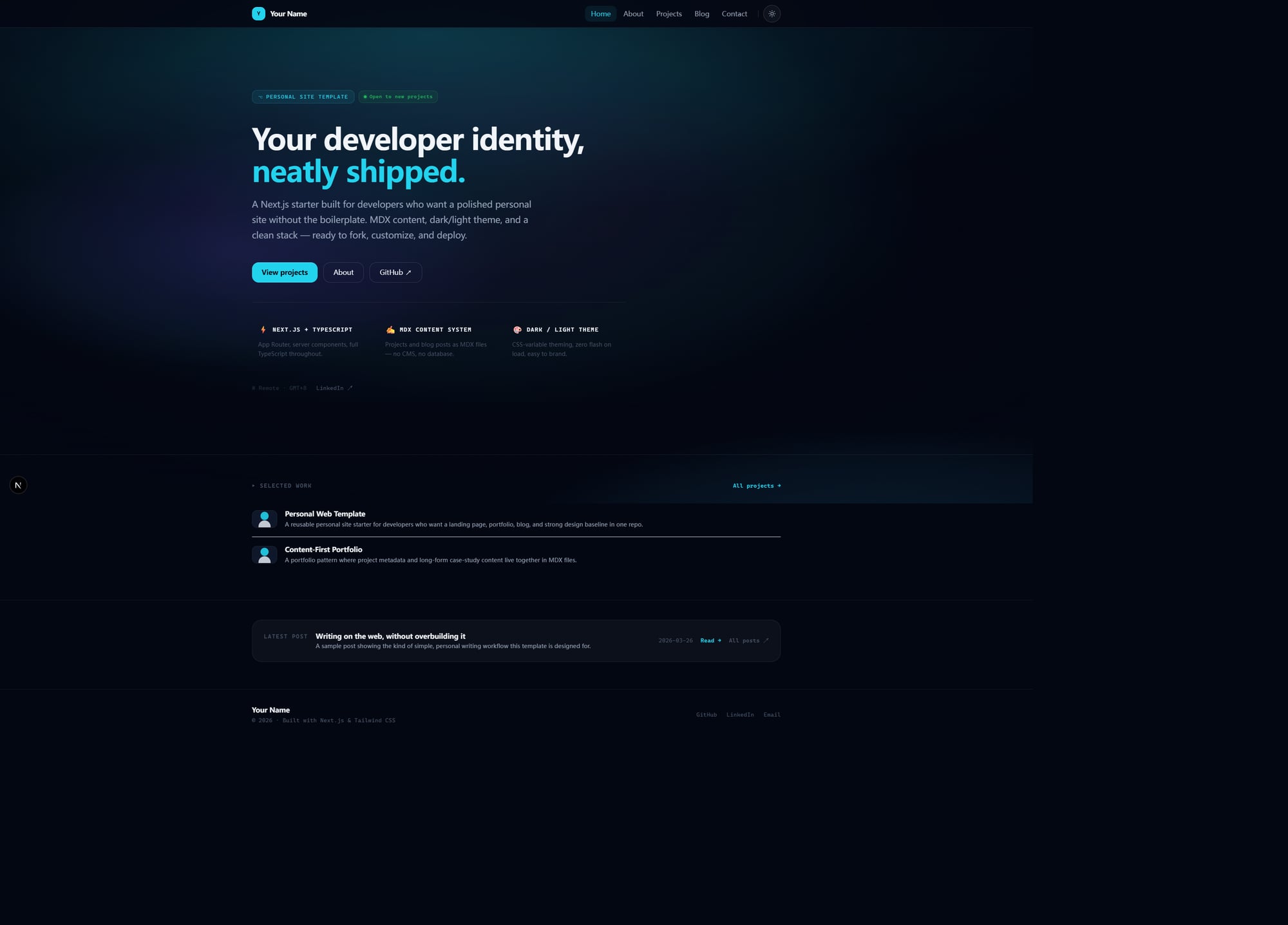
Landing-page-style home page rather than a default article index
Next.jsReactPortfolioBlogCorporate WebsiteStarter
personal-web-template — Next.js Portfolio Template
By KYD-bloody
A personal website template built with Next.js, TypeScript, Tailwind CSS, and file-based MDX, including a landing page, portfolio, blog, and modular About page. Suitable for forking and personalizing via configuration and MDX content.
Explore the design
Compare the page layouts and mobile experience. Open any screenshot for a closer look.
Author preview
Author-provided previewTop of page
Preview provided in the project README.
One original preview is available. Open the full image to inspect the design.
Screenshots show visual appearance; interactive behavior may differ.
Recorded 2026-10-03View source
What stands out
A quick read of the recorded project description.
Both blog and portfolio use file-based MDX content within the repository
Portfolio cards support metadata such as summary, status, role, tags, period, cover, and video
About page is configuration-driven with a modular structure
Light and dark themes with a unified animated background system
Includes SEO basics such as metadata, sitemap, robots, not-found, and OG route placeholders
Template Details
This is a personal website starter template for developers and product-oriented creators. The repository is MIT-licensed and aims for a middle ground between "too bare-bones a scaffold" and "too opinionated to modify": visually close to publishable, structurally reusable, and personalized as much as possible through configuration and file content.
The page structure includes a home landing page, a modular About page, portfolio list and detail pages, blog index and detail pages, and a simple contact page. Portfolio and blog content are stored as MDX files under src/content, with frontmatter parsed by gray-matter and MDX rendered by next-mdx-remote; the contentlayer.config.ts retained in the repository is only a placeholder for compatibility and future extension, not part of the current runtime architecture.
The personalization path prioritizes configuration: site identity, home page copy, and About page structure are located in src/config/site.ts, src/config/home.ts, and src/config/about.ts respectively, with example content and placeholder assets in src/content and the public directory. The template includes light and dark themes, a unified animated background, and SEO basics such as metadata, sitemap, robots, not-found, and OG route placeholders.
In terms of limitations, it does not provide a CMS backend, a multi-author publishing platform, no-code site building, or a full marketing site framework with many business pages; the content layer is deliberately simple, and if you need a more complex schema or Contentlayer workflow, you must extend it yourself in your fork.
Next.jsPortfolioBlogCorporate websiteStarter
Is it right for your project?
Use Cases
- Build a static site with a portfolio and blog for a developer's personal brand
- After forking, quickly replace site identity and home page copy via configuration files under src/config
- Maintain project case studies and blog posts as MDX files without introducing a CMS backend
- Showcase personal bio, values, working style, and current focus with a modular About page
Suitable For
- Developers who want a strong visual baseline for a personal website without designing from scratch
- Creators who need a portfolio and blog in the same repository with content managed as files
- Users who prefer personalization through configuration and MDX without relying on a CMS backend
- Fork users comfortable with a Next.js App Router and TypeScript codebase
Getting started & customization
Use these recorded setup notes alongside the repository instructions for your chosen version.
- 1
Install dependencies and start the development server: npm install, npm run dev, then visit http://localhost:3000 by default
- 2
After forking, first modify src/config/site.ts, src/config/home.ts, and src/config/about.ts to replace site identity and page copy
- 3
Replace the example content in src/content/projects and src/content/blog, and update placeholder assets under public
- 4
Before production verification, stop the dev server, then run npm run build to avoid interference from the .next cache
- 5
Third-party assets such as demo images, fonts, and icons must be checked against their respective licenses; the code's MIT license does not cover these assets
License & source material
Usage conditions & limitations
Free to use · keep license noticeThis entry covers the free version under the MIT license in the public repository; the free scope is the code of this version and does not imply that external services or third-party assets are free.
Must comply with when using
- You are allowed to use, modify, commercialize, and distribute the code of this version for free.
- When distributing copies or substantial portions of the code, retain the original author's copyright notice and the full MIT license notice.
- The code is provided as is; warranties and limitations of liability are governed by the original license and applicable law.
Additional costs & items to verify
- Demo images, fonts, icons, and other third-party assets must be checked against their respective licenses; they cannot be judged solely by the code's MIT license.
- External services such as domains, hosting, databases, payments, or AI may incur additional charges.
View Original Text Basis
https://github.com/KYD-bloody/personal-web-template/blob/master/LICENSEhttps://github.com/KYD-bloody/personal-web-template/blob/master/README.mdPermission is hereby granted, free of charge
Original License Text
Compiled by DeepSeek based on repository license and README ·2026-10-03. Results only cover the materials read; dependencies, images, fonts, and subsequent term changes are subject to their respective original texts.
Project checks & description sources
Template Information
- Source platforms
- GitHub
- Documentation and maintenance reference score
- Partly documented · 73 / 100
- Technologies
- Next.js · React
- Website type
- Portfolio · Blog · Corporate Website · Starter
How this score is calculated
Our heuristic uses license records (up to 30), a demo link (12), a preview (10), stars (15), recorded maintenance (15), description completeness (8), feature records (5) and classification data (5). It is not a code, security or performance test, or a Google score. A link does not establish tested functionality.
What to verify for this project
- Repository update recorded
- 2026-03-27
- Screenshot last checked
- 2026-10-03
No demo link is recorded. Use the repository instructions to evaluate the project locally; the screenshot alone cannot establish interactive behavior.
The catalog identifies Next.js as the primary stack. Check the actual dependency manifest and lockfile for versions and hosting requirements. These notes use recorded metadata, not a code audit or a deployment test.
Use a selection guide →How this description was prepared
AI-assisted description based on catalog records and repository material. Repository authors are not automatically the reviewers of this description.
Review declaration: [email protected] · 2026-10-04
Inspect the recorded source material
SHA-256: 7f791309d3eec697ec0825529aa122cc88b185be6fa86ec10800280dae5ecb7c
2026-10-03T15:11:42.529Z
Source file / repository# personal-web-template A polished **personal site starter** for developers who want a modern personal website with a strong landing page, a media-friendly projects section, and a file-based blog — without adding a CMS. Built with **Next.js**, **TypeScript**, **Tailwind CSS**, and a **file-based MDX content workflow**. Created by **Xinjie** — shaped by a practical view of personal sites for builders, developers, and product-minded people. This repo is meant to be **forked, customized, and deployed**. --- ## Preview  --- ## What this template is This template is for people who want: - a homepage that feels like a real personal brand page, not a default post index - a projects section that works more like a portfolio showcase than a plain list - a blog powered by files in the repo - an About page that is structured, but still personalizable - a starter that already feels publishable before heavy redesign A lot of personal-site starters land at one of two extremes: 1. **Too bare** — technically fine, but still obviously a scaffold 2. **Too opinionated** — visually strong, but annoying to adapt This repo aims for the middle: - **polished enough to publish** - **structured enough to reuse** - **simple enough to fork quickly** - **flexible enough to make your own** --- ## Core highlights - **Landing-style homepage** instead of a plain content index - **File-based MDX blog and projects** stored inside the repo - **Media-friendly Projects page** with richer metadata like summary, status, role, tags, period, cover, and optional video - **Modular About page** driven by config instead of hardcoded copy - **Dark / light theme** with a unified animated background system - **Config-first customization** for site identity, homepage copy, and about-page structure - **SEO foundations** included: metadata, sitemap, robots, not-found, OG route placeholder --- ## Current page structure - `/` — landing / homepage - `/about` — modular about page - `/projects` — portfolio showcase - `/projects/[slug]` — project detail page from MDX - `/blog` — blog index - `/blog/[slug]` — blog post detail page from MDX - `/contact` — simple contact page --- ## Tech stack - **Framework:** Next.js 15 - **Language:** TypeScript - **Styling:** Tailwind CSS + CSS variables - **Content:** file-based MDX + gray-matter + next-mdx-remote - **Rendering model:** App Router + static generation where appropriate --- ## Quick start Install dependencies: ```bash npm install ``` Run the dev server: ```bash npm run dev ``` Then open: ```txt http://localhost:3000 ``` --- ## Start here after forking If you only want the fastest path to your own version, do this in order: ### 1. Update site identity Edit: ```bash src/config/site.ts ``` Change: - site name - title / description - URL - author info - socials - nav ### 2. Rewrite the homepage Edit: ```bash src/config/home.ts ``` Change: - hero headline - description - CTA labels / links - feature cards - positioning pillars - status strip ### 3. Replace About page content Edit: ```bash src/config/about.ts ``` Change: - headline - manifesto - bio - values - work style - interests - current focus - stack - availability ### 4. Replace example content Edit: ```bash src/content/projects/ src/content/blog/ ``` ### 5. Replace placeholder assets Current placeholder assets live under: ```bash public/ ``` ### 6. Verify locally ```bash npm run build ``` That sequence should get most users from fork → local personalized version very quickly. --- ## What it includes - **Next.js App Router** structure - **TypeScript-first** codebase - **MDX-based content system** for blog posts and projects - **Dark / light theme** with CSS variable theming - **Reusable config layer** for site identity and core page content - **Portfolio-style Projects page** with richer project cards - **Modular About page** with configurable sections - **SEO-ready app shell** for personal site use cases --- ## Documentation map Use the docs like this: - [`docs/customization.md`](./docs/customization.md) — what to change first after forking - [`docs/deployment.md`](./docs/deployment.md) — how to verify and deploy - [`docs/release-checklist.md`](./docs/release-checklist.md) — final checks before publishing the template publicly - [`docs/github-release-notes.md`](./docs/github-release-notes.md) — suggested GitHub description, topics, and first release copy - [`docs/repo-architecture.md`](./docs/repo-architecture.md) — how the repo is organized internally - [`docs/roadmap.md`](./docs/roadmap.md) — what still needs polishing or future expansion --- ## Project structure ```bash personal-web-template/ ├─ public/ ├─ src/ │ ├─ app/ │ ├─ components/ │ ├─ config/ │ ├─ content/ │ ├─ data/ │ ├─ hooks/ │ ├─ lib/ │ ├─ styles/ │ └─ types/ ├─ docs/ ├─ README.md └─ package.json ``` --- ## Content system direction This template currently adopts a **file-based MDX content workflow**. That means: - blog posts and projects live in `src/content/**` - frontmatter is parsed with `gray-matter` - MDX is rendered with `next-mdx-remote` - the content layer is intentionally simple, readable, and easy to fork It does **not** currently use Contentlayer as the active content pipeline. A placeholder `contentlayer.config.ts` still exists in the repo, but it is there only as a compatibility / future-extension stub. It is **not part of the current runtime architecture**. Why this route was chosen: - fewer moving parts for template users - easier onboarding for people forking the repo - clearer debugging when editing local content files - enough structure for a personal site without adding build-time schema tooling yet If you want to extend the content system, the intended default is: 1. keep content in MDX files 2. evolve frontmatter deliberately 3. update `src/lib/content.ts` and the related types as the schema grows If you personally prefer Contentlayer, you can add it in your own fork — but this template should currently be understood as a **file-based MDX starter, not a Contentlayer starter**. --- ## Content model ### Blog posts Create files in: ```bash src/content/blog/ ``` Example frontmatter: ```md --- title: "My First Post" description: "A short intro post" date: "2026-03-26" tags: ["nextjs", "personal-site"] published: true cover: "/images/blog/first-post.jpg" --- ``` ### Projects Create files in: ```bash src/content/projects/ ``` Example frontmatter: ```md --- title: "Personal Web Template" description: "A reusable personal site starter" summary: "A polished portfolio + blog starter for developers" slug: "personal-web-template" stack: ["Next.js", "TypeScript", "Tailwind CSS"] featured: true featuredOrder: 1 status: "shipped" role: "Template design + implementation" client: "Self-initiated" period: "2026" tags: ["starter", "portfolio", "blog"] github: "https://github.com/your-name/personal-web-template" demo: "https://your-demo-url.com" cover: "/images/projects/my-project-cover.png" video: "https://www.youtube.com/embed/..." # optional category: "Open Source" year: "2026" --- ``` --- ## Important local dev workflow note During active development, keep: ```bash npm run dev ``` running while you iterate. When you want a production verification pass: 1. stop the dev server 2. run: ```bash npm run build ``` This helps avoid local `.next` cache / chunk confusion during iteration. --- ## Build for production ```bash npm run build npm run start ``` --- ## Good fit if... This template is a good fit if you want: - a personal website starter with a stronger visual baseline - a portfolio + blog in one repo - content stored as files - a modern starter without adding a CMS backend - a template that can be personalized mostly through config + MDX ## Probably not the right fit if... This is probably not the right fit if you want: - a CMS-backed editorial workflow - a multi-author publishing platform - a no-code website builder - a full marketing-site framework with many business pages --- ## Current strengths At the current stage, this project already has: - a clear starter-template direction - a reusable config layer - a functioning file-based content system - a stronger homepage than a typical starter - a portfolio page that feels more like showcase than list - a modular about page with room for expression - a unified animated background system --- ## What still needs polishing This repo is already usable, but if the goal is a stronger open-source release, the next layers are: - tighter documentation and onboarding - better placeholder assets / screenshots / demo materials - richer portfolio content schema over time - stronger release packaging for GitHub discovery See [`docs/roadmap.md`](./docs/roadmap.md). --- ## Author Created by **Xinjie**. - GitHub: <https://github.com/KYD-bloody> The template defaults remain intentionally easy to replace (`Your Name`, `your-handle`, `your-domain.com`) so that people forking the repo can adapt it quickly without inheriting someone else's personal site. --- ## License MIT — see [`LICENSE`](./LICENSE).
Explore similar templates
Compare previews and descriptions within the same stack and category.

Next.js SaaS Starter
The official Next.js SaaS starter template, integrating email/password authentication, Stripe Checkout subscriptions, a dashboard with user/team CRUD, basic Owner/Member RBAC, and activity logging.
Next.js · SaaS

Next.js Commerce
Vercel's officially maintained Next.js App Router ecommerce starter with deep Shopify integration, offering a complete product catalog, cart, and checkout flow. Core logic is modular for swapping backends, and community provider versions exist for BigCommerce, Medusa, and Saleor.
Next.js · E-commerce

Next-js-Boilerplate
A developer-first Next.js 16 starter with Tailwind CSS 4 and TypeScript, supporting both App Router and Page Router.
Next.js · Starter

tailwind-nextjs-starter-blog
A Next.js and Tailwind CSS blog starter template using Contentlayer for Markdown/MDX, with built-in SEO, code highlighting, and tags. It targets personal technical blogs and migration from Jekyll/Hugo to React, and supports one-click Vercel deployment.
Next.js · Blog

next-forge
next-forge is a Turborepo-based Next.js template maintained by Vercel, positioned as a starting point for SaaS products.
Next.js · Starter

SaaS-Boilerplate
SaaS-Boilerplate is an open-source SaaS starter template built with Next.js App Router, React 19, TypeScript, Tailwind CSS, and Shadcn UI.
Next.js · SaaS