包含简单聊天、结构化输出、Agent、链式 RAG、Agent 式 RAG 五个可运行示例
Next.jsReact启动器
langchain-nextjs-template — Next.js 启动器模板
作者 langchain-ai
LangChain 官方维护的 Next.js 启动模板,用多个示例演示 LangChain.js 在聊天、结构化输出、Agent 与 RAG 场景下的组合方式。
看看你的网站会是什么样
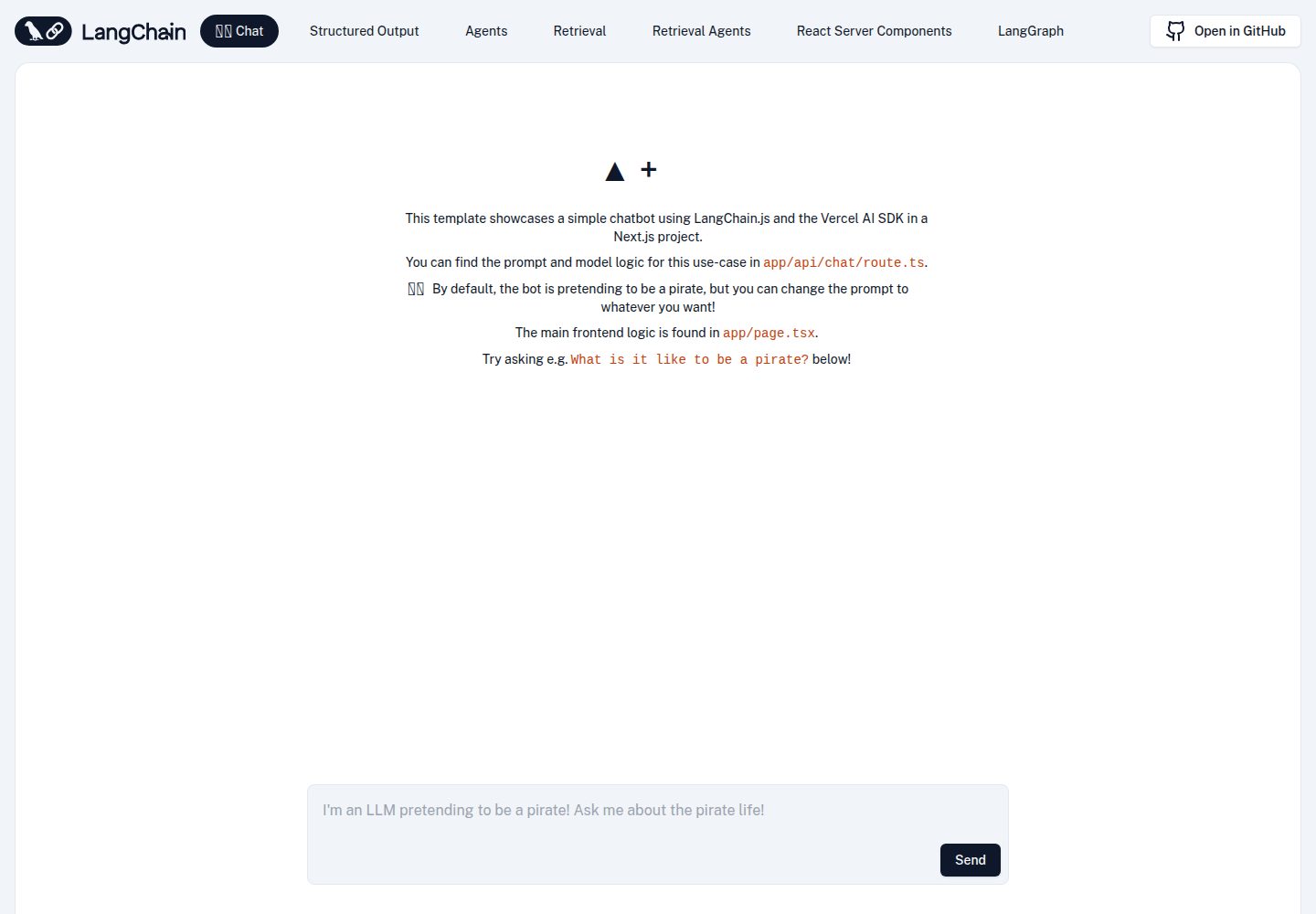
浏览真实页面截图,比较内容排版与手机效果。点击下方缩略图切换,放大查看整页细节。
全部页面与视图 2
截图用于了解视觉与布局,交互效果请以实际项目为准。
采集于 2026-09-30查看来源
值得关注的模板亮点
从已有项目资料中,快速了解它的特点。
多数示例通过 Vercel AI SDK 将模型输出流式传输到客户端
Agent 示例基于 LangGraph.js 构建,使用预置辅助函数,可替换为自定义图
检索示例通过本地适配器接入 Supabase 向量存储,复用已有表与函数,无需迁移
结构化输出示例使用 Zod 定义 schema 并按 OpenAI 函数调用格式传入
附带不依赖 API Key 和真实数据库的集成测试,并默认启用打包体积分析
模板详细介绍
该模板由 LangChain 官方仓库维护,基于 Next.js 搭建,用于演示如何在同一个应用中组合 LangChain.js 的各类模块。仓库提供五个可运行的示例:简单聊天、从模型调用返回结构化输出、使用 Agent 回答多步骤复杂问题、基于链与向量存储的检索增强生成(RAG),以及基于 Agent 与向量存储的 RAG。多数示例通过 Vercel 的 AI SDK 将 token 流式传输到客户端并展示消息。Agent 部分使用 LangGraph.js 构建,并采用预置的辅助函数以减少样板代码,也可以替换为自定义图。
检索示例通过一个基于 @supabase/supabase-js 与 @langchain/core 的本地适配器,把 Supabase 作为向量存储使用,复用已有的 documents 表和 match_documents 函数,无需数据库迁移;如需更换为其他受支持的向量存储,需要修改 ingest 与检索相关路由中的代码。结构化输出示例使用 Zod 构造 schema,并按 OpenAI 期望的格式传入函数调用参数。Agent 示例中的计算器只接受两个数字和一个算术运算,不解析任意表达式;联网搜索需要配置 Tavily 的 API Key。
模板的定位是启动器而非成品应用:它给出可运行的示例代码与目录结构,但不包含生产环境所需的鉴权、限流、持久化等能力。仓库附带不依赖 API Key 与真实数据库的集成测试,并默认配置了 @next/bundle-analyzer 以便查看打包体积。代码以 MIT 许可发布,可免费使用、修改、商用与分发,但演示图片、字体、图标等第三方素材需按各自许可单独核对,域名、托管、数据库与 AI 等外部服务可能另外收费。
Next.js启动器
适合你的项目吗?
适用场景
- 在 Next.js 项目中快速搭建一个可运行的 LangChain.js 示例应用,用于学习各模块的用法
- 对比同一模型在普通聊天、结构化输出与 Agent 调用下的不同接入方式
- 搭建基于向量存储的检索问答原型,并观察带引用来源的流式回答
- 以预置 LangGraph Agent 为起点,改造成自定义的 Agent 工作流
- 作为部署到 Vercel 的起点,验证服务端路由与流式响应的组合方式
适合人群
- 希望用官方示例了解 LangChain.js 与 Next.js 集成方式的开发者
- 需要在项目中引入结构化输出或 RAG 流程并寻找参考实现的前端或全栈开发者
- 准备以 Supabase 作为向量存储搭建检索问答原型的团队
- 想基于 LangGraph.js 预置 Agent 快速验证想法、再自行扩展的开发者
上手与定制指南
结合仓库当前版本的说明,按下面的资料检查内容、配置与运行要求。
- 1
克隆仓库后把 .env.example 复制为 .env.local,基础示例至少需要填入 OpenAI API Key
- 2
使用 LangSmith 追踪时,需将 LANGCHAIN_CALLBACKS_BACKGROUND 设为 false,以保证在无服务器 Edge 函数中追踪能正常结束
- 3
Agent 示例的联网搜索需要配置 TAVILY_API_KEY
- 4
检索示例需要按文档在 Supabase 中准备数据库,并把数据库 URL 与私钥写入 .env.local
- 5
集成测试需在 Node.js 22.6 及以上版本运行,且不需要 API Key 或真实数据库
授权与来源资料
使用条件与限制
免费使用 · 保留许可声明本次收录的是公开仓库中采用 MIT 许可的免费版本;免费范围为该版本代码,不代表外部服务或第三方素材免费。
使用时需要遵守
- 允许免费使用、修改、商用和分发该版本代码。
- 分发代码副本或实质性部分时,保留原作者版权声明和完整 MIT 许可声明。
- 代码按现状提供;担保与责任限制以原许可证及适用法律为准。
额外费用与待核对事项
- 基础示例必须配置 OpenAI API Key 才能运行,属于外部付费服务依赖。
- Agent 示例的联网搜索功能需要申请并配置 Tavily API Key。
- 检索示例需要自建 Supabase 数据库并提供 URL 与私钥。
- 使用 LangSmith 追踪时须将该环境变量设为 false,否则 Edge 函数中追踪可能无法完成。
- 集成测试要求 Node.js 22.6 及以上版本。
- 演示图片、字体、图标及其他第三方素材需按各自许可核对,不能仅凭代码的 MIT 许可判断。
- 域名、托管、数据库、支付或 AI 等外部服务可能另外收费。
查看原文依据
Permission is hereby granted, free of charge
许可证原文
you'll just need to add your OpenAI API key
README 原文
set `TAVILY_API_KEY` in `.env.local` for web search
README 原文
get your database URL and private key and paste them into `.env.local`
README 原文
make sure you've set the `LANGCHAIN_CALLBACKS_BACKGROUND` environment variable to `false`
README 原文
https://github.com/langchain-ai/langchain-nextjs-template/blob/main/LICENSEhttps://github.com/langchain-ai/langchain-nextjs-template/blob/main/README.mdRun the calculator and mock-backed Supabase regression tests with Node.js 22.6+
README 原文
DeepSeek 根据仓库许可证和 README 整理 ·2026-09-30。结果仅覆盖已读取资料,依赖、图片、字体及后续条款变更以各自原文为准。
项目核对记录与介绍依据
模板资料
- 来源平台
- GitHub
- 资料与维护参考分
- 资料较完整 · 95 / 100
- 技术栈
- Next.js · React
- 网站类型
- 启动器
这个分数如何计算
本站按许可资料(最高30分)、演示链接(12分)、预览图(10分)、Star数(15分)、记录的维护时间(15分)、描述完整度(8分)、功能记录(5分)和分类资料(5分)计算。它不是代码、安全或性能测试,也不是 Google 评分;有链接不代表已实测可用。
这个项目需要核对什么
- 记录的仓库更新时间
- 2026-09-29
- 截图检查日期
- 2026-09-30
已收录演示链接。请用你的内容与屏幕尺寸检查;有演示不代表表单、认证或支付已经可用。
目录记录的主要技术栈是 Next.js。请通过依赖清单和锁文件核对实际版本与托管要求。这些说明基于收录资料,不代表代码审计或部署实测。
查看具体选型方法 →介绍的制作与核对状态
介绍由 AI 辅助整理目录与仓库资料。仓库作者不等于这篇介绍的审核者。
已完成服务器许可规则与 AI 来源核对;未经过人工编辑审核。
查看当时使用的来源资料
SHA-256: bc6893fdb3b3391a5ae3840c28dfb2e2909dafbc451c211c823934a43760bc23
2026-09-30T08:02:32.892Z
来源文件 / 仓库# 🦜️🔗 LangChain + Next.js Starter Template [](https://codespaces.new/langchain-ai/langchain-nextjs-template) [](https://vercel.com/new/clone?repository-url=https%3A%2F%2Fgithub.com%2Flangchain-ai%2Flangchain-nextjs-template) This template scaffolds a LangChain.js + Next.js starter app. It showcases how to use and combine LangChain modules for several use cases. Specifically: - [Simple chat](/app/api/chat/route.ts) - [Returning structured output from an LLM call](/app/api/chat/structured_output/route.ts) - [Answering complex, multi-step questions with agents](/app/api/chat/agents/route.ts) - [Retrieval augmented generation (RAG) with a chain and a vector store](/app/api/chat/retrieval/route.ts) - [Retrieval augmented generation (RAG) with an agent and a vector store](/app/api/chat/retrieval_agents/route.ts) Most of them use Vercel's [AI SDK](https://github.com/vercel-labs/ai) to stream tokens to the client and display the incoming messages. The agents use [LangGraph.js](https://langchain-ai.github.io/langgraphjs/), LangChain's framework for building agentic workflows. They use preconfigured helper functions to minimize boilerplate, but you can replace them with custom graphs as desired. https://github.com/user-attachments/assets/e389e4e4-4fb9-4223-a4c2-dc002c8f20d3 It's free-tier friendly too! Check out the [bundle size stats below](#-bundle-size). You can check out a hosted version of this repo here: https://langchain-nextjs-template.vercel.app/ ## 🚀 Getting Started First, clone this repo and download it locally. Next, you'll need to set up environment variables in your repo's `.env.local` file. Copy the `.env.example` file to `.env.local`. To start with the basic examples, you'll just need to add your OpenAI API key. Because this app is made to run in serverless Edge functions, make sure you've set the `LANGCHAIN_CALLBACKS_BACKGROUND` environment variable to `false` to ensure tracing finishes if you are using [LangSmith tracing](https://docs.smith.langchain.com/). Next, install the required packages using your preferred package manager (e.g. `yarn`). Now you're ready to run the development server: ```bash yarn dev ``` Open [http://localhost:3000](http://localhost:3000) with your browser to see the result! Ask the bot something and you'll see a streamed response:  You can start editing the page by modifying `app/page.tsx`. The page auto-updates as you edit the file. Backend logic lives in `app/api/chat/route.ts`. From here, you can change the prompt and model, or add other modules and logic. ## 🧱 Structured Output The second example shows how to have a model return output according to a specific schema using OpenAI Functions. Click the `Structured Output` link in the navbar to try it out:  The chain in this example uses a [popular library called Zod](https://zod.dev) to construct a schema, then formats it in the way OpenAI expects. It then passes that schema as a function into OpenAI and passes a `function_call` parameter to force OpenAI to return arguments in the specified format. For more details, [check out this documentation page](https://js.langchain.com/docs/how_to/structured_output). ## 🦜 Agents To try out the agent example, set `TAVILY_API_KEY` in `.env.local` for web search. Get an API key from [Tavily](https://tavily.com/); the AI SDK agent example uses the same key. The calculator accepts two numbers and an arithmetic operation rather than evaluating arbitrary expressions. You can then click the `Agent` example and try asking it more complex questions:  This example uses a [prebuilt LangGraph agent](https://langchain-ai.github.io/langgraphjs/tutorials/quickstart/), but you can customize your own as well. ## 🐶 Retrieval The retrieval examples both use Supabase as a vector store through a small [local adapter](/utils/supabase-vector-store.ts) built on `@supabase/supabase-js` and `@langchain/core`. It uses the existing `documents` table and `match_documents` function; no database migration is needed. You can swap in [another supported vector store](https://js.langchain.com/docs/integrations/vectorstores) if preferred by changing the code under `app/api/retrieval/ingest/route.ts`, `app/api/chat/retrieval/route.ts`, and `app/api/chat/retrieval_agents/route.ts`. For Supabase, follow [these instructions](https://js.langchain.com/docs/integrations/vectorstores/supabase) to set up your database, then get your database URL and private key and paste them into `.env.local`. You can then switch to the `Retrieval` and `Retrieval Agent` examples. The default document text is pulled from the LangChain.js retrieval use case docs, but you can change them to whatever text you'd like. For a given text, you'll only need to press `Upload` once. Pressing it again will re-ingest the docs, resulting in duplicates. You can clear your Supabase vector store by navigating to the console and running `DELETE FROM documents;`. After splitting, embedding, and uploading some text, you're ready to ask questions! For more info on retrieval chains, [see this page](https://js.langchain.com/docs/tutorials/rag). The specific variant of the conversational retrieval chain used here is composed using LangChain Expression Language, which you can [read more about here](https://js.langchain.com/docs/how_to/qa_sources/). This chain example will also return cited sources via header in addition to the streaming response. For more info on retrieval agents, [see this page](https://langchain-ai.github.io/langgraphjs/tutorials/rag/langgraph_agentic_rag/). ## Integration tests Run the calculator and mock-backed Supabase regression tests with Node.js 22.6+: ```bash node --experimental-strip-types --test utils/integrations.test.mjs ``` These tests do not require API keys or a live database. ## 📦 Bundle size The bundle size for LangChain itself is quite small. After compression and chunk splitting, for the RAG use case LangChain uses 37.32 KB of code space (as of [@langchain/core 0.1.15](https://npmjs.com/package/@langchain/core)), which is less than 4% of the total Vercel free tier edge function alottment of 1 MB:  This package has [@next/bundle-analyzer](https://www.npmjs.com/package/@next/bundle-analyzer) set up by default - you can explore the bundle size interactively by running: ```bash $ ANALYZE=true yarn build ``` ## 📚 Learn More The example chains in the `app/api/chat/route.ts` and `app/api/chat/retrieval/route.ts` files use [LangChain Expression Language](https://js.langchain.com/docs/concepts#langchain-expression-language) to compose different LangChain.js modules together. You can integrate other retrievers, agents, preconfigured chains, and more too, though keep in mind `HttpResponseOutputParser` is meant to be used directly with model output. To learn more about what you can do with LangChain.js, check out the docs here: - https://js.langchain.com/docs/ ## ▲ Deploy on Vercel When ready, you can deploy your app on the [Vercel Platform](https://vercel.com/new?utm_medium=default-template&filter=next.js&utm_source=create-next-app&utm_campaign=create-next-app-readme). Check out the [Next.js deployment documentation](https://nextjs.org/docs/deployment) for more details. ## Thank You! Thanks for reading! If you have any questions or comments, reach out to us on Twitter [@LangChainAI](https://twitter.com/langchainai), or [click here to join our Discord server](https://discord.gg/langchain).
看看同类模板
对比同技术栈与用途的模板,找到更适合的视觉与内容结构。

ai-website-cloner-template
Clone any website with one command using AI coding agents
Next.js · 启动器

Next.js SaaS Starter
Next.js SaaS Starter 是 Next.js 官方维护的 SaaS 起点模板,定位介于学习资源和可直接部署的脚手架之间。
Next.js · SaaS

Next.js Commerce
Next.js Commerce 是 Vercel 团队维护的电商启动模板,基于 Next.js App Router 构建,采用服务端渲染、React Server Components、Server Actions …
Next.js · 电商

Next-js-Boilerplate
Next-js-Boilerplate 是一个面向 Next.js 16、Tailwind CSS 4 和 TypeScript 的启动器,核心定位是开发者体验优先。
Next.js · 启动器

tailwind-nextjs-starter-blog
tailwind-nextjs-starter-blog 是一个面向个人技术博客的 Next.js 与 Tailwind CSS 启动模板,其 v2 版本基于 App Router 与 React Server Comp…
Next.js · 博客

next-forge
Production-grade Turborepo template for Next.js apps.
Next.js · 启动器