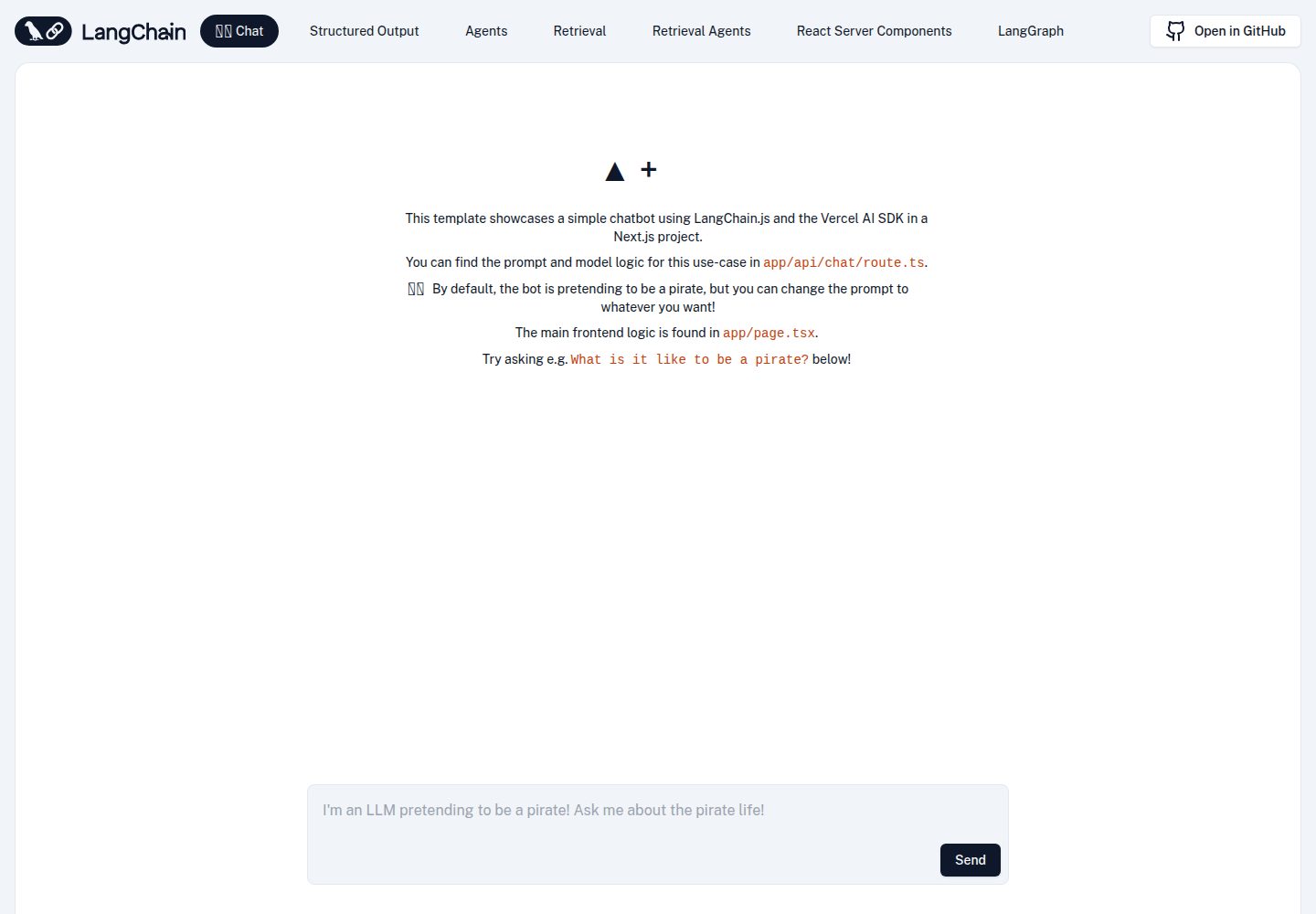
Includes five runnable examples: simple chat, structured output, Agent, chain-based RAG, and Agent-based RAG
Next.jsReactStarter
langchain-nextjs-template — Next.js Starter Template
By langchain-ai
An officially maintained Next.js starter template for LangChain, with multiple examples demonstrating how LangChain.js composes in chat, structured output, Agent, and RAG scenarios.
Explore the design
Compare the page layouts and mobile experience. Open any screenshot for a closer look.
Desktop homepage1 / 2
Desktop captureTop of page
Actual screenshot captured by the server browser.
All pages & views 2
Screenshots show visual appearance; interactive behavior may differ.
Recorded 2026-09-30View source
What stands out
A quick read of the recorded project description.
Most examples stream model output to the client via the Vercel AI SDK
Agent examples are built on LangGraph.js with prebuilt helper functions and can be replaced with custom graphs
The retrieval example connects to a Supabase vector store through a local adapter, reusing existing tables and functions without migrations
The structured output example uses Zod to define schemas and passes them in OpenAI function-calling format
Comes with integration tests that do not depend on API keys or a real database, and bundle size analysis is enabled by default
Template Details
This template is maintained in the official LangChain repository and built on Next.js to demonstrate how to combine various LangChain.js modules within a single application. The repository provides five runnable examples: simple chat, returning structured output from a model call, using an Agent to answer multi-step complex questions, retrieval-augmented generation (RAG) based on chains and a vector store, and RAG based on an Agent and a vector store. Most examples stream tokens to the client and display messages via Vercel's AI SDK. The Agent parts are built with LangGraph.js and use prebuilt helper functions to reduce boilerplate, and can also be replaced with custom graphs.
The retrieval example uses Supabase as a vector store through a local adapter based on @supabase/supabase-js and @langchain/core, reusing the existing documents table and match_documents function without database migrations; to switch to another supported vector store, you need to modify the code in the ingest and retrieval-related routes. The structured output example uses Zod to construct schemas and passes function-calling parameters in the format expected by OpenAI. The calculator in the Agent example only accepts two numbers and one arithmetic operation and does not parse arbitrary expressions; web search requires configuring a Tavily API key.
The template is positioned as a starter rather than a finished application: it provides runnable example code and directory structure, but does not include production capabilities such as authentication, rate limiting, or persistence. The repository includes integration tests that do not depend on API keys or a real database, and @next/bundle-analyzer is configured by default to inspect bundle size. The code is released under the MIT license and can be used, modified, commercialized, and distributed for free, but third-party assets such as demo images, fonts, and icons must be checked separately under their respective licenses, and external services such as domains, hosting, databases, and AI may incur additional charges.
Next.jsStarter
Is it right for your project?
Use Cases
- Quickly set up a runnable LangChain.js example application in a Next.js project to learn how each module is used
- Compare how the same model is integrated in ordinary chat, structured output, and Agent calls
- Build a retrieval-based question-answering prototype on a vector store and observe streaming answers with cited sources
- Use the prebuilt LangGraph Agent as a starting point and adapt it into a custom Agent workflow
- Use it as a starting point for deploying to Vercel and verify how server routes and streaming responses work together
Suitable For
- Developers who want to understand how LangChain.js integrates with Next.js using official examples
- Frontend or full-stack developers who need to introduce structured output or RAG flows into a project and are looking for reference implementations
- Teams preparing to build a retrieval-based question-answering prototype with Supabase as the vector store
- Developers who want to quickly validate ideas based on the prebuilt LangGraph.js Agent and then extend it themselves
Getting started & customization
Use these recorded setup notes alongside the repository instructions for your chosen version.
- 1
After cloning the repository, copy .env.example to .env.local; the basic examples require at least an OpenAI API key
- 2
When using LangSmith tracing, set LANGCHAIN_CALLBACKS_BACKGROUND to false to ensure tracing completes properly in serverless Edge functions
- 3
Web search in the Agent example requires configuring TAVILY_API_KEY
- 4
The retrieval example requires preparing the database in Supabase as documented and writing the database URL and private key into .env.local
- 5
Integration tests require Node.js 22.6 or later and do not need API keys or a real database
License & source material
Usage conditions & limitations
Free to use · keep license noticeThis entry covers the free version under the MIT license in the public repository; the free scope is the code of this version and does not mean external services or third-party assets are free.
Must comply with when using
- You may use, modify, commercialize, and distribute the code of this version for free.
- When distributing copies or substantial portions of the code, retain the original author's copyright notice and the full MIT license notice.
- The code is provided as is; warranties and limitations of liability are governed by the original license and applicable law.
Additional costs & items to verify
- The basic examples require an OpenAI API key to run, which is an external paid service dependency.
- Web search in the Agent example requires applying for and configuring a Tavily API key.
- The retrieval example requires setting up your own Supabase database and providing the URL and private key.
- When using LangSmith tracing, this environment variable must be set to false, otherwise tracing in Edge functions may not complete.
- Integration tests require Node.js 22.6 or later.
- Demo images, fonts, icons, and other third-party assets must be checked under their respective licenses and cannot be judged solely by the code's MIT license.
- External services such as domains, hosting, databases, payments, or AI may incur additional charges.
View Original Text Basis
Permission is hereby granted, free of charge
Original License Text
you'll just need to add your OpenAI API key
Original README
set `TAVILY_API_KEY` in `.env.local` for web search
Original README
get your database URL and private key and paste them into `.env.local`
Original README
make sure you've set the `LANGCHAIN_CALLBACKS_BACKGROUND` environment variable to `false`
Original README
https://github.com/langchain-ai/langchain-nextjs-template/blob/main/LICENSEhttps://github.com/langchain-ai/langchain-nextjs-template/blob/main/README.mdRun the calculator and mock-backed Supabase regression tests with Node.js 22.6+
Original README
Compiled by DeepSeek based on repository license and README ·2026-09-30. Results only cover the materials read; dependencies, images, fonts, and subsequent term changes are subject to their respective original texts.
Project checks & description sources
Template Information
- Source platforms
- GitHub
- Documentation and maintenance reference score
- More documented · 95 / 100
- Technologies
- Next.js · React
- Website type
- Starter
How this score is calculated
Our heuristic uses license records (up to 30), a demo link (12), a preview (10), stars (15), recorded maintenance (15), description completeness (8), feature records (5) and classification data (5). It is not a code, security or performance test, or a Google score. A link does not establish tested functionality.
What to verify for this project
- Repository update recorded
- 2026-09-29
- Screenshot last checked
- 2026-09-30
A demo link is listed. Check it with your own content and viewport sizes; its presence does not confirm that forms, authentication or payments work.
The catalog identifies Next.js as the primary stack. Check the actual dependency manifest and lockfile for versions and hosting requirements. These notes use recorded metadata, not a code audit or a deployment test.
Use a selection guide →How this description was prepared
AI-assisted description based on catalog records and repository material. Repository authors are not automatically the reviewers of this description.
Automatically checked against source and license rules; no manual editorial review.
Inspect the recorded source material
SHA-256: bc6893fdb3b3391a5ae3840c28dfb2e2909dafbc451c211c823934a43760bc23
2026-09-30T08:02:32.892Z
Source file / repository# 🦜️🔗 LangChain + Next.js Starter Template [](https://codespaces.new/langchain-ai/langchain-nextjs-template) [](https://vercel.com/new/clone?repository-url=https%3A%2F%2Fgithub.com%2Flangchain-ai%2Flangchain-nextjs-template) This template scaffolds a LangChain.js + Next.js starter app. It showcases how to use and combine LangChain modules for several use cases. Specifically: - [Simple chat](/app/api/chat/route.ts) - [Returning structured output from an LLM call](/app/api/chat/structured_output/route.ts) - [Answering complex, multi-step questions with agents](/app/api/chat/agents/route.ts) - [Retrieval augmented generation (RAG) with a chain and a vector store](/app/api/chat/retrieval/route.ts) - [Retrieval augmented generation (RAG) with an agent and a vector store](/app/api/chat/retrieval_agents/route.ts) Most of them use Vercel's [AI SDK](https://github.com/vercel-labs/ai) to stream tokens to the client and display the incoming messages. The agents use [LangGraph.js](https://langchain-ai.github.io/langgraphjs/), LangChain's framework for building agentic workflows. They use preconfigured helper functions to minimize boilerplate, but you can replace them with custom graphs as desired. https://github.com/user-attachments/assets/e389e4e4-4fb9-4223-a4c2-dc002c8f20d3 It's free-tier friendly too! Check out the [bundle size stats below](#-bundle-size). You can check out a hosted version of this repo here: https://langchain-nextjs-template.vercel.app/ ## 🚀 Getting Started First, clone this repo and download it locally. Next, you'll need to set up environment variables in your repo's `.env.local` file. Copy the `.env.example` file to `.env.local`. To start with the basic examples, you'll just need to add your OpenAI API key. Because this app is made to run in serverless Edge functions, make sure you've set the `LANGCHAIN_CALLBACKS_BACKGROUND` environment variable to `false` to ensure tracing finishes if you are using [LangSmith tracing](https://docs.smith.langchain.com/). Next, install the required packages using your preferred package manager (e.g. `yarn`). Now you're ready to run the development server: ```bash yarn dev ``` Open [http://localhost:3000](http://localhost:3000) with your browser to see the result! Ask the bot something and you'll see a streamed response:  You can start editing the page by modifying `app/page.tsx`. The page auto-updates as you edit the file. Backend logic lives in `app/api/chat/route.ts`. From here, you can change the prompt and model, or add other modules and logic. ## 🧱 Structured Output The second example shows how to have a model return output according to a specific schema using OpenAI Functions. Click the `Structured Output` link in the navbar to try it out:  The chain in this example uses a [popular library called Zod](https://zod.dev) to construct a schema, then formats it in the way OpenAI expects. It then passes that schema as a function into OpenAI and passes a `function_call` parameter to force OpenAI to return arguments in the specified format. For more details, [check out this documentation page](https://js.langchain.com/docs/how_to/structured_output). ## 🦜 Agents To try out the agent example, set `TAVILY_API_KEY` in `.env.local` for web search. Get an API key from [Tavily](https://tavily.com/); the AI SDK agent example uses the same key. The calculator accepts two numbers and an arithmetic operation rather than evaluating arbitrary expressions. You can then click the `Agent` example and try asking it more complex questions:  This example uses a [prebuilt LangGraph agent](https://langchain-ai.github.io/langgraphjs/tutorials/quickstart/), but you can customize your own as well. ## 🐶 Retrieval The retrieval examples both use Supabase as a vector store through a small [local adapter](/utils/supabase-vector-store.ts) built on `@supabase/supabase-js` and `@langchain/core`. It uses the existing `documents` table and `match_documents` function; no database migration is needed. You can swap in [another supported vector store](https://js.langchain.com/docs/integrations/vectorstores) if preferred by changing the code under `app/api/retrieval/ingest/route.ts`, `app/api/chat/retrieval/route.ts`, and `app/api/chat/retrieval_agents/route.ts`. For Supabase, follow [these instructions](https://js.langchain.com/docs/integrations/vectorstores/supabase) to set up your database, then get your database URL and private key and paste them into `.env.local`. You can then switch to the `Retrieval` and `Retrieval Agent` examples. The default document text is pulled from the LangChain.js retrieval use case docs, but you can change them to whatever text you'd like. For a given text, you'll only need to press `Upload` once. Pressing it again will re-ingest the docs, resulting in duplicates. You can clear your Supabase vector store by navigating to the console and running `DELETE FROM documents;`. After splitting, embedding, and uploading some text, you're ready to ask questions! For more info on retrieval chains, [see this page](https://js.langchain.com/docs/tutorials/rag). The specific variant of the conversational retrieval chain used here is composed using LangChain Expression Language, which you can [read more about here](https://js.langchain.com/docs/how_to/qa_sources/). This chain example will also return cited sources via header in addition to the streaming response. For more info on retrieval agents, [see this page](https://langchain-ai.github.io/langgraphjs/tutorials/rag/langgraph_agentic_rag/). ## Integration tests Run the calculator and mock-backed Supabase regression tests with Node.js 22.6+: ```bash node --experimental-strip-types --test utils/integrations.test.mjs ``` These tests do not require API keys or a live database. ## 📦 Bundle size The bundle size for LangChain itself is quite small. After compression and chunk splitting, for the RAG use case LangChain uses 37.32 KB of code space (as of [@langchain/core 0.1.15](https://npmjs.com/package/@langchain/core)), which is less than 4% of the total Vercel free tier edge function alottment of 1 MB:  This package has [@next/bundle-analyzer](https://www.npmjs.com/package/@next/bundle-analyzer) set up by default - you can explore the bundle size interactively by running: ```bash $ ANALYZE=true yarn build ``` ## 📚 Learn More The example chains in the `app/api/chat/route.ts` and `app/api/chat/retrieval/route.ts` files use [LangChain Expression Language](https://js.langchain.com/docs/concepts#langchain-expression-language) to compose different LangChain.js modules together. You can integrate other retrievers, agents, preconfigured chains, and more too, though keep in mind `HttpResponseOutputParser` is meant to be used directly with model output. To learn more about what you can do with LangChain.js, check out the docs here: - https://js.langchain.com/docs/ ## ▲ Deploy on Vercel When ready, you can deploy your app on the [Vercel Platform](https://vercel.com/new?utm_medium=default-template&filter=next.js&utm_source=create-next-app&utm_campaign=create-next-app-readme). Check out the [Next.js deployment documentation](https://nextjs.org/docs/deployment) for more details. ## Thank You! Thanks for reading! If you have any questions or comments, reach out to us on Twitter [@LangChainAI](https://twitter.com/langchainai), or [click here to join our Discord server](https://discord.gg/langchain).
Explore similar templates
Compare previews and descriptions within the same stack and category.

Next.js SaaS Starter
The official Next.js SaaS starter template, integrating email/password authentication, Stripe Checkout subscriptions, a dashboard with user/team CRUD, basic Owner/Member RBAC, and activity logging.
Next.js · SaaS

Next.js Commerce
Vercel's officially maintained Next.js App Router ecommerce starter with deep Shopify integration, offering a complete product catalog, cart, and checkout flow. Core logic is modular for swapping backends, and community provider versions exist for BigCommerce, Medusa, and Saleor.
Next.js · E-commerce

Next-js-Boilerplate
A developer-first Next.js 16 starter with Tailwind CSS 4 and TypeScript, supporting both App Router and Page Router.
Next.js · Starter

tailwind-nextjs-starter-blog
A Next.js and Tailwind CSS blog starter template using Contentlayer for Markdown/MDX, with built-in SEO, code highlighting, and tags. It targets personal technical blogs and migration from Jekyll/Hugo to React, and supports one-click Vercel deployment.
Next.js · Blog

next-forge
next-forge is a Turborepo-based Next.js template maintained by Vercel, positioned as a starting point for SaaS products.
Next.js · Starter

SaaS-Boilerplate
SaaS-Boilerplate is an open-source SaaS starter template built with Next.js App Router, React 19, TypeScript, Tailwind CSS, and Shadcn UI.
Next.js · SaaS