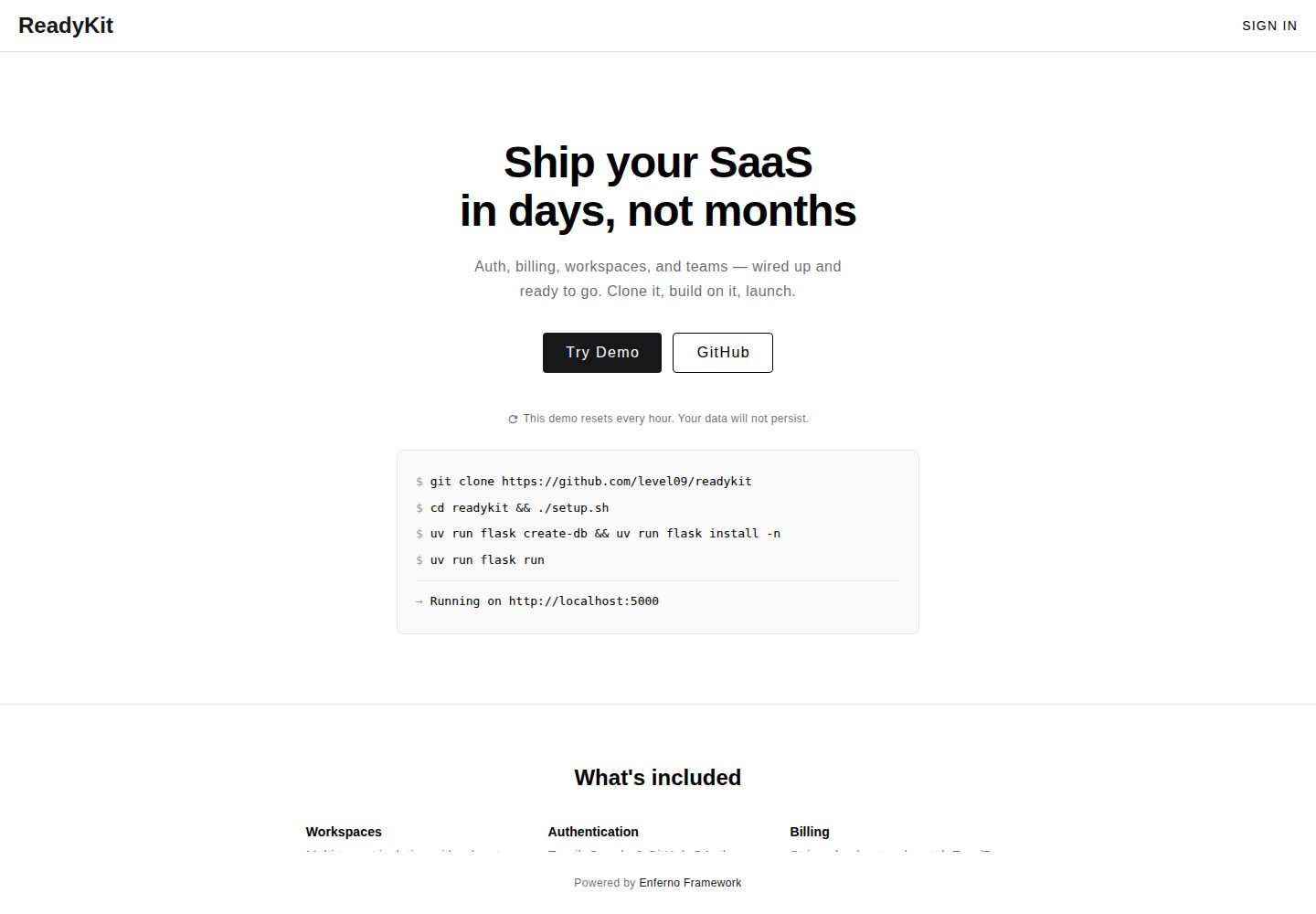
多租户工作区,支持数据隔离与从个人到团队的扩展
VueFlaskSaaS启动器
readykit — Vue SaaS模板
作者 level09
ReadyKit 是一个基于 Flask 与 Vue 的 SaaS 启动模板,内置多租户工作区、订阅计费、OAuth 登录和团队协作功能,采用 MIT 许可。
看看你的网站会是什么样
浏览真实页面截图,比较内容排版与手机效果。点击下方缩略图切换,放大查看整页细节。
全部页面与视图 2
截图用于了解视觉与布局,交互效果请以实际项目为准。
采集于 2026-10-01查看来源
值得关注的模板亮点
从已有项目资料中,快速了解它的特点。
集成 Stripe 或 Chargebee 订阅计费,含托管结账、Webhook 与客户门户
支持 Google 与 GitHub OAuth 登录
团队协作含 admin/member 角色与成员管理
提供 Docker Compose、Fly.io、Railway 与 VPS 部署指引
使用 Alembic 管理数据库迁移
模板详细介绍
ReadyKit 是面向 SaaS 产品的开源启动模板,后端使用 Flask,前端使用 Vue 与 Vuetify,数据层默认使用 PostgreSQL,并可选 Redis 与 Celery。模板已包含多租户工作区、订阅计费(Stripe 或 Chargebee)、Google 与 GitHub OAuth 登录、团队角色与成员管理,以及 Docker Compose 部署配置。
本地开发默认使用 SQLite 存储数据与会话,不强制依赖 Redis;通过 setup.sh --full 或 Docker 方式可启用 Redis 会话与 Celery 后台任务。生产部署提供 Fly.io、Railway、Docker Compose 自托管以及基于 Ignite 脚本的 VPS 部署路径,相关平台资源需按各自定价单独准备。
模板通过 WorkspaceScoped 与 require_workspace_access 等辅助方法实现工作区数据隔离,但普通 SQLAlchemy 查询不会自动按工作区过滤,需要在每个查询中显式使用这些辅助方法或添加 workspace_id 条件。数据库结构变更由 Alembic 管理。
VueFlaskSaaS启动器
适合你的项目吗?
适用场景
- 需要快速搭建带订阅计费与团队管理的 SaaS 产品原型
- 希望以 Flask 与 Vue 技术栈起步并复用认证、工作区与计费基础设施
- 需要多租户数据隔离与角色权限控制的 Web 应用
- 计划在 Fly.io、Railway 或自托管 VPS 上部署 Flask SaaS 服务
适合人群
- 熟悉 Flask 与 Vue 的全栈开发者
- 需要多租户与订阅计费能力的 SaaS 团队
- 希望基于 MIT 许可代码进行二次开发并商用的项目
- 接受自行配置 OAuth、支付与部署资源的开发者
上手与定制指南
结合仓库当前版本的说明,按下面的资料检查内容、配置与运行要求。
- 1
克隆仓库后运行 ./setup.sh,并按需编辑 .env 配置 OAuth 与计费密钥
- 2
本地默认使用 SQLite,Redis 与 Celery 需通过 ./setup.sh --full 或 Docker 方式启用
- 3
初始化数据库可运行 uv run flask create-db 与 uv run flask install
- 4
计费提供 Stripe(默认)与 Chargebee 两种选项,需配置对应密钥与价格 ID
- 5
工作区数据查询需显式使用 WorkspaceScoped 辅助方法或 workspace_id 过滤,普通查询不会自动隔离
授权与来源资料
使用条件与限制
免费使用 · 保留许可声明本次收录的是公开仓库中采用 MIT 许可的免费版本;免费范围为该版本代码,不代表外部服务或第三方素材免费。
使用时需要遵守
- 允许免费使用、修改、商用和分发该版本代码。
- 分发代码副本或实质性部分时,保留原作者版权声明和完整 MIT 许可声明。
- 代码按现状提供;担保与责任限制以原许可证及适用法律为准。
额外费用与待核对事项
- 使用 Google 登录需自行申请并配置 Google OAuth 客户端 ID 与密钥,属于外部服务账号要求。
- 启用订阅计费需配置 Stripe(或 Chargebee)的密钥与价格 ID,涉及第三方付费服务账号。
- 部署到 Fly.io、Railway 等云平台需按各平台定价自行承担资源费用。
- 普通 SQLAlchemy 查询不会自动按工作区过滤,必须显式使用辅助方法或 workspace_id 条件,否则存在数据隔离风险。
- 演示图片、字体、图标及其他第三方素材需按各自许可核对,不能仅凭代码的 MIT 许可判断。
- 域名、托管、数据库、支付或 AI 等外部服务可能另外收费。
查看原文依据
Permission is hereby granted, free of charge
许可证原文
GOOGLE_OAUTH_CLIENT_ID=your_id
README 原文
STRIPE_SECRET_KEY=sk_test_...
README 原文
Check provider pricing for your chosen resources.
README 原文
https://github.com/level09/readykit/blob/master/LICENSEhttps://github.com/level09/readykit/blob/master/README.mdOrdinary SQLAlchemy queries are not automatically filtered.
README 原文
DeepSeek 根据仓库许可证和 README 整理 ·2026-10-02。结果仅覆盖已读取资料,依赖、图片、字体及后续条款变更以各自原文为准。
项目核对记录与介绍依据
模板资料
- 来源平台
- GitHub
- 资料与维护参考分
- 资料较完整 · 96 / 100
- 技术栈
- Vue · Flask
- 网站类型
- SaaS · 启动器
这个分数如何计算
本站按许可资料(最高30分)、演示链接(12分)、预览图(10分)、Star数(15分)、记录的维护时间(15分)、描述完整度(8分)、功能记录(5分)和分类资料(5分)计算。它不是代码、安全或性能测试,也不是 Google 评分;有链接不代表已实测可用。
这个项目需要核对什么
- 记录的仓库更新时间
- 2026-09-27
- 截图检查日期
- 2026-10-02
已收录演示链接。请用你的内容与屏幕尺寸检查;有演示不代表表单、认证或支付已经可用。
目录记录的主要技术栈是 Vue。请通过依赖清单和锁文件核对实际版本与托管要求。这些说明基于收录资料,不代表代码审计或部署实测。
查看具体选型方法 →介绍的制作与核对状态
介绍由 AI 辅助整理目录与仓库资料。仓库作者不等于这篇介绍的审核者。
已完成服务器许可规则与 AI 来源核对;未经过人工编辑审核。
查看当时使用的来源资料
SHA-256: 69555fd39c3b50da0b310d38be63df0ccd290540e7ff0879e3e7674471178157
2026-10-02T03:16:08.650Z
来源文件 / 仓库# ReadyKit **Production-ready Flask SaaS template** Multi-tenant workspaces, subscription billing (Stripe or Chargebee), OAuth, and team collaboration out of the box. Build your product, not infrastructure. [](https://opensource.org/licenses/MIT) [](https://github.com/level09/readykit/actions/workflows/checks.yml) [](https://github.com/level09/readykit/actions/workflows/docs.yml) [](https://www.python.org/) **[Documentation](https://level09.github.io/readykit/)** · **[Live Demo](https://try.readykit.dev)** --- https://github.com/user-attachments/assets/c955e2a2-8f25-4430-98fe-5bbc95ffb4da --- ## What's Included - **Multi-tenant workspaces** - Data isolation, scales from solo to teams - **Subscription billing** - Stripe or Chargebee, hosted checkout, webhooks, customer portal - **OAuth authentication** - Google & GitHub login - **Team collaboration** - Roles (admin/member), member management - **Modern stack** - Flask 3.1, Vue 3, Vuetify 3, PostgreSQL, Redis - **Production ready** - Docker Compose, Celery background jobs ### Workspace Flow New OAuth accounts receive a workspace. Non-superadmins with one workspace skip the selection screen. Team, API key, and settings pages remain available according to the user's role. Superadmins manage workspaces from the dashboard. --- ## Quick Start ```bash # 1. Clone and setup git clone [email protected]:level09/readykit.git cd readykit ./setup.sh # 2. Configure (edit .env) GOOGLE_OAUTH_CLIENT_ID=your_id GOOGLE_OAUTH_CLIENT_SECRET=your_secret # Billing: choose stripe (default) or chargebee BILLING_PROVIDER=stripe STRIPE_SECRET_KEY=sk_test_... STRIPE_PRO_PRICE_ID=price_... # 3. Run uv run python checks.py --config uv run flask create-db uv run flask install uv run flask run ``` Visit http://localhost:5000 and sign in with the admin credentials from `flask install`. Google login is available after configuring OAuth. Local setup uses SQLite for data and sessions; Redis is not required. Use `./setup.sh --full` for Redis sessions and Celery, or select Docker during setup for the full production stack. See the [setup guide](docs/getting-started.md). --- ## Production Deploy **Cloud Platforms:** | Platform | Guide | |----------|-------| | Fly.io | [Setup Guide](docs/deployment/fly.md) | | Railway | [Setup Guide](docs/deployment/railway.md) | The platform guides cover PostgreSQL, Redis, and deployment workflows. Deployment workflows run manually unless you enable their push triggers. Check provider pricing for your chosen resources. **Docker Compose** - Self-hosted: ```bash ./setup.sh # Select Docker; review .env before starting docker compose up --build ``` Includes PostgreSQL, Redis, Nginx, Celery. **VPS Deploy** - One command for Ubuntu (Hetzner, DigitalOcean, etc.): ```bash curl -sSL https://raw.githubusercontent.com/level09/ignite/main/ignite.sh | sudo DOMAIN=your-domain.com REPO=level09/readykit bash ``` Handles Caddy (auto SSL), Python 3.13, Redis, systemd. See [Ignite](https://github.com/level09/ignite). --- ## Customize ReadyKit handles auth, billing, workspaces, and teams. You add your product features. Example - workspace-scoped model: ```python from enferno.extensions import db from flask import render_template from enferno.services.workspace import WorkspaceScoped, require_workspace_access class Invoice(db.Model, WorkspaceScoped): id = db.Column(db.Integer, primary_key=True) workspace_id = db.Column(db.Integer, db.ForeignKey('workspace.id'), nullable=False) # your fields here @app.get("/workspace/<int:workspace_id>/invoices/") @require_workspace_access("member") def invoices(workspace_id): invoices = Invoice.for_current_workspace() return render_template("invoices.html", invoices=invoices) ``` The decorator checks membership; `for_current_workspace()` and `get_by_id()` filter records to the selected workspace. Ordinary SQLAlchemy queries are not automatically filtered. Use these helpers or an explicit `workspace_id` filter for every query on workspace data. See the [workspace guide](docs/workspaces.md). ### Database Migrations Schema changes are managed with Alembic. Autogenerate drafts the migration; review and edit it before applying: ```bash uv run flask db migrate -m "add invoice table" # Draft from model changes # Review migrations/versions/<revision>.py uv run flask db upgrade # Apply ``` `create-db` stamps fresh databases automatically. Databases created before migrations existed need `uv run flask db stamp head` once. --- ## AI-Assisted Development Using Cursor, Claude Code, or GitHub Copilot? See [docs/agents.md](docs/agents.md) for patterns and conventions. --- ## Community Questions and showcases belong in [GitHub Discussions](https://github.com/level09/readykit/discussions). Reproducible bugs and scoped work belong in [GitHub Issues](https://github.com/level09/readykit/issues). See [CONTRIBUTING.md](CONTRIBUTING.md) and the [roadmap](docs/roadmap.md) before opening a pull request. --- ## License MIT - Build and sell products freely.
看看同类模板
对比同技术栈与用途的模板,找到更适合的视觉与内容结构。

vitesse
🏕 Opinionated Vite + Vue Starter Template
Vue · 启动器

vitesse-webext
⚡️ WebExtension Vite Starter Template
Vue · 启动器

laravel-vue-spa
A Laravel-Vue SPA starter kit.
Vue · 启动器

vue3-h5-template
vue3-h5-template 是一个面向移动端 H5 项目的启动模板,基于 Vue3、Vite 和 Vant4 构建,同时集成了 TypeScript、Tailwindcss、Pinia、Vue-router 等常用…
Vue · 启动器

tov-template
vite + vue3 + ts 开箱即用现代开发模板 | vite + vue3 + ts out-of-the-box modern development template
Vue · 启动器

shadcn-vue-landing-page
New design 🎉 Vue + Shadcn-vue + TypeScript + Tailwind. Landing page template ease-to-use
Vue · 企业官网