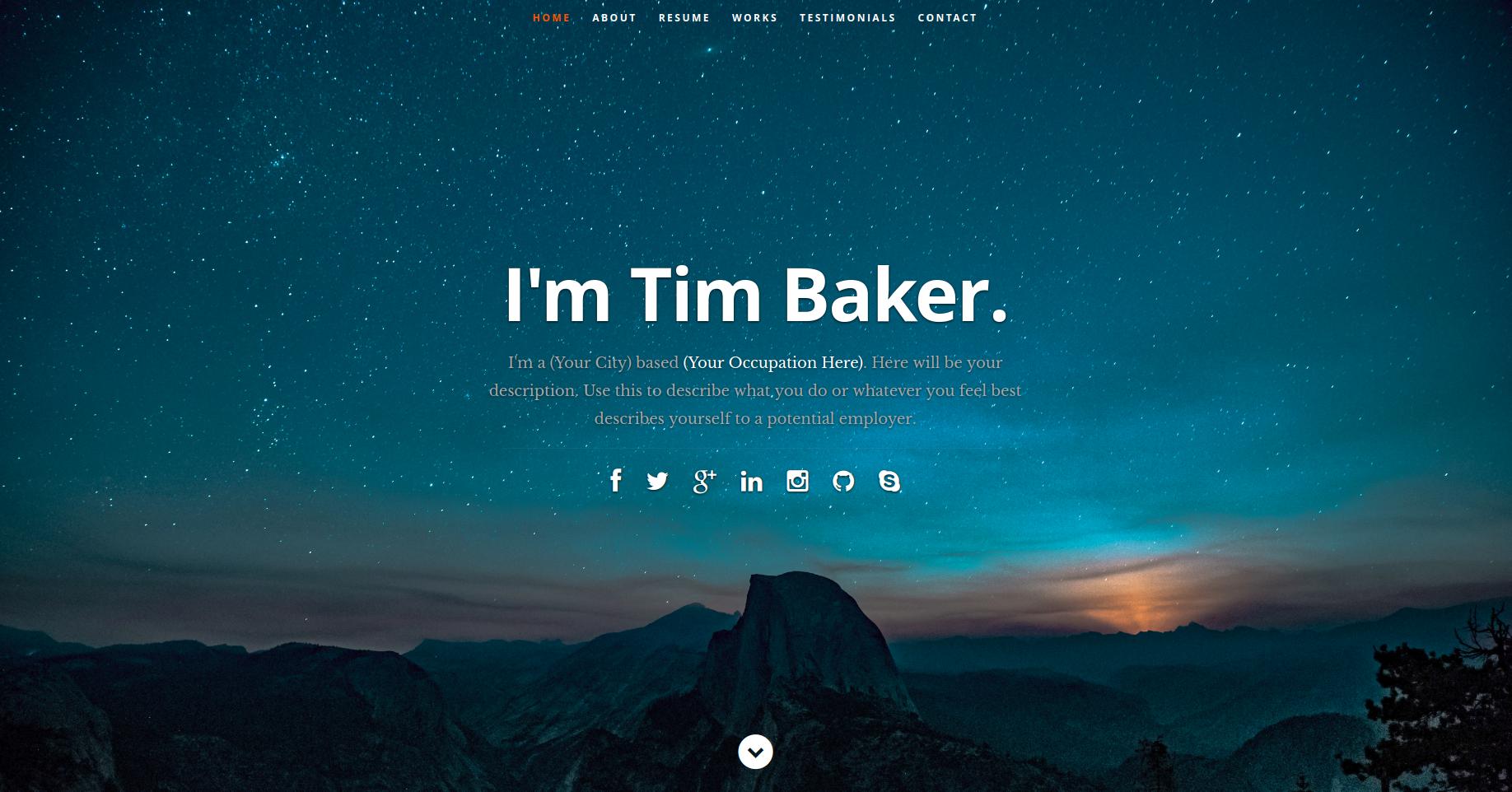
简历内容集中在 public/resumeData.json,替换数据即可更新网站展示
React作品集
resume-template — React 作品集模板
作者 logika024
基于 React 的个人简历网站模板,页面内容由 public/resumeData.json 驱动,替换 JSON 数据即可展示自己的履历信息。
看看你的网站会是什么样
浏览真实页面截图,比较内容排版与手机效果。点击下方缩略图切换,放大查看整页细节。
目前有 1 张原始预览,可打开完整图片查看设计细节。
截图用于了解视觉与布局,交互效果请以实际项目为准。
采集于 2026-10-01查看来源
值得关注的模板亮点
从已有项目资料中,快速了解它的特点。
基于 ReactJS,页面被拆分为独立的 React 组件
提供作品集区域,图片放在 public/images/portfolio 目录
README 给出从创建 React 项目到替换目录的完整步骤
仓库采用 MIT 许可,允许修改、商用和分发代码
模板详细介绍
这是一个用 ReactJS 编写的个人简历网站模板,作者参考 Udemy 课程并将 Styleshout 的 Ceevee HTML 模板拆分为独立的 React 组件。模板的主要特点是数据与视图分离:简历内容集中存放在 public/resumeData.json 中,修改该文件后网站会动态读取并展示,因此使用者无需改动组件代码即可填入自己的个人信息。
使用流程上,README 要求先通过 Create-React-App 创建项目,再安装 jquery 与 react-ga 两个依赖,然后用模板的 public 和 src 目录替换新建项目的对应目录。图片方面需要替换 public/images/header-background.jpg、public/images/testimonials-bg.jpg 和 public/favicon.ico,且必须保持文件名不变;作品集图片放入 public/images/portfolio 文件夹。样式代码全部开放,可以自行调整。
模板的预览图来自仓库 README,演示站点部署在 Heroku。README 中标注了 Udemy 课程、Ceevee 模板以及两张 Unsplash 头像照片的来源。仓库采用 MIT 许可,可免费使用、修改、商用和分发代码,但图片、字体、图标等第三方素材需要单独核对许可,域名、托管等外部服务也可能产生费用。
React作品集
适合你的项目吗?
适用场景
- 个人求职时搭建一份在线简历页面
- 作为 React 组件拆分与 JSON 数据驱动页面的学习参考
- 在已有 React 项目基础上替换数据快速生成个人主页
适合人群
- 希望用 JSON 配置维护简历内容的个人开发者
- 正在学习 React 组件化与数据驱动渲染的初学者
- 需要一份可自行修改样式的开源简历模板的使用者
上手与定制指南
结合仓库当前版本的说明,按下面的资料检查内容、配置与运行要求。
- 1
需先安装 Node(README 要求 Node >=6),并用 Create-React-App 创建初始项目
- 2
在项目目录中执行 npm install jquery --save 和 npm install react-ga --save
- 3
用模板的 public 与 src 目录替换新建项目的对应目录
- 4
替换 public/images/header-background.jpg、public/images/testimonials-bg.jpg 和 public/favicon.ico 时必须保持原文件名
- 5
简历数据写入 public/resumeData.json,作品集图片放入 public/images/portfolio
授权与来源资料
使用条件与限制
免费使用 · 保留许可声明本次收录的是公开仓库中采用 MIT 许可的免费版本;免费范围为该版本代码,不代表外部服务或第三方素材免费。
使用时需要遵守
- 允许免费使用、修改、商用和分发该版本代码。
- 分发代码副本或实质性部分时,保留原作者版权声明和完整 MIT 许可声明。
- 代码按现状提供;担保与责任限制以原许可证及适用法律为准。
额外费用与待核对事项
- 使用前必须在项目目录中执行 npm install jquery --save 和 npm install react-ga --save,安装 jquery 与 react-ga 两个依赖,否则模板无法正常运行。
- 替换图片时 public/images/header-background.jpg、public/images/testimonials-bg.jpg 和 public/favicon.ico 必须保持原有文件名,不能改名,否则页面无法正确加载图片。
- 本地构建需要预先安装 Node.js(README 要求 Node >=6),并需通过 Create-React-App 创建初始项目后再替换 public 与 src 目录。
- 演示图片、字体、图标及其他第三方素材需按各自许可核对,不能仅凭代码的 MIT 许可判断。
- 域名、托管、数据库、支付或 AI 等外部服务可能另外收费。
查看原文依据
Permission is hereby granted, free of charge
许可证原文
YOU MUST RUN THESE COMMANDS.
README 原文
YOU MUST KEEP THE SAME NAMES ON THE IMAGES.
README 原文
https://github.com/logika024/resume-template/blob/master/LICENSEhttps://github.com/logika024/resume-template/blob/master/README.mdyou will need to have Node >=6 downloaded and installed on your machine
README 原文
DeepSeek 根据仓库许可证和 README 整理 ·2026-10-01。结果仅覆盖已读取资料,依赖、图片、字体及后续条款变更以各自原文为准。
项目核对记录与介绍依据
模板资料
- 来源平台
- GitHub
- 资料与维护参考分
- 资料一般 · 65 / 100
- 技术栈
- React
- 网站类型
- 作品集
这个分数如何计算
本站按许可资料(最高30分)、演示链接(12分)、预览图(10分)、Star数(15分)、记录的维护时间(15分)、描述完整度(8分)、功能记录(5分)和分类资料(5分)计算。它不是代码、安全或性能测试,也不是 Google 评分;有链接不代表已实测可用。
这个项目需要核对什么
- 记录的仓库更新时间
- 2025-01-16
- 截图检查日期
- 2026-10-01
目前没有记录演示链接。请依据仓库说明在本地评估;仅凭截图无法确认交互行为。
目录记录的主要技术栈是 React。请通过依赖清单和锁文件核对实际版本与托管要求。这些说明基于收录资料,不代表代码审计或部署实测。
查看具体选型方法 →介绍的制作与核对状态
介绍由 AI 辅助整理目录与仓库资料。仓库作者不等于这篇介绍的审核者。
已完成服务器许可规则与 AI 来源核对;未经过人工编辑审核。
查看当时使用的来源资料
SHA-256: b34431f7d5ba69d60527111c3ed4ba373e31d56ea2892ec4f8325da3f2432ec0
2026-10-01T04:22:13.926Z
来源文件 / 仓库# React JS Resume Web App Template  ### <a href="https://react-resume-template.herokuapp.com/">LIVE DEMO</a> ## Description This is a ReactJS based personal resume website template. I have built this by following a Udemy course (credits below) and by beginning with the Ceevee template by Styleshout (credits also below), and breaking up their template into isolated React components. Data is fed directly from a JSON File. This means that in its final form, it can be customized and used by anybody simply by filling in their own personal info into the JSON file and the changes will be dynamically fed into the site. If you would like to use this template for your own personal resume website, read on to learn how to build your own copy. ## Make it Your Own! ### 1. Make sure you have what you need To build this website, you will need to have Node >=6 downloaded and installed on your machine. If you don't already have it, you can get it <a href="https://nodejs.org/en/download/">HERE</a> ### 2. Build a Create-React-App Next, you will build the initial application using a handy tool called Create-React-App. This allows you to get up and running with a React app without the headache of setting up build-tool configurations. Go <a href="https://reactjs.org/docs/installation.html">HERE</a> to get started. When the app building is finished run `cd yourappname` and run `npm start` to test it out. Hit ctrl+c in the terminal when you want to stop the server that the above command starts. For this project we will also need to install JQuery and ReactGA, do this by running `npm install jquery --save` and `npm install react-ga --save` in your terminal while inside your project folder. YOU MUST RUN THESE COMMANDS. ### 3. Download the template Once you have a React app up and running by following the steps in the above link, download my code by hitting the green "clone or download" button above and hit download zip. All you will have to do now is replace the "public" and "src" folders of your newly built app with mine that you just downloaded. If you run `npm start` now, you should see that your app renders the same as the one at the live demo link above. ### 4. Replace images and fonts Next, you will want to replace the images, and fonts if you like, with your own. All you have to do is replace the images at public/images/header-background.jpg, public/images/testimonials-bg.jpg and public/favicon.ico with your own. <em>YOU MUST KEEP THE SAME NAMES ON THE IMAGES.</em> ### 5. Fill in your personal info To populate the website with all of your own data, open the public/resumeData.json file and simply replace the data in there with your own. Images for the porfolio section are to be put in the public/images/portfolio folder. ### 6. Make any styling changes you would like Of course, all of the code is there and nothing is hidden from you so if you would like to make any other styling changes, feel free! ### 7. Enjoy your new Resume Website When you're all done, run `npm start` again and you'll see your new personal resume website! Congratulations! ## Credits ##### Udemy Course <a href="https://www.udemy.com/projects-in-reactjs-the-complete-react-learning-course/learn/v4/overview">Projects in ReactJS: The Complete React Learning Course by Eduonix</a> #### HTML Design Template <a href="https://www.styleshout.com/free-templates/ceevee/">Ceevee Template by Styleshout</a> ##### Header photo credit <a href="https://unsplash.com/@mischievous_penguins?utm_medium=referral&utm_campaign=photographer-credit&utm_content=creditBadge">Casey Horner</a> ##### Testimonial photo credit <a href="https://unsplash.com/@samuelzeller?utm_medium=referral&utm_campaign=photographer-credit&utm_content=creditBadge">Samuel Zeller</a>
看看同类模板
对比同技术栈与用途的模板,找到更适合的视觉与内容结构。

react-portfolio-template
React powered portfolio website template for developers
React · 作品集

personal-website-react
personal-website-react 是一个面向开发者的个人作品集单页模板,由 React 和 Material-UI 构建,并通过 Create React App 初始化。
React · 作品集

karngyan.com
karngyan.com 是一个面向开发者的个人网站与博客模板,作者用它搭建了自己的站点,并公开了完整代码。 模板的核心定位很明确:让写作者专注于内容,而不是花时间搭建基础设施。
React · 作品集

react-portfolio-template
react-portfolio-template 是一个由 Ryan Balieiro 开发的 React 作品集模板,定位为“sleek, futuristic”,适合开发者展示个人履历。
React · 作品集

portfolio
Personal website, Data scientist portfolio template
React · 作品集

react-portfolio
react-portfolio 是一个面向开发者的个人作品集模板,基于 React 16 和 Create React App 构建,界面样式采用 Material-UI。
React · 作品集