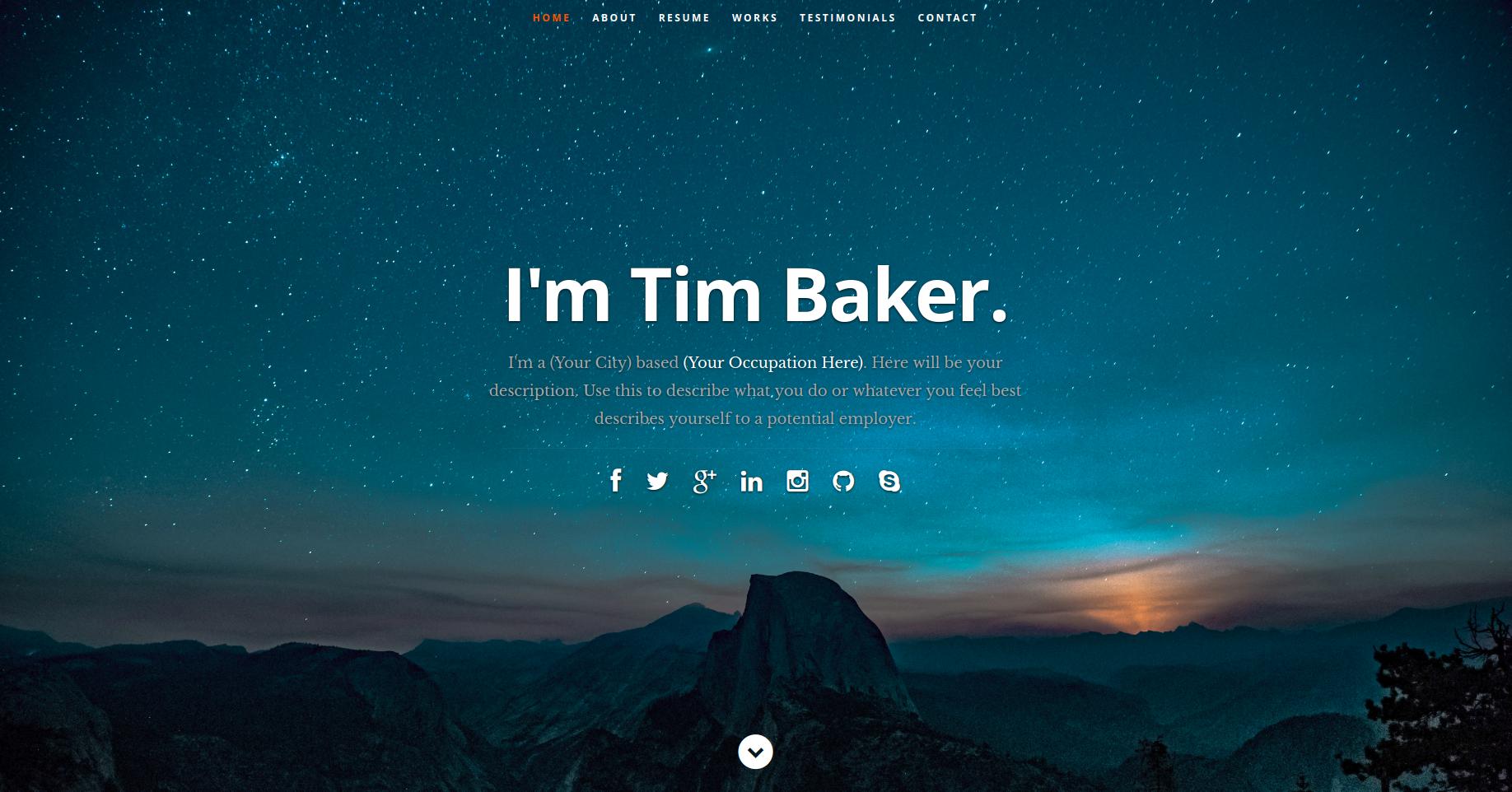
Resume content is centralized in public/resumeData.json; replacing the data updates the website display
ReactPortfolio
resume-template — React Portfolio Template
By logika024
A React-based personal resume website template where page content is driven by public/resumeData.json; replace the JSON data to display your own resume information.
Explore the design
Compare the page layouts and mobile experience. Open any screenshot for a closer look.
Author preview
Author-provided preview
Preview provided in the project README.
One original preview is available. Open the full image to inspect the design.
Screenshots show visual appearance; interactive behavior may differ.
Recorded 2026-10-01View source
What stands out
A quick read of the recorded project description.
Based on ReactJS, with pages split into separate React components
Provides a portfolio section, with images placed in the public/images/portfolio directory
The README gives complete steps from creating a React project to replacing directories
The repository uses the MIT license, allowing modification, commercial use, and distribution of the code
Template Details
This is a personal resume website template written in ReactJS. The author referenced a Udemy course and split Styleshout's Ceevee HTML template into separate React components. The template's main characteristic is the separation of data and view: resume content is stored centrally in public/resumeData.json, and after modifying that file the website dynamically reads and displays it, so users can fill in their own personal information without changing component code.
For the workflow, the README requires first creating a project via Create-React-App, then installing the jquery and react-ga dependencies, and then replacing the new project's public and src directories with the template's corresponding directories. For images, you need to replace public/images/header-background.jpg, public/images/testimonials-bg.jpg, and public/favicon.ico, and the filenames must remain unchanged; portfolio images go into the public/images/portfolio folder. All style code is open and can be adjusted freely.
The template's preview image comes from the repository README, and the demo site is deployed on Heroku. The README notes the sources of the Udemy course, the Ceevee template, and two Unsplash avatar photos. The repository uses the MIT license, allowing free use, modification, commercial use, and distribution of the code, but third-party assets such as images, fonts, and icons need separate license verification, and external services such as domains and hosting may incur costs.
ReactPortfolio
Is it right for your project?
Use Cases
- Building an online resume page for personal job applications
- As a learning reference for React component splitting and JSON data-driven pages
- Quickly generating a personal homepage by replacing data in an existing React project
Suitable For
- Individual developers who want to maintain resume content via JSON configuration
- Beginners learning React componentization and data-driven rendering
- Users who need an open-source resume template with customizable styles
Getting started & customization
Use these recorded setup notes alongside the repository instructions for your chosen version.
- 1
Node must be installed first (the README requires Node >=6), and an initial project must be created with Create-React-App
- 2
Run npm install jquery --save and npm install react-ga --save in the project directory
- 3
Replace the new project's public and src directories with the template's corresponding directories
- 4
When replacing public/images/header-background.jpg, public/images/testimonials-bg.jpg, and public/favicon.ico, the original filenames must be kept
- 5
Write resume data into public/resumeData.json, and place portfolio images into public/images/portfolio
License & source material
Usage conditions & limitations
Free to use · keep license noticeThis entry covers the free version in a public repository under the MIT license; the free scope is the code of that version and does not mean external services or third-party assets are free.
Must comply with when using
- Free use, modification, commercial use, and distribution of this version's code are permitted.
- When distributing copies or substantial portions of the code, retain the original author's copyright notice and the complete MIT license notice.
- The code is provided as is; warranties and limitations of liability are governed by the original license and applicable law.
Additional costs & items to verify
- Before use, you must run npm install jquery --save and npm install react-ga --save in the project directory to install the jquery and react-ga dependencies; otherwise the template will not run properly.
- When replacing images, public/images/header-background.jpg, public/images/testimonials-bg.jpg, and public/favicon.ico must keep their original filenames and cannot be renamed, otherwise the page will not load images correctly.
- Local builds require Node.js to be installed in advance (the README requires Node >=6), and an initial project must be created via Create-React-App before replacing the public and src directories.
- Demo images, fonts, icons, and other third-party assets must be checked against their respective licenses and cannot be judged solely by the code's MIT license.
- External services such as domains, hosting, databases, payments, or AI may incur additional charges.
View Original Text Basis
Permission is hereby granted, free of charge
Original License Text
YOU MUST RUN THESE COMMANDS.
Original README
YOU MUST KEEP THE SAME NAMES ON THE IMAGES.
Original README
https://github.com/logika024/resume-template/blob/master/LICENSEhttps://github.com/logika024/resume-template/blob/master/README.mdyou will need to have Node >=6 downloaded and installed on your machine
Original README
Compiled by DeepSeek based on repository license and README ·2026-10-01. Results only cover the materials read; dependencies, images, fonts, and subsequent term changes are subject to their respective original texts.
Project checks & description sources
Template Information
- Source platforms
- GitHub
- Documentation and maintenance reference score
- Partly documented · 65 / 100
- Technologies
- React
- Website type
- Portfolio
How this score is calculated
Our heuristic uses license records (up to 30), a demo link (12), a preview (10), stars (15), recorded maintenance (15), description completeness (8), feature records (5) and classification data (5). It is not a code, security or performance test, or a Google score. A link does not establish tested functionality.
What to verify for this project
- Repository update recorded
- 2025-01-16
- Screenshot last checked
- 2026-10-01
No demo link is recorded. Use the repository instructions to evaluate the project locally; the screenshot alone cannot establish interactive behavior.
The catalog identifies React as the primary stack. Check the actual dependency manifest and lockfile for versions and hosting requirements. These notes use recorded metadata, not a code audit or a deployment test.
Use a selection guide →How this description was prepared
AI-assisted description based on catalog records and repository material. Repository authors are not automatically the reviewers of this description.
Automatically checked against source and license rules; no manual editorial review.
Inspect the recorded source material
SHA-256: b34431f7d5ba69d60527111c3ed4ba373e31d56ea2892ec4f8325da3f2432ec0
2026-10-01T04:22:13.926Z
Source file / repository# React JS Resume Web App Template  ### <a href="https://react-resume-template.herokuapp.com/">LIVE DEMO</a> ## Description This is a ReactJS based personal resume website template. I have built this by following a Udemy course (credits below) and by beginning with the Ceevee template by Styleshout (credits also below), and breaking up their template into isolated React components. Data is fed directly from a JSON File. This means that in its final form, it can be customized and used by anybody simply by filling in their own personal info into the JSON file and the changes will be dynamically fed into the site. If you would like to use this template for your own personal resume website, read on to learn how to build your own copy. ## Make it Your Own! ### 1. Make sure you have what you need To build this website, you will need to have Node >=6 downloaded and installed on your machine. If you don't already have it, you can get it <a href="https://nodejs.org/en/download/">HERE</a> ### 2. Build a Create-React-App Next, you will build the initial application using a handy tool called Create-React-App. This allows you to get up and running with a React app without the headache of setting up build-tool configurations. Go <a href="https://reactjs.org/docs/installation.html">HERE</a> to get started. When the app building is finished run `cd yourappname` and run `npm start` to test it out. Hit ctrl+c in the terminal when you want to stop the server that the above command starts. For this project we will also need to install JQuery and ReactGA, do this by running `npm install jquery --save` and `npm install react-ga --save` in your terminal while inside your project folder. YOU MUST RUN THESE COMMANDS. ### 3. Download the template Once you have a React app up and running by following the steps in the above link, download my code by hitting the green "clone or download" button above and hit download zip. All you will have to do now is replace the "public" and "src" folders of your newly built app with mine that you just downloaded. If you run `npm start` now, you should see that your app renders the same as the one at the live demo link above. ### 4. Replace images and fonts Next, you will want to replace the images, and fonts if you like, with your own. All you have to do is replace the images at public/images/header-background.jpg, public/images/testimonials-bg.jpg and public/favicon.ico with your own. <em>YOU MUST KEEP THE SAME NAMES ON THE IMAGES.</em> ### 5. Fill in your personal info To populate the website with all of your own data, open the public/resumeData.json file and simply replace the data in there with your own. Images for the porfolio section are to be put in the public/images/portfolio folder. ### 6. Make any styling changes you would like Of course, all of the code is there and nothing is hidden from you so if you would like to make any other styling changes, feel free! ### 7. Enjoy your new Resume Website When you're all done, run `npm start` again and you'll see your new personal resume website! Congratulations! ## Credits ##### Udemy Course <a href="https://www.udemy.com/projects-in-reactjs-the-complete-react-learning-course/learn/v4/overview">Projects in ReactJS: The Complete React Learning Course by Eduonix</a> #### HTML Design Template <a href="https://www.styleshout.com/free-templates/ceevee/">Ceevee Template by Styleshout</a> ##### Header photo credit <a href="https://unsplash.com/@mischievous_penguins?utm_medium=referral&utm_campaign=photographer-credit&utm_content=creditBadge">Casey Horner</a> ##### Testimonial photo credit <a href="https://unsplash.com/@samuelzeller?utm_medium=referral&utm_campaign=photographer-credit&utm_content=creditBadge">Samuel Zeller</a>
Explore similar templates
Compare previews and descriptions within the same stack and category.

react-portfolio-template
A React-based developer portfolio template for showcasing projects, work history, and skills. It offers a multi-component layout, dark and light modes, and responsive mobile adaptation, with text and images editable in src/components.
React · Portfolio

personal-website-react
A single-page developer portfolio template built with React and Material-UI, driven by a JSON Resume-compliant resume.json. It offers light/dark theme switching with localStorage persistence, a clean responsive layout, and Create React App tooling for simple builds and static deployment.
React · Portfolio

karngyan.com
A personal website and blog template for developers, built with TanStack Start, React 19, Tailwind CSS v4, and shadcn/ui. It uses MDX for articles with Shiki highlighting and GFM tables, and automatically generates RSS, sitemap, robots.txt, llms.txt, and OG images.
React · Portfolio

react-portfolio-template
A React portfolio template by Ryan Balieiro with a fixed sidebar and page-turn transitions on desktop, bottom navigation on mobile, multilingual support, light/dark themes, and content components for experience, education, skills, projects, and testimonials.
React · Portfolio

portfolio
A data scientist personal portfolio template built with React and MUI, with content centrally managed through configuration files in the assets directory.
React · Portfolio

react-portfolio
A React 16 and Material-UI developer portfolio template that centralizes personal information in a JSON Resume-compliant resume.json, with light/dark theme switching saved to local storage. It currently provides portfolio display only; resume page templates and structured data enhancements are still planned.
React · Portfolio