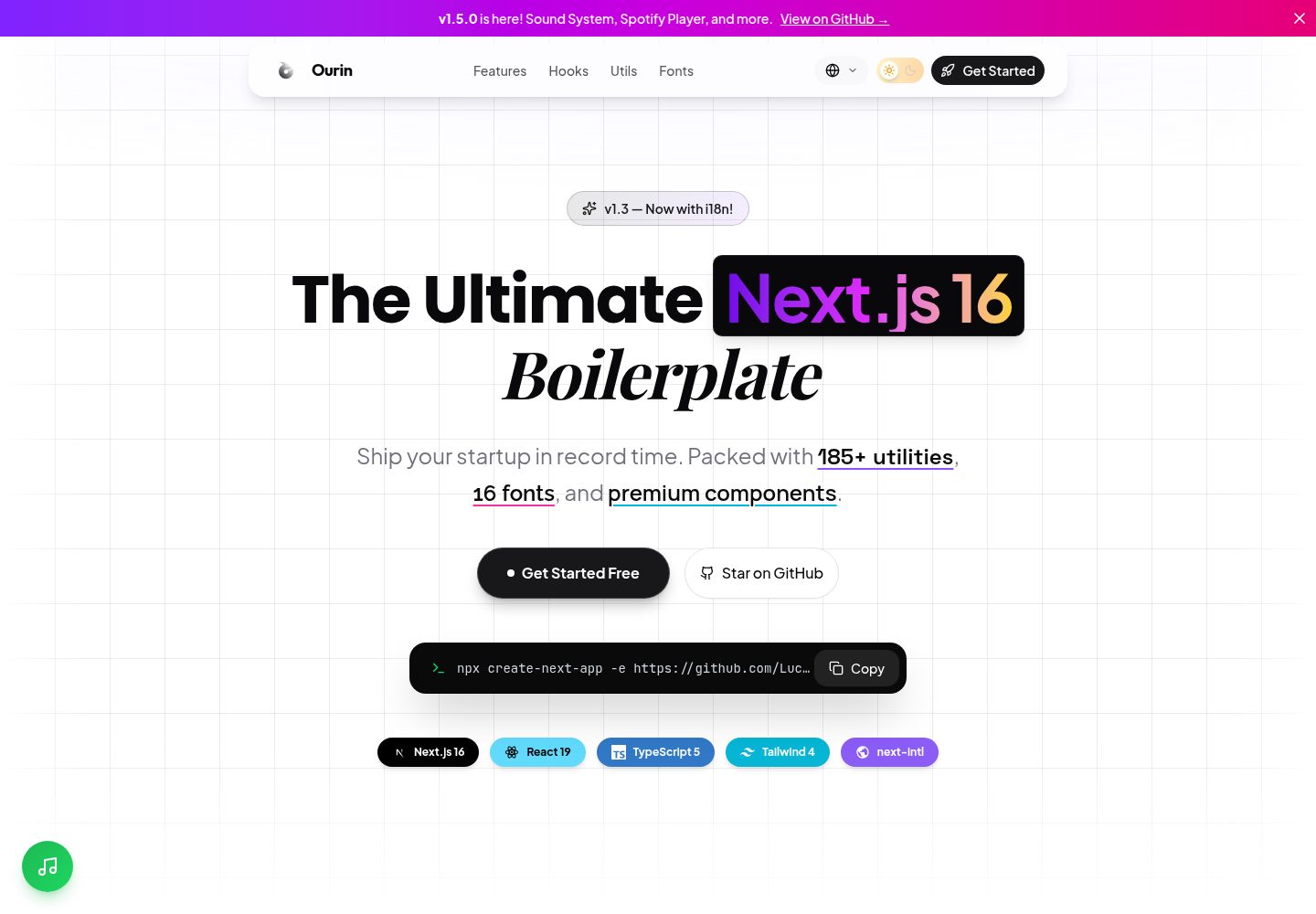
基于 Next.js App Router 与 React Server Components 构建,默认服务端渲染组件
Next.jsReact启动器
ourin-nextjs-starter — Next.js 启动器模板
作者 LuckyArch
Ourin 是一个基于 Next.js App Router 的启动模板,内置 TypeScript、Tailwind CSS、Shadcn/UI、next-intl 国际化、主题切换,以及 185+ 工具函数和 20+ 自定义 Hooks。
看看你的网站会是什么样
浏览真实页面截图,比较内容排版与手机效果。点击下方缩略图切换,放大查看整页细节。
全部页面与视图 2
截图用于了解视觉与布局,交互效果请以实际项目为准。
采集于 2026-10-14查看来源
值得关注的模板亮点
从已有项目资料中,快速了解它的特点。
使用 TypeScript 严格模式,README 称全项目无 any 类型
集成 Tailwind CSS 4 与 Shadcn/UI(Radix UI + Tailwind)组件体系
内置 next-intl 国际化,附带英语和印尼语翻译及语言切换组件
提供 185+ 工具函数与 20+ 自定义 React Hooks 的分类库
包含示例 API 路由(健康检查、用户 CRUD)与预配置中间件(安全头、CORS、日志、认证模式)
模板详细介绍
Ourin 是一个面向现代 Web 应用的 Next.js 启动模板,README 将其定位为「有主见、生产就绪的启动套件」,目标是在新项目开始时省去重复的配置工作。模板默认使用 React Server Components,并启用了 Turbopack 作为开发构建工具。样式层基于 Tailwind CSS 4,组件层集成 Shadcn/UI(基于 Radix UI 与 Tailwind)。主题切换通过 next-themes 实现,支持系统偏好检测与动画切换。国际化方面使用 next-intl,内置英语和印尼语翻译,并提供语言切换下拉组件,中间件负责语言路由与检测。模板还包含示例 API 路由(健康检查、带分页与校验的用户 CRUD)、预配置中间件(安全头、CORS、日志、认证模式),以及严格模式的 TypeScript 配置。README 声称包含 185+ 工具函数(覆盖字符串、数组、日期、数字、颜色、异步、加密、浏览器检测等分类)和 20+ 自定义 Hooks(如防抖、数据获取、倒计时、网络状态等)。项目结构清晰,包含 app、components、hooks、lib、config、constants、types 等目录。README 未提供关于生产环境部署、性能基准或具体框架版本兼容性的详细说明。
Next.jsReact启动器
适合你的项目吗?
适用场景
- 需要快速启动一个带国际化、主题切换和组件库的 Next.js 项目
- 希望直接使用现成的工具函数库和自定义 Hooks 来减少重复代码
- 需要参考示例 API 路由和中间件配置来搭建后端接口与安全策略
- 构建 SaaS 产品、营销站点或内部工具的前端基础架构
适合人群
- 熟悉 Next.js App Router 与 TypeScript 的前端开发者
- 需要多语言支持和明暗主题切换的 Web 应用项目
- 希望以 Shadcn/UI 和 Tailwind CSS 为基础搭建设计系统的团队
- 偏好使用 pnpm 作为包管理器的开发者
上手与定制指南
结合仓库当前版本的说明,按下面的资料检查内容、配置与运行要求。
- 1
需要 Node.js 18.x 或更高版本,推荐使用 pnpm 包管理器
- 2
可通过 npx create-next-app -e https://github.com/LuckyArch/ourin-nextjs-starter my-app 快速创建项目
- 3
手动安装需克隆仓库后执行 pnpm install,再运行 pnpm dev 启动开发服务器
- 4
开发服务器默认运行在 http://localhost:3000
授权与来源资料
使用条件与限制
免费使用 · 保留许可声明本次收录的是公开仓库中采用 MIT 许可的免费版本;免费范围为该版本代码,不代表外部服务或第三方素材免费。
使用时需要遵守
- 允许免费使用、修改、商用和分发该版本代码。
- 分发代码副本或实质性部分时,保留原作者版权声明和完整 MIT 许可声明。
- 代码按现状提供;担保与责任限制以原许可证及适用法律为准。
额外费用与待核对事项
- 演示图片、字体、图标及其他第三方素材需按各自许可核对,不能仅凭代码的 MIT 许可判断。
- 域名、托管、数据库、支付或 AI 等外部服务可能另外收费。
查看原文依据
https://github.com/LuckyArch/ourin-nextjs-starter/blob/main/LICENSEhttps://github.com/LuckyArch/ourin-nextjs-starter/blob/main/README.mdPermission is hereby granted, free of charge
许可证原文
DeepSeek 根据仓库许可证和 README 整理 ·2026-10-14。结果仅覆盖已读取资料,依赖、图片、字体及后续条款变更以各自原文为准。
项目核对记录与介绍依据
模板资料
- 来源平台
- GitHub
- 资料与维护参考分
- 资料较完整 · 88 / 100
- 技术栈
- Next.js · React
- 网站类型
- 启动器
这个分数如何计算
本站按许可资料(最高30分)、演示链接(12分)、预览图(10分)、Star数(15分)、记录的维护时间(15分)、描述完整度(8分)、功能记录(5分)和分类资料(5分)计算。它不是代码、安全或性能测试,也不是 Google 评分;有链接不代表已实测可用。
这个项目需要核对什么
- 记录的仓库更新时间
- 2025-12-17
- 截图检查日期
- 2026-10-14
已收录演示链接。请用你的内容与屏幕尺寸检查;有演示不代表表单、认证或支付已经可用。
目录记录的主要技术栈是 Next.js。请通过依赖清单和锁文件核对实际版本与托管要求。这些说明基于收录资料,不代表代码审计或部署实测。
查看具体选型方法 →介绍的制作与核对状态
介绍由 AI 辅助整理目录与仓库资料。仓库作者不等于这篇介绍的审核者。
审核声明: codex-user-requested-batch-review-20261017 · 2026-10-16
查看当时使用的来源资料
SHA-256: 82a035e2c10390cc92fddf1ef9a86a251bb23d1be447a46e9658ebff901fdda6
2026-10-14T14:46:47.473Z
来源文件 / 仓库# Ourin - The Ultimate Next.js Boilerplate
<div align="center">
<img src="public/logo.png" alt="Ourin Logo" width="240" />
<h3>Ship your startup in record time.</h3>
<p>An opinionated, production-ready starter kit for modern web applications.</p>
<br />
<a href="https://ourin-nextjs-starter.vercel.app/">
<img src="https://img.shields.io/badge/🚀_Live_Demo-Visit_Site-8B5CF6?style=for-the-badge" alt="Live Demo" />
</a>
</div>
<p align="center">
<img src="https://img.shields.io/github/v/release/LuckyArch/ourin-nextjs-starter?style=flat-square&color=8B5CF6" alt="Version" />
<img src="https://img.shields.io/github/license/LuckyArch/ourin-nextjs-starter?style=flat-square" alt="License" />
<img src="https://img.shields.io/badge/TypeScript-5.0-3178C6?style=flat-square&logo=typescript" alt="TypeScript" />
<img src="https://img.shields.io/badge/Next.js-16-black?style=flat-square&logo=next.js" alt="Next.js" />
<img src="https://img.shields.io/badge/Tailwind-4.0-06B6D4?style=flat-square&logo=tailwindcss" alt="Tailwind CSS" />
<img src="https://img.shields.io/badge/React-19-61DAFB?style=flat-square&logo=react" alt="React" />
</p>
<p align="center">
<a href="#-key-features">Features</a> •
<a href="#-getting-started">Quick Start</a> •
<a href="https://ourin-nextjs-starter.vercel.app/">Demo</a> •
<a href="#-contributing">Contributing</a>
</p>
---
## 📖 Table of Contents
- [What's New](#-whats-new-in-v15)
- [Introduction](#-introduction)
- [Key Features](#-key-features)
- [Technology Stack](#-technology-stack)
- [Getting Started](#-getting-started)
- [Project Structure](#-project-structure)
- [Typography System](#-typography-system)
- [Utility Library Deep Dive](#-utility-library-deep-dive)
- [Custom Hooks Reference](#-custom-hooks-reference)
- [Component Showcase](#-component-showcase)
- [Configuration Guide](#-configuration-guide)
- [Contributing](#-contributing)
- [License](#-license)
---
## 🆕 What's New in v1.5
### 🔊 Sound System (v1.4)
- **`useSoundEffects` hook**: Lightweight Web Audio API-based sounds for UI feedback
- **`useSound` hook**: Full audio file playback with controls
- **Sound utilities**: `SynthSound`, `SoundManager` for centralized audio management
### 🎵 Spotify Integration (v1.4)
- **`SpotifyModal` component**: Floating music button with modal player
- Supports playlists, albums, tracks, or custom Spotify URLs
- Mute toggle and theme customization
### 📍 UX Enhancements (v1.5)
- **Scroll Progress Indicator**: Gradient progress bar at the top of the page
- **Back to Top Button**: Floating button with SVG progress ring
- **Light/Dark Mode Grid**: Optimized bento grid for both themes
- **Brand Tech Stack Pills**: Colored badges with framework icons
- **Performance Optimizations**: Lazy loading with `React.lazy()` and `Suspense`
---
## 🌟 Introduction
**Ourin** is not just another Next.js template. It's a meticulously crafted architectural foundation designed to eliminate the repetitive setup phase of every new project. Whether you're building a SaaS product, a marketing site, or an internal tool, Ourin provides a rock-solid starting point that adheres to industry best practices.
We believe developers should spend their time building features, not configuring build tools or copy-pasting utility functions from old projects. That's why Ourin comes pre-loaded with everything you need: a massive library of **185+ utility functions**, **20+ custom React hooks**, a **premium 16-font typography system**, example API routes, and a production-ready middleware.
The entire codebase is strictly typed with **TypeScript 5**, ensuring type safety from the ground up. The styling is powered by **Tailwind CSS 4** with its new Oxide engine for blazing-fast builds and zero runtime overhead. And for UI components, we've integrated **Shadcn/UI**, giving you access to a world-class component library built on accessible Radix UI primitives.
---
## 🚀 Key Features
### ⚡ Performance-First Architecture
- **React Server Components (RSC)**: By default, all components are server-rendered, minimizing client-side JavaScript and maximizing performance.
- **Turbopack**: Next.js's new bundler is enabled for near-instant Hot Module Replacement (HMR) during development.
- **Zero-Runtime CSS**: Tailwind CSS 4's Oxide engine compiles all styles at build time, meaning no CSS-in-JS overhead.
### 🎨 World-Class Design System
- **16-Font Typography**: A carefully curated font stack for every use case—display, body, serif, mono, handwriting, and UI.
- **Glassmorphism & Gradients**: Pre-built CSS utilities for modern glass effects, text gradients, and shadow glows.
- **Dark Mode Built-In**: Seamless theme switching using `next-themes` with system preference detection and animated toggle.
### 🧰 Developer Experience
- **185+ Utility Functions**: Categorized library for strings, arrays, dates, numbers, colors, async, crypto, browser detection, and more.
- **20+ Custom Hooks**: Production-ready hooks for debouncing, data fetching, countdown timers, network status, and more.
- **Example API Routes**: Health check, CRUD users endpoints with pagination and validation.
- **Middleware**: Pre-configured with security headers, CORS, logging, and auth patterns.
- **Strict TypeScript**: No `any` types. Full type safety across the entire project.
### 🌍 Internationalization (i18n)
- **next-intl Integration**: Full i18n support out of the box with next-intl.
- **Multi-Language Ready**: English and Indonesian translations included, easy to add more.
- **Language Switcher**: Beautiful dropdown component for switching between locales.
- **Automatic Locale Detection**: Middleware handles locale routing and detection.
### 🧩 Premium UI Components
- **Floating Navbar**: A modern, animated navigation bar with scroll-aware visibility.
- **Grid Background**: Multi-layer background with grid, dots, and diagonal patterns.
- **Hooks Showcase**: Interactive cards showing all available hooks with diverse fonts.
- **Utils Showcase**: Category cards with gradient icons for utility functions.
- **Copy Command**: A sleek terminal-style pill for CLI commands.
---
## 🛠️ Technology Stack
| Category | Technology |
| ----------------- | -------------------------------------------------------------------------- |
| **Framework** | [Next.js 15/16](https://nextjs.org/) (App Router, React Server Components) |
| **Language** | [TypeScript 5](https://www.typescriptlang.org/) (Strict Mode) |
| **Styling** | [Tailwind CSS 4](https://tailwindcss.com/) (Oxide Engine) |
| **Components** | [Shadcn/UI](https://ui.shadcn.com/) (Radix UI + Tailwind) |
| **Animations** | [Framer Motion](https://www.framer.com/motion/) |
| **Theming** | [next-themes](https://github.com/pacocoursey/next-themes) |
| **Icons** | [Lucide React](https://lucide.dev/) |
| **Fonts** | [next/font/google](https://nextjs.org/docs/app/api-reference/components/font) |
| **Package Manager** | [pnpm](https://pnpm.io/) (recommended) |
---
## 🏁 Getting Started
### Prerequisites
Before you begin, ensure you have the following installed:
- **Node.js**: Version 18.x or later ([Download](https://nodejs.org/))
- **pnpm**: Recommended package manager ([Installation](https://pnpm.io/installation))
- Alternatively, you can use `npm` or `yarn`.
### Quick Start (Recommended)
The fastest way to get started is using `create-next-app` with the `-e` (example) flag:
```bash
npx create-next-app -e https://github.com/LuckyArch/ourin-nextjs-starter my-app
cd my-app
pnpm dev
```
This will create a new Next.js project using Ourin as the template in a folder called `my-app`.
### Manual Installation
Alternatively, you can clone the repository directly:
1. **Clone the repository:**
```bash
git clone https://github.com/LuckyArch/ourin-nextjs-starter.git
cd ourin-nextjs-starter
```
2. **Install dependencies:**
```bash
pnpm install
```
3. **Start the development server:**
```bash
pnpm dev
```
4. **Open in your browser:**
Navigate to [http://localhost:3000](http://localhost:3000). You should see the Ourin homepage.
---
## 📂 Project Structure
The project follows a well-organized, scalable folder structure. Each directory has a clear purpose, making it easy to navigate and extend.
```
ourin-nextjs-starter/
├── app/ # Next.js App Router
│ ├── globals.css # Global styles, Tailwind config, theme variables (850+ lines)
│ ├── layout.tsx # Root layout: Fonts, ThemeProvider, metadata
│ ├── page.tsx # Homepage: Hero, Features, Code section, Footer
│ ├── privacy/ # Privacy Policy page
│ └── terms/ # Terms of Service page
│
├── components/ # Reusable React components
│ ├── ui/ # Shadcn/UI primitive components
│ │ └── button.tsx # Button component with variants
│ ├── theme-provider.tsx # Wrapper for next-themes
│ └── theme-toggle.tsx # Animated dark/light mode switch
│
├── hooks/ # Custom React hooks
│ ├── index.ts # Central export file for all hooks
│ ├── use-debounce.ts # Debounce a value
│ ├── use-local-storage.ts # Persist state to localStorage
│ ├── use-media-query.ts # Track responsive breakpoints
│ ├── use-on-click-outside.ts # Detect clicks outside an element
│ └── ... (15 hooks total)
│
├── lib/ # Library code and utilities
│ ├── utils.ts # Primary `cn` function for class merging
│ └── utils/ # Categorized utility functions
│ ├── api.ts # Fetch wrapper, error handling
│ ├── array.ts # Array manipulation (chunk, unique, groupBy)
│ ├── color.ts # Color conversion, contrast calculations
│ ├── date.ts # Relative time, duration, date parsing
│ ├── dom.ts # Browser-safe utilities
│ ├── format.ts # Currency, file size, percentage formatting
│ ├── number.ts # Clamping, rounding, random, ordinals
│ ├── object.ts # Deep clone, omit, pick, merge
│ ├── storage.ts # Safe localStorage/sessionStorage wrappers
│ ├── string.ts # Slugify, truncate, capitalize, case converters
│ └── validation.ts # Regex patterns for validation
│
├── config/ # Application configuration
│ └── site.ts # Site name, description, navigation links
│
├── constants/ # Global constants
│ └── index.ts
│
├── types/ # Global TypeScript type definitions
│ └── index.ts
│
├── public/ # Static assets
│ └── logo.png # The Ourin logo
│
├── tailwind.config.ts # Tailwind configuration (optional overrides)
├── tsconfig.json # TypeScript configuration
├── package.json # Project dependencies and scripts
├── CHANGELOG.md # Project version history
└── LICENSE # MIT License
```
---
## ✍️ Typography System
Ourin implements a **6-font typography system** to provide maximum flexibility and visual richness. Fonts are loaded efficiently using `next/font/google`, which automatically optimizes font loading and prevents layout shift.
### Font Stack
| CSS Variable | Font Family | Use Case |
| ------------------- | -------------------- | ------------------------------------------ |
| `--font-display` | **Outfit** | Headings, brand name, hero titles |
| `--font-sans` | **Plus Jakarta Sans** | Body text, paragraphs, buttons |
| `--font-serif` | **Playfair Display** | Quotes, taglines, elegant accents |
| `--font-mono` | **JetBrains Mono** | Code blocks, terminal output, technical data |
| `--font-hand` | **Caveat** | Notes, signatures, personal touches |
| `--font-inter` | **Inter** | Small labels, metadata, dense UI |
### Usage in Components
Apply fonts using Tailwind classes:
```jsx
// Display font for headings
<h1 className="font-display text-5xl font-bold">Welcome to Ourin</h1>
// Serif for elegant accents
<p className="font-serif italic text-lg">"Build better apps, faster."</p>
// Monospace for code
<code className="font-mono text-sm">npm install ourin</code>
// Handwriting for personality
<span className="font-hand text-2xl">— The Team</span>
```
---
## 🧰 Utility Library Deep Dive
The `lib/utils/` directory contains **145+ utility functions** categorized by purpose. Here's an in-depth look at each module.
### `api.ts` — HTTP & Networking
A typed fetch wrapper with timeout, error handling, and response parsing.
```typescript
import { fetchWithTimeout, handleApiError } from '@/lib/utils/api';
// Fetch with a 5-second timeout
const data = await fetchWithTimeout('/api/users', { timeout: 5000 });
```
**Key Functions:**
- `fetchWithTimeout(url, options)`: Adds timeout to native fetch.
- `handleApiError(error)`: Standardizes error responses.
- `buildQueryString(params)`: Converts object to URL query string.
---
### `array.ts` — Array Manipulation
Helpers for common array operations without importing Lodash.
```typescript
import { chunk, unique, groupBy, shuffle } from '@/lib/utils/array';
chunk([1, 2, 3, 4, 5], 2); // [[1, 2], [3, 4], [5]]
unique([1, 1, 2, 3, 3]); // [1, 2, 3]
groupBy(users, 'role'); // { admin: [...], user: [...] }
shuffle([1, 2, 3, 4]); // [3, 1, 4, 2] (randomized)
```
**All Functions:** `chunk`, `unique`, `groupBy`, `shuffle`, `intersection`, `difference`, `flatten`, `sortBy`, `take`, `drop`, `compact`, `zip`, `unzip`, `range`, `sample`, `partition`, `first`, `last`, `findLast`, `countBy`, `minBy`, `maxBy`, `sumBy`.
---
### `date.ts` — Date & Time
Format dates in a human-readable way without heavy libraries like Moment.js or date-fns.
```typescript
import { formatRelativeTime, formatDuration, parseDate } from '@/lib/utils/date';
formatRelativeTime(new Date('2025-12-15')); // "2 days ago"
formatDuration(3661000); // "1h 1m 1s"
parseDate('2025-12-17'); // Date object
```
**All Functions:** `formatRelativeTime`, `formatDuration`, `parseDate`, `isValidDate`, `getStartOfDay`, `getEndOfDay`, `addDays`, `subtractDays`, `daysBetween`, `formatDate`, `isToday`, `isYesterday`, `isFuture`, `isPast`.
---
### `format.ts` — Data Formatting
Format numbers, currency, file sizes, and more.
```typescript
import { formatCurrency, formatFileSize, formatPercentage, formatPhone } from '@/lib/utils/format';
formatCurrency(1234567.89); // "$1,234,567.89"
formatFileSize(1048576); // "1 MB"
formatPercentage(0.756); // "75.6%"
formatPhone('6281234567890'); // "+62 812-3456-7890"
```
---
### `string.ts` — String Manipulation
Common string transformations.
```typescript
import { slugify, truncate, capitalize, camelCase, kebabCase } from '@/lib/utils/string';
slugify('Hello World!'); // "hello-world"
truncate('Long text...', 10); // "Long te..."
capitalize('hello'); // "Hello"
camelCase('foo-bar-baz'); // "fooBarBaz"
kebabCase('fooBarBaz'); // "foo-bar-baz"
```
---
### `validation.ts` — Input Validation
Regex patterns and validation functions.
```typescript
import { isEmail, isUrl, isStrongPassword, validateCreditCard } from '@/lib/utils/validation';
isEmail('[email protected]'); // true
isUrl('https://ourin.dev'); // true
isStrongPassword('P@ssw0rd!'); // { valid: true, score: 4 }
validateCreditCard('4111...'); // { valid: true, type: 'visa' }
```
---
*(Similar detail can be provided for `color.ts`, `dom.ts`, `number.ts`, `object.ts`, and `storage.ts` if needed.)*
---
## 🪝 Custom Hooks Reference
The `hooks/` directory contains **15 production-ready React hooks**. Each hook is fully typed and documented.
### `useDebounce<T>(value: T, delay: number): T`
Debounces a value. Useful for search inputs to avoid excessive API calls.
```typescript
const [search, setSearch] = useState('');
const debouncedSearch = useDebounce(search, 500);
useEffect(() => {
// This effect only runs 500ms after the user stops typing
fetchResults(debouncedSearch);
}, [debouncedSearch]);
```
### `useLocalStorage<T>(key: string, initialValue: T): [T, (value: T) => void]`
Persists state to `localStorage` with automatic JSON serialization.
```typescript
const [user, setUser] = useLocalStorage('user', { name: 'Guest' });
```
### `useMediaQuery(query: string): boolean`
Tracks whether a CSS media query matches.
```typescript
const isMobile = useMediaQuery('(max-width: 768px)');
```
### `useOnClickOutside(ref: RefObject, handler: () => void)`
Detects clicks outside a referenced element. Perfect for modals and dropdowns.
```typescript
const ref = useRef(null);
useOnClickOutside(ref, () => setOpen(false));
```
### `useScrollPosition(): { x: number, y: number }`
Tracks the current scroll position of the window.
```typescript
const { y } = useScrollPosition();
const showBackToTop = y > 500;
```
*(Full documentation for all 15 hooks available in the source files.)*
---
## 🧩 Component Showcase
### Floating Navigation Bar
A glassmorphism-styled navbar that intelligently hides when scrolling down and reappears when scrolling up. It uses Framer Motion for smooth animations and `useScroll` from Framer Motion to track scroll position.
**Features:**
- Scroll-aware visibility (hides on scroll down, shows on scroll up).
- Glassmorphism effect with `backdrop-blur` and semi-transparent background.
- Fully responsive with mobile-friendly design.
- Integrated theme toggle.
### Theme Toggle
An animated switch between light and dark modes. Uses `next-themes` for theme management and Framer Motion for the sliding animation of the toggle knob.
### Copy Command
A sleek, terminal-style pill component designed for displaying CLI commands with a one-click copy button. The button shows a checkmark animation on successful copy.
### Code Typewriter
An interactive code block that simulates a typing effect. Great for hero sections or feature showcases where you want to draw attention to your code.
---
## 🔧 Configuration Guide
### Site Metadata (`config/site.ts`)
Centralize your site's name, description, and URLs.
```typescript
export const siteConfig = {
name: 'Ourin',
description: 'The ultimate Next.js boilerplate.',
url: 'https://ourin.dev',
ogImage: 'https://ourin.dev/og.png',
links: {
twitter: 'https://twitter.com/ourin',
github: 'https://github.com/LuckyArch/ourin-nextjs-starter',
},
};
```
### Theming (`globals.css`)
Customize colors by modifying HSL values in the `:root` (light mode) and `.dark` (dark mode) blocks.
```css
:root {
--background: 0 0% 100%;
--foreground: 222.2 84% 4.9%;
--primary: 262.1 83.3% 57.8%; /* Purple */
/* ... */
}
.dark {
--background: 222.2 84% 4.9%;
--foreground: 210 40% 98%;
/* ... */
}
```
---
## 🤝 Contributing
Contributions are what make the open-source community such an amazing place to learn, inspire, and create. Any contributions you make are **greatly appreciated**.
If you have a suggestion that would make this better, please fork the repo and create a pull request. You can also simply open an issue with the tag "enhancement".
1. Fork the Project
2. Create your Feature Branch (`git checkout -b feature/AmazingFeature`)
3. Commit your Changes (`git commit -m 'feat: add some AmazingFeature'`)
4. Push to the Branch (`git push origin feature/AmazingFeature`)
5. Open a Pull Request
### Commit Convention
We follow [Conventional Commits](https://www.conventionalcommits.org/):
- `feat`: A new feature
- `fix`: A bug fix
- `docs`: Documentation only changes
- `style`: Changes that do not affect the meaning of the code (formatting)
- `refactor`: A code change that neither fixes a bug nor adds a feature
- `perf`: A code change that improves performance
- `test`: Adding missing tests
- `chore`: Changes to the build process or auxiliary tools
---
## 📄 License
Distributed under the **MIT License**. See [LICENSE](LICENSE) for more information.
This means you can use this boilerplate for personal and commercial projects with no attribution required.
---
<div align="center">
<p>Built with ❤️ by <a href="https://github.com/LuckyArch">Fauzan Adyatma P</a></p>
<p>
<a href="https://github.com/LuckyArch/ourin-nextjs-starter">GitHub</a> •
<a href="#">Demo (Coming Soon)</a>
</p>
</div>
看看同类模板
对比同技术栈与用途的模板,找到更适合的视觉与内容结构。

ai-website-cloner-template
Clone any website with one command using AI coding agents
Next.js · 启动器

Next.js SaaS Starter
Next.js SaaS Starter 是 Next.js 官方维护的 SaaS 起点模板,定位介于学习资源和可直接部署的脚手架之间。
Next.js · SaaS

Next.js Commerce
Next.js Commerce 是 Vercel 团队维护的电商启动模板,基于 Next.js App Router 构建,采用服务端渲染、React Server Components、Server Actions …
Next.js · 电商

Next-js-Boilerplate
Next-js-Boilerplate 是一个面向 Next.js 16、Tailwind CSS 4 和 TypeScript 的启动器,核心定位是开发者体验优先。
Next.js · 启动器

tailwind-nextjs-starter-blog
tailwind-nextjs-starter-blog 是一个面向个人技术博客的 Next.js 与 Tailwind CSS 启动模板,其 v2 版本基于 App Router 与 React Server Comp…
Next.js · 博客

next-forge
Production-grade Turborepo template for Next.js apps.
Next.js · 启动器