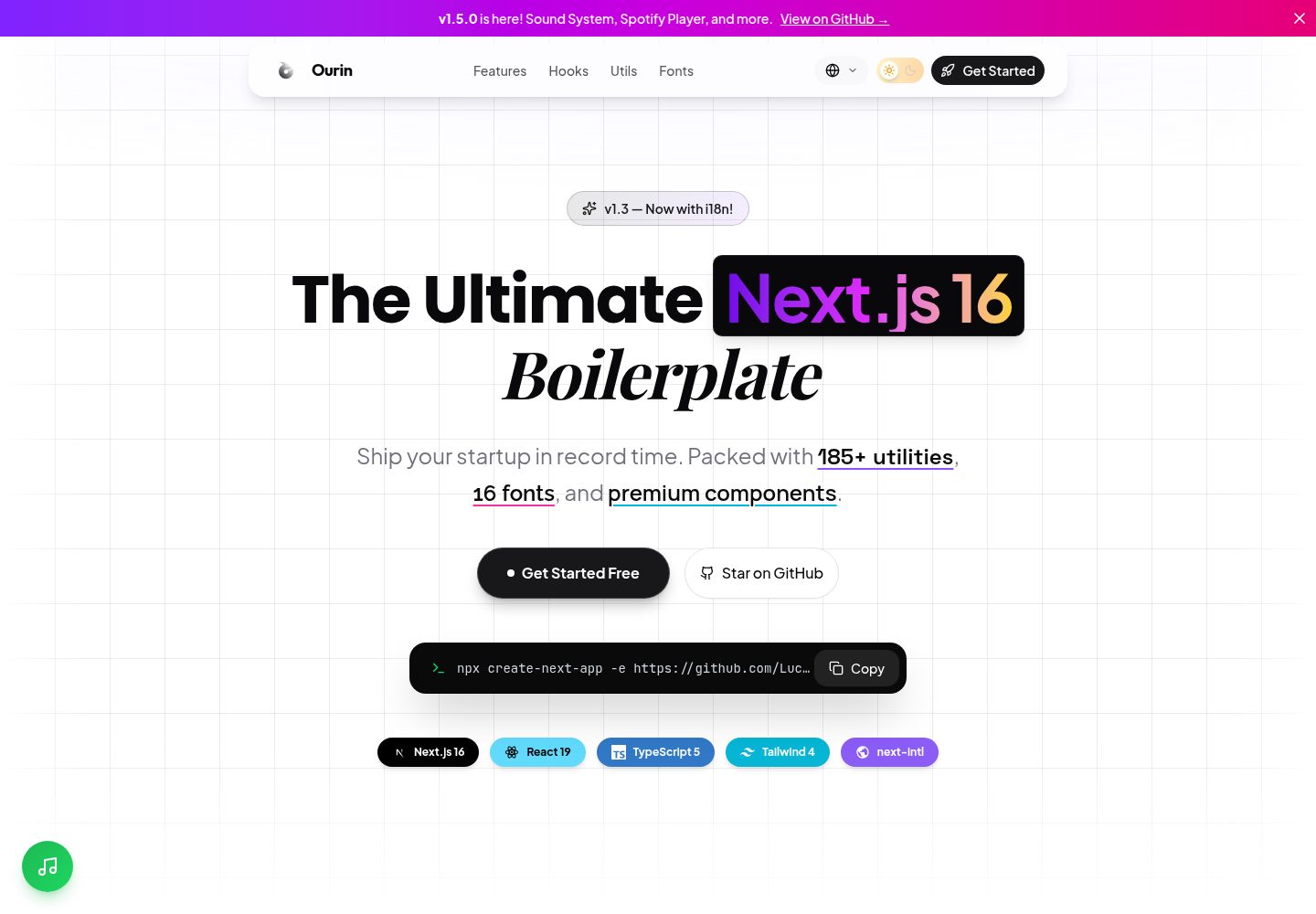
Built on the Next.js App Router and React Server Components, with server-rendered components by default
Next.jsReactStarter
ourin-nextjs-starter — Next.js Starter Template
By LuckyArch
Ourin is a starter template based on the Next.js App Router, with built-in TypeScript, Tailwind CSS, Shadcn/UI, next-intl internationalization, theme switching, plus 185+ utility functions and 20+ custom Hooks.
Explore the design
Compare the page layouts and mobile experience. Open any screenshot for a closer look.
Desktop homepage1 / 2
Desktop captureTop of page
Actual screenshot captured by the server browser.
All pages & views 2
Screenshots show visual appearance; interactive behavior may differ.
Recorded 2026-10-14View source
What stands out
A quick read of the recorded project description.
Uses TypeScript strict mode; the README states the entire project has no any types
Integrates Tailwind CSS 4 and the Shadcn/UI (Radix UI + Tailwind) component system
Built-in next-intl internationalization, with English and Indonesian translations and a language switcher component
Provides a categorized library of 185+ utility functions and 20+ custom React Hooks
Includes example API routes (health check, user CRUD) and preconfigured middleware (security headers, CORS, logging, authentication patterns)
Template Details
Ourin is a Next.js starter template for modern web applications. The README positions it as an "opinionated, production-ready starter kit" aimed at eliminating repetitive configuration work when starting a new project. The template uses React Server Components by default and enables Turbopack as the development build tool. The styling layer is based on Tailwind CSS 4, and the component layer integrates Shadcn/UI (built on Radix UI and Tailwind). Theme switching is implemented via next-themes, supporting system preference detection and animated transitions. For internationalization, it uses next-intl, includes built-in English and Indonesian translations, and provides a language switcher dropdown component, with middleware handling locale routing and detection. The template also includes example API routes (health check, user CRUD with pagination and validation), preconfigured middleware (security headers, CORS, logging, authentication patterns), and a strict-mode TypeScript configuration. The README claims 185+ utility functions (covering categories such as string, array, date, number, color, async, encryption, and browser detection) and 20+ custom Hooks (such as debounce, data fetching, countdown, and network status). The project structure is clear, including directories such as app, components, hooks, lib, config, constants, and types. The README does not provide detailed information on production deployment, performance benchmarks, or specific framework version compatibility.
Next.jsReactStarter
Is it right for your project?
Use Cases
- Quickly starting a Next.js project with internationalization, theme switching, and a component library
- Using the ready-made utility function library and custom Hooks directly to reduce repetitive code
- Referencing example API routes and middleware configuration to build backend endpoints and security policies
- Building the frontend foundation for SaaS products, marketing sites, or internal tools
Suitable For
- Frontend developers familiar with the Next.js App Router and TypeScript
- Web application projects that need multilingual support and light/dark theme switching
- Teams that want to build a design system based on Shadcn/UI and Tailwind CSS
- Developers who prefer using pnpm as the package manager
Getting started & customization
Use these recorded setup notes alongside the repository instructions for your chosen version.
- 1
Requires Node.js 18.x or higher; pnpm is recommended as the package manager
- 2
Quickly create a project with npx create-next-app -e https://github.com/LuckyArch/ourin-nextjs-starter my-app
- 3
For manual installation, clone the repository, run pnpm install, then run pnpm dev to start the development server
- 4
The development server runs at http://localhost:3000 by default
License & source material
Usage conditions & limitations
Free to use · keep license noticeThis entry covers the free version under the MIT license in the public repository; the free scope is the code of that version and does not mean external services or third-party assets are free.
Must comply with when using
- Free use, modification, commercial use, and distribution of that version's code are permitted.
- When distributing copies or substantial portions of the code, retain the original author's copyright notice and the full MIT license notice.
- The code is provided as is; warranties and limitations of liability are governed by the original license and applicable law.
Additional costs & items to verify
- Demo images, fonts, icons, and other third-party assets must be checked against their respective licenses and cannot be judged solely by the code's MIT license.
- External services such as domains, hosting, databases, payments, or AI may incur separate charges.
View Original Text Basis
https://github.com/LuckyArch/ourin-nextjs-starter/blob/main/LICENSEhttps://github.com/LuckyArch/ourin-nextjs-starter/blob/main/README.mdPermission is hereby granted, free of charge
Original License Text
Compiled by DeepSeek based on repository license and README ·2026-10-14. Results only cover the materials read; dependencies, images, fonts, and subsequent term changes are subject to their respective original texts.
Project checks & description sources
Template Information
- Source platforms
- GitHub
- Documentation and maintenance reference score
- More documented · 88 / 100
- Technologies
- Next.js · React
- Website type
- Starter
How this score is calculated
Our heuristic uses license records (up to 30), a demo link (12), a preview (10), stars (15), recorded maintenance (15), description completeness (8), feature records (5) and classification data (5). It is not a code, security or performance test, or a Google score. A link does not establish tested functionality.
What to verify for this project
- Repository update recorded
- 2025-12-17
- Screenshot last checked
- 2026-10-14
A demo link is listed. Check it with your own content and viewport sizes; its presence does not confirm that forms, authentication or payments work.
The catalog identifies Next.js as the primary stack. Check the actual dependency manifest and lockfile for versions and hosting requirements. These notes use recorded metadata, not a code audit or a deployment test.
Use a selection guide →How this description was prepared
AI-assisted description based on catalog records and repository material. Repository authors are not automatically the reviewers of this description.
Review declaration: codex-user-requested-batch-review-20261017 · 2026-10-16
Inspect the recorded source material
SHA-256: 82a035e2c10390cc92fddf1ef9a86a251bb23d1be447a46e9658ebff901fdda6
2026-10-14T14:46:47.473Z
Source file / repository# Ourin - The Ultimate Next.js Boilerplate
<div align="center">
<img src="public/logo.png" alt="Ourin Logo" width="240" />
<h3>Ship your startup in record time.</h3>
<p>An opinionated, production-ready starter kit for modern web applications.</p>
<br />
<a href="https://ourin-nextjs-starter.vercel.app/">
<img src="https://img.shields.io/badge/🚀_Live_Demo-Visit_Site-8B5CF6?style=for-the-badge" alt="Live Demo" />
</a>
</div>
<p align="center">
<img src="https://img.shields.io/github/v/release/LuckyArch/ourin-nextjs-starter?style=flat-square&color=8B5CF6" alt="Version" />
<img src="https://img.shields.io/github/license/LuckyArch/ourin-nextjs-starter?style=flat-square" alt="License" />
<img src="https://img.shields.io/badge/TypeScript-5.0-3178C6?style=flat-square&logo=typescript" alt="TypeScript" />
<img src="https://img.shields.io/badge/Next.js-16-black?style=flat-square&logo=next.js" alt="Next.js" />
<img src="https://img.shields.io/badge/Tailwind-4.0-06B6D4?style=flat-square&logo=tailwindcss" alt="Tailwind CSS" />
<img src="https://img.shields.io/badge/React-19-61DAFB?style=flat-square&logo=react" alt="React" />
</p>
<p align="center">
<a href="#-key-features">Features</a> •
<a href="#-getting-started">Quick Start</a> •
<a href="https://ourin-nextjs-starter.vercel.app/">Demo</a> •
<a href="#-contributing">Contributing</a>
</p>
---
## 📖 Table of Contents
- [What's New](#-whats-new-in-v15)
- [Introduction](#-introduction)
- [Key Features](#-key-features)
- [Technology Stack](#-technology-stack)
- [Getting Started](#-getting-started)
- [Project Structure](#-project-structure)
- [Typography System](#-typography-system)
- [Utility Library Deep Dive](#-utility-library-deep-dive)
- [Custom Hooks Reference](#-custom-hooks-reference)
- [Component Showcase](#-component-showcase)
- [Configuration Guide](#-configuration-guide)
- [Contributing](#-contributing)
- [License](#-license)
---
## 🆕 What's New in v1.5
### 🔊 Sound System (v1.4)
- **`useSoundEffects` hook**: Lightweight Web Audio API-based sounds for UI feedback
- **`useSound` hook**: Full audio file playback with controls
- **Sound utilities**: `SynthSound`, `SoundManager` for centralized audio management
### 🎵 Spotify Integration (v1.4)
- **`SpotifyModal` component**: Floating music button with modal player
- Supports playlists, albums, tracks, or custom Spotify URLs
- Mute toggle and theme customization
### 📍 UX Enhancements (v1.5)
- **Scroll Progress Indicator**: Gradient progress bar at the top of the page
- **Back to Top Button**: Floating button with SVG progress ring
- **Light/Dark Mode Grid**: Optimized bento grid for both themes
- **Brand Tech Stack Pills**: Colored badges with framework icons
- **Performance Optimizations**: Lazy loading with `React.lazy()` and `Suspense`
---
## 🌟 Introduction
**Ourin** is not just another Next.js template. It's a meticulously crafted architectural foundation designed to eliminate the repetitive setup phase of every new project. Whether you're building a SaaS product, a marketing site, or an internal tool, Ourin provides a rock-solid starting point that adheres to industry best practices.
We believe developers should spend their time building features, not configuring build tools or copy-pasting utility functions from old projects. That's why Ourin comes pre-loaded with everything you need: a massive library of **185+ utility functions**, **20+ custom React hooks**, a **premium 16-font typography system**, example API routes, and a production-ready middleware.
The entire codebase is strictly typed with **TypeScript 5**, ensuring type safety from the ground up. The styling is powered by **Tailwind CSS 4** with its new Oxide engine for blazing-fast builds and zero runtime overhead. And for UI components, we've integrated **Shadcn/UI**, giving you access to a world-class component library built on accessible Radix UI primitives.
---
## 🚀 Key Features
### ⚡ Performance-First Architecture
- **React Server Components (RSC)**: By default, all components are server-rendered, minimizing client-side JavaScript and maximizing performance.
- **Turbopack**: Next.js's new bundler is enabled for near-instant Hot Module Replacement (HMR) during development.
- **Zero-Runtime CSS**: Tailwind CSS 4's Oxide engine compiles all styles at build time, meaning no CSS-in-JS overhead.
### 🎨 World-Class Design System
- **16-Font Typography**: A carefully curated font stack for every use case—display, body, serif, mono, handwriting, and UI.
- **Glassmorphism & Gradients**: Pre-built CSS utilities for modern glass effects, text gradients, and shadow glows.
- **Dark Mode Built-In**: Seamless theme switching using `next-themes` with system preference detection and animated toggle.
### 🧰 Developer Experience
- **185+ Utility Functions**: Categorized library for strings, arrays, dates, numbers, colors, async, crypto, browser detection, and more.
- **20+ Custom Hooks**: Production-ready hooks for debouncing, data fetching, countdown timers, network status, and more.
- **Example API Routes**: Health check, CRUD users endpoints with pagination and validation.
- **Middleware**: Pre-configured with security headers, CORS, logging, and auth patterns.
- **Strict TypeScript**: No `any` types. Full type safety across the entire project.
### 🌍 Internationalization (i18n)
- **next-intl Integration**: Full i18n support out of the box with next-intl.
- **Multi-Language Ready**: English and Indonesian translations included, easy to add more.
- **Language Switcher**: Beautiful dropdown component for switching between locales.
- **Automatic Locale Detection**: Middleware handles locale routing and detection.
### 🧩 Premium UI Components
- **Floating Navbar**: A modern, animated navigation bar with scroll-aware visibility.
- **Grid Background**: Multi-layer background with grid, dots, and diagonal patterns.
- **Hooks Showcase**: Interactive cards showing all available hooks with diverse fonts.
- **Utils Showcase**: Category cards with gradient icons for utility functions.
- **Copy Command**: A sleek terminal-style pill for CLI commands.
---
## 🛠️ Technology Stack
| Category | Technology |
| ----------------- | -------------------------------------------------------------------------- |
| **Framework** | [Next.js 15/16](https://nextjs.org/) (App Router, React Server Components) |
| **Language** | [TypeScript 5](https://www.typescriptlang.org/) (Strict Mode) |
| **Styling** | [Tailwind CSS 4](https://tailwindcss.com/) (Oxide Engine) |
| **Components** | [Shadcn/UI](https://ui.shadcn.com/) (Radix UI + Tailwind) |
| **Animations** | [Framer Motion](https://www.framer.com/motion/) |
| **Theming** | [next-themes](https://github.com/pacocoursey/next-themes) |
| **Icons** | [Lucide React](https://lucide.dev/) |
| **Fonts** | [next/font/google](https://nextjs.org/docs/app/api-reference/components/font) |
| **Package Manager** | [pnpm](https://pnpm.io/) (recommended) |
---
## 🏁 Getting Started
### Prerequisites
Before you begin, ensure you have the following installed:
- **Node.js**: Version 18.x or later ([Download](https://nodejs.org/))
- **pnpm**: Recommended package manager ([Installation](https://pnpm.io/installation))
- Alternatively, you can use `npm` or `yarn`.
### Quick Start (Recommended)
The fastest way to get started is using `create-next-app` with the `-e` (example) flag:
```bash
npx create-next-app -e https://github.com/LuckyArch/ourin-nextjs-starter my-app
cd my-app
pnpm dev
```
This will create a new Next.js project using Ourin as the template in a folder called `my-app`.
### Manual Installation
Alternatively, you can clone the repository directly:
1. **Clone the repository:**
```bash
git clone https://github.com/LuckyArch/ourin-nextjs-starter.git
cd ourin-nextjs-starter
```
2. **Install dependencies:**
```bash
pnpm install
```
3. **Start the development server:**
```bash
pnpm dev
```
4. **Open in your browser:**
Navigate to [http://localhost:3000](http://localhost:3000). You should see the Ourin homepage.
---
## 📂 Project Structure
The project follows a well-organized, scalable folder structure. Each directory has a clear purpose, making it easy to navigate and extend.
```
ourin-nextjs-starter/
├── app/ # Next.js App Router
│ ├── globals.css # Global styles, Tailwind config, theme variables (850+ lines)
│ ├── layout.tsx # Root layout: Fonts, ThemeProvider, metadata
│ ├── page.tsx # Homepage: Hero, Features, Code section, Footer
│ ├── privacy/ # Privacy Policy page
│ └── terms/ # Terms of Service page
│
├── components/ # Reusable React components
│ ├── ui/ # Shadcn/UI primitive components
│ │ └── button.tsx # Button component with variants
│ ├── theme-provider.tsx # Wrapper for next-themes
│ └── theme-toggle.tsx # Animated dark/light mode switch
│
├── hooks/ # Custom React hooks
│ ├── index.ts # Central export file for all hooks
│ ├── use-debounce.ts # Debounce a value
│ ├── use-local-storage.ts # Persist state to localStorage
│ ├── use-media-query.ts # Track responsive breakpoints
│ ├── use-on-click-outside.ts # Detect clicks outside an element
│ └── ... (15 hooks total)
│
├── lib/ # Library code and utilities
│ ├── utils.ts # Primary `cn` function for class merging
│ └── utils/ # Categorized utility functions
│ ├── api.ts # Fetch wrapper, error handling
│ ├── array.ts # Array manipulation (chunk, unique, groupBy)
│ ├── color.ts # Color conversion, contrast calculations
│ ├── date.ts # Relative time, duration, date parsing
│ ├── dom.ts # Browser-safe utilities
│ ├── format.ts # Currency, file size, percentage formatting
│ ├── number.ts # Clamping, rounding, random, ordinals
│ ├── object.ts # Deep clone, omit, pick, merge
│ ├── storage.ts # Safe localStorage/sessionStorage wrappers
│ ├── string.ts # Slugify, truncate, capitalize, case converters
│ └── validation.ts # Regex patterns for validation
│
├── config/ # Application configuration
│ └── site.ts # Site name, description, navigation links
│
├── constants/ # Global constants
│ └── index.ts
│
├── types/ # Global TypeScript type definitions
│ └── index.ts
│
├── public/ # Static assets
│ └── logo.png # The Ourin logo
│
├── tailwind.config.ts # Tailwind configuration (optional overrides)
├── tsconfig.json # TypeScript configuration
├── package.json # Project dependencies and scripts
├── CHANGELOG.md # Project version history
└── LICENSE # MIT License
```
---
## ✍️ Typography System
Ourin implements a **6-font typography system** to provide maximum flexibility and visual richness. Fonts are loaded efficiently using `next/font/google`, which automatically optimizes font loading and prevents layout shift.
### Font Stack
| CSS Variable | Font Family | Use Case |
| ------------------- | -------------------- | ------------------------------------------ |
| `--font-display` | **Outfit** | Headings, brand name, hero titles |
| `--font-sans` | **Plus Jakarta Sans** | Body text, paragraphs, buttons |
| `--font-serif` | **Playfair Display** | Quotes, taglines, elegant accents |
| `--font-mono` | **JetBrains Mono** | Code blocks, terminal output, technical data |
| `--font-hand` | **Caveat** | Notes, signatures, personal touches |
| `--font-inter` | **Inter** | Small labels, metadata, dense UI |
### Usage in Components
Apply fonts using Tailwind classes:
```jsx
// Display font for headings
<h1 className="font-display text-5xl font-bold">Welcome to Ourin</h1>
// Serif for elegant accents
<p className="font-serif italic text-lg">"Build better apps, faster."</p>
// Monospace for code
<code className="font-mono text-sm">npm install ourin</code>
// Handwriting for personality
<span className="font-hand text-2xl">— The Team</span>
```
---
## 🧰 Utility Library Deep Dive
The `lib/utils/` directory contains **145+ utility functions** categorized by purpose. Here's an in-depth look at each module.
### `api.ts` — HTTP & Networking
A typed fetch wrapper with timeout, error handling, and response parsing.
```typescript
import { fetchWithTimeout, handleApiError } from '@/lib/utils/api';
// Fetch with a 5-second timeout
const data = await fetchWithTimeout('/api/users', { timeout: 5000 });
```
**Key Functions:**
- `fetchWithTimeout(url, options)`: Adds timeout to native fetch.
- `handleApiError(error)`: Standardizes error responses.
- `buildQueryString(params)`: Converts object to URL query string.
---
### `array.ts` — Array Manipulation
Helpers for common array operations without importing Lodash.
```typescript
import { chunk, unique, groupBy, shuffle } from '@/lib/utils/array';
chunk([1, 2, 3, 4, 5], 2); // [[1, 2], [3, 4], [5]]
unique([1, 1, 2, 3, 3]); // [1, 2, 3]
groupBy(users, 'role'); // { admin: [...], user: [...] }
shuffle([1, 2, 3, 4]); // [3, 1, 4, 2] (randomized)
```
**All Functions:** `chunk`, `unique`, `groupBy`, `shuffle`, `intersection`, `difference`, `flatten`, `sortBy`, `take`, `drop`, `compact`, `zip`, `unzip`, `range`, `sample`, `partition`, `first`, `last`, `findLast`, `countBy`, `minBy`, `maxBy`, `sumBy`.
---
### `date.ts` — Date & Time
Format dates in a human-readable way without heavy libraries like Moment.js or date-fns.
```typescript
import { formatRelativeTime, formatDuration, parseDate } from '@/lib/utils/date';
formatRelativeTime(new Date('2025-12-15')); // "2 days ago"
formatDuration(3661000); // "1h 1m 1s"
parseDate('2025-12-17'); // Date object
```
**All Functions:** `formatRelativeTime`, `formatDuration`, `parseDate`, `isValidDate`, `getStartOfDay`, `getEndOfDay`, `addDays`, `subtractDays`, `daysBetween`, `formatDate`, `isToday`, `isYesterday`, `isFuture`, `isPast`.
---
### `format.ts` — Data Formatting
Format numbers, currency, file sizes, and more.
```typescript
import { formatCurrency, formatFileSize, formatPercentage, formatPhone } from '@/lib/utils/format';
formatCurrency(1234567.89); // "$1,234,567.89"
formatFileSize(1048576); // "1 MB"
formatPercentage(0.756); // "75.6%"
formatPhone('6281234567890'); // "+62 812-3456-7890"
```
---
### `string.ts` — String Manipulation
Common string transformations.
```typescript
import { slugify, truncate, capitalize, camelCase, kebabCase } from '@/lib/utils/string';
slugify('Hello World!'); // "hello-world"
truncate('Long text...', 10); // "Long te..."
capitalize('hello'); // "Hello"
camelCase('foo-bar-baz'); // "fooBarBaz"
kebabCase('fooBarBaz'); // "foo-bar-baz"
```
---
### `validation.ts` — Input Validation
Regex patterns and validation functions.
```typescript
import { isEmail, isUrl, isStrongPassword, validateCreditCard } from '@/lib/utils/validation';
isEmail('[email protected]'); // true
isUrl('https://ourin.dev'); // true
isStrongPassword('P@ssw0rd!'); // { valid: true, score: 4 }
validateCreditCard('4111...'); // { valid: true, type: 'visa' }
```
---
*(Similar detail can be provided for `color.ts`, `dom.ts`, `number.ts`, `object.ts`, and `storage.ts` if needed.)*
---
## 🪝 Custom Hooks Reference
The `hooks/` directory contains **15 production-ready React hooks**. Each hook is fully typed and documented.
### `useDebounce<T>(value: T, delay: number): T`
Debounces a value. Useful for search inputs to avoid excessive API calls.
```typescript
const [search, setSearch] = useState('');
const debouncedSearch = useDebounce(search, 500);
useEffect(() => {
// This effect only runs 500ms after the user stops typing
fetchResults(debouncedSearch);
}, [debouncedSearch]);
```
### `useLocalStorage<T>(key: string, initialValue: T): [T, (value: T) => void]`
Persists state to `localStorage` with automatic JSON serialization.
```typescript
const [user, setUser] = useLocalStorage('user', { name: 'Guest' });
```
### `useMediaQuery(query: string): boolean`
Tracks whether a CSS media query matches.
```typescript
const isMobile = useMediaQuery('(max-width: 768px)');
```
### `useOnClickOutside(ref: RefObject, handler: () => void)`
Detects clicks outside a referenced element. Perfect for modals and dropdowns.
```typescript
const ref = useRef(null);
useOnClickOutside(ref, () => setOpen(false));
```
### `useScrollPosition(): { x: number, y: number }`
Tracks the current scroll position of the window.
```typescript
const { y } = useScrollPosition();
const showBackToTop = y > 500;
```
*(Full documentation for all 15 hooks available in the source files.)*
---
## 🧩 Component Showcase
### Floating Navigation Bar
A glassmorphism-styled navbar that intelligently hides when scrolling down and reappears when scrolling up. It uses Framer Motion for smooth animations and `useScroll` from Framer Motion to track scroll position.
**Features:**
- Scroll-aware visibility (hides on scroll down, shows on scroll up).
- Glassmorphism effect with `backdrop-blur` and semi-transparent background.
- Fully responsive with mobile-friendly design.
- Integrated theme toggle.
### Theme Toggle
An animated switch between light and dark modes. Uses `next-themes` for theme management and Framer Motion for the sliding animation of the toggle knob.
### Copy Command
A sleek, terminal-style pill component designed for displaying CLI commands with a one-click copy button. The button shows a checkmark animation on successful copy.
### Code Typewriter
An interactive code block that simulates a typing effect. Great for hero sections or feature showcases where you want to draw attention to your code.
---
## 🔧 Configuration Guide
### Site Metadata (`config/site.ts`)
Centralize your site's name, description, and URLs.
```typescript
export const siteConfig = {
name: 'Ourin',
description: 'The ultimate Next.js boilerplate.',
url: 'https://ourin.dev',
ogImage: 'https://ourin.dev/og.png',
links: {
twitter: 'https://twitter.com/ourin',
github: 'https://github.com/LuckyArch/ourin-nextjs-starter',
},
};
```
### Theming (`globals.css`)
Customize colors by modifying HSL values in the `:root` (light mode) and `.dark` (dark mode) blocks.
```css
:root {
--background: 0 0% 100%;
--foreground: 222.2 84% 4.9%;
--primary: 262.1 83.3% 57.8%; /* Purple */
/* ... */
}
.dark {
--background: 222.2 84% 4.9%;
--foreground: 210 40% 98%;
/* ... */
}
```
---
## 🤝 Contributing
Contributions are what make the open-source community such an amazing place to learn, inspire, and create. Any contributions you make are **greatly appreciated**.
If you have a suggestion that would make this better, please fork the repo and create a pull request. You can also simply open an issue with the tag "enhancement".
1. Fork the Project
2. Create your Feature Branch (`git checkout -b feature/AmazingFeature`)
3. Commit your Changes (`git commit -m 'feat: add some AmazingFeature'`)
4. Push to the Branch (`git push origin feature/AmazingFeature`)
5. Open a Pull Request
### Commit Convention
We follow [Conventional Commits](https://www.conventionalcommits.org/):
- `feat`: A new feature
- `fix`: A bug fix
- `docs`: Documentation only changes
- `style`: Changes that do not affect the meaning of the code (formatting)
- `refactor`: A code change that neither fixes a bug nor adds a feature
- `perf`: A code change that improves performance
- `test`: Adding missing tests
- `chore`: Changes to the build process or auxiliary tools
---
## 📄 License
Distributed under the **MIT License**. See [LICENSE](LICENSE) for more information.
This means you can use this boilerplate for personal and commercial projects with no attribution required.
---
<div align="center">
<p>Built with ❤️ by <a href="https://github.com/LuckyArch">Fauzan Adyatma P</a></p>
<p>
<a href="https://github.com/LuckyArch/ourin-nextjs-starter">GitHub</a> •
<a href="#">Demo (Coming Soon)</a>
</p>
</div>
Explore similar templates
Compare previews and descriptions within the same stack and category.

Next.js SaaS Starter
The official Next.js SaaS starter template, integrating email/password authentication, Stripe Checkout subscriptions, a dashboard with user/team CRUD, basic Owner/Member RBAC, and activity logging.
Next.js · SaaS

Next.js Commerce
Vercel's officially maintained Next.js App Router ecommerce starter with deep Shopify integration, offering a complete product catalog, cart, and checkout flow. Core logic is modular for swapping backends, and community provider versions exist for BigCommerce, Medusa, and Saleor.
Next.js · E-commerce

Next-js-Boilerplate
A developer-first Next.js 16 starter with Tailwind CSS 4 and TypeScript, supporting both App Router and Page Router.
Next.js · Starter

tailwind-nextjs-starter-blog
A Next.js and Tailwind CSS blog starter template using Contentlayer for Markdown/MDX, with built-in SEO, code highlighting, and tags. It targets personal technical blogs and migration from Jekyll/Hugo to React, and supports one-click Vercel deployment.
Next.js · Blog

next-forge
next-forge is a Turborepo-based Next.js template maintained by Vercel, positioned as a starting point for SaaS products.
Next.js · Starter

SaaS-Boilerplate
SaaS-Boilerplate is an open-source SaaS starter template built with Next.js App Router, React 19, TypeScript, Tailwind CSS, and Shadcn UI.
Next.js · SaaS