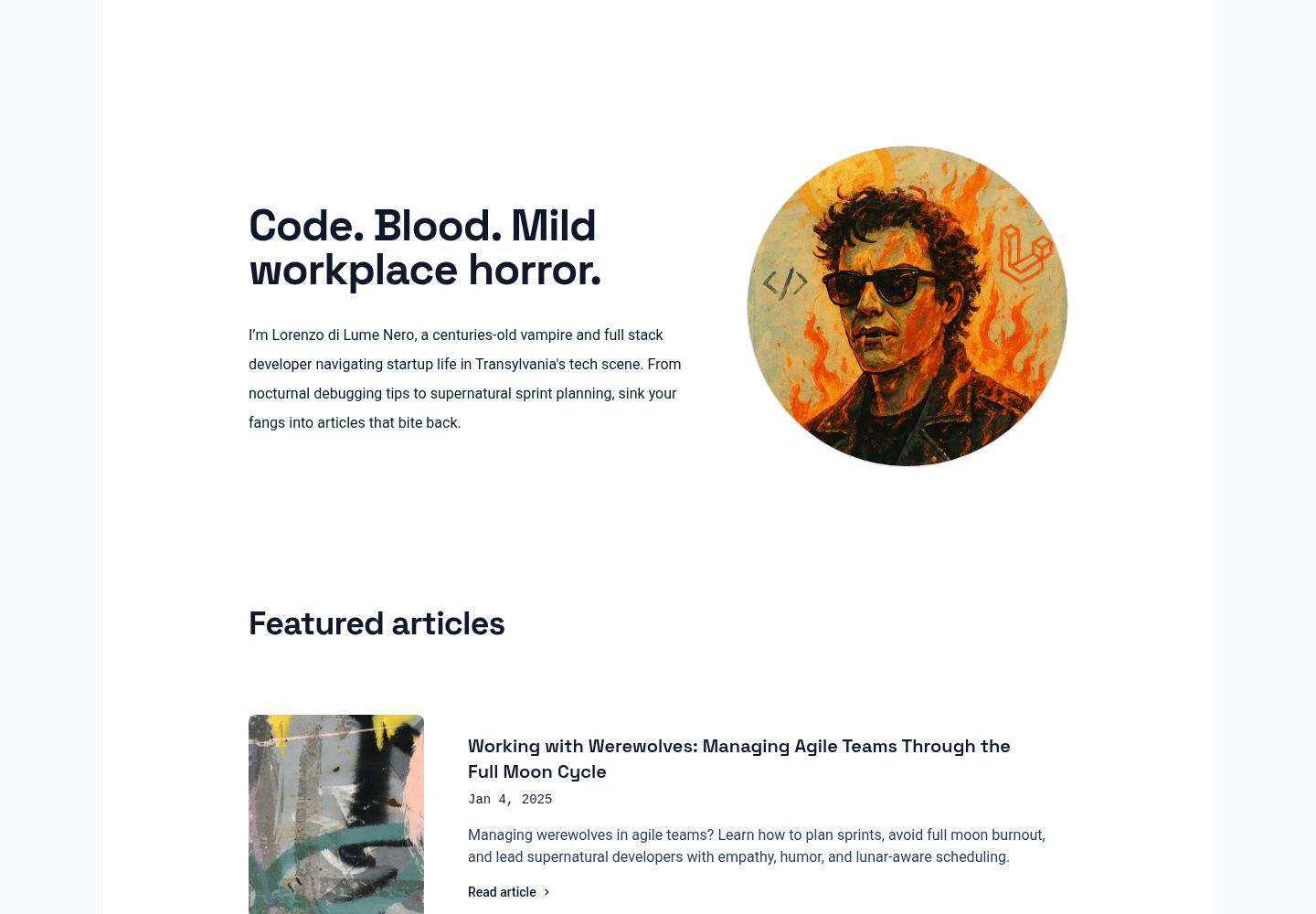
基于 Astro 的博客模板,页面路由由 src/pages/ 下的 .astro 文件生成
Astro启动器
sobasic — Astro 启动器模板
作者 lukeska
sobasic 是一个基于 Astro 的博客模板,提供首页、博客列表与文章页,使用 Markdown/MDX 管理内容,并通过 Tailwind 主题变量调整主色。
看看你的网站会是什么样
浏览真实页面截图,比较内容排版与手机效果。点击下方缩略图切换,放大查看整页细节。
全部页面与视图 3
截图用于了解视觉与布局,交互效果请以实际项目为准。
采集于 2026-10-04查看来源
值得关注的模板亮点
从已有项目资料中,快速了解它的特点。
文章使用 src/content/blog/ 中的 .md 或 .mdx 文件,支持 title、description、pubDate、heroImage、featured 字段
提供 FeaturedArticles 组件,可展示标记 featured 的文章
主色通过 src/styles/global.css 中的 color-primary-* 变量调整,可映射到 Tailwind 颜色
主导航链接在 src/components/Header.astro 的 navItems 数组中配置
MIT 许可,演示站部署于 Netlify
模板详细介绍
sobasic 是 lukeska 在 GitHub 上开源的 Astro 博客模板,采用 MIT 许可,演示站部署在 Netlify。模板面向个人博客或内容型站点,提供首页、博客列表、文章详情与关于页等基础页面,并内置 FeaturedArticles 组件用于突出显示标记为 featured 的文章。
内容管理方面,文章以 .md 或 .mdx 文件放在 src/content/blog/ 目录,文件头部需填写 title、description、pubDate,heroImage 与 featured 为可选字段;文章配图放在 src/images/。页面通过 src/pages/ 下的 .astro 文件生成路由,新增页面时需使用 BaseLayout 以保持站点统一外观。
定制方面,主色在 src/styles/global.css 中通过 color-primary-* 变量设置,可映射到任意 Tailwind 颜色;主导航链接在 src/components/Header.astro 的 navItems 数组中修改。仓库 README 还提供了 StackBlitz、CodeSandbox 与 GitHub Codespaces 的在线打开入口。
限制与注意:模板未在资料中说明内置搜索、评论、RSS、分页或 CMS 集成;演示图片来自 Unsplash,需按素材自身许可核对,不能仅凭代码的 MIT 许可判断。
Astro启动器
适合你的项目吗?
适用场景
- 搭建个人博客并集中管理 Markdown/MDX 文章
- 需要首页、博客列表与文章详情等基础页面的内容站点
- 希望用 Tailwind 主题变量快速替换站点主色的项目
- 通过 StackBlitz、CodeSandbox 或 GitHub Codespaces 在线查看与试用模板
适合人群
- 熟悉 Astro 与 Markdown 写作的个人博主
- 需要轻量博客起始结构的前端开发者
- 接受自行处理评论、搜索等扩展功能的项目
上手与定制指南
结合仓库当前版本的说明,按下面的资料检查内容、配置与运行要求。
- 1
可用 npm create astro@latest -- --template lukeska/sobasic 创建项目,或克隆仓库后执行 npm install 与 npm run dev
- 2
文章放入 src/content/blog/,文件头部需包含 title、description、pubDate,heroImage 与 featured 可选
- 3
新增页面放在 src/pages/ 并使用 BaseLayout 包裹内容
- 4
主色在 src/styles/global.css 的 color-primary-* 变量中修改,导航链接在 src/components/Header.astro 中调整
- 5
演示图片来自 Unsplash,使用前需按素材自身许可核对
授权与来源资料
使用条件与限制
免费使用 · 保留许可声明本次收录的是公开仓库中采用 MIT 许可的免费版本;免费范围为该版本代码,不代表外部服务或第三方素材免费。
使用时需要遵守
- 允许免费使用、修改、商用和分发该版本代码。
- 分发代码副本或实质性部分时,保留原作者版权声明和完整 MIT 许可声明。
- 代码按现状提供;担保与责任限制以原许可证及适用法律为准。
额外费用与待核对事项
- 演示图片、字体、图标及其他第三方素材需按各自许可核对,不能仅凭代码的 MIT 许可判断。
- 域名、托管、数据库、支付或 AI 等外部服务可能另外收费。
- 模板中的演示照片来自 Unsplash,由 Josep Martins 拍摄,需按 Unsplash 素材自身许可使用,不能仅凭代码的 MIT 许可判断图片授权。
查看原文依据
Permission is hereby granted, free of charge
许可证原文
https://github.com/lukeska/sobasic/blob/main/LICENSEhttps://github.com/lukeska/sobasic/blob/main/README.mdPhotos by <a href="https://unsplash.com/@josepmartins?utm_content=creditCopyText&utm_medium=referral&utm_source=unsplash">Josep Martins</a> on <a href="https://unsplash.com/photos/white-smoke-0-c5T6meRuk?utm_content=creditCopyText&utm_medium=referral&utm_source=unsplash">Unsplash</a>
README 原文
DeepSeek 根据仓库许可证和 README 整理 ·2026-10-04。结果仅覆盖已读取资料,依赖、图片、字体及后续条款变更以各自原文为准。
项目核对记录与介绍依据
模板资料
- 来源平台
- Astro Themes
- 资料与维护参考分
- 资料一般 · 73 / 100
- 技术栈
- Astro
- 网站类型
- 启动器
这个分数如何计算
本站按许可资料(最高30分)、演示链接(12分)、预览图(10分)、Star数(15分)、记录的维护时间(15分)、描述完整度(8分)、功能记录(5分)和分类资料(5分)计算。它不是代码、安全或性能测试,也不是 Google 评分;有链接不代表已实测可用。
这个项目需要核对什么
- 记录的仓库更新时间
- 2025-05-26
- 截图检查日期
- 2026-10-04
已收录演示链接。请用你的内容与屏幕尺寸检查;有演示不代表表单、认证或支付已经可用。
目录记录的主要技术栈是 Astro。请通过依赖清单和锁文件核对实际版本与托管要求。这些说明基于收录资料,不代表代码审计或部署实测。
查看具体选型方法 →介绍的制作与核对状态
介绍由 AI 辅助整理目录与仓库资料。仓库作者不等于这篇介绍的审核者。
审核声明: [email protected] · 2026-10-05
查看当时使用的来源资料
SHA-256: 4610a175988b14e0c4b74c28e89d710864b418c169dd83daa7e40d288da2dfc5
2026-10-04T21:32:10.081Z
来源文件 / 仓库# So Basic - Astro Blog Template
Howdy! Before you read anything below, you can check out the ✨ [Live Demo](https://sobasic.netlify.app/) ✨
[](https://sobasic.netlify.app/)
[](https://stackblitz.com/github/lukeska/sobasic)
[](https://codesandbox.io/p/sandbox/github/lukeska/sobasic)
[](https://codespaces.new/lukeska/sobasic?devcontainer_path=.devcontainer/devcontainer.json)
## 📦 Installation
### Astro installation
```sh
npm create astro@latest -- --template lukeska/sobasic
```
### Manual installation
#### 1. Clone the repo
```sh
git clone https://github.com/lukeska/sobasic.git my-project
# or
git clone https://github.com/lukeska/sobasic.git .
```
The . will clone it to the current directory so make sure you are inside your project folder first.
#### 2. Install dependencies
```sh
npm install
```
#### 3. Start the development server
```sh
npm run dev
```
## 🚀 Project Structure
Inside of your Astro project, you'll see the following folders and files:
```text
/
├── public/
│ └── favicon.svg
├── src/
│ ├── components/
│ ├── content/
│ │ └── blog/
│ ├── images/
│ ├── layouts/
│ ├── pages/
│ │ └── index.astro
│ └── styles/
├── astro.config.mjs
└── package.json
```
Astro looks for `.astro` or `.md` files in the `src/pages/` directory. Each page is exposed as a route based on its file name.
There's nothing special about `src/components/`, but that's where we like to put any Astro/React/Vue/Svelte/Preact components.
Any static assets, like images, can be placed in the `public/` directory.
## 📰 Add your own content
### Add or change existing pages
Feel free to change any of the content on the existing files in folder `src/pages/`. In this folder you
can add any `.astro` file. Make sure to use `<BaseLayout> to ensure any new page looks like the rest of the site.
```html
---
import BaseLayout from "../layouts/BaseLayout.astro";
---
<BaseLayout>
<!-- your content here -->
</BaseLayout>
```
### Add new articles to the blog
Articles for the blog can be added as `.md` or `.mdx` files inside `src/content/blog/`. Hero images for the articles can be added to `src/images/`
Make sure to add the following data at the top of your file:
```html
---
title: 'This is my title'
description: 'This is my description'
pubDate: '2025-01-02'
heroImage: '../../images/article-image.jpg'
featured: true
---
```
- title is the title and meta title for the article
- description is used as short text in list of articles and as meta description
- pubDate is the publication date, used to sort articles in lists
- heroImage is optional and references an image inside `src/images/`
- featured is optional. Values can be `true` or `false`. It defines if an article is visible in the `FeaturedArticles.astro` component.
### Change links in the main navigation
Links in the main navigation can be changed in `src/components/Header.astro` by altering this variable:
```javascript
const navItems = [
{ href: "/", text: "Home", active: currentPath === "/" },
{ href: "/blog", text: "Blog", active: currentPath.startsWith("/blog") },
{ href: "/about", text: "About", active: currentPath.startsWith("/about") },
];
```
## 🎨 Customization
The primary color of this theme can be easily changed in `src/styles/global.css`.
You can assign any Tailwind color to the various `color-primary-*` variables.
```css
@theme {
--color-primary-50: var(--color-purple-50);
--color-primary-100: var(--color-purple-100);
--color-primary-200: var(--color-purple-200);
--color-primary-300: var(--color-purple-300);
--color-primary-400: var(--color-purple-400);
--color-primary-500: var(--color-purple-500);
--color-primary-600: var(--color-purple-600);
--color-primary-700: var(--color-purple-700);
--color-primary-800: var(--color-purple-800);
--color-primary-900: var(--color-purple-900);
--color-primary-950: var(--color-purple-950);
...
}
```
## 👀 Want to learn more?
Feel free to check [Astro's documentation](https://github.com/withastro/astro) or jump into Astro's [Discord server](https://astro.build/chat).
## Images credits
Photos by <a href="https://unsplash.com/@josepmartins?utm_content=creditCopyText&utm_medium=referral&utm_source=unsplash">Josep Martins</a> on <a href="https://unsplash.com/photos/white-smoke-0-c5T6meRuk?utm_content=creditCopyText&utm_medium=referral&utm_source=unsplash">Unsplash</a>看看同类模板
对比同技术栈与用途的模板,找到更适合的视觉与内容结构。

astrowind
⭕️ AstroWind: A free template using Astro v7 and Tailwind CSS v4. Astro starter theme.
Astro · 博客
accessible-astro-starter
Accessible Astro Starter 是一个以无障碍为核心理念的 Astro 6 启动模板,由 incluud 团队维护。
Astro · 博客

astro-erudite
An opinionated, unstyled static blogging template built with Astro and native CSS.
Astro · 作品集

astro-shopify
astro-shopify 是一个面向开发者的轻量级电商启动模板,用于构建基于 Shopify 的无头店面。
Astro · 电商

brutal
A neobrutalism Astro starter theme
Astro · 启动器

qwind
⭕️ Qwind: A template to make your website using Qwik + Tailwind CSS.
Astro · 工具站