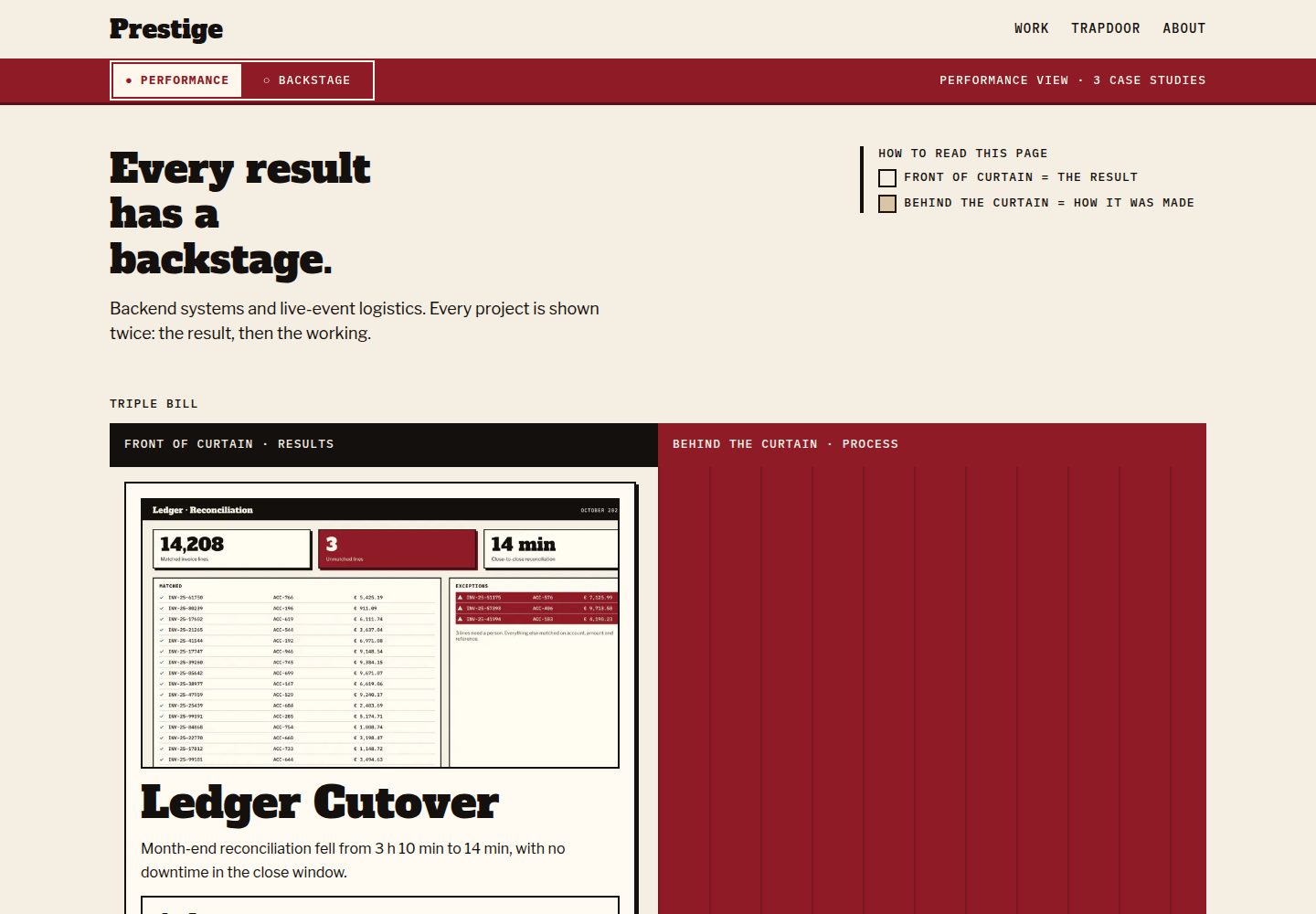
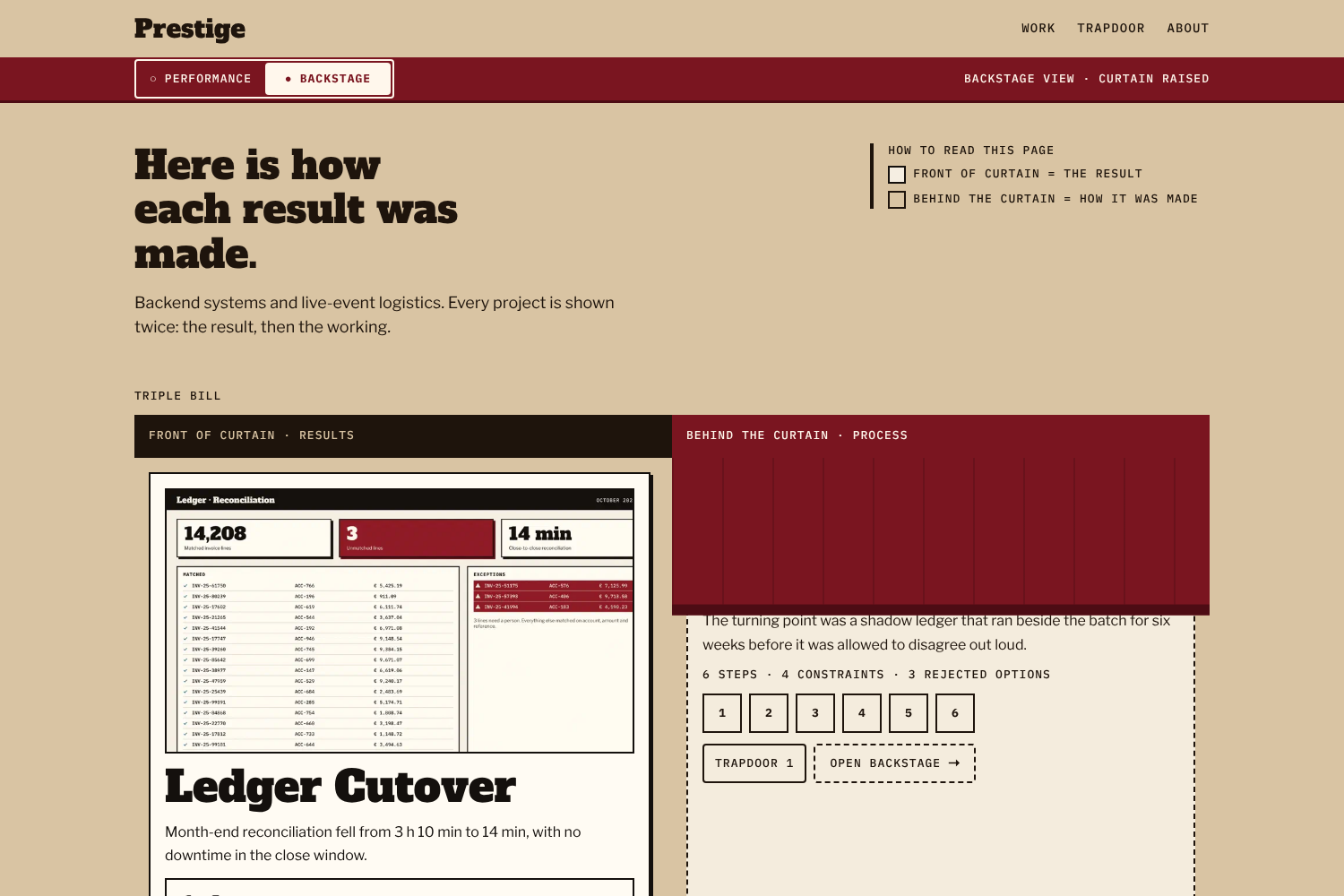
每个案例研究分为 Performance 成果层与 Backstage 编号过程层,失败经历归入 Trapdoor 板块
Hugo作品集
Prestige — Hugo 作品集模板
作者 m0hss
Prestige 是一个 Hugo 作品集主题,把每个项目拆成 Performance(成果)与 Backstage(编号制作过程)两层,失败案例另归入 Trapdoor 板块。
看看你的网站会是什么样
浏览真实页面截图,比较内容排版与手机效果。点击下方缩略图切换,放大查看整页细节。
全部页面与视图 3
截图用于了解视觉与布局,交互效果请以实际项目为准。
采集于 2026-10-07查看来源
值得关注的模板亮点
从已有项目资料中,快速了解它的特点。
步骤支持 problem、constraints、hypotheses、rejected、implementation、result、note 七种类型,构建时校验字段结构
提供 metric、ba-metric、ba-image、ba-code、aside、stepref 等短代码,用于展示指标、前后对比与步骤引用
不包含分析、第三方脚本和 Cookie,仅在 localStorage 中保存模式与配色偏好
输出 robots.txt、sitemap、RSS 订阅及带严格 CSP 的 Netlify _headers 文件
禁用 JavaScript 后仍可按阅读顺序浏览全部内容,目标为 WCAG 2.2 AA
模板详细介绍
Prestige 面向案例研究型作品集:每个项目以页面包(page bundle)组织,index.md 承载 Performance 层,展示项目成果;backstage.md 与 steps/ 目录共同构成 Backstage 层,用带编号的步骤记录制作过程,二者可同时省略,只保留 Performance 的案例同样有效。失败经历单独放在 Trapdoor 内容区,每条包含严重程度、原因、代价、改动与教训等字段。
主题要求 Hugo extended 0.146.0 或更高版本,构建在 0.146.0 与 0.167.0 上测试。安装方式支持 Hugo Module 或 git submodule。由于 Hugo 不会合并主题的 [markup]、[taxonomies]、[outputs] 配置,需要把示例站点中的相关配置复制到自己的 hugo.toml,包括 discipline、stack、lesson 三个分类法、work 与 trapdoor 的固定链接规则以及主菜单。
内容层面,案例研究通过 front matter 声明标题、摘要、简报、日期、角色、学科、技术栈、封面、条形码信息、结果指标与链接等字段;步骤文件按 n 从 1 连续编号,kind 放在 params 下,可选 problem、constraints、hypotheses、rejected、implementation、result、note 七种类型,各自带不同的附加字段。构建会校验这套结构,缺少必填项时直接报错并给出文件路径。Trapdoor 条目需要 title、date、severity、what、cause、cost、changed 和至少一条 lessons。
主题不包含分析脚本、第三方脚本或 Cookie,仅用 localStorage 保存访客的模式与配色选择。它输出 robots.txt、sitemap、RSS 订阅和 Netlify 的 _headers 安全头文件;CSP 采用严格策略,页面内联代码只有设置模式的首屏脚本与 @font-face 规则两处,新增内联代码需写入指定模板文件,否则会被策略拦截。无障碍方面目标为 WCAG 2.2 AA,各层与步骤均为按阅读顺序排列的纯 HTML,禁用 JavaScript 后仍可阅读。浏览器支持 Chrome 与 Edge 123+、Firefox 120+、Safari 17.5+,更旧的浏览器只显示浅色方案下的 Performance 配色。字体为自托管的 Alfa Slab One、Libre Franklin 与 IBM Plex Mono,采用 SIL Open Font License 1.1。
Hugo作品集
适合你的项目吗?
适用场景
- 为设计、开发或咨询项目建立带成果展示与制作过程记录的案例研究作品集
- 把项目中的失败与教训整理成独立条目,并关联到对应案例研究
- 需要按学科、技术栈和教训分类浏览作品的内容站点
- 在 Netlify 上部署并希望直接使用主题生成的严格安全响应头
适合人群
- 使用 Hugo 并愿意按主题 schema 编写 front matter 与步骤文件的个人或团队
- 以案例研究而非简单图片墙形式呈现项目过程的创作者
- 重视无障碍与无 JavaScript 可读性的站点维护者
- 需要 RSS 订阅和分类法导航的作品集站点
上手与定制指南
结合仓库当前版本的说明,按下面的资料检查内容、配置与运行要求。
- 1
需要 Hugo extended 0.146.0 或更高版本,构建在 0.146.0 与 0.167.0 上测试
- 2
通过 Hugo Module 或 git submodule 安装后,需把示例站点的 [markup]、[taxonomies]、[outputs] 与菜单配置复制到自己的 hugo.toml
- 3
案例研究使用页面包结构:index.md 为 Performance 层,backstage.md 与 steps/ 为可选的 Backstage 层
- 4
Trapdoor 条目需包含 title、date、severity、what、cause、cost、changed 和至少一条 lessons
- 5
新增内联脚本或样式需写入 layouts/_partials/lib/inline-assets.html,否则会被 CSP 拦截
授权与来源资料
使用条件与限制
免费使用 · 保留许可声明本次收录的是公开仓库中采用 MIT 许可的免费版本;免费范围为该版本代码,不代表外部服务或第三方素材免费。
使用时需要遵守
- 允许免费使用、修改、商用和分发该版本代码。
- 分发代码副本或实质性部分时,保留原作者版权声明和完整 MIT 许可声明。
- 代码按现状提供;担保与责任限制以原许可证及适用法律为准。
额外费用与待核对事项
- 演示图片、字体、图标及其他第三方素材需按各自许可核对,不能仅凭代码的 MIT 许可判断。
- 域名、托管、数据库、支付或 AI 等外部服务可能另外收费。
- 使用该主题必须安装 Hugo extended 0.146.0 或更高版本,普通版 Hugo 无法构建。
- Hugo 不会自动合并主题的 [markup]、[taxonomies]、[outputs] 配置,必须手动复制到站点 hugo.toml 才能正常使用。
- 安全响应头依赖 Netlify 的 _headers 文件;换用其他托管平台需自行把生成的头部复制到平台配置中。
- 新增内联脚本或样式必须写入 layouts/_partials/lib/inline-assets.html,否则会被严格 CSP 拦截,检查脚本也会失败。
- 生成 PNG 图标需要额外安装 Playwright。
- 生成目录截图需要额外安装 Playwright 与 ImageMagick。
- 仅支持 Chrome/Edge 123+、Firefox 120+、Safari 17.5+;更旧浏览器只能显示浅色方案下的 Performance 配色。
- 设计规范及其设计导出文件不在仓库内,属于主题之外的内容,不随主题提供。
查看原文依据
Permission is hereby granted, free of charge
许可证原文
Hugo **extended 0.146.0 or later**. Builds are tested on 0.146.0 and 0.167.0.
README 原文
Hugo does not merge a theme's `[markup]`, `[taxonomies]` or `[outputs]` into your site, so copy these into your `hugo.toml`
README 原文
The `headers` output format writes a Netlify `_headers` file
README 原文
Add any new inline code there, or the policy blocks it; `tools/check-csp.sh` fails when an inline block or a `style` attribute is not covered.
README 原文
node tools/render-favicons.mjs # PNG icons from static/favicon.svg (needs Playwright)
README 原文
node tools/capture-screenshots.mjs # catalogue images (needs Playwright and ImageMagick)
README 原文
Chrome and Edge 123+, Firefox 120+, Safari 17.5+. Older browsers get the Performance palette in the light scheme only.
README 原文
https://github.com/m0hss/Prestige/blob/master/LICENSEhttps://github.com/m0hss/Prestige/blob/master/README.mdThe design source of truth is the [Prestige design specification](https://github.com/m0hss/Prestige/blob/4e31e696a2a006be096ba2612a26f602dae78017/stitch_markdown_prestige_system_designer/prestige_design.md). It is not part of the theme: the specification and its design exports live outside the repository
README 原文
DeepSeek 根据仓库许可证和 README 整理 ·2026-10-07。结果仅覆盖已读取资料,依赖、图片、字体及后续条款变更以各自原文为准。
项目核对记录与介绍依据
模板资料
- 来源平台
- GitHub
- 资料与维护参考分
- 资料较完整 · 80 / 100
- 技术栈
- Hugo
- 网站类型
- 作品集
这个分数如何计算
本站按许可资料(最高30分)、演示链接(12分)、预览图(10分)、Star数(15分)、记录的维护时间(15分)、描述完整度(8分)、功能记录(5分)和分类资料(5分)计算。它不是代码、安全或性能测试,也不是 Google 评分;有链接不代表已实测可用。
这个项目需要核对什么
- 记录的仓库更新时间
- 2026-10-07
- 截图检查日期
- 2026-10-07
已收录演示链接。请用你的内容与屏幕尺寸检查;有演示不代表表单、认证或支付已经可用。
目录记录的主要技术栈是 Hugo。请通过依赖清单和锁文件核对实际版本与托管要求。这些说明基于收录资料,不代表代码审计或部署实测。
查看具体选型方法 →介绍的制作与核对状态
介绍由 AI 辅助整理目录与仓库资料。仓库作者不等于这篇介绍的审核者。
审核声明: [email protected] · 2026-10-08
查看当时使用的来源资料
SHA-256: 93d4f5acfa85ac417f37339703b85fa354c0b075eb1e5603ca3250e39979590a
2026-10-07T15:39:15.944Z
来源文件 / 仓库# Prestige
A Hugo theme for case-study portfolios: every project is shown as its polished result (**Performance**) and as a numbered account of how it was made (**Backstage**), with failures filed in their own section (**Trapdoor**).
[](https://github.com/m0hss/Prestige/blob/master/LICENSE) [](https://gohugo.io)
> Live demo: <https://prestige-hugo.netlify.app/>. The screenshot is a staged frame with the curtain frozen mid-raise (see `tools/capture-screenshots.mjs`); visitors see it either down or up.
## Requirements
Hugo **extended 0.146.0 or later**. Builds are tested on 0.146.0 and 0.167.0. On Hugo 0.158 and later the stylesheet is bundled with `css.Build`; on older releases the theme assembles the same bundle itself.
## Installation
As a Hugo Module:
```bash
hugo mod init github.com/you/your-site
```
```toml
[module]
[[module.imports]]
path = "github.com/m0hss/Prestige"
```
Or as a git submodule:
```bash
git submodule add https://github.com/m0hss/Prestige.git themes/prestige
```
```toml
theme = "prestige"
```
## Minimal configuration
Hugo does not merge a theme's `[markup]`, `[taxonomies]` or `[outputs]` into your site, so copy these into your `hugo.toml` (the permalinks keep slugs equal to folder and file names). The complete example is [`exampleSite/hugo.toml`](https://github.com/m0hss/Prestige/blob/master/exampleSite/hugo.toml).
```toml
enableRobotsTXT = true # robots.txt with a Sitemap: line
[outputs]
home = ["html", "rss", "headers"] # "headers" writes Netlify's _headers; see Security headers
[taxonomies]
discipline = "disciplines"
stack = "stack"
lesson = "lessons"
[permalinks.page]
work = "/work/:contentbasename/"
trapdoor = "/trapdoor/:contentbasename/"
[markup.goldmark.parser]
wrapStandAloneImageWithinParagraph = false # lets standalone images become <figure>
[markup.highlight]
noClasses = false
[[menus.main]]
name = "Work"
pageRef = "/work"
weight = 10
[[menus.main]]
name = "Trapdoor"
pageRef = "/trapdoor"
weight = 20
[[menus.main]]
name = "About"
pageRef = "/about"
weight = 30
[params]
description = "One sentence about you and your work."
[params.author]
name = "Your Name"
role = "What you do"
location = "" # optional, shown on the About page
portrait = "" # optional, a path under assets/; 96 px, About page only
[params.contact]
email = "[email protected]"
availability = "" # optional, e.g. "Booking from March 2027"
# [[params.contact.links]]
# label = "Code"
# url = "https://example.org"
[params.links]
schemes = ["http", "https", "mailto", "tel"] # URL schemes allowed in any link (the default)
[params.stage]
default_mode = "performance" # or "backstage": the mode for a first-time visitor
programme_from = 5 # add the Programme list to the homepage from this many case studies
trapdoor_on_home = true
[params.scheme]
switch = true # footer Auto / Light / Dark switch
[params.footer]
description = "" # optional, two short lines under the footer email; replaces contact links there
note = ""
credit = true # "Built with Prestige by FixByte" in the footer
```
Prestige ships no analytics, no third-party scripts and no cookies. It stores the visitor's mode and colour scheme in `localStorage` only.
## Search, feeds and security headers
- **Descriptions.** `<meta name="description">` and `og:description` use the page's `description:` front matter when it is set, then `summary` (case studies), `what` (Trapdoor entries) or `lede` (sections and About). Taxonomy and term pages without one get a sentence naming the term, so no two term pages share a description. `params.description` is the last fallback.
- **Feed.** `index.xml` lists case studies and Trapdoor entries, newest first, up to `services.rss.limit`. Each item carries its one-line description (never the full text) and its terms as categories. Sections and terms get their own feeds.
- **Robots and sitemap.** With `enableRobotsTXT = true`, `robots.txt` allows everything and points at `sitemap.xml`.
- **Icons.** `favicon.svg`, plus `favicon-32.png` and a 180 px `apple-touch-icon.png` rendered from it by `tools/render-favicons.mjs`. Put your own files of the same names in your site's `static/` to replace them.
- **Security headers.** The `headers` output format writes a Netlify `_headers` file with a strict Content-Security-Policy (`default-src 'none'`, same-origin scripts, styles, fonts and images, plus `data:` images for the CSS arrow glyphs), `nosniff`, a referrer policy, a permissions policy, frame denial and long caching for the fingerprinted `/css/`, `/js/` and `/fonts/` files. The page has exactly two inline blocks, the head script that sets the mode before first paint and the `@font-face` rules. Both are built in `layouts/_partials/lib/inline-assets.html`, which also hashes them for the policy, so the hashes always match the build. Add any new inline code there, or the policy blocks it; `tools/check-csp.sh` fails when an inline block or a `style` attribute is not covered. On another host, copy the headers from the generated `_headers` into its configuration.
## Writing a case study
```bash
hugo new content work/my-project
hugo new content trapdoor/my-failure.md
```
A case study is a page bundle. `index.md` is the Performance layer; `backstage.md` and `steps/` are optional together, and a bundle without steps is a valid Performance-only case study. Paths in front matter and shortcodes are relative to the bundle folder, including from inside a step.
```
content/work/my-project/
├── index.md # Performance: front matter + narrative
├── backstage.md # Backstage: status, planned, updated + optional preface (≤ 80 words)
├── steps/
│ ├── 01-problem.md
│ └── 02-constraints.md
├── snippets/ # text files for {{< ba-code >}}
├── cover.jpg
└── shots/ # images for the body, steps and {{< ba-image >}}
```
### `index.md` front matter
| Field | Required | Notes |
|---|---|---|
| `title` | yes | ≤ 48 characters |
| `description` | no | Search and social description; defaults to `summary` |
| `summary` | yes | The result as one sentence, ≤ 140 characters |
| `backstage_title` | no | H1 shown in Backstage view; defaults to “Backstage: <title>” (`i18n` key `backstage_title`). Only used when the case has steps |
| `brief` | yes | The problem as one sentence, ≤ 160 characters |
| `date` | yes | Project end date; its year feeds the `PRS-<year>-<NNN>` reference |
| `weight`, `headliner` | no | Lower weight sorts first (default 100). One `headliner: true` per site |
| `role`, `client` | `role` yes | |
| `disciplines`, `stack` | `disciplines` yes | Taxonomies |
| `cover.image`, `cover.alt`, `cover.focus` | image and alt yes | `focus` is a Hugo anchor such as `TopLeft` |
| `barcode.duration`, `barcode.team`, `barcode.outcome.value`, `.unit`, `.label`, `barcode.ref` | yes, except `unit` and `ref` | `team` is a whole number of at least 1 ("4 people") or a string |
| `result.headline`, `result.metrics` (1 to 3), `result.outcome` | yes | Each metric: `value`, `unit`, `label`, `context` |
| `links` | no | `label`, `url`, `kind` (`live`, `repo`, `writeup`) |
| `backstage.teaser` | when steps exist | The turning point, ≤ 140 characters |
| `backstage.note`, `og_image` | no | |
### Steps
One file per step in `steps/`, numbered with `n` from 1 without gaps. Hugo reserves a top-level `kind`, so the step kind goes under `params`:
```yaml
---
title: "Three ways the numbers could be wrong"
n: 3
params:
kind: hypotheses
gist: "Duplicates, slow matching, ordering: two confirmed, one refuted."
when: "Weeks 2–4"
hypotheses:
- { id: "H1", claim: "…", test: "…", verdict: "confirmed", evidence: "…" }
---
```
| Kind | Code | Extra fields |
|---|---|---|
| `problem` | PRB | `statement` (required), `evidence` list of `{label, value}` |
| `constraints` | CON | `constraints` list of `{name, limit, type: hard/soft/assumed, source}` |
| `hypotheses` | HYP | `hypotheses` list of `{id, claim, test, verdict: confirmed/refuted/inconclusive/untested, evidence}` |
| `rejected` | REJ | `options` list of `{name, why, revisit: low/medium/high}` |
| `implementation` | IMP | `decisions` list of `{decision, because}` (optional) |
| `result` | RES | `metrics` list of `{label, before, after, unit, better, before_text, after_text}`, `verdict`, `caveat` |
| `note` | NTE | none |
The build checks this schema and stops with the file path when something required is missing.
### Trapdoor entries
`content/trapdoor/<slug>.md` with `title`, `date`, `severity` (`minor`, `major`, `critical`), `what`, `cause`, `cost`, `changed`, `lessons` (at least one) and an optional `case` naming a case-study folder. An optional `description` replaces `what` as the search description. The `TD-<NNN>` reference is the entry's position by date, so it moves when an earlier entry is added or a draft is published. Add `ref: "TD-007"` to pin it once it has been cited anywhere; the build stops if two entries share a reference. (Case studies pin theirs with `barcode.ref`.)
### Shortcodes
| Shortcode | Purpose |
|---|---|
| `{{< metric value="14" unit="min" label="…" context="…" size="xl" >}}` | One headline figure |
| `{{< ba-metric label="…" before="190" after="14" unit="min" before_text="3 h 10 min" after_text="14 min" >}}` | Before/after figure with computed change |
| `{{< ba-image before="shots/a.png" before_alt="…" after="shots/b.png" after_alt="…" caption="…" >}}` | Two images compared |
| `{{< ba-code before="snippets/a.sql" after="snippets/b.sql" lang="sql" hl_before="4-9" hl_after="2-6" >}}` | Two code snippets compared |
| `{{< aside label="Cost of being wrong" >}}…{{< /aside >}}` | A margin note |
| `{{< stepref n="5" text="How the cutover ran" >}}` | A link to a Backstage step |
Markdown links, case-study `links` and `params.contact.links` may use `http`, `https`, `mailto` and `tel` (change the list with `params.links.schemes`); any other scheme (such as `javascript:`) stops the build with the file path. A site path such as `/work/missing/` that matches no page prints a warning with the file name.
Markdown images take a fragment for width: ``; `#bleed` spans the viewport in the Performance layer when the image stands on its own in the body (inside a list item, quote or aside, and in Backstage, it is an ordinary figure); `#decorative` allows empty alt text.
## Accessibility
Prestige targets WCAG 2.2 AA. Every layer and every step is plain HTML in reading order, so the whole site is readable with JavaScript disabled; the script only hides the inactive layer, remembers the choice and runs the step accordion. The curtain toggle is a native radio group, mode changes are announced through a polite status region, targets are at least 44 px, and the four palettes meet the contrast pairs listed in the design specification. Report accessibility problems as issues on the repository.
## Browser support
Chrome and Edge 123+, Firefox 120+, Safari 17.5+. Older browsers get the Performance palette in the light scheme only.
## Fonts and licences
Self-hosted, Latin and Latin Extended subsets, under the SIL Open Font License 1.1 (texts in [`assets/fonts/`](https://github.com/m0hss/Prestige/tree/master/assets/fonts)):
- Alfa Slab One by JM Solé
- Libre Franklin by Impallari Type
- IBM Plex Mono by IBM
## Development
`exampleSite/` is a demo for a fictional person; every name, client, figure and failure in it is invented, and its images are original illustrations dedicated to the public domain (CC0).
`exampleSite/content/work/stress-fixture/` is a draft layout stress test (full-bleed images, wide tables, awkward code fences, repeated step titles and headings). It builds only with `-D`, so `hugo server` shows it and the deployed demo does not.
```bash
cd exampleSite && hugo server # http://localhost:1313/
cd .. && tools/check-budgets.sh # CSS ≤ 51,200 bytes, JS ≤ 30,720 bytes
tools/check-csp.sh # every inline block is hashed in the generated CSP
node tools/render-favicons.mjs # PNG icons from static/favicon.svg (needs Playwright)
node tools/capture-screenshots.mjs # catalogue images (needs Playwright and ImageMagick)
```
The repository is a Hugo Module (`github.com/m0hss/Prestige`). `exampleSite/hugo.toml` imports it by that path and maps the path to the local checkout (`replacements = "github.com/m0hss/Prestige -> ../.."`), so the demo runs from any clone, whatever its folder is called, without Go installed and without a `themes/` folder.
The demo is deployed to Netlify by `netlify.toml`: it builds `exampleSite/` against the same commit's theme with Hugo extended and overrides the demo's placeholder `baseURL` with the URL Netlify gives each deploy, so deploy previews work too. It is published at <https://prestige-hugo.netlify.app/>; the build settings come from `netlify.toml`, and its security headers from the generated `_headers` file.
The design source of truth is the [Prestige design specification](https://github.com/m0hss/Prestige/blob/4e31e696a2a006be096ba2612a26f602dae78017/stitch_markdown_prestige_system_designer/prestige_design.md). It is not part of the theme: the specification and its design exports live outside the repository (the `stitch_markdown_prestige_system_designer/` folder is gitignored), and the link points at the last commit that contained them.
## Licence
MIT. See [LICENSE](https://github.com/m0hss/Prestige/blob/master/LICENSE).
看看同类模板
对比同技术栈与用途的模板,找到更适合的视觉与内容结构。

hugo-PaperMod
PaperMod 是 Hugo 生态里知名度较高的主题之一,定位很明确:给博客和轻量作品集站点提供一套干净、响应式的阅读界面。
Hugo · 作品集

Congo
Congo 是一款为 Hugo 设计的现代内容主题,核心定位是让内容本身成为页面焦点。 它基于 Tailwind CSS 3.0 构建,整体布局完全响应式,视觉风格干净且克制,没有多余装饰。
Hugo · 博客

toha
Toha 是一款面向个人作品集场景的 Hugo 主题,以极简设计和响应式布局为核心,适合用来搭建个人主页、作品展示或技术博客。
Hugo · 作品集

hugo-profile
A highly customizable and mobile first Hugo template for personal portfolio and blog.
Hugo · 作品集

hugo-theme-introduction
Minimal, single page, smooth-scrolling theme for Hugo static site generator.
Hugo · 作品集

hugo-theme-console
hugo-theme-console 是一款以系统终端为灵感的极简 Hugo 主题,基于 Terminal CSS 构建,整体视觉干净利落,强调快速加载与响应式布局。
Hugo · 作品集