首页由 hero、统计、特性、自动下一场活动、最新文章、组织者、推荐语和 CTA 等区块组合而成
AstroHugo启动器
astro-theme-popular — Astro 启动器模板
作者 Mariatta
Popular 是一个面向聚会、用户组和小型活动的 Astro 主题,与同名 Hugo 主题共享设计令牌、CSS、行为脚本和内容模型,提供活动、博客、组织者、文档等页面与内容导入脚本。
看看你的网站会是什么样
浏览真实页面截图,比较内容排版与手机效果。点击下方缩略图切换,放大查看整页细节。
全部页面与视图 3
截图用于了解视觉与布局,交互效果请以实际项目为准。
采集于 2026-10-02查看来源
值得关注的模板亮点
从已有项目资料中,快速了解它的特点。
活动自动分为即将开始与已结束,并包含演讲者资料、场地页(地址、到达提示、无障碍信息)和签到说明
博客支持标签过滤、标签页、RSS 以及基于作者档案或 guestAuthors 的多作者署名
文档页带滚动监听目录,Checklist 组件用 localStorage 记住勾选进度,键格式与 Hugo 主题一致
提供 Sessionize 和电子表格导入脚本,可生成活动、演讲者与场地内容且不覆盖已有文件
构建时检查所有图片的 alt 文本,缺失会导致 CI 失败
模板详细介绍
Popular 是 hugo-theme-popular 的 Astro 版本,两者共享设计令牌、CSS、行为 JS 和内容模型,并遵循跨仓库的 PARITY 契约。主题面向聚会、用户组和小型活动,提供可组合的首页(hero、统计、特性、自动下一场活动、最新文章、组织者、推荐语、CTA)、带标签过滤与 RSS 的博客、自动区分即将开始与已结束的活动(含演讲者资料、场地页与签到说明)、组织者/团队页,以及带滚动监听目录和可记忆进度清单的文档页。内容模型支持多作者:文章可用 authors 引用作者档案,也可用 guestAuthors 添加一次性客座作者,或回退到纯 author 字符串。UI 字符串集中存放,便于翻译;品牌配置集中在 src/config.ts。主题附带 Sessionize 与电子表格导入脚本,可填充活动、演讲者和场地数据,且不会覆盖已有文件。构建时若图片缺少 alt 文本会失败。仓库还提供 AGENTS.md 供 AI 代理与人类贡献者遵循相同规则。
AstroHugo启动器
适合你的项目吗?
适用场景
- 为本地聚会或用户组搭建包含活动日程、演讲者介绍和场地信息的社区网站
- 为粉丝俱乐部或兴趣社团建立带博客、标签过滤和 RSS 的内容站点
- 整理组织者团队、行为准则、参与方式和活动手册等文档页面
- 从 Sessionize 或电子表格批量导入活动与演讲者数据,减少手工录入
- 需要与已有 Hugo 站点保持相同设计令牌和内容模型,以便在两种框架间迁移内容
适合人群
- 组织聚会、用户组或小型活动的社区运营者
- 希望用 Astro 构建静态社区站点并自行托管到 Netlify、GitHub Pages 或 Cloudflare Pages 的开发者
- 需要多作者博客、活动管理和文档手册一体化内容结构的团队
- 已经在使用 hugo-theme-popular 并希望尝试对应 Astro 版本的项目
上手与定制指南
结合仓库当前版本的说明,按下面的资料检查内容、配置与运行要求。
- 1
使用 npm create popular-site@latest 创建项目,再执行 npm install 和 npm run dev 启动本地开发服务器
- 2
站点名称、品牌色、导航、页脚、社交链接和首页区块均在 src/config.ts 中配置,无需修改 CSS
- 3
内容文件放在 src/content 下的 blog、events、organizers、pages、docs 等目录,front-matter 由 zod 校验并与 Hugo 主题保持兼容
- 4
部署静态输出 dist/ 前,在 astro.config.mjs 中设置 site;若部署在子路径还需设置 base,并可用 scripts/setup.py 生成 GitHub Pages 工作流
- 5
导入活动数据可运行 scripts/sessionize-import.py 或 scripts/spreadsheet-import.py,已有文件不会被覆盖
授权与来源资料
使用条件与限制
免费使用 · 保留许可声明本次收录的是公开仓库中采用 MIT 许可的免费版本;免费范围为该版本代码,不代表外部服务或第三方素材免费。
使用时需要遵守
- 允许免费使用、修改、商用和分发该版本代码。
- 分发代码副本或实质性部分时,保留原作者版权声明和完整 MIT 许可声明。
- 代码按现状提供;担保与责任限制以原许可证及适用法律为准。
额外费用与待核对事项
- README 提供 GitHub Sponsors 赞助链接,属自愿支持,不影响 MIT 授权下的免费使用。
- 主题使用 Google Fonts 的 Inter/Quantico 字体与 Font Awesome 6 图标,这些第三方资源有各自的许可条款,使用前需自行核实。
- Sessionize 导入脚本依赖 Sessionize 服务的公开 API 端点,使用该功能需访问外部服务。
- 演示图片、字体、图标及其他第三方素材需按各自许可核对,不能仅凭代码的 MIT 许可判断。
- 域名、托管、数据库、支付或 AI 等外部服务可能另外收费。
查看原文依据
Permission is hereby granted, free of charge
许可证原文
Sponsor on GitHub
README 原文
Typography: **Inter** & **Quantico** (Google Fonts). Icons: **Font Awesome 6**.
README 原文
https://github.com/Mariatta/astro-theme-popular/blob/main/LICENSEhttps://github.com/Mariatta/astro-theme-popular/blob/main/README.mdfrom a [Sessionize](https://sessionize.com) event's public "API / Embeds" endpoint
README 原文
DeepSeek 根据仓库许可证和 README 整理 ·2026-10-02。结果仅覆盖已读取资料,依赖、图片、字体及后续条款变更以各自原文为准。
项目核对记录与介绍依据
模板资料
- 来源平台
- Astro Themes
- 资料与维护参考分
- 资料较完整 · 88 / 100
- 技术栈
- Astro · Hugo
- 网站类型
- 启动器
这个分数如何计算
本站按许可资料(最高30分)、演示链接(12分)、预览图(10分)、Star数(15分)、记录的维护时间(15分)、描述完整度(8分)、功能记录(5分)和分类资料(5分)计算。它不是代码、安全或性能测试,也不是 Google 评分;有链接不代表已实测可用。
这个项目需要核对什么
- 记录的仓库更新时间
- 2026-09-04
- 截图检查日期
- 2026-10-02
已收录演示链接。请用你的内容与屏幕尺寸检查;有演示不代表表单、认证或支付已经可用。
目录记录的主要技术栈是 Astro。请通过依赖清单和锁文件核对实际版本与托管要求。这些说明基于收录资料,不代表代码审计或部署实测。
查看具体选型方法 →介绍的制作与核对状态
介绍由 AI 辅助整理目录与仓库资料。仓库作者不等于这篇介绍的审核者。
已完成服务器许可规则与 AI 来源核对;未经过人工编辑审核。
查看当时使用的来源资料
SHA-256: 10738a41fbde2e956cf9b1a70ef30c2309ce9430fa180ddef1549a9959bd8f8b
2026-10-02T15:52:08.179Z
来源文件 / 仓库# Popular: an Astro theme for meetups & communities
> *Built to make your community seen and famous.*
> **AI agents / automated contributors:** read [AGENTS.md](AGENTS.md) before making changes. It covers the repo layout, build commands, the Hugo-Astro parity contract, and content conventions.
> **Something not working as described?** Please [open an issue](https://github.com/Mariatta/astro-theme-popular/issues/new) as you hit it, while it's fresh: a command that errors, a step that's out of date, a sentence you had to read three times. Setup friction is a bug. Reporting it here gets it fixed upstream, so the next person doesn't hit the same wall. Fixes to the wording are welcome as pull requests too.
**Popular** is a warm, community-first [Astro](https://astro.build) theme for meetups, user
groups and small events. Named after the song *Pop!ular* by Darren Hayes, it is the Astro
twin of [`hugo-theme-popular`](https://github.com/Mariatta/hugo-theme-popular). Both share the same design tokens, CSS,
behaviour JS and content model; see **PARITY.md** for the cross-repo contract.
- Composable **home page** (hero, stats, features, auto next-event, latest posts, organizers, testimonials, CTA)
- **Blog** with tag filtering, tag pages, RSS, and per-post speaker bios
- **Events** that split into *upcoming* and *past* automatically, with speaker profiles, venue pages (address, buzz-code arrival notes, accessibility) and check-in instructions
- **Organizers / team** page
- **Docs** (handbook & runbooks) with scroll-spy TOC and **checklists that remember progress**
- Dark footer with **land-acknowledgement** slot and social links
- **Alt text, required**: CI builds every site and fails if any image lacks alt text
- **One-command imports**: populate events, speakers and venues from Sessionize or a spreadsheet (`scripts/`), cross-referenced and dependency-free
- **Agent & human friendly**: ships [`AGENTS.md`](AGENTS.md) so AI coding agents follow the same rules as human contributors
- **Translatable UI**: every template string lives in one place (Hugo `i18n/`, Astro `STRINGS` config), so a site can run in any language
- Re-brand the whole theme from `src/config.ts`, no CSS edits needed
**Full documentation** lives on the theme's project site (deployed from the Hugo
repo): start at `/docs/quick-start/?fw=astro`. This README covers the essentials.
**Multi-author blogging:** posts support `authors: ["slug"]` (profiles in
`src/content/authors/` with bio, photo, socials, website → linked profile pages)
and inline `guestAuthors` for one-off guest writers, plus a plain `author` string fallback.
## Quick start
Start a site with the scaffolder. You get a small project that **depends on**
the theme, so updating is `npm update astro-theme-popular` rather than diffing
tags and re-copying files:
```bash
npm create popular-site@latest my-community
cd my-community
npm install
npm run dev # http://localhost:4321
```
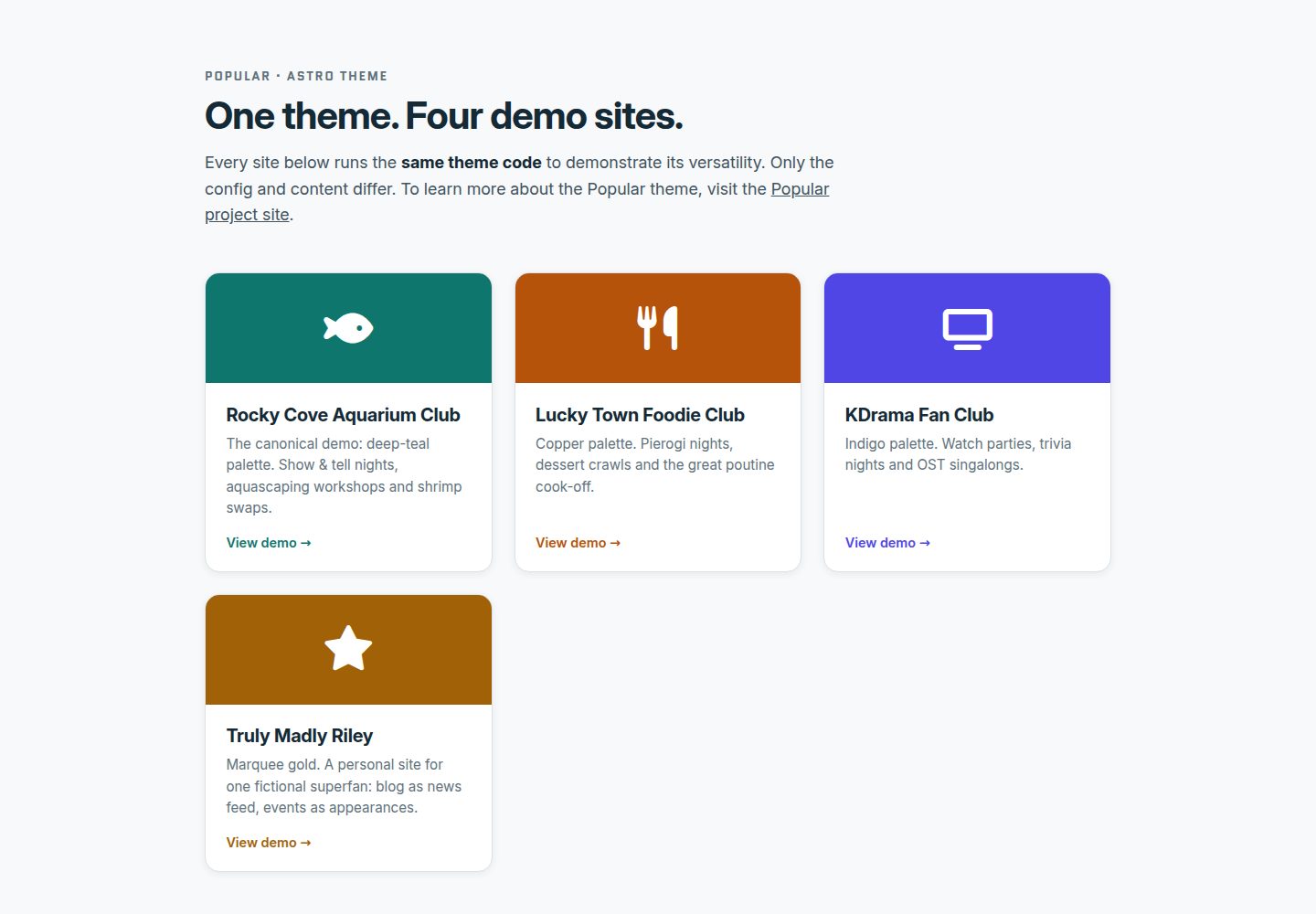
Pick the neutral **"Your Community" starter** (the default) or any of the four
fictional demos as a fuller example to edit down: **Rocky Cove Aquarium Club**
(teal), **Lucky Town Foodie Club** (copper), **KDrama Fan Club** (indigo) and
**Truly Madly Riley** (gold, a personal site for one fictional superfan). All
communities and venues in them are made up for demonstration.
Live: the [starter](https://mariatta.ca/astro-theme-popular/) is the deployment
root, and the [demo gallery](https://mariatta.ca/astro-theme-popular/demos/)
links the other four.
### Working in this repo
Each demo is its own workspace consuming the package, so there is no activation
step: build or serve one where it lives.
```bash
npm install # one install for every workspace member
npm run dev --workspace demos/aquarium # or: npm run demo:aquarium
npm run build --workspaces # build everything
```
`DEMO_BAR` in a demo's `popular.config.ts` drives the in-page switcher; it is
`null` on the starter and on anything the scaffolder writes, so it never
appears on a real site.
## Make it yours
| What | Where |
|---|---|
| Site name, logo, tagline, land acknowledgement | `src/config.ts` → `SITE` |
| Colours, fonts, radii (design tokens) | `src/config.ts` → `BRAND` (deep changes: `src/styles/tokens/`) |
| Navigation, header CTA, footer, socials | `src/config.ts` → `NAV`, `CTA`, `FOOTER`, `SOCIAL` |
| Home page sections | `src/config.ts` → `HOME` |
| Blog posts / events / organizers | `src/content/{blog,events,organizers}/*.md` |
| About, Code of Conduct, Get involved | `src/content/pages/*.mdx` |
| Handbook & runbooks | `src/content/docs/*.mdx` (use `<Callout>` and `<Checklist>`); sidebar ordered by `weight`, set it on every docs page |
Front-matter schemas live in `src/content.config.ts` (zod-validated) and are kept
1:1 compatible with the Hugo theme, so content moves between the two freely.
### MDX components
```mdx
import Callout from '../../components/Callout.astro';
import Checklist from '../../components/Checklist.astro';
<Callout tone="tip" title="Two-deep rule">
Aim for **two** organizers at every event.
</Callout>
<Checklist id="rb-venue" items={[
'Shortlist 2–3 venues',
'Confirm step-free access',
]} />
```
`Checklist` progress persists in the visitor's browser (`localStorage`), using the same
key format as the Hugo theme.
## Helper scripts
- `scripts/sessionize-import.py`: populate `src/content/events/` and `src/content/speakers/`
from a [Sessionize](https://sessionize.com) event's public "API / Embeds" endpoint:
```bash
python3 scripts/sessionize-import.py --url https://sessionize.com/api/v2/<embed-id>/view/All --site .
```
Existing files are never overwritten, so edit freely after importing.
- `scripts/spreadsheet-import.py`: the same import from one spreadsheet with tabs for
Speakers, Venues, Organizers and Events (dependency-free .xlsx or per-tab CSVs).
`--make-sample community.xlsx` writes a starter workbook (one ships at
`scripts/sample-community.xlsx`); import it with
`--xlsx community.xlsx --site .`.
The helper scripts have a dependency-free test suite: `python3 -m unittest discover -s scripts/tests` (also run in CI).
## Deploying
Static output: deploy `dist/` to Netlify, GitHub Pages, Cloudflare Pages, etc.
Set `site` in `astro.config.mjs` for correct RSS/OG URLs.
**Serving from a subpath** (a GitHub project page lives at `user.github.io/repo/`)
is supported: set `site` and `base` in `astro.config.mjs`, and every link, image
and feed URL picks it up. Your config and content need no changes, paths keep
their leading slash.
```js
export default defineConfig({
site: 'https://you.github.io',
base: '/my-community',
integrations: [mdx(), sitemap(), popularMarkdown()],
});
```
`scripts/setup.py` writes both from your `base_url` answer, along with a
ready-to-run GitHub Pages workflow at `.github/workflows/deploy.yml` (only when
the site has no workflows of its own). If you write your own components or
pages, wrap the URLs you emit: `import { withBase } from './lib/url'` (npm
consumers: `from 'astro-theme-popular/url'`), then `href={withBase('/about/')}`.
## Support the theme
Popular is free and MIT licensed. If it made your community site easier, there are three
ways to support the work:
- **Star the repo** so other organizers can find it
- **Tell others about it**: share it with another meetup, club or community, or use it
yourself for your next community site
- **[Sponsor on GitHub](https://github.com/sponsors/Mariatta)**
## Credits & license
Typography: **Inter** & **Quantico** (Google Fonts). Icons: **Font Awesome 6**.
MIT: see `LICENSE`. Fork it, adapt it, and share your community's version.
## Versioning & staying up to date
Releases are tagged `v0.x` (semver, in lockstep with
[`hugo-theme-popular`](https://github.com/Mariatta/hugo-theme-popular)); the
1.0 release will mark the content model and brand keys as stable. Changes are
documented in [CHANGELOG.md](CHANGELOG.md). To hear about updates, watch this
repo (Watch → Custom → Releases) or subscribe to the
[releases feed](https://github.com/Mariatta/astro-theme-popular/releases.atom).
Since Astro sites vendor the theme (you copy this repo), updating means
re-copying the files you haven't customized; the changelog tells you which
areas moved, and the full guide is at
[/docs/updating/](https://popular.mariatta.ca/docs/updating/).
Releases are cut by the Release workflow after the CHANGELOG entry is merged:
`gh workflow run release.yml -f version=X.Y.Z`, run in **both** repos. It
validates the CHANGELOG section and cross-repo parity, then tags `vX.Y.Z` and
publishes the GitHub Release with that section as the notes. On this repo it also checks that
`package.json` matches the version.
看看同类模板
对比同技术栈与用途的模板,找到更适合的视觉与内容结构。

astrowind
⭕️ AstroWind: A free template using Astro v7 and Tailwind CSS v4. Astro starter theme.
Astro · 博客
accessible-astro-starter
Accessible Astro Starter 是一个以无障碍为核心理念的 Astro 6 启动模板,由 incluud 团队维护。
Astro · 博客

astro-erudite
An opinionated, unstyled static blogging template built with Astro and native CSS.
Astro · 作品集

astro-shopify
astro-shopify 是一个面向开发者的轻量级电商启动模板,用于构建基于 Shopify 的无头店面。
Astro · 电商

brutal
A neobrutalism Astro starter theme
Astro · 启动器

qwind
⭕️ Qwind: A template to make your website using Qwik + Tailwind CSS.
Astro · 工具站