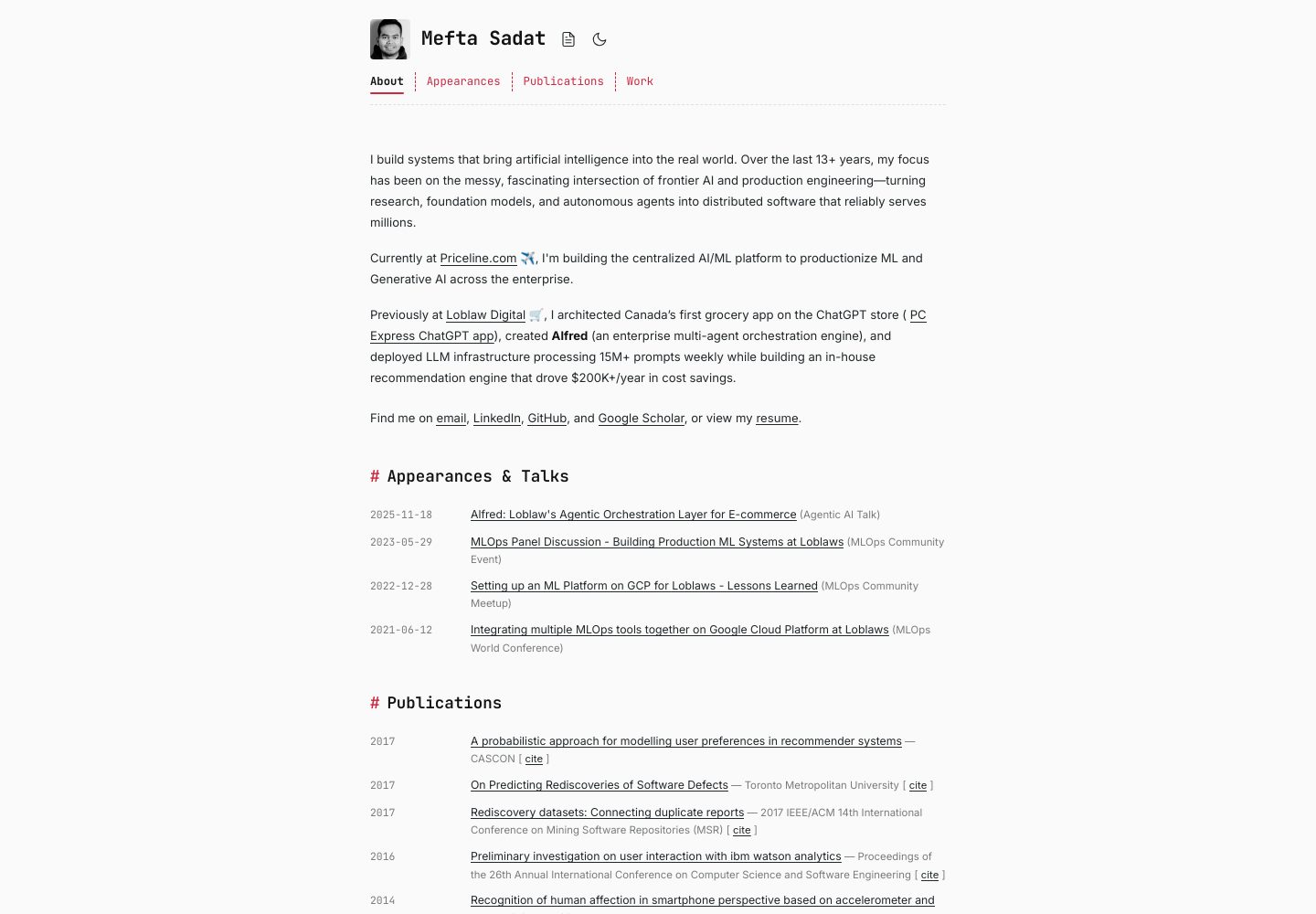
前后端合并为单个容器镜像,Vite 构建前端、FastAPI 提供 API 并托管静态资源
React作品集
bio — React 作品集模板
作者 meftasadat
一个 React + FastAPI 的全栈个人作品集模板,用 Markdown 驱动简历、博客、演讲和论文内容,可打包为单个容器镜像部署到 Google Cloud Run。
看看你的网站会是什么样
浏览真实页面截图,比较内容排版与手机效果。点击下方缩略图切换,放大查看整页细节。
目前有 1 张原始预览,可打开完整图片查看设计细节。
截图用于了解视觉与布局,交互效果请以实际项目为准。
采集于 2026-09-29查看来源
值得关注的模板亮点
从已有项目资料中,快速了解它的特点。
简历、博客、演讲、论文等内容由本地或远程 Markdown 文件驱动
服务端渲染 Markdown,支持表格、任务列表、脚注和代码高亮
内置简历、会议演讲和论文等页面区块
附带 GitHub Actions 工作流,推送 main 分支时自动构建并推送镜像到 GHCR
提供 run-local.sh 脚本,同时启动前后端开发服务或预览生产构建
模板详细介绍
该模板将 React 前端与 FastAPI 后端整合在同一个容器镜像中:Vite 负责构建前端,FastAPI 负责提供 API 并托管构建产物,因此部署时只需一个容器镜像。个人简介、博客、演讲和论文等内容存放在后端目录下的 Markdown 文件中,也可以配置为从独立的 GitHub 仓库拉取并自动更新。Markdown 在服务端渲染,支持表格、任务列表、脚注和代码块语法高亮。模板内置简历、会议演讲和论文等页面区块,并提供 GitHub Actions 工作流,在推送到 main 分支时构建镜像并推送到 GitHub Container Registry。本地开发通过 run-local.sh 同时启动后端(8000 端口)和带热重载的前端(5173 端口),也可用该脚本预览生产构建。部署文档以 Google Cloud Run 为例,通过 gcloud 命令部署镜像,并可通过环境变量配置 CORS 来源、内容来源(本地或 GitHub)以及内容仓库。
React作品集
适合你的项目吗?
适用场景
- 搭建个人技术作品集网站,展示简介、经历、博客、演讲和论文
- 将 Markdown 内容托管在独立仓库,通过配置让后端自动拉取更新
- 以单个容器镜像部署到 Google Cloud Run 或其他容器运行时
- 在本地同时调试 React 前端与 FastAPI 后端
适合人群
- 需要快速搭建个人作品集并接受 React + FastAPI 技术栈的开发者
- 希望用 Markdown 管理简历、博客和演讲内容的用户
- 计划将作品集部署到 Google Cloud Run 或类似容器平台的用户
- 需要前后端一体化模板作为二次开发起点的开发者
上手与定制指南
结合仓库当前版本的说明,按下面的资料检查内容、配置与运行要求。
- 1
本地运行需要 Python 3.13+、Node.js 18+、全局安装的 uv,以及 Docker 或兼容的容器运行时
- 2
克隆仓库后执行 ./run-local.sh 启动开发服务,后端在 http://localhost:8000,前端在 http://localhost:5173
- 3
执行 ./run-local.sh build 可在本地预览生产构建
- 4
部署到 Cloud Run 前需将镜像推送到 GHCR,并使用 gcloud run deploy 命令部署,按需设置 CORS_ORIGINS、CONTENT_SOURCE、CONTENT_GITHUB_REPO 等环境变量
- 5
替换 backend/app/static/resume.pdf 为个人简历,并编辑 backend/app/content/markdown/ 下的 Markdown 文件更新内容
授权与来源资料
使用条件与限制
免费使用 · 保留许可声明本次收录的是公开仓库中的免费 MIT 版本;免费范围为该版本代码,不代表外部服务或第三方素材免费。
使用时需要遵守
- 使用、修改或分发代码时,保留原作者版权声明和完整 MIT 许可证。
- 允许免费使用、修改及商用,也允许分发代码;分发时仍需随附版权与许可声明。
- 代码按现状提供,作者不承诺担保或承担使用责任。
额外费用与待核对事项
- 部署到 Google Cloud Run 需要安装并使用 gcloud CLI,并拥有 Google Cloud 项目与账号。
- 官方部署流程以 Google Cloud Run 为目标平台,使用该平台可能产生费用。
- 若使用远程内容源,需要配置 GitHub 仓库及相关环境变量。
- 演示图片、字体、图标及其他第三方素材需按各自许可核对,不能仅凭代码的 MIT 许可判断。
- 域名、托管、数据库、支付或 AI 等外部服务可能另外收费。
查看原文依据
Permission is hereby granted, free of charge
许可证原文
`gcloud` CLI (for deployment)
README 原文
This project is optimized for deployment on Google Cloud Run.
README 原文
https://github.com/meftasadat/bio/blob/main/LICENSEhttps://github.com/meftasadat/bio/blob/main/README.md`CONTENT_SOURCE` | `local` or `github`. Use `github` to pull from a remote repo.
README 原文
依据完整 MIT 许可证与仓库 README 核对 · 2026-09-29。结果仅覆盖已读取资料,依赖、图片、字体及后续条款变更以各自原文为准。
项目核对记录与介绍依据
模板资料
- 来源平台
- GitHub
- 资料与维护参考分
- 资料较完整 · 80 / 100
- 技术栈
- React
- 网站类型
- 作品集
这个分数如何计算
本站按许可资料(最高30分)、演示链接(12分)、预览图(10分)、Star数(15分)、记录的维护时间(15分)、描述完整度(8分)、功能记录(5分)和分类资料(5分)计算。它不是代码、安全或性能测试,也不是 Google 评分;有链接不代表已实测可用。
这个项目需要核对什么
- 记录的仓库更新时间
- 2026-09-28
- 截图检查日期
- 2026-09-29
已收录演示链接。请用你的内容与屏幕尺寸检查;有演示不代表表单、认证或支付已经可用。
目录记录的主要技术栈是 React。请通过依赖清单和锁文件核对实际版本与托管要求。这些说明基于收录资料,不代表代码审计或部署实测。
查看具体选型方法 →介绍的制作与核对状态
介绍由 AI 辅助整理目录与仓库资料。仓库作者不等于这篇介绍的审核者。
已完成服务器许可规则与 AI 来源核对;未经过人工编辑审核。
查看当时使用的来源资料
SHA-256: 38f42720cb9ac2f8f5e923572787ce9188e8e0473c30c69009939340b8594e4d
2026-09-29T01:08:17.963Z
来源文件 / 仓库# Bio – A Professional Bio & Portfolio Template
This is a full-stack, batteries-included portfolio application designed to be easily deployed and maintained. It serves a React frontend and a FastAPI backend from a single container, making it perfect for platforms like Google Cloud Run. The content for your bio, blog, talks, and publications is driven by local or remote Markdown files, allowing for quick updates.
This repository is designed to be a template. Fork it, customize it, and deploy your own professional bio in minutes.
## Features
- **Single Deployment Artifact**: Vite builds the frontend, and FastAPI serves it. This means you only need one container image for your entire application.
- **Markdown-Driven Content**: Your professional information lives in Markdown files. You can edit them locally or, for a more advanced setup, host them in a separate GitHub repository. The backend can be configured to pull updates automatically.
- **Rich Blog & Content Rendering**: Markdown is rendered on the server-side, supporting features like tables, checklists, footnotes, and syntax-highlighted code blocks.
- **Built-in Sections**: Comes with pre-built sections for your resume, conference talks, and publications.
- **Automated Builds**: A GitHub Actions workflow is included to build and push a container image to GitHub Container Registry (GHCR) on every push to the `main` branch.
## Tech Stack
- **Backend**: FastAPI, Pydantic, uvicorn, `uv` for dependency management.
- **Frontend**: React 18 + Vite with React Router.
- **Content Pipeline**: `markdown-it-py`, `mdit-py-plugins`, and `bleach`.
- **Container**: A multi-stage Docker build suitable for any container runtime, optimized for Google Cloud Run.
## Getting Started
### Prerequisites
- Python 3.13+
- Node.js 18+
- [`uv`](https://github.com/astral-sh/uv) installed globally
- Docker or a compatible container runtime (like Podman).
- `gcloud` CLI (for deployment)
### Local Development
1. **Clone the repository:**
```bash
git clone https://github.com/meftasadat/bio.git
cd bio
```
2. **Run the development server:**
```bash
# This script handles both backend and frontend setup.
./run-local.sh
```
- The backend will be available at `http://localhost:8000`.
- The frontend (with hot-reloading) will be at `http://localhost:5173`.
3. **To preview the production build locally:**
```bash
./run-local.sh build
```
This will build the frontend and serve it from the FastAPI backend, just like in production.
## Deployment to Google Cloud Run
This project is optimized for deployment on Google Cloud Run.
### 1. Build and Push the Container Image
The included GitHub Actions workflow in `.github/workflows/container.yml` will automatically build and push the container image to GitHub Container Registry (GHCR) every time you push to the `main` branch.
The image will be tagged as `ghcr.io/<your-github-username>/bio:latest`.
### 2. Deploy to Cloud Run
Once your image is on GHCR, you can deploy it using the `gcloud` command-line tool.
```bash
# Replace <your-github-username> with your GitHub username
# Replace <your-gcp-project-id> with your Google Cloud project ID
# Replace <your-region> with your desired GCP region (e.g., us-central1)
gcloud run deploy bio-app \
--image ghcr.io/<your-github-username>/bio:latest \
--platform managed \
--project <your-gcp-project-id> \
--region <your-region> \
--allow-unauthenticated \
--set-env-vars="CORS_ORIGINS=https://your-domain.com"
```
This command deploys your application and makes it publicly accessible.
### 3. Setting Environment Variables
You can set environment variables directly in the `gcloud` command or configure them in the Cloud Run console. The most important one to configure for a production deployment is `CORS_ORIGINS`.
| Variable | Description | Example |
| --- | --- | --- |
| `CORS_ORIGINS` | Comma-separated list of allowed origins. | `https://your-domain.com,https://www.your-domain.com` |
| `CONTENT_SOURCE` | `local` or `github`. Use `github` to pull from a remote repo. | `github` |
| `CONTENT_GITHUB_REPO` | `owner/name` for the repo hosting your Markdown files. | `your-username/my-portfolio-content` |
For a full list of environment variables, see the "Environment Configuration" section below.
## Customizing the Content
To make this portfolio your own, you'll want to edit the content.
- **Bio, Experience, etc.**: Edit the Markdown files in `backend/app/content/markdown/`.
- **Resume**: Replace the placeholder `backend/app/static/resume.pdf` with your own resume.
- **Images**: Add your own images to `backend/app/static/` and update the references in the frontend components (e.g., `frontend/src/components/Experience.jsx`).
For more advanced customization, you can modify the React components in `frontend/src/components/`.
## API Overview
- `GET /api/content` – The entire bio payload.
- `GET /api/blog` – Paginated blog posts.
- `GET /api/resume/download` – Serves your resume file.
- `GET /health` – A health check endpoint for Cloud Run.
For a full list of API endpoints, see the code in `backend/app/api/`.
## Project Structure
```
bio/
├── backend/
│ ├── app/
│ │ ├── api/ # FastAPI routers
│ │ ├── content/ # Markdown content and loaders
│ │ └── services/ # Content repository and renderers
├── frontend/
│ ├── src/
│ │ ├── components/ # React components
│ └── lib/api.js # API configuration
├── .github/workflows/container.yml # GitHub Actions workflow for CI/CD
├── Dockerfile # Multi-stage Dockerfile
└── run-local.sh # Local development script
```
This project is licensed under the terms of the MIT license. See LICENSE for more details.看看同类模板
对比同技术栈与用途的模板,找到更适合的视觉与内容结构。

react-portfolio-template
React powered portfolio website template for developers
React · 作品集

personal-website-react
personal-website-react 是一个面向开发者的个人作品集单页模板,由 React 和 Material-UI 构建,并通过 Create React App 初始化。
React · 作品集

karngyan.com
karngyan.com 是一个面向开发者的个人网站与博客模板,作者用它搭建了自己的站点,并公开了完整代码。 模板的核心定位很明确:让写作者专注于内容,而不是花时间搭建基础设施。
React · 作品集

react-portfolio-template
react-portfolio-template 是一个由 Ryan Balieiro 开发的 React 作品集模板,定位为“sleek, futuristic”,适合开发者展示个人履历。
React · 作品集

portfolio
Personal website, Data scientist portfolio template
React · 作品集

react-portfolio
react-portfolio 是一个面向开发者的个人作品集模板,基于 React 16 和 Create React App 构建,界面样式采用 Material-UI。
React · 作品集