Frontend and backend combined into a single container image, with Vite building the frontend and FastAPI serving the API and hosting static assets
ReactPortfolio
bio — React Portfolio Template
By meftasadat
A full-stack personal portfolio template built with React and FastAPI, using Markdown to drive resume, blog, talk, and paper content, deployable as a single container image to Google Cloud Run.
Explore the design
Compare the page layouts and mobile experience. Open any screenshot for a closer look.
Desktop homepage
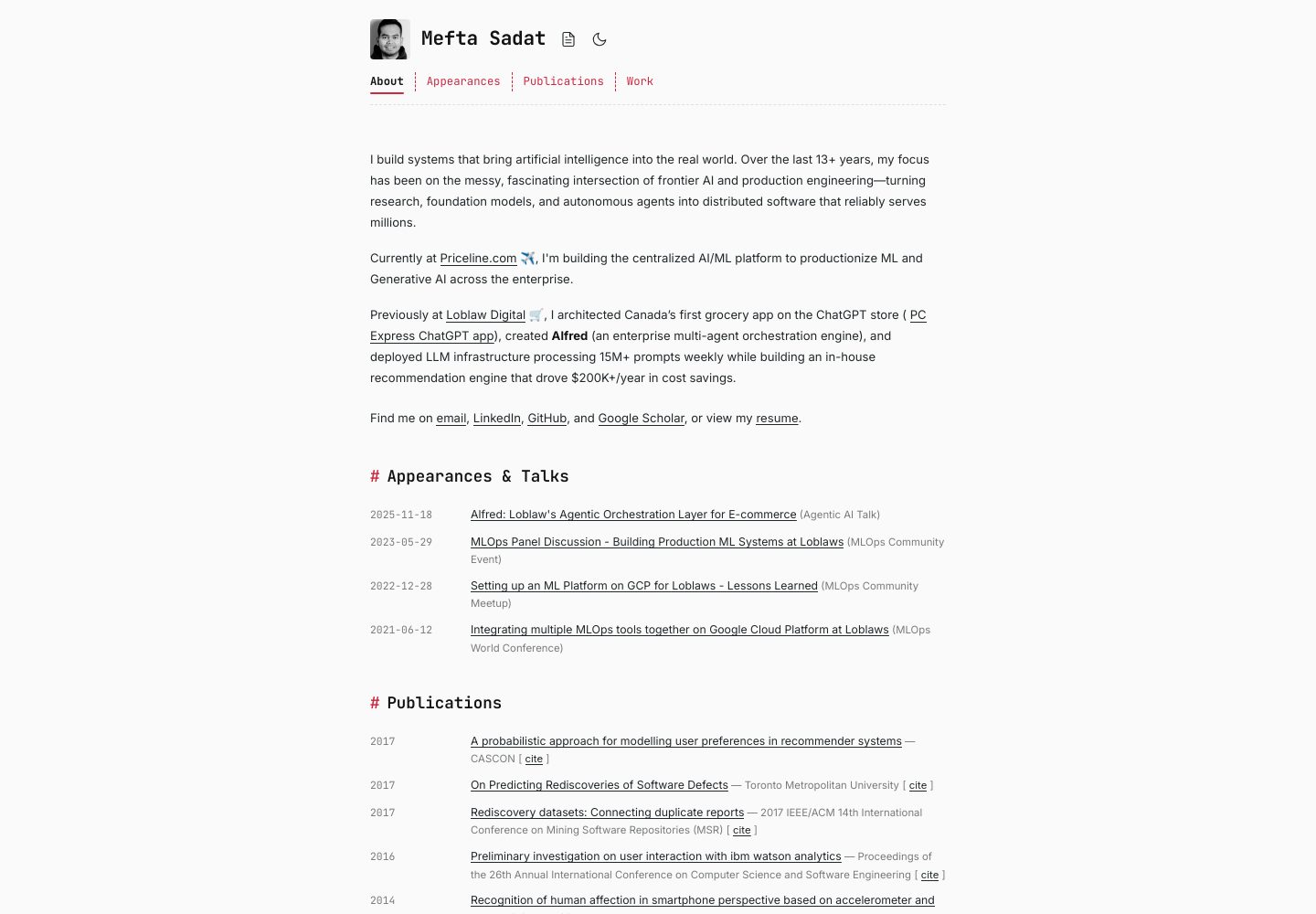
Desktop captureTop of page
Actual screenshot captured by the server browser.
One original preview is available. Open the full image to inspect the design.
Screenshots show visual appearance; interactive behavior may differ.
Recorded 2026-09-29View source
What stands out
A quick read of the recorded project description.
Resume, blog, talks, papers, and other content driven by local or remote Markdown files
Server-side Markdown rendering with support for tables, task lists, footnotes, and code highlighting
Built-in page sections for resume, conference talks, and papers
Includes a GitHub Actions workflow that automatically builds and pushes the image to GHCR when pushing to the main branch
Provides a run-local.sh script to start both frontend and backend development services or preview the production build
Template Details
This template integrates a React frontend and a FastAPI backend into a single container image: Vite builds the frontend, while FastAPI serves the API and hosts the build output, so deployment requires only one container image. Content such as personal bio, blog posts, talks, and papers is stored in Markdown files under the backend directory, and can also be configured to pull from a separate GitHub repository and update automatically. Markdown is rendered server-side and supports tables, task lists, footnotes, and syntax highlighting for code blocks. The template includes built-in page sections for resume, conference talks, and papers, and provides a GitHub Actions workflow that builds the image and pushes it to GitHub Container Registry when pushing to the main branch. For local development, run-local.sh starts both the backend (port 8000) and the frontend with hot reload (port 5173); the same script can also preview the production build. Deployment documentation uses Google Cloud Run as an example, deploying the image via gcloud commands, with environment variables to configure CORS origins, content source (local or GitHub), and the content repository.
ReactPortfolio
Is it right for your project?
Use Cases
- Building a personal technical portfolio website to showcase bio, experience, blog, talks, and papers
- Hosting Markdown content in a separate repository and configuring the backend to pull updates automatically
- Deploying as a single container image to Google Cloud Run or other container runtimes
- Debugging the React frontend and FastAPI backend simultaneously locally
Suitable For
- Developers who need to quickly build a personal portfolio and accept the React + FastAPI stack
- Users who want to manage resume, blog, and talk content with Markdown
- Users planning to deploy the portfolio to Google Cloud Run or a similar container platform
- Developers who need an integrated frontend-backend template as a starting point for further development
Getting started & customization
Use these recorded setup notes alongside the repository instructions for your chosen version.
- 1
Local running requires Python 3.13+, Node.js 18+, a globally installed uv, and Docker or a compatible container runtime
- 2
After cloning the repository, run ./run-local.sh to start development services; the backend runs at http://localhost:8000 and the frontend at http://localhost:5173
- 3
Run ./run-local.sh build to preview the production build locally
- 4
Before deploying to Cloud Run, push the image to GHCR and deploy using the gcloud run deploy command, setting environment variables such as CORS_ORIGINS, CONTENT_SOURCE, and CONTENT_GITHUB_REPO as needed
- 5
Replace backend/app/static/resume.pdf with your own resume, and edit the Markdown files under backend/app/content/markdown/ to update content
License & source material
Usage conditions & limitations
Free to use · keep license noticeThis entry covers the free MIT version in the public repository; the free scope applies to that version's code and does not mean external services or third-party assets are free.
Must comply with when using
- When using, modifying, or distributing the code, retain the original author's copyright notice and the full MIT license.
- Free use, modification, and commercial use are permitted, as is distribution of the code; distribution must still include the copyright and license notice.
- The code is provided as is, and the author does not promise warranties or accept liability for use.
Additional costs & items to verify
- Deploying to Google Cloud Run requires installing and using the gcloud CLI, and having a Google Cloud project and account.
- The official deployment process targets Google Cloud Run, and using that platform may incur costs.
- If using a remote content source, you need to configure a GitHub repository and related environment variables.
- Demo images, fonts, icons, and other third-party assets must be checked against their respective licenses; they cannot be judged solely by the code's MIT license.
- External services such as domains, hosting, databases, payments, or AI may incur additional charges.
View Original Text Basis
Permission is hereby granted, free of charge
Original License Text
`gcloud` CLI (for deployment)
Original README
This project is optimized for deployment on Google Cloud Run.
Original README
https://github.com/meftasadat/bio/blob/main/LICENSEhttps://github.com/meftasadat/bio/blob/main/README.md`CONTENT_SOURCE` | `local` or `github`. Use `github` to pull from a remote repo.
Original README
Based on the full MIT license and the repository README · 2026-09-29. Results only cover the materials read; dependencies, images, fonts, and subsequent term changes are subject to their respective original texts.
Project checks & description sources
Template Information
- Source platforms
- GitHub
- Documentation and maintenance reference score
- More documented · 80 / 100
- Technologies
- React
- Website type
- Portfolio
How this score is calculated
Our heuristic uses license records (up to 30), a demo link (12), a preview (10), stars (15), recorded maintenance (15), description completeness (8), feature records (5) and classification data (5). It is not a code, security or performance test, or a Google score. A link does not establish tested functionality.
What to verify for this project
- Repository update recorded
- 2026-09-28
- Screenshot last checked
- 2026-09-29
A demo link is listed. Check it with your own content and viewport sizes; its presence does not confirm that forms, authentication or payments work.
The catalog identifies React as the primary stack. Check the actual dependency manifest and lockfile for versions and hosting requirements. These notes use recorded metadata, not a code audit or a deployment test.
Use a selection guide →How this description was prepared
AI-assisted description based on catalog records and repository material. Repository authors are not automatically the reviewers of this description.
Automatically checked against source and license rules; no manual editorial review.
Inspect the recorded source material
SHA-256: 38f42720cb9ac2f8f5e923572787ce9188e8e0473c30c69009939340b8594e4d
2026-09-29T01:08:17.963Z
Source file / repository# Bio – A Professional Bio & Portfolio Template
This is a full-stack, batteries-included portfolio application designed to be easily deployed and maintained. It serves a React frontend and a FastAPI backend from a single container, making it perfect for platforms like Google Cloud Run. The content for your bio, blog, talks, and publications is driven by local or remote Markdown files, allowing for quick updates.
This repository is designed to be a template. Fork it, customize it, and deploy your own professional bio in minutes.
## Features
- **Single Deployment Artifact**: Vite builds the frontend, and FastAPI serves it. This means you only need one container image for your entire application.
- **Markdown-Driven Content**: Your professional information lives in Markdown files. You can edit them locally or, for a more advanced setup, host them in a separate GitHub repository. The backend can be configured to pull updates automatically.
- **Rich Blog & Content Rendering**: Markdown is rendered on the server-side, supporting features like tables, checklists, footnotes, and syntax-highlighted code blocks.
- **Built-in Sections**: Comes with pre-built sections for your resume, conference talks, and publications.
- **Automated Builds**: A GitHub Actions workflow is included to build and push a container image to GitHub Container Registry (GHCR) on every push to the `main` branch.
## Tech Stack
- **Backend**: FastAPI, Pydantic, uvicorn, `uv` for dependency management.
- **Frontend**: React 18 + Vite with React Router.
- **Content Pipeline**: `markdown-it-py`, `mdit-py-plugins`, and `bleach`.
- **Container**: A multi-stage Docker build suitable for any container runtime, optimized for Google Cloud Run.
## Getting Started
### Prerequisites
- Python 3.13+
- Node.js 18+
- [`uv`](https://github.com/astral-sh/uv) installed globally
- Docker or a compatible container runtime (like Podman).
- `gcloud` CLI (for deployment)
### Local Development
1. **Clone the repository:**
```bash
git clone https://github.com/meftasadat/bio.git
cd bio
```
2. **Run the development server:**
```bash
# This script handles both backend and frontend setup.
./run-local.sh
```
- The backend will be available at `http://localhost:8000`.
- The frontend (with hot-reloading) will be at `http://localhost:5173`.
3. **To preview the production build locally:**
```bash
./run-local.sh build
```
This will build the frontend and serve it from the FastAPI backend, just like in production.
## Deployment to Google Cloud Run
This project is optimized for deployment on Google Cloud Run.
### 1. Build and Push the Container Image
The included GitHub Actions workflow in `.github/workflows/container.yml` will automatically build and push the container image to GitHub Container Registry (GHCR) every time you push to the `main` branch.
The image will be tagged as `ghcr.io/<your-github-username>/bio:latest`.
### 2. Deploy to Cloud Run
Once your image is on GHCR, you can deploy it using the `gcloud` command-line tool.
```bash
# Replace <your-github-username> with your GitHub username
# Replace <your-gcp-project-id> with your Google Cloud project ID
# Replace <your-region> with your desired GCP region (e.g., us-central1)
gcloud run deploy bio-app \
--image ghcr.io/<your-github-username>/bio:latest \
--platform managed \
--project <your-gcp-project-id> \
--region <your-region> \
--allow-unauthenticated \
--set-env-vars="CORS_ORIGINS=https://your-domain.com"
```
This command deploys your application and makes it publicly accessible.
### 3. Setting Environment Variables
You can set environment variables directly in the `gcloud` command or configure them in the Cloud Run console. The most important one to configure for a production deployment is `CORS_ORIGINS`.
| Variable | Description | Example |
| --- | --- | --- |
| `CORS_ORIGINS` | Comma-separated list of allowed origins. | `https://your-domain.com,https://www.your-domain.com` |
| `CONTENT_SOURCE` | `local` or `github`. Use `github` to pull from a remote repo. | `github` |
| `CONTENT_GITHUB_REPO` | `owner/name` for the repo hosting your Markdown files. | `your-username/my-portfolio-content` |
For a full list of environment variables, see the "Environment Configuration" section below.
## Customizing the Content
To make this portfolio your own, you'll want to edit the content.
- **Bio, Experience, etc.**: Edit the Markdown files in `backend/app/content/markdown/`.
- **Resume**: Replace the placeholder `backend/app/static/resume.pdf` with your own resume.
- **Images**: Add your own images to `backend/app/static/` and update the references in the frontend components (e.g., `frontend/src/components/Experience.jsx`).
For more advanced customization, you can modify the React components in `frontend/src/components/`.
## API Overview
- `GET /api/content` – The entire bio payload.
- `GET /api/blog` – Paginated blog posts.
- `GET /api/resume/download` – Serves your resume file.
- `GET /health` – A health check endpoint for Cloud Run.
For a full list of API endpoints, see the code in `backend/app/api/`.
## Project Structure
```
bio/
├── backend/
│ ├── app/
│ │ ├── api/ # FastAPI routers
│ │ ├── content/ # Markdown content and loaders
│ │ └── services/ # Content repository and renderers
├── frontend/
│ ├── src/
│ │ ├── components/ # React components
│ └── lib/api.js # API configuration
├── .github/workflows/container.yml # GitHub Actions workflow for CI/CD
├── Dockerfile # Multi-stage Dockerfile
└── run-local.sh # Local development script
```
This project is licensed under the terms of the MIT license. See LICENSE for more details.Explore similar templates
Compare previews and descriptions within the same stack and category.

react-portfolio-template
A React-based developer portfolio template for showcasing projects, work history, and skills. It offers a multi-component layout, dark and light modes, and responsive mobile adaptation, with text and images editable in src/components.
React · Portfolio

personal-website-react
A single-page developer portfolio template built with React and Material-UI, driven by a JSON Resume-compliant resume.json. It offers light/dark theme switching with localStorage persistence, a clean responsive layout, and Create React App tooling for simple builds and static deployment.
React · Portfolio

karngyan.com
A personal website and blog template for developers, built with TanStack Start, React 19, Tailwind CSS v4, and shadcn/ui. It uses MDX for articles with Shiki highlighting and GFM tables, and automatically generates RSS, sitemap, robots.txt, llms.txt, and OG images.
React · Portfolio

react-portfolio-template
A React portfolio template by Ryan Balieiro with a fixed sidebar and page-turn transitions on desktop, bottom navigation on mobile, multilingual support, light/dark themes, and content components for experience, education, skills, projects, and testimonials.
React · Portfolio

portfolio
A data scientist personal portfolio template built with React and MUI, with content centrally managed through configuration files in the assets directory.
React · Portfolio

react-portfolio
A React 16 and Material-UI developer portfolio template that centralizes personal information in a JSON Resume-compliant resume.json, with light/dark theme switching saved to local storage. It currently provides portfolio display only; resume page templates and structured data enhancements are still planned.
React · Portfolio